Where to buy
Check the latest price, availability and delivery on Amazon — every pick below installs without hardwiring except one clearly flagged step-up, and the checkout price is the one that counts. Orders are placed on Amazon.
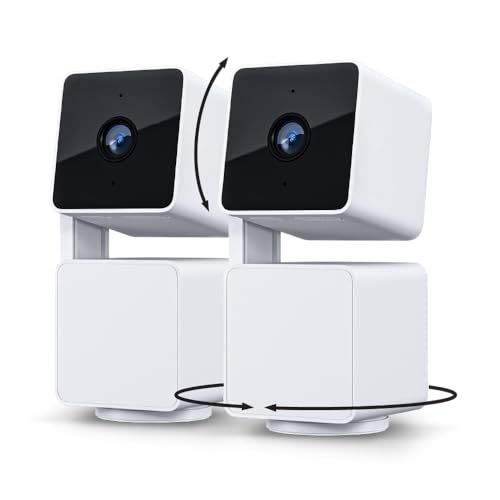
- Best pick under $300: Wyze Cam Pan v3, 2-Pack — check price on Amazon
- Ring Indoor Cam (2nd Gen), 3-Pack — check price on Amazon
- eufy SoloCam S220 — check price on Amazon
- Blink Outdoor 4, 3-Camera System — check price on Amazon
- eufy Security Indoor Cam S350 with HomeBase 3 — check price on Amazon
- Wyze Cam Floodlight v2 — check price on Amazon
Read the full guide ↓
Disclosure: As an Amazon Associate, dailyhomedecorating.com earns from qualifying purchases. Prices and availability change; the price at checkout is the final word.
Finding the best security camera for apartments under $300 starts with a constraint most guides ignore: you probably cannot wire, drill or mount whatever you like, and your lease — not your budget — is the real ceiling. The good news is that $300 is a generous apartment budget. A flat has fewer approaches than a house — typically one entry door, a hallway, the living space and maybe a balcony — so this tier buys complete coverage of a typical rental with cameras that sit on shelves, perch on stands and come down clean when you move out, leaving no holes and no deposit deductions.
The six picks below are ordered for renter reality. The flexible pan-and-tilt pair and the indoor three-pack lead because they need nothing but outlets and Wi-Fi. The solar outdoor camera and the battery kit follow for renters whose lease allows a balcony or patio mount — with an explicit warning to check your building’s rules first, because many leases restrict anything attached to exterior walls or visible from outside. The hub-based flagship suits renters in larger flats who want fee-free local storage. And the floodlight is included honestly as the exception: it is the best deterrent here, but it replaces a mains-wired fixture, which in most rentals means written landlord permission or not at all.
Two disclosures shape this guide. First, subscriptions: Ring’s indoor camera cannot record at all without a Ring Home plan; Blink’s cloud history and person detection sit behind its plan; Wyze gates cloud clips and smart detection labels behind Cam Plus while local recording stays free; both eufy picks record locally with no fee. In a rental that fee follows you from home to home, so choose it deliberately. Second, privacy — yours and your neighbours’. Apartment cameras should watch your door and your rooms, not the corridor’s other doors or the windows opposite; several picks include physical privacy covers or lens-down privacy modes, and the setup section explains aiming and activity zones for shared-space living. Battery and solar figures throughout are manufacturer claims under the makers’ stated conditions.
In this guide
Quick Picks
Ordered for lease-friendly reality: shelf-and-stand cameras first, balcony-capable wire-free picks next, the hub flagship for bigger flats, and the hardwired floodlight last as a permission-only step-up. The best-for column assumes you want your deposit back.
| Camera | Best for | Key spec |
|---|---|---|
| Wyze Cam Pan v3, 2-Pack | Best all-round apartment pair | 2 cameras, 1080p PTZ, shelf placement, IP65 maker rating |
| Ring Indoor Cam (2nd Gen), 3-Pack | Best multi-room indoor pack (cloud) | 3 cameras, 1080p, physical privacy cover |
| eufy SoloCam S220 | Best balcony/patio sentinel | 2K, solar charging, built-in 8GB local storage |
| Blink Outdoor 4, 3-Camera System | Best wire-free kit for house-shares & duplex rentals | 3 cameras, 1080p, maker-claimed up to 2-year battery |
| eufy Security Indoor Cam S350 with HomeBase 3 | Best fee-free hub system for larger flats | 4K + 2K telephoto dual lenses, HomeBase 3 local storage |
| Wyze Cam Floodlight v2 | Best deterrent — landlord permission required | 2K, maker-rated 2,800-lumen floods, hardwired |
How These Picks Were Chosen
The first filter was the lease test: could a typical renter install this without breaching a standard tenancy agreement? Shelf, stand and plug-in cameras passed automatically. Battery cameras passed with a caution — most ship with screw mounts, and while adhesive and clamp accessories exist, anything attached outside the building line needs the landlord’s or building management’s agreement in most leases. One pick, the hardwired floodlight, deliberately fails the default test and is included only because readers kept asking for a deterrent option; it is labelled as requiring written permission wherever it appears, and it is never the headline recommendation for renters.
Second, deposit-safe coverage per dollar. Apartments concentrate risk at one door, so the pool favours systems that cover the entry, the main living space and a second room or balcony without paying house-sized prices for house-sized range. Multi-packs and pairs scored heavily; a single exquisite lens scored less, because a flat’s second viewpoint is usually worth more than the first viewpoint’s extra resolution. The $300 ceiling was treated as a ceiling — most renters should land well under it with the pair or pack that matches their floor plan, and the guide says so rather than inventing reasons to spend.
Third, the subscription audit, run with renter logic: a plan is a portable obligation. It follows you between homes, survives your move, and quietly becomes part of your monthly cost of living. We therefore weighted fee-free local recording (both eufy picks, Wyze on microSD) more heavily here than in a homeowner guide, and stated Ring’s position with extra bluntness: its indoor camera records nothing at all without a Ring Home plan. Blink sits between — live view free, cloud history and person detection on plan, USB backup through its hub as a partial local route.
Finally, neighbour and housemate ethics, which are practical as well as polite: cameras that annoy a building get removed by building management. Physical privacy covers, lens-down privacy modes, activity zones and person-only alerts all reduce the chance your camera becomes a corridor dispute. Battery and solar claims were recorded as maker claims under stated conditions — a balcony in permanent shade will not deliver the solar figures, and a camera over a busy shared stairwell door will not deliver the two-year battery figure, and the reviews say so.
The 6 Best Security Cameras for Apartments Under $300
Placement is stated first in every review — indoor, outdoor, or balcony-with-permission — followed by the fee reality and the honest limitation. Nothing here needs an electrician except the final pick, and that one says so in its first paragraph.
Wyze Cam Pan v3, 2-Pack
Who it suits: Most renters, most flats: one camera for the living room and entry, one for the bedroom hallway, nursery or home-office corner — placed on shelves, moved in minutes, gone without a trace at move-out.
The Pan v3 earns the top spot for apartment life because it solves the renter’s core problem — viewpoints change. Per Wyze’s specifications each camera pans 360 degrees and tilts through 180 degrees with motion tracking, so one unit on a bookshelf genuinely covers a studio or open-plan living space, door included, without a second purchase. The two-pack format means the classic apartment layout is covered in one box: living area plus the hallway or bedroom door. Placement is a shelf and an outlet; removal is unplugging. When you move, the whole system goes in a shoebox and works in the next flat the same evening.
Wyze’s fee structure suits renters well: a microSD card in each camera records locally — including continuously, if you set it — with no plan required, while the optional Cam Plus plan adds cloud event clips and person, pet and package detection labels. Without the plan, expect more raw motion alerts; in a small flat that is manageable, and you can add the plan later without changing hardware. The maker rates the housing IP65, so a unit can live on a covered balcony within reach of power — but check your lease before anything goes outside the window line. The honest limits: 1080p, not 4K, and the cameras are wired for power, so ‘anywhere’ means ‘anywhere near an outlet’. For apartment geometry, that trade is right.
- Two movable PTZ viewpoints cover a typical flat completely
- Shelf placement: zero drilling, zero deposit risk
- Local microSD recording with no mandatory subscription
- Privacy Mode rotates the lens down when you’re home
Honest limitation: Wired power tethers placement to outlets, and the smartest alert labels need Cam Plus.
Choose it if you want complete, movable, lease-safe coverage in one purchase. Skip it if you need a camera on an exposed balcony with no outlet nearby — see the solar SoloCam below.
Ring Indoor Cam (2nd Gen), 3-Pack
Who it suits: Renters in larger flats or house-shares who want three rooms on one polished app — and who have read the subscription disclosure below and chosen it anyway.
Three identical 1080p indoor cameras solve the multi-room flat neatly: entry hall, living room, and the corridor to the bedrooms, all behaving the same way in one app, all with colour night vision and two-way talk per Ring’s specifications. The detail renters and housemates will appreciate most is the physical privacy cover — slide it shut and the lens and microphone are blocked mechanically, which ends the ‘is it watching?’ conversation in a shared living room more convincingly than any settings toggle. If your building’s entry already runs on Ring or your home is full of Echo devices, the integration is seamless and genuinely convenient.
Now the blunt part, because in a rental it matters twice: this camera records nothing without a Ring Home plan. No local storage, no microSD, no free saved video — the plan is not an upgrade, it is the product’s recording function, and it will follow you to every future home. That can still be a rational choice — cloud clips survive a stolen camera, and Ring’s app is excellent — but sign up with open eyes and the plan’s cost counted as rent-adjacent, not as an afterthought. Placement is shelf-or-stand with plug-in power, fully deposit-safe, and the cameras are indoor-only: the balcony is not their habitat.
- Three rooms covered uniformly in one mature app
- Physical privacy cover settles housemate concerns
- Cloud recording survives theft of the camera itself
- Completely drill-free, move-out friendly setup
Honest limitation: Recording is entirely subscription-dependent — no plan, no footage, no local fallback.
Choose it if you’re a Ring/Alexa household and accept the plan as a standing cost of the system. Skip it if you want fee-free recording — the Wyze pair above and both eufy picks below record locally for nothing.
eufy SoloCam S220
Who it suits: Renters whose lease and building rules allow a balcony or patio camera — one wire-free sentinel over your own outdoor space, with no cable runs and no charging routine.
Permission first: many leases restrict anything mounted outside the building line, so confirm with your landlord or building management before this camera goes on a balcony rail or patio wall — a clamp mount avoids drilling, but the rule that matters is your building’s, not the mount’s. Within those bounds, the S220 is the ideal rental outdoor camera. Per eufy’s maker claims, its integrated solar panel keeps the battery topped up with a few hours of direct sun a day, which removes the renter’s nightmare of a charging cable dangled from a window. Video is 2K, and the built-in 8GB of local storage means core recording and alerts run with no monthly fee.
The limits are sun and scale. A shaded, north-facing balcony will not deliver the maker’s solar figures — budget an occasional USB top-up as a seasonal chore — and 8GB is a rolling window of days on a busy outlook, not an archive. Aim it at your balcony door and your space only: in apartment buildings, a camera that records the neighbours’ terrace or the windows opposite is a complaint and possibly a lease issue, so use the activity zones and keep the frame tight. Judged as one polite, self-sufficient sentinel for your own outdoor corner, nothing else here is as effortless.
- Solar top-up (maker claim) ends the balcony charging problem
- No subscription: built-in local storage, fee-free alerts
- 2K detail in a compact wire-free body
- Clamp or screw mounting; pairs with HomeBase 3 later
Honest limitation: Needs building permission for exterior mounting and real sunlight to hit its claims; storage window is short.
Choose it if your lease allows a balcony camera and your balcony gets genuine sun. Skip it if your balcony is shaded all day or exterior mounts are banned — keep the budget indoors with the Wyze pair.
Blink Outdoor 4, 3-Camera System
Who it suits: Renters in duplexes, garden flats and house-shares with several doors to watch — or landlords’ permission for exterior mounts — who want a whole kit that installs in an afternoon and ignores its batteries for seasons.
Three 1080p cameras plus the required Sync Module 2 in one box is a lot of coverage for a rental with more than one entrance: front door, back door and the side path, or — in a house-share — the entry, the hall and the bike store. Blink’s maker claim is up to two years of battery life from the included AA lithium cells under default settings; a camera over a busy shared entrance will not reach that figure, but even a quarter of it means the system mostly disappears from your life, which is what rental security should do. Mounts are small screws — get permission for exterior walls, and prefer adhesive or clamp solutions where your lease demands them.
The fee ledger: live view is free; saving and reviewing clips in the cloud and person-detection alerts require a Blink Subscription Plan after the trial, while the Sync Module 2 can back up clips to a USB drive you provide — a workable, if unglamorous, local route. The cameras are weather-resistant and work indoors too, though their talents are wasted on a living room when cheaper indoor cameras exist. The real apartment caveat is scope: if your flat has one door and no outdoor space, three outdoor cameras are over-coverage, and the Wyze pair or Ring pack fits your floor plan better. Buy the kit when your rental genuinely has house-like approaches.
- Three viewpoints and the hub in one box
- Maker-claimed long battery life suits install-and-forget renting
- USB local backup available through the included hub
- Small, discreet cameras; mature Alexa-friendly app
Honest limitation: Cloud history and person detection are plan features; exterior mounting may still need landlord consent.
Choose it if your rental has multiple entrances or outdoor space you’re allowed to cover. Skip it if you’re in a one-door flat — a pair or pack sized to the floor plan serves you better.
eufy Security Indoor Cam S350 with HomeBase 3
Who it suits: Renters in larger flats who want the strongest indoor camera in this guide and a fee-free local hub — especially anyone planning to stay put for a few years or take the system to a future house.
The S350’s dual lenses — a 4K wide view and a 2K telephoto with up to 8x hybrid zoom per eufy’s specifications — make it the one camera here that can sit in a living room and still read a face, or a delivery label, at the far end of a long open-plan space. It pans 360 degrees, tracks people and pets, and in this bundle records to the included HomeBase 3 hub: 16GB of local storage, expandable with a drive you add, and no subscription required for recording or core alerts. For a renter, the hub is a feature, not a chore — your footage lives on your shelf, not a landlord-adjacent cloud account, and the whole system unplugs and moves with you.
The trade-offs are placement and scope. The camera is wired and indoor-only, so it anchors one important room rather than covering the flat; smaller rentals will find the Wyze pair covers more life for less money. The hub needs a home near your router, and if it were stolen the footage would go with it — tuck it somewhere unglamorous. But as the fee-free, future-proof core of a system you intend to own for years — adding eufy battery cameras when a future home allows them — this bundle is the most grown-up purchase in the guide.
- Best indoor detail here: 4K + telephoto zoom, full pan
- Local hub storage — no subscription, footage stays home
- Hub anchors a wider eufy system in your next home
- Privacy mode turns the lens away on demand
Honest limitation: One wired indoor viewpoint; over-specified and over-priced for a small studio.
Choose it if you have a large main room to anchor and want zero running costs for years. Skip it if your flat is small — the same money buys the two-viewpoint Wyze pair with change to spare.
Wyze Cam Floodlight v2
Who it suits: The exception in this guide: renters with written landlord permission to replace an existing porch or parking-area fixture — typically in rented houses rather than flats — who want maximum deterrence at one approach.
Read this first: the Floodlight v2 is hardwired. It replaces an existing mains-powered outdoor light at its junction box, which in almost any rental means written landlord permission before work starts, and in most apartment buildings means no. It is included because renters of houses kept asking, and because where it is allowed it is superb: a 2K camera with a 160-degree view flanked by LED panels Wyze rates at 2,800 lumens, a siren the maker rates at 105 dB, and colour night recording — light arrives with the motion, which deters in a way a silent camera never will. Being mains-powered, it also never needs charging: the one truly zero-maintenance outdoor option here.
Storage follows Wyze’s split model: microSD in the camera records locally with no plan, and the optional Cam Plus subscription adds cloud history and person, vehicle and package labels. The limitations are the installation itself and the single fixed viewpoint — the fixture’s position is the camera’s position, so confirm the view in the app before final tightening, and remember a floodlight over a shared parking area will light your neighbours’ evenings too; aim and sensitivity need neighbourly tuning. If permission is refused — as it often will be — the SoloCam or Blink kit delivers most of the practical security with none of the wiring.
- Light + siren + 2K colour recording is real deterrence
- Mains power: no batteries, no charging, no ladder
- Local microSD recording without any subscription
- Excellent for a rented house’s driveway or back door
Honest limitation: Hardwired install — written landlord permission required; simply not available to most flat renters.
Choose it if you rent a house, have written permission, and one approach needs active deterrence. Skip it if you rent a flat or permission is declined — every other pick here installs without touching the wiring.
Comparison Table
The apartment view of the six: install style and fee reality first, because those are what your lease and your bank account will actually experience. Specs are maker figures throughout.
| Camera | Placement | Headline spec (maker) | Storage | Plan reality |
|---|---|---|---|---|
| Wyze Cam Pan v3, 2-Pack | Indoor or sheltered outdoor (IP65, maker rating) | 1080p pan/tilt/zoom, 360° pan, colour night vision, motion tracking | Local microSD recording on each camera; optional Cam Plus cloud | No plan required for local recording; Cam Plus gates cloud event video and person/pet/package detection |
| Ring Indoor Cam (2nd Gen), 3-Pack | Indoor only | 1080p HD, colour night vision, manual privacy cover, two-way talk | Cloud only — no local storage on this model | Ring Home plan required to record and review video at all |
| eufy SoloCam S220 | Outdoor, wire-free | 2K resolution, integrated solar panel, two-way talk, works with HomeBase 3 | Built-in 8GB local storage on the camera; no cloud required | No monthly fee for core recording and alerts |
| Blink Outdoor 4, 3-Camera System | Outdoor (also usable indoors) | 1080p HD, 143° diagonal field of view, infrared night vision, two-way talk | Cloud via Blink Subscription Plan; local clip backup via Sync Module 2 + USB drive (sold separately) | Plan required for cloud history and person detection; live view free |
| eufy Security Indoor Cam S350 with HomeBase 3 | Indoor (camera) + indoor hub | Dual cameras: 4K wide + 2K telephoto, 8x hybrid zoom, 360° pan / 75° tilt | Local on HomeBase 3 (16GB built in, expandable); optional eufy cloud | No plan required for recording or core AI alerts |
| Wyze Cam Floodlight v2 | Outdoor, hardwired at an existing fixture box | 2K HD, 160° wide view, twin LED floods (maker-rated 2,800 lumens), 105 dB siren (maker figure) | Local microSD recording; optional Cam Plus cloud | No plan required for local recording; Cam Plus adds cloud history and smart detection labels |
How to Choose the Best Security Camera for Apartments Under $300
Apartment camera choice is a lease problem before it is a technology problem. Work through the steps in this order — permission, floor plan, fees, neighbours, then specs — and you will land on a system that survives both your tenancy and your move-out inspection.
Step 1: Read your lease before any product page
Standard leases commonly ban drilling into exterior walls, attaching anything to the building facade, and altering electrical fixtures. That single clause sorts this guide instantly: shelf and stand cameras (Wyze pair, Ring pack, eufy S350) are almost always fine; battery cameras (Blink, SoloCam) are fine indoors and need consent outdoors; the hardwired floodlight needs written permission, full stop. A five-minute email to your landlord asking about a balcony clamp mount protects your deposit far better than any camera protects your parcels.
Step 2: Map the flat, not the marketing
Apartments have chokepoints: the entry door, the hallway it opens into, and the living space beyond. One well-placed PTZ camera often covers all three in a studio or one-bed; a two-bed flat usually wants the second viewpoint the Wyze pair provides; three-plus rooms justify the Ring pack or the kit logic of Blink. Balconies count only if your lease allows a camera there and the camera can be aimed at your door and your space exclusively. Buy for your floor plan’s chokepoints and $300 stretches to complete coverage with money left over.
Step 3: Price the subscription like rent
A plan is a monthly obligation that follows you between homes. Ring’s indoor camera records nothing without one — treat its plan as part of the purchase price, multiplied by every month you will own the cameras. Blink charges for cloud history and person detection but offers USB backup through its hub. Wyze and eufy record locally for free, with paid plans as optional polish. Renters move more often than owners, and systems move with them; the fee you choose today is the fee you will still be paying in your next flat, so choose the model you can defend at month thirty, not just month one.
Step 4: Be a good neighbour on purpose
In shared buildings, aim is ethics. Your camera should frame your door, your balcony, your rooms — not the corridor’s other doors, the landing’s traffic, or the windows opposite. Use activity zones to cut shared spaces out of alerts, prefer person-only detection where your plan includes it, and use privacy covers or lens-down modes in shared living areas so housemates are not recorded living their lives. A camera that respects the building rarely gets complained about, and complaints — to landlords and building managers — are how rental cameras get banned.
Step 5: Only now compare specs
With the architecture settled, specs are tie-breakers: night vision that identifies at your door’s distance, a field of view matched to the room (PTZ range for open-plan, fixed wide for hallways), two-way talk for deliveries you buzz in, and app reliability. Battery and solar numbers are maker claims under stated conditions — a busy stairwell door and a shaded balcony will both underperform the brochure — so weight placement and power access over brochure figures every time.
Subscriptions, Storage and Privacy in a Rented Home
The subscription question has a renter-specific edge: portability cuts both ways. A cloud plan means your footage and settings follow you to the next flat with zero migration effort — unplug, move, plug in, and your history is intact. It also means the meter never stops: Ring’s model makes recording itself the subscription, so the plan is functionally part of the camera’s price forever; Blink and Wyze make the plan an enhancement layer over free local or live functionality; eufy’s two picks here charge nothing for core use at all. None of these is dishonest, but only one of them is free at month thirty-six, and renters — who re-decide their housing every year or two — should run that arithmetic before the trial period runs it for them.
Storage location matters differently when you don’t own the walls. Local storage — the eufy hub, Wyze microSD cards, the SoloCam’s built-in memory, Blink’s USB backup — keeps footage inside your home and under your physical control, which many renters prefer for indoor views of their own living space. Its weakness is theft: a camera or hub taken in a break-in takes its footage along. Cloud storage inverts the trade — footage survives the hardware, at the price of a subscription and of your most private rooms’ video living on a provider’s servers under its retention rules. A sensible rental pattern emerges from this guide’s pool: local recording for interior cameras, cloud or hub backup considered for the door camera whose footage matters most after an incident.
Privacy inside the home deserves equal billing. Shared flats mean shared frames: a living-room camera records your housemates’ guests, conversations and bad days as faithfully as it records intruders. The picks here offer real mitigations — Ring’s slide-shut physical cover, Wyze’s lens-down Privacy Mode, eufy’s privacy positioning — and the respectful pattern is to use them: cameras on for absence and deliveries, demonstrably off when the flat is occupied and social. Agree it with the household before installation. A camera system your housemates resent will be unplugged within the month, and an unplugged camera has the worst specifications of all.
And the standing honesty note for this category: cameras record, alert and deter — they are not an alarm system, they summon no help, and in a rental they change nothing about your landlord’s responsibilities for locks and building security. If the building’s entry is insecure, that is a landlord conversation; your cameras document your own door. Keep that division clear, set expectations accordingly, and the systems here will do their actual job — evidence, awareness, deterrence — very well within a renter’s constraints.
One renter-specific pattern is worth naming outright, because it resolves most apartment dilemmas in this guide: interior-first, door-second, exterior-last. Interior cameras are unregulated by almost every lease, cover the space your belongings actually live in, and — aimed at the entry from inside — document the one event that matters most, someone coming through your door. A camera watching the door from the hall side needs no permission, no weather rating and no neighbour diplomacy, which is why the Wyze pair and the eufy hub bundle anchor this guide’s recommendations. Exterior cameras add approach awareness where leases allow them, but an apartment system that starts indoors is legal everywhere, portable everywhere, and complete sooner. Build in that order and the permission questions shrink to the one or two mounts that genuinely need asking about.
A word on ecosystems, because renters feel the lock-in twice. Cameras from one brand share its app and its plan, and when you move, the whole system moves — which makes a coherent single-brand setup a genuine rental asset: one app learned, one plan decision made, one box to pack. The pool above is brand-paired for that reason (two Wyze, two eufy, one Ring pack, one Blink kit), so a renter can start with the pair that fits this flat and add the same brand’s outdoor camera when the next home has a garden. Mixing brands is sometimes right — the floodlight’s deterrence, where permitted, has no rival here — but mix for a named reason, not by drift, because every additional app is another alert stream to tune and another trial quietly counting down in a drawer.
Placement and Setup for Renters: Maximum Coverage, Zero Holes
Furniture is your mounting system. Bookshelves, the top of a fridge, a tall cabinet by the entry — any stable surface at roughly head height or above that sees the door puts an indoor camera in business without a single screw. PTZ cameras like the Wyze pair belong in corners, where their pan range covers two walls and the door between them; fixed cameras like Ring’s belong aimed down the hallway axis, so faces approach the lens rather than crossing it. Spend the saved drilling effort on cable tidiness instead: a visible cable down a wall is both ugly and an invitation to unplug, so route along skirting and behind furniture.
Wi-Fi in rentals is often a single router in a corner the landlord chose. Test signal at each camera position with your phone before committing — a camera at the balcony door with one bar of signal will miss events and, if battery-powered, drain fast as it retries. Hub-based systems (Blink’s Sync Module, eufy’s HomeBase) want a central spot within easy range of both router and cameras. If the far room is a dead zone, prefer a local-recording camera there — eufy and Wyze models keep recording to their local storage through a dropout and reconcile when the network returns, so evidence survives even when live view stutters.
Tune alerts for shared-building life. A camera watching your door from inside will see your own comings and goings, your housemates, and the cleaner’s Tuesday visit; a balcony camera will see pigeons with ambitions. Draw activity zones tightly around your door and your space, enable person detection where included, and set schedules — armed when the flat is empty, privacy mode when it is full. Ten minutes of tuning in the first week is the difference between a system you trust and a notification stream you mute, and a muted camera in a rental is just decor with a power cable.
Move-out day is the final setup test, so plan for it at installation: keep the boxes, photograph each mount before removal, and prefer the adhesive pads and clamp mounts in the box over fresh screws wherever the surface allows. Battery cameras on balcony rails come down in minutes; shelf cameras simply unplug. If you did obtain written permission for any screw mount, fill and touch up the holes as you would for a picture hook — two minutes of filler is cheaper than a deposit dispute. The systems in this guide were chosen partly for this portability: the whole installation, done right, fits in a shoebox and re-installs in the next flat the same evening, which is exactly how rental security should behave.
Common Buying Mistakes
Drilling first and reading the lease later. Exterior screws, facade mounts and fixture swaps are the classic deposit deductions. Shelf, clamp and adhesive solutions cover almost every apartment need; get written permission for anything beyond them.
Buying a camera that can’t record without a plan — by accident. Ring’s indoor camera records nothing without its subscription. That’s a legitimate model when chosen deliberately and a nasty surprise when discovered at the end of a trial.
Filming the neighbours. A balcony camera framed across the opposite windows or the whole corridor invites complaints, building bans and lease trouble. Frame your door and your space; zone out everything shared.
Ignoring housemate consent. A living-room camera your flatmates didn’t agree to will be unplugged, covered or resented. Use privacy covers and schedules, and agree the rules before installation.
Believing the two-year battery claim for a stairwell door. Maker battery figures assume default settings and modest traffic. A camera triggered by every resident of the building lives a much shorter cycle — place battery cameras on your traffic, not the building’s.
Spending the full $300 because it’s there. Most flats are fully covered by the pair or pack that matches the floor plan, well under the ceiling. The leftover budget is better kept than spent on resolution your rooms can’t use.
Final Recommendation
For most renters, the answer is the Wyze Cam Pan v3 two-pack: two movable, shelf-sitting viewpoints that cover a typical flat’s chokepoints, record locally with no mandatory fee, and leave with you — tracelessly — when the lease ends. It is the only pick here that is simultaneously complete coverage, deposit-safe and subscription-optional. If your household is already Ring-and-Alexa and three rooms need covering, the Ring three-pack is the polished alternative — bought, crucially, with the plan priced in from day one rather than discovered at day thirty-one.
Add the SoloCam S220 when your lease allows a balcony sentinel and the sun cooperates; step up to the eufy S350 hub bundle when a large open-plan room deserves flagship detail and you want fee-free local storage for the long term; reserve the Blink kit for house-like rentals with several doors. And the floodlight: an excellent deterrent for a rented house with written permission, and the wrong purchase — however tempting — for everyone else. In apartment security, the best system is the one your lease, your neighbours and your future self all approve of.
- Wyze Cam Pan v3, 2-Pack — the default renter buy — two movable viewpoints, no drilling, no mandatory fee
- Ring Indoor Cam (2nd Gen), 3-Pack — the ecosystem pick — three rooms, one app, plan priced in deliberately
- eufy SoloCam S220 — the balcony sentinel — solar, wire-free, fee-free, permission permitting
Frequently Asked Questions
Can I install a security camera in a rented apartment at all?
Indoor shelf or stand cameras are almost always fine — they alter nothing. Anything screwed to exterior walls, mounted outside the building line or wired into fixtures commonly needs the landlord’s written permission, and some buildings ban exterior cameras entirely. Check your lease first; a short permission email is cheaper than a deposit deduction.
Which of these cameras work without a subscription?
Both eufy picks record locally with no fee, and both Wyze picks record to microSD for free with Cam Plus optional. Blink’s live view is free but cloud history and person detection need its plan, with USB backup as a partial local option. Ring’s indoor camera does not record at all without a Ring Home plan.
Will a balcony camera get me in trouble with neighbours?
It can, if it films their space. Aim any balcony camera at your own door and terrace area only, draw activity zones to exclude shared and neighbouring space, and follow your building’s rules. A tightly framed camera watching your own door is normal; a wide camera watching the building is a complaint waiting to happen.
Are the battery and solar claims realistic in an apartment?
They are manufacturer claims under stated conditions — default settings, moderate triggers, and for solar a few hours of direct sun daily. A camera over a busy shared entrance or on a shaded balcony will need attention far more often. Place battery cameras on your own traffic patterns, not the whole building’s.
What should I do about housemates who don’t want to be recorded?
Agree rules before installing: cameras armed when the flat is empty, privacy covers or lens-down privacy modes when people are home, and no cameras in bedrooms or bathrooms, ever. Ring’s physical cover and Wyze’s Privacy Mode exist for exactly this. A system the household trusts stays plugged in; one it resents doesn’t.
Do these cameras replace the building’s security responsibilities?
No. Cameras document your own door and rooms; locks, entry systems and common-area security remain the landlord’s responsibility. Your footage can support a complaint or a police report, but the camera itself summons no help and substitutes for no lock.


