Where to buy
Shopping for the best security camera for apartments under $400? Check the latest price, availability and delivery options on Amazon for each system below. Prices and stock change often, so confirm the current listing before you buy — and remember that under $400 is a ceiling for a whole system here, not a price any single camera should approach. Orders are placed on Amazon.
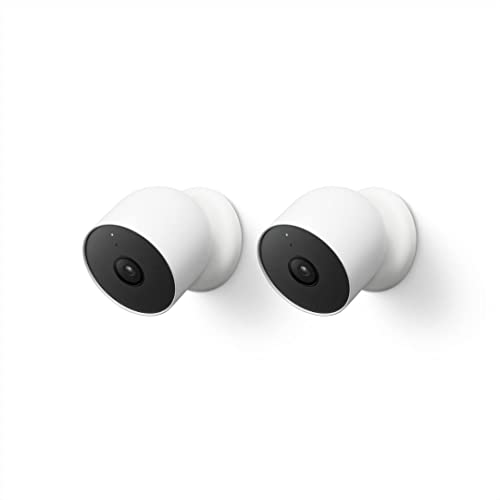
- Best for renters overall: Google Nest Cam (Outdoor or Indoor, Battery) — 2-Pack — Check on Amazon
- Best multi-view rental coverage: Blink Outdoor 4 Wireless Security Camera — 5-Camera System with Sync Module 2 — Check on Amazon
- Best balcony and terrace view: REOLINK Argus 4 Pro 4K Dual-Lens Solar Security Camera — Check on Amazon
- Best no-fee kit for larger rentals: eufy Security eufyCam S330 (eufyCam 3) 2-Cam Kit with HomeBase 3 — Check on Amazon
- Best single detail camera: Arlo Pro 5S 2K Spotlight Security Camera — Check on Amazon
- Best where wiring already exists: Ring Floodlight Cam Wired Pro — Check on Amazon
Read the full guide ↓
Disclosure: As an Amazon Associate, dailyhomedecorating.com earns from qualifying purchases. Links to Amazon on this page are affiliate links; they cost you nothing extra. Listing details such as price and availability change often, so check the current Amazon listing before you buy.
Apartment security starts with a constraint homeowners never face: almost everything you install has to leave with you, undamaged walls and deposit intact. So when you search for the best security camera for apartments under $400, read that budget the renter’s way — it is a generous ceiling for a portable system of one to five cameras that mounts without drilling, watches your door, your living space and maybe a balcony, and packs into a single box on moving day. Nothing in this guide needs to be hardwired into the building except one clearly-flagged pick for the rare rental where the wiring already exists and the landlord agrees in writing.
The apartment lens also changes what ‘indoor and outdoor’ means. Your outdoors is a front door opening onto a shared hallway, a small balcony, a terrace, or a window view of the parking area — not a yard. Cameras here are judged on compact footprints, adhesive or clamp-friendly mounting, magnetic bases, and how politely they behave in shared spaces: a camera aimed at your own door mat is a different neighbourly proposition from one sweeping the whole corridor, and several jurisdictions and leases restrict recording shared areas, so check yours before mounting anything that overlooks neighbours. Inside, the same camera often doubles as a check-in on pets, deliveries left inside the door, and the general peace of mind of knowing the flat is as you left it.
And the standing caution applies with extra force in a flat: a camera documents your door; it does not secure the building. The block’s entry system, your door’s locks and your landlord’s responsibilities do the heavy lifting, and a camera is evidence and awareness layered on top — valuable, but never a substitute, and never a reason to skip the boring basics like actually using the deadbolt.
In this guide
Quick Picks
Short on time? This table matches each system to the job it does best in this guide’s lens. Every pick is reviewed in full below, including exactly what its subscription does and does not lock away.
| Pick | Best for | Zone | Key spec | Link |
|---|---|---|---|---|
| Google Nest Cam (Battery) 2-Pack | Best for renters overall | Indoor and outdoor (either, per camera) | 1080p HDR, battery or optional wired power, magnetic mount, on-device person/animal/vehicle detection, IP54 maker rating | Check on Amazon |
| Blink Outdoor 4 5-Camera System | Best multi-view rental coverage | Outdoor (also usable indoors) | 1080p HD, maker-claimed battery life up to two years on AA lithium cells, 143-degree diagonal field of view, Sync Module 2 hub | Check on Amazon |
| Reolink Argus 4 Pro | Best balcony and terrace view | Outdoor (single wide-view camera) | 4K 8MP dual-lens 180-degree stitched view, ColorX colour night vision, battery plus included solar panel, microSD local recording, IP66 maker rating | Check on Amazon |
| eufyCam S330 2-Cam Kit | Best no-fee kit for larger rentals | Outdoor (cameras) + indoor hub | 4K cameras, integrated solar panel, HomeBase 3 local storage expandable to 16TB (drive sold separately), face-recognition AI on the hub, IP67 maker rating | Check on Amazon |
| Arlo Pro 5S 2K | Best single detail camera | Outdoor (also rated for indoor use) | 2K HDR video, dual-band Wi-Fi, integrated spotlight and siren, colour night vision, removable rechargeable battery | Check on Amazon |
| Ring Floodlight Cam Wired Pro | Best where wiring already exists | Outdoor only (hardwired) | 2K HDR video (maker ‘Retinal 2K’), 2000-lumen LED floodlights per maker spec, 3D Motion Detection with radar, hardwired power | Check on Amazon |
How we chose
For apartments we re-weighted everything around tenancy. Damage-free mounting came first: magnetic bases, stands and clamp or minimal-screw mounts outranked anything needing a drill. Portability came second — a system worth its ceiling in a rental is one you would genuinely take to the next flat. Third, shared-space manners: fields of view that can be tightened to your own door and threshold, and privacy behaviour you control. Fourth, the storage and subscription truth, stated per pick, because a renter’s monthly budget notices plan fees. Power claims are treated as maker claims throughout, and the one hardwired pick is included only for the minority of rentals with an existing floodlight fitting and written landlord consent.
Across all six picks we also applied three standing rules for this series. Every specification quoted — resolution, field of view, weather rating, battery endurance — is a manufacturer claim from the maker’s own listing or documentation, and is described as such; we do not present lab results we did not produce. Every dollar figure in this article is the keyword’s own under-$400 framing: linked picks say check price on Amazon because live prices move, and no static product price appears anywhere in the guide. And every pick had to be a real, currently listed product with a verifiable Amazon listing, checked for this guide — no placeholder products, no invented models.
Detailed reviews
Google Nest Cam (Outdoor or Indoor, Battery) — 2-Pack
Zone: Indoor and outdoor (either, per camera). Key spec: 1080p HDR, battery or optional wired power, magnetic mount, on-device person/animal/vehicle detection, IP54 maker rating.
This is the only pick in the guide that is genuinely both an indoor and an outdoor camera at once: the same sealed, battery-powered unit sits on a magnetic base on a living-room shelf one month and screws to a wall plate over the porch the next, which makes the two-pack a flexible starter system rather than two fixed decisions. Video is 1080p with HDR and night vision, and Google builds person, animal and vehicle detection into the camera itself, so basic intelligent alerts work without paying anything. What is free is deliberately short, though: the camera keeps a rolling few hours of event history at no cost, and anything longer — extended event video history and familiar-face recognition — requires a Nest Aware subscription. There is no local storage option at all; no card slot, no hub, no USB path. The battery is rechargeable and built in, with maker battery-life estimates that vary by activity level, and an optional weatherproof cable can power a camera continuously where an outlet is reachable. The maker weather rating is IP54, splash-resistant rather than sealed against driving rain, so placement under eaves matters.
Subscription and storage, plainly: cloud-only storage. Short rolling event history is included free; longer history and familiar faces are locked behind Nest Aware. If a no-subscription system is a hard requirement, this is the wrong pick no matter how elegant the hardware feels.
For renters this is the natural first pick: the magnetic base sits on a shelf or sticks to its wall plate with minimal fuss, the same unit moves from hallway to balcony to the next apartment without tools, and its person alerts work free even if its recorded history is short without a plan. It is the camera that behaves like furniture, which is exactly what rental security should do.
Ownership notes: decide the charging rhythm early — a camera that comes down monthly wants its charge cable kept somewhere findable, and the magnetic base makes the down-and-up a two-minute job. Review the free history window behaviour in your first week so the plan decision is informed by your actual checking habits, and download any clip you care about before it ages out of the window you have.
Honest limitation: The honest limitation is the storage model: when the free history window is only hours long, an event you sleep through on a trip can age out before you ever see it unless you pay for the plan — the subscription is effectively part of this product’s price.
Choose it if its zone, storage story and power source match the viewpoint you are filling. Skip it if any of those three fights your plan — the other five picks cover the remaining combinations. Check on Amazon
Blink Outdoor 4 Wireless Security Camera — 5-Camera System with Sync Module 2
Zone: Outdoor (also usable indoors). Key spec: 1080p HD, maker-claimed battery life up to two years on AA lithium cells, 143-degree diagonal field of view, Sync Module 2 hub.
Five cameras in one box is the entire argument here, and it is a strong one: front, back, both sides and the garage approach can all be covered in a single afternoon without running a single cable. Each camera is a compact weather-resistant unit powered by two AA lithium batteries, which Blink rates for up to two years of life under its stated typical-use assumptions — a maker claim that shrinks fast on busy driveways and in cold snaps, but even a fraction of it beats quarterly ladder trips. Video is 1080p with infrared night vision and two-way talk. The kit’s Sync Module 2 matters more than the cameras do: plugged in indoors with a USB drive you supply, it records clips locally with no plan at all. Person detection and extended cloud history, however, sit behind the Blink Subscription Plan, and live view length and clip storage in the cloud are plan features too. The cameras are outdoor units by design, though nothing stops one watching a garage interior or a hallway from a shelf.
Subscription and storage, plainly: local recording through the included Sync Module 2 plus your own USB drive works without any subscription. Cloud clip storage, person detection and photo capture require the Blink Subscription Plan after the trial. Budget the USB drive as part of the system, because the module alone stores nothing.
Five cameras sounds like a house system, but in a larger rental it maps neatly: entry, living room, balcony, spare room, and one spare for the next place. The tiny bodies and stand-or-two-screw mounts keep landlords calm, and because each camera is inexpensive, a camera left behind in a move is an annoyance, not a disaster.
Ownership notes: feed the Sync Module 2 a decent-sized USB drive from day one, name cameras by viewpoint rather than number, and keep a spare set of AA lithium cells in the drawer the hub lives in. Battery swaps on five cameras are a rota, not an emergency, if you stagger them — swap the busiest camera’s cells first and let the app’s battery indicators, treated as rough guides, set the order.
Honest limitation: The honest limitation is resolution and responsiveness: 1080p at this price-per-camera cannot read a number plate across a wide driveway, and battery cameras wake and start recording a beat slower than wired ones, so the first moment of an event can be missed.
Choose it if its zone, storage story and power source match the viewpoint you are filling. Skip it if any of those three fights your plan — the other five picks cover the remaining combinations. Check on Amazon
REOLINK Argus 4 Pro 4K Dual-Lens Solar Security Camera
Zone: Outdoor (single wide-view camera). Key spec: 4K 8MP dual-lens 180-degree stitched view, ColorX colour night vision, battery plus included solar panel, microSD local recording, IP66 maker rating.
One camera doing the work of two is the pitch: twin lenses stitch a single 180-degree panoramic frame, so a corner mount watches both walls of an L-shaped yard, or one driveway camera covers the street approach and the garage door together. Resolution is 4K from an 8MP sensor pair, and Reolink’s ColorX night mode uses a very fast lens and a large sensor to hold colour after dark without leaning on a spotlight — maker claims that hold up best where some ambient light exists and should be read as best-case. Power is a built-in rechargeable battery topped up by the included solar panel, so mounting is two screws and no cables. Recording is local to a microSD card you supply (the maker supports large-capacity cards), person, vehicle and animal detection runs on the camera, and no subscription is required for recording or smart alerts; Reolink’s optional cloud exists but nothing core is locked behind it. The maker weather rating is IP66. Dual-band Wi-Fi is on board, and the camera can also pair with Reolink’s Home Hub if you later want centralised storage.
Subscription and storage, plainly: no plan needed. Local microSD recording and on-camera detection are included; the card is sold separately, and footage lives on that card in the camera itself, so a stolen camera takes its evidence with it unless you add the optional hub or cloud.
The balcony case is where this pick earns its place: one wide 180-degree unit covers a terrace and the sliding doors behind it, solar-topped so no cable crosses the balcony door seal, and the recording stays on its own card — no landlord network, no building Wi-Fi involvement at all.
Ownership notes: use a high-endurance microSD card — continuous event writing wears ordinary cards — and format it in the camera. Check the stitched image at the seam after mounting by walking the boundary yourself, angle the solar panel for the worst month rather than the best week, and download important clips promptly: the card in the camera is a working buffer, not an archive.
Honest limitation: The honest limitation is the stitched image: objects crossing the seam between lenses can distort briefly, the extreme wide view spreads pixels thin at long range, and like every solar camera it depends on the panel actually seeing sun.
Choose it if its zone, storage story and power source match the viewpoint you are filling. Skip it if any of those three fights your plan — the other five picks cover the remaining combinations. Check on Amazon
eufy Security eufyCam S330 (eufyCam 3) 2-Cam Kit with HomeBase 3
Zone: Outdoor (cameras) + indoor hub. Key spec: 4K cameras, integrated solar panel, HomeBase 3 local storage expandable to 16TB (drive sold separately), face-recognition AI on the hub, IP67 maker rating.
The two cameras are outdoor battery cameras with an integrated solar panel that eufy describes as needing about two hours of daily sunlight to sustain charge in typical use — treat that as a maker claim that depends heavily on sun exposure, mounting angle and how busy the view is. Video is 4K, night vision is in colour with a spotlight, and all recording lands on the HomeBase 3 hub indoors rather than in a cloud account. The hub ships with a modest amount of built-in storage and accepts an added hard drive for expansion up to the maker’s stated 16TB ceiling. Person, pet and vehicle detection plus face recognition run on the hub itself, which is why eufy can sell this kit with no monthly fee for its core recording and detection features. The cameras carry an IP67 weather rating as a manufacturer specification. Two-way talk, a siren and Alexa and Google Assistant streaming round out the kit. What the kit does not do is Apple HomeKit, and the cameras only talk to the HomeBase, so hub placement indoors — near the router, roughly central to the cameras — decides real-world reliability more than any headline specification.
Subscription and storage, plainly: no plan is required to record, play back or use the hub-based detection. Storage is local only, on the HomeBase 3; there is no eufy cloud recording fallback in this kit, so if the hub is stolen or fails, the footage goes with it unless you have expanded storage and your own backup habits.
A two-camera 4K kit is a lot for a small flat, and this guide says so: this pick suits larger apartments, duplex rentals and anyone who knows the next home is a house, because the hub-based system moves with you and grows. In a studio it is overkill; in a three-bed rental it is the no-fee backbone.
Ownership notes: keep the HomeBase 3 on a wired network connection in a central indoor spot, label each camera’s position in the app the day you mount it, and check solar exposure after the first week — a camera whose battery trends down despite sun wants a slightly different angle, not a bigger complaint. Add storage before you need it; moving to a larger drive later means planning a quiet afternoon with the hub.
Honest limitation: The honest limitation is the two-camera ceiling of the box itself: a third viewpoint means buying an add-on camera, and shaded north-facing walls can starve the solar panel in winter, turning a fit-and-forget camera into one you occasionally bring indoors to charge.
Choose it if its zone, storage story and power source match the viewpoint you are filling. Skip it if any of those three fights your plan — the other five picks cover the remaining combinations. Check on Amazon
Arlo Pro 5S 2K Spotlight Security Camera
Zone: Outdoor (also rated for indoor use). Key spec: 2K HDR video, dual-band Wi-Fi, integrated spotlight and siren, colour night vision, removable rechargeable battery.
A single flagship camera earns its place in an under-$400 system guide because two or three of them still fit the ceiling, and because it does the one job value kits do badly: identifying detail. The 2K HDR sensor, wide field of view and integrated spotlight produce colour night footage with noticeably more facial and clothing detail than 1080p battery cameras, and dual-band Wi-Fi lets it hold the stronger of your 2.4 or 5 GHz networks — a real advantage at the far end of a house. The battery is removable and rechargeable, the housing is weather-sealed for outdoor mounting, and a built-in siren and two-way talk are standard. The catch defines the brand: without an Arlo Secure subscription, this camera is essentially a live-view device. Recorded playback, person/package/vehicle recognition and activity zones all sit behind the plan once the trial ends, and there is no memory-card slot in the camera. Local recording exists only through a separate Arlo SmartHub with USB storage, an extra purchase that still does not unlock the recognition features. Treat the plan as a running cost of owning this camera, not an optional extra.
Subscription and storage, plainly: Arlo Secure is effectively required — recording and smart recognition are subscription features. Local storage needs a separate SmartHub and USB drive and still leaves smart alerts plan-dependent. No plan, no recordings: that sentence should decide this pick for you.
One superb camera over the apartment door — inside the entry, aimed at the door itself — answers the renter’s core question (‘did anyone come in?’) with identifiable detail. Its subscription dependence is the tax; renters who accept it get the clearest evidence camera in the guide.
Ownership notes: the removable battery is the maintenance story — a second charged battery turns a ladder trip into a swap, and the camera’s downtime drops to minutes. Keep the plan renewal on autopay if this camera guards a viewpoint you rely on, audit your activity zones after the first fortnight, and expect firmware and app changes to occasionally move settings; a quarterly five-minute check keeps the detail you paid for actually switched on.
Honest limitation: The honest limitation is total cost of ownership: one camera plus years of plan fees can overtake a no-fee kit’s price, and buyers who cancel the plan are left with far less camera than the box art suggests.
Choose it if its zone, storage story and power source match the viewpoint you are filling. Skip it if any of those three fights your plan — the other five picks cover the remaining combinations. Check on Amazon
Ring Floodlight Cam Wired Pro
Zone: Outdoor only (hardwired). Key spec: 2K HDR video (maker ‘Retinal 2K’), 2000-lumen LED floodlights per maker spec, 3D Motion Detection with radar, hardwired power.
Every other pick in this guide runs on batteries; this one replaces an existing outdoor light fitting and never needs charging, recharging or solar luck again. In exchange for an electrician-grade install — it hardwires to a standard junction box — you get two bright LED floodlight heads, a 2K HDR camera, colour night vision, a siren, and Ring’s radar-based 3D Motion Detection, which the maker says tracks movement through the yard more precisely than pixel-watching alone and enables its Bird’s Eye View map of an event’s path. Continuous power also means the camera is always awake: no wake-up delay, no missed first seconds, and pre-event buffering features that battery cameras cannot match. The trade is Ring’s storage model in its purest form. The camera has no local storage of any kind. Without a Ring subscription, you can watch live and receive motion alerts, but you cannot review, save or share a single recorded event; video history, person alerts and rich notifications are all plan features after the trial. It is also resolutely outdoor-only and fixed: where it is wired is where it watches, forever, so placement mistakes are expensive ones.
Subscription and storage, plainly: cloud-only, and the Ring subscription is required for any recorded video playback at all. There is no card, hub or USB alternative for this model. If subscription-free recording matters to you, skip this pick entirely and look at the local-storage systems above it.
Read this pick’s conditions carefully: it only belongs in a rental where a wired floodlight fitting already exists over a private terrace or parking spot AND your landlord has agreed in writing. Where those stars align it is superb — always on, part of the lighting. Everywhere else, it is a homeowner’s camera and should stay on the homeowner list.
Ownership notes: there is almost nothing to maintain, which is the point — no batteries, no cards, no hub. Your ownership tasks are account tasks instead: keep the subscription active if you rely on recordings, review the radar motion settings after the first week of real traffic, and clean the lens and floodlight heads each season, because hardwired permanence quietly accumulates grime that battery cameras get wiped during every recharge.
Honest limitation: The honest limitation is lock-in plus installation: it needs existing wiring (or an electrician to add it), it cannot move rooms or houses cheaply, and its entire recording history lives behind a paid plan on Ring’s servers.
Choose it if its zone, storage story and power source match the viewpoint you are filling. Skip it if any of those three fights your plan — the other five picks cover the remaining combinations. Check on Amazon
Comparison table
| System | Zone | Recording without a plan | Storage | Power |
|---|---|---|---|---|
| Google Nest Cam (Battery) 2-Pack | Indoor and outdoor (either, per camera) | Short free event window only | Cloud only | Rechargeable battery, optional wired cable |
| Blink Outdoor 4 5-Camera System | Outdoor (also usable indoors) | Yes — via Sync Module 2 local storage | Local USB via hub, or cloud with plan | AA lithium batteries (maker claim: up to two years) |
| Reolink Argus 4 Pro | Outdoor (single wide-view camera) | Yes — on-camera detection and recording | Local microSD (card sold separately) | Battery + included solar panel |
| eufyCam S330 2-Cam Kit | Outdoor (cameras) + indoor hub | Yes — hub detection and recording included | Local, HomeBase 3 (expandable) | Battery + integrated solar (maker claim) |
| Arlo Pro 5S 2K | Outdoor (also rated for indoor use) | No — recording requires Arlo Secure | Cloud; local only via separate SmartHub | Removable rechargeable battery |
| Ring Floodlight Cam Wired Pro | Outdoor only (hardwired) | No — playback requires Ring subscription | Cloud only | Hardwired mains |
Read that middle column before anything else in this guide. It is the difference between a system whose cost ends at checkout and one whose cost is a standing order — and it is the column most product pages work hardest to blur. If you only follow one link from this section, make it the headline pick for this lens: Check on Amazon.
How to choose the best security camera for apartments under $400
Start with your lease, not with products. Check what it says about mounting, about cameras, and about recording shared spaces; where it is silent, a quick written okay from the landlord protects your deposit better than any adhesive pad. As a rule, cameras inside your own flat are your business; cameras watching hallways, landings or shared courtyards involve other people’s privacy and sometimes local law, so keep outward views tight to your own door and terrace.
Choose mounts that forgive. Magnetic bases, tabletop stands, clamp mounts and minimal-screw brackets all leave a rental restorable in minutes. The picks above lean on exactly those. Avoid anything that needs a junction box or a drilled cable run unless you have written consent — the single hardwired pick in this guide is labelled with that condition wherever it appears.
Think in doors, not rooms. An apartment typically needs two or three views: the entry (from inside, watching the door), the main living space, and the balcony or terrace if you have one. That is why the ceiling is a ceiling — a two-pack or a modest kit covers most flats, and the leftover budget is better kept than spent on cameras watching the bathroom door.
Weigh the subscription honestly against renters’ cash flow. Local-recording picks (the hub and card-based systems here) ask nothing monthly, which suits a household already carrying rent, utilities and a moving fund. The cloud picks are excellent cameras whose recorded history stops without a plan — fine if you accept the fee as part of the rent-like cost of the flat, a poor surprise if you do not.
Plan the exit on day one. Keep the boxes, photograph your mounts, and choose systems whose hub and cameras re-pair painlessly in a new home on a new network. Every pick in this guide except the hardwired floodlight can be running in the next apartment the evening you move in — that portability is a feature worth paying for, and it is priced into our ordering.
Common mistakes
- Drilling first and reading the lease later. Deposit deductions for ‘minor’ holes are the most predictable cost in rental security; the damage-free options above exist precisely to avoid them.
- Aiming a camera down a shared hallway. Beyond lease and legal issues, it films your neighbours’ lives far more than your own door — tighten the view to your threshold and use activity zones.
- Buying a five-camera system for a one-bed flat. More cameras means more batteries, more alerts and more footage of nothing; two or three well-placed views beat a camera in every room.
- Forgetting the building already has layers. A camera is not a substitute for using the entry phone, the deadbolt and the peephole the flat came with — it documents the door those things protect.
- Letting a trial subscription lapse unknowingly. On the cloud picks here, the end of the trial is the end of recorded history; if you rely on playback, set the plan decision in your calendar the day you install.
- Leaving the system behind in the move. Hubs and Sync Modules are small, valuable and easily abandoned in a cupboard — put them on the moving checklist.
Final recommendation
For most renters, the Google Nest Cam two-pack is the system to buy: two genuinely indoor-outdoor cameras, damage-free mounting, free intelligent alerts, and total portability — just budget for Nest Aware if recorded history matters to you. If avoiding subscriptions entirely is the priority, build around the eufy kit in a larger rental or the Blink system where you want more viewpoints, both of which record locally for no monthly fee. And whatever you choose, keep the spend honest: in an apartment, the best system under $400 is usually the one that costs well under it and leaves with you.
Three ways to spend the ceiling in a rental
Blueprint one — the deposit-safe pair. The Nest two-pack alone: one camera inside watching the entry, one on the balcony or living-room shelf, both removable in minutes on moving day. Add the plan only if your checking habits prove you need the longer history. Most renters should stop here and keep the rest of the ceiling unspent.
Blueprint two — the larger rental. The Blink system spread across entry, living space, balcony and spare room, recording locally through the Sync Module 2 so the flat’s camera layer adds nothing to monthly outgoings — a real consideration alongside rent. Keep the fifth camera boxed as the spare that makes the next move painless.
Blueprint three — the nearly-a-house rental. For duplexes and long leases, the eufy hub kit as the no-fee backbone plus the Reolink on the terrace gives a system that behaves like a homeowner’s while remaining fully removable. Skip the floodlight unless the wired fitting and the written permission both already exist.
Placement, power and privacy in practice
Wherever the lens, three practical truths govern every pick in this guide. Placement beats specification: a modest camera at face height on a choke point outperforms a flagship filming a panorama from the eaves, so mount, walk the view yourself at night, and judge the actual recorded clip rather than the live preview. Power is a schedule, not a feature: every battery and solar figure quoted by these makers assumes their version of typical use, so your real maintenance interval is set by your busiest camera in your worst month — discover it in the first season and write it on the calendar. And privacy is part of the installation, not an afterthought: aim away from neighbours’ windows and gardens, use activity and privacy zones where the app offers them, tell household members and regular visitors the cameras exist, and remember that indoor cameras watch your own life most of all — the picks with physical shutters, covers or lens-away privacy modes exist because that matters. A system installed with those three habits will still be trusted in year three; one installed for the spec sheet alone usually is not.
Understanding the numbers on the box
One more translation applies to every figure in this guide, including the ones in its own comparison table: a specification is a promise about a component, not about your installation. The same camera produces different real-world results at two metres and at twelve, in a lit street and in a dark lane, on a strong router signal and on the far side of three walls from a weak one. That is why this guide keeps returning to the unglamorous verbs — mount, walk, check, adjust — because they are where specifications become performance. It is also why we describe endurance, sealing and detection figures as maker claims throughout: not as a legal reflex, but because the maker’s test bench and your February are genuinely different places, and an honest guide prices that difference in from the start rather than apologising for it afterwards.
Four numbers do most of the persuading in this category, and all four deserve translation before they are allowed to influence you. Resolution — 1080p, 2K, 4K — counts pixels, not clarity: a 4K camera behind a small lens, compressing hard to save battery and bandwidth, can resolve less real detail than a well-lit 2K camera, and distance divides whatever detail exists. Judge resolution as potential, then ask the placement question: at the distance your camera will actually work, does the pick’s tier give a face enough pixels to be a face? Field of view works the opposite way to intuition — wider is not better, merely broader: every extra degree spreads the same pixels thinner, which is why this guide pairs wide detection views with narrower identification views instead of crowning one number. Battery figures are the softest numbers in the category: each maker tests under its own stated typical use, with its own assumptions about events per day and temperature, so treat every endurance claim in this guide as an optimistic bound set by the manufacturer and plan your charging rhythm around your busiest camera, not the brochure’s average one. Weather ratings, finally, are laboratory specifications: an IP code describes how a sealed sample resisted water and dust under test conditions, and it says nothing about years of gasket ageing, driven coastal rain or a mount that pools water against the housing. Read IP66 as ‘properly rain-resistant when mounted sensibly’, IP54 as ‘sheltered positions’, and you will never be surprised by weather. None of this makes the numbers useless — it makes them comparable, which is the only job they were ever fit for.
A word about the view from your window, because apartment dwellers ask about it constantly: a camera inside your flat, looking out through glass, is a compromised camera. Glass defeats infrared night vision with reflections, window frames crop the view, and what you record is mostly the shared world rather than your own threshold. Where the building allows nothing outside, an interior camera aimed at your own front door from inside records the event that actually matters to you — the door opening — with none of those problems. Choose the door, not the panorama.
Finally, remember that an apartment system is also a guest system. Partners, flatmates, cleaners and visiting family all live inside its view in a way a house’s perimeter cameras never impose. The picks with physical privacy answers — covers, shutters, lens-away modes — and the simple habit of a visible camera rather than a hidden one keep the system a comfort to the people you live with instead of a quiet grievance. In a small shared home, that social placement is a technical specification too.
Our headline pick for this lens is the Google Nest Cam (Outdoor or Indoor, Battery) — 2-Pack — Check on Amazon — because it fits the lens’s priorities with the fewest compromises on storage honesty and day-to-day ownership.
Frequently asked questions
Can I install security cameras in a rented apartment?
Inside your own flat, generally yes — the picks here mount without damage. For anything watching shared spaces, or any drilling or wiring, check your lease and get written landlord consent first; rules vary by building and jurisdiction.
What is the best camera setup for a small apartment?
Usually two views: one indoor camera watching the entry door and one covering the living space or balcony. The Nest two-pack and a Blink subset both fit that pattern well under the ceiling.
Do I need my landlord’s Wi-Fi or permission to use Wi-Fi cameras?
You need your own Wi-Fi for all of these; none requires landlord involvement beyond the mounting and shared-space questions above. The Reolink pick can even record locally if the network drops.
Which of these cameras need a subscription to record?
Ring and Google Nest are cloud-first: recorded history beyond a short free window needs their plans, and Arlo locks recording behind Arlo Secure. The eufy kit, the Blink system with its Sync Module 2 local storage, and the Reolink record without any plan.
Can I take the system to my next apartment?
Every pick except the hardwired Ring floodlight is portable and re-installs in minutes — that is a deliberate selection criterion in this guide. The floodlight stays with the property, which is why it is conditionally recommended.
Is a camera a substitute for renter’s insurance or good locks?
No. It records and alerts; it does not prevent entry or replace losses. Keep locks, building security and insurance as your foundation and let cameras add evidence and awareness.


