Where to buy
Check the latest price, availability and delivery on Amazon — every pick below is a real, currently sold system from a major maker, and the checkout price is the one that counts. Orders are placed on Amazon.
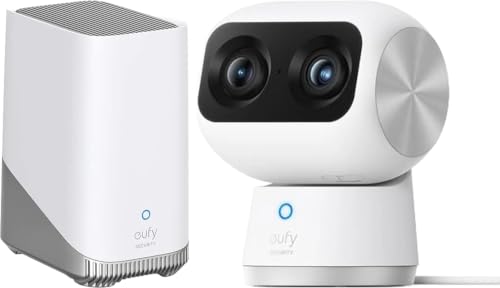
- Best pick under $300: eufy Security Indoor Cam S350 with HomeBase 3 — check price on Amazon
- Blink Outdoor 4, 3-Camera System — check price on Amazon
- Wyze Cam Floodlight v2 — check price on Amazon
- Wyze Cam Pan v3, 2-Pack — check price on Amazon
- Ring Indoor Cam (2nd Gen), 3-Pack — check price on Amazon
- eufy SoloCam S220 — check price on Amazon
Read the full guide ↓
Disclosure: As an Amazon Associate, dailyhomedecorating.com earns from qualifying purchases. Prices and availability change; the price at checkout is the final word.
Shopping for the best security camera under $300 is a different exercise from shopping at half that budget. Down at the value tiers you pick a lens and live with its compromises; at $300 you are assembling coverage — more than one viewpoint, a storage strategy, and a power plan — and the wrong architecture costs more to fix than the wrong camera. This guide treats the $300 figure as a ceiling for a whole setup, not a target for a single device, and every pick below is labelled honestly as indoor, outdoor or both, because a general security camera guide that blurs that line sets you up to mount the wrong hardware in the wrong place.
The six picks split into three philosophies. Hub-and-local systems (the eufy S350 bundle and the SoloCam S220) keep footage on hardware in your home and ask for no monthly fee. Cloud-first systems (the Blink three-camera kit and the Ring indoor three-pack) trade a subscription for effortless off-site storage and polished apps. And the two Wyze picks sit between the camps: local microSD recording that works free, with an optional plan layered on top for smarter alerts. None of these is a professional alarm system, and no camera in this guide replaces monitored security, solid locks or lighting — what they do is record evidence, deter casual opportunists and tell you what happened at your door, driveway or hallway while you were away.
One disclosure belongs up front, because it shapes every recommendation that follows: subscription and cloud fees are stated plainly for each brand. Ring’s indoor camera cannot record at all without a Ring Home plan. Blink’s person detection and cloud history sit behind its plan, though the included Sync Module 2 can back clips up to a USB drive you supply. Wyze gates cloud event video and person, pet and package labels behind Cam Plus, while local recording stays free. eufy’s two picks record locally with no fee at all. Battery-life figures, solar-charging claims, floodlight brightness and weather ratings are manufacturer claims and manufacturer specifications throughout — real-world results depend on traffic, temperature, sunlight and settings, and the reviews below say so where it matters.
In this guide
Quick Picks
Six ways to spend up to $300 on whole-home coverage, ordered by architecture rather than brand: hub flagship first, then the outdoor kit, the floodlight, the flexible pair, the indoor triple-pack and the solar sentinel. If you already know your storage philosophy — local and fee-free, or cloud and hands-off — the best-for column will route you to the right row in seconds.
| Camera | Best for | Key spec |
|---|---|---|
| eufy Security Indoor Cam S350 with HomeBase 3 | Best hub-based indoor flagship | 4K + 2K telephoto dual lenses, HomeBase 3 local storage |
| Blink Outdoor 4, 3-Camera System | Best multi-camera outdoor kit | 3 cameras, 1080p, maker-claimed up to 2-year battery |
| Wyze Cam Floodlight v2 | Best floodlight deterrent | 2K, maker-rated 2,800-lumen floods, hardwired |
| Wyze Cam Pan v3, 2-Pack | Best flexible indoor/outdoor pair | 2 cameras, 1080p PTZ, IP65 maker rating |
| Ring Indoor Cam (2nd Gen), 3-Pack | Best indoor multi-room pack (cloud) | 3 cameras, 1080p, physical privacy cover |
| eufy SoloCam S220 | Best wire-free solar outdoor camera | 2K, solar charging, built-in 8GB local storage |
How These Picks Were Chosen
The first filter was architectural honesty: each pick had to be a complete, working purchase at or under the ceiling — a kit with its hub in the box, a camera with its storage story told straight — rather than a cheap headline device that needs a pile of extra accessories before it records anything. Add-on cameras sold without the hub they require were excluded unless the hub was bundled, and every ASIN in this guide was verified against a live Amazon US listing or the maker’s own documentation before it earned a link.
The second filter was the three-year cost of ownership, because at this tier the sticker is the smallest part of the bill. We mapped exactly what each brand locks behind its subscription: recording itself (Ring), cloud history and person detection (Blink), cloud event clips and smart labels (Wyze), or essentially nothing for core use (eufy). A camera that is cheap to buy and expensive to own can still be the right choice — cloud storage genuinely protects footage if the camera is stolen — but you should choose that trade with your eyes open, which is why the comparison table carries a plan-reality column instead of burying fees in footnotes.
Third, coverage realism. A general guide has to span the places incidents actually happen: the front approach, the driveway, the back door, the hallway. So the pool deliberately mixes placements — two indoor specialists, three outdoor cameras and one rated for both — and each review states its placement in the first lines. Resolution claims were weighed against lens quality and night performance rather than taken at face value; a clean 2K image with good dynamic range beats a noisy 4K feed for identifying a face at a gate, and pan-and-tilt range mattered only where a fixed wide lens could not do the same job more reliably.
Finally, power practicality. Battery figures in this guide are maker claims quoted under the makers’ stated test conditions — Blink’s up-to-two-years assumes default settings and modest traffic, and eufy’s solar claims assume a few hours of direct sun a day. We favoured systems whose power story survives a busy household: solar top-up, hardwired permanence, or batteries cheap and quick to swap. Cameras that demand a ladder, a drill and a free Saturday every few weeks to recharge were marked down, however good their video looked.
The 6 Best Security Cameras Under $300
Each review states the placement first, then the storage and subscription reality, then the honest limitation — because at $300 the differences that matter are architectural, not cosmetic. Prices are deliberately not printed: check price on Amazon from any link and you will see today’s figure, which is the only one worth planning around.
eufy Security Indoor Cam S350 with HomeBase 3
Who it suits: Homeowners who want the strongest single indoor viewpoint in this guide and a local-storage hub the rest of a system can grow around — no monthly fee, no footage leaving the house unless you send it.
The S350 is two cameras in one housing: a 4K wide lens for the room and a 2K telephoto that, per eufy’s specifications, delivers up to 8x hybrid zoom, so a face or a parcel label across a large living space stays legible instead of dissolving into pixels. The head pans a full 360 degrees and tilts 75 degrees, tracks people and pets using on-device AI, and — bundled here with HomeBase 3 — records to the hub’s 16GB of built-in local storage, expandable with a hard drive you supply. That hub matters beyond this one camera: it is the same base station eufy’s battery cameras and doorbells build on, so this bundle is quietly the foundation of a whole fee-free system.
The subscription disclosure is the shortest in this guide: there effectively isn’t one for core use. Recording, human and pet detection and app alerts work without a plan; eufy sells optional cloud plans for off-site backup, but nothing in the everyday feature set is locked behind them. The trade is the mirror image of Ring’s: if someone steals the hub, the footage goes with it, and the camera itself is wired, indoor-only and needs a shelf or mount with a power outlet in reach. Dual-band Wi-Fi 6 support, per the maker, keeps the 4K stream off your congested 2.4GHz band if your router offers 5GHz.
- Dual-lens 4K + telephoto zoom is genuinely useful at room scale
- Local storage on HomeBase 3 — no subscription needed to record
- Hub anchors a wider fee-free eufy system later
- Privacy mode turns the lens away when you are home
Honest limitation: Indoor only and wired — it cannot watch a driveway, and the hub is a single point of failure if it is stolen or damaged.
Choose it if you want flagship indoor detail and a local-storage architecture with zero running costs. Skip it if your priority is outdoor coverage — start with the Blink kit or the SoloCam below and add indoor cameras later.
Blink Outdoor 4, 3-Camera System
Who it suits: Anyone whose $300 needs to cover several outdoor viewpoints at once — front door, driveway and back gate — with the least possible maintenance per camera.
Three cameras change the security maths more than any resolution bump: incidents are rarely kind enough to happen in front of your one best lens. This kit puts three 1080p Outdoor 4 cameras and the required Sync Module 2 in one box, each camera offering a 143-degree diagonal field of view, infrared night vision and two-way talk per Blink’s specifications. The headline maker claim is battery life of up to two years from the included AA lithium cells — quoted, as Blink states, under default settings; a camera watching a busy street will drain faster, but even a fraction of that figure means maintenance measured in seasons, not weekends.
Now the honest ledger. Live view is free, but saving and reviewing clips in the cloud and getting person-detection alerts require a Blink Subscription Plan after the included trial; the local escape hatch is real but partial — the Sync Module 2 can back up clips to a USB drive you supply, which is a backup routine, not an app-browsable local library. The cameras are weather-resistant for outdoor mounting and small enough to use indoors too, but 1080p is the ceiling: fine for ‘who and what’, weaker for reading a number plate at distance. As a system buy under the ceiling, though, nothing else here covers three approaches for the money.
- Three true viewpoints in one box, hub included
- Maker-claimed up-to-two-year battery keeps maintenance rare
- Simple, mature app and Alexa integration
- Local USB backup option via the included Sync Module 2
Honest limitation: Cloud history and person detection are subscription features, and 1080p limits fine detail at range.
Choose it if coverage breadth matters more than per-camera sharpness, and you accept a modest plan for cloud history. Skip it if you refuse subscriptions on principle — the eufy picks record locally with no plan at all.
Wyze Cam Floodlight v2
Who it suits: Homes with an existing outdoor fixture box over a driveway, garage or back door, where light itself is the deterrent and a camera alone feels too passive.
The Floodlight v2 replaces a dumb porch or garage light with a 2K camera flanked by twin LED panels that Wyze rates at 2,800 lumens — a maker figure, but by any measure this is a serious amount of light arriving the moment motion is detected, paired with a colour night image instead of the usual grey infrared murk. The lens sees 160 degrees, the housing carries a siren Wyze rates at 105 dB, and because it is hardwired into the fixture box it never needs charging, ladder trips or battery swaps. For a driveway that has already had one package walk away, that combination — light, siren, recording — is the most actively deterrent single purchase in this guide.
Storage is Wyze’s usual split: a microSD card in the camera records locally with no plan required, while the optional Cam Plus subscription adds cloud event storage and person, pet, vehicle and package detection labels. The limitations are installation-shaped. You need an existing junction box and the confidence (or an electrician) to wire it; renters and homes without a fixture in the right spot are out. It is also a single viewpoint — a floodlight guards the approach it faces, and wide properties will still want a second camera for the far side. Treat it as the anchor of an outdoor setup, not the whole of it.
- Light + 2K colour recording + siren is a real deterrent stack
- Hardwired: zero charging or battery maintenance, ever
- Local microSD recording works without any subscription
- 160-degree view covers a driveway and its edges
Honest limitation: Needs an existing outdoor fixture box and mains wiring; not a renter-friendly or movable option.
Choose it if you have a fixture over the driveway or back door and want deterrence, not just evidence. Skip it if you rent, lack a junction box, or need several viewpoints — the Blink kit covers more ground per dollar.
Wyze Cam Pan v3, 2-Pack
Who it suits: Households that want two movable viewpoints — one watching the living room, one under the porch eaves — and the freedom to reposition them as life changes.
The Pan v3’s party trick is range: per Wyze’s specifications it pans 360 degrees and tilts through 180 degrees, tracks motion automatically, and carries an IP65 weather-resistance rating from the maker, which is why this two-pack straddles the indoor/outdoor line more honestly than most — one unit on a nursery shelf, its twin under a covered porch, both in the same app. Video is 1080p with colour night vision, and a Privacy Mode rotates the lens down into its base when you want the camera demonstrably off. As a pair under the ceiling, it is the most flexible coverage in this guide: two rooms, two angles, repositioned in minutes whenever the furniture — or the threat model — changes.
The Wyze ledger applies in full: microSD cards in each camera record locally for free, including continuous recording if you set it up, while Cam Plus is what unlocks cloud event video and the person, pet and package detection labels that cut notification noise. Without the plan you will get more motion alerts, and in a busy room that fatigue is real. The cameras are wired for power despite their weather rating, so ‘outdoor’ means within reach of an outlet under cover, not screwed to a fence post. And 1080p through a moving PTZ head will not match the S350’s zoomed detail. Flexibility is the product here; sharpness is the compromise.
- Two PTZ cameras cover rooms a fixed lens cannot
- Maker-rated IP65: genuinely usable under porch cover outdoors
- Local recording free; privacy mode is physical, not a menu promise
- Cheapest way in this guide to watch two spaces at once
Honest limitation: Wired power limits outdoor placement, and the smartest alerts need Cam Plus.
Choose it if your rooms and routines change, and movable coverage beats fixed perfection. Skip it if you want set-and-forget outdoor cameras with no cables — look at the Blink kit or SoloCam S220.
Ring Indoor Cam (2nd Gen), 3-Pack
Who it suits: Homes already living in the Ring and Alexa ecosystem that want three indoor rooms covered — hallway, living room, nursery-adjacent — inside one polished app, and who accept a subscription as the price of admission.
Three identical 1080p indoor cameras, one app, one ecosystem: the appeal is uniformity. Each unit offers colour night vision and two-way talk per Ring’s specifications, plus the detail that matters most indoors — a physical privacy cover you slide shut to block the lens and microphone, no software trust required. If your doorbell is already a Ring and your displays are Echo Shows, these slot into existing routines, snapshots and announcements without a second app or a second set of passwords, and the three-pack format means the hallway camera and the living-room camera behave identically at 2 a.m. when you are half asleep and checking an alert.
The disclosure, plainly: this camera does not record without a Ring Home plan. There is no local storage, no microSD slot, no free tier of saved video — live view works, but the moment you want to review what happened, a subscription is mandatory, and the smarter detection tiers sit on the higher plan levels. That is a legitimate model — cloud footage survives a stolen camera, and Ring’s app polish is genuinely strong — but it must be a deliberate purchase, not a surprise at the end of a trial. Buy this pack because you want Ring’s ecosystem three rooms deep, not because the box price looked low.
- Three matching cameras, one mature app and ecosystem
- Physical privacy cover blocks lens and mic mechanically
- Cloud footage is safe even if a camera is taken
- Colour night vision and two-way talk in every room
Honest limitation: Recording itself is subscription-locked; there is no local storage fallback of any kind.
Choose it if you are already a Ring household and value one app and cloud safety over fee-free recording. Skip it if any mandatory monthly fee is a deal-breaker — both eufy picks and both Wyze picks record locally for free.
eufy SoloCam S220
Who it suits: A single exposed outdoor viewpoint — a front path, a side gate, a garden shed — where running power is impossible and a charging cable would mean a ladder every few months.
The S220’s integrated solar panel is the whole pitch, and per eufy’s maker claims a few hours of direct sunlight a day keeps its battery topped up indefinitely, which turns the worst part of wire-free cameras — the recharge ritual — into a non-event. Video is 2K, storage is a built-in 8GB on the camera itself, and core recording and human-detection alerts run with no monthly fee, in keeping with eufy’s local-first model. It also pairs with HomeBase 3 if you later adopt the S350 bundle above, at which point footage can live on the hub instead of the camera — a tidy growth path within one brand.
The caveats are sunlight and scale. A north-facing, tree-shaded mount will not deliver the maker’s solar figures, and in a dark winter the battery becomes a battery again — plan a USB top-up as a seasonal chore if your spot is gloomy. The 8GB of onboard storage is finite and overwrites oldest footage first, so on a busy path your review window may be days rather than weeks. And this is one camera: at this tier it is the value pick you add to a system, or the single sentinel for one vulnerable approach, not whole-property coverage. Judged as exactly that, it is the lowest-effort outdoor camera in this guide.
- Solar top-up (maker claim) can end routine recharging
- Built-in local storage, no subscription for core use
- 2K video in a compact wire-free body
- HomeBase 3 compatible for a later system upgrade
Honest limitation: Solar performance collapses in shaded spots, and 8GB onboard storage is a short rolling window.
Choose it if one sunny outdoor approach needs a camera and you never want to think about its battery. Skip it if your only mounting spot is shaded all day, or you need multi-camera coverage now — see the Blink kit.
Comparison Table
Architecture at a glance. The plan-reality column is the one to read twice: it decides what this purchase costs you in year two and three, long after the box price is forgotten.
| Camera | Placement | Headline spec (maker) | Storage | Plan reality |
|---|---|---|---|---|
| eufy Security Indoor Cam S350 with HomeBase 3 | Indoor (camera) + indoor hub | Dual cameras: 4K wide + 2K telephoto, 8x hybrid zoom, 360° pan / 75° tilt | Local on HomeBase 3 (16GB built in, expandable); optional eufy cloud | No plan required for recording or core AI alerts |
| Blink Outdoor 4, 3-Camera System | Outdoor (also usable indoors) | 1080p HD, 143° diagonal field of view, infrared night vision, two-way talk | Cloud via Blink Subscription Plan; local clip backup via Sync Module 2 + USB drive (sold separately) | Plan required for cloud history and person detection; live view free |
| Wyze Cam Floodlight v2 | Outdoor, hardwired at an existing fixture box | 2K HD, 160° wide view, twin LED floods (maker-rated 2,800 lumens), 105 dB siren (maker figure) | Local microSD recording; optional Cam Plus cloud | No plan required for local recording; Cam Plus adds cloud history and smart detection labels |
| Wyze Cam Pan v3, 2-Pack | Indoor or sheltered outdoor (IP65, maker rating) | 1080p pan/tilt/zoom, 360° pan, colour night vision, motion tracking | Local microSD recording on each camera; optional Cam Plus cloud | No plan required for local recording; Cam Plus gates cloud event video and person/pet/package detection |
| Ring Indoor Cam (2nd Gen), 3-Pack | Indoor only | 1080p HD, colour night vision, manual privacy cover, two-way talk | Cloud only — no local storage on this model | Ring Home plan required to record and review video at all |
| eufy SoloCam S220 | Outdoor, wire-free | 2K resolution, integrated solar panel, two-way talk, works with HomeBase 3 | Built-in 8GB local storage on the camera; no cloud required | No monthly fee for core recording and alerts |
How to Choose the Best Security Camera Under $300
At $300 the unit of decision is the system, not the camera. Work through the five choices below in order — placement, storage, power, coverage count, then specs — and the right pick usually selects itself. Reversing that order (specs first) is how households end up with a magnificent 4K lens watching the wrong wall on a subscription they resent.
Start with placement, and be literal about it
Walk your home and list the viewpoints that matter: front approach, driveway, back door, side gate, hallway, living room. Mark each indoor or outdoor, because that single label eliminates half of any catalogue. Indoor cameras like the S350 and the Ring pack are not weather-sealed and will die outside; outdoor cameras work indoors but waste their sealing and often their battery bulk. In this guide the Pan v3 pair is the only true both-worlds option, thanks to its maker-rated IP65 housing. If your list is mostly outdoor, weight your budget toward the Blink kit, floodlight and SoloCam; mostly indoor, toward the S350 bundle and Ring pack.
Decide your storage philosophy before your brand
Local storage (eufy, Wyze on microSD) means no monthly fee and footage that stays in your home — but it can be stolen with the camera or hub, and reviewing it is sometimes less slick. Cloud storage (Ring entirely, Blink and Wyze by plan) means footage survives theft and apps are polished — at a recurring cost that, over three years, can exceed the camera’s price. Neither is morally superior; they are different risk trades. What is not acceptable is discovering the trade after purchase, which is why every review above states it in plain words. Pick the philosophy first and the brand shortlist writes itself.
Match power to your tolerance for chores
Hardwired (the floodlight) is fit-and-forget but fixes the viewpoint forever and may need an electrician. Battery (Blink) is flexible but its maker-claimed lifespan assumes default settings and moderate traffic — a camera over a busy pavement is a monthly recharge, not a two-year one. Solar (SoloCam S220) splits the difference where sun reaches the mount. Plug-in indoor cameras (S350, Ring, Pan v3) never run flat but tether you to outlet geography. Be honest about whether future-you will actually climb, unclip and recharge a camera in February; if not, pay for the power option that removes the chore.
Count viewpoints before megapixels
Two adequate cameras covering two approaches will outperform one superb camera covering one, almost every time something actually happens. At this ceiling that trade is concrete: the Blink kit’s three 1080p views versus the S350’s single dual-lens 4K room. Resolution earns its keep in exactly two situations — zooming into a face or plate across a wide space (where the S350’s telephoto is the real deal) and wide driveways where detail at distance matters. Everywhere else, spend on coverage, light and placement first.
Then, and only then, compare specs
With architecture settled, specs become tie-breakers: night performance (colour with a floodlight or spotlight beats infrared at identification distance), field of view matched to the space (143–160 degrees for approaches, less for hallways), two-way talk for doors, and app quality — read how each brand handles alerts, because alert fatigue is the number one reason home cameras get muted and forgotten. A camera you have stopped checking is furniture, whatever it cost.
Subscriptions, Storage and Power: The Three Ledgers of This Tier
Every camera in this guide keeps three ledgers, and only one of them is the price on the box. The subscription ledger: Ring charges rent on recording itself — no plan, no saved video, full stop. Blink charges for cloud history and person detection while leaving live view free and offering USB backup through the Sync Module 2. Wyze charges for cloud event clips and the smart labels that make alerts bearable, while local microSD recording stays free. eufy charges nothing for core use on either pick here, selling optional cloud purely as off-site insurance. None of these models is a scam; all of them are permanent. Multiply any plan by thirty-six months before you decide a camera is cheap.
The storage ledger is about where evidence lives. Local footage (eufy hub or onboard, Wyze microSD, Blink USB backup) is private, fee-free and hostage to the hardware’s survival. Cloud footage is theft-proof and effortless, and it lives on someone else’s servers under someone else’s retention policy — event clips are typically kept for a set window of days or months depending on plan, after which they are gone whether you reviewed them or not. For a camera watching a public-facing driveway the cloud trade is often worth it; for a camera inside your home, many households reasonably prefer the hub in the hallway closet. This guide’s pool lets you choose per camera, which is exactly how a general system should be built.
The power ledger is paid in effort, not money. Maker battery claims — Blink’s up to two years, eufy’s solar ‘forever power’ framing — are measured under the makers’ stated conditions: default sensitivity, modest daily triggers, mild temperatures, and for solar a few hours of direct sun. Cold snaps shorten battery chemistry; a camera triggered two hundred times a day by a busy road lives a different life from one watching a quiet garden. None of this makes the claims dishonest — it makes them conditional, and the reviews above flag the conditions. The only power source with no conditions is the mains: the hardwired floodlight and the plug-in indoor cameras simply never ask you for anything.
A final honesty note that belongs in every security camera guide: these devices record and deter; they do not protect in the way a monitored alarm system, reinforced locks and good lighting protect, and no camera here summons help on its own. Insurers, police and neighbours will all find good footage useful after an incident — which is precisely why storage reliability and placement matter more than marketing resolution figures. Buy cameras as evidence-and-awareness tools, keep expectations calibrated, and they will do that job very well at this budget.
One more ledger deserves a line, because it is the one nobody itemises: your own attention. Every camera here converts your home into a stream of events, and the stream’s value depends entirely on whether a human reads it. Systems differ quietly in how they respect that attention — person detection that filters the postman-shaped noise, activity zones that exclude the road, daily summaries instead of two hundred pings. eufy’s hub AI, Blink’s and Wyze’s plan-tier labels and Ring’s plan-tier detection are all, in part, attention products. When you compare architectures, compare the quality of the silence between real events: the best system in this guide is the one whose alerts you still believe in year three, because belief is what makes you look, and looking is what makes the footage matter.
A word on ecosystems, because at this tier you are quietly choosing one. Cameras from a brand share its app, its hub and its plan, and mixing brands means mixing all three — two apps on the phone, two alert styles, two subscriptions potentially running at once. The pool above is deliberately brand-paired (two eufy, two Wyze, one Blink kit, one Ring pack) so a household can build a coherent system in stages: start with the architecture whose fee model you accept, add its siblings as new viewpoints demand, and let one app learn your household’s rhythms. Cross-brand mixing is not wrong — the floodlight plus a rival brand’s indoor pair is a rational build — but do it for a named reason, such as a deterrent only one brand makes well, rather than by accident across three separate impulse buys. Systems age as units; ecosystems age as platforms, and the platform is what you will actually live with.
Placement and Setup: Getting System Performance From Real Homes
Height and angle beat resolution. Mount outdoor cameras roughly eight to ten feet up — high enough to frustrate tampering, low enough that faces are not just the tops of hats — and angle them across the approach rather than straight down it, so a visitor’s face turns toward the lens. For the floodlight, that means the fixture position decides the camera’s view, so check the framing in the app before you finally tighten everything down. Indoors, corner placement high on a wall or shelf lets a fixed or PTZ lens see the whole room including the door, which is the part of the frame that matters.
Wi-Fi is the invisible foundation. Every camera here is only as reliable as its signal at the mounting point, so test your phone’s Wi-Fi where each camera will live before drilling anything; a hub-based system like Blink’s or eufy’s also cares about the hub’s position, which should sit within comfortable range of both router and cameras. Battery cameras far from the hub work harder and drain faster — another maker-claim condition that real homes expose. If a far gate defeats your network, a camera with onboard storage like the SoloCam still records locally even when its live view stutters.
Set sensitivity like you mean it. Out of the box, most cameras alert on every shadow, insect and headlight sweep, and within a week the household has muted the app. Spend the first evenings tuning: activity zones drawn around the path and door rather than the road, person detection enabled where your plan includes it, sensitivity lowered until the alerts that remain are ones you would cross the room for. This tuning, unglamorous as it is, is the difference between a security system and a notification generator — and it is free on every pick in this guide.
Common Buying Mistakes
Spending the whole budget on one camera. A single flagship watching the front door leaves the back door, driveway and hallway blind. At $300, coverage breadth — a kit, a pair, a pack — prevents more incidents than one perfect lens detects.
Discovering the subscription after the trial ends. Ring records nothing without a plan; Blink and Wyze gate their smartest features. Read the plan-reality column before buying, and price three years of fees into the comparison.
Mounting an indoor camera outside ‘because it’s under the eaves’. Indoor cameras are not weather-sealed; condensation and temperature swings kill them slowly and void warranties. Use the IP-rated picks for anything outdoors.
Believing battery claims without reading their conditions. Maker figures assume default settings and light traffic. A busy, cold, far-from-hub camera can need charging ten times as often. Solar and hardwired picks exist precisely for low-tolerance households.
Pointing every camera at the street. Footage of public pavement is low-value and alert-heavy. Aim at your doors, gates and driveway — the ground where an incident would actually involve your home — and draw activity zones to match.
Treating cameras as an alarm system. No pick here monitors, dispatches or guarantees anything. Cameras provide evidence and awareness; locks, lighting and, where wanted, a monitored alarm provide protection. Budget for both roles honestly.
Final Recommendation
If you buy one thing from this guide, make it the architecture that matches your home rather than the camera with the longest spec sheet. For most houses, the strongest all-round spend under the ceiling is the Blink Outdoor 4 three-camera system for the approaches plus, when budget allows in a later month, an indoor pick — but within this single purchase, the kit is the recommendation: three viewpoints, hub included, maintenance measured in seasons. Households that refuse subscriptions on principle should start instead with the eufy S350 and HomeBase 3 bundle as the indoor anchor and add the SoloCam S220 outside; that pairing records everything locally and never sends you a bill.
Choose the Wyze Floodlight v2 instead when one driveway or back door is the proven problem spot and a fixture box already exists there — deterrence you can see beats footage you review later. The Pan v3 pair is the renter’s and rearranger’s answer, and the Ring three-pack is the right buy only for committed Ring households who have priced the plan and chosen it deliberately. Every one of these is a defensible system under $300; the only indefensible purchase is the one whose fees, placement limits or power chores you learn about after the return window closes.
- Blink Outdoor 4, 3-Camera System — the default system buy — three outdoor viewpoints, hub in the box
- eufy Security Indoor Cam S350 with HomeBase 3 — the fee-free anchor — flagship indoor detail on local hub storage
- Wyze Cam Floodlight v2 — the deterrent — light, siren and 2K recording for the problem approach
Frequently Asked Questions
Is $300 better spent on one premium camera or a multi-camera kit?
For most homes, the kit. Incidents choose their own location, and three adequate viewpoints catch more than one excellent one. The exception is a single known problem spot — a wide driveway needing zoomed detail, or a driveway needing a floodlight — where one specialised camera (the S350’s telephoto indoors, the Wyze floodlight outdoors) earns its concentration of budget.
Which of these cameras record without any subscription?
Both eufy picks record locally with no fee — the S350 to its HomeBase 3 hub, the SoloCam S220 to built-in storage. Both Wyze picks record to microSD locally for free, with Cam Plus optional. Blink’s live view is free but cloud history and person detection need its plan, with USB backup as a partial local option. Ring’s indoor camera does not record at all without a Ring Home plan.
Are battery-life and solar claims trustworthy?
They are manufacturer claims measured under the makers’ stated conditions — default settings, moderate motion traffic, and for solar a few hours of direct sun daily. Busy, cold or shaded placements will see shorter intervals between charges. Treat the claims as best-case framing, and prefer hardwired or solar-assisted picks if your tolerance for recharging is low.
Can these cameras replace a home alarm system?
No. Cameras record, alert and deter; they do not monitor around the clock, verify emergencies or dispatch help, and none of the picks here is a certified alarm component. Think of them as the evidence and awareness layer alongside locks, lighting and — if you want response — a monitored alarm service.
What happens to my footage if a camera is stolen?
It depends on the architecture. Cloud footage (Ring, Blink or Wyze on a plan) survives the theft. Local footage on a stolen camera or hub is gone with the hardware — which is why hub-based systems should keep the hub somewhere discreet indoors, and why some owners pair local recording with an optional cloud backup for the most exposed camera.
Do I need Wi-Fi at every camera position?
Live view, alerts and cloud recording all need a connection, and weak signal at the mount point is the most common cause of missed events and fast battery drain. Local-recording cameras (eufy, Wyze on microSD) keep recording through an outage and sync later. Test signal strength at each planned position before you mount anything permanently.


