Disclosure: As an Amazon Associate, dailyhomedecorating.com earns from qualifying purchases. Links to Amazon on this page are affiliate links; they cost you nothing extra. Prices and availability change often, so check the current Amazon listing before you buy.
The best office chairs for computer work are not the plushest chairs or the most dramatic ones — they are the chairs that disappear. Computer work is a specific physical job: hours of forearms-forward sitting, eyes fixed at one distance, small movements repeated thousands of times, punctuated by calls where you lean back and think. A chair for that job needs a back that supports without pushing, arms that meet your forearms at keyboard height, a seat that stays comfortable and cool into the sixth hour, and a swivel-and-roll base that turns your whole workstation into one reachable arc. Get those right and the chair stops being furniture and becomes part of the computer setup itself.
This guide reviews six verified chairs against the computer-work brief specifically — not gaming, not lounging, not executive display. Each was checked in its manufacturer’s own listing data for the hardware that matters at a desk: lumbar adjustment, armrest range, seat construction, recline behavior and stated capacity. You will find a contract-grade all-rounder leading the list, a self-adjusting Steelcase, a premium FLEXISPOT, and a budget SIHOO that embarrasses chairs twice its tier. If your days are even longer than the standard shift, pair this with Best Office Chairs For Long Term Sitting; if your back is the headline issue, start with Best Office Chairs For Back And Neck Support; and for the room the desk lives in, Best Sofas And Chairs For Small Room covers compact layouts that actually work.
Where to Buy
Every pick in this guide is sold on Amazon, where you can check the current price, configuration and availability before you buy. Start with the HON Ignition 2.0 Ergonomic Office Chair — Check on Amazon. The other five picks: Steelcase Series 1 — Check on Amazon; Ticova Ergonomic Office Chair — Check on Amazon; FLEXISPOT ErgoX — Check on Amazon; Hbada P5 — Check on Amazon; SIHOO M18 — Check on Amazon.
In this guide
Quick Picks
| Pick | Badge | Why it earns its place |
|---|---|---|
| HON Ignition 2.0 | Best Overall | Built and described by HON for computer work specifically — mesh back, adjustable lumbar, height-and-width arms, 300 lb capacity, full warranty. |
| Steelcase Series 1 | Best Set-and-Forget | Weight-activated controls set the chair’s behavior automatically — ideal for shared desks and knob-averse workers. |
| Ticova Ergonomic Office Chair | Best for Precise Fitting | Lumbar in height and depth, 3D armrests and a W-shaped foam seat for workers who dial in every contact point. |
| FLEXISPOT ErgoX | Best Premium | Dynamic lumbar, adjustable seat depth, 3D headrest and a stated 400 lb limit — the most complete computer-work system here. |
| Hbada P5 | Best for Hybrid Days | S-curve support for the work hours, plus a footrest and 135-degree recline for the breaks between them. |
| SIHOO M18 | Best Budget | Adjustable lumbar and headrest, mesh back and a stated 330 lb capacity at a budget-tier position. |
Key Takeaways
- Computer work rewards adjustability at three contact points — lumbar, armrests, seat height — more than any styling or padding claim; all six picks deliver the core three.
- Mesh backs (HON, SIHOO, Hbada) suit warm rooms and long screen hours; foam seats (Ticova) suit workers who prefer a cushioned, planted feel.
- Armrest width adjustment (HON) and 3D movement (Ticova, FLEXISPOT) matter at a keyboard, where forearms live forward of the body for hours.
- A swivel base and a sane recline turn a desk into an arc: everything reachable without twisting, every call a chance to change position.
- The chair is half the setup — screen height, keyboard position and foot support complete the computer-work system, and the how-to section covers all three.
How These Picks Were Chosen
We filtered for the desk-work evidence in each manufacturer’s own listing data. A pick needed an adjustable lumbar support, armrests that adjust at least in height, a seat and back suited to multi-hour sessions, and a build from a named manufacturer with a stated capacity or a real warranty. We then weighted the features computer work specifically rewards: mesh or breathable construction for warm, still air; armrest ranges that fit keyboard posture; recline systems that support the lean-back-and-think moments between typing bursts; and bases that swivel and roll without drama.
Excluded: pure gaming chairs whose bolsters punish upright typing posture (they have their own guides), executive chairs whose contribution to computer work is a photograph, and any chair whose listing could not document its adjustments. One deliberate inclusion deserves a note: the Hbada P5’s footrest is a break feature, not a working posture, and it is here because hybrid days — work, pause, work — are how computer work actually happens now. Comfort is discussed in comfort terms throughout. For the value-first cut of this same shortlist, see Best Office Chairs For 200; for flooring questions under the desk, Best Office Chairs For Carpet Floors.
The 6 Best Office Chairs for Computer Work — Reviewed

HON Ignition 2.0 Ergonomic Office Chair
Our badge: Best Overall
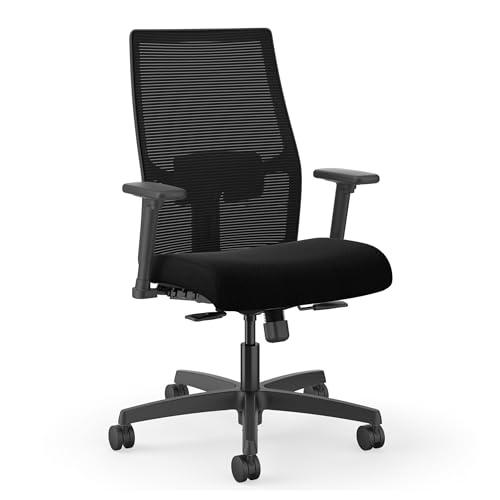
The HON Ignition 2.0 leads this guide because HON designed and describes it for exactly this job: its listing names computer work, desk activities, studying and productivity routines as its home territory, and the hardware matches the brief. A mid-back mesh design promotes airflow through long screen sessions, the lumbar support encourages alignment, the arms adjust in both height and width — the width adjustment being a keyboard worker’s quiet blessing, since forearms-forward posture varies with shoulder width — and the standard tilt encourages the small movements that keep a long day loose. HON states a 300 lb capacity and backs the chair with the HON Full Warranty.
Strengths
- Height- and width-adjustable arms — the arm spec that fits the widest range of keyboard postures.
- Breathable mesh back sized for all-day computer sessions in real rooms.
- Contract-furniture durability: stated 300 lb capacity and a full manufacturer warranty.
Trade-offs
- Mid-back coverage ends below the shoulders; high-back devotees should look at the Ticova or FLEXISPOT.
- No headrest — lean-back calls are supported by the backrest and tilt, not a pillow.
- Professional, utilitarian looks; it will not dress up a styled home office.
| Color | Black |
| Dimensions | 28.5 x 27 x 44.5 inches |
The Ignition’s virtue at a desk is its lack of theater. It does not ask to be admired; it asks to be sat in for the length of a project. The mesh keeps your back from becoming the warmest surface in the room by hour five, the tilt lets you rock gently through a long document instead of freezing over it, and the whole chair tolerates the daily abuse of a working office — rolling between desk and printer, hosting a colleague’s five-minute sit, being adjusted by whoever arrives next. HON sells it across home offices, study spaces and professional workstations, and that breadth reads as confidence rather than vagueness: this is the chair a facilities team would issue, refined for one desk.
For the remote professional whose computer work is the job — documents, calls, spreadsheets, code, design — the Ignition is the lowest-drama route to a properly supported day. It is also the easiest recommendation in this guide to defend to a second person: a spouse, a manager, an office budget. Everything about it is documented, warranted and aimed at the work.
Assembly and ownership follow the same pattern: standard parts, a real support channel, and a warranty that assumes daily use rather than hoping to avoid it. If your current chair is a kitchen chair or a decade-old task chair with a mind of its own, the Ignition is the upgrade that simply ends the conversation.
Best for: Full-time computer workers who want a documented, durable, no-drama desk chair / Not suited for: Anyone who needs a headrest or a high-back lounge feel
Choose it for the complete, warranted package; skip it if a headrest is non-negotiable — the Ticova and FLEXISPOT below both have real ones. Check on Amazon

Steelcase Series 1
Our badge: Best Set-and-Forget
The Steelcase Series 1 is the computer-work chair for people who think about their chair least — because it thinks for them. Its weight-activated controls sense the sitter’s body weight and set the recline behavior automatically, so the chair’s support is correct on day one and day one hundred without a single knob being understood. Adaptive bolstering and flexible seat edges keep the sit pressure-free, optional 4D arm support and a headrest exist within the line, and at 29 pounds with tool-free assembly in under two minutes, it is the easiest serious chair in this guide to bring home and put to work.
Strengths
- Automatic, weight-sensing recline — the most mis-set control in office seating, removed entirely.
- Instantly re-fits between users, making it the shared-desk champion of this guide.
- Compact, light and fast to assemble; Steelcase research and build quality throughout.
Trade-offs
- Manual-control lovers get fewer levers; the chair’s philosophy is automation.
- Compact frame best suits small-to-average builds; larger users should read the FLEXISPOT review.
- Headrest and 4D arms are configuration options — verify the listing’s configuration before ordering.
| Color | Graphite |
| Dimensions | 23.75 x 27 x 41.25 inches |
| Weight | 29 pounds |
Computer work is cognitively expensive, and the Series 1’s design respects that: every unit of attention not spent managing a chair is attention available for the screen. In practice this shows up in small mercies. You sit, and the recline is right. A partner sits, and it is right for them. You lean back on a call and the chair carries you at exactly your weight’s resistance, then returns you to work without a lurch. Over months, that frictionlessness compounds into the thing computer workers actually want from a chair, which is to forget it exists.
The chair’s space efficiency deserves its own sentence in a computer-work guide, because desks attract equipment — second monitors, printers, speakers, the archaeology of projects — and floor space is the scarcest resource in a home office. The Series 1’s compact footprint buys back inches that bigger chairs spend, and its light weight makes the weekly roll-aside for cleaning a one-hand job.
Steelcase backs the design with its research program and quality standards, and the chair’s simplicity means there is very little to go wrong. For the worker who wants ergonomic support as an appliance — plug it in, it works — this is the guide’s answer.
Best for: Shared desks, small offices and anyone who wants support without administration / Not suited for: Large users or compulsive manual adjusters
Choose it for effortless, automatic fit; skip it if you want to hand-tune every contact point — that is the Ticova’s pleasure, next. Check on Amazon

Ticova Ergonomic Office Chair
Our badge: Best for Precise Fitting
The Ticova Ergonomic Office Chair is the computer-work chair for the worker who treats fit as a craft. Its lumbar support adjusts in height and depth, the headrest in height and angle, the armrests in three dimensions with thick PU padding, and the seat is a 3.4-inch slab of high-density foam cut into a W shape with a waterfall front edge that spreads pressure across hips and thighs. The back is breathable high-tensile mesh, the rocking range runs to 130 degrees with adjustable resilience, and Ticova lists BIFMA testing and a static pressure test in its data.
Strengths
- Lumbar depth adjustment — the fit dimension that decides whether support feels right at a keyboard.
- 3D armrests meet forearms in the forward, varied positions typing actually uses.
- Thick W-shaped seat stays planted and supportive through long sessions.
Trade-offs
- The foam seat runs warmer than the full-mesh picks in hot rooms.
- Precision takes patience: expect a week of small adjustments.
- The curved headrest’s shape is fixed even though its position adjusts.
| Color | Black |
| Weight | 17.5 kilograms |
At a computer, the Ticova’s party trick is the lumbar depth dial. Typing posture leans the pelvis slightly differently from reading posture, and a pad that can be brought a few millimeters closer or eased a few away lets one chair serve both without compromise. Owners who invest the fitting week describe the result as a chair that feels tailored — because, within its ranges, it is. The mesh back handles the heat of still air and a warm room, while the foam seat gives the planted, cushioned base that mesh-seat skeptics prefer.
The 30-day return policy Ticova lists suits the chair’s nature: it asks to be judged fitted, across real work, rather than in a first sit. For the detail-minded computer worker — the one who calibrates a monitor and remaps a keyboard — this is the chair that respects the instinct.
It is also, quietly, one of the better values in this guide: hardware that competes with the premium picks, at a mid-tier position, from a maker who publishes its testing. Precision has rarely been this accessible.
Best for: Detail-oriented workers who will dial in lumbar depth, arms and headrest / Not suited for: Anyone who wants the chair fitted by default
Choose it for control; skip it for automation — the Steelcase above. Check on Amazon

FLEXISPOT ErgoX Premium Ergonomic Office Chair
Our badge: Best Premium
The FLEXISPOT ErgoX is what computer work looks like at the premium end: a dynamic lumbar support that maintains contact as you shift between typing, calls and reading; a seat depth adjustable from 17 to 20 inches; a five-level back; a 3D headrest; 3D armrests; a tilt system with real range; and a nap footrest for the breaks. The stated maximum is 400 lb for users 5’1″ to 6’2″, on a class-4 gas lift — the broadest and strongest specification in this guide.
Strengths
- Dynamic lumbar follows computer work’s constant small posture changes.
- Adjustable seat depth fits the chair to your thigh length — a fit most chairs cannot offer at any price.
- Stated 400 lb limit makes it the computer-work chair for larger users, full stop.
Trade-offs
- Premium positioning; verify the current listing price.
- Fit range ends at 6’2″.
- Mesh and foam seat configurations exist — confirm before ordering.
| Color | Black |
| Weight | 38 pounds |
Computer work’s hidden posture problem is the slow slouch: as focus deepens, the pelvis rolls, the back leaves the backrest, and support becomes theoretical. The ErgoX fights it at the root — the right seat depth keeps your back against the backrest without effort, and the dynamic lumbar stays present when you arrive there. The headrest’s three-dimensional travel means a reclined call actually rests your head, and the armrests keep your forearms carried between keyboard bursts.
For hybrid workers whose desk is also a gaming or reading station, the footrest and tilt turn the same chair into the evening’s seat without a furniture change. FLEXISPOT builds it for all-day use, and the specification sheet reads like it.
If your budget reaches the premium tier and your height fits the range, this is the most complete computer-work chair in the guide — the one against which the others are value judgments rather than capability judgments.
Best for: Premium buyers, larger users and posture-conscious computer workers / Not suited for: Users over 6’2″ or mid-tier budgets
Choose it for the complete system; skip it if the HON’s documented value or the SIHOO’s price tier fits your reality better. Check on Amazon

Hbada P5 Ergonomic Office Chair
Our badge: Best for Hybrid Days
The Hbada P5 understands the modern computer day: work arrives in sprints, and the chair that serves the sprints and the pauses wins. Its work mode is a proper ergonomic chair — an S-shaped backrest with adjustable lumbar support, a 2D headrest with 3.94 inches of height travel and 40 degrees of swivel, adjustable armrests, a 3.35-inch seat-height range and recline to 135 degrees. Its pause mode is a footrest away from a lounger. Hbada states SGS certification and BIFMA testing, sized for users roughly 5′ to 5’10”.
Strengths
- The footrest converts break time into actual recovery without leaving the desk.
- Generous headrest adjustment supports call-heavy, lean-back working styles.
- Compact footprint suits the small home offices where hybrid work lives.
Trade-offs
- Stated fit range excludes taller users.
- Feet-up working is a temptation; the footrest is for breaks, not for typing posture.
- Narrower sit than the SIHOO’s wide cushion.
| Color | Black |
| Weight | 44 pounds |
The P5’s computer-work case is rhythm. A morning of focused typing in an S-curved, lumbar-supported seat; a midday recline with the footrest out and a podcast on; an afternoon of calls with the headrest meeting you at 120 degrees. Each mode is honest, and the transitions take seconds. In a small apartment or a spare-room office, that single-chair versatility replaces a desk chair plus a reading chair — a real economy of both money and floor.
Hbada’s listing promises installation guidance and a repair-service route, which rounds out a package aimed at students, hybrid workers and small-space professionals. If your height fits its stated range and your day alternates between sprints and pauses, the P5 is the guide’s most lifestyle-aware pick.
It will not out-fit the Ticova or out-muscle the ErgoX, and it does not try to. It tries to be the chair your whole day fits inside — and for its audience, it succeeds.
Best for: Hybrid workers and students in compact spaces / Not suited for: Tall users or single-mode, all-typing workdays
Choose it for the work-break rhythm; skip it if you are tall. Check on Amazon

SIHOO M18 Ergonomic Office Chair
Our badge: Best Budget
The SIHOO M18 closes the guide with the essential proof that computer work does not require a premium chair — it requires an adjustable one. Four support points (head, back, hips, hands), an adjustable lumbar support, an adjustable headrest, a breathable mesh back, 2D armrests and a wide cushion serve users roughly 5’6″ to 6’2″, with a stated 330 lb capacity, BIFMA testing and a three-year parts promise in SIHOO’s data.
Strengths
- The full ergonomic checklist at a budget-tier position.
- Stated 330 lb capacity — the strongest durability signal in its tier.
- Mesh back keeps long screen sessions cool in warm rooms.
Trade-offs
- No lumbar depth control; the Ticova is the upgrade.
- 2D armrests only — no width or forward adjustment.
- Petite users may find the wide seat deep.
| Color | Charcoal |
| Weight | 31.53 pounds |
The M18’s priorities are a working person’s priorities: the lumbar moves, the headrest moves, the base is rated like it means it, and the mesh breathes. What it omits — armrest dimensions beyond two, luxury materials, styling — is precisely what a computer cannot tell the difference about. Across a semester of study or a year of remote work, it delivers the supported, cool, adjustable sit that defines this keyword, at the tier where most buyers actually live.
Assembly is an eight-step affair with clear instructions, and the parts promise softens the long-term risk that budget chairs usually carry. For a first real computer chair, or two chairs for two desks, the M18 is the rational default of this entire guide.
Buy it, fit it with the routine in the how-to section, and spend the savings on the monitor riser your neck will thank you for. That is the smartest total purchase in this guide.
Best for: Budget buyers who refuse to compromise on adjustability / Not suited for: Petite users or depth-control seekers
Choose it for value with integrity; skip it only when the premium systems are honestly within reach. Check on Amazon
Comparison Table
| Pick | Back / Seat | Armrest Adjustment | Stated Capacity | Check price on Amazon |
|---|---|---|---|---|
| HON Ignition 2.0 | Mesh back | Height + width | 300 lb | Check price on Amazon |
| Steelcase Series 1 | Flexible-edge seat | Optional 4D in line | See listing | Check price on Amazon |
| Ticova Ergonomic | Mesh back, foam W-seat | 3D | See listing | Check price on Amazon |
| FLEXISPOT ErgoX | Mesh or foam | 3D | 400 lb | Check price on Amazon |
| Hbada P5 | Mesh, S-curve back | Adjustable | See listing | Check price on Amazon |
| SIHOO M18 | Mesh back, wide cushion | 2D | 330 lb | Check price on Amazon |
How to Choose an Office Chair for Computer Work
Start with the three contact points
Computer work happens at three interfaces: your back against the backrest, your forearms on the armrests, your feet on the floor. A chair earns its place by serving all three — lumbar support you can place, armrests that reach your forearms at keyboard height, and a seat-height range that plants your feet. Judge every candidate against those three before looking at a single extra feature, because a chair that fails one contact point will tax you at that point ten thousand times a year.
Choose the back for your room’s temperature
Still air and a warm room make mesh the rational back: HON, SIHOO and Hbada in this guide all breathe. Cooler rooms and workers who prefer a cushioned embrace can choose foam-backed designs, accepting the warmth as the price. The hybrid pattern — mesh back, foam seat, as in the Ticova — is the considered middle, and it is no accident that it recurs across this guide’s tiers.
Match armrests to your desk, not your hopes
Measure your desk’s height and underside clearance, then compare armrest ranges honestly. Width adjustment (HON) serves broad shoulders and varied typing postures; 3D arms (Ticova, FLEXISPOT) serve workers who move between keyboard, mouse and phone; simple height arms serve everyone else. Arms that cannot slide under the desk will keep you sitting further from your screen than your eyes prefer — a daily tax disguised as a furniture detail.
Decide your recline philosophy
Typing wants near-upright; calls and reading want 110–130 degrees. A chair with a lockable or well-tensioned recline across that range (all six picks qualify in their own ways) supports the whole computer day, while a fixed-back chair supports only its first hour. If your work is call-heavy, weight the recline and headrest more heavily in your choice.
Read capacity as a build-quality proxy
Even if you weigh 150 lb, a chair stated at 300–330 lb (HON, SIHOO) is built with more mechanism margin than one stated at 220 lb, and computer work’s daily hours consume margin steadily. Stated numbers, named makers and real warranties are the durability story; everything else is upholstery.
Plan the chair-and-desk budget together
The smartest computer-work purchase splits the budget: most of it on the chair, a deliberate remainder on the desk’s half of the system — a monitor riser, a keyboard solution at elbow height, a footrest if your feet dangle. A mid-tier chair plus a correct desk beats a premium chair under a wrong desk, every working day of the year.
How Do You Set Up a Computer Workstation Around Your Chair?
Fit the chair first, with the floor-up routine: feet flat, knees near 90–100 degrees, lumbar placed in the small of your back, armrests at relaxed elbow height, recline tension set so the backrest carries you. Then fit the desk to the chair, not the other way around. The screen’s top third belongs near eye level, roughly an arm’s length away; raise it on a riser or books without apology. The keyboard belongs where your forearms, resting on the chair’s arms, naturally land — if the desk is too high, a keyboard tray is a workstation fix, not an accessory. Light the screen from the side, manage glare, and route cables so the chair can swivel and roll through its arc without snagging. Finally, place the phone, notebook and water inside that arc: a workstation arranged for reaching is a chair allowed to do its job.
Problem: Your neck tires by mid-afternoon despite a good chair — the screen is almost certainly too low or too far; raise it to eye level and bring it closer before touching the chair’s settings.
Problem: Your mouse shoulder aches — the armrest on that side is too low or the mouse too far; bring the mouse within the armrest’s arc and let the arm carry the shoulder.
Problem: The chair feels fine in the morning and wrong by evening — check for a sinking lift (a warranty matter) and for seat-depth slouch; then re-run the fitting routine rather than shopping.
Problem: You keep perching on the seat’s front edge — the seat is likely too deep or the desk too high, pulling you forward; adjust depth if your chair offers it, and lower the work surface or raise the chair with a footrest beneath your feet.
Typing Posture, Call Posture, Reading Posture: One Chair, Three Jobs
Computer work is really three jobs sharing a chair. Typing wants you upright, close, forearms level, eyes slightly down at the screen. Calls want you reclined a touch, head supported, hands free. Reading and reviewing want the middle distance — reclined enough to breathe, upright enough to annotate. Chairs fail computer work when they serve one job and tax the others: the fixed upright chair that makes every call a perch, the deep lounge recliner that makes typing a reach. The six picks here were chosen for spanning the triangle — tilt ranges that cover all three positions, headrests that arrive for the call, arms that adjust for the typing. When you test a chair during a return window, deliberately work in all three modes across a real day; the chair that disappears in each is the one to keep.
Two Screens, Laptops and Other Real-World Setups
Dual-monitor workers should center the chair on the seam only if both screens are truly equal partners; most people have a primary screen, and the chair, the keyboard and the body should face it squarely, with the second screen angled into peripheral duty — otherwise the day is spent in a gentle, constant twist that no lumbar pad can forgive. Laptop workers face the opposite trap: the laptop’s screen and keyboard are welded at the wrong distance from each other, so the honest fix is a riser plus an external keyboard, turning the laptop into a screen the chair can serve properly. Docking-station and hot-desk workers should value the Steelcase’s automatic fit or keep a written card of their settings, because a shared chair re-fitted daily from memory is a chair fitted approximately forever. The equipment varies; the principle does not — the chair is the center of the system, and everything else arranges itself around the body in it.
The Ten-Year View: Cost Per Hour of Computer Work
A full-time computer worker sits roughly 1,800 hours a year. Across that arithmetic, the difference between a budget chair replaced three times and a durable chair bought once is smaller than it looks — and the difference in daily experience is not small at all. This is why the guide weighs stated capacities, BIFMA testing and warranties so heavily: they are the predictors of whether a chair’s fifth year resembles its first. It is also why the budget pick here, the SIHOO, was chosen for its rating and parts promise rather than its price alone. Buy the most durability your budget honestly allows, fit it patiently, and let the cost-per-hour math quietly vindicate you.
Sit-Stand Desks and the Computer Chair’s New Job
The rise of the height-adjustable desk has quietly rewritten the computer chair’s job description. The chair is no longer the day’s only position — it is the sitting half of an alternating system — and that changes what to buy. Recline quality matters more, not less, because sitting time now concentrates into focused blocks that deserve real support. Seat height range matters more too, since a sit-stand desk’s sitting position may sit higher than a fixed desk’s, and a chair that cannot reach it — with your feet still supported — breaks the alternation. The posture principles do not change at all: the fitted, supported sit described in Best Office Chairs For Comfort And Posture is exactly what the sitting blocks should be, which is why the chairs in this guide, chosen for fixed desks, transfer to sit-stand setups without modification. What does change is the rhythm: stand for the calls that allow it, sit for the work that demands it, and let the chair be excellent at its half rather than adequate at a whole day it no longer has to carry alone.
Keeping a Computer Chair Alive: A Maintenance Rhythm
Daily computer work is the hardest duty cycle a chair can draw, and a small maintenance rhythm is the difference between a five-year chair and a ten-year one. Monthly: flip the chair and clear the caster axles of hair and fiber, because clogged casters are the leading cause of “my chair stopped rolling,” and check the base bolts for the first signs of loosening. Quarterly: re-torque every bolt to snug, wipe mesh with a vacuum brush so its airflow stays honest, and condition any leatherette gently if your chair wears it. Yearly: inspect the gas lift’s hold across a full day, the lumbar mechanism’s grip on its setting, and the seat for the first feel of frame through foam — the fade signs that, caught early, are warranty conversations rather than replacement emergencies. None of this takes more than minutes, and all of it protects the purchase this guide has just helped you make. Households that keep this rhythm on the calendar — the same calendar that runs the rest of the home’s upkeep, from the desk’s cable nest to the seating in Best Sofas For Older Adults — consistently report the same surprise: chairs do not really wear out all at once; they are maintained, or they are not, one small month at a time.
The Remote Worker’s Upgrade Path: Chair, Then Desk, Then Light
Most home offices are built in the wrong order — a desk found on sale, a chair inherited from somewhere, a lamp borrowed from the living room — and then upgraded in a panic when the body files its complaint. If you are rebuilding deliberately, the order that experienced remote workers converge on is: chair first, because it is the only component in contact with you for the entire day; desk geometry second, because screen and keyboard positions decide what the chair is asked to support; light third, because glare quietly manufactures the forward lean that ruins the first two investments. The chair budget should be the largest single line, and within it, the money should follow the contact points this guide has emphasized — lumbar, arms, seat — rather than silhouette.
The upgrade path also has a sensible staging. Stage one is the chair itself, fitted with the week’s patience this guide prescribes. Stage two, a month later, is the desk’s half: the riser, the keyboard position, the footrest if needed — bought after you know exactly where your fitted body wants them, rather than guessed on day one. Stage three is the environment: side lighting, cable order, the printer placed inside the swivel arc. Each stage makes the previous one look smarter, which is the signature of a system being built in the right order. Workers who follow it rarely describe their setup as finished — they describe it as forgotten, which in office furniture is the highest available praise.
A Note on Video Calls: The Chair Behind You
One modern consideration deserves its honest paragraph: your chair is now part of your professional background, visible in every video call, and it is reasonable to care how it reads. The good news is that competence photographs well — the HON’s professional mesh, the Steelcase’s graphite discretion and the FLEXISPOT’s clean lines all signal “serious workstation” without effort. The caution is the reverse purchase: a chair bought for its silhouette on camera but against the contact-point evidence will tax its owner in every hour the camera is off, which is nearly all of them. Buy for the body, and let the background be what it honestly is — a working chair, in a working room, behind a person whose posture on calls is quietly better than it used to be.
Common Buying Mistakes
Buying a gaming chair for typing work
Bolstered bucket seats hold a driver; they resist the upright, forearms-forward posture typing needs. Gaming chairs have their own guides — for a keyboard-first day, choose from this page’s species instead.
Ignoring armrest width and desk clearance
Arms that cannot fit your shoulders or your desk’s underside will be wrong ten thousand times a year. Measure both before ordering, and value the HON’s width adjustment accordingly.
Judging the chair without the desk
A chair tested at a random height, facing a low laptop, tells you about the setup, not the chair. Fit the whole workstation during the trial window before rendering a verdict.
Spending the entire budget on the chair
The monitor riser and keyboard position are part of the product you are buying. Hold back a little for the desk’s half of the system.
Assuming expensive means fitted
Premium chairs still need the fitting week. An unfitted ErgoX loses to a fitted SIHOO — the routine is the great equalizer, and it is free.
Final Recommendation
For most computer workers, the HON Ignition 2.0 is the answer: designed for this exact work, documented, durable and warranted. If your budget reaches the premium system, the runner-up is the more complete personal fit: Check on Amazon for the FLEXISPOT ErgoX. Shared desks should take the Steelcase, precise fitters the Ticova, hybrid workers the Hbada, and budget buyers the SIHOO with confidence. Fit the winner with the routine above, set the desk to match, and get back to the work the chair was bought to support.
Frequently Asked Questions
What chair features matter most for computer work specifically?
Adjustable lumbar support, armrests that meet your forearms at keyboard height (width adjustment is a bonus), a breathable back for long still hours, and a recline that covers call posture. The six picks here were filtered on exactly that list.
Is a mesh or foam seat better for long typing days?
Mesh breathes and holds tension; high-density foam cushions and plants you. Warm rooms favor mesh, cool rooms forgive foam, and hybrids like the Ticova split the difference deliberately.
Do I need a headrest for computer work?
For typing, no. For call-heavy and reading-heavy days, a headrest that meets your head in recline — Ticova, FLEXISPOT, Hbada — earns its place. Judge it reclined, never upright.
How high should my chair be for a standard desk?
High enough that your feet rest flat while your forearms, supported by the armrests, sit level with the keyboard. If the desk forces the chair higher than your feet allow, add a footrest rather than dangling.
Can one chair serve two computer workers?
Yes, with either fast manual ranges and a written settings card, or an automatically adjusting chair like the Steelcase Series 1 that re-fits itself to each sitter.
Is a standing desk a substitute for a good chair?
No — it is a partner to one. Sit-stand desks change how long you sit, not how you sit, and the sitting hours that remain deserve the same fitted support as a full seated day. Buy the chair for the sitting, the desk for the alternation, and fit them together: the chair’s height range must serve the desk’s sitting position with your feet supported. Workers who treat the two as one system consistently report the combination outperforms either upgrade alone — the desk gives the day its rhythm, the chair gives the sitting its quality, and neither is asked to perform the other’s job, which is precisely why both finally work, together, every day.
When should I replace a computer-work chair?
When the lift sinks, the lumbar will not hold its setting, or the seat lets you feel its frame — the fade signs. On chairs from real makers, check parts and warranty first; replacement is the second resort, not the first.


