Disclosure: As an Amazon Associate, dailyhomedecorating.com earns from qualifying purchases. Links to Amazon on this page are affiliate links; they cost you nothing extra. Prices and availability change often, so check the current Amazon listing before you buy.
The best office chairs for back and neck support share one trait that cheaper chairs fake: their support actually moves. A fixed foam bump presses wherever the factory put it, but a real support chair lets you place the lumbar pad in the curve of your own back, raise the headrest to meet your own neck, and set the recline tension so the backrest carries you instead of fighting you. By the end of a long day, that adjustability — not padding thickness, not racing styling — is what decides whether you stand up feeling worked or feeling worn out. This guide is about comfort and fit only; nothing here is medical advice, and persistent pain deserves a professional, not a product page.
We reviewed six verified chairs whose listings document genuine back and neck hardware: adjustable lumbar supports, real headrests, dynamic backs and suspension seats. Each is argued on its own merits below, because the right choice depends on whether your neck or your lower back complains first. Readers building a full setup should pair this with Best Office Chairs For Computer Work for the desk side of the equation and Best Office Chairs For Long Term Sitting for the longest days; those furnishing the room around the desk may also like Best Sofas And Chairs For Small Room.
Where to Buy
Every pick in this guide is sold on Amazon, where you can check the current price, configuration and availability. Start with the Ticova Ergonomic Office Chair — Check on Amazon. The other five picks: FLEXISPOT ErgoX — Check on Amazon; Hbada P5 — Check on Amazon; SIHOO M18 — Check on Amazon; Herman Miller Aeron Classic — Check on Amazon; Steelcase Series 1 — Check on Amazon.
In this guide
Quick Picks
| Pick | Badge | Why it earns its place |
|---|---|---|
| Ticova Ergonomic Office Chair | Best Overall | Lumbar support that adjusts in height and depth, a big curved foam headrest and 3D armrests — the most complete back-and-neck tuning here. |
| FLEXISPOT ErgoX | Best Premium | Dynamic lumbar that follows your movement, a five-level back and a 3D headrest, plus a stated 400 lb limit. |
| Hbada P5 Ergonomic Office Chair | Best with Footrest | S-curve backrest, a headrest with height and swivel adjustment, and a footrest for genuine break posture. |
| SIHOO M18 Ergonomic Office Chair | Best Budget | Four support points and adjustable lumbar at a budget-tier position, with a stated 330 lb capacity. |
| Herman Miller Aeron Classic | Best for Long Workdays | Pellicle suspension seat and back, Kinemat tilt and a lumbar pad — the original ergonomic work chair, with a 12-year warranty. |
| Steelcase Series 1 | Best Compact | Weight-activated controls and adaptive back support in a smaller footprint that assembles in minutes. |
Key Takeaways
- Back support works when it is placed, not padded: lumbar supports that move in height (all six picks) and depth (Ticova, FLEXISPOT) fit real spines instead of average ones.
- Neck support is a headrest-position problem: look for height and angle adjustment (Ticova, Hbada, FLEXISPOT) so the pillow meets your head, not your shoulders.
- A suspension seat like the Aeron’s Pellicle removes the hard seat pan from the equation entirely, which many long-day sitters prefer to any foam.
- Armrests are back support too — arms that hang unsupported pull the shoulders forward; every pick here adjusts arm height at minimum.
- Set-up matters as much as the chair: the fitting routine in the how-to section below extracts more comfort than any single feature.
How These Picks Were Chosen
The entry ticket for this keyword was documented support hardware in the manufacturer’s own listing data: a lumbar support described as adjustable, a headrest described as adjustable, or — in the Aeron’s case — a patented suspension and tilt system with a lumbar pad. Chairs whose “support” consisted of a shaped foam back with no moving parts were excluded, however comfortable their photographs looked. We then weighted the quality of adjustment: depth-adjustable lumbar outranks height-only, which outranks fixed; headrests that change angle outrank those that only slide.
We also checked the supporting cast — seat construction, recline range and lock, armrest adjustment — because back and neck comfort is a system: a great lumbar pad under a seat that forces you to perch is a wasted pad. Capacities and fit ranges were taken from listing data where stated, and are reported as stated. What did not influence selection: styling, brand fame (the Aeron earns its place on its suspension and warranty, not its reputation) and price position, though the list deliberately spans from the budget SIHOO to the premium Aeron so readers can choose their tier. Comfort language throughout is comfort language only. For the value-first version of this shortlist, see Best Office Chairs For 200; for shared and larger bodies, Best Office Chairs For Large People.
The 6 Best Office Chairs for Back and Neck Support — Reviewed

Ticova Ergonomic Office Chair
Our badge: Best Overall
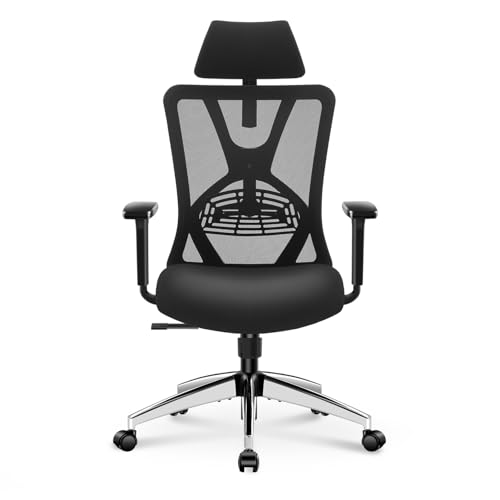
The Ticova Ergonomic Office Chair leads this guide because it attacks back and neck support at both ends with real adjustment. The lumbar support moves in height and depth — you can place it in your back’s curve and then decide how firmly it meets you — while the big curved foam headrest adjusts in height and angle to support the neck during reclined calls and reading. Underneath, a 3.4-inch high-density foam seat in a W shape with a waterfall front edge spreads pressure across the hips and thighs, and 3D armrests with thick PU padding keep the shoulders out of the equation.
Strengths
- Lumbar height and depth adjustment — the most complete back tuning in this guide.
- Large curved headrest with height and angle adjustment for genuine neck support while reclined.
- Breathable high-tensile mesh back keeps the upper back cool through long sessions.
Trade-offs
- The foam seat sleeps warmer than a full-mesh or suspension seat in hot rooms.
- Many adjustment points mean a patient first-week fitting process.
- Very tall users should confirm headrest reach against their torso length on the listing.
| Color | Black |
| Weight | 17.5 kilograms |
The fitting experience is where the Ticova separates itself. Most chairs give you a lumbar bump and a hope; this one gives you a small workstation for your spine. Owners who take twenty minutes across the first few days — lumbar placed, headrest angled, armrests set so the shoulders drop — consistently describe the same outcome: the chair stops being something they notice. The 130-degree rocking range with adjustable resilience supports the position changes that keep a long day comfortable, and the mesh back’s tensile strength means the support you dial in on Monday is still there on Friday.
Ticova lists BIFMA testing and a static pressure test in its data, plus a 30-day return policy that suits the try-it-properly approach this chair rewards. For buyers whose discomfort lives in both places named by this keyword — a lower back that aches by afternoon and a neck that stiffens by evening — this is the most direct answer in the guide, and the one we would buy first with our own money at its tier.
Best for: Anyone whose back and neck both need adjustable, placeable support / Not suited for: Buyers who want a chair that needs no fitting, or who strongly prefer a suspension seat
Choose it if you will spend the fitting time; skip it if you want set-and-forget simplicity — the Steelcase below is your chair. Check on Amazon

FLEXISPOT ErgoX Premium Ergonomic Office Chair
Our badge: Best Premium
The FLEXISPOT ErgoX takes a different route to the same destination: instead of asking you to place a static pad perfectly, its dynamic lumbar support follows your movement, pressing consistently whether you sit upright, perch forward or recline. Around it, FLEXISPOT builds a five-level adjustable back, a 3D headrest, 3D armrests, seat depth adjustable from 17 to 20 inches, a nap footrest, and a stated maximum weight limit of 400 lb for users from 5’1″ to 6’2″ — the broadest fit envelope in this guide.
Strengths
- Dynamic lumbar support maintains contact through posture changes instead of only at one angle.
- 3D headrest plus five-level back height fits an unusually wide range of torso lengths.
- Stated 400 lb limit and class-4 gas lift give it the strongest hardware story here.
Trade-offs
- Premium positioning within this guide — check the current listing against your budget.
- The stated fit range ends at 6’2″; taller users should look elsewhere in this guide.
- Mesh and foam seat configurations exist; confirm which the current listing describes.
| Color | Black |
| Weight | 38 pounds |
In practice, the ErgoX suits the restless sitter — the person who shifts, leans, crosses a leg, uncrosses it — because its support does not abandon you between postures. The headrest’s three-dimensional adjustment is the other standout: most headrests meet tall users at the shoulder blades and short users at the crown, while this one can genuinely be brought to the back of the head, which is where neck support happens during a reclined call. The footrest converts the chair into a legitimate rest seat, and the tilt function encourages the micro-movement that keeps long sessions comfortable.
It is also the natural upgrade path for larger users who need support hardware and a rating in the same chair — a combination rarer than it should be, as our Best Office Chairs For 400 Lbs investigation found. If your budget reaches it and your height fits its range, the ErgoX is the most complete support system in this guide; the Ticova beats it only on lumbar depth control and price tier.
Best for: Restless sitters, larger users and anyone wanting dynamic lumbar plus a true 3D headrest / Not suited for: Users over 6’2″ or strict budgets
Choose it for the dynamic support system; skip it if depth-adjustable static lumbar (Ticova) matches your habits better. Check on Amazon

Hbada P5 Ergonomic Office Chair
Our badge: Best with Footrest
The Hbada P5 builds its support story around an S-shaped backrest that follows the spine’s natural curve, with adjustable lumbar support, adjustable armrests, and a 2D headrest offering 3.94 inches of height travel and 40 degrees of swivel — enough range to genuinely meet the back of your head. The backrest reclines to 135 degrees, the seat height adjusts across 3.35 inches, and a pull-out footrest turns the whole chair into a break lounger. Hbada states SGS certification and BIFMA testing, and sizes the chair for users roughly 5′ to 5’10”.
Strengths
- Headrest height and swivel range are unusually generous for the tier.
- The footrest supports true posture variety — the other half of all-day back comfort.
- S-curve backrest with adjustable lumbar suits upright task work as well as breaks.
Trade-offs
- The stated fit range excludes taller users; check it before falling in love.
- The footrest tempts feet-up working, which no backrest can make ergonomic — it is a break feature.
- Compact footprint means a narrower sit than the SIHOO’s wide cushion.
| Color | Black |
| Weight | 44 pounds |
The P5’s insight is that back and neck comfort is partly a scheduling problem: eight hours in one position defeats any chair, while a chair that invites a genuine position change — recline, footrest out, head back — resets you at lunch and again at three. During work hours its support hardware is honest and adjustable; during breaks it stops being an office chair and becomes the recliner a small home office has no floor space for. Students, hybrid workers and apartment dwellers feel that double value most.
Assembly and support are part of the package: Hbada promises installation guidance and a repair service route in its listing, which matters in a tier where many sellers vanish. If your height fits its stated range and your workday mixes focus with real pauses, the P5 is the most lifestyle-complete chair in this guide.
Best for: Small-space workers whose chair must serve work and genuine rest / Not suited for: Users taller than about 5’10”
Choose it for the footrest and headrest range; skip it if you are tall — the ErgoX and Ticova fit longer frames. Check on Amazon

SIHOO M18 Ergonomic Office Chair
Our badge: Best Budget
The SIHOO M18 proves that back and neck support is not a luxury feature. Its design covers four support points — head, back, hips and hands — with an adjustable lumbar support, an adjustable headrest, a breathable mesh back, 2D armrests and a wide seat cushion, sized for users roughly 5’6″ to 6’2″. SIHOO states a 330 lb capacity (150 kg), BIFMA testing and a static pressure test, plus a three-year parts promise in its listing data — a durability story that embarrasses chairs at twice its tier.
Strengths
- Adjustable lumbar and headrest at a budget-tier position — the core hardware, without the premium.
- Stated 330 lb capacity is the highest among this guide’s non-premium picks.
- Mesh back keeps the supported back cool, which matters by hour six.
Trade-offs
- Lumbar adjusts in placement but not depth — the Ticova’s depth control is the upgrade.
- Armrests are 2D; no forward-back sliding for very close desk work.
- Shorter users below the stated range may find the seat deep.
| Color | Charcoal |
| Weight | 31.53 pounds |
What the M18 gets right is priorities. It spends on the lumbar mechanism, the headrest and the base rating — the parts your back actually interacts with — and saves on armrest dimensions and styling flourishes you will never miss. In a home office it behaves like a chair from the tier above, and its wide cushion suits the long homework, office and gaming sessions its listing describes. Assembly is an eight-step job with straightforward instructions.
For a first serious support chair, or a household buying two chairs for two desks, the M18 is where the value curve bends. It will not out-adjust the Ticova or out-float the Aeron, but it delivers the essential promise of this keyword — support you can place — at the friendliest tier in the guide.
Best for: Budget buyers who refuse to compromise on adjustable lumbar and headrest / Not suited for: Petite users or those wanting lumbar depth control
Choose it for value with real hardware; skip it if depth-adjustable lumbar is your top criterion. Check on Amazon

Herman Miller Aeron Classic
Our badge: Best for Long Workdays
The Herman Miller Aeron Classic approaches back and neck support by removing the usual failure points. There is no foam to compress into a wrong shape: the Pellicle suspension seat and back distribute pressure evenly and dissipate heat, the patented Kinemat tilt lets your neck, shoulders, hips, knees and ankles pivot naturally as you move, and a lumbar pad supports the lower back within that moving system. Tilt limiter, seat-angle adjustment and fully adjustable arms finish the fit, in Size B (Medium), under a 12-year warranty.
Strengths
- Suspension support never pancakes — the back support in year ten is the one you bought.
- Kinemat tilt keeps the neck and shoulders in a natural chain of movement rather than a locked pose.
- The waterfall seat front protects thigh comfort, which quietly supports better back posture all day.
Trade-offs
- No headrest — neck support here is postural, via tilt and fit, rather than a pillow; dedicated headrest hunters should choose the Ticova or ErgoX.
- Premium pricing and a Size B fit that outliers must verify.
- The supportive, firm sit is a philosophy some buyers need a week to appreciate.
| Color | Graphite Frame / Lead Classic Pellicle |
| Size | Size B (Medium) |
| Dimensions | 17 x 27 x 42 inches |
| Weight | 48 pounds |
The Aeron’s support is dynamic in the oldest sense: it assumes you will move, and it makes every position along the way a supported one. That is why it remains the long-workday reference — the chair least likely to be the reason you are uncomfortable at hour nine. Its honesty about the headrest deserves noting: Herman Miller’s position is that a well-fitted tilt makes a headrest unnecessary for task work, and generations of users agree; buyers who specifically want to lean their head back on calls should treat that as a genuine fork in the road and choose accordingly.
Bought once and kept for a decade-plus, the Aeron’s cost per year undercuts most of this guide. If your workdays are long, your horizon is longer, and your neck comfort comes from posture rather than pillows, this is your chair.
Best for: Long-day professionals who want suspension support and natural movement / Not suited for: Anyone who specifically wants a headrest, or a plush first impression
Choose it for the decade of support; skip it if a headrest is non-negotiable. Check on Amazon

Steelcase Series 1
Our badge: Best Compact
The Steelcase Series 1 delivers back support the quiet way: weight-activated controls that sense your body and set recline behavior automatically, adaptive bolstering, and flexible edges that keep the sit pressure-free without a fitting ritual. Optional 4D arm support and an adjustable headrest exist within the line for buyers who want them, and the space-efficient frame — 29 pounds, assembled without tools in under two minutes — suits the small home offices where support chairs are often squeezed into corners.
Strengths
- Weight-activated recline removes the most-misadjusted control on any chair: tension.
- Adaptive bolstering supports the back’s movement rather than sculpting one pose.
- Compact, light and fast to assemble — support without the furniture footprint.
Trade-offs
- Less manual adjustment than the Ticova — control enthusiasts may feel under-served.
- The compact frame is not the pick for large users; see the ErgoX in this guide.
- Headrest is configuration-dependent; confirm the listing’s configuration before ordering.
| Color | Graphite |
| Dimensions | 23.75 x 27 x 41.25 inches |
| Weight | 29 pounds |
The Series 1 is the support chair for people who will never read a chair manual — which is most people. Steelcase’s research-driven bet is that automatic, weight-sensing support beats a drawer full of knobs that owners set once, wrongly, and never touch again. In shared home offices, where two people alternate in one chair, that bet pays off daily: the chair re-fits itself to whoever sits down, with no negotiation and no forgotten settings.
It is also the easiest chair here to live around: light enough to move for cleaning, compact enough for a corner desk, and quick enough to assemble that it can be working within minutes of the box opening. For small spaces and shared desks, its support-per-square-foot is unmatched in this guide.
Best for: Shared desks, small offices and anyone who wants support without knobs / Not suited for: Large users or meticulous manual fitters
Choose it for automatic, everyday support; skip it if you want to hand-tune every point — that is the Ticova’s game. Check on Amazon
Comparison Table
| Pick | Lumbar System | Headrest | Seat | Check price on Amazon |
|---|---|---|---|---|
| Ticova Ergonomic | Adjustable height + depth | Adjustable height + angle, foam | Foam W-seat, mesh back | Check price on Amazon |
| FLEXISPOT ErgoX | Dynamic, follows movement | 3D adjustable | Mesh or foam, depth-adjustable | Check price on Amazon |
| Hbada P5 | Adjustable, S-curve back | Height + 40° swivel | Mesh | Check price on Amazon |
| SIHOO M18 | Adjustable | Adjustable | Wide cushion, mesh back | Check price on Amazon |
| Herman Miller Aeron | Lumbar pad, suspension back | None (postural design) | Pellicle suspension | Check price on Amazon |
| Steelcase Series 1 | Adaptive bolstering | Optional in line | Flexible-edge seat | Check price on Amazon |
How to Choose a Chair for Back and Neck Support
Decide which end complains first
Back-first buyers should prioritize the lumbar system: depth adjustment (Ticova) or dynamic contact (ErgoX) before anything else. Neck-first buyers should prioritize the headrest: height and angle range, and a shape that meets the head during a reclined call. Buyers with both should shortlist the Ticova and ErgoX and choose by fitting style — precise and manual versus adaptive and automatic.
Test the lumbar’s range, not its presence
Every chair claims lumbar support; the question is whether the pad can reach your curve. Sit, place a hand behind your lower back, and note where the hollow sits above the seat — then check the chair’s adjustment range against that spot. A support that tops out two inches below your curve will press your pelvis instead, which is worse than none.
Treat the headrest as recline equipment
A headrest does its work when you lean back — on calls, reading, thinking — not while you type upright. Judge it in the reclined position: does it meet the back of your head without pushing it forward? Adjustable angle (Ticova, Hbada) is what separates a neck pillow from a neck nuisance.
Do not forget the arms and the seat
Unsupported arms drag the shoulders forward and load the neck from below; armrests at elbow height with shoulders relaxed are neck support by another name. Likewise, a seat that is too deep pushes you into a slouch that no lumbar pad can rescue — the ErgoX’s adjustable depth exists for exactly this failure mode. Support is a chain, and it breaks at its weakest link.
Match the chair to your sitting style
Still, focused sitters thrive on precise static fits (Ticova). Restless movers need dynamic systems (ErgoX, Aeron). Break-takers need a chair that converts (Hbada). Shared-chair households need automatic fit (Steelcase). Name your style honestly before you shop, and the shortlist halves itself.
How Do You Fit a Support Chair to Your Body?
Work from the floor up, in this order, and change one thing per day during the first week. First, seat height: feet flat, knees at roughly 90–100 degrees, thighs parallel or sloping slightly down. Second, seat depth if adjustable: a fist’s width between the seat edge and the back of your knee. Third, lumbar: raise the pad into the small of your back — it should feel like a firm hand supporting, not a fist pushing — then set depth so contact is clear but gentle. Fourth, backrest angle and tension: a working recline around 100–110 degrees, with tension set so the backrest holds you without either dumping you backward or shoving you upright. Fifth, armrests: forearms supported, shoulders down and relaxed, elbows near 90 degrees. Sixth, headrest: set it to meet your head when you recline, then forget it during upright work.
Problem: The lumbar pad feels like a fist in your back — it is probably too high or too deep; lower it toward the belt line’s curve and reduce depth before concluding the chair is wrong.
Problem: Your neck aches more with the headrest than without it — the headrest is pushing your head forward; increase its angle backward or lower it so it supports only in recline.
Problem: Shoulders creep up toward your ears by afternoon — armrests are too low or too far away; raise them until your forearms rest with shoulders fully dropped.
Problem: You slide forward and slouch within an hour — the seat is likely too deep or tilted forward; reduce depth, add a slight rearward tilt, and check that your feet are truly flat.
Back Support vs Neck Support: Two Different Purchases
It is worth separating the two halves of this keyword, because chairs solve them with different parts and buyers often need one more than the other. Back support is structural: it lives in the lumbar mechanism, the backrest’s shape and the seat that positions your pelvis. It works all day, in every position, and its failures announce themselves as afternoon lower-back fatigue. Neck support is positional: it lives in the headrest and in the recline geometry that lets your head rest, and it works in episodes — calls, reading, deliberate pauses. A chair can be superb at one and ordinary at the other: the Aeron is a back-support masterpiece with no headrest at all, while some pillow-covered chairs offer a lovely headrest over a backrest that supports nothing.
The practical consequence is a buying order. Solve the back first, because it is structural and constant; then check that the headrest — if you need one — fits your recline habits. Buyers who reverse that order end up with comfortable heads on unsupported backs, which is the most common disappointment pattern in this category. The two chairs in this guide that genuinely solve both in one package are the Ticova and the ErgoX, which is why they lead it.
Desk Setup: The Other Half of Back and Neck Comfort
A perfect chair under a bad desk still produces a bad day. The screen’s top third should sit near eye level, so you are not tipping your head down into your neck for eight hours — a riser or a stack of books is a legitimate fix. The keyboard belongs at elbow height with your forearms able to rest on the chair’s armrests without reaching. If your feet dangle once the chair is set for the desk, a footrest restores the chain; dangling feet pull the pelvis forward and quietly undo the lumbar support you paid for. Light matters too: a screen you squint at pulls your head forward, so manage glare and font size before blaming the chair. Fit the chair with the routine above, fit the desk with this paragraph, and the system — not any single product — delivers the comfort this keyword promises. Readers setting up from scratch will find the workstation view in Best Office Chairs For Computer Work a useful companion.
Support Accessories: What Helps, What Is Furniture Jewelry
Once the chair is fitted, a small market of accessories competes for your money, and they divide sharply. A separate lumbar cushion helps exactly one situation: a chair whose built-in support cannot reach your curve — a travel fix, a guest-chair fix, a car-seat fix. On a chair with a real adjustable lumbar, an added cushion usually pushes the pad out of position and makes things worse; the correct move is adjusting the chair you bought. A seat cushion follows the same logic: it rescues a compressed foam seat near the end of its life, and it spoils the geometry of a healthy one by raising you out of the lumbar’s range.
What genuinely helps is upstream of the chair. A monitor riser that puts the screen at eye level removes the largest single cause of neck load in a home office. A simple footrest, for anyone whose feet dangle at desk-correct chair height, completes the support chain at trivial cost. A document holder between keyboard and screen ends the twist-and-look pattern of desk readers. Notice what these have in common: none of them touches the chair. The lesson generalizes — buy the chair for the chair’s job (support you can place), buy the desk accessories for the desk’s job, and be suspicious of any cushion that promises to turn a bad chair into a good one. If the chair is wrong, the honest accessory is a return label.
How Support Needs Change Across a Working Life
The chair that served a twenty-five-year-old without comment may nag the same person at forty-five, not because either body is broken but because tolerance narrows: positions that were free become priced, and recovery from a bad sitting day takes longer. The practical response is not alarm but adjustability — the older the worker, the more valuable a chair whose support can be re-placed as the body changes, which is one reason the Ticova’s depth control and the ErgoX’s dynamic contact age better than fixed designs. Students face the opposite profile: shorter sessions, tighter budgets, more moving house — the SIHOO’s honest hardware at a friendly tier, or the Hbada’s work-and-rest double life, fits that chapter best.
Career changers discover a third pattern: the home worker who suddenly sits nine hours where they once stood or walked all day. Their first ergonomic chair should be bought like equipment, not furniture — fitted patiently, judged across weeks, and paired with the desk corrections described in this guide. And the near-retiree setting up a study for writing, volunteering and grandchildren’s video calls needs the same support in a chair that also looks like it belongs in a home, which is where the Aeron’s design pedigree and the Steelcase’s compact discretion earn their keep. Support is not a product category; it is a life-stage fit, and the six chairs in this guide were chosen to cover its chapters.
A Ten-Minute Field Test for Any Support Chair
Whether you are testing in a store or during a return window at home, a structured ten minutes tells you more than an afternoon of vague sitting. Minute one and two: sit down and do nothing but notice the seat — where the pressure concentrates, whether the front edge touches the backs of your knees, whether you feel perched or planted. Minutes three and four: find the lumbar support and place it deliberately, then lean back and type in the air; the pad should stay in conversation with your back through both positions, and if it vanishes when you recline, note that — it is the most common design failure in this category. Minutes five and six: recline fully, rest your head, and make an imaginary phone call; this is the headrest’s audition, and it either meets your head or it does not.
Minutes seven and eight belong to the arms and the reach test: rest your forearms, shrug your shoulders up and let them drop — if they cannot fully drop with your arms supported, the armrests are wrong for you no matter how many directions they adjust. Then roll or swivel to an imaginary printer and back; a chair that fights small movements will tax you a thousand times a week. Minutes nine and ten are the honesty minutes: stand up, walk around, sit again, and ask the only question that matters — did sitting down feel like relief or like negotiation? Your body answers that one instantly and accurately, and across a week of return-window testing it almost never changes its mind. Trust the pattern of the ten minutes, repeated, over any specification sheet — including, we would say, the ones in this guide.
Reading a Support Chair’s Listing Like an Engineer
Product pages for support chairs are written by marketers, but they are audited by engineers — and you can borrow the engineer’s habits in about ninety seconds. Start with the adjustment verbs: a listing that says a lumbar support “adjusts in height and depth” has told you something testable, while one that says “ergonomic lumbar design” has told you nothing at all. Count the verbs and discount the adjectives. Next, find the numbers with units: headrest travel in inches, recline in degrees, seat-height range, a stated capacity, a stated fit range by height. The chairs in this guide publish those numbers because their makers measured them; the chairs that hide them are asking you to buy the photograph.
Then read the warranty and the test claims with the same cold eye. BIFMA testing, SGS certification and static-pressure figures are checkable statements; “designed for all-day comfort” is not. Finally, read the maker’s own answers in the questions section, where support quality shows its character: brands that engineer for backs answer sizing and adjustment questions precisely, while resellers deflect. Ninety seconds of this reading, applied to any chair beyond this guide, will sort the support chairs from the styled ones more reliably than any badge — including, we are happy to say, ours.
When to Replace a Support Chair
Support chairs rarely fail dramatically; they fade. The signs are consistent enough to list: a gas lift that sinks an inch by lunch, a lumbar mechanism that no longer holds its setting, foam that lets you feel the seat pan through it, a backrest that has developed a lean or a creak that re-torquing cannot silence. Any one of these is a maintenance conversation — lifts, pads and bolts are replaceable on chairs from real makers, and the parts ecosystem behind the Aeron and Steelcase in this guide exists precisely for this chapter. Two or more at once is a replacement conversation, because a chair whose support has faded is charging you daily for its decline in the currency this keyword cares about.
Common Buying Mistakes
Buying the thickest padding instead of the best adjustment
Padding is comfort for a week; adjustment is support for years. A deep foam back with a fixed lumbar bump fits the showroom’s average body, which is nobody’s body. Spend on mechanisms that move.
Judging the headrest while sitting bolt upright
Headrests are recline equipment. Evaluate them leaned back, on an imaginary call, or you will reject good ones and buy bad ones for the wrong reasons.
Setting everything once, on day one
Your body needs days to report back on a setting. One change at a time, a full workday per change — the fitting routine in this guide exists because rushed setups are the top cause of “ergonomic chairs don’t work” reviews.
Ignoring armrests in a neck-support purchase
Hanging arms load the neck and shoulders from below all day. If the armrests cannot reach your forearms at a relaxed height, the finest headrest in the world is fighting your own arms.
Expecting a chair to fix a desk problem
A low monitor and a high desk will defeat any chair. Budget an hour and, if needed, a simple riser for the desk side before concluding a chair has failed you.
Final Recommendation
For most buyers, the Ticova Ergonomic Office Chair is the answer: lumbar support in height and depth, a real adjustable headrest, and a mid-tier position. If you move constantly while you work, the runner-up is the better personal fit: Check on Amazon for the FLEXISPOT ErgoX and its dynamic lumbar. Budget buyers should start with the SIHOO M18 without embarrassment, and long-horizon buyers with the Aeron. Whichever you choose, run the fitting routine — the chair you fit is the chair that supports you.
Frequently Asked Questions
What matters more, lumbar support or a headrest?
Lumbar support, for most people: it works structurally all day, while a headrest works in reclined episodes. Solve the back first, then check the headrest against your call and reading habits.
How long does it take to know if a support chair fits?
About a week of real work with patient, one-at-a-time adjustments. Day-one impressions mostly measure how different the chair is from your old one, not how well it fits.
Is a firmer chair better for back support?
Support comes from placement and shape, not hardness. A well-placed adjustable pad on a medium chair outperforms a rock-hard fixed back for most users; extremes in either direction are usually wrong.
Do I need a headrest if I rarely recline?
Probably not — the Aeron’s headrest-free design serves generations of upright workers. If your day includes long calls or reading sessions leaned back, a headrest earns its place.
Can a chair help my neck if my monitor is low?
Only partially. A low screen pulls your head forward for hours, and no chair fully compensates. Raise the screen to near eye level first; then the chair’s support can do its work.
Are massage add-ons a substitute for support?
No — they are a complement at best. A massage cushion can make a break feel restorative, but it cannot place a lumbar support in your curve or hold your posture through a workday, and strapping one over a well-fitted chair usually displaces the very support you fitted. Buy the support first; add comfort extras only once the chair itself is right, fitted, and proven across a full working week.
What if my back and my partner’s back need different settings?
Choose a chair with wide, quick adjustment ranges (Ticova) and a shared fitting ritual, or an automatically adjusting chair (Steelcase Series 1) that re-fits itself to whoever sits down.


