Where to buy
Check the latest price, availability and delivery on Amazon. Orders are placed on Amazon. We may earn a commission from qualifying purchases.
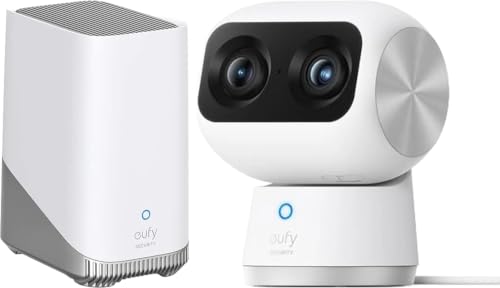
- Best overall under $300: eufy Security Indoor Cam S350 with HomeBase 3 — Check on Amazon
- Reolink E1 Zoom Indoor Camera — Check on Amazon
- Aqara Camera Hub G3 — Check on Amazon
- Arlo Essential Indoor Camera 2K (2nd Gen) — Check on Amazon
See 2 more Amazon options
- Ring Indoor Cam (2nd Gen), 3-Pack — Check on Amazon
- Wyze Cam Pan v3, 2-Pack — Check on Amazon
Read the full guide ↓
Disclosure: As an Amazon Associate, dailyhomedecorating.com earns from qualifying purchases. Links to Amazon on this page are affiliate links; they cost you nothing extra. Listing details such as price and availability change often, so check the current Amazon listing before you buy.
Finding the best indoor security camera under $300 starts with an honest admission: $300 is a ceiling, not a target. A single indoor camera from a major brand rarely needs anything close to that figure, and the shoppers who get the most from this budget are not the ones who buy the most expensive single camera on the page. They are the ones who treat the budget as a system budget — a flagship camera paired with a local-recording hub, a two- or three-camera bundle that covers every entry point, or one premium pan-and-tilt model with enough left over for the memory cards and mounts that make it actually work. This guide is built around that idea. Every pick below either earns its place as a genuinely premium indoor camera or uses the headroom to cover more of your home for the same money.
There is a second honesty test in this category, and it matters more than resolution: what the camera costs you after you bring it home. Indoor cameras split into two camps. Local-first models from eufy, Reolink and TP-Link record to a memory card or a home hub and give you their core features with no monthly fee at all. Cloud-first models from Ring, Arlo and Google are excellent hardware, but their recordings live behind a subscription — stop paying and, depending on the brand, you keep live view and motion alerts but lose the ability to watch what actually happened. Neither camp is wrong, but they are different purchases, and this guide states plainly, for every single pick, which features are locked behind a plan and which are yours outright. We also score privacy hardware — physical lens covers, privacy shields and lens-away modes — because a camera that watches your living room should be able to prove it has stopped.
A note on scope before the picks. This guide covers general indoor security cameras: living rooms, hallways, entry doors, garages and pet watching as part of whole-home coverage. It does not cover nursery-specific monitors with breathing tracking and crib mounting, which are a different product category with different buying criteria; if that is what you need, start from the dedicated baby camera guides on this site instead. It also stays indoors. Several picks are technically weather-resistant, but everything here was chosen, priced and judged as an indoor camera first.
In this guide
Quick Picks
Short on time? This table matches each pick to the job it does best at this tier, from a flagship local-recording system to whole-home bundles.
| Buyer type | Pick | Why it stands out | Link |
|---|---|---|---|
| Best overall system | eufy Security Indoor Cam S350 with HomeBase 3 | Dual-lens 4K flagship bundled with a local-recording hub — the premium pick with no required monthly fee | Check on Amazon |
| Best for zoom detail | Reolink E1 Zoom Indoor Camera | True optical zoom and pan-tilt tracking that records to a memory card — identification-grade detail without a plan | Check on Amazon |
| Best for HomeKit homes | Aqara Camera Hub G3 | A 2K pan-tilt camera that is also a Zigbee hub and IR remote — three devices in one small body | Check on Amazon |
| Best for alert quality | Arlo Essential Indoor Camera 2K (2nd Gen) | An automated privacy shield that physically closes over the lens, paired with the most refined alert filtering here | Check on Amazon |
| Best whole-home coverage | Ring Indoor Cam (2nd Gen), 3-Pack | Three plug-in cameras for the front door, living room and hallway in one box — coverage beats one flagship for many homes | Check on Amazon |
| Best budget coverage | Wyze Cam Pan v3, 2-Pack | Two motorised pan-tilt cameras with local card recording for a fraction of the tier — spend the rest on cards and mounts | Check on Amazon |
How These Picks Were Chosen
We began with the budget itself. Because $300 sits far above the price of a single mainstream indoor camera, we required every pick to justify the tier in one of three ways: flagship hardware (dual lenses, 4K capture, optical zoom, a bundled recording hub), multi-camera coverage that protects more than one room, or a genuinely premium single camera whose detection, privacy hardware and build are a clear step above the value tier. Cameras that are simply ordinary models wearing a premium badge did not make the list, and where a pick is a well-known value model, it appears as a multi-pack that spends the budget on coverage rather than on one expensive box.
Storage and subscriptions were scored as first-class criteria, not footnotes. For each pick we verified, from the maker’s own documentation, what records without a plan, what stops when a plan lapses, and whether local storage exists at all. A camera that cannot record a single clip without a subscription is a different product from one that records to a memory card forever, and the reviews below say which is which in plain language. We applied the same discipline to privacy: a physical cover or a lens that mechanically turns away outranks a software toggle, because you can see it working from across the room.
Finally, we checked the fundamentals that decide whether footage is useful: resolution and zoom for identifying a face or a parcel, pan-and-tilt range for covering a whole room from one outlet, night vision for the hours when indoor cameras earn their keep, and detection quality, because an alert for every shadow is an alert you learn to ignore. Every specification in this guide is the manufacturer’s published figure, and the sources behind each pick are recorded alongside this article. We did not hands-on test these cameras; we compared verified specifications, maker documentation on plans and storage, and the consistent themes in owner feedback.
The 6 Best Indoor Security Cameras Under $300
eufy Security Indoor Cam S350 with HomeBase 3
Who it suits: Homeowners who want the strongest single-room camera in this guide and recordings that stay in the house, on hardware they own, with no subscription standing between them and their footage.
The S350 is eufy’s flagship indoor camera, and it is built around an idea no rival in this guide copies: two lenses working together. A 4K wide-angle lens keeps the whole room in frame while a 2K telephoto lens with optical zoom watches the detail, and the app shows both views at once, so you can see a person cross the room and read what they are carrying in the same glance. The head pans a full circle and tilts to cover floor to ceiling, tracks people and pets automatically, and connects over dual-band Wi-Fi. As a piece of camera hardware, this is the most capable indoor unit in this guide, full stop.
What elevates this bundle from a good camera to our top pick is the HomeBase 3 it ships with. The hub becomes the recording vault for the system: footage is stored locally on the hub rather than on a memory card in a camera a burglar could unplug and pocket, the hub adds eufy’s more advanced on-device recognition, and it can anchor additional eufy cameras later. Crucially, none of this requires a monthly fee. eufy sells optional cloud storage plans, but they are genuinely optional — local recording, detection, alerts and playback all work without one. That is the honest flagship proposition at this tier: premium hardware, premium storage, no rent.
Privacy is handled mechanically. The S350 has a privacy mode that turns the lens away to a preset position when you are home, so the camera visibly stops watching rather than asking you to trust a settings page. Two-way talk, a built-in siren-style alarm and sound detection round out a package with no obvious hole. The fair warnings are size and app depth: this is a larger, more conspicuous camera than the little fixed models below, and eufy’s app offers so many modes that new owners should expect an evening of exploring settings rather than a five-minute setup.
- Dual lenses: 4K wide-angle plus 2K telephoto with hybrid zoom, shown together in the app (maker specification).
- HomeBase 3 included: local hub recording with expandable storage and advanced on-device recognition.
- No subscription required for recording, detection or playback; optional cloud plans exist but gate nothing essential.
Honest limitation: It is the bulkiest camera here and the two-device setup (camera plus hub) needs two outlets and a little shelf space; the memory card for camera-only local backup is not included.
Choose it if you want one room covered to flagship standard with recordings stored locally and no monthly fee, now or later. Skip it if you need three rooms covered on this budget — the multi-camera picks below spread the same money further.
Reolink E1 Zoom Indoor Camera
Who it suits: Buyers whose priority is identifying what happened — a face at the door, a number plate through a window, which pet knocked over the plant — and who refuse to rent that ability by the month.
Most indoor cameras zoom by cropping, which means the closer you look, the less you see. The E1 Zoom carries a real optical zoom lens, so it can tighten on a doorway or a desk from across the room and still hand you a usable image. Paired with full pan-and-tilt movement, auto-tracking that follows a person or pet across the room, and a high-resolution sensor (the current version of this long-running model steps up to 4K capture, per the maker’s listing), it is the evidence camera of this guide: the one you buy when ‘something moved in the living room’ is not enough and you need to know exactly what.
Reolink’s storage philosophy is the other half of the appeal. The camera records to its own microSD card, can also record to a Reolink hub or NVR, and supports standard streaming protocols that let technically inclined owners archive footage to their own network storage. Reolink offers an optional cloud service, but nothing in the core experience is hostage to it: detection for people, pets and even crying sounds, tracking, playback and alerts all run without a plan. For buyers burned by subscription creep elsewhere, that permanence is the product.
The trade-offs are ecosystem-shaped. Reolink’s app is functional rather than delightful, voice-assistant integration is thinner than the Google and Amazon house brands offer, and the design is a plain white dome that looks like what it is — a security camera. There is a privacy mode that parks the lens, but no physical shutter. None of that dents its core case: at well inside this budget, it delivers the detail and the ownership model that security-minded buyers actually ask for.
- 3x optical zoom (maker specification) with pan, tilt and automatic subject tracking.
- Local-first recording: microSD card, optional Reolink hub/NVR and network streaming; cloud plan optional only.
- Person, pet and crying-sound detection run on the camera with no subscription required.
Honest limitation: The app and smart-home integrations are less polished than Ring, Nest or Aqara, and there is no physical privacy shutter — privacy mode is a parked lens position.
Choose it if identifying detail matters more to you than app polish, and you want recordings you own outright. Skip it if you live inside Alexa, Google Home or HomeKit routines and want the camera to be a citizen of that world first.
Aqara Camera Hub G3
Who it suits: Apple HomeKit households and smart-home builders who would rather buy one device that watches the room, runs their sensors and replaces a hub than three devices that each do one job.
The G3 is the most versatile object in this guide. As a camera it is a competent 2K pan-and-tilt unit with a wide lens, automatic tracking, infrared night vision and on-device recognition that can distinguish faces and even simple hand gestures. But the camera is only the first of its three jobs. Inside the same small body sits a Zigbee 3.0 hub that can run a whole ecosystem of Aqara sensors — door, motion, leak, vibration — and an infrared blaster that can switch on a legacy air conditioner or television. If your alternative is a camera plus a hub plus an IR controller, the G3’s price suddenly reads as three purchases collapsed into one.
It is also the strongest HomeKit citizen here. The G3 supports HomeKit Secure Video, which means recordings can live in your iCloud account under Apple’s encryption model rather than on a camera maker’s servers — though note honestly that HomeKit recording itself requires an iCloud+ plan, and Apple caps HomeKit video at 1080p even though the camera’s own app records in 2K. Local recording to a microSD card works in the Aqara app with no Aqara subscription. Privacy is physical in spirit: a sleep mode rotates the lens down into the body, so the camera’s ‘off’ state is something you can see.
The compromises are real. The face and gesture tricks only work in the Aqara app, not in HomeKit, some advanced features cannot all run at once, and setup order matters — owners consistently advise adding it to HomeKit first. It is also a camera that looks like a small robot, cat ears and all (the ears are removable), which delights some households and annoys others. As a pure camera it is mid-pack; as a system purchase it is unmatched in this guide.
- 2K pan-and-tilt camera plus Zigbee 3.0 hub (up to 128 child devices, maker specification) plus IR remote control.
- HomeKit Secure Video support; local microSD recording in the Aqara app needs no subscription.
- Sleep mode rotates the lens down into the body — a visible, physical off state.
Honest limitation: HomeKit Secure Video recording needs an iCloud+ plan and is capped at 1080p by Apple; face/gesture features live only in the Aqara app and cannot all run simultaneously.
Choose it if you are building a HomeKit or Aqara sensor system and want the camera to be its hub. Skip it if you want the best pure camera per dollar and have no use for a hub or IR control — the eufy and Reolink picks spend everything on the camera.
Arlo Essential Indoor Camera 2K (2nd Gen)
Who it suits: Privacy-first buyers who like the idea of an indoor camera but want a hard, visible guarantee that it is off when they are home — and who accept a subscription as the price of Arlo’s alert polish.
Arlo’s signature move is the automated privacy shield: a physical cover that opens and closes over the lens on a schedule, on geofencing, or with a tap in the app, disabling the microphone along with the picture. It is the most elegant privacy answer in this guide, because it needs no discipline from you — the camera puts itself away when you walk in and wakes when you leave. Behind the shield sits a sharp 2K camera with a wide field of view, clear two-way audio and an integrated siren, all in a compact wired body that suits a shelf or wall in any main room.
Where Arlo earns its ongoing cost is detection. With an Arlo Secure plan, the camera distinguishes people, packages, vehicles and animals, can recognise familiar people and vehicles on higher tiers, and sends rich notifications you can act on without opening the app. This is the alert stream least likely to train you to ignore it. But the honesty box matters: without Arlo Secure, this camera does not record video at all. You get live view and motion notifications, and nothing to play back. The plan is not an upgrade to this camera; for recording purposes it is part of the camera, and the purchase only makes sense if you accept that from day one.
There is also no local storage option — no memory card, no hub recording — so your archive exists only in Arlo’s cloud, for exactly as long as your plan’s retention window. Buyers comfortable inside that model get one of the most refined indoor cameras sold. Buyers who are not should take the eufy or Reolink picks and never think about a monthly bill again.
- Automated privacy shield physically covers the lens and mutes the microphone on schedule or geofence.
- 2K video with wide field of view, two-way audio and integrated siren (maker specifications).
- Arlo Secure plan unlocks all recording and smart detection; a trial is included in the box.
Honest limitation: No recording of any kind without an Arlo Secure subscription, and no local storage fallback at any price — the cloud plan is effectively mandatory.
Choose it if you want the camera to disable itself physically and you value best-in-class alert filtering over storage ownership. Skip it if the words ‘subscription required to record’ end the conversation for you — choose eufy or Reolink instead.
Ring Indoor Cam (2nd Gen), 3-Pack
Who it suits: Households whose real security gap is geography: an entry, a living space and a hallway that all need eyes, in a home already friendly to Ring and Alexa.
One superb camera watches one room superbly. Most homes, though, are not breached, flooded or pet-escaped in one room — they have a front door, a back door, a garage entry and a hall between them. This three-pack of Ring’s second-generation Indoor Cam is the coverage answer at this tier: three compact 1080p plug-in cameras with colour night vision and two-way talk, each small enough for a shelf or a wall, all reporting into the same Ring app and the same Alexa ecosystem. Spread across entry points, they will tell you more about your home’s day than any single flagship staring at the sofa.
Each camera carries Ring’s manual privacy cover, a little swivelling shutter that turns off camera and microphone with a fingertip — simple, physical and foolproof, if less automatic than Arlo’s shield. What the bundle cannot escape is Ring’s storage model. Ring cameras have no local storage at all: without a Ring Home plan, you get live view and motion alerts, but no recorded video, no playback, no evidence. One plan can cover all three cameras at a single address on the higher tiers, which softens the arithmetic, but it remains rent, forever, on hardware you bought. The 24/7 continuous recording Ring advertises sits on its premium plan tier.
Judged as hardware-plus-service, the bundle is coherent: dead-simple setup, an app every visitor already half-knows, and doorbell and alarm siblings that slot into the same system. Judged as hardware alone, you are paying flagship money for three modest cameras whose memories are rented. Both judgements are in this review because both are true; which one governs depends on whether your home already speaks Ring.
- Three 1080p plug-in cameras in one box, each with colour night vision and two-way talk (maker specifications).
- Manual privacy cover on every camera disables lens and microphone with a swivel.
- One Ring Home plan can cover every camera at the address on the relevant tier.
Honest limitation: No local storage and no recording whatsoever without a Ring Home subscription; video resolution is a step below the 2K and 4K picks in this guide.
Choose it if covering three real locations matters more than perfecting one, and your home already runs on Ring or Alexa. Skip it if you want footage stored in your own house, or 2K-plus detail for identifying faces.
Wyze Cam Pan v3, 2-Pack
Who it suits: Pragmatic buyers who would rather have two rooms watched today, with local recording and money left over, than one premium camera and a promise to expand later.
The Pan v3 is the camera that makes this whole tier look overpriced, and the two-pack is its best form. Each unit is a motorised pan-and-tilt camera that can sweep a full circle, patrol between saved viewpoints, track motion across the room and see in colour at night thanks to a sensitive starlight sensor. It is even weather-resistant, so the second camera can live in a garage or covered porch if your indoor plan changes. Two of them cover the two rooms most homes actually worry about, and the pair still lands far inside this budget, leaving room for the high-endurance memory cards each camera wants.
Wyze’s storage story is friendlier than the big cloud brands. A microSD card in each camera records continuously or on events with no plan at all, and that footage is yours. The optional Cam Plus subscription is exactly that — optional — but be clear about what it gates: without it, cloud events are limited to snapshots with a cooldown between them, and the smart person/pet/package detection labels belong to the plan. The free experience is a good local camera; the plan turns it into a smart cloud camera. Wyze also gives the Pan v3 a genuine privacy mode that rotates the lens down into its base when off.
The savings show in the app experience, which is busier and more upsell-prone than Ring’s or Nest’s, and in a 1080p ceiling that the 2K and 4K picks above beat for fine detail. But as a way to convert this budget into actual watched rooms with recordings you own, nothing else in the guide is as efficient, and for many homes two good angles beat one perfect one.
- Two pan-tilt cameras with full-circle pan, patrol points and motion tracking (maker specifications).
- microSD local recording works with no subscription; Cam Plus adds cloud events and smart detection labels.
- Privacy mode rotates the lens down out of sight; weather-resistant body allows garage or covered-porch duty.
Honest limitation: 1080p resolution trails the field for fine detail, free cloud events are snapshots with a cooldown, and the app pushes its subscription hard.
Choose it if you want maximum covered rooms per dollar with recordings stored on your own cards. Skip it if you want one polished app, top-tier resolution, or zero subscription nudges.
Comparison Table
| Product | Type | Best use | Link |
|---|---|---|---|
| eufy Security Indoor Cam S350 with HomeBase 3 | Dual-lens flagship + hub | One important room, recorded locally at the highest detail in this guide | Check on Amazon |
| Reolink E1 Zoom Indoor Camera | Optical-zoom pan/tilt | Reading detail across a large room or open-plan space | Check on Amazon |
| Aqara Camera Hub G3 | Camera + hub + IR blaster | The nerve centre of a sensor-based smart home | Check on Amazon |
| Arlo Essential Indoor Camera 2K (2nd Gen) | Cloud camera, privacy shield | Homes that want premium alerts and a camera that visibly stands down | Check on Amazon |
| Ring Indoor Cam (2nd Gen), 3-Pack | 3-camera bundle | Entry points and main rooms covered simultaneously | Check on Amazon |
| Wyze Cam Pan v3, 2-Pack | 2-camera pan/tilt bundle | Two main rooms watched with local recording on a value budget | Check on Amazon |
How to Choose the Best Indoor Security Camera Under $300
- Decide what the budget is for: one room perfectly, or several rooms well. At this tier the most consequential choice is not which camera but how many. A flagship-plus-hub system like the eufy bundle perfects a single space. Bundles from Ring and Wyze cover the entries and main rooms most incidents actually involve. Walk your home and list the spots you would want footage from after a break-in, a leak or a pet escape; if the list has three entries, buy coverage, not a flagship.
- Settle the subscription question before the hardware question. Ring and Arlo cameras record nothing without a paid plan; Nest keeps only a few hours of event history free; eufy, Reolink, Tapo-style local recording and Wyze’s card recording work with no plan at all. Neither answer is wrong, but a camera bought in ignorance of its storage model is a disappointment scheduled for the day the trial ends. Choose the model you can live with permanently.
- Treat local storage as an evidence decision, not a feature checkbox. A memory card inside a camera can be stolen with the camera. A hub in a closet, an NVR, or network recording survives the camera’s removal. If the camera’s job is security evidence rather than pet watching, prefer hub or network recording (eufy HomeBase, Reolink’s hub/NVR options) and treat in-camera cards as a convenience tier.
- Demand a physical answer to the privacy question. Software toggles ask for trust; hardware gives proof. Rank the options: a cover or shield that blocks the lens (Ring’s covers, Arlo’s automated shield), a lens that rotates away or down (eufy privacy mode, Wyze and Aqara sleep positions), and only then app-only off switches. In bedrooms and living rooms, buy the proof.
- Match resolution and zoom to the identification job. 1080p is fine for ‘is the dog on the sofa’. Identifying a face across a room, reading a label or checking a stove dial wants 2K, 4K or optical zoom. Note that digital zoom only enlarges pixels; the Reolink’s optical zoom and the eufy’s telephoto lens genuinely add detail, which is why they anchor this guide.
- Count outlets and Wi-Fi before rooms. Every wired indoor camera needs power where it watches. Flagships with hubs need two outlets. Pan-tilt cameras need a sightline, not a corner burial. And a camera is only as good as its Wi-Fi: dual-band models (eufy S350, Reolink, Aqara) cope better in crowded networks than 2.4GHz-only units.
- Plan the second purchase while making the first. At this budget there will be money left over or a second phase coming. Buy into the ecosystem you want to expand: the hub you already own (HomeBase 3, Aqara G3) makes the next camera cheaper and smarter, while a one-off bargain brand makes it a second app and a second set of rules.
Subscriptions, Storage and Privacy: The Three Ledgers of This Tier
Every indoor camera in this guide keeps three ledgers, and the purchase price is only the first. The subscription ledger asks what stops working when you stop paying. For Ring and Arlo the answer is stark: recording itself stops, and the camera becomes a live-view intercom with motion pings. For Nest the free tier keeps a short rolling window of event clips, measured in hours, and the plan buys weeks of history plus familiar-face recognition. For Blink-style and Wyze-style models the card in the camera keeps recording regardless, and the plan buys cloud convenience and smarter labels. For eufy, Reolink and Aqara’s local modes, the ledger is empty: there is nothing to stop, because nothing essential was rented. Read the per-pick honesty notes with this ledger open.
The storage ledger asks where footage physically lives and who can take it. Cloud storage survives a stolen camera and a house fire, and dies with a lapsed card or a cancelled account. In-camera cards are free forever and leave with the thief. Hub storage — the HomeBase 3 in our top pick, Reolink’s hub options, Aqara’s card-in-hub arrangement — is the middle path: local, fee-free, and physically separate from the camera an intruder can reach. Security professionals have preferred recorders out of reach for decades; the hub picks in this guide are how a consumer budget buys the same architecture.
The privacy ledger is the one shoppers forget until the camera is on the shelf and the room feels watched. An indoor camera observes the most unguarded hours of a household: mornings, arguments, illnesses, children. The picks here were required to offer a credible off — a cover, a shield, a lens that turns its face away — because a camera you cannot confidently silence is a camera you will unplug, and an unplugged camera protects nothing. When you compare two finalists, ask which one’s silence you can verify from the doorway. That is the one that will still be plugged in next year.
Indoor Cameras Are Not Baby Monitors, and Not Outdoor Cameras
Two neighbouring categories deserve a clear boundary, because shoppers cross it constantly. A dedicated baby security camera is built around a crib: it adds breathing or sleep tracking, temperature and humidity sensing, lullabies and a dedicated parent screen, and it is judged on those nursery jobs. The cameras in this guide can certainly glance at a sleeping baby — several detect crying sounds — but they are whole-room security cameras, chosen for coverage, evidence and storage, and a nursery deserves the dedicated comparison in our baby camera guides rather than a hand-me-down pick from this page.
The outdoor boundary matters just as much. Outdoor cameras are weather-sealed, battery or solar friendly, and built around driveways and yards; indoor cameras assume shelter, an outlet and a shelf, and spend their budget on resolution, privacy hardware and detection instead of weatherproofing. A weather-resistant pick like the Wyze Pan v3 can moonlight in a garage, but buying an outdoor camera for a living room usually means paying for sealing you do not need and living without the privacy cover you do. Keep the categories separate and each budget goes further.
Placement and Setup: Getting Flagship Performance From Real Rooms
Premium hardware underperforms in careless positions, and at this tier the gap between a well-placed camera and a badly placed one is larger than the gap between any two picks in this guide. Start with height: roughly head height to a little above, on a shelf or mount, angled slightly down. That angle is what turns a wide lens into faces rather than foreheads, and it is why the pan-tilt picks should be commissioned with a slow sweep of the room from the app before you declare the job done — watch where the frame actually goes at its extremes, because the doorway you care about has a way of sitting just outside the comfortable arc.
Light decides the night shift. Every camera here will produce a picture in the dark, but the useful question is what that picture shows: aim the camera along the room rather than into its brightest window, keep it out of the direct throw of a lamp that will bloom the sensor at night, and check the night view from the doorway with the room in its real evening state. The colour night vision on the Ring, Wyze and Tapo picks depends on ambient light to work with; the infrared modes on the eufy and Reolink picks do not care. Knowing which your camera prefers tells you whether the hallway light stays on.
Finally, commission the system like a system. If your pick has a hub, place the hub centrally and boringly — a closet shelf near the router — rather than beside the camera it serves. Fit the memory cards before the cameras go up, format them in the camera, and set retention deliberately instead of accepting defaults. Then run one honest drill: walk in through the main door at normal speed, at night, and watch the alert arrive and the clip play back. The drill takes four minutes and tells you more about your under-$300 system than a week of reading settings menus, because it tests the whole chain — detection, alert, recording, playback — exactly as an incident will.
Common Buying Mistakes
- Assuming the most expensive single camera is the best use of this budget. At this tier, coverage and storage architecture usually matter more than one flagship’s spec sheet.
- Buying a cloud camera without reading what happens when the trial plan ends. On some brands, recording itself ends with it.
- Putting the only copy of your evidence on a memory card inside the camera an intruder can unplug and carry away.
- Judging cameras by resolution alone. A 1080p camera with good detection and the right angle beats a 4K camera pointed at a wall and silenced by false alerts.
- Skipping the privacy hardware check, then unplugging the camera in the living room because nobody in the house trusts its off switch.
- Forgetting the hub’s outlet and shelf space. Flagship systems are two devices; plan the second box before the first arrives.
- Mixing three brands across three rooms and ending up with three apps, three subscriptions and three alert styles to manage.
- Mounting before testing. Live with each camera on a shelf for a week; the right height and angle are obvious by day three and annoying to change after drilling.
Final Recommendation
- Most buyers: eufy Security Indoor Cam S350 with HomeBase 3
- Detail without a subscription: Reolink E1 Zoom Indoor Camera
- HomeKit and sensor systems: Aqara Camera Hub G3
- Privacy shield and alert polish: Arlo Essential Indoor Camera 2K (2nd Gen)
- Three-room coverage: Ring Indoor Cam (2nd Gen), 3-Pack
- Maximum rooms per dollar: Wyze Cam Pan v3, 2-Pack
Our top two at this tier are the eufy S350 with HomeBase 3 — the only pick that pairs flagship optics with hub-based local recording and no required fee — and the Reolink E1 Zoom, which delivers genuine optical-zoom evidence on the same own-your-footage terms. If your home already runs on Ring, the three-pack converts this budget into coverage no single camera can match, and if it runs on HomeKit, the Aqara G3 is a camera, hub and remote in one purchase. Decide your storage model first, your room count second, and the camera third; at under $300, that order of decisions is what separates a system from a gadget.
Frequently Asked Questions
Do I really need to spend the full $300 on an indoor camera?
No, and this guide is deliberately built around that fact. A single indoor camera from a major brand typically sits far below this ceiling. The sensible ways to use the full budget are a flagship-plus-hub system, a multi-camera bundle, or a premium camera plus the cards and mounts it needs. Spending the whole amount on one mid-range camera because the budget allows it buys nothing extra.
Which indoor cameras record without a subscription?
The local-first models: eufy (memory card or HomeBase), Reolink (card, hub or NVR), Aqara in its own app (card) and Wyze (card) all record with no plan. Ring and Arlo record nothing without a paid plan, and Nest keeps only a short free window of event history. Every pick in this guide states its model plainly in its review.
Is local storage or cloud storage better for an indoor camera?
They protect against different failures. Cloud footage survives a stolen camera but vanishes when the subscription lapses. A card in the camera is free forever but can be taken with the camera. Hub storage splits the difference: local and fee-free, but stored away from the camera. For evidence-grade security, hub or cloud beats an in-camera card; for everyday pet and family check-ins, any of the three works.
What does a privacy cover or shield actually do?
A physical cover blocks the lens so the camera cannot see, and on Ring and Arlo models it disables the microphone too. Arlo’s shield is motorised and can follow a schedule or your phone’s location; Ring’s covers are manual swivels; eufy, Wyze and Aqara rotate the lens away or down instead. All of them beat an app toggle because the off state is visible from across the room.
Can one camera really cover a whole room?
A pan-and-tilt camera with a wide lens can see a whole room over time, and tracking models follow movement across it. What it cannot do is watch every corner at the same instant — while it follows a person at the door, the far corner is unwatched. For a single living space that trade is usually fine; for entry points, fixed cameras on each door beat one rotating camera in the hall.
Will these cameras work during a power cut or internet outage?
Local-recording models with power can keep recording to card or hub during an internet outage, though alerts and remote viewing pause until the connection returns; battery backup is not a feature of these wired indoor models, so a power cut stops them all. Cloud-only cameras can do nothing at all without internet. If outage recording matters, favour the local-first picks and a small backup battery for your router.


