Where to buy
Check the latest price, availability and delivery on Amazon. Orders are placed on Amazon. We may earn a commission from qualifying purchases.
- Best overall for apartments: Aqara Camera Hub G3 — Check on Amazon
- Ring Pan-Tilt Indoor Cam — Check on Amazon
- TP-Link Tapo C225 Pan/Tilt Camera — Check on Amazon
- Blink Mini 2 — Check on Amazon
See 2 more Amazon options
- Wyze Cam Pan v3 — Check on Amazon
- Google Nest Cam (Indoor, Wired) — Check on Amazon
Read the full guide ↓
Disclosure: As an Amazon Associate, dailyhomedecorating.com earns from qualifying purchases. Links to Amazon on this page are affiliate links; they cost you nothing extra. Listing details such as price and availability change often, so check the current Amazon listing before you buy.
Choosing the best indoor security camera for apartments under $300 is a different exercise from equipping a house, because the apartment writes half the specification for you. The lease forbids drilling, so every camera here sits on a shelf, a bookcase or an adhesive-friendly mount you can remove without a trace. The floor plan is compact, so one well-placed pan-and-tilt camera can honestly cover a studio or a one-bedroom in a way it never could a sprawling house. And the budget stretches further than apartment shoppers expect: $300 is a ceiling, not a target, and at apartment scale it can buy a genuinely premium camera with local recording, or a small fleet of simple cameras for the door, the living space and the window a fire escape passes. This guide spends the budget both ways and tells you which pattern fits which lease.
Apartment living also raises the privacy stakes in a specific direction: other people. Roommates who never consented to be filmed, partners who work from the sofa, guests, cleaners, and a landlord or maintenance tech who can legally enter with notice all pass through an indoor camera’s view. So every pick here was required to have a credible off — a physical cover, a shield, or a lens that rotates away — and we state plainly how each camera handles subscriptions, because a renter’s camera that stops recording when a trial ends is a deposit-box problem, not a security system. Storage matters for the same reason: local recording to a card or hub means your footage of your own home lives in your home, not on a stranger’s server farm.
One more boundary before the picks. These are general indoor security cameras for whole-room coverage — entries, living spaces, package doors and pet supervision. They are not nursery monitors; a crib camera with sleep tracking and a parent unit is a separate category with its own guides on this site, and a spare bedroom that occasionally hosts a baby still deserves the dedicated tool when the baby moves in full-time. Everything below was chosen, and is judged, as apartment security first.
In this guide
Quick Picks
In a hurry before a move-in date? This table matches each pick to the apartment situation it handles best, from studio coverage to roommate-proof privacy.
| Buyer type | Pick | Why it stands out | Link |
|---|---|---|---|
| Best for smart apartments | Aqara Camera Hub G3 | Camera, Zigbee hub and IR remote in one small body — replaces three boxes on a renter’s one shelf | Check on Amazon |
| Best one-camera coverage | Ring Pan-Tilt Indoor Cam | Full-circle pan from the Ring app means one camera sweeps a whole studio — and a manual cover ends the watching when you are home | Check on Amazon |
| Best value flagship feel | TP-Link Tapo C225 Pan/Tilt Camera | 2K clarity, a physical privacy position and free on-device detection — premium behaviour with local recording and no required plan | Check on Amazon |
| Best for small shelves | Blink Mini 2 | A palm-sized 1080p camera with a very wide lens and a built-in spotlight — the easiest camera to place in a cramped rental | Check on Amazon |
| Best patrol camera | Wyze Cam Pan v3 | Motorised patrol and tracking with card recording and no required fee — the cheapest way to make one camera walk a room | Check on Amazon |
| Best for Google homes | Google Nest Cam (Indoor, Wired) | A design-forward camera guests mistake for decor, with intelligent alerts that need no plan for the basics | Check on Amazon |
How These Picks Were Chosen
We applied a lease test to every candidate before looking at a single specification. Does it install with no screws into studs, no permanent adhesive damage, nothing the move-out inspection can bill you for? Every pick here passes: they are plug-in cameras that sit on furniture or use small mounts a renter can reverse. Does it need a hub, and if so, is the hub small enough for an apartment’s one media shelf? The hub-based pick here earns its footprint by replacing other devices. Anything requiring hardwiring, a doorbell transformer or a landlord’s permission was excluded, however good its video.
Privacy was scored for shared homes, not empty ones. A physical privacy cover or a lens that turns away outranked app toggles, because the person who needs to trust the off switch is often not the person who installed the app. We also verified each brand’s subscription truth from maker documentation: which of these cameras keep recording with no plan, which keep only live view, and which gate their smartest detection behind a tier. Renters move, budgets wobble, and a camera whose memory is rented is a camera whose memory can lapse mid-lease.
Finally, the apartment fundamentals: coverage per camera, because a studio needs one wide or rotating view rather than three narrow ones; footprint, because the camera competes with plants and books for the same shelf; Wi-Fi behaviour in dense buildings, where dozens of neighbouring networks crowd the air; and noise, because a pan motor that whirs at 2 a.m. in a studio is a roommate issue, not a spec. Specifications quoted are the manufacturers’ published figures, with sources recorded alongside this article; we compared documentation and owner feedback rather than hands-on testing.
The 6 Best Indoor Security Cameras for Apartments Under $300
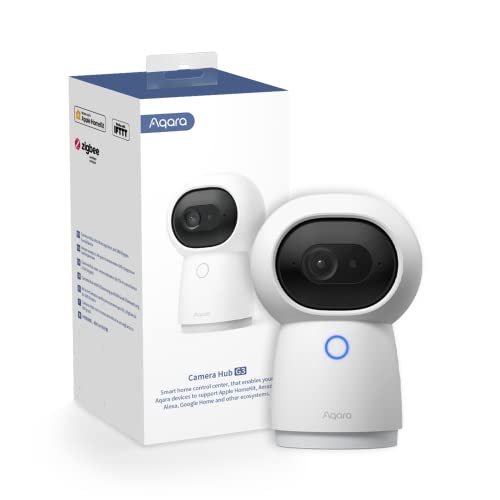
Aqara Camera Hub G3
Who it suits: Renters building a small smart home — especially Apple HomeKit households — who want one device that watches the room, runs door and leak sensors, and works the TV and air conditioner.
Apartments punish device sprawl. The shelf by the TV already holds a router, a speaker and a tangle of chargers; there is no utility closet for a rack of hubs. The G3’s whole argument is consolidation: inside one compact body you get a 2K pan-and-tilt camera, a Zigbee hub that can run a renter-friendly sensor kit (door sensor on the entry, leak sensor under the sink, motion sensor in the hall — all battery-powered, all adhesive-mounted, all removable at move-out), and an infrared blaster that makes a dumb split-system air conditioner or TV respond to your phone. For a renter, that is three purchases and three wall warts collapsed into one outlet.
As a camera it covers an apartment’s main room properly: the lens pans most of a circle, tracking follows a person or pet across the space, and on-device recognition can tell familiar faces from strangers and even read simple hand gestures to trigger scenes. It supports HomeKit Secure Video, so recordings can live in iCloud under Apple’s model — with two honest caveats: HomeKit recording requires an iCloud+ plan, and Apple caps the video at 1080p even though the Aqara app records the camera’s full 2K. Local recording to a microSD card in the Aqara app needs no subscription at all.
Privacy is where the G3 quietly wins the apartment brief. Its sleep mode rotates the lens down into the body, so when you are home the camera’s face is visibly turned away — the single most roommate-legible off state in this guide. The compromises: the face and gesture features live only in Aqara’s app, setup order matters (add it to HomeKit first, owners advise), and the little robot styling with its removable cat ears will not suit every shelf. As a system purchase for a small home, nothing else here comes close.
- 2K pan-and-tilt camera plus Zigbee 3.0 hub plus IR remote in one unit (maker specifications).
- Sleep mode rotates the lens into the body — a visible off that roommates can verify at a glance.
- microSD local recording with no subscription; HomeKit Secure Video available for Apple households.
Honest limitation: HomeKit recording needs an iCloud+ plan and is capped at 1080p by Apple; the smartest face and gesture features work only in the Aqara app and not all can run at once.
Choose it if you want one box to be your camera, your sensor hub and your remote, and your home runs on HomeKit or Aqara. Skip it if you want a camera and only a camera, with the simplest possible app — the Tapo or Ring picks ask less of you.
Ring Pan-Tilt Indoor Cam
Who it suits: Studio and open-plan renters who need a single camera to see the door, the kitchenette and the sofa in turn, inside the Alexa and Ring ecosystem they already use.
Open-plan apartments break fixed cameras. The room is one space with four jobs, and a lens bolted to one angle watches the kitchen while the door happens behind it. Ring’s Pan-Tilt Indoor Cam answers with a motorised head you drive from the app: a full circle of pan and a wide tilt range let one camera, parked on a shelf, check the entry, sweep the living area and glance at the windows in a single patrol. Video is 1080p with colour night vision, two-way talk lets you answer the door or calm a pet, and the whole thing plugs into one outlet and asks for no screws beyond an optional small mount.
The feature that makes this camera apartment-appropriate is not the motor; it is the manual privacy cover. Slide it over the lens and the camera and microphone switch off, physically. In a studio, where the camera’s room is also your bedroom, that fingertip shutter is the difference between a security device and a surveillance problem. It costs nothing, needs no app, and works on guests and roommates exactly as well as it works on you: anyone in the room can see the cover is closed.
Now the ledger Ring never leads with. This camera has no local storage at all. Without a Ring Home plan you get live view and motion alerts but no recorded video — nothing to replay, nothing to hand to a landlord or police officer after an incident. Continuous 24/7 recording sits on Ring’s premium plan tier. The camera is also 2.4GHz Wi-Fi only, worth knowing in dense buildings. None of this makes it a bad buy; it makes it a subscription product wearing a hardware price tag, and renters should sign up with eyes open.
- Motorised pan and tilt driven from the Ring app covers a whole open-plan room from one shelf (maker specifications).
- Manual privacy cover disables camera and microphone with a slide — no app required.
- 1080p video with colour night vision and two-way talk; plugs in, no drilling needed.
Honest limitation: No local storage and no recording of any kind without a Ring Home subscription; 1080p video and 2.4GHz-only Wi-Fi trail the 2K dual-band picks here.
Choose it if one camera must cover an entire open-plan space and your home already speaks Alexa and Ring. Skip it if you want recordings stored in the apartment, or a camera that keeps working when a subscription lapses.
TP-Link Tapo C225 Pan/Tilt Camera
Who it suits: Renters who want the flagship experience — sharp 2K video, smart detection, HomeKit support — without a flagship’s subscription, and who like their privacy mode mechanical.
The C225 is the quiet overachiever of this guide. Its 2K QHD sensor sits behind a fast f/1.6 lens that gathers enough light for colour night vision in many real rooms, the head pans and tilts with brisk motion tracking, and the detection smarts — person, pet, vehicle and even baby-cry alerts — run on the camera itself, free, with no cloud tier deciding whether your camera is allowed to be clever today. For apartment shoppers comparing spec sheets against Ring and Arlo, that last line is the whole story: the Tapo’s intelligence is included in the box.
Privacy is handled the way privacy people ask for. The C225’s physical privacy mode rotates the lens up into the camera’s housing, so the eye disappears entirely; nobody across the room has to wonder whether a software toggle worked. Storage is equally renter-sane: a microSD card in the camera records with no plan, while TP-Link’s Tapo Care cloud is an optional extra for off-site clips and richer notifications, not a ransom for basic recording. It is also one of the few budget-friendly cameras with genuine Apple HomeKit support alongside Alexa and Google.
The honest trade-offs are app and ecosystem depth. Tapo’s app is capable but less refined than Ring’s, the camera is a 2.4GHz Wi-Fi device, and if your wider home is Ring or Nest, this camera will live in its own app on your phone. It is also a single camera at a single-camera price, leaving most of this budget unspent — which, for a renter, is arguably a feature: the same money buys the C225 for the living room and a second one for the entry, both recording locally, no plan in sight.
- 2K QHD video with f/1.6 lens and colour night vision (maker specifications).
- Physical privacy mode rotates the lens into the housing; on-device person/pet detection is free.
- microSD local recording with no subscription; works with HomeKit, Alexa and Google Home.
Honest limitation: The Tapo app is less polished than Ring’s or Nest’s, Wi-Fi is 2.4GHz only, and HomeKit Secure Video is not supported — HomeKit use is live view and control.
Choose it if you want flagship detection and a real privacy shutter without signing a monthly plan. Skip it if your home is already all-in on Ring or Nest and one more app is a deal-breaker.
Blink Mini 2
Who it suits: Renters with almost no shelf space, first-time camera buyers, and Alexa households who want a simple camera watching the entry or the pet corner by tonight.
The Mini 2’s apartment virtue is its size. It is a small cube that disappears onto a bookcase, a windowsill or the top of a fridge, points through a very wide 143-degree lens that sees more of a small room than most fixed cameras, and adds a built-in spotlight so its night view comes back in colour rather than infrared grey. Setup is the Blink app, a QR code and a few minutes; the camera plugs into any outlet and its stand needs no screws. For a first camera in a first apartment, that absence of friction is the feature.
Blink’s honesty box has two entries. First, the subscription: a Blink plan unlocks cloud recording and person detection, and a camera bought without one is limited to live view and motion alerts unless you add Blink’s Sync Module with a USB drive for local clips — and even then, person detection stays with the plan. Second, privacy: there is no physical shutter on the Mini 2. You can disarm it in the app and set privacy zones, but the lens is always visibly a lens, which some roommates will accept and some will not. Both points are manageable; neither should be discovered after purchase.
Within this budget the Mini 2 invites multiplication: several of them cost less than one flagship, so a renter can watch the entry, the living room and the bedroom door for less than a single premium camera, all in one simple app. What you give up is resolution headroom and the mechanical privacy answers of the picks above. What you get is coverage that fits in a shoebox when the lease ends.
- Very wide 143-degree field of view and built-in spotlight for colour night view (maker specifications).
- Palm-sized plug-in body with a stand that needs no screws or landlord permission.
- Optional local clips via Blink Sync Module and USB drive; plan unlocks cloud recording and person detection.
Honest limitation: No physical privacy cover, 1080p resolution, and person detection plus cloud recording require a Blink subscription plan.
Choose it if space is the scarcest thing in your apartment and you want simple, wide coverage tonight. Skip it if a visible lens with no shutter will bother your household, or you need recordings with no plan and no extra module.
Wyze Cam Pan v3
Who it suits: Budget-minded renters who want a camera that actively sweeps the apartment — door, windows, pet bed — and records locally while they are out, at a price that leaves the rest of the budget untouched.
The Pan v3 does the studio trick — one camera, whole room — at the lowest price in this guide. Its motorised head pans a full circle and tilts through a wide range, can patrol automatically between viewpoints you set (entry, window, crate), and locks on to follow motion across the room. Colour night vision from a sensitive starlight sensor, two-way talk and a weather-resistant body round it out; that last point matters in rentals more than expected, because a camera that can move to a balcony door, garage or covered porch at the next apartment is a camera you do not rebuy.
Wyze’s storage deal is the renter-friendly kind: put a microSD card in the camera and it records, continuously or on events, with no subscription. The optional Cam Plus plan adds full-length cloud events and the smart detection labels for people, pets and packages; without it, cloud events are snapshots with a cooldown period, which we state plainly because it is the part of the free experience that surprises people. Privacy mode is mechanical in spirit — the camera rotates its lens down into its base when off, a visible stand-down your roommates can check from the sofa.
The compromises are polish and resolution. The app is busy, carries its subscription pitch everywhere, and the video tops out at 1080p where the Tapo and Aqara picks offer 2K. But weigh what the price buys: two or three Pan v3s, each with a card, cover a whole apartment with local recording for less than one cloud flagship — and at move-out, the entire system fits in a tote bag.
- Full-circle pan, wide tilt, patrol points and motion tracking at a budget price (maker specifications).
- microSD card recording works with no plan; Cam Plus adds cloud events and smart labels.
- Privacy mode points the lens down into the base; weather-resistant body suits balcony doors and garages.
Honest limitation: 1080p video, an upsell-heavy app, and free cloud events limited to snapshots with a cooldown between them.
Choose it if you want active room patrol and local recording while spending as little of the budget as possible. Skip it if you want 2K detail, a calm app, or HomeKit support.
Google Nest Cam (Indoor, Wired)
Who it suits: Google Home households and design-conscious renters who want the camera to look like it belongs in the room, with the gentlest app learning curve in this guide.
Most indoor cameras look like equipment. The Nest Cam looks like an object someone chose — a smooth, pebble-like camera on a neat stand, in colours that sit comfortably on a styled shelf. In an apartment, where the camera shares a room with everything you own and every guest you host, that design restraint is a genuine feature, and it is paired with the most approachable app here: Google Home setup is measured in minutes, and the camera’s built-in intelligence tells people, animals and vehicles apart and sends sensible alerts with no subscription at all.
The free tier deserves precise description, because it is the best of the cloud brands and still limited. Without Nest Aware you keep a rolling few hours of event history — enough to check this morning’s alert at lunch, not enough to investigate last weekend. Nest Aware extends event history to weeks and adds familiar-face detection; the higher tier adds continuous recording for this wired model. There is no local storage option at any price: no card slot, no hub. If Google’s cloud is a place you trust, that is a fair trade; if it is not, three of the picks above will keep your footage at home.
As a camera it is fixed rather than motorised, with a wide 135-degree view that suits a living room corner, 1080p HDR video and clear two-way talk. In a studio it will not patrol like the Ring or Wyze, so placement is the whole game: one corner, aimed across the entry and the main space. Renters in Google households who value calm software and a camera that does not shout ‘security’ will find it the easiest pick here to live with.
- 1080p HDR video with a wide 135-degree view and person/animal/vehicle alerts included free (maker specifications).
- Free rolling event history measured in hours; Nest Aware extends it and adds familiar faces.
- Stand sits on any shelf with no mount and no holes; design blends into a styled room.
Honest limitation: No local storage option exists, the free history window is short, and the fixed lens cannot patrol a room like the pan-tilt picks.
Choose it if your home runs on Google Home and you want the calmest app and the least industrial-looking camera. Skip it if you need recordings kept locally, a long free history, or a camera that can sweep the room.
Comparison Table
| Product | Type | Best use | Link |
|---|---|---|---|
| Aqara Camera Hub G3 | Camera + hub + IR blaster | One shelf-friendly device running a whole rental smart home | Check on Amazon |
| Ring Pan-Tilt Indoor Cam | Motorised pan/tilt, cloud | Studios and one-bedrooms where one camera must see everything in turn | Check on Amazon |
| TP-Link Tapo C225 Pan/Tilt Camera | Pan/tilt, local-first | The main room of a rental, watched sharply with zero required fees | Check on Amazon |
| Blink Mini 2 | Fixed mini camera | Entries, pet corners and small rooms where a tiny camera disappears | Check on Amazon |
| Wyze Cam Pan v3 | Budget pan/tilt | Studios and one-bedrooms that want one camera to sweep the whole space | Check on Amazon |
| Google Nest Cam (Indoor, Wired) | Fixed designer camera | Living rooms in Google households where looks and simplicity lead | Check on Amazon |
How to Choose the Best Indoor Security Camera for Apartments Under $300
- Start from the lease, not the spec sheet. No drilling, no hardwiring, no permanent adhesive. Every pick here is plug-in and shelf-friendly; if a camera you are considering elsewhere needs a junction box or a transformer, it is a homeowner product wearing apartment marketing. Your security system should be fully removable in an afternoon, leaving the unit exactly as you found it.
- Count rooms honestly; apartments need fewer cameras than you think. A studio is one camera’s job if the camera pans. A one-bedroom usually wants the living space covered and the entry watched, which one pan-tilt plus one mini, or two minis, achieves. Spend on covering the entry first — it is where packages, intrusions and landlord visits all announce themselves.
- Make the privacy off-switch a household feature, not a personal setting. Roommates and partners did not buy this camera; you did. Choose hardware whose off state they can see and operate themselves: Ring’s sliding cover, Tapo’s lens-away mode, Aqara’s sleeping face, Wyze’s lens-down position. A camera only you can silence will eventually be unplugged by someone else.
- Decide whose server your footage lives on. Local recording (Tapo, Wyze, Aqara’s card mode) keeps your home’s footage in your home and keeps working if you cancel everything. Cloud recording (Ring, Blink, Nest) is effortless and survives a stolen camera, but it is rented: Ring and Blink record nothing without a plan, and Nest’s free window is a few hours. Renters who move and re-budget often should weigh the local option seriously.
- Check the Wi-Fi you actually have. Apartment buildings are RF war zones. Dual-band cameras cope better; 2.4GHz-only cameras (several here) reach further through walls but share crowded spectrum. Place the router and camera with a clear-ish path, and test the live view at the far wall before you settle a camera’s spot.
- Think about the move-out box. You will pack this system up, possibly within a year. Fewer, smaller devices win: a hub-camera like the Aqara, or two minis and a pan-tilt, travel in one tote. Keep the boxes and the little bags of screws you never used; future-you, in a new living room, says thanks.
- Use the budget headroom on purpose. Under $300 at apartment scale buys more than the camera: the memory cards local recording needs, a second camera for the entry, or a sensor or two on the door and under the sink if you choose the hub route. An apartment system built from a plan beats a single expensive camera bought on impulse.
Roommates, Guests and Landlords: The Apartment Privacy Playbook
An indoor camera in a shared apartment is a social device before it is a security device, and the households that keep theirs plugged in are the ones that negotiate it early. The workable pattern looks like this: cameras watch shared and entry spaces, never bedrooms or bathrooms; the camera’s off state is physical and known to everyone; and the app access is shared with the people who live there, not hoarded by the person who bought it. Every pick in this guide can live under those rules, but the ones with covers and lens-away modes make the rules visible, which is what makes them stick.
Guests deserve a sentence of their own. A camera with its cover closed or its lens turned away needs no explanation; a camera with a glowing eye and an app-only off switch invites an awkward one. If you host often, weight the privacy hardware in these reviews even higher than we did. Cleaners, dog walkers and maintenance visits are the mirror image: those are exactly the moments renters buy cameras for, and a camera you can arm from your phone when the text says ‘we’re outside’ earns its shelf space in a single afternoon.
Landlords sit in a specific legal and practical frame. A camera inside your own unit, watching your own space, is your business in most places; a camera aimed out a window at shared hallways or a neighbour’s door is a different and murkier matter, and no pick here should be deployed that way without checking your lease and local rules. Inside the unit, your camera can also protect you: time-stamped footage of an unannounced entry or a repair left half-done is the kind of evidence that settles deposit disputes. Local recording, again, keeps that evidence in your hands.
What $300 Buys at Apartment Scale (and What It Should Not)
Because a studio or one-bedroom needs so little hardware, the full budget here is best understood as a system fund. The premium single-device route — the Aqara hub camera — spends it on consolidation: camera, sensor hub and remote in one. The coverage route spends it on two or three simple cameras and the memory cards that free them from subscriptions. The ecosystem route spends it inside Ring or Google, where the camera is partly a service. All three are defensible; the indefensible spend is a lone mid-priced cloud camera plus a lapsed trial, which is how most apartment camera regrets are manufactured.
What the budget should not buy is a nursery monitor in disguise or an outdoor camera indoors. Baby cameras trade whole-room security features for crib-specific ones and are compared separately on this site; outdoor cameras trade privacy hardware and resolution for weather sealing an apartment does not need. Keep the categories clean, and under $300 equips a rental properly, with change left for the door sensor that tells you the entry opened before any camera would.
Setting Up in a Weekend: The Renter’s Installation Walkthrough
Saturday morning is when apartment camera systems actually get built, and the good news is that every pick in this guide can go from box to working in one unhurried hour per camera, with no tools beyond what is in the box. Start by walking the unit with your phone in your hand and one question per room: what would I want footage of here? The entry almost always wins the first camera. The living space takes the second. Bedrooms, for most renters, are a deliberate no — and deciding that in advance, with the people who share the home, is part of the installation, not a distraction from it.
Place before you plug. Put the camera where it will live, on the shelf or bookcase, and open the live view before you commit the cable to a route. Check three frames: the door opening, a person crossing the room at normal speed, and the same view at night with the room’s real lighting. Renters have one advantage homeowners do not — everything is reversible until you love it. Move the camera twice now, while moving it costs nothing, rather than once later, when it costs a patch and a repaint you are not allowed to do. Route cables along skirting and behind furniture, keep them out of walkways, and leave the camera’s little power brick reachable; the day you need to power-cycle the camera is the day you will be glad it is not behind the bookcase.
The last step is the household meeting, and it is not optional in a shared unit. Show everyone the live view, show them the cover or the lens-away mode, close it together, and agree when the camera is on: armed when the home is empty, covered when it is full, is the pattern most apartments settle on. Put the app on the phones of the people who live there. A system installed this way — placed twice-checked, cabled neatly, and socially agreed — is still running a year later, which is more than can be said for most of the cameras bought on impulse and installed in anger at a spec sheet.
A Note on Cameras and the Front Door
One placement deserves its own paragraph in an apartment guide: the camera that watches the front door from inside. It is the highest-value view in any rental — it sees deliveries handed over, visitors arriving, the door itself opening and closing, and, in the scenario nobody wants, someone who should not be there. It is also the view most likely to cause a dispute if it strays: an indoor camera aimed through a peephole or a window at the shared hallway beyond is no longer watching your home, and in many buildings and leases that crosses a line. Keep the door camera inside the unit, aimed at your own door and entry area, and it stays what it should be — your witness, in your space, under your lease.
Common Buying Mistakes
- Drilling for a camera mount in a unit you do not own. Every pick here works from a shelf; a deposit deduction costs more than any camera in this guide.
- Pointing a camera at a roommate’s door, a bathroom or out the window at a shared hallway. Watch your entry and your shared spaces; the rest creates problems no footage is worth.
- Buying a cloud camera and letting the trial lapse, then discovering after an incident that nothing was recorded. Ring and Blink record nothing without a plan.
- Assuming one fixed camera covers an open-plan studio. Either buy the pan, or place the fixed camera where the entry and the main space share one view.
- Forgetting the camera needs an outlet where the view is. The best angle in the apartment and the nearest free socket are rarely the same spot; check both before ordering.
- Hoarding app access. If the people who live with the camera cannot see what it sees and silence it themselves, trust fails and the camera gets unplugged.
- Paying flagship money for a single camera when the same budget covers the entry, the living room and the cards to record locally on both.
- Skipping the Wi-Fi test. In a dense building, run the live view from the camera’s intended shelf for a day before declaring the setup done.
Final Recommendation
- Most apartment households: Aqara Camera Hub G3
- Open-plan studios: Ring Pan-Tilt Indoor Cam
- Privacy without a subscription: TP-Link Tapo C225 Pan/Tilt Camera
- Smallest footprint: Blink Mini 2
- Budget patrol: Wyze Cam Pan v3
- Google Home households: Google Nest Cam (Indoor, Wired)
Our top two for apartment life are the Aqara G3 — camera, hub and remote in one shelf-friendly box, with a sleeping face your roommates can trust — and the Tapo C225, which pairs a mechanical privacy mode and free on-device detection with local recording that no subscription can switch off. Studio dwellers inside the Ring ecosystem should take the Pan-Tilt for its whole-room sweep and fingertip cover, and anyone furnishing a first rental on a budget can cover the whole unit with Wyze and Blink picks and still return change from this budget. Measure your rooms, agree the privacy rules with the people who live there, and buy the system you can pack up in one tote when the lease ends.
Frequently Asked Questions
Can I install a security camera in a rented apartment?
In most places, yes: a camera inside your own unit, watching your own space, installed without damaging the property, is generally a renter’s right. Every pick here is plug-in and shelf-placed, so nothing about the installation touches the landlord’s property. Aiming a camera at shared hallways, neighbours’ doors or other units is a different matter — check your lease and local rules before doing anything like that.
Do I need my landlord’s permission for an indoor camera?
For a freestanding indoor camera that requires no modification to the unit, permission is not typically required, because nothing is installed in the property sense. If you want to mount anything with screws, or place a camera covering shared areas, ask first and get it in writing. The picks in this guide were chosen so that the permission question never arises.
Which apartment camera records without a subscription?
The Tapo C225 and Wyze Cam Pan v3 record to their own memory cards with no plan, and the Aqara G3 records locally in its own app the same way. Ring’s Pan-Tilt records nothing without a Ring Home plan, Blink’s Mini 2 needs a plan or a Sync Module for clips, and Nest keeps only a few hours of event history free. Each review in this guide states its model’s rule plainly.
How do I handle a camera when I have roommates?
Agree the rules before you plug it in: shared spaces and entries only, never private rooms; a physical off state everyone can see and operate; and app access shared with everyone who lives there. The Aqara’s lens-down sleep mode, Ring’s sliding cover and Tapo’s lens-away position exist precisely for this negotiation — they let the camera prove it is off.
How many cameras does a one-bedroom apartment need?
Usually two at most: one covering the living space (ideally a pan-tilt, so it can check the whole room) and one watching the entry, which can be a simple mini camera. A studio often needs only one pan-tilt camera. Under this budget, two good cameras plus memory cards cost less than one flagship and tell you far more about your home’s day.
What happens to my camera system when I move?
It all unplugs and packs into a box — that is the point of choosing plug-in, shelf-based hardware. Local recordings on your cards travel with you; cloud recordings stay in your account. If you change ecosystems at the new place, the local-first picks (Tapo, Wyze, Aqara) carry over with no subscription entanglements at all.


