Where to buy
Check the latest price, availability and delivery on Amazon. Orders are placed on Amazon. We may earn a commission from qualifying purchases. Every camera in this guide sits under $150 at its normal street position, but check the live listing, because indoor cameras are discounted often and bundles change what you actually pay.
- Best overall: eufy Security Indoor Cam S350 — Check on Amazon
- Best for privacy: TP-Link Tapo C225 — Check on Amazon
- Best pan-and-tilt value: eufy Security Indoor Cam E220 — Check on Amazon
- Best for Google Home households: Google Nest Cam (Indoor, Wired, 2nd Gen) — Check on Amazon
- Best for Alexa and Ring households: Ring Indoor Cam (2nd Gen) — Check on Amazon
- Best detail on a budget: Wyze Cam v4 — Check on Amazon
Read the full guide ↓
Disclosure: As an Amazon Associate, dailyhomedecorating.com earns from qualifying purchases. Links to Amazon on this page are affiliate links; they cost you nothing extra. Listing details such as price and availability change often, so check the current Amazon listing before you buy.
Finding the best indoor security camera under $150 used to mean choosing which compromise you could live with: grainy video, a subscription you could not escape, or an app that fought you every time you opened it. That is no longer the shape of this market. A budget ceiling of under $150 now covers dual-lens 4K cameras, pan-and-tilt models that follow a pet across the room, and cameras that record to a memory card in your own home with no monthly fee at all. The real differences have moved away from raw picture quality and towards three quieter questions: where your video is stored, what stops working if you refuse to pay a monthly plan, and how the camera behaves when you are home and do not want to be watched.
That shift matters because an indoor camera is not an outdoor camera pointed the other way. It sits in the rooms where you live: the hallway your children cross at night, the living room where parcels are left by a helpful neighbour, the kitchen doorway your dog has learned to guard. You are not buying it to watch a driveway. You are buying it to check that the dog walker came, to see which cat knocked the plant over, to confirm the front door really did close behind the cleaner, and to have a recording if something ever does go wrong. Every camera in this guide was judged on that job, in that order: useful alerts, honest storage, real privacy control, and a picture clear enough to identify a face or a pet at normal room distances.
One boundary before the picks. This guide is about general indoor monitoring for adults, pets and deliveries. It deliberately does not cover nursery monitoring: the separate baby security camera guides in this series judge cameras on crib distance, sleep safety and monitor handsets, which are different criteria. If your main subject is a sleeping baby, read those instead. If your subject is the rest of the house, start here. Our short answer: the eufy Indoor Cam S350 is the camera we would buy first, because it pairs the sharpest picture in this price band with local recording and no compulsory subscription. The Tapo C225 is the one we would buy if privacy comes first. Everything below explains why, and what each brand quietly charges you for after the box is open.
A word on how to read the prices in this guide. The under-$150 in the title is a ceiling, not a target: several cameras here normally sell far below it, and the gap between the cheapest and the most expensive pick buys you specific things, a second lens, a privacy mechanism, a wider ecosystem, not a vague sense of quality. We have deliberately not printed street prices, because indoor cameras are discounted so often that any number we published would mislead you within weeks. Judge each camera by what it does and what it charges monthly, then check the live Amazon listing for the number that matters today.
In this guide
Quick picks
| Camera | Best for | Key spec |
|---|---|---|
| eufy Security Indoor Cam S350 | Best overall | Dual cameras: 4K wide-angle + 2K telephoto, 8x hybrid zoom, 360-degree pan/tilt, dual-band Wi-Fi 6 |
| TP-Link Tapo C225 | Best for privacy | 2K QHD (4MP) video, 360-degree pan and 149-degree tilt, starlight colour night vision, Apple HomeKit support |
| eufy Security Indoor Cam E220 | Best pan-and-tilt value | 2K resolution, 360-degree pan and 96-degree tilt, motion tracking, works with HomeBase 3 |
| Google Nest Cam (Indoor, Wired, 2nd Gen) | Best for Google Home households | 1080p HDR video, 135-degree diagonal field of view, person and animal alerts built in, Google Home app |
| Ring Indoor Cam (2nd Gen) | Best for Alexa and Ring households | 1080p HD video, colour night vision, two-way talk, manual audio and video privacy cover |
| Wyze Cam v4 | Best detail on a budget | 2.5K QHD video, enhanced colour night vision, built-in spotlight and siren, Wi-Fi 6, IP65 weather resistance |
How we chose
We set the ceiling first: every pick is an indoor camera whose normal selling position sits under $150, with no reliance on a one-day coupon to qualify. Within that ceiling we compared six things. Resolution and field of view came first, but judged at room scale, where the difference between 2K and 4K is about reading a face across a living room rather than counting pixels on a spec sheet. Second, movement: a pan-and-tilt camera can cover a whole open-plan room from one shelf, while a fixed camera is simpler, cheaper to run in multiples, and has nothing mechanical to wear or drift.
Third, and most heavily weighted, was the storage and subscription model, because this is where the true cost of a cheap camera hides. We separated the field into three honest groups: cameras that record locally to a memory card or home hub and work fully without a plan (eufy, Tapo, Wyze), cameras that are cloud-only but include a genuinely useful free tier (Google Nest, with its short free event history), and cameras where recording itself is the subscription (Ring, Blink for clips, Arlo after its trial). None of these models is automatically wrong, but you should choose yours knowing which group you are in. Fourth came privacy hardware: a physical shutter or lens cover you can see beats an app toggle you have to trust. Fifth, detection quality: on-device person and pet detection, stated as maker claims, reduces the flood of useless alerts from curtains and sunlight. Finally, ecosystem fit: a camera that talks to the smart displays already in your home gets used; one that needs a second app gets ignored.
The cameras in detail
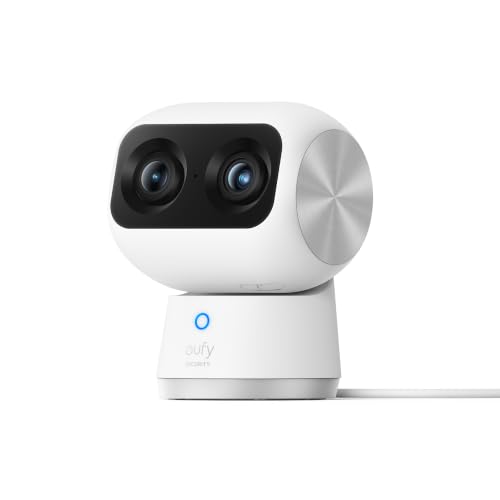
eufy Security Indoor Cam S350
The eufy Indoor Cam S350 is the easiest camera in this guide to recommend because it removes the two compromises that define the rest of the field. It carries two lenses on one pan-and-tilt head: a 4K wide-angle camera that takes in the whole room and a 2K telephoto camera that zooms in on whatever the wide lens spotted. In practice that means the clip of your dog on the sofa is not a soft digital crop; the camera pairs a wide establishing view with a genuinely closer second view, up to 8x hybrid zoom by eufy’s spec. For identifying a face at a doorway or reading what a pet is chewing, that second lens is the single biggest picture-quality advantage available under $150.
The rest of the spec sheet supports the headline. The head pans a full circle and tracks movement automatically, detection of people and pets happens on the device rather than in a paid cloud, and dual-band Wi-Fi makes it less fussy about router placement than the 2.4GHz-only crowd. Two-way talk is present for the classic use cases: telling the dog to get off the sofa and telling a delivery driver where to leave a parcel. Night vision is infrared, clear at normal room distances, and the tracking is smooth enough that a walking adult stays framed rather than being chased in jerks.
Who should skip it? If you want the camera to disappear, this is not it: the dual-lens head is noticeably larger than a Blink or Ring mini camera, and it looks like what it is. It also has no Apple HomeKit support, so households built on HomeKit should look at the Tapo C225 or the eufy E220 below. And while there is no physical shutter, buyers who want a lens they can visibly cover should weigh that honestly. For everyone else, this is the complete package: the sharpest eyes in the group, recording that stays in your house, and no monthly bill for the privilege of watching your own hallway. Choose it if you are buying one camera to cover one important room properly.
Day to day, the S350’s most useful security habit is how it handles the ordinary: a parcel left inside the door, a cleaner arriving, a dog greeting an empty room. The wide lens keeps the context, the telephoto keeps the detail, and because detection is on-device, the alert arrives labelled as a person or a pet rather than as anonymous motion. Owners stepping up from a basic 1080p camera notice the difference most at night and at distance, the two places budget cameras usually dissolve into guesswork. If one camera must cover your main living space and stand up as evidence, this is the one in this guide built for exactly that.
Storage and subscriptions, honestly: Local: microSD card or eufy HomeBase 3. No subscription is required for recording, playback or its on-device human and pet detection; an optional eufy cloud plan exists but nothing core is locked behind it.
Privacy: Privacy is handled in the app: you can switch the camera off, schedule it, and set privacy zones. There is no physical shutter, so when privacy matters you are trusting the software state and the status light rather than a cover you can see.
TP-Link Tapo C225
The TP-Link Tapo C225 earns its place for one feature that sounds small and turns out to be the thing owners mention most: Privacy Mode physically rotates the lens down into the body of the camera. No app promise, no status light to interpret; the lens is covered, mechanically, and you can see that it is covered from across the room. For a camera that lives in a living room or a bedroom-adjacent hallway, that visible off state is worth more than another increment of resolution, and it is the main reason the C225 is our privacy pick ahead of technically sharper rivals.
It is not a one-trick camera. The 2K QHD sensor (4MP, by TP-Link’s spec) is a step above the 1080p fixed cameras here, the pan-and-tilt range covers a full room, and the starlight sensor produces colour night vision in low light where rivals switch to black and white. Person, pet and vehicle detection run on the device at no charge, motion tracking follows a subject across the room, and it is the only camera in this six that speaks to Apple HomeKit as well as Alexa and Google Home, which makes it the natural pick for iPhone households that want their camera in the Home app.
The honest limitation is the ecosystem around it. The Tapo app is capable but busier than Ring’s or Google’s, and Tapo Care, TP-Link’s optional cloud plan, is marketed inside it persistently enough that you need to be clear it is optional: with a memory card fitted, recording, playback and smart detection all work without it. The camera is also plug-in only, like everything here, and its privacy mode, while physical, still has to be triggered from the app or a schedule rather than by a cover you flip with a finger. Choose the C225 if privacy you can see matters more than the absolute sharpest picture, and especially if your home runs on HomeKit.
One practical note for households comparing the C225 with the eufy models: its colour night vision changes what evening footage looks like. Where infrared cameras render the room in grey, the C225’s starlight sensor holds colour in low light, so a clip of someone at the door carries the colour of a coat or a bag, details that matter when you are describing an event rather than just confirming one happened. Combined with the rotating privacy lens, it is the most thoughtfully designed camera here for a room that is both lived in and worth watching, and the one whose compromises are the easiest to live with.
Storage and subscriptions, honestly: Local: microSD card up to 512GB by maker spec, so weeks of event clips can live on the camera itself. Tapo Care cloud storage is optional; person, pet and vehicle detection are handled on-device without it.
Privacy: This is the privacy pick of the group: Privacy Mode physically rotates the lens down into the camera body, so the lens is visibly covered. It is the strongest kind of indoor privacy control because you can confirm it with your eyes.
eufy Security Indoor Cam E220
The eufy Indoor Cam E220 is the sensible middle of this guide: a 2K pan-and-tilt camera that does everything the S350 does in simpler form, at a lower selling position that leaves room in the under-$150 budget for a second camera or a large memory card. The picture is a clear step up from 1080p, the head pans a full 360 degrees with 96 degrees of tilt, and motion tracking follows people and pets across the room. On-device detection means the alert that reaches your phone is usually about a person or an animal, not about the sun moving across the floor.
What makes the E220 easy to live with is what it does not ask for. There is no subscription in its core path at all: fit a memory card, or pair it with a eufy HomeBase, and recording, playback and detection are simply how the camera works. It also supports Apple HomeKit, with the caveat, stated plainly by eufy, that HomeKit streaming is at 1080p even though the camera records in 2K in eufy’s own app. Two-way talk, infrared night vision and Alexa and Google Assistant support round out a spec sheet with no embarrassing gaps for a camera of its generation.
Its limitations are about age and privacy hardware rather than competence. It is a 2.4GHz Wi-Fi camera in a field that is moving to dual-band, which only matters if your router placement is awkward. There is no physical shutter, so privacy is an app setting, and the design is functional rather than decorative. None of that stops it being the best pan-and-tilt value here: if the S350’s dual lenses feel like more camera than your hallway needs, the E220 is the same philosophy, recording locally with no monthly fee, in a simpler and cheaper body. Choose it for second rooms, pet corners and anywhere you want tracking without paying flagship money.
The E220 also deserves credit for how it behaves as a second or third camera. Because it needs no hub and no plan, adding one to a spare room, a garage entry or a pet’s corner is a self-contained decision: camera, card, done. Households that start with a premium camera in the living room often end up standardising on the E220 elsewhere, because the app is already familiar and the running cost of each additional room stays at zero. That scalability, unglamorous as it sounds, is a real advantage over ecosystem cameras whose every addition deepens a subscription relationship.
Storage and subscriptions, honestly: Local: microSD card or eufy HomeBase 3. On-device human and pet detection runs without a monthly fee, and recordings stay in your home unless you choose eufy’s optional cloud add-on.
Privacy: There is no physical privacy shutter. The app offers an off mode and privacy zones, so the honest position is that privacy here is a software promise, not a mechanical one.
Google Nest Cam (Indoor, Wired, 2nd Gen)
The Google Nest Cam (indoor, wired) is the camera for households that already live in the Google Home app, and its appeal is intelligence rather than optics. The hardware is modest on paper: 1080p HDR video and a wide 135-degree diagonal view from a small, well-finished camera that sits unobtrusively on a shelf. What you are actually buying is Google’s detection. Person and animal alerts are built in without a subscription, the camera distinguishes a person from a pet reliably by maker design, and the Google Home app ties it neatly to Google displays, so checking the living room from a Nest Hub is a single voice command.
That convenience comes with the clearest storage trade-off in this guide after Ring. There is no memory card and no local recording of any kind. Google includes a rolling three hours of event video history free, which is enough to check what just happened and genuinely useful day to day. Anything beyond that window needs Nest Aware, the paid plan that extends history to weeks and adds familiar-face alerts. If you think of this camera as a live window with a short memory, it is excellent. If you think of it as an evidence recorder, the subscription is not optional, and you should price the camera accordingly.
Choose the Nest Cam if your home already runs on Google, you value calm, well-sorted alerts over raw resolution, and most of your checking is live or same-day. Skip it if you want recordings that stay in your house, if you need pan and tilt, or if the idea of a three-hour free memory expiring mid-holiday bothers you, because no setting changes that. It is the most polished experience here and the least independent one, and both halves of that sentence are the point.
There is one more Nest strength worth naming for the right household: familiarity detection and activity zones inside Google Home make its alerts feel curated rather than merely filtered. The camera learns the geography of the room, the door zone matters, the sofa zone does not, and the result is a notification stream calm enough that people keep it unmuted for years. In a category where most cameras are muted within a month, that calm is a feature with real security value, and it is the strongest argument for accepting this camera’s cloud-only design if your home already runs on Google.
Storage and subscriptions, honestly: Cloud only, with no local storage option. Google includes a rolling 3 hours of event video history free; a Nest Aware subscription extends that history and adds familiar-face alerts. Without the plan, anything older than that short free window is gone.
Privacy: There is no physical shutter. Google Home offers a home/away routine that can switch the camera with your presence, which is convenient, but the lens is never physically covered.
Ring Indoor Cam (2nd Gen)
The Ring Indoor Cam (2nd Gen) is the default recommendation for a specific and very common household: one that already has a Ring doorbell or a house full of Echo devices. Within that ecosystem it is genuinely pleasant. Setup is the fastest here, the app is the most familiar in the category, live view opens quickly, two-way talk is clear, and the camera drops into Alexa routines and Echo Show displays without any fiddling. The hardware itself is deliberately simple: 1080p video, colour night vision, a compact plug-in body that disappears onto a shelf or mounts to a wall.
It also has the best manual privacy control in the group alongside the Tapo. The attached privacy cover swivels over the lens and cuts the microphone with it, so the camera’s off state is physical and obvious. For a living-room camera that only needs to watch while you are out, that cover, opened when you leave and closed when you come home, is a routine many owners prefer to any app schedule.
Now the part Ring’s box does not shout about: this camera records nothing you can watch later unless you pay for Ring Protect. There is no memory-card slot and no local option at any price. Without the plan you get live view and motion alerts, and the moment itself is gone. With the plan you get video history and richer notifications. That may be a fair trade inside a Ring household, where one plan covers the doorbell too, but it means the camera’s low hardware price is only half the story. Choose it for ecosystem fit and that excellent cover; skip it if a monthly fee for basic playback is a principle you do not want to bend, because with Ring there is no local-storage workaround.
Ring’s other quiet advantage is shared access. The app makes it simple to give a partner, a family member or a house-sitter their own login with camera access, and to remove that access later, which matters for a camera that watches the inside of a home. Combined with privacy zones that blank out a desk or a neighbour-facing window, and the end-to-end encryption option Ring offers in its settings, the Indoor Cam is more configurable than its simple hardware suggests. None of that changes the storage verdict, but for households already inside Ring’s world, the whole package is more considered than the little white box implies.
Storage and subscriptions, honestly: Cloud only, and this is the honest catch: there is no microSD slot and no local recording. Without a Ring Protect subscription you get live view and motion alerts but you cannot watch recorded video back; the subscription is what unlocks video history and rich notifications. Budget for the plan as part of the real cost.
Privacy: The manual privacy cover is excellent: swivel it over the lens and it physically blocks the camera and switches off the microphone. It is simple, visible and needs no app, though you do have to remember to open it again before you leave.
Wyze Cam v4
The Wyze Cam v4 is the proof that the under-$150 ceiling is generous: its normal selling position is far below the cap, yet it records in 2.5K QHD, a resolution that beats the 1080p Ring and Nest cameras outright. It is a fixed camera rather than a pan-and-tilt model, but the wide view, enhanced colour night vision, built-in spotlight and a small siren make it a capable guard for a hallway, garage entry or living-room corner. Wi-Fi 6 support is a thoughtful touch at this level, and the IP65 rating means the same camera can move to a covered porch later without being replaced.
Wyze’s storage story is the friendliest of the cloud-era brands. A memory card up to 512GB by maker spec gives you continuous or event recording with no plan at all, and playback from the card is part of the standard app experience. The paid layer, Cam Plus, adds the smarter layer on top: person detection and cloud event recording. Read that split carefully, because it is the opposite of Ring’s: here the subscription buys better alerts, not the ability to see recordings at all. For most homes, card recording plus motion alerts is a complete system, and the plan is a genuine optional upgrade.
The limitations are real but proportionate. The fixed lens means placement is everything; a badly aimed v4 watches a wall beautifully. There is no privacy shutter, so the off state is an app setting, and Wyze’s app, while much improved, still surfaces its subscription offers regularly. Two-way talk is serviceable rather than class-leading. None of that changes the verdict for value: if you want to cover two or three rooms for the price of one premium camera, a small fleet of v4s on memory cards is the most rational spend in this guide. Choose it for coverage per pound of budget; step up to the eufy S350 when one room deserves the best picture instead.
A final practical strength: the v4’s small spotlight changes its night behaviour in a way spec sheets undersell. Triggered by motion, it lets the camera record colour footage at night instead of switching to infrared grey, and it quietly announces to anyone in the room that they have been noticed, which is half of what a security camera is for. For a hallway or an entry corner, that combination, colour evidence plus a visible response, is remarkable at this camera’s price position, and it is why the v4 keeps appearing in this series’ guides despite competition with far longer feature lists.
Storage and subscriptions, honestly: Local: microSD card up to 512GB by maker spec, with continuous or event recording and no plan required. As with the Pan v3, Cam Plus is the paid layer that adds person detection and cloud event videos; the camera is genuinely usable without it, which is not true of every brand here.
Privacy: There is no lens cover or privacy shutter. You can turn the camera off in the app and disable the microphone, but nothing physically blocks the lens, so place it with that in mind.
Comparison table
| Camera | Video | Movement | Local storage | Plan needed for playback |
|---|---|---|---|---|
| eufy Security Indoor Cam S350 | 4K wide + 2K telephoto | Pan and tilt | microSD / HomeBase 3 | No |
| TP-Link Tapo C225 | 2K QHD (4MP) | Pan and tilt | microSD up to 512GB | No |
| eufy Security Indoor Cam E220 | 2K | Pan and tilt | microSD / HomeBase 3 | No |
| Google Nest Cam (Indoor, Wired, 2nd Gen) | 1080p HDR | Fixed | None | Free 3-hour history; Nest Aware for more |
| Ring Indoor Cam (2nd Gen) | 1080p | Fixed | None | Yes, Ring Protect |
| Wyze Cam v4 | 2.5K QHD | Fixed | microSD up to 512GB | Only for smart detection / cloud |
How to choose the best indoor security camera under $150 for your home
Start with storage, because it decides your running costs for years. If the phrase ‘monthly fee’ ends the conversation for you, your shortlist is eufy, Tapo and Wyze: all three record to a memory card in the camera and treat the cloud as an option. If you already pay for a household plan, Ring Protect or Nest Aware may add little or nothing to your existing bill, and the calculation flips. The mistake is buying the hardware first and discovering the model afterwards, so decide which of those households you are before you fall in love with a lens.
Next, count rooms, not cameras. One pan-and-tilt camera on a shelf covers an open-plan living space better than one fixed camera, because it can turn from the front door to the dog’s bed to the kitchen doorway. But a hallway, a stairwell or a nursery-adjacent landing is a fixed, predictable view, and there a cheaper fixed camera is not a compromise, it is the right tool. Many good under-$150 systems are mixed: one tracking camera for the big room, fixed cameras for the predictable ones.
Then think about what the camera watches when you are home. An indoor camera’s privacy control is not a footnote; it is a feature you will use daily. Physical solutions, the Tapo C225’s rotating lens, Ring’s swivel cover, Arlo’s automated shield in the wider market, can be verified at a glance and trusted by everyone in the house, including guests. App-only off switches work, but they ask the whole household to trust a setting. If the camera will sit in a bedroom or face a sofa, weight this heavily; if it watches a front door from a hallway, weight it less.
Finally, match the camera to the platform your home already speaks. Google households get the most from the Nest Cam, Alexa households from Ring and Blink, HomeKit households from Tapo and eufy. A camera inside your existing app gets checked; a camera in a new app gets muted. Resolution, the number everyone shops by, honestly comes last: at room distances, every camera in this guide identifies people and pets, and the 2K and 4K models simply do it with more margin for zooming into a face or a licence-plate moment at the door.
One more test before you commit: the two-week test. Whichever camera you choose, judge it after a fortnight of tuned alerts, not after the first noisy day. In week one, set the activity zones, confirm the night view, check a playback from the card or the cloud, and practise the privacy routine until it is habit. Cameras that survive that fortnight with their alerts still unmuted are the ones still protecting the house a year later. Every pick in this guide can pass that test; the ones that fail it in real homes are almost always failed by setup, not by hardware.
Common mistakes
Buying on resolution alone
A 4K badge does not fix a camera pointed at a bright window, mounted too high, or connected to weak Wi-Fi at the far end of the house. Placement, lighting and network reach change real-world picture quality more than the gap between 2K and 4K. Decide position first, then buy the resolution that position can use.
Ignoring the subscription until after setup
The most common regret in this category is discovering, mid-holiday, that the moment you needed was never recorded because playback sat behind a plan you had not bought. Ring records nothing viewable without Ring Protect; Arlo’s recordings need Arlo Secure after the trial; Nest’s free memory is three hours. Check the storage section of any camera before it goes on the shelf, not after an incident.
Putting a camera where a shutter matters and buying one without
A camera facing a sofa, a bed or a desk is a camera the household will want provably off. If the model you choose has no physical cover, you are relying on everyone trusting an app state. Either choose a model with a lens cover or rotating privacy mode for those rooms, or place the camera where its view is limited to doors and circulation space.
Expecting an indoor camera to do a baby monitor’s job
General indoor cameras lack the crib-distance testing, dedicated parent handsets and sleep-focused design of proper baby monitors, and their alert logic is tuned for intruders and pets, not for a sleeping infant. Use this guide for rooms, pets and deliveries; use a purpose-built baby camera, covered in our baby security camera guides, for the nursery.
Leaving default settings in place
Out of the box, most cameras alert on every motion event, record audio, and watch more of the room than you intend. Spend ten minutes on activity zones, detection sensitivity and privacy zones, turn off audio recording where you do not need it, and set a privacy schedule for the hours you are home. The camera you tuned is a tool; the camera you did not is a noise machine.
Forgetting the memory card at checkout
Three of the six cameras in this guide record to a memory card that is sold separately, and a cardless eufy, Tapo or Wyze is a camera that cannot keep its recordings. Add the card when you buy the camera, choose a high-endurance card made for continuous recording, and format it in the camera on day one. It is the cheapest component in the system and the one everything else depends on.
Final recommendation
Under $150 is the price band where indoor cameras stop being toys and start being systems, and the dividing line is not resolution. It is whether the camera respects the three facts of indoor life: that footage of your home is sensitive, that a monthly fee compounds quietly, and that the camera shares rooms with the people it watches. The eufy Indoor Cam S350 wins this guide because it is strongest exactly there: the best picture in the group, recording that stays in your house, detection that does not rent itself back to you. The Tapo C225 runs it close and beats it on the one feature the S350 lacks, a lens that physically hides itself.
Buy the Nest Cam if your home speaks Google and your checking is mostly live, the Ring Indoor Cam if your home speaks Alexa and the plan is already in your life, the eufy E220 if you want tracking value in a second room, and the Wyze Cam v4 if covering several rooms matters more than any single camera’s polish. Whichever you choose, fit the memory card if it takes one, set the privacy zones on day one, and decide about the subscription with your eyes open. That is the whole secret to this category.
Start with the eufy Security Indoor Cam S350 if you want one decision and no second-guessing: Check on Amazon and check the current listing before you buy. If its one real limitation is the thing you care about most, the TP-Link Tapo C225 is the alternative we would buy instead.
FAQ
Do I need a subscription for an indoor security camera?
Not always. eufy, Tapo and Wyze cameras record to a memory card and work without any plan, though Wyze reserves person detection and cloud clips for its paid tier. Ring and Arlo require a subscription to watch recordings at all, and Google’s Nest Cam includes three hours of free event history before its plan is needed. Always check what the free tier actually includes before buying.
Is local storage or cloud storage better for an indoor camera?
Local storage keeps footage in your home, costs nothing monthly and keeps working if your internet drops, but the card is in the camera if the camera is taken. Cloud storage survives the camera being removed and is easier to share, at the price of a subscription and your footage living on a company’s servers. Many owners use local recording as the base and treat cloud as optional backup.
How much resolution do I actually need indoors?
At typical room distances, 1080p identifies people and pets, 2K adds comfortable margin for zooming into a face at a door, and 4K, especially with the S350’s second telephoto lens, helps when one camera covers a large open-plan space. Lighting and placement matter as much as the number; a well-placed 2K camera beats a badly placed 4K one.
Can one camera cover a whole room?
A pan-and-tilt camera with motion tracking, like the eufy and Tapo picks here, can survey a whole room from one shelf and follow a subject across it. A fixed camera covers only its field of view, which is fine for a hallway or doorway. Remember that a panning camera can only look one way at a time, so busy multi-direction rooms may still need two cameras.
What privacy features should an indoor camera have?
The strongest is physical: a lens cover, a rotating privacy mode or an automated shield you can see. After that, look for privacy zones that blank out areas like a desk or a neighbour’s window, an off schedule for the hours you are home, and clear status lights. Be wary of relying on an app toggle alone in bedrooms and living rooms.
Will these cameras work if my internet goes down?
Cameras recording to a memory card, the eufy, Tapo and Wyze models here, keep recording locally during an outage and show you the footage when the connection returns. Cloud-only cameras like Ring and Nest cannot record or send alerts without a connection. Live viewing of any of them needs the internet or at least your home network, depending on the brand.
Can I watch these cameras on a TV or smart display?
Mostly yes, within each brand’s ecosystem. Ring and Blink cameras appear on Amazon Echo Show displays and Fire TV, Google’s Nest Cam appears on Google displays and Chromecast, and eufy and Tapo cameras can be viewed on compatible Alexa and Google displays. Apple HomeKit households should choose the Tapo C225 or eufy E220, which are the HomeKit-compatible picks in this guide.


