Where to buy
Check the latest price, availability and delivery on Amazon. Orders are placed on Amazon. We may earn a commission from qualifying purchases. Every camera in this guide sits under $150 at its normal street position, but check the live listing, because indoor cameras are discounted often and bundles change what you actually pay.
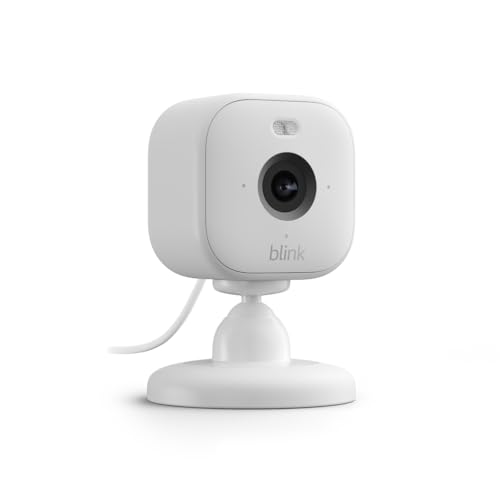
- Best tiny footprint for renters: Blink Mini 2 — Check on Amazon
- Best privacy for apartment living: TP-Link Tapo C225 — Check on Amazon
- Best room coverage without drilling: Wyze Cam Pan v3 — Check on Amazon
- Best for Alexa apartments: Ring Indoor Cam (2nd Gen) — Check on Amazon
- Best no-subscription tracking: eufy Security Indoor Cam E220 — Check on Amazon
- Best automated privacy shield: Arlo Essential Indoor Camera 2K (2nd Gen) — Check on Amazon
Read the full guide ↓
Disclosure: As an Amazon Associate, dailyhomedecorating.com earns from qualifying purchases. Links to Amazon on this page are affiliate links; they cost you nothing extra. Listing details such as price and availability change often, so check the current Amazon listing before you buy.
Looking for the best indoor security camera for apartments under $150 starts with a constraint homeowners never face: almost everything you install has to leave with you, and nothing can leave a mark. No drilled mounts the landlord will charge you for, no wiring projects, no camera so large it dominates a studio you already share with a desk, a bike and a drying rack. An apartment camera earns its keep differently, too. It watches one or two rooms rather than a whole house, it keeps an eye on the front door your parcels pile up against, and it has to be polite: when you are home, which in a small flat is most of the time you are awake, it should be provably not watching you.
The good news is that under $150 is more than enough for this job. Every camera in this guide is plug-in, shelf-friendly and installable in minutes with no tools beyond what is in the box, and all of them can be unplugged and in a moving box in less time than it takes to return a key. What separates them is rental logic. Some record to a memory card in the camera, so your footage never leaves the flat and there is no subscription nibbling at a budget that already includes rent. Some are cloud-only, which is fine if the plan is already in your life and a problem if it is not. And some offer physical privacy, a lens that covers itself, which matters more in a studio where the camera that watches your door also, inevitably, watches your sofa.
Our short answer for renters: the TP-Link Tapo C225 is the apartment camera we would buy first, because its lens physically rotates away when you are home and it records locally with no fee. The Blink Mini 2 is the pick when size and simplicity outrank everything. One scope note: this guide covers watching your rooms, your door and your pets; nursery monitoring is a different job with different rules, covered in our baby security camera guides. Everything below is judged through the renter’s lens: footprint, reversibility, privacy, and total cost once the subscription question is answered honestly.
One more renter-specific filter runs through every pick below: noise and light discipline. In a block of flats, a camera that flashes, beeps or chatters its way through the night is a bad neighbour to yourself before it is a bad neighbour to anyone else. Every camera here can be set to work quietly, status lights dimmed or off where the brand allows, alerts tuned to people rather than to every passing shadow in the hallway. We favoured cameras whose default behaviour respects a small home’s acoustics, and we note the ones, like the tracking Wyze, whose moving parts you may hear in a studio at night so you can schedule around them.
In this guide
Quick picks
| Camera | Best for | Key spec |
|---|---|---|
| Blink Mini 2 | Best tiny footprint for renters | 1080p HD video, colour night view, built-in spotlight, plug-in power, works with Alexa |
| TP-Link Tapo C225 | Best privacy for apartment living | 2K QHD (4MP) video, 360-degree pan and 149-degree tilt, starlight colour night vision, Apple HomeKit support |
| Wyze Cam Pan v3 | Best room coverage without drilling | 1080p HD, 360-degree pan and 180-degree tilt, automatic motion tracking, IP65 weather resistance |
| Ring Indoor Cam (2nd Gen) | Best for Alexa apartments | 1080p HD video, colour night vision, two-way talk, manual audio and video privacy cover |
| eufy Security Indoor Cam E220 | Best no-subscription tracking | 2K resolution, 360-degree pan and 96-degree tilt, motion tracking, works with HomeBase 3 |
| Arlo Essential Indoor Camera 2K (2nd Gen) | Best automated privacy shield | 2K video (2560 x 1440), 130-degree field of view, automated privacy shield, integrated siren, night vision |
How we chose
We judged these cameras as a renter would, which reorders the usual priorities. First came reversibility: every pick sits on a shelf or mounts with the included hardware without permanent alteration, and every one is small enough to disappear into a studio or one-bedroom flat. Second came footprint and presence: in a small home a camera is furniture, so size, cable behaviour and whether it looks like surveillance equipment all counted. Third came privacy hardware, weighted more heavily than in our general guide, because in an apartment the camera’s view of the door is usually also its view of where you live your life.
Fourth, total cost of ownership. A cheap camera with a compulsory subscription can cost more over a lease than a pricier camera that records to a memory card for free, so we separated local-recording cameras (Tapo, eufy, Wyze) from cloud-dependent ones (Blink for clips, Ring entirely, Arlo after its trial) and treated that split as a first-order decision. Fifth, coverage per camera: pan-and-tilt models can watch a whole open-plan living space from one shelf, which suits apartments where one camera often has to do the whole job. Finally, ecosystem: Alexa-heavy flats, Google flats and HomeKit flats each have a natural pick, and a camera that answers to the displays you already own gets checked instead of muted.
The cameras in detail
Blink Mini 2
The Blink Mini 2 is the camera that understands apartment geometry. It is genuinely tiny, a small cube that sits on a bookshelf, a window ledge or the top of a fridge without announcing itself, and it plugs in wherever there is a socket. For a studio or a one-bedroom flat, that discretion is not a minor virtue: the camera covers your door and your living space without turning a small home into a monitored facility. Video is 1080p HD with colour night view from its built-in spotlight, two-way talk handles the classic apartment tasks, talking to a courier through the door camera’s view of the hallway pile, or telling the cat to get off the counter, and setup through the Blink app is among the quickest here.
Blink is an Amazon brand, so the Mini 2 is at its best in an Alexa flat: live view on an Echo Show is a voice command away, and arming the system as you leave can ride along with your other routines. The camera is fixed rather than pan-and-tilt, which in a small flat is less of a sacrifice than it sounds; one well-aimed Mini 2 on a shelf usually takes in a studio’s door, sofa and kitchenette in a single frame.
The honest cost is the storage model. Without a Blink Subscription Plan you get live view and motion alerts but no saved clips, and person detection is a plan feature too. Local storage exists only via a separate Sync Module accessory with its own storage, an extra box and an extra purchase that eats the size advantage. So the Mini 2 is best read as a low hardware price plus a plan, or plus the module. Choose it if you are in the Alexa ecosystem, your flat is small enough for one fixed view, and the subscription is a cost you have already accepted; choose the Tapo below if you want recording that is simply yours.
Renters in shared houses will also appreciate how undemanding the Mini 2 is about placement politics. It asks for no mount, no shelf of its own and no visible cabling project; it sits where it sits and can move to a new room, or a new flat, in a coat pocket. For a first rental, a house-share room with a lock, or a short lease where nothing about the setup should be permanent, that lightness is the point. Just keep the storage condition in view: the camera’s memory is a subscription or a separate module, and a renter’s budget feels that monthly line more than most.
Storage and subscriptions, honestly: Cloud-first: recorded clips and person detection sit behind the Blink Subscription Plan. Local storage is possible only through a separate Blink Sync Module with USB or card storage, which is an extra purchase; without either, you have live view and motion alerts but no saved video.
Privacy: There is no privacy shutter or lens cover. The app lets you arm and disarm the camera and set privacy zones, so privacy is a settings choice rather than a physical one.
TP-Link Tapo C225
The Tapo C225 is our top apartment pick because it solves the renter’s privacy problem mechanically. Privacy Mode rotates the lens down into the camera body, so when you are home the camera is visibly, physically blind. In a flat where the security camera and the living space are the same room, that visible off state is the difference between a tool you control and a lens you tolerate. You can trigger it from the app or put it on a schedule, home hours covered, away hours watching, and the whole household can see which state it is in.
Around that headline, the C225 is a strong general camera: 2K QHD video, a pan-and-tilt head that covers a full open-plan room from one shelf, motion tracking that follows a pet or a person across the space, and colour night vision from its starlight sensor. Detection of people and pets runs on the device without a fee. It is also the only camera in this apartment six that works with Apple HomeKit alongside Alexa and Google Home, which settles the question for iPhone renters who want their camera inside the Home app.
The compromises are modest. The Tapo app is busier than Blink’s or Ring’s and promotes the optional Tapo Care cloud plan, which you can safely ignore because a memory card up to 512GB by maker spec gives you local recording and playback without it. The camera needs a shelf spot with a sightline across the room, and like every pick here it is plug-in, so socket placement shapes your options. For renters who want one camera that covers the flat, records for free and minds its manners when they are home, this is the one. Choose it first; add a second fixed camera later only if a blind spot actually appears.
Apartment life also tests a camera’s manners with guests, and the C225 passes that test better than any rival here. When friends are on the sofa, one tap rotates the lens away and the camera stops being a presence in the room; nobody has to wonder, and nobody has to perform trust in an app setting. Combined with activity zones that can blank the seating area while keeping the door covered, it lets a renter run a genuinely partial system, door watched, life unwatched, which is the configuration most flats actually want once the novelty of full coverage fades.
Storage and subscriptions, honestly: Local: microSD card up to 512GB by maker spec, so weeks of event clips can live on the camera itself. Tapo Care cloud storage is optional; person, pet and vehicle detection are handled on-device without it.
Privacy: This is the privacy pick of the group: Privacy Mode physically rotates the lens down into the camera body, so the lens is visibly covered. It is the strongest kind of indoor privacy control because you can confirm it with your eyes.
Wyze Cam Pan v3
The Wyze Cam Pan v3 is the coverage maximiser of this apartment list: a pan-and-tilt camera that rotates a full 360 degrees and tilts through 180, with automatic motion tracking and a Pan Scan patrol that sweeps between viewpoints you set. Perched on one shelf in an open-plan flat, it can take turns watching the front door, the living area and the kitchen, which makes it the closest thing here to a one-camera whole-flat system. It is also, unusually, IP65 weather resistant, so if your lease later becomes a house with a covered porch, the same camera can graduate outdoors instead of being replaced.
Wyze’s recording model suits renters’ budgets. A memory card in the camera records events or continuously with no plan required, and playback from the card is part of the normal app. The paid layer, Cam Plus, is where person detection and cloud event recording live; without it, motion alerts arrive with still-image thumbnails rather than smart labels. That is a fair split for a camera at this price, but go in knowing which side of it your expectations sit on, because the app will remind you about the upgrade.
Two apartment-specific notes. First, the tracking motor is quiet but not silent, and in a studio at night you may notice the patrol; many owners turn Pan Scan off overnight and let Privacy Mode, which folds the lens down into the base, stand guard over their privacy instead. Second, it is a 2.4GHz Wi-Fi camera, so it depends on your router reaching the shelf you choose. Neither point dethrones it: for a renter who wants maximum room coverage from a single, card-recording camera with a genuinely low running cost, the Pan v3 is the value play of this guide.
For renters whose flat has one awkward feature, a long entry hall, an L-shaped living space, a kitchen visible only around a corner, the Pan v3’s patrol is more than a gimmick: set viewpoints at the door and at the bend, and the camera checks both on rotation, all day, without a second purchase. That is coverage a fixed camera simply cannot offer at any aim. The trade is the gentle mechanical presence of a camera that moves, which some renters love as a visible deterrent and others find distracting in a small room; the app lets you park it as a fixed camera whenever you prefer stillness.
Storage and subscriptions, honestly: Local: microSD card recording works without a plan. Be clear-eyed about the split, though: Wyze’s Cam Plus subscription is what unlocks person detection and full cloud event recording; without it you get motion alerts with still-image thumbnails and your card footage.
Privacy: Privacy Mode points the lens down into the base and stops recording, a physical gesture you can verify at a glance, though the microphone state follows the app setting rather than a hardware switch.
Ring Indoor Cam (2nd Gen)
For renters whose flat already runs on Alexa, the Ring Indoor Cam (2nd Gen) is the path of least resistance, and in a rented home low-friction has real value. It is small, it sets up in minutes, it sits happily on a shelf with no drilling, and it plugs straight into the Ring app and Echo displays you may already use for a doorbell at a house you own or a previous home. Live view is quick, two-way talk is clear, and the 1080p picture with colour night vision is entirely adequate for door-and-sofa duty in a small flat.
Its standout feature for apartment life is the manual privacy cover. Swivel it across the lens and the camera and microphone are physically off; swivel it back when you head out. In a studio, where the camera that guards your door also faces your bed and your desk, that simple mechanical gesture, no app, no schedule to trust, is the feature owners build a routine around. It is the same reason the camera suits shared flats: everyone in the home can see, without asking an app, whether the camera is watching.
The cost of admission is Ring’s storage model, and renters should read it before the box arrives. There is no memory card and no local recording; without a Ring Protect subscription you can watch live and receive motion alerts, but you cannot play back recorded video at all. With the plan, you get video history and richer notifications. If you already pay for Ring Protect for a doorbell, adding this camera costs nothing extra and the deal is good. If this would be your only Ring device, the plan is effectively rent on your own recordings, and the Tapo C225 above does the same job with a memory card. Choose Ring for ecosystem and that cover; choose it with the subscription counted in.
In blocks where parcels vanish from shared hallways, a Ring camera inside your own door will not solve the corridor problem, and it should not be pointed out of your door at common areas without checking building rules. What it does solve is the inside half: proof of what arrived, when, and what happened to it afterwards, plus a live view before you open the door. Paired with the privacy cover routine, out means watching, home means covered, it fits the rhythm of flat life neatly, provided the Ring Protect subscription is already part of your household maths.
Storage and subscriptions, honestly: Cloud only, and this is the honest catch: there is no microSD slot and no local recording. Without a Ring Protect subscription you get live view and motion alerts but you cannot watch recorded video back; the subscription is what unlocks video history and rich notifications. Budget for the plan as part of the real cost.
Privacy: The manual privacy cover is excellent: swivel it over the lens and it physically blocks the camera and switches off the microphone. It is simple, visible and needs no app, though you do have to remember to open it again before you leave.
eufy Security Indoor Cam E220
The eufy Indoor Cam E220 is the apartment pick for renters who want tracking and local recording without any subscription conversation at all. Its 2K picture is a clear step above the 1080p fixed cameras, the head pans a full circle and tilts 96 degrees with motion tracking that follows a pet’s patrol route around the flat, and detection of people and pets happens on the device, so alerts are about subjects, not sunlight. Fit a memory card, or pair it with a eufy HomeBase if you have one, and recording and playback simply work, with your footage staying inside your flat.
For Apple households it carries a bonus the Wyze and Blink cameras lack: HomeKit support, with the honest caveat that HomeKit streaming runs at 1080p while the camera’s own app records in 2K. Alexa and Google Assistant support are present too. Two-way talk, infrared night vision and a compact plug-in body complete a package that asks very little of a renter: a shelf, a socket, ten minutes.
What it does not have is a physical privacy shutter, and in a small flat that omission deserves a sentence of its own. Privacy on the E220 is an app off-switch and privacy zones, which many renters will find sufficient for a hallway-facing camera, but if your only sensible shelf faces the sofa or the bed, the Tapo C225’s rotating lens is the safer buy. The E220 is also 2.4GHz-only for Wi-Fi. Weigh those two points and the rest is easy: this is the strongest no-fee tracking camera here after the C225, and the better choice of the two if HomeKit matters and a shutter does not.
The E220’s tracking deserves one apartment-specific caveat and one compliment. The caveat: in a small flat, a camera that follows every movement will follow you, constantly, until zones and schedules tame it, so set its active area to the door side of the room during setup. The compliment: once tamed, it is the best pet camera in this apartment list, because a cat’s route around a small flat is exactly what a pan-and-tilt head was invented for, and the 2K picture makes those check-ins genuinely pleasant rather than merely reassuring.
Storage and subscriptions, honestly: Local: microSD card or eufy HomeBase 3. On-device human and pet detection runs without a monthly fee, and recordings stay in your home unless you choose eufy’s optional cloud add-on.
Privacy: There is no physical privacy shutter. The app offers an off mode and privacy zones, so the honest position is that privacy here is a software promise, not a mechanical one.
Arlo Essential Indoor Camera 2K (2nd Gen)
The Arlo Essential Indoor Camera 2K (2nd Gen) brings one idea to apartment living that nobody else here automates: its privacy shield is a physical cover that closes over the lens by itself when the camera is disarmed. Come home, and the shield shuts; arm the system as you leave, and it opens. For a renter who loves the idea of Ring’s cover but knows they will forget to swivel it, Arlo’s version removes the human from the loop, and the audible, visible movement of the shield makes the camera’s state something the whole flat can verify.
The camera behind the shield is capable: 2K video from a 130-degree view, night vision, two-way talk and an integrated siren that is more relevant in a ground-floor flat than most features on this list. Arlo’s app is polished, the design is the most furniture-friendly here, and person, package and animal recognition are genuinely smart when active. On a shelf it looks like a small speaker rather than a security device, which in a rented living room is a legitimate advantage.
The condition is Arlo Secure. After the included trial, recordings and the smart recognition features require the subscription; there is no memory-card slot on the camera, so there is no local escape route, and without the plan the camera is largely a live-view device. That makes the Arlo the opposite budget proposition to the Tapo and eufy picks: low effort, high polish, ongoing cost. Choose it if the automated shield and the app experience are worth a plan to you, especially in a ground-floor or shared-entrance flat; choose the C225 if you want the same physical privacy with recording that stays free and local.
Arlo’s shield has one more apartment virtue: it negotiates the flatmate question for you. In a shared flat, a camera in the living room is a negotiation; a camera whose lens visibly closes itself whenever the system is disarmed is a negotiation already settled. Everyone can see the state, nobody administers an app for the group, and the camera survives socially in a way app-only cameras often do not. That social durability, plus the siren for ground-floor flats, is Arlo’s real case here, and it is a good one for the right household, provided the subscription is a shared, accepted cost.
Storage and subscriptions, honestly: Cloud-first: after the included trial, an Arlo Secure subscription is required to store and review recordings and to use person, package and animal recognition. There is no memory-card slot on the camera, so treat the plan as part of the purchase, not an optional extra.
Privacy: The automated privacy shield is the headline: a physical cover closes over the lens when the camera is disarmed, and you can hear and see it move. It is privacy you can verify, controlled from the app or by schedule.
Comparison table
| Camera | Video | Movement | Local storage | Plan needed for playback |
|---|---|---|---|---|
| Blink Mini 2 | 1080p | Fixed | Via separate Sync Module | Yes, Blink plan for clips |
| TP-Link Tapo C225 | 2K QHD (4MP) | Pan and tilt | microSD up to 512GB | No |
| Wyze Cam Pan v3 | 1080p | Pan and tilt | microSD | Only for smart detection / cloud |
| Ring Indoor Cam (2nd Gen) | 1080p | Fixed | None | Yes, Ring Protect |
| eufy Security Indoor Cam E220 | 2K | Pan and tilt | microSD / HomeBase 3 | No |
| Arlo Essential Indoor Camera 2K (2nd Gen) | 2K | Fixed | None on camera | Yes, Arlo Secure after trial |
How to choose the best indoor security camera for apartments under $150
Start with your lease, not with a spec sheet. Walk the flat and mark the spots a camera could live: a shelf with a view of the door, a bookcase corner, the top of a kitchen cabinet. Every candidate spot needs a socket within cable reach, because all of these cameras are plug-in. If a spot requires drilling to work, cross it off; every camera in this guide was chosen because a shelf is enough. Renters who plan around shelf positions first almost never end up returning a camera.
Then decide the privacy rule for your home, because in an apartment it is the decision you will live with daily. If the camera’s view includes where you sit, sleep or work, insist on physical privacy: a rotating lens like the Tapo’s, a swivel cover like Ring’s, or an automated shield like Arlo’s. If the camera can be aimed so it only ever sees the door and the hallway, an app off-switch is a reasonable compromise and the eufy and Wyze cameras come back into play at full strength.
Next, do the subscription maths over your expected tenancy, not over the first month. A camera that records to a memory card costs its shelf price and nothing more, indefinitely. A cloud camera costs its shelf price plus a plan for as long as you want recordings, which over a two-year lease is a real number. Neither answer is wrong, but renters move, budgets reset, and a camera whose recordings stop when a plan lapses is a camera whose value depends on a direct debit. Choose the model whose costs you can predict.
Finally, match coverage to floor plan. Studios and open-plan one-beds are where pan-and-tilt earns its keep: one tracking camera genuinely covers the space. A flat with a separate hallway and closed doors is different; there, one fixed camera on the door and your budget kept in reserve beats one panning camera that can only face one room at a time. Buy for the flat you have, in the ecosystem you already use, and the apartment camera decision mostly makes itself.
A last apartment-specific step: agree the camera with the household before you agree it with yourself. Show flatmates or partners the privacy mode, the schedule and exactly which parts of the flat are in frame, and set activity zones together so the seating is out of the picture. Cameras that arrive as a household decision stay installed; cameras that arrive as one person’s gadget get unplugged during the first argument. Every pick in this guide offers enough privacy tooling to pass that household vote, but only if you hold the vote before the camera goes on the shelf.
Renters should also think one move ahead, because the camera you buy for this flat will serve the next one too. That argues for cameras whose value does not depend on this specific home: a memory-card camera carries its recordings and its zero running cost to any address, while a cloud camera carries its subscription. It also argues for keeping the box, the spare mount and the cable ties, the unglamorous kit that makes the second installation as deposit-safe as the first. None of the cameras in this guide is flat-specific, which is deliberate: we excluded anything that needs a hub wired into a router cupboard you may not have, a mount that assumes you own the wall, or a system whose setup only makes sense as a permanent installation. Your security should be as portable as your furniture, and with any of these six, it is. When the lease ends, the whole system is one small box in the moving van, and the flat is left exactly as you found it, which is the renter’s definition of a successful installation.
And keep the receipt and the app login details somewhere you will find them in two years, because the renter who can prove purchase dates and reset a password calmly is the renter whose camera survives every move, every new router and every change of phone without drama or replacement cost.
Common mistakes
Drilling first and asking the landlord later
A camera mount is a small thing until it comes out of a deposit. Every camera in this guide works from a shelf, and adhesive or freestanding placement covers almost every apartment sightline. If a view truly needs height, use the top of furniture you own rather than the wall you rent.
Forgetting the camera watches you more than anyone else
In a small flat the camera’s busiest subject is the household. Leaving a camera recording the sofa around the clock because setup was easy is how people end up deleting an app in irritation. Use the privacy mode, cover or schedule from day one, and aim the camera at doors and circulation space rather than seating wherever the floor plan allows.
Counting only the shelf price
Renters are rightly price-sensitive, which makes the subscription trap easier to fall into: the cheapest box can carry the most expensive two years. Before buying any cloud-dependent camera, total the plan cost across your lease and compare it honestly with a memory-card camera that costs more once and nothing ever after.
Buying a pan-and-tilt camera for a flat with closed doors
A tracking camera is brilliant in open plan and pointless through a wall. If your rooms are separate, a fixed camera on the entry door plus, if needed, a second cheap fixed camera will watch more of your actual home than one rotating camera in the living room. Match the mechanism to the floor plan.
Ignoring the neighbours and the hallway
An apartment camera should watch your space, not the shared corridor or the flat opposite. Angle cameras inward, use privacy zones to blank anything beyond your own door, and check your building’s rules before pointing anything at common areas. Good apartment security is considerate as well as effective.
Pointing the camera at the bed in a studio because the shelf was there
In a studio, shelf positions are few and the obvious one often faces the bed. Resist it. A camera that watches where you sleep will be resented, covered with a sock, and eventually removed, leaving the door unwatched too. Move the shelf, use a bookcase, or choose a model whose lens physically hides itself, but keep the bed out of the frame.
Final recommendation
Apartment camera buying is a negotiation between three things renters care about: a deposit that must come back, a small space that must stay liveable, and a budget that already has rent in it. The Tapo C225 wins this guide because it is the only camera that leads on all three: nothing to drill, a lens that physically minds its own business when you are home, and recording that costs nothing after the memory card. In a flat where the camera and the sofa share a room, that combination is not a luxury; it is the whole point.
The alternatives each win a specific flat. The Blink Mini 2 wins the tiny studio in an Alexa household that accepts its plan. The Wyze Pan v3 wins the open-plan flat that wants one camera to patrol everything on a card. Ring wins the flat already paying for Ring Protect, Arlo wins the renter who wants the privacy shield to work automatically, and the eufy E220 wins the HomeKit renter who does not need a shutter. Pick by your floor plan and your feelings about subscriptions, fit the card if it takes one, and set the privacy routine before the first evening in. The camera will do the rest.
Start with the TP-Link Tapo C225 if you want one decision and no second-guessing: Check on Amazon and check the current listing before you buy. If its one real limitation is the thing you care about most, the Blink Mini 2 is the alternative we would buy instead.
FAQ
Can I install an indoor security camera in a rented apartment without drilling?
Yes. Every camera in this guide sits on a shelf, bookcase or cabinet and plugs into a normal socket, so installation is reversible and deposit-safe. Use furniture height for a better angle instead of wall mounts, and keep the cable tidy so the camera can move rooms or move house with you.
Do apartment cameras need a subscription?
Only some. Tapo, eufy and Wyze cameras record to a memory card with no plan, though Wyze keeps person detection in its paid tier. Blink needs its plan for saved clips and person detection unless you add a Sync Module for local storage, Ring needs Ring Protect for any playback, and Arlo needs Arlo Secure after its trial. In a rented flat, a no-fee camera is often the simplest budget choice.
Which is better for a studio flat, a fixed or pan-and-tilt camera?
Pan-and-tilt usually wins in a studio, because one camera on a shelf can follow activity across the whole open space and check the door, the kitchenette and the pet’s bed in turn. A fixed camera is fine if one wide view genuinely covers the room, and it is simpler and often smaller. The exception is privacy: in a studio, a model with a physical privacy mode matters more than the movement style.
How do I stop my apartment camera recording when I am home?
Use the strongest privacy tool your camera offers: the Tapo C225 rotates its lens into the body, Ring’s cover swivels over the lens by hand, Arlo’s shield closes automatically when disarmed, and Wyze’s Pan v3 folds its lens down in Privacy Mode. Cameras without hardware privacy, like the Blink Mini 2 and eufy E220, rely on app off-switches and schedules, so set those up on day one.
Will one camera cover a whole apartment?
In a studio or open-plan one-bedroom, usually yes, especially a pan-and-tilt model placed centrally. In a flat with a hallway and closed doors, one camera covers the door and one room at best. Start with one camera on the entry, live with it for a week, and add a second only for a blind spot you have actually found.
Can my landlord object to an indoor camera?
Rules vary by lease and location, but a freestanding camera inside your own flat, aimed at your own rooms, is a very different proposition from altering the property or filming shared areas. Avoid pointing cameras at corridors, neighbours’ doors or windows, and if your lease mentions surveillance or smart devices, check the wording before you buy.
Can I take my apartment camera with me when I move?
Yes, and you should. Every camera in this guide is plug-in and freestanding, so moving is: unplug, pack, plug in at the new flat, reconnect to the new Wi-Fi in the app. Memory-card cameras keep their footage with you; cloud cameras keep your account and settings. Nothing here is wired into the property, which is precisely why they suit renting.
What happens to my camera setup if I move to a house later?
It moves with you and mostly stays useful. Shelf cameras become hallway and living-room cameras in the new place, the Wyze Cam Pan v3 can move to a covered porch thanks to its weather resistance, and memory-card cameras carry no address-specific baggage at all. If the new home needs outdoor cameras or a doorbell, those are separate purchases in their own guides; the indoor system you built as a renter remains the indoor layer of the bigger system.


