Where to buy
Check the latest price, availability and delivery on Amazon. Orders are placed on Amazon. We may earn a commission from qualifying purchases. Every camera in this guide sits under $150 at its normal street position, but check the live listing, because indoor cameras are discounted often and bundles change what you actually pay.
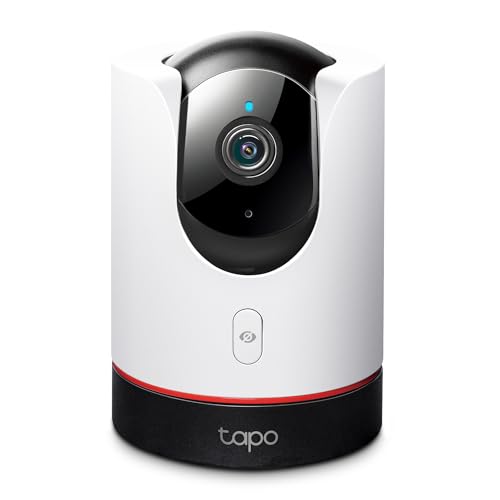
- Best one-camera solution for a small home: TP-Link Tapo C225 — Check on Amazon
- Smallest camera, easiest to hide: Blink Mini 2 — Check on Amazon
- Best value for two-room coverage: Wyze Cam v4 — Check on Amazon
- Best tracking for open-plan layouts: eufy Security Indoor Cam E220 — Check on Amazon
- Best wide view for one main room: Google Nest Cam (Indoor, Wired, 2nd Gen) — Check on Amazon
- Best compact pick for Alexa homes: Ring Indoor Cam (2nd Gen) — Check on Amazon
Read the full guide ↓
Disclosure: As an Amazon Associate, dailyhomedecorating.com earns from qualifying purchases. Links to Amazon on this page are affiliate links; they cost you nothing extra. Listing details such as price and availability change often, so check the current Amazon listing before you buy.
The best indoor security camera for small homes under $150 is rarely the best camera in absolute terms; it is the camera that covers a compact home completely without cluttering it. In a small house, a cottage or a compact bungalow, the geometry is forgiving: one main living space, a hallway you can cross in six steps, a front door within sight of the kitchen. A single well-chosen camera can genuinely watch such a home, which changes the buying question from ‘how many cameras’ to ‘which one camera, placed where, with what running costs’. It also raises the stakes on presence: in a small home there is no spare room to exile an ugly or intrusive camera to, so size, looks and privacy behaviour are first-order features, not afterthoughts.
Under $150 buys more than a small home needs, which is a pleasant problem. The money covers pan-and-tilt cameras that survey a whole open-plan ground floor from one shelf, and fixed cameras so small and inexpensive that two of them, one on the front door and one on the back, still leave change from the budget. What the money should not buy is an ongoing bill you did not plan for: several cameras in this guide record to a memory card for free, while others keep their recordings behind a subscription, and in a one-camera household that difference is the whole running cost of your security.
Our short answer: the TP-Link Tapo C225 is the small-home camera we would buy first, because one unit covers a main room completely, records locally with no fee, and hides its own lens when you are home, which in a compact house is most of the day. The Wyze Cam v4 is the value alternative for homes that need two fixed viewpoints instead of one moving one. This guide is about doors, rooms and pets in a general home; nursery monitoring is a separate job covered by our baby security camera guides. Everything below is judged on small-home logic: coverage per camera, footprint, privacy at close quarters, and total cost.
Small homes also forgive one thing and punish another. They forgive modest resolution: when the furthest wall is six metres away, even a 1080p camera is working well inside its comfort zone, which is why this guide includes excellent smaller cameras alongside the 2K models. They punish clutter and complication: a system that needs a hub on the kitchen counter, a camera the size of a kettle on the only shelf, or an app per room will be quietly dismantled by the household within a season. Every pick below was therefore chosen to be a complete, self-contained system for a compact home, camera, app and recording, with nothing else to find space for.
In this guide
Quick picks
| Camera | Best for | Key spec |
|---|---|---|
| TP-Link Tapo C225 | Best one-camera solution for a small home | 2K QHD (4MP) video, 360-degree pan and 149-degree tilt, starlight colour night vision, Apple HomeKit support |
| Blink Mini 2 | Smallest camera, easiest to hide | 1080p HD video, colour night view, built-in spotlight, plug-in power, works with Alexa |
| Wyze Cam v4 | Best value for two-room coverage | 2.5K QHD video, enhanced colour night vision, built-in spotlight and siren, Wi-Fi 6, IP65 weather resistance |
| eufy Security Indoor Cam E220 | Best tracking for open-plan layouts | 2K resolution, 360-degree pan and 96-degree tilt, motion tracking, works with HomeBase 3 |
| Google Nest Cam (Indoor, Wired, 2nd Gen) | Best wide view for one main room | 1080p HDR video, 135-degree diagonal field of view, person and animal alerts built in, Google Home app |
| Ring Indoor Cam (2nd Gen) | Best compact pick for Alexa homes | 1080p HD video, colour night vision, two-way talk, manual audio and video privacy cover |
How we chose
We judged these cameras for compact floor plans first. Coverage per camera led the criteria: in a small home, a pan-and-tilt camera in the main room can see the front door, the living space and the kitchen doorway in one sweep, while in a small but divided house, two cheap fixed cameras beat one rotating one. We weighted both strategies and picked cameras that serve each, rather than pretending one layout fits every small home.
Footprint and presence came second, because in a compact home a camera is always in someone’s eyeline. Size, cable tidiness and whether the design reads as furniture or as surveillance all counted. Third was privacy at close quarters: a small home’s camera is rarely more than a few metres from where people sit and sleep, so a physical privacy mode or cover scored heavily, and app-only privacy was treated as a compromise to be chosen knowingly. Fourth, running cost, with the now-familiar split: memory-card cameras (Tapo, Wyze, eufy) record free forever, Nest includes a short free history window, and Ring and Blink tie saved video to a plan. Fifth, simplicity of the whole system: one app, one camera or two, nothing that needs a hub on a shelf a small home does not have.
The cameras in detail
TP-Link Tapo C225
The Tapo C225 is the small home’s one-camera answer, and the reason is the combination rather than any single spec. Its pan-and-tilt head turns a full circle from one shelf, so in the typical compact layout, living room opening onto the hall, kitchen off the same space, one C225 genuinely sees the front door, the seating area and the kitchen entrance. Its 2K QHD picture is sharp enough to identify a face at those short-to-medium distances with room to spare, motion tracking follows a person or the dog across the space, and the starlight sensor keeps evening footage in colour long after simpler cameras have faded to grey.
Its privacy mode is where it pulls away from the field for this lens. In a small home, the camera that guards the door at noon is three metres from the sofa at seven. The C225’s lens rotates physically down into the body, on a tap or a schedule, so the household’s evenings are provably unrecorded and the camera’s armed hours are trusted. That visible courtesy is what keeps a camera installed in a compact house instead of exiled to a drawer, and it costs nothing to run.
Recording is equally home-sized: a memory card up to 512GB by maker spec holds the footage locally, detection of people and pets runs on the device free of charge, and the optional cloud plan can be ignored without losing anything core. It works with HomeKit, Alexa and Google Home, so it joins whichever platform the house already uses. The Tapo app is functional rather than beautiful, and the camera wants a shelf with a real sightline, but for one camera covering one small home completely, with no monthly fee and manners built in, this is the complete package. Buy it first; most small homes will not need a second.
One more small-home virtue: the C225 consolidates. A compact house often ends up wanting a pet check, a door watch and a holiday eye, and buying three gadgets for three jobs is how small shelves drown. The C225’s tracking, two-way talk and scheduling let one camera hold all three roles, watching the door while you are out, checking the dog at lunch, and covering its own lens in the evening. Consolidation is an underrated specification in a small home, and it is the deepest reason this camera tops the guide: it is not the best at one thing, it is the only one that makes a second purchase feel optional.
Storage and subscriptions, honestly: Local: microSD card up to 512GB by maker spec, so weeks of event clips can live on the camera itself. Tapo Care cloud storage is optional; person, pet and vehicle detection are handled on-device without it.
Privacy: This is the privacy pick of the group: Privacy Mode physically rotates the lens down into the camera body, so the lens is visibly covered. It is the strongest kind of indoor privacy control because you can confirm it with your eyes.
Blink Mini 2
The Blink Mini 2 is the small home’s discretion pick: the camera you choose when the house is compact enough that a visible gadget on every shelf would change how the rooms feel. It is a tiny plug-in cube that disappears onto a bookcase or a kitchen shelf, yet it covers the small-home essentials: 1080p HD video, colour night view from its spotlight, two-way talk for a word with the dog or a courier, and motion alerts to your phone. In a cottage or a small terrace where the front door opens almost into the living room, one Mini 2 aimed from a corner takes in the door and the room in a single fixed frame, no panning required.
As an Amazon brand it is happiest in an Alexa household, where an Echo Show becomes its screen and routines can arm it as the house empties. Setup is the quickest here, which suits a camera whose entire philosophy is not making a fuss. Its small size also makes it the easiest camera in this guide to reposition as a home’s needs change: this month the door, next month the puppy’s corner, with nothing but a plug moved.
The trade is Blink’s storage model, and in a small home with one camera it is the whole story. Saved clips and person detection sit behind the Blink Subscription Plan; without it you have live view and alerts but no recordings to review. Local storage is possible only through a separate Sync Module accessory, which rather spoils the one-small-box elegance. So read the Mini 2 as a plan camera: excellent if the subscription is acceptable, or if an Echo-filled house makes Blink’s ecosystem worth it. If you want recordings that are simply yours at no monthly cost, the Tapo above and the Wyze below are built that way.
In the smallest homes, a studio, a one-room annexe, a compact flat, the Mini 2’s fixed view deserves a second look rather than a dismissal. When one frame genuinely contains the door, the bed end and the kitchenette, panning adds machinery without adding information, and the smallest, quietest camera becomes the rational choice. The discipline it demands is aiming: spend the setup minutes finding the corner where that single frame includes the door’s swing and the room’s valuables, and the Mini 2 will cover a tiny home as completely as cameras three times its size cover larger ones.
Storage and subscriptions, honestly: Cloud-first: recorded clips and person detection sit behind the Blink Subscription Plan. Local storage is possible only through a separate Blink Sync Module with USB or card storage, which is an extra purchase; without either, you have live view and motion alerts but no saved video.
Privacy: There is no privacy shutter or lens cover. The app lets you arm and disarm the camera and set privacy zones, so privacy is a settings choice rather than a physical one.
Wyze Cam v4
The Wyze Cam v4 is the small home’s value strategy made physical: because its price position sits far below the under-$150 ceiling, the budget that buys one premium camera buys two v4s, and for a small but divided house, front door plus back door, hall plus kitchen, two fixed viewpoints protect more real life than one rotating camera that can only face one way at a time. Each v4 records in 2.5K QHD, sharper than the 1080p cameras from Ring, Blink and Google here, with colour night vision, a spotlight and a small siren, so the pair is not a compromise system; it is a wider one.
Its recording model suits a small household’s budget perfectly. Each camera takes a memory card up to 512GB by maker spec and records events or continuously with no subscription; playback lives in one app for both cameras. Wyze’s paid Cam Plus tier adds person detection and cloud copies of events, and with two cameras the honest maths is that the plan is an optional refinement, not a necessity: the cards already hold your footage. Wi-Fi 6 support helps the pair behave on a busy home network.
What two v4s do not give you is movement or hardware privacy. Each camera watches one fixed view, so aiming is the whole craft: door-height faces, not ceiling corners. There is no lens cover, so the off state is an app switch and a schedule, acceptable for door-facing cameras in a hall and living room, less ideal aimed anywhere near a bedroom. And the app will offer Cam Plus regularly. None of that changes the arithmetic for a small home that needs coverage in two places: this is the most protection per pound in the guide, and the natural partner to a C225, one tracking the main room, one v4 watching the back door.
A small home with a garden or a rear lane gets one more benefit from the v4 pair: the second camera’s weather resistance lets it graduate to a covered porch or outbuilding position later, watching the back gate from under cover, while a third inexpensive unit takes the indoor back-door view. Systems that can reshuffle like this suit small homes, whose needs change with a puppy, a lodger or a new shed far more often than their floor plans do. The v4’s low price position is what makes that flexibility real rather than theoretical.
Storage and subscriptions, honestly: Local: microSD card up to 512GB by maker spec, with continuous or event recording and no plan required. As with the Pan v3, Cam Plus is the paid layer that adds person detection and cloud event videos; the camera is genuinely usable without it, which is not true of every brand here.
Privacy: There is no lens cover or privacy shutter. You can turn the camera off in the app and disable the microphone, but nothing physically blocks the lens, so place it with that in mind.
eufy Security Indoor Cam E220
The eufy Indoor Cam E220 is the tracking alternative for small homes whose ground floor is one flowing space: a cottage living room that runs into the kitchen, a bungalow where the hall is a suggestion rather than a corridor. From a single shelf its head pans a full 360 degrees and tilts 96 degrees, and motion tracking follows whoever or whatever crosses the space, a burglar in the worst case, the dog’s evening patrol in the usual one. The 2K picture is a clear step above 1080p at the short distances a small home imposes, and detection of people and pets happens on the camera itself, so alerts arrive about subjects, not shadows.
Like the Tapo, it is a subscription-free design at its core: recordings go to a memory card in the camera or to a eufy HomeBase if the household later adds one, and nothing about playback or detection is rented. It supports HomeKit, at 1080p in Apple’s Home app, alongside Alexa and Google Assistant, which makes it the flexible citizen of a small smart home whose platform loyalties may still be forming. Two-way talk and infrared night vision complete a package with no real gaps for its role.
Against the C225, its two gaps are specific: there is no physical privacy shutter, so in a compact home where the camera shares the room with the sofa, privacy is an app setting and a schedule rather than a hidden lens; and its Wi-Fi is 2.4GHz only, a non-issue in most small homes where the router is never far away. If your small home is open-plan and you do not need the lens to hide itself, the E220 matches the Tapo feature for feature at a lower price position, and leaves budget for the memory card and a second camera later. Choose between them on privacy hardware, not on picture.
Small homes with high ceilings, a cottage with beams, a converted barn space, use the E220’s tilt more than most: angled down from a high shelf or a beam-side bookcase, its 96 degrees of tilt covers the floor plan below without the camera needing a special mount, and the tracking keeps a subject framed as they cross beneath. It is also worth saying plainly that at small-home distances its 2K picture and the Tapo’s are effectively indistinguishable in use; the choice between them is the privacy shutter and the ecosystem, not the image, and buyers can decide on those grounds with confidence.
Storage and subscriptions, honestly: Local: microSD card or eufy HomeBase 3. On-device human and pet detection runs without a monthly fee, and recordings stay in your home unless you choose eufy’s optional cloud add-on.
Privacy: There is no physical privacy shutter. The app offers an off mode and privacy zones, so the honest position is that privacy here is a software promise, not a mechanical one.
Google Nest Cam (Indoor, Wired, 2nd Gen)
The Google Nest Cam (indoor, wired) suits one small-home layout particularly well: the single main room that does everything. Its 135-degree diagonal view is the widest fixed view in this guide, so from one corner of a compact living room it takes in the door, the seating and most of the kitchen doorway without moving at all. For a small home that wants one camera, no panning mechanism and no fuss, that wide, forgiving frame is a genuine design answer, and the camera’s small, soft-edged body is the least surveillance-looking object here, a real consideration when the camera is always in the room with you.
Google’s intelligence is the other half of the appeal. Person and animal alerts are built in without a subscription, the Google Home app is the clearest here, and in a small smart home already running Google displays or speakers, asking for the living-room view aloud becomes part of the house’s furniture. Setup is minutes, and there is nothing to fit, because there is no memory-card slot: all recording is cloud recording.
That is also the limitation to accept with open eyes. The free allowance is a rolling three hours of event history; a Nest Aware subscription extends it to weeks and adds familiar-face alerts. In a small home the three-hour window covers most daily checking, what was that noise, did the dog walker come, but a week-long holiday outruns it entirely. There is no privacy shutter either, though Google’s home-and-away routines can switch the camera with your presence. Choose the Nest Cam if your small home speaks Google, your checking is mostly same-day, and one wide, calm view of the main room is the whole requirement.
For the small home that is also a quiet home, a reader’s cottage, a couple’s bungalow, the Nest Cam’s temperament matters as much as its view. It makes no sound, shows a small calm status light, sends few and well-judged alerts, and asks for no interaction for weeks at a time. Cameras in small homes fail socially more often than technically, and the Nest is engineered against social failure. If its three-hour free history and Google-only world fit your household’s habits, it is the pick most likely to still be running, unmuted and unresented, five years from now.
Storage and subscriptions, honestly: Cloud only, with no local storage option. Google includes a rolling 3 hours of event video history free; a Nest Aware subscription extends that history and adds familiar-face alerts. Without the plan, anything older than that short free window is gone.
Privacy: There is no physical shutter. Google Home offers a home/away routine that can switch the camera with your presence, which is convenient, but the lens is never physically covered.
Ring Indoor Cam (2nd Gen)
The Ring Indoor Cam (2nd Gen) is the small home’s ecosystem pick, and in a compact house its virtues compound. It is small enough for any shelf, quick to set up, and its 1080p picture with colour night vision is well matched to the short viewing distances of a small home, where faces cross the frame at three metres rather than ten. If the house already has a Ring doorbell, this camera joins the same app and the same subscription, and an Echo Show in the kitchen becomes its monitor; the whole system stays in one place, which in a small home with one of everything is exactly right.
Its manual privacy cover is worth singling out for compact living. The swivel cover blocks the lens and cuts the microphone in one gesture, so the camera that watches the door while the house is empty is visibly off while everyone is home, no app, no schedule, no debate. In a small home, where the camera is never far from the people it watches, that physical courtesy is the feature that keeps it plugged in, and Ring’s version is the simplest here: a cover you move with a finger, attached so it cannot be lost in a drawer.
The standing condition applies, and in a one-camera home it decides everything: there is no memory card and no local recording, and without a Ring Protect subscription you cannot play back recorded video at all, only watch live and receive alerts. Inside a Ring household already paying the plan, that condition costs nothing extra and the camera is an easy yes. As a standalone first camera for a small home, it makes your only security recording a rented one, while the Tapo C225 at the top of this guide records locally for free and hides its lens on a schedule. Choose Ring when the ecosystem is already yours; choose it knowing the plan is part of the price.
In a small home the Ring’s cover routine has a rhythm worth describing, because it is how the camera earns its keep socially: cover closed when the house wakes, opened with the front door as the last person leaves, closed again on return. It takes two seconds, it is visible to everyone including guests, and it converts the camera from a presence into an appliance with an obvious on and off. Small homes run on such household rituals, and a camera that fits one will outlast a technically better camera that demands an app visit every time the house changes state.
Storage and subscriptions, honestly: Cloud only, and this is the honest catch: there is no microSD slot and no local recording. Without a Ring Protect subscription you get live view and motion alerts but you cannot watch recorded video back; the subscription is what unlocks video history and rich notifications. Budget for the plan as part of the real cost.
Privacy: The manual privacy cover is excellent: swivel it over the lens and it physically blocks the camera and switches off the microphone. It is simple, visible and needs no app, though you do have to remember to open it again before you leave.
Comparison table
| Camera | Video | Movement | Local storage | Plan needed for playback |
|---|---|---|---|---|
| TP-Link Tapo C225 | 2K QHD (4MP) | Pan and tilt | microSD up to 512GB | No |
| Blink Mini 2 | 1080p | Fixed | Via separate Sync Module | Yes, Blink plan for clips |
| Wyze Cam v4 | 2.5K QHD | Fixed | microSD up to 512GB | Only for smart detection / cloud |
| eufy Security Indoor Cam E220 | 2K | Pan and tilt | microSD / HomeBase 3 | No |
| Google Nest Cam (Indoor, Wired, 2nd Gen) | 1080p HDR | Fixed | None | Free 3-hour history; Nest Aware for more |
| Ring Indoor Cam (2nd Gen) | 1080p | Fixed | None | Yes, Ring Protect |
How to choose the best indoor security camera for small homes under $150
Sketch the ground floor before you shop. If your small home is essentially one connected space, hall opening into living room, kitchen visible from the sofa, one pan-and-tilt camera on a central shelf covers it, and the Tapo C225 or eufy E220 is your whole system. If the home is small but divided, with a separate hall and closed doors, plan on fixed cameras at the doors instead: two Wyze Cam v4s will protect a divided house better than one rotating camera ever can. The floor plan, not the spec sheet, makes this decision.
Place the main camera where the routes cross. In a small home that is usually a corner of the living room or the hall end, high on furniture you own, angled to catch the front door and the path to the stairs or the valuables. Check the view at night as well as by day, because a small home’s camera often faces a window, and backlight will silhouette exactly the faces you bought it to see. Ten minutes of repositioning on day one is worth more than any resolution upgrade.
Decide the privacy rule for a house where the camera is always nearby. If the camera’s room is also the room you relax in, prefer physical privacy: the Tapo’s rotating lens or Ring’s swivel cover, used on a routine. If the camera can live in the hall aimed only at doors, app-based privacy on the eufy, Wyze or Nest is a fair compromise. In small homes this choice, more than any other, decides whether the camera is still in use at Christmas.
Finally, keep the running cost at zero if you can. A small home’s camera system should be boring financially: a memory-card camera costs its shelf price and a card, then nothing, indefinitely. Cloud cameras are fine when a plan is already in the household budget for a doorbell, but a standalone subscription for one indoor camera is the worst-value line item in this guide. Spend the under-$150 budget on the camera and the card, set the privacy schedule, and let the system disappear into the house’s routine.
One more small-home step: plan the cable before the camera. In a compact house, the difference between a tidy installation and a trailing wire across the living room is usually one shelf position to the left, nearer the socket. Walk the cable route for each candidate spot, keep the wire behind furniture where you can, and never let a cable cross a doorway or a stair. A camera that looks installed rather than abandoned is one the household accepts, and in a small home acceptance is half the specification.
Do not overlook the household’s second screen, because in a small home it changes how the camera gets used. An Echo Show in the kitchen, a Google display on the sideboard or a tablet that lives in the hall turns ‘check the camera’ from a phone-fumbling chore into a glance, and small homes, where the display and the camera are often in adjoining spaces, benefit most. Match the camera brand to the display you already own where you can: Ring and Blink to Amazon displays, Nest to Google displays, eufy and Tapo to either. It is a soft factor that never appears on a spec sheet, yet in practice the camera that appears on the kitchen screen is the camera the household actually uses, and an unused camera is the most expensive kind there is, whatever it cost.
And keep the camera’s box in the loft or the cupboard if you can, because the household that can re-pack, re-aim or relocate its camera in ten minutes is the household that keeps one small, well-chosen system for years instead of buying a new answer for every rearranged room.
Common mistakes
Buying a multi-camera system for a one-room problem
Small homes are the one case where a single camera can be the whole answer. Owners who start with three cameras in a compact house end up with overlapping views, triple the alerts and a system they resent. Start with one camera at the main door, live with it for two weeks, and add a second only for a blind spot you can name.
Putting the camera in the prettiest spot instead of the useful one
The shelf that hides the camera best often gives it a view of a wall and the top of the door. Security value lives at the route crossing: door, hall, path to the stairs. In a small home you can usually find one spot that is both discreet and useful, but usefulness must win the tie-break, or the camera is decor with a lens.
Ignoring how close the camera is to daily life
A camera three metres from the sofa is a member of the household. Choosing one with no privacy mode, and no plan for switching it off, is how small-home cameras end up unplugged by partners and teenagers. Buy the privacy behaviour first and the resolution second; an armed camera with a shutter beats a sharper camera in a drawer.
Paying a subscription to record one room
Cloud plans make sense spread across a doorbell and several cameras. For a single indoor camera in a small home, the plan can exceed the camera’s own value within a couple of years while a memory-card camera records the same room free. Do that arithmetic before the trial ends, not after the first renewal.
Using the home camera as a nursery monitor
A general indoor camera is not designed or tested for watching a sleeping baby, and in a small home the temptation to repurpose the living-room camera for the nursery is understandable and wrong. Use a purpose-built baby camera for the cot, covered in our baby security camera guides, and keep the cameras here on doors, rooms and pets.
Oversizing the camera for the room
A flagship pan-and-tilt head on the only shelf of a tiny living room dominates the space and draws every guest’s eye. Small homes reward small hardware: if a compact fixed camera covers the room, as it often can at these distances, choose the camera the room can absorb. Presence is a specification, and in a small home it outranks resolution.
Final recommendation
A small home is the kindest brief in this category: the distances are short, the routes are few, and one honest camera can do the whole job. The Tapo C225 earns the top spot because it is the most complete one-camera system here: full-room pan-and-tilt coverage, 2K QHD detail, recording on a memory card at no monthly cost, and a lens that physically puts itself away when the house is occupied. In a compact home, that last feature is not a bonus; it is what makes the first three usable every day.
The alternatives map to the other small-home shapes. Two Wyze Cam v4s cover the divided house with two doors. The eufy E220 matches the Tapo for open-plan tracking when a shutter is not required. The Blink Mini 2 disappears into the smallest rooms for Alexa households that accept its plan, the Nest Cam gives the Google home one wide, calm view, and the Ring serves the house already invested in Ring. Buy for your floor plan, fit the card, set the privacy routine, and a small home’s security becomes the simplest system in this entire series.
Start with the TP-Link Tapo C225 if you want one decision and no second-guessing: Check on Amazon and check the current listing before you buy. If its one real limitation is the thing you care about most, the Wyze Cam v4 is the alternative we would buy instead.
FAQ
How many cameras does a small home actually need?
Usually one, sometimes two. One pan-and-tilt camera covers an open-plan small home from a central shelf. A small home with a separate hall and back door may justify a second fixed camera on the rear entry. Start with one at the main door and add only when you can name the blind spot the second camera will cover.
Is one pan-and-tilt camera better than two fixed cameras?
It depends on the floor plan. In one connected space, the panning camera wins: it follows movement and checks every corner in turn. In a divided house, two fixed cameras win, because a panning camera can only face one room at a time and cannot see through the hall wall. The Wyze Cam v4 pair and the Tapo C225 represent the two strategies in this guide.
Which small-home camera has no monthly fee?
The Tapo C225, eufy E220 and Wyze Cam v4 record to memory cards and need no subscription for recording or playback; Wyze’s optional plan adds person detection and cloud copies. The Nest Cam includes three hours of free event history, while Ring needs its plan for any playback and Blink needs its plan or a storage module for saved clips.
How do I keep a camera from feeling intrusive in a small home?
Choose physical privacy where you can: the Tapo C225 rotates its lens into its body, and the Ring Indoor Cam has a swivel cover. Aim cameras at doors and routes rather than seating, set an off schedule for the hours you are home, and pick a design that reads as a small appliance rather than surveillance equipment, as the Nest Cam and Blink Mini 2 do.
Where is the single best spot for a camera in a small home?
High in the corner of the main living space or at the end of the hall, on furniture you own, angled to include the front door and the path through the home. That one position covers arrivals, the main room and the route to the bedrooms or valuables in most compact layouts. Verify the night view from that spot before settling.
Can a small-home camera also watch my pet?
Yes, and in a small home it is often the same camera doing both jobs. Pan-and-tilt models like the Tapo C225 and eufy E220 follow a pet around the room, and two-way talk on every pick here lets you speak to them. Just remember the camera’s security placement, aimed at the door, may not be the pet’s favourite corner; tracking models solve that by looking around.
Can one camera really cover a small house, including upstairs?
One camera covers one floor’s main space, not a staircase and a landing behind doors. Most small homes put the camera on the ground floor, where the doors and valuables are, and accept that upstairs is covered indirectly: anyone entering must cross the ground-floor view. If upstairs has its own external access, a fire escape or a dormer, that is a genuine second position and deserves the second camera.
Will a camera raise my small home’s energy or Wi-Fi load noticeably?
Barely. These are small plug-in devices drawing a few watts, comparable to a phone charger, and their Wi-Fi use is modest except while you are watching live or a clip is uploading. A single camera will not trouble any broadband connection; even the two-camera Wyze setup in this guide is lighter on a network than one video call. The real resource a small-home camera consumes is shelf space and attention, which is why this guide weights footprint and calm alerts so heavily.


