Where to buy
Shopping for the best indoor security camera for small homes under $200? Check the latest price, availability and delivery on Amazon. Orders are placed on Amazon. We may earn a commission from qualifying purchases. Every camera below sits within the under $200 framing of this guide at the time of writing — check the current Amazon listing before you buy, and read each pick’s storage notes, because what a camera records for free differs more than what it costs.
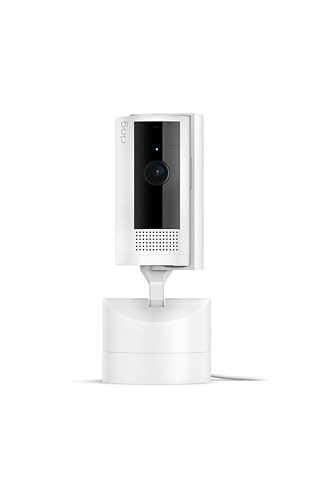
- Best one-camera whole-home answer: Ring Pan-Tilt Indoor Cam (White) — Check on Amazon
- Best detail for open-plan rooms: eufy Security Indoor Cam S350 — Check on Amazon
- Best two-room value pairing: Wyze Cam v4 — Check on Amazon
- Best for hallways and nooks: Blink Mini 2 (White, 1 Camera) — Check on Amazon
- Best for bedroom-adjacent privacy: Arlo Essential Indoor Camera 2K — 2nd Generation (VMC3060) — Check on Amazon
- Best compact shelf camera: Google Nest Cam (Indoor, Wired) — 2nd Generation — Check on Amazon
Read the full guide ↓
Disclosure: As an Amazon Associate, dailyhomedecorating.com earns from qualifying purchases. Links to Amazon on this page are affiliate links; they cost you nothing extra. Listing details such as price and availability change often, so check the current Amazon listing before you buy.
The search for the best indoor security camera for small homes under $200 starts from a happy fact: a small home is the easiest security problem in this category. Fewer rooms, shorter sightlines and usually one main entry mean that one well-chosen camera — or two modest ones — can genuinely watch a whole home, where a large house would need a system. The under-$200 budget that would be a compromise in a big property is, in a cottage, bungalow, terraced house or compact family home, enough to do the job properly. The skill is not spending the whole tier on one flagship by reflex; it is matching the camera count and type to a floor plan you can draw on a napkin.
Small homes do impose their own rules. Rooms live closer together, so a living-room camera may also see the kitchen, the hallway and the top of the stairs — wonderful for coverage, demanding for privacy, because the camera is simply nearer to daily life than it would be in a rambling house. Shelf space and outlets are finite, cables show, and a bulky camera dominates a small room in a way it never would in a large one. And multi-use spaces — the room that is office by day and guest room by night — need cameras whose off state is obvious and respected. This guide judges every pick against that compact reality rather than against a show-home floor plan.
This is an indoor guide for small homes specifically: not a nursery roundup of baby cameras, though a general camera can glance at a cot’s room under the usual cautions, and not a general security list padded with outdoor models for gardens a small home may not have. Our headline is the Ring Pan-Tilt, because one moving camera at a central point is the small home’s most elegant answer — with the eufy S350 for open-plan detail, a Wyze pairing for two-room value, and the Blink, Arlo and Nest each solving a particular small-space problem of their own.
In this guide
Quick picks
| Camera | Best for | Key spec |
|---|---|---|
| Ring Pan-Tilt Indoor Cam (White) | Best one-camera whole-home answer | 1080p HD, 360° pan / 169° tilt, attached privacy cover, Ring app and Alexa |
| eufy Security Indoor Cam S350 | Best detail for open-plan rooms | Dual lenses: 4K wide-angle + 2K telephoto, 360° pan / 75° tilt, microSD or HomeBase 3 local storage |
| Wyze Cam v4 | Best two-room value pairing | 2.5K QHD fixed camera, microSD local recording, colour night vision, spotlight |
| Blink Mini 2 (White, 1 Camera) | Best for hallways and nooks | 1080p HD plug-in camera, 143° field of view, Alexa, Blink plan or Sync Module local clips |
| Arlo Essential Indoor Camera 2K — 2nd Generation (VMC3060) | Best for bedroom-adjacent privacy | 2K fixed camera, automated privacy shield, cloud-first with Arlo Secure plan |
| Google Nest Cam (Indoor, Wired) — 2nd Generation | Best compact shelf camera | 1080p HDR fixed camera, free short event history, Google Home app, no local storage |
The table is the shortcut; the reviews below are the substance. In particular, do not choose from the table alone on storage: two of these cameras record happily to a memory card with no plan at all, while others keep their recorded history behind a subscription, and that difference will shape your ownership more than any specification in the right-hand column.
How we chose
We chose for compact floor plans. First, coverage per device: in a small home the winning metric is how much of the home one camera honestly watches, which promotes pan-and-tilt models and very wide fixed views, and demotes narrow cameras that would need a partner in every room. Second, physical footprint: physical size, cable length and whether the camera needs a hub all count double when shelves are small and sockets are few. Third, sightline intelligence — small homes have short views, so extreme resolution matters less and field of view, placement flexibility and night performance at close range matter more.
Fourth, privacy at close quarters: the nearer a camera lives to the sofa, the desk and the bedroom door, the more a physical shield, cover or visible privacy mode matters, so the Arlo and Ring score privacy points here that would be minor in a larger house. Fifth, honest running costs for smaller budgets: which cameras record locally with no plan — eufy and Wyze — and which need a subscription for history, stated plainly for Ring, Arlo, Blink’s cloud path and Nest beyond its short free window. We kept the list to indoor plug-in cameras a small home can actually host: no outdoor models, no battery units to recharge, no nursery-only devices, and no ratings or review counts anywhere in the reasoning.
Detailed reviews
Ring Pan-Tilt Indoor Cam (White)
The Ring Pan-Tilt Indoor Cam is the natural pick for Alexa households and anyone already using a Ring doorbell. One camera covers a whole room: the head pans a full 360 degrees and tilts through a wide range under your control in the Ring app, so a single unit at a hallway junction or living-room corner replaces the two fixed cameras a larger space might otherwise need. Video is 1080p HD with colour night vision, two-way talk includes noise cancellation per Ring’s spec sheet, and the long power cable makes shelf and wall placement flexible.
Ring keeps this simple and entirely cloud-based: there is no local storage on this camera — no card slot, no hub option. Without a Ring subscription plan you get live view and motion alerts, but you cannot review, save or share recorded video, because recording history is a plan feature. Person and package-style smart alerts are also plan features on Ring’s current tiers. If you already pay for a Ring plan covering your doorbell address, adding this camera usually slots into that same household plan; if you do not, price the plan into your decision exactly as you would with Arlo or Nest. What you are buying into is convenience and ecosystem, not storage independence.
Ring fits this camera with an attached privacy cover that slides over the lens, and the app also offers modes and motion schedules. The cover is manual rather than motorised, so it depends on someone remembering to close it — but when it is closed, it is closed, and everyone in the room can see that it is.
In a small home one pan-and-tilt camera at a central point can genuinely watch the living area, hall and kitchen entrance — the fewest devices, cables and apps of any setup here.
- Full pan and tilt coverage from one camera at a mid-range position in the tier
- Attached privacy cover plus Ring modes and schedules
- Deep Alexa and Ring doorbell ecosystem integration
- Colour night vision and two-way talk with noise cancellation, per maker specs
Honest limitation: No local storage at all and no recorded history without a subscription; the privacy cover is manual, and the camera only connects on 2.4GHz Wi-Fi.
Choose the Ring Pan-Tilt if you want one camera to sweep a whole room inside the Ring and Alexa ecosystem. Skip it if subscription-free recording is a hard requirement or your router setup makes 2.4GHz-only devices a problem.
eufy Security Indoor Cam S350
The eufy Indoor Cam S350 is the pick for anyone who wants the sharpest indoor picture in this price band without signing up for a monthly plan to get it. Its dual-lens design pairs a 4K wide-angle camera that watches the whole room with a 2K telephoto camera that zooms in on a face, a doorway or a pet, and the two views can be shown together so you never have to choose between context and detail. The motorised head pans a full circle and tilts, and maker-stated AI tracking follows a person or pet across the room instead of leaving them at the edge of the frame.
Storage is where the S350 most clearly breaks from the cloud-first brands in this guide. It records to a microSD card slotted into the camera itself — the maker states support for cards up to 128GB, and the card is sold separately, so budget for one — or to a eufy HomeBase 3 hub if you already own one, which keeps footage inside your home. Local recording, playback and the on-device human, pet and sound detection work without any subscription. eufy does sell an optional cloud backup plan, but it is genuinely optional: nothing in the core recording path is locked behind it. Be precise about one limit, though — without a HomeBase, footage lives on that single card in the camera, so a stolen camera takes its card with it.
For indoor privacy, the S350 offers a privacy mode in the app that turns the lens away and stops recording, which is the honest way to handle a camera in a living room or bedroom: a physical repositioning you can see from across the room, not just a software promise. Two-way talk, activity zones and Alexa and Google Assistant display support round it out, though the maker notes Google Home integration is limited and HomeKit is not supported.
Open-plan small homes suit the S350: one position, a wide 4K view for the whole space, and a telephoto for the door, with no second camera competing for shelf space.
- Dual 4K wide and 2K telephoto lenses with hybrid zoom for faces and detail
- Local microSD or HomeBase 3 recording with no required subscription
- Full pan and tilt coverage with person and pet tracking, per maker specs
- Dual-band Wi-Fi 6 support helps on crowded home networks
Honest limitation: The microSD card is not included, the camera is larger than the fixed mini cameras here, and app-based zoom and tracking features depend on eufy firmware and app updates rather than working entirely offline.
Choose the S350 if you want one camera to cover a whole room in high detail and you prefer your footage stored at home. Skip it if you want the smallest possible camera, you are committed to the Google Home or Ring app, or you specifically want continuous cloud history managed by someone else.
Wyze Cam v4
The Wyze Cam v4 is the value engine of this guide: a small wired camera with 2.5K QHD resolution, enhanced colour night vision, a motion-activated spotlight and two-way audio, at a budget-tier position that leaves most of an under-$200 allowance free for a second or third camera. Wyze built its reputation on exactly this formula — headline specs at prices the big ecosystems do not match — and the v4 adds a faster processor and Wi-Fi improvements over its predecessors while keeping the same simple cube form that mounts almost anywhere.
Local storage is a genuine strength here. The v4 records to a microSD card — the maker and listing state support for large-capacity cards — so event clips and, with the right settings, continuous recording can live in the camera with no plan at all. Wyze’s Cam Plus subscription exists and adds cloud storage plus richer person and pet detection, but unlike Ring or Arlo, the camera’s core recording does not stop without it. Read the fine print on free cloud stills and short cloud clips, which are a taster rather than a history archive; the card is where your real footage lives, with the usual caveat that footage stored in the camera leaves with the camera if it is taken.
There is no physical shutter on the v4. The app offers on and off control, schedules and automation rules, and the status light tells the room the camera is live. In shared or sensitive rooms, treat placement and scheduling as your privacy tools, or step up to the shielded Arlo in this guide.
A pair of v4s — living room and bedroom hallway — is the classic small-home layout, and the tier budget absorbs both plus memory cards comfortably.
- 2.5K QHD video and colour night vision at a budget-tier position
- microSD local recording works without any subscription
- Spotlight and siren features unusual at this level
- Leaves budget room for multi-camera coverage under the same ceiling
Honest limitation: No physical privacy shutter, the richest smart detection sits behind the optional Cam Plus plan, and Wyze’s app experience is more utilitarian than the Google or Ring apps.
Choose the Wyze Cam v4 if you want the most rooms covered for the money with card recording included. Skip it if you want a physical privacy shutter, a premium app, or pan and tilt movement.
Blink Mini 2 (White, 1 Camera)
The Blink Mini 2 is the smallest, simplest camera in this guide: a tiny plug-in unit with 1080p HD video, colour night view from its built-in spotlight, two-way audio and a wide 143-degree field of view per Blink’s specifications. It is the camera people buy in multiples — one for the front room, one for the hallway, one watching a pet’s favourite corner — because each unit sits at the budget end of the category while staying inside Amazon’s Alexa ecosystem with Echo Show viewing and routine support.
Blink’s storage story has two halves and both deserve honesty. Cloud recording, saved clip history and person detection require a Blink subscription plan; a trial plan is typically bundled with the camera, after which those features stop if you do not subscribe. The local alternative is real but conditional: with a Sync Module 2 and a USB drive, Blink can store clips locally when no cloud plan is active — the newer Sync Module Core does not offer that local storage, so check exactly which module a bundle includes before assuming you have the no-subscription path. Without either a plan or the right module, you have live view and alerts rather than a reviewable history.
The Mini 2 has no privacy shutter or cover. Privacy controls are app-based — arm and disarm, motion zones and schedules — which is adequate for entryways and pet corners, and a weaker answer than the Arlo shield or Ring cover for bedrooms and other sensitive rooms.
Hallways, landings and the corner by the front door are Mini 2 territory: tiny rooms where a big camera would dominate and a wide small one is exactly right.
- Tiny plug-in design with a wide field of view for corners and shelves
- Budget-tier position makes multi-room coverage realistic
- Local clip storage possible via Sync Module 2 and USB when no plan is active
- Straightforward Alexa and Echo Show integration
Honest limitation: Person detection and cloud history need a subscription, local storage depends on owning the correct Sync Module, and there is no physical privacy cover.
Choose the Blink Mini 2 for simple, affordable coverage of several rooms inside an Alexa home. Skip it if you want card-in-camera local recording, a privacy shutter, or resolution above 1080p.
Arlo Essential Indoor Camera 2K — 2nd Generation (VMC3060)
The Arlo Essential Indoor 2K earns its place on one feature almost nobody else in this guide offers: an automated privacy shield that physically closes over the lens when the camera is disarmed. For an indoor camera — a device you are pointing at your own life — that visible, mechanical closed state is the strongest privacy answer in this roundup. Behind the shield sits a 2K fixed camera with night vision, two-way talk and a wide view suited to living rooms, hallways and nurseries used as a general room camera rather than a dedicated baby monitor.
Arlo is a cloud-first system and you should buy it with open eyes. Live view and basic motion notifications work without a plan, but cloud recording and video history, and the smart person, package, vehicle and animal detection that makes Arlo alerts genuinely useful, require an Arlo Secure subscription. This indoor model has no microSD slot; Arlo’s local-recording route involves a separate SmartHub base station on compatible systems, which is extra hardware and not a feature of this camera on its own. Treat the subscription as part of the product’s real price and the camera makes sense; treat it as an optional extra and you will be disappointed by how little history the free tier keeps.
The privacy shield is the headline: it opens and closes automatically as you arm and disarm, so family members can see at a glance whether the camera can see them. Combined with geofencing-style arming in the Arlo app, it is the most household-friendly privacy setup here for shared spaces and bedrooms.
Small homes put cameras closer to private life; the Arlo’s shield matters more, not less, when the living room camera can also see the bedroom door.
- Automated physical privacy shield — the clearest privacy signal in this guide
- 2K video with night vision and two-way talk
- Smart detection for people, packages, vehicles and animals on a plan
- Works within the wider Arlo camera and doorbell ecosystem
Honest limitation: Cloud recording and smart detection are subscription features, there is no memory-card slot on the camera, and the fixed lens cannot pan to follow action across a large room.
Choose the Arlo if a physical privacy shield matters more to you than avoiding a subscription. Skip it if you want local card recording included in the box, whole-room pan coverage, or a camera that keeps full history for free.
Google Nest Cam (Indoor, Wired) — 2nd Generation
The wired Google Nest Cam is the pick for households already living in Google Home. It is a small, neat fixed camera with a magnetic-style stand that sits happily on a shelf, records 1080p HDR video with night vision, and — unusually at this level — includes person, animal and vehicle alerts and activity zones without a subscription, according to Google. If your home already answers to Google Assistant and your other devices live in the Google Home app, this is the camera that feels like it was always there.
Be clear-eyed about storage before you buy, because this camera has no local option at all: there is no microSD slot and no hub recording. Without a paid plan you get live view plus a short rolling window of recent event history — Google provides a few hours of event video history free. Anything longer, including extended event history and, on the higher plan tier, continuous recording for wired cameras, requires a Nest Aware subscription, now sold under Google’s premium home plans. That subscription is also what unlocks familiar-face detection. None of this is hidden by Google, but it means the true cost of a Nest camera is the camera plus a plan if you want history you can actually search next week.
There is no physical shutter or privacy cover on this camera. Privacy is handled in software: you can turn the camera off in the app, schedule it, or use Home and Away routines so it only records when the household is out. That works well for disciplined Google Home users, but if a visible, physical cover matters to you in a bedroom, the Arlo or Ring picks in this guide answer that need more directly.
The Nest Cam’s compact body suits small shelves and bookcases where a pan-and-tilt head would look oversized, and one app keeps a small setup tidy.
- Person, animal and vehicle alerts included without a plan, per Google
- Clean Google Home integration and familiar-face detection on a plan
- Compact wired design with HDR video and night vision
- Activity zones included, which several rivals reserve for subscribers
Honest limitation: No local storage of any kind, only a short free event-history window, and extended history or continuous recording is subscription-only — the camera is cloud-dependent by design.
Choose the Nest Cam if your home runs on Google Home and you accept a subscription for real history. Skip it if you want recordings stored in your house, you refuse monthly fees on principle, or you need pan and tilt coverage from a single camera.
Comparison table
| Camera | Video | Movement | Storage without a plan | Privacy control |
|---|---|---|---|---|
| Ring Pan-Tilt Indoor Cam (White) | 1080p HD | Pan and tilt | Live view only; history needs a plan | Attached sliding privacy cover |
| eufy Security Indoor Cam S350 | 4K wide + 2K telephoto | Pan and tilt | microSD card or HomeBase 3 local recording | Privacy mode turns lens away |
| Wyze Cam v4 | 2.5K QHD | Fixed | microSD card local recording | App off and schedules |
| Blink Mini 2 (White, 1 Camera) | 1080p HD | Fixed | Live view; local clips only via Sync Module 2 + USB with no plan | App arm/disarm and schedules |
| Arlo Essential Indoor Camera 2K — 2nd Generation (VMC3060) | 2K | Fixed | Live view only; history needs a plan | Automated physical privacy shield |
| Google Nest Cam (Indoor, Wired) — 2nd Generation | 1080p HDR | Fixed | Short free event-history window only | App off, schedules, Home/Away |
Read the storage column as the decision column. Resolution and movement decide what a camera can see; storage decides whether you will ever see it again. If you take one idea from this guide, take that one — and then choose the row whose no-plan behaviour you could live with permanently, because plans, trials and prices all change, while the camera on your shelf stays the same.
How to choose the best indoor security camera for small homes under $200 (one or two cameras is enough)
Draw the napkin floor plan first
Sketch your home’s rooms, doors and the hallway that joins them, then mark the single point that sees the most: usually a living-room corner facing the front door and the hall. If one point sees your entry and main room, a pan-and-tilt camera — Ring or eufy — is your whole system. If the bedrooms hide around a corner no single point can see, plan on two fixed cameras instead and let the Wyze and Blink prices make that painless.
Spend on the junction, save on the rooms
In a small home, money belongs at the choke point. Put your best camera where routes cross — entry, hall, main room in one view — and use the simplest camera, or none, in secondary rooms. A flagship guarding a spare bedroom while a budget camera watches the front door is the classic small-home misallocation, and this tier’s budget is exactly big enough to get the order right.
Use the short sightlines to your advantage
Small rooms forgive resolution and reward width. A 1080p camera with a wide view identifies perfectly well across a twelve-foot room, so do not over-buy pixels for a compact home. Where detail does matter — a long open-plan living-kitchen, a face at the far door — the eufy’s zooming second lens is the one specification that still earns its place.
Make the off state a household fixture
When one camera can see most of your home, its privacy state is a whole-house question. Choose a visible answer — the Arlo shield, the Ring cover, the eufy turning its lens away, or a schedule the family sets together — and treat guests the same way: a camera they are told about, in a home this size, is hospitality; one they discover is not.
Common mistakes
- Buying a big-house system for a small house. A hub, four cameras and a video doorbell package solves a problem you do not have, eats the shelves and sockets you do have, and spends the tier several times over. One or two cameras, placed at the junction, is the complete small-home answer.
- Over-buying resolution for short rooms. Paying flagship prices for maximum resolution to watch a room twelve feet wide buys detail you cannot use. In small homes, field of view, night performance and storage honesty outrank raw pixel counts almost every time.
- Putting the only camera where it cannot see the door. A camera centred on the living room’s social life often has the front door behind it. In a small home the entry is the one view that must exist; arrange the camera for the door first and let the room be covered second.
- Forgetting the camera can hear the whole house. Compact homes carry sound: a camera in the living room may hear the kitchen conversation and the hallway phone call. Keep two-way audio and audio recording choices deliberate, tell the household what is on, and use schedules in the evenings if the home feels overheard.
- Ignoring the subscription because the camera was cheap. A small budget feels a monthly plan more, not less. If a cloud camera’s plan lapses, its history goes with it — so for a small home watching costs, the local-recording eufy and Wyze deserve first consideration, and any cloud pick should be chosen with its plan priced in.
Final recommendation
A small home does not need a smaller ambition — it needs a tidier one. The Ring Pan-Tilt covers the classic compact layout from a single shelf; the eufy S350 owns the open-plan version with detail and no subscription; a Wyze pair splits the difference in closed floor plans; and the Blink, Arlo and Nest fill the hallway, privacy and Google-shaped gaps. Sketch the floor plan, guard the junction, make the off state visible, and an under-$200 spend will watch a small home completely — with nothing drilled, nothing wasted and nothing watched that should not be.
Our top three for this guide, in order: Ring Pan-Tilt Indoor Cam (White), eufy Security Indoor Cam S350, Wyze Cam v4. Start with the first that matches your home’s app, your storage preference and your rooms — and check its current Amazon listing for price and availability before you commit.
Compact homes reward tidy cabling more than any other setting, because every wire is on display. Route power leads down the back of bookcases and along skirting where the cameras here allow it, and prefer the shelf nearest the socket over the theoretically perfect corner that needs a cable across the ceiling. A camera installation that looks intentional also behaves intentionally: it is less likely to be knocked, unplugged for the vacuum cleaner’s socket, or quietly resented by the people living around it.
Heat and height are the small home’s quiet placement traps. The top of a bookshelf near a ceiling in a warm room can run hot in summer, and cameras wedged above radiators or in sunlit window corners age early and see poorly. A shaded, mid-height shelf with air around it beats the highest perch in the house. Check the live view on the warmest afternoon as well as the darkest night before you call the placement finished.
Think one step ahead about the second camera even if you never buy it. Choosing an ecosystem and storage model that a future camera can join — the same app, the same plan or the same card routine — means a small home’s security can grow by one hallway or one back door without starting again. The tidiest systems in this guide are the ones that began with that thought, and it costs nothing at the start beyond a moment’s planning.
Sharing access is a feature to set up deliberately, not casually. Partners and adult household members should generally have their own access through the app’s sharing tools rather than borrowing one password, so that access can be removed cleanly when circumstances change — a flatmate moves out, a house-sitter’s week ends, a phone is lost. Review the shared-users list whenever your household changes. The camera pointed at your front door should have the most carefully managed guest list of any device you own.
When a camera eventually leaves your home — sold, gifted or recycled — reset it to factory settings and remove it from your account first. A camera still linked to you can send its new owner’s pictures to your phone, and a camera you forget to remove keeps a window into a home that is no longer yours to watch. The reset button and the app’s remove-device option take two minutes; do them before the camera leaves the house, not after.
Power cuts and router restarts are the everyday emergencies of indoor cameras, and they sort the setups in this guide into two behaviours. Card-recording cameras generally resume recording once power returns, with a gap only for the outage itself. Cloud cameras return when both power and internet do. After any outage, open the app once and confirm your camera is live and recording rather than assuming it — the check takes seconds and closes the only silent failure mode these devices really have.
A last practical note on evidence: if a camera ever records something that matters, export and save that clip outside the camera system the same day — to your phone, your computer or your cloud drive. Loop recording overwrites, plans expire and cards fail, usually on their own schedules rather than yours. The export button in each app here exists for exactly that moment, and learning where it is before you need it is the cheapest insurance in this entire guide.
Memory cards deserve a beginner-proof explanation, because two picks in this guide depend on them. A microSD card is the small card that slides into the camera and holds its recordings; when it fills, the camera normally overwrites the oldest footage first, which is called loop recording. A larger card simply means more days of history before that overwriting begins. Buy cards sold as high-endurance where the maker recommends them — security cameras write constantly, and a card made for occasional photo storage wears out far sooner. Format a new card in the camera itself, through its app, rather than on a computer, and replace cards that start producing gaps or errors instead of trusting them with the one week that matters.
Firmware and app updates are the invisible half of owning any of these cameras. Makers use them to fix security flaws, improve detection and occasionally change how plans and features behave — which is one more reason to read update notes for a camera that watches your home. Turn on automatic updates where the platform offers them, keep the phone app current, and after any major update, glance at your motion zones and recording settings to confirm they survived the change exactly as you left them. Five minutes of attention after an update prevents the silent setting reset that owners usually discover only after an incident.
Frequently asked questions
How many cameras does a small home actually need?
Most small homes need one or two. One pan-and-tilt camera at the living-room and hallway junction covers the entry and main space in many layouts; a second small fixed camera covers a back door or an upstairs landing. Beyond two, most small homes are buying overlap, not coverage.
Is one expensive camera or two cheap ones better for a small home?
It depends on the floor plan. One moving camera wins in open layouts where a single point sees the door and the main room. Two inexpensive fixed cameras win in closed layouts with a hallway bend, because a pan head cannot see around a corner. The napkin sketch decides, not the price tag.
Which camera here needs no subscription in a small home?
The eufy S350 and the Wyze Cam v4 record to memory cards with no plan required. Ring, Arlo and Blink’s cloud recording need a plan for history, and the Nest Cam’s free history is a short window before its plan applies — worth knowing before a small budget meets a monthly bill.
Where is the single best spot for a camera in a small home?
A high shelf or corner of the main living space, facing the front door with the hallway in frame, angled along the room rather than at a window. It is the one position that answers who came in, when, and which way they went — the three questions a small home actually asks.
Are small homes too small for a camera to be private?
No, but the margin is thinner, which is why visible privacy hardware matters here: the Arlo’s closing shield, the Ring’s sliding cover and the eufy’s privacy mode all let a compact household see the camera is off. Combine that with a family schedule and a small home keeps both its security and its ease.
Can a small-home camera double as a pet camera?
Yes — pet watching is the natural second job of every camera here, and the pan-and-tilt and tracking models follow a pet across the room. That is different from a dedicated baby camera’s nursery role; for general pet and room duty, these security cameras are the right tool.


