Where to buy
Check the latest price, availability and delivery on Amazon. Orders are placed on Amazon. We may earn a commission from qualifying purchases.
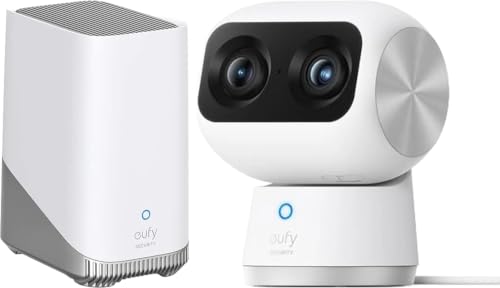
- Best for home security overall: eufy Security Indoor Cam S350 with HomeBase 3 — Check on Amazon
- Reolink E1 Zoom Indoor Camera — Check on Amazon
- Arlo Essential Indoor Camera 2K (2nd Gen) — Check on Amazon
- Ring Pan-Tilt Indoor Cam — Check on Amazon
See 2 more Amazon options
- Google Nest Cam (Indoor, Wired) — Check on Amazon
- TP-Link Tapo C225 Pan/Tilt Camera — Check on Amazon
Read the full guide ↓
Disclosure: As an Amazon Associate, dailyhomedecorating.com earns from qualifying purchases. Links to Amazon on this page are affiliate links; they cost you nothing extra. Listing details such as price and availability change often, so check the current Amazon listing before you buy.
Judged strictly as a security tool, the best indoor security camera for home security under $300 is the one that produces usable evidence and keeps producing it under stress: when the Wi-Fi stumbles, when the intruder unplugs the obvious camera, when the subscription card expires, when the alert has to be believed at 3 a.m. That is a harsher brief than pet-watching or package-checking, and it reshuffles the usual rankings. Pretty apps matter less here. What matters is identification-grade detail, detection that separates a person from a shadow, recording that survives the camera itself, and a privacy arrangement honest enough that the household leaves the system armed. This guide grades every pick on those security terms first.
The budget works in your favour: $300 is a ceiling, not a target, and at security grade it buys real architecture — a flagship camera recording to a hub hidden elsewhere in the house, an optical-zoom camera that can read a face across a long room, or layered coverage across the entry points an intruder must actually use. It also buys mistakes, if spent carelessly: a cloud camera whose recordings stop the month a plan lapses is a security system with an expiry date, and we flag every pick’s storage model in plain language for exactly that reason. A security camera that cannot show you what happened has failed at its only job.
Scope, stated once: these are indoor cameras for the inside of a home security setup — entries from within, halls, living spaces, garages. They complement rather than replace outdoor cameras, an alarm panel or good locks, and they are not nursery monitors; the baby camera category, with its crib-specific sensing, is covered in its own guides on this site. Within their indoor brief, though, these six are the picks we would trust with evidence.
In this guide
Quick Picks
For readers who want the short version: this table ranks the picks by the security job each does best, from evidence-grade local recording to always-on cloud patrol.
| Buyer type | Pick | Why it stands out | Link |
|---|---|---|---|
| Best evidence system | eufy Security Indoor Cam S350 with HomeBase 3 | Dual-lens 4K detail recorded to a separate hub in the house — the evidence survives even if the camera does not | Check on Amazon |
| Best for long rooms | Reolink E1 Zoom Indoor Camera | True 3x optical zoom and auto-tracking pull identification detail out of big spaces, recorded locally with no fee | Check on Amazon |
| Best alert intelligence | Arlo Essential Indoor Camera 2K (2nd Gen) | The most discriminating alert filtering in the guide and a privacy shield that enforces the armed/disarmed boundary physically | Check on Amazon |
| Best active patrol | Ring Pan-Tilt Indoor Cam | A motorised head that sweeps the whole interior on your command, inside the Ring ecosystem of doorbells and alarms | Check on Amazon |
| Best for Google security setups | Google Nest Cam (Indoor, Wired) | Person, animal and vehicle alerts with no plan at all, and wired power that enables continuous recording on the top tier | Check on Amazon |
| Best fee-free sentinel | TP-Link Tapo C225 Pan/Tilt Camera | On-device person detection and local card recording that no lapsed plan can switch off — security that cannot expire | Check on Amazon |
How These Picks Were Chosen
We scored security outcomes, not feature counts. The first criterion was evidence quality: can this camera, at the distance a real room imposes, identify a person rather than merely detect one? That favoured genuine resolution, telephoto and optical-zoom optics, and frame-filling fields of view over headline megapixels behind a fisheye. The second was detection integrity — on-device person detection that ignores curtains, headlights and pets reduces the false alerts that teach households to disarm systems, so it counted heavily.
The third criterion was recording survivability, and it is where this guide is most opinionated. Footage that lives only on a card inside the camera dies if the camera is taken. Footage that lives only in a cloud dies if the subscription does. We therefore weighted hub-based local recording and always-on cloud recording above in-camera cards for pure security use, verified each brand’s lapse behaviour from maker documentation, and said plainly which picks record nothing without a plan. A security buyer deserves that sentence before purchase, not after an incident.
Finally, the human layer: privacy hardware strong enough that the household keeps the system armed (a disarmed camera is a decoration), two-way talk and sirens for active response, and behaviour during outages. Specifications are the manufacturers’ published figures, with sources recorded alongside this article; we compared documentation and long-term owner reporting rather than hands-on testing, and where a maker’s claim is doing heavy lifting we say so.
The 6 Best Indoor Security Cameras for Home Security Under $300
eufy Security Indoor Cam S350 with HomeBase 3
Who it suits: Homeowners building indoor security around one critical room — the entry hall or main living space — who want evidence-grade footage stored beyond an intruder’s reach, with no subscription in the chain.
The security case for this bundle is architectural. The camera itself is eufy’s flagship: a 4K wide lens holds the whole room while a 2K telephoto lens with real zoom reads the detail — a face at the door, an object in a hand — and both views record together as the head pans, tilts and tracks people and pets across the space. But the decisive component is the HomeBase 3 across the room or in a closet, because that is where the recordings live. An intruder who spots the camera and rips it off the shelf has taken a lens, not the evidence; the footage of them doing it is already on the hub. Professional systems have separated cameras from recorders for decades for exactly this reason, and this is the only pick in the guide that buys that separation at this price.
The second security virtue is independence. The system records, detects and plays back with no subscription, so there is no card-expiry scenario in which your security quietly stops being able to prove anything. eufy’s optional cloud plans exist, but nothing essential is rented. On-device recognition on the hub distinguishes familiar faces from strangers, which sharpens alerts without sending your household’s comings and goings to a server for analysis. A privacy mode turns the lens away when the household is home, keeping the system socially armable — the most underrated security feature there is.
The costs are footprint and complexity: two devices, two outlets, and an app with enough modes to deserve an evening of configuration. For a pure security brief, that trade is correct. If one room in your home is where an incident would happen or be seen, this is the strongest indoor witness under the budget.
- Dual lenses: 4K wide plus 2K telephoto with hybrid zoom, recorded simultaneously (maker specifications).
- HomeBase 3 hub stores footage away from the camera, with expandable local storage and on-device face recognition.
- No subscription required for recording, detection or playback — the system cannot lapse into blindness.
Honest limitation: One camera still watches one room at a time, the hub needs its own outlet and shelf, and the telephoto view follows the head — it is not a second independent camera.
Choose it if you want the strongest evidence chain available indoors at this price: flagship optics, separated storage, no plan. Skip it if you need three entry points covered now — spend the budget on coverage and accept simpler cameras.
Reolink E1 Zoom Indoor Camera
Who it suits: Owners of long or open-plan interiors — great rooms, L-shaped living spaces, halls with a distant entry — where the security question is asked across ten metres, not two.
Detection is easy; identification is the security product. Most indoor cameras can tell you a person crossed the living room. The E1 Zoom is built to tell you who: its motorised lens carries a genuine 3x optical zoom, so instead of enlarging pixels it actually gathers more detail from across the room, and the current version of the model records at up to 4K resolution per the maker’s listing. Combined with pan-and-tilt auto-tracking that follows a subject and keeps them centred, it produces the kind of footage — face, clothing, objects carried — that a police report or an insurance claim can actually use.
Reolink’s recording model suits security buyers who think in worst cases. The camera records to its own microSD card, can also feed a Reolink hub or NVR elsewhere in the house, and supports standard network streaming for owners who archive to their own storage — three ways to keep evidence off the camera and out of a subscription. Person, pet and crying-sound detection run on the device with no plan, and Reolink’s optional cloud is exactly that: optional. There is no lapse scenario in which this camera forgets how to record.
Its weaknesses are the domestic kind, not the security kind: the app is utilitarian, voice-assistant support is thinner than the platform brands, and privacy is a parked-lens mode rather than a physical shutter. For a camera whose job description starts with evidence, those are acceptable trades, and its price leaves budget for the hub or a second unit covering the far entry.
- 3x optical zoom with pan, tilt and auto-tracking (maker specifications) — real detail at room distance.
- Records to microSD, Reolink hub/NVR or network storage; no subscription required for any core function.
- Person, pet and crying-sound detection run on-device, free, with no cloud in the loop.
Honest limitation: In-camera card storage is the default, so hub or NVR recording is worth adding for evidence that must survive the camera; app polish trails the platform brands.
Choose it if your rooms are long, your entries are far from the camera shelf, and identification detail is the point. Skip it if your security plan is a broad multi-camera ecosystem inside Alexa or HomeKit rather than a detail-focused unit.
Arlo Essential Indoor Camera 2K (2nd Gen)
Who it suits: Security-minded households that will pay for a managed service: the camera that tells you ‘person at the back door’ rather than ‘motion’, and shields itself when you are home.
Arlo’s security argument is about the quality of the interruption. With an Arlo Secure plan, this camera’s detection distinguishes people, packages, vehicles and animals, recognises familiar faces and vehicles on higher tiers, and delivers rich notifications that show you the event before you open the app. In security terms, that filtering is not a luxury: it is what keeps a household responding to alerts in month six instead of having muted them in week two. The 2K sensor, wide field of view, two-way audio and integrated siren give the response somewhere to go — see clearly, speak, sound off.
The privacy shield deserves its security framing too. It is a motorised cover that closes over lens and microphone on a schedule or when your phone comes home, and opens when you leave. Households disarm indoor cameras because living under a lens is uncomfortable; a camera that visibly stands down at home and arms itself as you leave attacks that failure mode directly, which is why a shielded camera that stays plugged in out-secures a better camera in a drawer.
Then the condition, stated without varnish: with no Arlo Secure plan, this camera records nothing. Live view and motion pings survive; evidence does not. There is no local storage at any price, so your archive is rented by the month and bounded by your tier’s retention window. As a managed security service, that is a coherent product and many households will prefer it. As hardware ownership, it is a lease. Buy it as the former and it is one of the strongest picks here.
- Automated privacy shield enforces the home/away boundary physically, on schedule or geofence (maker documentation).
- Plan detection separates people, packages, vehicles and animals, with familiar-face recognition on higher tiers.
- 2K video, two-way talk and an integrated siren for active response from the app.
Honest limitation: Zero recording without an Arlo Secure subscription and no local storage option — if the plan lapses, the evidence stops with it.
Choose it if you want a managed, low-noise alert system and accept the plan as part of the product. Skip it if your security plan cannot depend on a subscription staying paid — take the eufy or Reolink architecture instead.
Ring Pan-Tilt Indoor Cam
Who it suits: Homes already invested in Ring — doorbell, alarm, or both — that want an indoor camera able to patrol a whole floor’s main space rather than stare at one angle.
A fixed camera guards a view; this camera guards a room. Its motorised head pans a full circle and tilts widely under app control, so from one shelf it can check the front door, turn to the kitchen, and look back at the living room in one sweep — and when an alert fires, you can drive the view to the noise instead of wishing the fixed camera had been pointed there. For the single-camera floor of a house, that patrol ability is a genuine security capability, and it arrives with Ring’s mature app, 1080p video, colour night vision and two-way talk.
Ring’s ecosystem is the second argument: this camera shares an app and a plan with Ring doorbells and Ring Alarm, so an indoor incident arrives in the same stream as the doorbell press and the alarm event, and one plan can cover the household’s Ring cameras together. The manual privacy cover, which kills camera and microphone with a slide, keeps the indoor unit socially acceptable in a living room between alerts.
The security audit, though, must note two things. Ring stores nothing locally, so without a Ring Home plan this camera records no video at all — and the continuous 24/7 recording Ring advertises lives on its premium tier, meaning the always-on evidence mode is the most rented one. Resolution is also the modest part of the package: at 1080p, identification across a large room trails the eufy and Reolink picks. Inside a Ring household paying the plan, it is a capable patrol unit. Outside one, its evidence chain is weaker than its motor suggests.
- Full-circle motorised pan and wide tilt driven live from the Ring app (maker specifications).
- Manual privacy cover disables camera and microphone; integrates with Ring doorbells and Alarm in one app.
- 1080p video with colour night vision and two-way talk for responding to alerts.
Honest limitation: No local storage and no recording without a Ring Home plan; continuous recording requires the premium tier, and 1080p limits identification distance.
Choose it if your home already runs Ring and you want one indoor camera that can patrol a whole main space. Skip it if you need evidence that survives a lapsed plan or a stolen camera — hub-based local recording is the stronger architecture.
Google Nest Cam (Indoor, Wired)
Who it suits: Google Home households that want intelligent alerting without an immediate subscription decision, in the room where the household actually lives.
Nest’s security contribution is discrimination without a paywall at the first level: this camera tells people, animals and vehicles apart out of the box, so the alerts a household receives are already filtered to the categories that matter, and a few hours of event history are kept free for same-day review. For a living-room camera in a Google home — displayed on Nest Hubs, announced through speakers, filed in the same app as the doorbell — that calm intelligence is a real security property, because alert streams that cry wolf get silenced, and silenced cameras catch nothing.
The wired design carries a security consequence worth naming: because it never sleeps to save a battery, this camera can record continuously on the top Nest Aware tier, closing the gaps between motion events that battery cameras and cooldown-limited cloud plans leave open. The tiers below extend event history from hours to weeks and add familiar-face detection, which turns ‘person in the kitchen’ into a named household member or a stranger — a distinction with obvious security value.
The structural weakness is the same as Ring’s and Arlo’s, in milder form: there is no local storage, so the archive is entirely Google’s, bounded by your tier, and the free window is short enough that a weekend-away incident can age out before you return. The fixed lens also cannot patrol. As the intelligent, always-awake member of a Google-centred setup, it earns its place; as a standalone evidence system, the hub-based picks are built tougher.
- Person, animal and vehicle detection included free, with a short rolling event history (maker documentation).
- Wired power enables continuous 24/7 recording on the top Nest Aware tier; higher tiers add familiar faces.
- 1080p HDR video, wide view and two-way talk, integrated across Google Home displays and speakers.
Honest limitation: No local storage at any price, a free history window measured in hours, and a fixed lens that cannot check a second angle.
Choose it if your security setup is Google-centred and you value alert quality and always-on wired power. Skip it if you need footage retained locally or a free history longer than the same day.
TP-Link Tapo C225 Pan/Tilt Camera
Who it suits: Security buyers on a principle: the system must keep working if every subscription in the house were cancelled tomorrow, at the highest quality the budget allows.
The C225’s security argument is permanence. Its person, pet and vehicle detection runs on the camera itself and is included in the purchase; its recording goes to a microSD card in the camera with no plan involved; its optional cloud is a convenience layered on top, not the load-bearing wall. Cancel everything, let every trial in the house expire, and this camera wakes up the next morning with exactly the capabilities it had the day before. For a security brief, that immunity to lapse is worth more than several spec-sheet victories elsewhere in this guide.
The optics support the argument: a 2K QHD sensor behind a fast f/1.6 lens, colour night vision that holds detail in dim rooms where cheaper cameras fall back to grainy infrared, and a pan-tilt head with motion tracking to follow a subject across the space. Its physical privacy mode rotates the lens into the housing, so the household’s off-hours are enforced by geometry, and it interoperates with HomeKit, Alexa and Google for live view in whichever ecosystem the rest of the home uses.
Set against the flagship picks, the compromises are evidence architecture and app depth: the card lives in the camera, so a stolen camera takes its footage unless you add Tapo’s cloud, and the app, while capable, lacks the managed polish of Arlo’s. Within this budget, though, a household can field two C225s on two entries — both recording locally, both fee-free — and that layered, un-expirable coverage is a legitimate answer to the flagship’s single perfect room.
- 2K QHD video with f/1.6 lens and colour night vision (maker specifications).
- On-device person/pet/vehicle detection and microSD recording included with no subscription.
- Physical privacy mode hides the lens in the housing; Tapo Care cloud is optional, never required.
Honest limitation: Default storage is a card inside the camera, so evidence survivability depends on adding cloud backup; the app is less refined than the managed brands.
Choose it if you want security that cannot lapse, at 2K quality, with a real privacy off. Skip it if you want recordings stored away from the camera by default — the eufy hub bundle does that out of the box.
Comparison Table
| Product | Type | Best use | Link |
|---|---|---|---|
| eufy Security Indoor Cam S350 with HomeBase 3 | Dual-lens flagship + hub | The critical room, recorded to a hub an intruder cannot reach | Check on Amazon |
| Reolink E1 Zoom Indoor Camera | Optical-zoom pan/tilt | Reading faces and detail across large or open-plan interiors | Check on Amazon |
| Arlo Essential Indoor Camera 2K (2nd Gen) | Cloud camera, privacy shield | Households that want premium detection and a camera that arms itself | Check on Amazon |
| Ring Pan-Tilt Indoor Cam | Motorised pan/tilt, cloud | Patrolling a main floor inside an existing Ring system | Check on Amazon |
| Google Nest Cam (Indoor, Wired) | Fixed cloud camera | The main living space in a Google Home security setup | Check on Amazon |
| TP-Link Tapo C225 Pan/Tilt Camera | Pan/tilt, local-first | Entries and main rooms guarded permanently, with zero ongoing fees | Check on Amazon |
How to Choose the Best Indoor Security Camera for Home Security Under $300
- Grade cameras on identification, not detection. Any camera can buzz your phone for a shadow. The security question is whether the footage identifies a person well enough to act on: face, build, clothing, what they carried. That is bought with resolution where it counts, optical or telephoto zoom, and a field of view that fills the frame with the subject — which is why the eufy and Reolink picks lead this guide.
- Separate the recorder from the camera. Evidence stored inside the camera is evidence an intruder can pocket. Hub recording (eufy’s HomeBase), an NVR, or cloud storage all survive the camera’s removal; an in-camera card does not. For any camera whose footage you would hand to police or an insurer, choose one of the separated architectures, or add cloud backup to a local camera.
- Refuse a security system that can lapse. If recording depends on a subscription, the system’s real specification includes your payment method’s expiry date. That may be an acceptable trade for managed detection (Arlo) or ecosystem patrol (Ring), but make it knowingly, and prefer at least one camera in the house — a local-first model — that records no matter what.
- Arm the household, not just the camera. Indoor systems fail socially before they fail technically: someone unplugs the living-room camera because it watches dinner. Physical privacy — Arlo’s self-closing shield, Ring’s cover, lens-away modes on eufy, Tapo and Wyze-class cameras — is what keeps a system armed for years. Budget for the household’s comfort as a security feature.
- Cover the entries an intruder must use. One perfect camera in the living room loses to adequate cameras on the front entry, back entry and the hall between them. At this budget, decide your map first: flagship-plus-hub for the critical room, or two to three simpler cameras across the approaches. The map is the system; the cameras are interchangeable parts of it.
- Test the alert stream like an alarm. For two weeks, treat every alert as real and tune ruthlessly: person-only notifications, activity zones on doors and windows, sensitivity below the curtain threshold. A security camera’s value is the household’s belief in its alerts, and belief is built or destroyed in the first fortnight.
- Plan for the outage and the dark. Wired cameras die with the power and cloud cameras die with the internet; local-recording models keep filming through an internet outage if they have power. Night is the working shift for security cameras, so weigh colour night vision and infrared range honestly, and check your chosen camera’s night view from the doorway before you call the installation done.
The Evidence Chain: Where Your Footage Lives Decides What It Is Worth
After an incident, a camera’s value collapses to one question: can you produce the footage? The chain has three links, and each pick in this guide breaks at a different one. Capture is the strong link almost everywhere — even the 1080p picks record a usable picture of a lit room. Retention is where systems quietly fail: a free cloud window measured in hours can expire over a long weekend; a subscription tier’s history is generous until the month it is not paid; a card in a camera keeps everything until the camera is carried away. Storage location is the third link: hub and cloud survive the camera, cards do not.
This is why the guide’s ordering puts a hub bundle first and treats in-camera cards as a convenience tier for security use. It is also why a mixed system is often the wisest spend under this budget: one local-first camera that can never lapse, watching the most important entry, inside whatever ecosystem the household prefers for the rest. Redundancy across storage models is not indecision; it is how professionals design evidence systems, scaled down to a consumer budget.
One more link deserves naming: export. When footage matters, you will need it out of the app — saved, shared with police or an insurer, kept beyond a retention window. All six ecosystems here allow clip saving, but the habit is worth forming early: save any clip you might need the day it happens, because every retention clock in this guide, cloud or card, is always ticking toward deletion.
Indoor Cameras Inside a Whole Security Setup
An indoor camera is one layer, and it should be bought as one. Locks and lighting decide whether anyone tests the door; outdoor cameras and a doorbell see the approach; the alarm decides the response. The indoor camera’s unique job is the interior truth: which room, which person, what was taken, and whether the kids or the dog are safe. Picks that integrate with a wider system — Ring with its alarm, Aqara-class hubs with their sensors, Nest within Google Home — gain value from that context, while standalone local cameras gain independence from it. Neither is automatically right; the error is buying an indoor camera as if it were the whole system.
A final boundary, repeated because shoppers blur it: nothing in this guide is a baby monitor. Nursery cameras trade in crib mounting, sleep analytics and parent units, and they are compared on those terms elsewhere on this site. A security camera can glance into a nursery, but a household buying primarily for a baby should start from that category, not from an evidence-first ranking like this one.
Building the Indoor Layer: A Room-by-Room Plan
A security-grade indoor setup starts on paper, with the doors. List every way a person can enter the home — front, back, side, garage-into-house, and any ground-floor window a determined person would call a door — and mark which room each entry lands in. Those landing rooms are your camera rooms, in priority order. The living room matters because entries so often cross it and because it holds the things worth taking; the hall matters because every route through the house passes it. Bedrooms and bathrooms stay off the map for most households, and a plan that respects that boundary is a plan the household will keep armed.
Assign the architecture by priority. The most important landing room gets the separated-recording treatment — the eufy bundle’s hub, or a Reolink feeding storage elsewhere — because that is the footage you can least afford to lose with a stolen camera. Secondary entries can be covered by local-first cameras recording to their own cards, accepting the smaller risk for the smaller prize. If the household prefers a managed ecosystem, the Arlo or the Ring patrol unit covers the main space while the plan unifies the alerts; just hold one local-first camera on the most important door as the layer that cannot lapse. Mixed architectures are not a compromise here — they are how the evidence chain survives different failures on different nights.
Finish with the response layer, because detection without response is only documentation. Two-way talk and the Arlo’s siren let you interrupt an incident in progress; a camera that can show its live view on the TV or a smart display lets the household verify an alert without hunting for a phone. Then rehearse once: trigger the main door, watch the alert arrive, open the clip, save the clip out of the app. That five-minute rehearsal, done on a quiet afternoon, is what separates a household that owns cameras from a household that has a security system.
False Alarms: The Quiet Way Security Systems Die
Ask a security installer what kills home camera systems and they will not say burglars with jammers; they will say Tuesday. Tuesday is when the camera alerts for the cat, the curtain, the headlight sweep and the spider, eleven times before lunch, and the household turns the notifications off — permanently, and usually without telling anyone. Every real event after that arrives silently into an app nobody opens. The defence is boring and total: person-only alerts wherever the model offers them, activity zones drawn tightly on doors and windows rather than whole rooms, sensitivity set one notch below the level that catches foliage and fabric, and a two-week tuning period treated as part of the installation rather than an annoyance after it.
This is also where the picks in this guide separate on security merit rather than specification. On-device detection (eufy, Reolink, Tapo) filters at the camera and keeps working with no plan; managed cloud detection (Arlo, and Ring and Nest on their tiers) filters with bigger models and richer categories, at the price of the subscription the filtering rides on. Both approaches can hold a household’s trust for years. What cannot is an untuned camera of any brand, which is why this guide would rather you bought a mid-priced camera and tuned it for a fortnight than a flagship and muted it by Friday. The best security camera is the one whose alerts the household still believes in month twelve.
A Word on Deterrence
Visible cameras change behaviour, and indoors that cuts both ways. A camera an intruder can see may hurry them out — or may simply tell them where the recorder’s little brother sits, which is one more reason the hub-based architecture in this guide stores footage somewhere the visible camera is not. For the household, visibility is the point: the family should see the camera, know its state, and watch its shield or cover do its work. Deterrence, in other words, belongs at the doors and windows outside, where signs and outdoor cameras do it best; indoors, the camera’s job is quieter — to witness accurately, to alert believably, and to keep its evidence somewhere a hurried intruder will never think to look.
Common Buying Mistakes
- Storing the only copy of your evidence on a card inside the camera. If the camera is taken, your proof is taken with it.
- Letting a subscription-dependent camera’s plan lapse and assuming it still records. On Ring and Arlo models, recording stops entirely.
- Buying resolution and ignoring detection. Footage of a person you were never alerted to, in an app you stopped opening, is an archive, not a security system.
- Pointing the main camera at the sofa instead of the entries. Incidents enter through doors; aim the best camera at the most likely door.
- Skipping the privacy conversation, then finding the living-room camera unplugged. An armed modest camera beats a disarmed flagship every night of the year.
- Trusting digital zoom numbers. Cropping is not zoom; optical and telephoto optics are what add identification detail at distance.
- Forgetting the night shift. Check the camera’s view from the doorway in the dark before deciding the installation is finished.
- Treating one camera as a whole security system. Locks, lighting, outdoor coverage and an alarm each do jobs no indoor camera can.
Final Recommendation
- Strongest evidence system: eufy Security Indoor Cam S350 with HomeBase 3
- Identification at distance: Reolink E1 Zoom Indoor Camera
- Managed detection with a plan: Arlo Essential Indoor Camera 2K (2nd Gen)
- Ring households: Ring Pan-Tilt Indoor Cam
- Google households: Google Nest Cam (Indoor, Wired)
- Fee-free permanence: TP-Link Tapo C225 Pan/Tilt Camera
Our top two for a security brief are the eufy S350 with HomeBase 3 — flagship identification optics with the recorder hidden elsewhere and no subscription anywhere in the chain — and the Reolink E1 Zoom, whose optical zoom and local recording deliver evidence-grade detail on the same own-it-outright terms. Households that prefer a managed service should take the Arlo and budget its plan as part of the purchase, and Ring and Google homes have coherent in-ecosystem options in the Pan-Tilt and the Nest Cam. Whatever you choose, separate the evidence from the camera, refuse a system that can silently lapse, and aim the best lens at the door.
Frequently Asked Questions
What makes a camera good for home security rather than just convenient?
Three things: identification-grade footage (enough real resolution or optical zoom to describe a person, not just detect one), detection accurate enough that alerts stay believable, and a recording chain that survives stress — a stolen camera, an internet outage, a lapsed subscription. This guide ranks on those terms, which is why hub-based local recording leads it.
Can an intruder defeat an indoor camera by unplugging it?
They can blind that camera, yes — which is why where the footage lives matters. With hub recording (eufy HomeBase) or cloud recording, everything up to the unplugging is already stored elsewhere, including the approach. With a card in the camera, the footage leaves with the camera. Cameras also cannot record during the unplugged period itself; an alarm and outdoor cameras cover that gap.
Do security cameras keep recording if the internet goes down?
Local-recording cameras (eufy, Reolink, Tapo in this guide) keep recording to card or hub during an internet outage, though remote viewing and alerts pause. Cloud-only cameras (Ring, Arlo, Nest) cannot record new footage without a connection. All of these wired models stop in a power cut unless your router and camera sit on a backup battery.
Is a subscription acceptable in a security system?
It can be, if it is chosen rather than discovered. Arlo’s and Ring’s plans buy genuinely capable detection and cloud evidence storage, and one plan can cover several cameras. The unacceptable version is unknowing dependence: a camera whose recording stops when a trial ends, in a house that believes it is protected. This guide states each model’s rule so the dependence, where it exists, is a decision.
How many indoor cameras does a house need for security?
Start with the entries: the main door, any ground-floor back or side entry, and the hall connecting them. For many houses that is two or three cameras; one flagship with a hub perfects the most important room, while two local-first cameras cover two doors with no fees. A single camera, however good, cannot watch two doors at once.
Will an indoor security camera work as a baby monitor too?
It can show a nursery and several picks here detect crying sounds, which suits occasional check-ins. It is not a substitute for a baby monitor’s crib mounting, sleep and breathing tracking, room-condition sensing or dedicated parent screen. If the nursery’s the priority, start from the baby camera guides on this site and treat security coverage as the secondary job.
Should my indoor cameras be visible or hidden?
Visible, in almost every home. A visible camera is one the household can live with honestly — its cover, shield and status are part of the family’s daily awareness — and covert indoor recording of guests, carers or cleaners raises legal and ethical problems that vary by place and are never worth a marginal security gain. Hide the recorder, not the camera: hub and cloud storage exist so the evidence can be discreet while the lens stays in plain sight.


