Disclosure: As an Amazon Associate, dailyhomedecorating.com earns from qualifying purchases. Links to Amazon on this page are affiliate links; they cost you nothing extra. Prices and availability change often, so check the current Amazon listing before you buy.
Programmers sit like it is an endurance sport — because it is. The debugging session that eats an afternoon, the flow state that makes lunch theoretical, the release-night vigil: coding concentrates sitting into long, still, high-focus blocks that punish a bad chair more honestly than any other desk work. The best chairs for computer programmers are built for that specific punishment: support that survives six-hour sessions without going numb or hot, adjustments that fit the chair to the body rather than the reverse, armrests that carry forearms through ten thousand keystrokes, and a recline that lets a stuck brain lean back and let the answer arrive.
This guide reviews six chairs chosen for the programmer’s day — two benchmarks from the ergonomic world, two adjustability champions, a budget overachiever, and a gaming chair for the work-play double life most programmers actually live. Every claim is a comfort claim: these chairs support long, focused sitting, and that is the whole of their promise. The posture theory beneath them is developed in Best Chairs For Back Posture, and the movement-friendly perspective for restless sitters in Best Chairs For Adhd.
Where to Buy
Every pick below is sold on Amazon, where you can check the current price, size and configuration options, and availability before you buy.
- Secretlab Titan Evo Gaming Chair — Check on Amazon
- Steelcase Series 1 Ergonomic Office Chair — Check on Amazon
- FLEXISPOT ErgoX Premium Ergonomic Office Chair — Check on Amazon
- Ticova Ergonomic Office Chair — Check on Amazon
- Herman Miller Classic Aeron Task Chair — Check on Amazon
- Respawn 110 Pro Ergonomic Gaming Chair with Footrest and Recline — Check on Amazon
In this guide
Quick Picks
| Pick | Badge | Why it earns its place |
|---|---|---|
| Secretlab Titan Evo Gaming Chair | Best Overall | Cold-cure foam, integrated lumbar support, 4D armrests, and a magnetic memory-foam head pillow — built for marathon sessions of work and play. |
| Steelcase Series 1 Ergonomic Office Chair | Best for Focused Work | Weight-activated controls that set themselves — the chair disappears so the code can have your whole attention. |
| FLEXISPOT ErgoX Premium Ergonomic Office Chair | Best Adjustable | Seat depth, dynamic lumbar, a 3D headrest, and a nap footrest — every dimension tunable to one programmer’s body. |
| Ticova Ergonomic Office Chair | Best Budget | Two-axis lumbar adjustment, 3D armrests, and a waterfall seat at an entry price — the junior developer’s correct first chair. |
| Herman Miller Classic Aeron Task Chair | Best Premium | Pellicle suspension and a Kinemat tilt under a 12-year warranty — the benchmark for sitters who buy once. |
| Respawn 110 Pro Ergonomic Gaming Chair with Footrest and Recline | Best for Work-Play | 155-degree infinite-lock recline and a reinforced footrest in breathable fabric — standup to gaming chair without changing seats. |
Key Takeaways
- Programming sessions run longer and stiller than ordinary desk work; foam density, breathability, and pressure distribution decide comfort at hour five.
- Armrests are a programmer’s specification, not an accessory — 4D and 3D sets position forearms for keyboards of every height and style.
- Adjustability should match your temperament: self-adjusting (Steelcase) for forgetters, full manual (FLEXISPOT) for tuners, set-once precision (Aeron, Secretlab) between.
- The recline is a thinking tool. The chair that lets you lean back comfortably will be leaned in, daily, at exactly the moments problems unsnarl.
- Budget honestly across the career: a programmer sits more than almost any profession, and the cost-per-hour of a good chair collapses to nearly nothing.
How These Picks Were Chosen
The audit weighted the programmer’s realities: session length first — chairs needed foam or suspension that does not bottom out, pack down, or heat up across a working day — then forearm support, because keyboard work loads the arms differently from paperwork, then fit range, because programmers come in every size and share chairs in offices and households. Recline quality was scored as a work feature, and breathability as a session feature.
The six survivors divide the market by philosophy: gaming-grade endurance (Secretlab, Respawn), automatic ergonomics (Steelcase), manual ergonomics at premium and budget poles (FLEXISPOT, Ticova), and the suspension benchmark (Aeron). Capacities and size options are named per chair; the Secretlab and Aeron both require a sizing decision, which their reviews flag honestly.
Specifications come from the verified pool, with package-style dimension figures omitted from spec boxes where they occur and flagged in the sources file.
The 6 Best Best Chairs for Computer Programmers — Reviewed

Secretlab Titan Evo Gaming Chair
Our badge: Best Overall
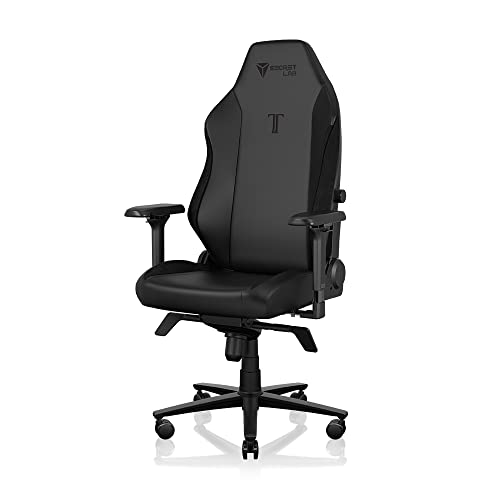
The Secretlab Titan Evo Gaming Chair leads because it was engineered for exactly the programmer’s session shape — hours of high-focus sitting — by a maker who treats endurance as the whole product: cold-cure foam that holds its support instead of collapsing into it, integrated lumbar support, a memory-foam magnetic head pillow that snaps onto the backrest and adjusts across a wide range for genuine neck support, 4D armrests that position in every direction a keyboard could ask, height adjustment, and a reclining high back. This Regular size is rated for users up to 285 lb; other sizes exist in the range for other bodies.
Strengths
- Cold-cure foam keeps its sit through marathon sessions and long ownership.
- 4D armrests plus a magnetic head pillow: the full keyboard-and-thinking support chain.
- Integrated lumbar and a reclining back serve sprint and thinking postures alike.
Trade-offs
- Size selection matters — Regular suits its stated range; check the maker’s sizing before ordering.
- Leatherette warms in hot rooms compared with mesh chairs.
- At 76 pounds it is a permanent resident of its desk.
| Color | Black |
| Size | Regular |
| Dimensions | 19.291338563 x 22.047244072 x 53.937007819 inches |
| Weight | 76.05948039 pounds |
The Titan Evo’s programmer case is the foam. Cheap chairs fail coders in month six, when the seat that felt plush in the showroom has packed into a board; cold-cure foam is molded to density rather than cut from a slab, and it holds the sitter at hour six of the day and year three of ownership with the same support. The head pillow deserves its own sentence: magnetic, memory foam, and wide-ranging, it makes the lean-back-and-think posture genuinely restful for the neck — the posture in which, anecdotally and universally, the bug explains itself.
Choose the Secretlab if your desk serves work and play in one long daily session. Skip it if your room runs hot or your body falls outside the Regular’s range without stepping to the correct size.
Best for: Marathon work-play sessions at one desk / Not suited for: Hot rooms or unmeasured size guesses

Steelcase Series 1 Ergonomic Office Chair
Our badge: Best for Focused Work
The Steelcase Series 1 Ergonomic Office Chair is the chair for the programmer who resents chair management: weight-activated controls read your body and set recline resistance automatically, so deep-focus leaning, upright sprinting, and the sideways perch all meet correct support without a lever ever being touched. Adaptive bolstering and flexible edges keep the sit pressure-free, the frame is compact and space-efficient, and assembly takes under two minutes. This configuration ships with carpet casters.
Strengths
- Self-setting support: always configured, never forgotten.
- Compact footprint suits apartment desks and multi-monitor corners.
- Steelcase research and build quality at the range’s sensible end.
Trade-offs
- No footrest or gaming-style recline for the play hours.
- Carpet casters on this configuration.
- Less manual tuning for programmers who enjoy dialing in.
| Color | Graphite |
| Size | Carpet (Pack of 1) |
| Dimensions | 23.75 x 27 x 41.25 inches |
| Weight | 29 pounds |
There is a cognitive argument for the Series 1 that programmers will appreciate: every adjustment a chair demands is a context switch, and context switches are the currency focus pays in. A chair that re-derives its support from your weight each time you sit spends nothing. In pair-programming and shared-desk households it shines twice, because the previous sitter’s settings simply do not exist. Its graphite restraint also suits the camera: standups and reviews see a professional, not a gaming rig.
Choose the Steelcase if your chair should be invisible infrastructure. Skip it if the desk doubles as your gaming station and the footrest hours matter — the Respawn below exists for that desk.
Best for: Deep-focus coding with zero chair management / Not suited for: Work-play desks

FLEXISPOT ErgoX Premium Ergonomic Office Chair
Our badge: Best Adjustable
The FLEXISPOT ErgoX Premium Ergonomic Office Chair is the tuner’s chair: seat depth from 17 to 20 inches, seat height from 20.1 to 22.4 inches, a five-level adjustable back, dynamic lumbar support, a 3D adjustable headrest, 3D armrests, tilt, and a nap footrest, for users 5’1″ to 6’2″ and up to 400 lb. Programmers who have measured their desk, their femurs, and their patience will find every one of those numbers answerable here — and the footrest converts the compile-wait and the code review into genuine recovery minutes without leaving the chair.
Strengths
- Seat-depth adjustment: the fit dimension most chairs deny you.
- Dynamic lumbar plus 3D headrest and arms — the full chain, tunable.
- 400 lb rating; the widest fit range in this guide.
Trade-offs
- Premium price among the manual chairs.
- The pool lists package-style dimensions for this model.
- Rewards a real setup session; punishes skipping one.
| Color | Black |
| Size | Overall Depth 44″ |
| Weight | 38 pounds |
The ErgoX’s depth adjustment deserves a programmer’s respect because coding posture is leg-driven: the right depth lets your back own the backrest while your feet own the floor, and the wrong depth — the industry default for most bodies — quietly chooses perching or slumping for you. Set once with this guide’s sequence, the chair then maintains the fit dynamically, and its headrest makes code review at a lean an actual rest for the neck. The upper-spine details are argued fully in Best Chairs For Neck Support.
Choose the FLEXISPOT if you want your chair fitted like your development environment — exactly, and by you. Skip it if setup sessions bore you; that is the Steelcase’s entire pitch.
Best for: Programmers who tune everything, including the chair / Not suited for: Set-and-forget buyers

Ticova Ergonomic Office Chair
Our badge: Best Budget
The Ticova Ergonomic Office Chair is the correct first serious chair: lumbar support adjustable in height and depth, a headrest adjustable in height and angle, 3D armrests with thick, soft PU padding, a 130-degree rocking function, breathable mesh across a spine-shaped backrest, and a 3.4-inch high-density foam seat in a W shape with a waterfall edge. It has passed BIFMA testing and the maker’s static pressure test. For the junior developer, the bootcamp graduate, and the home-office convert, it delivers the adjustments that matter at a price that does not require a sign-on bonus.
Strengths
- Two-axis lumbar adjustment — the expensive feature, at an entry price.
- 3D armrests position forearms for real keyboard work.
- W-shaped waterfall seat keeps long sessions circulating.
Trade-offs
- The pool’s dimension figures appear to be package measurements.
- Foam seat warms more than full-mesh designs.
- No footrest for the off-hours.
| Color | Black |
| Size | 70D x 26W x 54H cm |
| Weight | 17.5 Kilograms |
The Ticova’s value is in what it refuses to cheapen: the lumbar moves in both axes, the arms move in three, and the seat is shaped rather than slabbed. A programmer’s first chair shapes their sitting habits for a career, and habits formed on real support — back met, arms carried, legs circulating — are the ones that survive contact with deadline season. Its curved foam headrest, unusually generous at this price, completes a chair that punches a full class above its cost.
Choose the Ticova if the budget is real and the career is long. Skip it if you know you will want the footrest and depth adjustment within the year — buy the FLEXISPOT once instead.
Best for: Early-career programmers and budget home offices / Not suited for: Footrest seekers

Herman Miller Classic Aeron Task Chair
Our badge: Best Premium
The Herman Miller Classic Aeron Task Chair is the buy-once benchmark: Pellicle suspension that distributes weight and dissipates heat across seat and back, a Kinemat tilt that pivots your body naturally at the neck, shoulders, hips, knees, and ankles, an adjustable lumbar pad, a tilt limiter with seat-angle adjustment, fully adjustable vinyl arms, and a waterfall seat edge that keeps thigh circulation free — under a 12-year warranty. For the programmer whose chair is a decade-long colleague, its cost-per-hour is the lowest in this guide.
Strengths
- Suspension comfort that does not pack down, heat up, or wear out like foam.
- Body-following tilt made for lean-in, lean-back coding rhythms.
- 12-year warranty: the ownership math of a career chair.
Trade-offs
- The premium price is real and immediate.
- Size B fits the middle; verify your size before ordering.
- Carpet casters on this configuration.
| Color | Graphite Frame/Lead Classic Pellicle |
| Size | Size B (Medium) |
| Dimensions | 17 x 27 x 42 inches |
| Weight | 48 pounds |
The Aeron’s programmer argument is thermal and temporal. Suspension never gives you the hour-four hot spot that foam does, because there is no foam to compress and insulate; and its mechanism never asks you to choose between leaning in to type and leaning back to think, because the tilt carries your whole body between the two with support intact. Senior engineers who have sat in one for a decade describe it the way they describe their text editor: not exciting, simply correct, and unthinkable to replace. The workstation context around it is covered in Best Task Chairs For Home Office.
Choose the Aeron if you buy career equipment once and keep it. Skip it if your budget belongs to the monitor and the machine this year — the Ticova will hold your posture honorably until the Aeron year arrives.
Best for: Buy-once programmers and decade-long desks / Not suited for: This year’s tight budget

Respawn 110 Pro Ergonomic Gaming Chair with Footrest and Recline
Our badge: Best for Work-Play
The Respawn 110 Pro Ergonomic Gaming Chair with Footrest and Recline serves the desk that clocks out into a game without changing rooms: a 155-degree recline with an infinite angle lock, a reinforced retractable footrest, dual-density foam, lumbar support and a cushioned headrest, tilt control, and 360-degree swivel, supporting up to 275 lb in a breathable gray fabric that reads professional on the standup call and disappears into the evening’s session.
Strengths
- Infinite-lock recline: any angle, held — for code review and cutscenes alike.
- Fabric breathes through double-duty days.
- Footrest built on multi-point brackets for daily use.
Trade-offs
- 275 lb capacity ceiling.
- Fabric needs more spill care than leatherette.
- A larger footprint than the task chairs.
| Color | Gray Fabric |
| Size | 28.50″ D x 26.75″ W x 51.50″ H |
| Dimensions | 28 x 26.4 x 51.2 inches |
| Weight | 46.3 pounds |
The Respawn’s honesty is its recognition that most programmers’ desks are not single-purpose. The same chair that holds a supported sprint through the morning’s tickets reclines through the evening’s raid, and the infinite lock — no notches, no compromises — is the detail that makes both feel native. Dual-density foam keeps the work hours supported and the play hours soft in the right places, a combination pure office chairs rarely attempt.
Choose the Respawn if your desk has two shifts. Skip it if your work is camera-formal all day — the Steelcase wears the suit better.
Best for: Programmers whose desk doubles as their gaming station / Not suited for: Formal offices
Comparison Table
| Pick | Color | Dimensions | Weight | Check price on Amazon |
|---|---|---|---|---|
| Secretlab Titan Evo Gaming Chair | Black | 19.291338563 x 22.047244072 x 53.937007819 inches | 76.05948039 pounds | Check price on Amazon |
| Steelcase Series 1 Ergonomic Office Chair | Graphite | 23.75 x 27 x 41.25 inches | 29 pounds | Check price on Amazon |
| FLEXISPOT ErgoX Premium Ergonomic Office Chair | Black | — | 38 pounds | Check price on Amazon |
| Ticova Ergonomic Office Chair | Black | — | 17.5 Kilograms | Check price on Amazon |
| Herman Miller Classic Aeron Task Chair | Graphite Frame/Lead Classic Pellicle | 17 x 27 x 42 inches | 48 pounds | Check price on Amazon |
| Respawn 110 Pro Ergonomic Gaming Chair with Footrest and Recline | Gray Fabric | 28 x 26.4 x 51.2 inches | 46.3 pounds | Check price on Amazon |
How to Choose the Best Chairs for Computer Programmers
Size the chair to the session, not the showroom
Your reference session is not ten minutes; it is the longest sitting of your working month — the deep-debug afternoon, the migration weekend. Foam that feels plush at minute ten and packs flat by hour four fails that session; cold-cure foam, suspension, and dual-density designs exist precisely for it. When you cannot test for hours, weight the materials and the warranty: makers who guarantee a chair for years are telling you how its session six-hundredth feels.
Armrests are keyboard equipment
Programming loads the forearms for hours at a fixed height — the desk’s. Armrests must meet your forearms at that height without shrugging your shoulders or abandoning your elbows, which is why 3D and 4D adjustment matters more to coders than to almost any other sitter. If you use a keyboard tray, a split keyboard, or a standing desk’s lower position, your arms’ geometry changes with each; buy the adjustment range that covers your actual setups, plural.
Breathability is a focus feature
Heat is a distraction with a thermostat. Mesh backs, suspension seats, and fabric upholstery keep long sessions thermally neutral; leatherette looks sharp and warms steadily. In cool rooms and short sessions it hardly matters; in warm rooms and flow states, it is the difference between the chair you forget and the chair you keep surfacing from. Match the material to your room’s honest climate, not its January climate.
Fit the body you have, in the size it needs
Two of this guide’s best chairs — the Secretlab and the Aeron — are sized products. Their Regular and B fit the broad middle superbly and the edges of the population poorly. Read the makers’ sizing guidance, measure, and order your size rather than the default; a benchmark chair in the wrong size is an expensive ordinary chair. Adjustable-range chairs (FLEXISPOT, Ticova) forgive more bodies per model, which is their own kind of value.
Decide the desk’s second shift
If the desk games, streams, or hosts the evening’s media, weight the recline and footrest picks — Respawn, Secretlab — because a chair bought only for work will be endured all evening. If the desk is work-only and camera-facing, weight the professionals — Steelcase, Aeron, HON-class restraint. The honest inventory of your desk’s full day is the shortest path to the right chair, and Best Chairs For Podcasting covers the streaming variant of the question for creators.
How Do You Set Up a Programmer’s Chair and Desk?
Set the chair in the standard order — height for flat feet, depth for the knee gap, lumbar to the curve, arms to the forearms — then set the desk to meet it, not the reverse. The keyboard belongs where your forearms rest level from the chair’s arms; the monitor’s top third belongs at eye level, at arm’s length or a little beyond, so your head balances over your spine instead of leading it. Multi-monitor setups should center the primary screen and angle the rest, because a chair cannot compensate for a neck rotated thirty degrees for six hours — swivel to the side screens for glances, and arrange the work so the glance is the exception.
Then program the breaks like you program everything else: a timer, a trigger, a habit. The Pomodoro rhythm suits chair life well — stand at the interval, walk, refill the water, return — and the recline exists for the in-chair resets between. Flow state is precious and this guide will not insult it; but the programmers who last decades are the ones whose chairs and habits let them surface from flow without paying for it in their backs.
Problem: Your forearms ache by mid-afternoon — Your arms are working unsupported or shrugged. Raise the armrests to carry the forearms’ weight with shoulders down, or lower the keyboard to meet them; the ache is geometry, not endurance.
Problem: You end every session perched on the seat’s edge — The seat is too deep or the desk too far. Use depth adjustment if you have it, move the chair closer, and let the backrest back into your life.
Problem: Your neck is stiff after code review — Reviews happen leaned back; your headrest is set for upright. Adjust it to meet your head at your review angle, or choose a chair whose pillow adjusts across a wide range.
Problem: The chair is comfortable but the room feels hotter by the hour — It is the chair’s materials storing your heat. Mesh, suspension, or fabric is your next chair’s first specification.
Problem: You cannot feel the lumbar at all — It is positioned for a different back — too high, too low, or too shallow. Work the two-axis adjustment in small steps across a day until contact becomes support.
The Long Career Sitting Strategy
Programmers who plan their sitting like their architecture make three decisions early. They buy the chair against the decade, not the job — fit range, materials, and warranty weighted over this quarter’s budget. They keep the desk’s geometry honest through every equipment change, re-running the setup sequence whenever a monitor, desk, or keyboard changes the chain. And they treat movement as part of the toolchain: the stand, the walk, the recline, scheduled like backups, because both protect against the same kind of catastrophic loss. The chairs in this guide are the hardware of that strategy; the strategy itself is what makes a thirty-year career of sitting survivable, and it costs mostly attention.
Home Office Versus Office Office
The home programmer’s chair carries extra duties: it is the video-call backdrop, the household’s most contested seat, and often the only ergonomic purchase the whole home makes. That argues for the versatile middle of this guide — chairs that look professional, adjust across bodies, and survive family use. The office programmer’s chair, by contrast, can be purely personal: sized, tuned, and left configured, which is where the Aeron and the FLEXISPOT justify their setup investments. Know which life your chair will live, and buy for that life rather than the showroom’s.
The Chair and the Standing Desk
Many programmers now split the day between sitting and standing, which changes the chair’s job description in a way worth naming: it becomes the recovery station rather than the all-day address. That argues for two specific virtues. The first is instant rightness — a chair that is correct the moment you drop into it, because a sitter arriving from an hour of standing does not want a setup ritual; the Steelcase’s self-adjustment and the gaming chairs’ parked favorite positions both answer this. The second is a genuine recline, because the sit that follows standing is a rest, and the chairs that recline with a headrest — Secretlab, Respawn, FLEXISPOT with its footrest — turn the alternation into a rhythm the body looks forward to. The home-office version of the whole sit-stand arrangement, chairs included, is treated in Best Work From Home Chairs For Back Pain, and its central lesson transfers exactly: the alternation only works if both stations are good, because a bad chair teaches you to stand too long and a bad standing setup teaches you to sit too long, and the body pays for both lessons.
Pair Programming, Interviews, and the Second Chair
Programming is more social than its stereotype, and the social hours have their own chair logic. Pair programming puts two people at one screen, which means the second seat — usually the household’s worst chair, dragged in from the kitchen — decides whether the session lasts an hour or an afternoon. Interview loops, mentoring, and code reviews conducted at your desk repeat the pattern. The economical answer is a second chair of real quality at the value tier — the Ticova’s exact position — kept in the room rather than fetched, so collaboration is never taxed by furniture. Remote work has moved much of this to video, where the second chair is the guest’s problem; but households with two programmers, and offices that still pair in person, will recognize the dragged kitchen chair as a small, daily, entirely fixable failure of planning. Buy the second chair once, and every collaborative hour afterward starts on time and in comfort.
What Senior Engineers Know About Chairs
Ask programmers with twenty years in the chair — literally — what they have learned, and the answers converge with suspicious consistency. The first lesson is that the chair outlasts the technology: the senior engineer has owned five laptops, three desks, and two chairs, and remembers the chairs the way they remember editors, as the tools that touched every working day. The second is that fit beats features in the long run — the chair with fewer adjustments, correctly sized, out-serves the chair with a dozen adjustments set approximately, which is why the sized benchmarks in this guide (the Aeron’s B, the Secretlab’s Regular) demand measurement rather than offering ranges: precision is the feature. The third is that the body keeps the score of every deadline season, and the chair is either compounding comfort or compounding damage across all of them, with no neutral setting available.
The fourth lesson is about timing: every senior programmer wishes they had bought the real chair one job earlier. The junior who waits for the promotion to deserve the good chair spends the highest-sitting years of their life — the years of longest hours and fewest boundaries — in the worst seat they will ever own. The arithmetic in this guide runs the other way: the Ticova exists so the first chair can be a real one, and the career chairs exist so the fifth chair can be the last. If there is a single sentence this entire guide exists to say to its specific reader, it is that one: your chair is not a perk to earn after the career; it is equipment the career is conducted from, starting with the very first sprint, and it should be bought with the same seriousness as the machine it sits in front of.
The Accessibility Angle: Chairs for Programmers With Bodies That Differ
Programming is one of the most accessible professions ever created for people whose bodies do not match the standard template — the work is cognitive, the tools are configurable, the location is negotiable — and the chair is where that accessibility is either honored or quietly revoked. Programmers with mobility differences, chronic pain conditions, limb differences, or simply bodies far from the population middle depend on their chairs more, not less, than the average sitter, and the specifications in this guide read differently through their eyes: fit ranges are not marketing but gatekeeping, adjustment ranges are independence, and a chair’s capacity and dimensions decide whether the profession’s best tool is available to them at all. The FLEXISPOT’s 400 lb rating and wide fit range, the sized benchmarks’ honest alternatives, and the value tier’s real adjustability all matter here beyond their convenience.
The practical advice is to buy adjustability and range first and brand last, to use return windows without embarrassment — they exist precisely because fit cannot be fully predicted from a listing — and to treat the chair as the assistive technology it legitimately is when a care professional’s letter can unlock funding or workplace accommodation for it. Employers, for their part, should hear the same message this guide gives individuals: the chair is the cheapest accessibility a programming job can buy, and the request for a specific one is a professional specifying their tools, exactly as they would a monitor or a keyboard. The code does not care what body wrote it. The chair’s whole job is to make sure the body can keep writing it — every body, for the whole career.
The Remote Era’s Chair: Working From Anywhere, Sitting From Home
The profession’s center of gravity has moved into spare rooms, and the chair has become the remote programmer’s most consequential piece of office infrastructure — more than the laptop, which the employer provides, and more than the desk, which any flat surface can improvise. At home, the chair carries duties the office never asked of it: it is the standup-meeting backdrop, the interview room, the all-day workstation, and the household’s most contested seat after hours, all without a facilities department to maintain or replace it. That argues for buying home chairs to a higher standard than office chairs, not a lower one — the home chair has no janitor, no swap closet, no ergonomic assessment team; it has you, a hex key, and the maintenance ritual of tightening its bolts twice a year, which this guide recommends scheduling with the same seriousness as a backup test.
It also argues for the home chair’s second quality: discretion. The programmer’s chair appears on camera behind its owner hundreds of times a year, in front of colleagues, clients, and interviewers, and it testifies silently about its owner’s professionalism before a word is spoken. The graphite restraint of the Steelcase and the Aeron, the HON-class office honesty, even the gaming chairs’ deliberate branding — each says something, and the remote worker should choose the statement rather than inherit it. None of this is vanity; it is the ordinary stagecraft of a profession now conducted through a lens. Buy the chair for the sitting first — the session, the foam, the fit — and then confirm it can appear in public. The six in this guide can, each in its dialect, which is one more reason they are the six.
It is worth pausing, before the verdict, on how completely the chair has become part of the profession’s toolkit — ranked now, in senior engineers’ own accounts of their setups, alongside the machine and the monitor rather than below them with the furniture. The reason is actuarial as much as ergonomic: a programmer’s output across a thirty-year career is bounded less by talent than by the body’s willingness to keep sitting down to do the work, and the chair is the single largest daily influence on that willingness. Every senior who has left the profession early with a wrecked back is a data point; every one still shipping at sixty, in a chair fitted at forty, is another. This guide cannot prove the counterfactual for any individual reader, and it does not try. It simply notes that the profession’s veterans treat the chair as career infrastructure and budget it accordingly — and that the juniors who imitate them early rarely regret the imitation.
A final note on the purchase process itself, since programmers buy chairs the way they buy everything — by specification, review, and benchmark — and this category punishes that method in one specific way worth naming. Chair fit is not benchmarkable across bodies: the review that calls a seat perfect is reporting a skeleton you do not own, and the aggregate scores that settle other purchases average away exactly the variable that decides this one. The correct method is the engineer’s other method — hypothesis, experiment, measurement: shortlist by specification and range, test in your own sessions across the return window, and keep the chair your own data vindicates. You would never ship code you had not run. Do not sit for a career in a chair you have not either.
And if the first candidate fails your own testing, return it without sentimentality and test the next. The right chair is out there in this guide’s six or just beyond them, and the method — not luck, not reviews, not brand loyalty — is what reliably finds it. Your sessions will know when you have.
Sit well, ship well: the two have been the same resolution all along, and the chair is where both of them start.
Choose once, choose carefully, and then forget the chair exists for a decade.
Common Buying Mistakes
Buying the chair your favorite streamer uses, in their size
Sized chairs fit their sitters, not their audiences. Measure yourself, read the maker’s sizing, and let the recommendation inform the model — never the size.
Spending the whole budget on the chair and none on the setup
A great chair under a low monitor still produces a stiff neck. Budget the monitor arm or riser with the chair; the chain is only as strong as its geometry.
Choosing leatherette for a warm room and long sessions
It photographs beautifully and heats steadily. Warm-room programmers belong in mesh, suspension, or fabric — the guide’s majority, for a reason.
Ignoring the armrests until the forearms complain
By then you have owned the wrong arms for months. Test arm height against your desk and keyboard before the return window closes; it is a five-minute check with a career’s consequences.
Treating the recline as a toy
The lean-back is where programmers think. A chair whose recline is stiff, notchy, or unsupported will simply never be used — and its owner will do their thinking perched, at the spine’s expense.
Final Recommendation
For most programmers, the Secretlab Titan Evo Gaming Chair is the answer: cold-cure foam that outlasts sessions and years, 4D arms for the keyboard, a magnetic head pillow for the thinking lean, and lumbar support built in. For pure focused work, the Steelcase disappears beneath you; for a decade-long buy, the Aeron — compare it via its Check on Amazon listing and order your correct size. On a budget, the Ticova is the right first chair. Fit it properly, set the desk to meet it, and let the chair carry the sitting so your attention can carry the code.
Frequently Asked Questions
Are gaming chairs actually good for programming?
The best of them are — they were designed for session lengths programmers recognize, with foam, recline, and arm support to match. The Secretlab and Respawn in this guide are work chairs in gaming dress. Judge by foam quality, arm adjustment, and fit, not by the category label or the color scheme.
How much should a programmer spend on a chair?
Enough to cover your session length and your career horizon. A programmer sits more than almost any worker; divided across years of daily hours, even the Aeron’s premium is a trivial hourly cost, while a cheap chair replaced twice plus the discomfort between is the expensive path. Buy the best fit your budget honestly allows, once.
Mesh or foam for all-day coding?
Mesh and suspension breathe and never pack down; quality foam cushions and supports with a softer contact. Warm rooms and long sessions favor mesh or suspension (Aeron, Ticova’s mesh back); cool rooms and sitters who like a cushioned seat favor cold-cure foam (Secretlab). Both are right; your room decides.
Do I need a headrest?
For upright typing, no. For the reclined thinking, review, and call postures that fill a programmer’s day, a good adjustable headrest — the Secretlab’s magnetic pillow, the FLEXISPOT’s 3D unit — is the difference between resting your neck and holding it. If your work includes long reclined chapters, weight it heavily.
What chair size should I order?
Your own, measured: the makers of sized chairs publish guidance by height and weight, and the Regular and B sizes in this guide fit the broad middle. If you fall outside a size’s stated range, order the size that contains you or choose an adjustable-range chair. A benchmark in the wrong size is just an expensive chair.
How do I stop my chair from squeaking during calls?
Tighten every bolt — squeaks are loose joints — and check the tilt mechanism’s tension settings. Fabric contact points squeak less than leatherette against clothing. For streamers and frequent callers, the quiet-chair criteria are covered in this program’s podcasting guide.