Disclosure: As an Amazon Associate, dailyhomedecorating.com earns from qualifying purchases. Links to Amazon on this page are affiliate links; they cost you nothing extra. Prices and availability change often, so check the current Amazon listing before you buy.
The best task chairs for home office use share a quiet virtue: they disappear. A true task chair is not a throne or a gaming rig — it is the chair that lets you move between typing, calls, reading, and thinking for eight hours without the chair itself becoming a topic. Home offices make the demand harder, because the same chair must fit a spare-room desk, survive being shared with a partner or a teenager, roll on whatever floor the room happens to have, and look acceptable in a home rather than a cubicle farm.
This guide reviews six task chairs that meet that standard at different budgets and sizes, from a research-led automatic chair to a compact mesh chair with a footrest for apartment desks. Each review covers the adjustments that matter, the bodies each chair suits, and the honest trade-offs. If you are still deciding where and how to shop, Best Place To Shop For Office Chairs covers the buying process, and if your floor needs protection, Best Rugs For Desk Chairs covers the chair-and-rug system.
Where to Buy
Every pick below is sold on Amazon, where you can check the current price, configuration options, and caster type for your floor before you buy.
- Steelcase Series 1 Ergonomic Office Chair — Check on Amazon
- HON Ignition 2.0 Ergonomic Office Chair — Check on Amazon
- SIHOO M18 Ergonomic Office Chair — Check on Amazon
- Ticova Ergonomic Office Chair — Check on Amazon
- Hbada P5 Ergonomic Office Chair — Check on Amazon
- FLEXISPOT ErgoX Premium Ergonomic Office Chair — Check on Amazon
In this guide
Quick Picks
| Pick | Badge | Why it earns its place |
|---|---|---|
| Steelcase Series 1 Ergonomic Office Chair | Best Overall | Weight-activated controls and adaptive bolstering deliver comfort with almost no setup — the task chair for people who hate adjusting chairs. |
| HON Ignition 2.0 Ergonomic Office Chair | Best Budget | Commercial mesh task chair with adjustable arms and a full warranty — the office standard brought home. |
| FLEXISPOT ErgoX Premium Ergonomic Office Chair | Best Premium | Dynamic lumbar support, five-level back, and full adjustability for workers whose chair is their whole office. |
| SIHOO M18 Ergonomic Office Chair | Best for Home Office | Breathable mesh, adjustable lumbar and headrest, and a wide cushion at the balanced middle of the range. |
| Ticova Ergonomic Office Chair | Best for Long Workdays | Two-axis lumbar adjustment and 3D armrests for the longest sitting days on the calendar. |
| Hbada P5 Ergonomic Office Chair | Best Compact | S-shaped mesh back, footrest, and a small footprint made for apartment and spare-room desks. |
Key Takeaways
- A task chair earns its name through adjustability and movement, not padding — look for lumbar support that positions, arms that adapt, and a tilt that lets you shift.
- Mesh backs suit warm rooms and long days; foam seats suit people who want cushion under them. Several picks here combine both thoughtfully.
- Size the chair to your body using the maker’s stated height range, and match the casters to your floor.
- Shared home offices favor chairs that refit quickly — automatic controls or simple, memorable adjustments.
- Every pick here is a verified listing with published specifications; the reviews state who should skip each chair as plainly as who should buy it.
How These Picks Were Chosen
The pool was filtered for genuine task chairs: chairs designed for active desk work, with adjustable lumbar support, adaptable armrests, breathable or quality seating surfaces, and published dimensions and capacities. Executive-style chairs with fixed padding and gaming chairs with racing aesthetics were set aside — not because they cannot be comfortable, but because this keyword asks for the working chair, and working chairs are judged on adjustment, movement, and durability across thousands of hours.
The six finalists divide the territory sensibly: an automatic premium chair, a commercial standard, a deep-adjustment flagship, two mid-range mesh chairs with different strengths, and a compact specialist. Between them they cover carpet and hard floors, bodies from about five feet to well over six, and budgets from the accessible to the invest-once level. Each was checked for the details home offices specifically need — desk-clearing arms, tuck-under footprints, and caster information on the listing.
Specifications come from the verified pool’s manufacturer information. Comfort descriptions are framed as comfort; no chair here is sold as a cure for anything, and readers with persistent pain should treat a chair as one part of a larger conversation with their clinician and their work habits.
The 6 Best Best Task Chairs for Home Office — Reviewed

Steelcase Series 1 Ergonomic Office Chair
Our badge: Best Overall
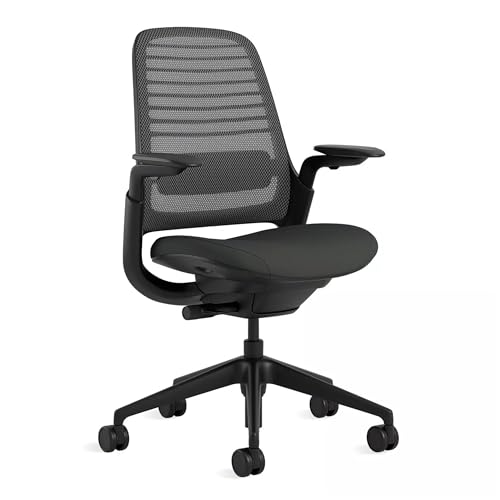
The Steelcase Series 1 Ergonomic Office Chair is the task chair for people who have better things to do than adjust a task chair. Its weight-activated controls respond to your body automatically, its flexible edges and adaptive bolstering keep pressure off your forearms and thighs, and it assembles in under two minutes without tools. Optional 4D arms and an adjustable headrest extend the fit, and this graphite configuration is specified for carpet floors — the spare-room reality in many homes. At 29 pounds, it is also the easiest serious chair here to move when the home office has to become a guest room by Friday.
Strengths
- Automatic, weight-activated comfort that suits shared chairs and impatient owners.
- Space-efficient frame and light weight fit real home offices, not showroom ones.
- Research-led back and arm support that moves with your working postures.
Trade-offs
- Manual fine-tuners may miss a bank of levers to play with.
- This configuration is for carpet; hard floors need the matching casters.
- Professional, restrained looks rather than a design statement.
| Color | Graphite |
| Size | Carpet (Pack of 1) |
| Dimensions | 23.75 x 27 x 41.25 inches |
| Weight | 29 pounds |
Steelcase’s research shows up in the defaults: the chair supports documentation, calls, and focused work without asking you to maintain a posture, because the support moves as you do. In a home office, that forgiveness is the feature — you sit down distracted by a deadline, not by a chair setup ritual, and the chair is simply right. The flexible seat edges deserve their mention: by giving at the front, they avoid the thigh pressure that makes people perch on the edge of lesser chairs by afternoon.
For households where the office chair doubles as the household’s spare chair — carried to the dining table at holidays — the Series 1’s weight and clean lines make it the natural volunteer. It is the rare premium chair that also behaves like convenient furniture.
Choose the Series 1 if you want the set-and-forget benchmark of home task seating. Skip it if you want a plush seat or a headrest in the base price.
Best for: Home workers who want automatic comfort and a movable, compact chair / Not suited for: Hard-floor rooms in this configuration, or lever enthusiasts

HON Ignition 2.0 Ergonomic Office Chair
Our badge: Best Budget
The HON Ignition 2.0 Ergonomic Office Chair is the office standard itself: a mid-back mesh task chair with lumbar support that encourages alignment, arms adjustable in height and width, a standard tilt that encourages movement, and a stable rolling base, supporting up to 300 lb and backed by the HON Full Warranty. Offices buy it by the floor because it fits many bodies well and survives commercial use; a home office inherits both virtues at an accessible position in the range.
Strengths
- Breathable mesh back for warm rooms and long desk sessions.
- Width-adjustable arms fit narrow desks and broad shoulders alike.
- Commercial durability and a full warranty behind a household price.
Trade-offs
- No headrest; mid-back support ends at the shoulder blades.
- Corporate styling, plainly finished.
- Fewer adjustments than the flagship picks.
| Color | Black |
| Size | Oversized |
| Dimensions | 28.5 x 27 x 44.5 inches |
The Ignition’s home-office virtue is breadth: students, hybrid workers, administrators of the household, and the occasional gamer all sit in it comfortably, because it was designed for exactly that rotation. The mesh back keeps air moving during summer workdays in rooms without office-grade cooling, and the tilt keeps your body making the small movements that divide a good sitting day from a stiff one.
For a first home office furnished on a real budget, this is the chair that leaves money for the desk, the light, and the monitor arm without leaving your back out of the budget. It is also the safest recommendation to give a friend, because its fit range is wide and its behavior predictable.
Choose the Ignition if you want commercial-grade task seating at a household price. Skip it if you recline for calls and want head support — the Ticova and FLEXISPOT below are your chairs. Readers comparing work chairs for comfort should also see Best Work Chairs For Lower Back Pain.
Best for: Budget home offices and shared family workspaces / Not suited for: Recliners who need a headrest

SIHOO M18 Ergonomic Office Chair
Our badge: Best for Home Office
The SIHOO M18 Ergonomic Office Chair is the balanced middle of this guide: a breathable, non-pattern mesh back, adjustable lumbar support, an adjustable headrest, 2D armrests, a wide cushion, and tilt lock, providing four support points for users roughly 5’6″ to 6’2″. It passed BIFMA testing and a static pressure test and supports up to 150 kg — credentials that separate it from the crowd of lookalike mesh chairs with no testing behind them.
Strengths
- Mesh back breathes through warm rooms and long sessions.
- Lumbar, headrest, and arm adjustments cover the essential fit points.
- Tested construction with a generous stated capacity.
Trade-offs
- Shorter users may find the seat deeper than ideal.
- Eight-step assembly is easy but not instant.
- Functional black-mesh styling.
| Color | Charcoal |
| Size | Pack of 1 |
| Dimensions | 27.5 x 21 x 11 inches |
| Weight | 31.526103466 pounds |
The M18’s appeal is that it asks nothing exotic of its owner. The adjustments are where your hands expect them, the lumbar support moves to meet your back rather than presenting a fixed bump, and the wide cushion lets you shift position through the day — cross-legged for a call, feet flat for the spreadsheet — without the chair punishing variety. SIHOO supports it with replacement parts during the warranty period, which is the practical difference between a chair and a chair-shaped purchase.
In the home office specifically, the M18 handles the hybrid pattern well: full workdays in the week, homework and household administration at the weekend, and the occasional gaming session, all in the same seat without adjustment drama between users of similar size.
Choose the M18 if you want the default answer in mesh task chairs. Skip it if you are well under its height range — the Hbada below was sized for you.
Best for: Home workers in the stated height range who want tested mesh value / Not suited for: Petite users needing a shallower seat

Ticova Ergonomic Office Chair
Our badge: Best for Long Workdays
The Ticova Ergonomic Office Chair is built around the adjustment most chairs fake: lumbar support that moves in depth as well as height. Add a curved foam headrest adjustable in height and angle, 3D armrests with thick, soft padding, a rocking back to 130 degrees with adjustable resistance, and a 3.4-inch high-density foam seat in a W-shape with a waterfall edge, and you have the chair for the home worker whose days run longest. The mesh back is high-tensile and breathable, so the support system does not come with a heat penalty.
Strengths
- Two-axis lumbar adjustment fits backs that one-axis chairs leave unsupported.
- 3D armrests with generous padding keep shoulders relaxed through long sessions.
- Rocking function with adjustable resilience suits thinking as well as typing.
Trade-offs
- Dialing in takes days of small changes.
- Foam seat will soften across years of use.
- High-back recline needs room behind the desk.
| Color | Black |
| Size | 70D x 26W x 54H cm |
| Weight | 17.5 Kilograms |
Ticova’s philosophy is that fit is a process, and the chair gives you the tools to run it: change the lumbar depth when your back asks, angle the headrest to meet you only in recline, swing the armrests to match a keyboard, a notebook, or a controller. The chair passed BIFMA testing and a static pressure test, and its return policy lowers the risk of buying an adjustment-heavy chair online — relevant, because this is a chair you should live with for a week before judging.
For programmers, analysts, writers, and support professionals — the home workers who measure their sitting in shifts — the Ticova is the pick that respects the reality of their days. It also transitions gracefully to evening use, since the recline and headrest make it a legitimate reading chair.
Choose the Ticova if your workdays are the longest and your lower back is particular. Skip it if you want two levers and no homework. Programmers comparing chairs in depth will find Best Chairs For Computer Programmers a useful next read.
Best for: Long-shift home workers who will use deep adjustability / Not suited for: Minimalists or shallow desk nooks

Hbada P5 Ergonomic Office Chair
Our badge: Best Compact
The Hbada P5 Ergonomic Office Chair proves a task chair does not need a big room. Its S-shaped mesh backrest conforms to your spine, the lumbar support adjusts up and down, the 2D headrest adjusts in height and swivels to 40 degrees, the armrests raise and lower to clear desk edges, and the back reclines to 135 degrees — with a retractable footrest waiting for the break. It suits users roughly 5′ to about 5’10” and has passed SGS certification and BIFMA testing.
Strengths
- Full ergonomic set in a compact, tuck-under footprint.
- Footrest turns a small desk chair into a break chair.
- Certified, tested construction at a small-chair size.
Trade-offs
- Height range excludes taller users.
- Firmer mesh seating feel.
- Modest 3.35-inch seat height range.
| Color | Black |
| Size | 27.56 x 27.56 x 49.41 inches |
| Weight | 44 pounds |
The P5’s home-office scenario is the bedroom corner and the studio desk, where the chair must vanish under the desk at day’s end and the footrest must substitute for the lounge chair there is no room for. Hbada engineered honestly for that life: the armrests clear the desk, the recline gives you a genuine lean-back for calls, and the mesh keeps a small, warm room’s chair from becoming a heat trap.
Students and first-apartment workers get the most from it, but any smaller-framed adult in a tight workspace will recognize the design intent. It is the compact pick that does not ask its owner to accept a compact fit.
Choose the P5 if space is tight and you are inside its height range. Skip it if you are tall or the chair will be shared across very different bodies.
Best for: Small home offices, dorms, and apartment desks / Not suited for: Tall users or widely shared chairs

FLEXISPOT ErgoX Premium Ergonomic Office Chair
Our badge: Best Premium
The FLEXISPOT ErgoX Premium Ergonomic Office Chair is the flagship: dynamic lumbar support that follows your posture, a five-level adjustable back, a 3D headrest, 3D armrests, adjustable seat depth and height, recline and tilt, a nap footrest, breathable mesh, and a class 4 gas lift, for users roughly 5’1″ to 6’2″ with a stated maximum of 400 lb. It is the chair for the home worker whose office is a room of its own and whose sitting is a profession.
Strengths
- Dynamic lumbar and five-level back track posture changes through the day.
- Every contact point adjusts — seat depth, arms, headrest, back.
- Premium materials and a class 4 lift suit a decade of daily use.
Trade-offs
- Setup is a project; expect an evening of dialing in.
- Footrest and recline need floor depth.
- Premium position in the range.
| Color | Black |
| Size | Overall Depth 44″ |
| Weight | 38 pounds |
The ErgoX rewards the owner who treats fit as an investment. Seat depth set so your thighs are supported without knee pressure, lumbar height matched to your curve, arms placed so your shoulders can drop — once set, the chair disappears more completely than any automatic chair can, because it disappears into your exact shape. The nap footrest, dismissed as a gimmick by people who have not used one, converts the same square footage into a rest space that small homes cannot otherwise offer.
FLEXISPOT’s stated fit range and capacity are unusually candid, and the mesh-versus-cushion choice in the range lets you match the seat to your climate and preference. For the dedicated home office, this is the chair around which the rest of the room gets planned.
Choose the ErgoX if your home office is permanent and your sitting is all-day. Skip it for temporary setups or tight nooks.
Best for: Dedicated home offices and all-day professional sitters / Not suited for: Temporary desks or compact corners
Comparison Table
| Pick | Color | Dimensions | Weight | Check price on Amazon |
|---|---|---|---|---|
| Steelcase Series 1 Ergonomic Office Chair | Graphite | 23.75 x 27 x 41.25 inches | 29 pounds | Check price on Amazon |
| HON Ignition 2.0 Ergonomic Office Chair | Black | 28.5 x 27 x 44.5 inches | — | Check price on Amazon |
| SIHOO M18 Ergonomic Office Chair | Charcoal | 27.5 x 21 x 11 inches | 31.526103466 pounds | Check price on Amazon |
| Ticova Ergonomic Office Chair | Black | 27.165354303 x 9.842519675 x 20.866141711 inches | 17.5 Kilograms | Check price on Amazon |
| Hbada P5 Ergonomic Office Chair | Black | 27.56 x 27.56 x 49.41 inches | 44 pounds | Check price on Amazon |
| FLEXISPOT ErgoX Premium Ergonomic Office Chair | Black | 10.0787401472 x 10.0787401472 x 20.6299212388 inches | 38 pounds | Check price on Amazon |
How to Choose the Best Task Chairs for Home Office
Start with the adjustments you will actually use
Every task chair should offer seat height, lumbar positioning, and armrest adjustment at minimum. Beyond that, buy for your body and habits: depth-adjustable lumbar if your back is particular, seat-depth adjustment if your legs are long or short, a headrest only if you recline. An adjustment you never touch is not a feature; it is weight and cost. The reviews above are organized by exactly this logic, from the automatic Steelcase to the maximalist FLEXISPOT.
Mesh, foam, or both
Mesh backs breathe and suit warm rooms and people who run hot; they also keep their shape for years. Foam seats cushion and suit people who dislike a firm sit, and they soften with age. Hybrid chairs — mesh back, foam seat, like the Ticova — split the difference and please the widest range. Full suspension seating, at the premium end, eliminates foam aging entirely. Match the surfaces to your climate and your honest preference, because you will feel them every hour.
Fit the chair to the room
Measure desk height, knee clearance, and the floor the chair will roll on. Arms must clear or fit under the desk; casters must match carpet or hard floor; a high-back recline needs depth behind you. In multi-use rooms, weight matters too — a 29-pound chair gets moved for guests without a negotiation, a 45-pound chair stays where it was placed. Home offices fail on room fit more often than on ergonomics.
Plan for sharing honestly
If a partner, roommate, or teenager will use the chair, favor quick refits: automatic controls, or adjustments with obvious positions that reset in seconds. Deep personal chairs serve single users best. Many households end up happiest with a great shared chair — the HON or Steelcase pattern — plus a personal chair only when a second desk appears.
Judge the warranty as a specification
Warranty length on the mechanism and lift is the maker’s own estimate of service life, printed on the listing. Compare it between finalists, and favor chairs with replaceable parts — casters, arm pads, lifts — because a repairable chair is a decade-long chair. In a home office that depends on one seat, that serviceability is a working feature, not fine print.
How Do You Set Up a Task Chair for a Home Office?
Assemble on a clear floor with the parts laid out in order, then set the chair in sequence: seat height for flat feet and relaxed knees; seat depth, if adjustable, for a fist’s clearance behind your knees; lumbar height to fill the curve above your belt line, and depth if your chair offers it; armrests so your elbows rest with shoulders fully down; tilt tension so a gentle lean reclines you without a push. Then set the desk relationship: screen top near eye level, keyboard where your forearms rest roughly level, and the chair close enough that you are not reaching forward all day — a chair set perfectly at the wrong distance still fails.
Live with the setup for three days before changing it, and change one thing at a time. Most early discomfort is a single inch somewhere, and systematic small changes find it. Keep the packaging until the return window nearly closes, because a chair that cannot be made right in a week of honest adjustment is the wrong chair, and exchanging it is a success, not a failure.
Problem: Your lower back feels unsupported by midday — Raise or lower the lumbar pad until it fills your back’s inward curve, and if your chair has depth adjustment, bring the pad gently forward; support should feel like a hand resting there, not a fist.
Problem: The seat edge presses the backs of your thighs — Lower the seat slightly or reduce seat depth if adjustable; a waterfall edge helps, and your feet should stay flat throughout.
Problem: Your shoulders creep up toward your ears — Armrests are too high, too wide, or missing from your working position. Reset them so your elbows are supported with shoulders fully relaxed.
Problem: The chair squeaks when you shift — Check and tighten the assembly bolts in sequence; new chairs often settle in their first weeks and a single re-tightening ends most noise.
Problem: You keep perching on the front edge — The seat is likely too deep or the lumbar pad is pushing you forward. Reduce depth settings, soften lumbar depth, and confirm your feet reach the floor flat.
Task Chairs Versus Executive and Gaming Chairs at Home
The home market blurs three categories that behave differently across a workday. Executive chairs prioritize presence and padding; they photograph like authority and often adjust like furniture, which is why their owners end up perched, slumped, or shopping again within a couple of years. Gaming chairs prioritize recline, bolstering, and style; the good ones are genuinely comfortable for long sessions, but their fixed bolsters fit a narrower range of bodies and their aesthetics commit a room. Task chairs prioritize fit and movement for active work, which is why offices standardized on them and why this guide recommends them for the home office’s core job.
None of that forbids mixing: a task chair at the desk and a lounge chair for reading is a better home office than any single throne. But if one chair must carry the workday, the task chair’s adjustability is the quality that survives contact with real bodies and real weeks. Choose the category by the job, then the model by the fit.
Making a Small Home Office Work Like a Real One
A home office succeeds on systems, not square footage. The chair is the center: give it a defined zone — a rug edge, a mat, a floor boundary — so the room reads as an office during work and the chair has a home position. Keep the chair’s rolling range clear of cables, bags, and the household’s drift, because a chair that fights obstacles all day teaches its owner to sit badly. Light the desk from the side, keep a water bottle within the chair’s reach so hydration does not require a expedition, and end the day by parking the chair squared to the desk; the ritual closes the office in a room that cannot close a door.
When the office shares a bedroom, the compact picks in this guide earn their keep twice — once in the workday, once at night when the room returns to being a bedroom. The Hbada’s tuck-under arms and the Steelcase’s light frame exist for exactly that double life. A home office that respects both of the room’s jobs will be used happily for years, which is the only metric that matters.
The Two-Chair Home Office: Desk Chair Plus Everything Else
Experienced home workers often discover that the perfect setup is not one perfect chair but a small rotation. The task chair carries the focused hours; a second, different seat — a lounge chair for reading, a glider for calls, even the dining chair for a change of posture — gives the body the variety that no single chair, however adjustable, can fully provide. This is not an argument for buying two chairs today. It is an argument for choosing your task chair without demanding it also be your reading chair, your nap chair, and your meditation seat, because that impossible brief produces over-padded compromises that do the core job worse.
Buy the task chair for the desk, ruthlessly, by the criteria in this guide. Then let the rest of your home do what it already does well — the couch for the long read, the bed for the nap, the floor for the stretch. If a second chair joins later, choose it for contrast: softer where the task chair is firm, reclined where it is upright. Households furnishing that second seat will find the comfort-first logic of Best Chairs For Lounging a useful complement, and those whose second seat must also host guests should look at Best Sleeper Chairs For Small Spaces.
What Good Task Chairs Share: A Pattern Worth Recognizing
Read enough chair listings and a pattern separates the serious makers from the stylists. Serious chairs publish their dimensions in full, state a capacity, name their materials, describe each adjustment in mechanical language, and put a warranty length in plain sight. Their photography shows the chair from the back and underneath, where the mechanism lives. Stylists publish adjectives. Their photography shows the chair in a loft, at golden hour, with a plant.
Every pick in this guide passes the serious test, which is why the reviews can afford to be specific about trade-offs — a maker confident enough to publish its numbers has usually built a chair that survives scrutiny. When you shop beyond this list, apply the same filter before you compare a single feature. It takes thirty seconds per listing, and it will eliminate more bad purchases than any other habit in this article.
Ergonomics Without the Jargon: Five Sensations to Trust
Ergonomic advice drowns buyers in angles and acronyms, but your body reports fit in five plain sensations, and learning to read them is worth more than any specification. The first is your feet: they should rest flat and forgotten, neither dangling nor jammed, because feet that search for the floor all day pull your whole posture with them. The second is the backs of your thighs: they should feel supported along their length and free at the edge — pressure at the edge is the seat telling you it is too deep or too high. The third is your lower back: it should feel accompanied, a gentle presence filling its curve, never pushed and never abandoned. The fourth is your shoulders: at the end of a typing hour they should be where they started, down and relaxed, which is the armrests’ report card. The fifth is your impulse to move: a good chair makes small movements easy and pleasant, so that you realize, at day’s end, that you have sat in a dozen positions without ever being uncomfortable in any of them.
When you trial the chairs in this guide — or any chair — run the five sensations at the end of a real workday, not in the first minute. First minutes lie in favor of softness; fifth hours tell the truth about support. A chair that scores well on all five, four days running, is not merely a good chair. It is your chair, and the specifications that produced that result are the ones to remember when you buy its successor in a decade.
Chair Care in a Working Home
A task chair in a home office accumulates a life that office chairs never meet: pet hair in the casters, craft glitter in the mesh, a toddler’s sticker campaign on the base, and the occasional relocation to serve as a dining chair, a step to reach a shelf (do not — chairs are not steps, and casters make the lesson memorable), or a laundry valet. The care routine that keeps it a precision instrument is short. Monthly, vacuum the mesh and seat with a brush attachment and clear the caster axles of hair and thread, because a caster that stops rolling starts dragging, and dragging changes how you move all day. Quarterly, work around the chair with the assembly tool and snug every bolt in sequence; chairs loosen by millimeters, and the squeak you have been ignoring since March is a bolt asking for ten seconds.
Upholstery care follows the material: mesh wants only vacuuming and the occasional wipe, foam-and-fabric seats want spills blotted immediately rather than rubbed, and arm pads — the highest-wear surface on the chair — should be inspected yearly, because several makers in this guide sell replacements, and fresh arm pads make a three-year-old chair feel serviced rather than tired. Treat the chair like the tool it is, and the tool will hold its calibration for the decade it was built for.
Standing, Sitting, and the Hybrid Day
Many home workers now split their day between sitting and standing, and the chair’s role in a hybrid day is worth stating precisely: it is the recovery position, not the failure position. A well-fitted task chair makes the sitting hours genuinely restorative for legs and feet that have been standing, which is why the hybrid workers who thrive keep their chair standards high rather than treating the chair as the desk’s junior partner. When you return to the chair from a standing stretch, take the ten seconds to re-seat yourself deliberately — back into the lumbar support, feet flat, shoulders dropped — instead of collapsing into whatever shape gravity suggests. The chair can only support the posture you bring to it, and the hybrid day’s rhythm gives you a dozen fresh chances a day to bring it a good one.
Task Chairs for Two: The Guest and Client Question
Home offices increasingly host other people — a client across the desk, a collaborator for the afternoon, a child doing homework in the corner — and the second seat in the room deserves one paragraph of thought. It does not need to match the task chair’s investment; it needs to be honest, stable, and comfortable for an hour, because a guest wobbling on a broken spare undermines the professionalism the home office exists to project. A sound, simple chair — even a good dining chair — serves better than a failed ergonomic cast-off. And when the second seat is chosen well, it quietly becomes the household’s spare for every purpose, which in a home is the most useful thing a chair can be.
The Chair and the Career
It is worth ending on the long view. A home worker will sit in this purchase for something like ten thousand hours across its life — longer than they will spend in their car, their bed’s waking edges, or any other single object they own. At that scale, the difference between a chair that fits and a chair that almost fits is not a detail; it is a substantial fraction of a working life, experienced one afternoon at a time. Buy accordingly: slowly, measurably, and with the return window as your ally.
The First Week With a New Task Chair
Treat the first week as calibration, not verdict. Set the chair up by the numbers — seat height so your feet rest flat, backrest meeting your lower back, armrests just under your elbows — then work normally and change exactly one thing per day: a little more lumbar pressure, a centimeter of seat height, a touch more recline tension. Small, single changes teach you what your body actually responds to, where adjusting everything at once teaches you nothing. By the end of the week the chair should disappear beneath you, which is the entire point: the best home office chair is the one you stop noticing by Tuesday and only remember when you sit in someone else’s.
Common Buying Mistakes
Buying the executive look for a working job
Deep padding and high backs photograph well and adjust poorly. For eight-hour work, a task chair’s fit and movement outperform upholstery theater by the second week.
Ignoring caster type
Carpet casters on hardwood and hard casters on carpet are the most common avoidable disappointment in home offices. The listing states the floor type; read it before ordering.
Choosing a chair outside your size range
Makers publish height guidance because mesh tension and seat geometry are tuned to a range. A chair sized wrong feels wrong in ways no adjustment repairs.
Setting the chair once and never again
Bodies, desks, and seasons change. Revisit your setup when something feels off; most discomfort is one adjustment, discovered in a minute, that you have been enduring for a month.
Forgetting the return window
A task chair reveals itself across a week. Buy where returns are workable, keep the packaging, and use the window as the test it is meant to be.
Final Recommendation
For most home offices, the Steelcase Series 1 Ergonomic Office Chair is the task chair to beat: automatic comfort, a compact and movable frame, and research-led support that suits shared and solo desks alike. On a budget, the HON Ignition 2.0 delivers the commercial standard — compare it through its Check on Amazon listing. Long-day workers should shortlist the Ticova or the FLEXISPOT ErgoX, and small-room workers the Hbada P5. Buy the chair that fits your body, your desk, and your floor, set it up in sequence, and the home office becomes the easiest room in the house to work in.
Frequently Asked Questions
What is the difference between a task chair and an office chair?
Task chair is the specific category: an adjustable, mobile chair designed for active desk work, with lumbar support, adaptable arms, and a tilt that encourages movement. Office chair is the umbrella term that also covers executive, conference, and guest chairs. For a working home office, the task chair is the right subset.
How long should a task chair last at home?
A well-built task chair should serve for many years of daily use. Commercial and research-led models are designed for that lifespan, and replaceable parts — casters, arm pads, lifts — extend it further. Warranty length on the mechanism is the best published clue to a maker’s own expectations.
Is mesh or foam better for a home office?
Mesh breathes, suits warm rooms, and holds its shape; foam cushions and suits people who want a softer sit, softening slowly with age. Hybrids — mesh back, foam seat — satisfy the widest range. Choose by your climate and your honest sitting preference rather than by fashion.
Do I need a headrest on a task chair?
Only if you recline to read, think, or take calls. While typing upright, a headrest should not touch you. If you never lean back, a mid-back chair is simpler and costs less; if you do, choose a headrest that adjusts in height and angle so it meets you only in recline.
What seat height do I need?
The height at which your feet rest flat on the floor with your knees at roughly a right angle, while your desk meets your forearms comfortably. Most task chairs adjust across the range most adults need; shorter and taller users should check the chair’s stated height range and seat height travel before ordering.
Can one task chair serve two people?
Yes, if refitting is fast. Automatic chairs like the Steelcase adapt instantly; manual chairs serve sharing best when their adjustments are few and obvious. If the two users differ greatly in size, check that both fall inside the chair’s stated fit range, or the sharing will quietly fail for one of them.