Disclosure: As an Amazon Associate, dailyhomedecorating.com earns from qualifying purchases. Links on this page are affiliate links; they cost you nothing extra. Prices and availability change often, so check the current Amazon listing before you buy.
This tv stand review starts with the only honest place to begin: a tv stand is furniture you will look at every day, holding the most fragile large object in the room, so a useful tv stand review has to judge safety, sizing, ventilation, and storage as seriously as style. Below is a full, practical verdict on the category as a whole, with representative designs assessed in prose while verification is pending.
Key Takeaways
- The stand must be wider than the TV’s actual width — TV size is measured diagonally.
- Anchor the TV with an anti-tip strap and anchor tall stands; never let children climb drawers or shelves.
- Consoles need airflow: never seal hot boxes in closed cabinets.
- Keep remote-heavy top surfaces clear as a daily habit.
In this guide
TV Stand Review: The Short Verdict
Safety comes before style with any television on furniture. A television on a stand is a tip-over hazard for climbing children, and the risk rises when a curious child pulls on a drawer, a door, or the screen itself to stand up. Anchor the television to the wall with an anti-tip strap, and anchor tall stands to the wall as well, so neither piece can move independently. Never let children climb on drawers, shelves, or open doors, and never treat a stand as a step stool during setup. Keep the heaviest components low and centred, because weight placed high makes any piece of furniture less forgiving.
Television size is measured diagonally, corner to corner of the screen, and that single habit explains most sizing mistakes. A screen sold by its diagonal can be considerably narrower than the number suggests once you account for the bezel, or wider in feel once the feet are placed near the edges. What matters at home is the actual width of the set from side to side and the distance between its feet. The stand must be wider than the television’s real width, with a little breathing room on each side, and the top must be deep enough that both feet sit fully on the surface with margin front and back. Measure the set itself, measure the feet spacing, and only then shop.
Cable management decides whether a living room feels calm or cluttered. A good stand gives cables a planned route: openings at the back, shelves that let power strips sit out of sight, and enough depth that plugs do not force the furniture away from the wall. Bundle related cables together, leave gentle slack for anything you move to clean behind, and label both ends of the leads you rarely touch. Keep remote-heavy top surfaces clear as a daily habit, because a crowded top invites remotes, game controllers, mugs, and chargers to migrate toward the screen and the edges, where a knock can send something onto the floor or into the set.
What a TV Stand Is and Where It Fits
Think about the room before the product page. In a small apartment the stand often has to earn its footprint twice, hiding board games, blankets, and chargers as well as holding the screen. In a family room it becomes the anchor that seating, rug, and lighting all arrange themselves around. In a bedroom it needs to sit lower and quieter, without bright indicator lights at eye level from the bed. The same stand can be perfect in one of those rooms and awkward in another, which is why honest room thinking beats chasing a showroom photograph taken in a space twice the size of yours.
Style works best when it answers to the room you already have. A stand that echoes one or two existing notes, the wood tone of a coffee table, the black metal of a lamp, the woven texture of a rug, will settle in quietly, while a stand chosen as a statement in isolation can fight everything around it for years. Consider the wall behind it as well: a dark stand against a pale wall reads bold and graphic, a pale stand can disappear and let the screen dominate, and open-legged designs let more floor show, which helps smaller rooms feel less full.
Cable management decides whether a living room feels calm or cluttered. A good stand gives cables a planned route: openings at the back, shelves that let power strips sit out of sight, and enough depth that plugs do not force the furniture away from the wall. Bundle related cables together, leave gentle slack for anything you move to clean behind, and label both ends of the leads you rarely touch. Keep remote-heavy top surfaces clear as a daily habit, because a crowded top invites remotes, game controllers, mugs, and chargers to migrate toward the screen and the edges, where a knock can send something onto the floor or into the set.
Ventilation is the quiet requirement people forget until a console runs hot. Game consoles, streaming boxes, and amplifiers all shed heat, and they should never be sealed inside a closed cabinet with the door shut during long sessions. Open-backed shelves, slatted doors, and generous gaps around each device let warm air escape the way the makers intended. If you prefer doors for a tidy look, leave the door open while playing, choose a design with ventilation cut into the back panel, and check by hand after a long session: a shelf that feels noticeably warm is telling you the airflow needs help.
Materials shape both the look and the lifespan of a stand. Solid wood feels substantial and can often be repaired, engineered wood keeps larger designs lighter and more consistent in finish, metal frames read modern and keep the profile slim, and glass tops brighten a room while showing every fingerprint and cable shadow. None of these is automatically best. What matters is honest construction where it counts: joints that do not wobble, shelves that do not bow under a receiver, doors that hang straight, and a finish that survives the duster and the occasional moved ornament without marking at the first touch.
Design, Build and Setup
Materials shape both the look and the lifespan of a stand. Solid wood feels substantial and can often be repaired, engineered wood keeps larger designs lighter and more consistent in finish, metal frames read modern and keep the profile slim, and glass tops brighten a room while showing every fingerprint and cable shadow. None of these is automatically best. What matters is honest construction where it counts: joints that do not wobble, shelves that do not bow under a receiver, doors that hang straight, and a finish that survives the duster and the occasional moved ornament without marking at the first touch.
Assembly is part of the real cost of any flat-packed stand, paid in time and patience rather than money. Read the instructions fully before opening the hardware bags, lay every panel out and check it against the parts list, and build on a rug or blanket so finished surfaces are not scratched by the floor. Tighten fixings in stages rather than fully at the first pass, because a frame pulled square at the end sits straighter than one forced together early. Keep the spare fixings and the hex key in a labelled bag inside the stand itself, so a future tightening takes minutes.
Think about the room before the product page. In a small apartment the stand often has to earn its footprint twice, hiding board games, blankets, and chargers as well as holding the screen. In a family room it becomes the anchor that seating, rug, and lighting all arrange themselves around. In a bedroom it needs to sit lower and quieter, without bright indicator lights at eye level from the bed. The same stand can be perfect in one of those rooms and awkward in another, which is why honest room thinking beats chasing a showroom photograph taken in a space twice the size of yours.
Viewing height is an ergonomic decision disguised as a furniture decision. Ideally the centre of the screen sits near eye level from your main seat, so your neck stays neutral through a film or a match. A stand that is too tall forces a permanent slight tilt of the head, and a stand that is too low does the same in the other direction. Sofa seat height, cushion sink, and viewing distance all feed into the right number for your room, so sit where you actually sit, note where your eyes rest on the wall, and work backwards from there rather than copying a height from a catalogue.
Storage needs are easy to overestimate and just as easy to underestimate. List what genuinely lives near the television: the console, perhaps a soundbar, a router, a small stack of games or discs, remotes, chargers, and the household odds and ends that drift toward the screen. Closed storage hides the visual noise and keeps dust off equipment, while open shelves make plugging, unplugging, and ventilation simpler. Many households land happiest with a mix: doors for the clutter, an open bay for the warm-running box, and one drawer that becomes the honest home for remotes instead of the sofa cushions.
Day-to-day care is simple but not optional. Dust with a soft cloth, lift objects rather than dragging them across the top, and use coasters under drinks without exception, because a single ring mark on a veneer top is permanent in a way a dusty shelf is not. Check the anti-tip strap and wall fixings whenever you move the stand to clean behind it, and re-tighten any fixing that has worked loose. Keep cables from pinching between the stand and the wall, and give the whole setup a slow look every few months: wobble, heat, dust build-up, and cable strain all announce themselves early if you bother to look.

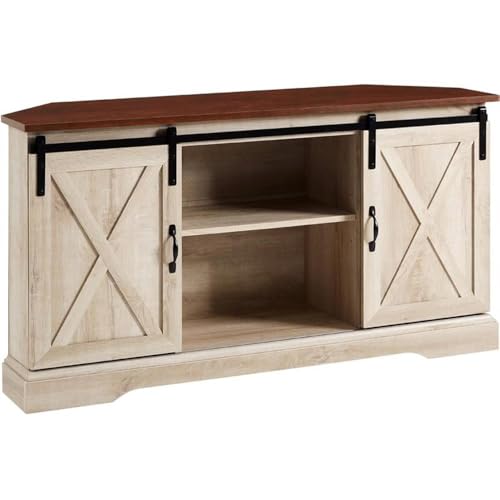
Walker Edison Modern Farmhouse TV Stand
The Walker Edison Modern Farmhouse TV Stand is a farmhouse-leaning design with cabinet storage that suits family living rooms wanting doors on the clutter and a warm wood-look finish. Consider it in the mid tier in qualitative terms, and judge it on the same checks as everything else in this guide: real width against your television’s real width, feet spacing, shelf room for your largest device, and a back design that lets cables out and warm air escape. During setup, anchor the television with an anti-tip strap, keep the heaviest device on the lowest shelf, and leave the top surface clear apart from the screen itself.
In daily use, the honest questions are simple. Does it wobble when a door closes? Do the warm devices get air? Can you reach the power strip without moving the whole piece? Does dust show fast enough to annoy you, and does the finish forgive the duster? A stand that answers those questions well for your room is a better buy than a more fashionable stand that answers them badly, whatever the product photograph promised.
VASAGLE TV Stand
The VASAGLE TV Stand is an industrial-leaning mix of wood-look panels and metal framing that pairs open shelving for ventilation with a compact footprint. Consider it in the mid tier in qualitative terms, and judge it on the same checks as everything else in this guide: real width against your television’s real width, feet spacing, shelf room for your largest device, and a back design that lets cables out and warm air escape. During setup, anchor the television with an anti-tip strap, keep the heaviest device on the lowest shelf, and leave the top surface clear apart from the screen itself.
In daily use, the honest questions are simple. Does it wobble when a door closes? Do the warm devices get air? Can you reach the power strip without moving the whole piece? Does dust show fast enough to annoy you, and does the finish forgive the duster? A stand that answers those questions well for your room is a better buy than a more fashionable stand that answers them badly, whatever the product photograph promised.
Performance in Real Use
Everyday Viewing
Viewing height is an ergonomic decision disguised as a furniture decision. Ideally the centre of the screen sits near eye level from your main seat, so your neck stays neutral through a film or a match. A stand that is too tall forces a permanent slight tilt of the head, and a stand that is too low does the same in the other direction. Sofa seat height, cushion sink, and viewing distance all feed into the right number for your room, so sit where you actually sit, note where your eyes rest on the wall, and work backwards from there rather than copying a height from a catalogue.
Sound deserves a thought in any stand decision. A soundbar needs a clear, unobstructed line to the room, so check that the stand top or the shelf intended for it does not leave the bar tucked behind a lip or a door frame. Subwoofers usually prefer the floor beside the stand rather than a shelf inside it, where cabinet resonance can muddy the bass. Centre speakers, where they exist, belong centred under the screen and angled slightly toward the listeners. None of this needs specialist knowledge, just the willingness to place audio gear where it can actually do its job.
Storage needs are easy to overestimate and just as easy to underestimate. List what genuinely lives near the television: the console, perhaps a soundbar, a router, a small stack of games or discs, remotes, chargers, and the household odds and ends that drift toward the screen. Closed storage hides the visual noise and keeps dust off equipment, while open shelves make plugging, unplugging, and ventilation simpler. Many households land happiest with a mix: doors for the clutter, an open bay for the warm-running box, and one drawer that becomes the honest home for remotes instead of the sofa cushions.
Assembly is part of the real cost of any flat-packed stand, paid in time and patience rather than money. Read the instructions fully before opening the hardware bags, lay every panel out and check it against the parts list, and build on a rug or blanket so finished surfaces are not scratched by the floor. Tighten fixings in stages rather than fully at the first pass, because a frame pulled square at the end sits straighter than one forced together early. Keep the spare fixings and the hex key in a labelled bag inside the stand itself, so a future tightening takes minutes.
Family Life and Safety
Safety comes before style with any television on furniture. A television on a stand is a tip-over hazard for climbing children, and the risk rises when a curious child pulls on a drawer, a door, or the screen itself to stand up. Anchor the television to the wall with an anti-tip strap, and anchor tall stands to the wall as well, so neither piece can move independently. Never let children climb on drawers, shelves, or open doors, and never treat a stand as a step stool during setup. Keep the heaviest components low and centred, because weight placed high makes any piece of furniture less forgiving.
Storage needs are easy to overestimate and just as easy to underestimate. List what genuinely lives near the television: the console, perhaps a soundbar, a router, a small stack of games or discs, remotes, chargers, and the household odds and ends that drift toward the screen. Closed storage hides the visual noise and keeps dust off equipment, while open shelves make plugging, unplugging, and ventilation simpler. Many households land happiest with a mix: doors for the clutter, an open bay for the warm-running box, and one drawer that becomes the honest home for remotes instead of the sofa cushions.
Cable management decides whether a living room feels calm or cluttered. A good stand gives cables a planned route: openings at the back, shelves that let power strips sit out of sight, and enough depth that plugs do not force the furniture away from the wall. Bundle related cables together, leave gentle slack for anything you move to clean behind, and label both ends of the leads you rarely touch. Keep remote-heavy top surfaces clear as a daily habit, because a crowded top invites remotes, game controllers, mugs, and chargers to migrate toward the screen and the edges, where a knock can send something onto the floor or into the set.
Ventilation is the quiet requirement people forget until a console runs hot. Game consoles, streaming boxes, and amplifiers all shed heat, and they should never be sealed inside a closed cabinet with the door shut during long sessions. Open-backed shelves, slatted doors, and generous gaps around each device let warm air escape the way the makers intended. If you prefer doors for a tidy look, leave the door open while playing, choose a design with ventilation cut into the back panel, and check by hand after a long session: a shelf that feels noticeably warm is telling you the airflow needs help.
Gaming and Consoles
Ventilation is the quiet requirement people forget until a console runs hot. Game consoles, streaming boxes, and amplifiers all shed heat, and they should never be sealed inside a closed cabinet with the door shut during long sessions. Open-backed shelves, slatted doors, and generous gaps around each device let warm air escape the way the makers intended. If you prefer doors for a tidy look, leave the door open while playing, choose a design with ventilation cut into the back panel, and check by hand after a long session: a shelf that feels noticeably warm is telling you the airflow needs help.
Cable management decides whether a living room feels calm or cluttered. A good stand gives cables a planned route: openings at the back, shelves that let power strips sit out of sight, and enough depth that plugs do not force the furniture away from the wall. Bundle related cables together, leave gentle slack for anything you move to clean behind, and label both ends of the leads you rarely touch. Keep remote-heavy top surfaces clear as a daily habit, because a crowded top invites remotes, game controllers, mugs, and chargers to migrate toward the screen and the edges, where a knock can send something onto the floor or into the set.
Materials shape both the look and the lifespan of a stand. Solid wood feels substantial and can often be repaired, engineered wood keeps larger designs lighter and more consistent in finish, metal frames read modern and keep the profile slim, and glass tops brighten a room while showing every fingerprint and cable shadow. None of these is automatically best. What matters is honest construction where it counts: joints that do not wobble, shelves that do not bow under a receiver, doors that hang straight, and a finish that survives the duster and the occasional moved ornament without marking at the first touch.
Think about the room before the product page. In a small apartment the stand often has to earn its footprint twice, hiding board games, blankets, and chargers as well as holding the screen. In a family room it becomes the anchor that seating, rug, and lighting all arrange themselves around. In a bedroom it needs to sit lower and quieter, without bright indicator lights at eye level from the bed. The same stand can be perfect in one of those rooms and awkward in another, which is why honest room thinking beats chasing a showroom photograph taken in a space twice the size of yours.
Cleaning and Clutter
Day-to-day care is simple but not optional. Dust with a soft cloth, lift objects rather than dragging them across the top, and use coasters under drinks without exception, because a single ring mark on a veneer top is permanent in a way a dusty shelf is not. Check the anti-tip strap and wall fixings whenever you move the stand to clean behind it, and re-tighten any fixing that has worked loose. Keep cables from pinching between the stand and the wall, and give the whole setup a slow look every few months: wobble, heat, dust build-up, and cable strain all announce themselves early if you bother to look.
Cable management decides whether a living room feels calm or cluttered. A good stand gives cables a planned route: openings at the back, shelves that let power strips sit out of sight, and enough depth that plugs do not force the furniture away from the wall. Bundle related cables together, leave gentle slack for anything you move to clean behind, and label both ends of the leads you rarely touch. Keep remote-heavy top surfaces clear as a daily habit, because a crowded top invites remotes, game controllers, mugs, and chargers to migrate toward the screen and the edges, where a knock can send something onto the floor or into the set.
Think about the room before the product page. In a small apartment the stand often has to earn its footprint twice, hiding board games, blankets, and chargers as well as holding the screen. In a family room it becomes the anchor that seating, rug, and lighting all arrange themselves around. In a bedroom it needs to sit lower and quieter, without bright indicator lights at eye level from the bed. The same stand can be perfect in one of those rooms and awkward in another, which is why honest room thinking beats chasing a showroom photograph taken in a space twice the size of yours.
Strengths and Trade-Offs
Strengths
- A well-sized stand centres the room and hides cable clutter completely.
- Closed storage keeps dust off equipment and visual noise out of the room.
- Open bays give consoles the airflow they need for long sessions.
Trade-offs
- Flat-packed designs demand patient, careful assembly to sit square.
- Closed cabinets fight ventilation unless the back is open or vented.
- A stand that is too small for the set looks wrong and is less safe.
How It Compares
Buying well is mostly about resisting the first attractive photograph. Check the real width against your television’s real width, check the feet spacing, check the internal shelf dimensions against the largest box you own, and check how the back is finished, because the back decides your cable and ventilation options. Read the assembly description honestly against your patience and tools. A stand is a long-lived, low-excitement purchase that you will look at every single day, so boring correctness on measurements and construction matters far more than a fashionable detail you will stop noticing within a month.
Materials shape both the look and the lifespan of a stand. Solid wood feels substantial and can often be repaired, engineered wood keeps larger designs lighter and more consistent in finish, metal frames read modern and keep the profile slim, and glass tops brighten a room while showing every fingerprint and cable shadow. None of these is automatically best. What matters is honest construction where it counts: joints that do not wobble, shelves that do not bow under a receiver, doors that hang straight, and a finish that survives the duster and the occasional moved ornament without marking at the first touch.
Storage needs are easy to overestimate and just as easy to underestimate. List what genuinely lives near the television: the console, perhaps a soundbar, a router, a small stack of games or discs, remotes, chargers, and the household odds and ends that drift toward the screen. Closed storage hides the visual noise and keeps dust off equipment, while open shelves make plugging, unplugging, and ventilation simpler. Many households land happiest with a mix: doors for the clutter, an open bay for the warm-running box, and one drawer that becomes the honest home for remotes instead of the sofa cushions.
Assembly is part of the real cost of any flat-packed stand, paid in time and patience rather than money. Read the instructions fully before opening the hardware bags, lay every panel out and check it against the parts list, and build on a rug or blanket so finished surfaces are not scratched by the floor. Tighten fixings in stages rather than fully at the first pass, because a frame pulled square at the end sits straighter than one forced together early. Keep the spare fixings and the hex key in a labelled bag inside the stand itself, so a future tightening takes minutes.
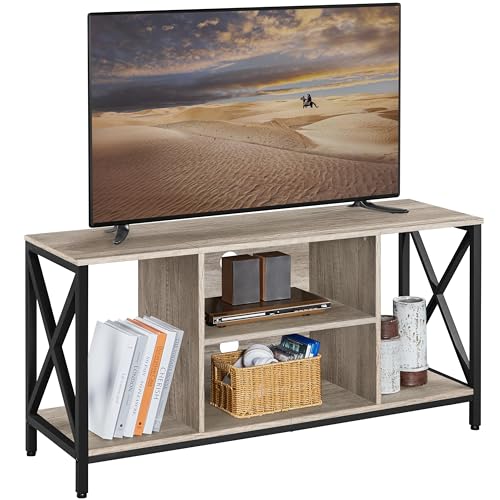
Yaheetech TV Stand with Storage
The Yaheetech TV Stand with Storage is a storage-forward design with shelves and cabinets aimed at households that need the stand to swallow consoles, games, and everyday clutter. Consider it in the mid tier in qualitative terms, and judge it on the same checks as everything else in this guide: real width against your television’s real width, feet spacing, shelf room for your largest device, and a back design that lets cables out and warm air escape. During setup, anchor the television with an anti-tip strap, keep the heaviest device on the lowest shelf, and leave the top surface clear apart from the screen itself.
In daily use, the honest questions are simple. Does it wobble when a door closes? Do the warm devices get air? Can you reach the power strip without moving the whole piece? Does dust show fast enough to annoy you, and does the finish forgive the duster? A stand that answers those questions well for your room is a better buy than a more fashionable stand that answers them badly, whatever the product photograph promised.

Pemberly Row TV Stand
The Pemberly Row TV Stand is a more traditional furniture-first design for readers who want the stand to read as a proper living-room piece rather than media equipment. Consider it in the premium-leaning tier in qualitative terms, and judge it on the same checks as everything else in this guide: real width against your television’s real width, feet spacing, shelf room for your largest device, and a back design that lets cables out and warm air escape. During setup, anchor the television with an anti-tip strap, keep the heaviest device on the lowest shelf, and leave the top surface clear apart from the screen itself.
In daily use, the honest questions are simple. Does it wobble when a door closes? Do the warm devices get air? Can you reach the power strip without moving the whole piece? Does dust show fast enough to annoy you, and does the finish forgive the duster? A stand that answers those questions well for your room is a better buy than a more fashionable stand that answers them badly, whatever the product photograph promised.
Who Should Buy It and Who Should Skip It
Think about the room before the product page. In a small apartment the stand often has to earn its footprint twice, hiding board games, blankets, and chargers as well as holding the screen. In a family room it becomes the anchor that seating, rug, and lighting all arrange themselves around. In a bedroom it needs to sit lower and quieter, without bright indicator lights at eye level from the bed. The same stand can be perfect in one of those rooms and awkward in another, which is why honest room thinking beats chasing a showroom photograph taken in a space twice the size of yours.
Buying well is mostly about resisting the first attractive photograph. Check the real width against your television’s real width, check the feet spacing, check the internal shelf dimensions against the largest box you own, and check how the back is finished, because the back decides your cable and ventilation options. Read the assembly description honestly against your patience and tools. A stand is a long-lived, low-excitement purchase that you will look at every single day, so boring correctness on measurements and construction matters far more than a fashionable detail you will stop noticing within a month.
Assembly is part of the real cost of any flat-packed stand, paid in time and patience rather than money. Read the instructions fully before opening the hardware bags, lay every panel out and check it against the parts list, and build on a rug or blanket so finished surfaces are not scratched by the floor. Tighten fixings in stages rather than fully at the first pass, because a frame pulled square at the end sits straighter than one forced together early. Keep the spare fixings and the hex key in a labelled bag inside the stand itself, so a future tightening takes minutes.
Day-to-day care is simple but not optional. Dust with a soft cloth, lift objects rather than dragging them across the top, and use coasters under drinks without exception, because a single ring mark on a veneer top is permanent in a way a dusty shelf is not. Check the anti-tip strap and wall fixings whenever you move the stand to clean behind it, and re-tighten any fixing that has worked loose. Keep cables from pinching between the stand and the wall, and give the whole setup a slow look every few months: wobble, heat, dust build-up, and cable strain all announce themselves early if you bother to look.
Style works best when it answers to the room you already have. A stand that echoes one or two existing notes, the wood tone of a coffee table, the black metal of a lamp, the woven texture of a rug, will settle in quietly, while a stand chosen as a statement in isolation can fight everything around it for years. Consider the wall behind it as well: a dark stand against a pale wall reads bold and graphic, a pale stand can disappear and let the screen dominate, and open-legged designs let more floor show, which helps smaller rooms feel less full.
Setup, Care and Maintenance Essentials
Assembly is part of the real cost of any flat-packed stand, paid in time and patience rather than money. Read the instructions fully before opening the hardware bags, lay every panel out and check it against the parts list, and build on a rug or blanket so finished surfaces are not scratched by the floor. Tighten fixings in stages rather than fully at the first pass, because a frame pulled square at the end sits straighter than one forced together early. Keep the spare fixings and the hex key in a labelled bag inside the stand itself, so a future tightening takes minutes.
Day-to-day care is simple but not optional. Dust with a soft cloth, lift objects rather than dragging them across the top, and use coasters under drinks without exception, because a single ring mark on a veneer top is permanent in a way a dusty shelf is not. Check the anti-tip strap and wall fixings whenever you move the stand to clean behind it, and re-tighten any fixing that has worked loose. Keep cables from pinching between the stand and the wall, and give the whole setup a slow look every few months: wobble, heat, dust build-up, and cable strain all announce themselves early if you bother to look.
Safety comes before style with any television on furniture. A television on a stand is a tip-over hazard for climbing children, and the risk rises when a curious child pulls on a drawer, a door, or the screen itself to stand up. Anchor the television to the wall with an anti-tip strap, and anchor tall stands to the wall as well, so neither piece can move independently. Never let children climb on drawers, shelves, or open doors, and never treat a stand as a step stool during setup. Keep the heaviest components low and centred, because weight placed high makes any piece of furniture less forgiving.
Style works best when it answers to the room you already have. A stand that echoes one or two existing notes, the wood tone of a coffee table, the black metal of a lamp, the woven texture of a rug, will settle in quietly, while a stand chosen as a statement in isolation can fight everything around it for years. Consider the wall behind it as well: a dark stand against a pale wall reads bold and graphic, a pale stand can disappear and let the screen dominate, and open-legged designs let more floor show, which helps smaller rooms feel less full.
Sound deserves a thought in any stand decision. A soundbar needs a clear, unobstructed line to the room, so check that the stand top or the shelf intended for it does not leave the bar tucked behind a lip or a door frame. Subwoofers usually prefer the floor beside the stand rather than a shelf inside it, where cabinet resonance can muddy the bass. Centre speakers, where they exist, belong centred under the screen and angled slightly toward the listeners. None of this needs specialist knowledge, just the willingness to place audio gear where it can actually do its job.
Final Verdict
Buying well is mostly about resisting the first attractive photograph. Check the real width against your television’s real width, check the feet spacing, check the internal shelf dimensions against the largest box you own, and check how the back is finished, because the back decides your cable and ventilation options. Read the assembly description honestly against your patience and tools. A stand is a long-lived, low-excitement purchase that you will look at every single day, so boring correctness on measurements and construction matters far more than a fashionable detail you will stop noticing within a month.
Viewing height is an ergonomic decision disguised as a furniture decision. Ideally the centre of the screen sits near eye level from your main seat, so your neck stays neutral through a film or a match. A stand that is too tall forces a permanent slight tilt of the head, and a stand that is too low does the same in the other direction. Sofa seat height, cushion sink, and viewing distance all feed into the right number for your room, so sit where you actually sit, note where your eyes rest on the wall, and work backwards from there rather than copying a height from a catalogue.
Style works best when it answers to the room you already have. A stand that echoes one or two existing notes, the wood tone of a coffee table, the black metal of a lamp, the woven texture of a rug, will settle in quietly, while a stand chosen as a statement in isolation can fight everything around it for years. Consider the wall behind it as well: a dark stand against a pale wall reads bold and graphic, a pale stand can disappear and let the screen dominate, and open-legged designs let more floor show, which helps smaller rooms feel less full.
More Practical Notes
Day-to-day care is simple but not optional. Dust with a soft cloth, lift objects rather than dragging them across the top, and use coasters under drinks without exception, because a single ring mark on a veneer top is permanent in a way a dusty shelf is not. Check the anti-tip strap and wall fixings whenever you move the stand to clean behind it, and re-tighten any fixing that has worked loose. Keep cables from pinching between the stand and the wall, and give the whole setup a slow look every few months: wobble, heat, dust build-up, and cable strain all announce themselves early if you bother to look.
Buying well is mostly about resisting the first attractive photograph. Check the real width against your television’s real width, check the feet spacing, check the internal shelf dimensions against the largest box you own, and check how the back is finished, because the back decides your cable and ventilation options. Read the assembly description honestly against your patience and tools. A stand is a long-lived, low-excitement purchase that you will look at every single day, so boring correctness on measurements and construction matters far more than a fashionable detail you will stop noticing within a month.
Think about the room before the product page. In a small apartment the stand often has to earn its footprint twice, hiding board games, blankets, and chargers as well as holding the screen. In a family room it becomes the anchor that seating, rug, and lighting all arrange themselves around. In a bedroom it needs to sit lower and quieter, without bright indicator lights at eye level from the bed. The same stand can be perfect in one of those rooms and awkward in another, which is why honest room thinking beats chasing a showroom photograph taken in a space twice the size of yours.
Materials shape both the look and the lifespan of a stand. Solid wood feels substantial and can often be repaired, engineered wood keeps larger designs lighter and more consistent in finish, metal frames read modern and keep the profile slim, and glass tops brighten a room while showing every fingerprint and cable shadow. None of these is automatically best. What matters is honest construction where it counts: joints that do not wobble, shelves that do not bow under a receiver, doors that hang straight, and a finish that survives the duster and the occasional moved ornament without marking at the first touch.
Frequently Asked Questions
How wide should a TV stand be compared with the TV?
Wider than the television’s actual width, not its diagonal screen size. Television size is measured diagonally, so check the set’s real side-to-side width and the spacing between its feet, then choose a stand with a little clear surface on each side. That margin looks better, feels more stable, and keeps the set from overhanging the furniture in a way that invites knocks.
Do I really need to anchor a TV on a stand?
Yes. A television on a stand is a tip-over hazard for climbing children, and anchoring is the simple step that changes that. Fit an anti-tip strap from the television to the wall, anchor tall stands to the wall as well, and never let children climb on drawers, shelves, or doors. Check the strap whenever you move the furniture to clean behind it.
Can I keep a game console inside a closed cabinet?
Not while it is running hard for long sessions. Consoles shed heat and should never be sealed inside a closed cabinet without airflow. Choose open-backed shelving, leave the door open during play, or pick a design with ventilation in the back panel, and check the shelf by hand afterwards. A noticeably warm shelf is a clear sign the setup needs more air.
What should I keep on top of a TV stand?
As little as possible. Keep remote-heavy top surfaces clear, with the television centred, perhaps a soundbar with a clear line to the room, and nothing stacked near the edges. Remotes belong in a drawer or a small tray, drinks belong on coasters on a side table, and chargers belong out of sight. A clear top is safer, calmer to look at, and easier to dust.
How do I hide cables without trapping heat?
Route cables through the stand’s rear openings, bundle related leads together with gentle slack, and keep the power strip accessible rather than buried. Hiding cables and ventilating equipment are compatible goals as long as warm devices sit in open bays or vented sections. Photograph the layout once it works, so any future unplugging for cleaning or moving rebuilds in minutes.
How often should I check a TV stand for safety?
Give it a slow check every few months and after every move or deep clean. Look for wobble, loose fixings, a slack anti-tip strap, dust build-up around vents, and cables pinched against the wall. Tighten what has loosened, re-seat what has shifted, and confirm the television still sits fully on its feet with margin on the stand top.