Where to buy
Shopping for the best outdoor security camera under $300 starts with one decision: wired floodlight, battery camera or solar kit. Check the latest price, availability and delivery on Amazon. Orders are placed on Amazon. We may earn a commission from qualifying purchases. Every pick below is a complete outdoor camera or a complete camera kit that can be bought on its own — check the listing carefully so the box, mount and any hub in the title match what the review describes.
- Best floodlight flagship: Ring Floodlight Cam Wired Pro — Check on Amazon
- Best kit with no monthly fee: eufy Security eufyCam S330 (eufyCam 3) 2-Cam Kit — Check on Amazon
- Best wire-free single camera: Arlo Pro 5S 2K Spotlight Camera — Check on Amazon
- Best for Google Home households: Google Nest Cam with Floodlight — Check on Amazon
- Best brightness for the money: Wyze Cam Floodlight Pro — Check on Amazon
- Best low-effort battery system: Blink Outdoor 4 Floodlight Camera — Check on Amazon
Read the full guide ↓
Disclosure: As an Amazon Associate, dailyhomedecorating.com earns from qualifying purchases. Links to Amazon on this page are affiliate links; they cost you nothing extra. Listing details such as price and availability change often, so check the current Amazon listing before you buy.
Finding the best outdoor security camera under $300 used to mean choosing between a sharp camera that demanded a monthly fee and a cheap camera that missed the moment that mattered. That trade-off has softened. At this ceiling you can now buy a hardwired floodlight flagship with radar motion detection, a two-camera 4K kit that stores everything inside your own home, or a wire-free camera with a view so wide it covers a whole front yard from one corner. What separates the good buys from the frustrating ones is rarely the headline resolution. It is the fine print: what still records when the free trial ends, where the footage actually lives, how the camera is powered through a dark February, and whether the weather rating on the box matches the wall you plan to mount it on.
This guide stays strictly outdoors. Indoor cameras are built for climate-controlled rooms, with housings, cables and night-vision ranges that assume no rain and no frost, and they do not belong in a roundup like this one. Every pick below is designed to live outside through storms and heat, aimed at driveways, porches, side gates, yards and outbuildings. We also treat the six picks as three different ownership models rather than six versions of the same product. The Ring, Nest and Wyze are hardwired floodlight cameras that replace an existing light fixture and never need charging. The Arlo and Blink run on batteries, so they can go almost anywhere but need a power plan. The eufy kit splits the difference, sipping sunlight through an integrated solar panel while its footage stays on a hub indoors.
One warning before the picks, because it decides more purchases at this tier than any spec: a subscription is part of the product on most of these cameras, not an optional extra. On the Ring, nothing is recorded at all without a paid plan. On the Arlo, the smart detection most people buy it for sits behind Arlo Secure. The eufy and Wyze can record locally with no plan at all, and the Nest gives you its smartest detection free but charges for a long memory. None of that makes any of them a bad camera. It does mean the honest price of each system is the camera plus the plan you will actually keep, and this guide states that cost structure plainly for every pick instead of burying it. If your priority is protection rather than gadgets, our companion guide Best Outdoor Security Camera For Home Security Under $300 judges this same shortlist purely as a security system, while this page stays focused on what under $300 buys today.
In this guide
Quick Picks
Short on time? These six are the complete shortlist. Start with the ownership model that fits your house — wired floodlight, battery camera or solar kit — then pick the name that matches it.
| Buyer type | Pick | Why it stands out | Link |
|---|---|---|---|
| Best floodlight flagship | Ring Floodlight Cam Wired Pro | Retinal 2K video, radar-based 3D motion detection and 2,000-lumen lights in one hardwired fixture | Check on Amazon |
| Best kit with no monthly fee | eufy Security eufyCam S330 (eufyCam 3) 2-Cam Kit | Two 4K solar cameras plus a HomeBase that stores footage locally, so recording never needs a subscription | Check on Amazon |
| Best wire-free single camera | Arlo Pro 5S 2K Spotlight Camera | 2K HDR, a very wide 160° view and dual-band Wi-Fi in a camera you can mount anywhere without wiring | Check on Amazon |
| Best for Google Home households | Google Nest Cam with Floodlight | On-device person, animal and vehicle detection that works without a plan, inside the Google Home app | Check on Amazon |
| Best brightness for the money | Wyze Cam Floodlight Pro | 3,000 lumens across three light heads, a 180° view and microSD recording at a value-tier position | Check on Amazon |
| Best low-effort battery system | Blink Outdoor 4 Floodlight Camera | A floodlight camera system that runs on replaceable batteries and asks almost nothing of your wiring or your weekends | Check on Amazon |
How we chose
We built this list from manufacturer specifications, official support documentation and current Amazon listings, then filtered it with one hard rule: the camera or complete kit had to be a genuine under-$300 purchase, not a single add-on camera that secretly needs a hub, a plan and three accessories before it works. Add-on cameras that require a base station are only included when the base station is in the box. Where a kit’s price moves with promotions — the eufy two-camera kit is the clearest case — we say so and tell you to confirm the live listing price against the ceiling before buying, rather than pretending a sale price is permanent.
Specs in this guide are maker specs, and we label them that way where it matters. A battery-life figure is the manufacturer’s claim under the manufacturer’s assumed conditions: a modest number of events a day, mild temperatures, default settings. A busy driveway in January will not match it, and no honest guide should present it as a promise. The same applies to weather ratings: an IP number is a laboratory rating published by the maker, useful for comparing housings, not a guarantee about a decade on a sun-baked wall. What we can verify and compare fairly is the architecture — power source, storage location, subscription gates, field of view and light output — and that architecture is what this guide judges.
- Outdoor-first design: Every pick is built to live outside: sealed housings with published weather ratings, operating ranges that cover winter nights, and mounts designed for siding, brick and eaves rather than bookshelves.
- A recording path you can name: For each camera we state exactly where footage goes — cloud, hub or memory card — and what stops working without a subscription. A camera that cannot record is a doorbell with a lens, and we treat that as a first-order fact.
- Power that survives the season: Hardwired, battery and solar picks are judged separately. Wired cameras never sleep; battery cameras must justify their charging interval; solar cameras must still work on a shaded wall.
- Light as a security feature: Four of the six picks carry real floodlights or spotlights. Bright, well-aimed light deters, identifies and turns night footage from grey shapes into usable colour evidence.
- Whole-cost honesty: We flag the plan, hub or memory card each system quietly assumes, so the under-$300 headline stays honest a year after checkout.
Finally, we ordered the picks by how completely they solve the common case — a householder who wants the front of the home covered properly, once, without becoming a part-time systems administrator. Lens-specific orderings in our companion guides differ, and they should: the right first camera for an apartment balcony is not the right first camera for a detached garage.
The 6 best outdoor security cameras under $300
Ring Floodlight Cam Wired Pro
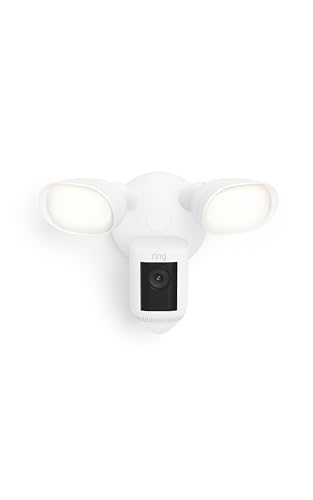
The Ring Floodlight Cam Wired Pro is the most complete single-fixture answer in this guide. It replaces an existing outdoor light, hardwires to the junction box that light already uses, and from that one position delivers Retinal 2K HDR video, two floodlight heads rated by Ring at 2,000 lumens, a remote-activated siren and radar-based 3D Motion Detection with Bird’s Eye View, which maps a visitor’s path across your property from above rather than simply announcing that something moved. For a driveway or a front yard — the two places most households actually need covered — that combination of light, deterrence and precise alerts is difficult to beat at this tier.
The ownership terms need to be just as clear as the spec sheet. This camera has no memory-card slot and no local recording of any kind. Without a paid Ring plan it is a live-view camera: you can watch in real time, answer an alert as it happens, talk through it and sound the siren, but nothing is saved, and the person and package alerts that make its radar so useful are plan features too. Budget for the plan from day one and the camera is exactly what it claims to be. Buy it assuming the plan is optional and you will feel misled within a month, because the trial ends and the history goes dark.
In daily use the strengths are the ones that matter at 2 a.m. The hardwired power means the camera is always awake, pre-buffering and ready, with none of the wake-up lag battery cameras show. Dual-band Wi-Fi gives it a better chance of holding a clean connection on an outside wall than 2.4 GHz-only rivals, and the Audio+ two-way talk is genuinely intelligible at driveway distance. The lights are bright enough to work as your yard lighting, with schedules and dusk-to-dawn behaviour in the app, so the fixture earns its wall space even on quiet weeks.
Who it suits: Homeowners replacing an existing driveway or porch floodlight who want the strongest deterrence and the most precise motion alerts in one fixture, and who accept a subscription as part of the deal.
- Radar 3D Motion Detection with Bird’s Eye View cuts false alerts and shows the path a visitor took
- 2,000-lumen floodlights (maker figure) double as real yard lighting, not just camera garnish
- Hardwired power means instant wake, continuous readiness and nothing to recharge
- Dual-band Wi-Fi and Audio+ two-way talk are a step above most floodlight rivals
Honest limitation: There is no local storage at all: cancel the plan and every recording, past and future, is gone. If fee-free recording is a principle rather than a preference, this is the wrong camera no matter how good the hardware is.
Choose it if you have a junction box where you want coverage and you value precise alerts and deterrence over storage freedom. Skip it if you refuse ongoing fees on principle, or the mounting point has no existing wiring and no easy way to add it. Check on Amazon
eufy Security eufyCam S330 (eufyCam 3) 2-Cam Kit
The eufyCam S330 two-camera kit is the ownership opposite of the Ring, and for many households the smarter buy. Each camera records in 4K, carries its own integrated solar panel, and sends its footage to the included HomeBase 3, which stores recordings on built-in memory inside your house and can be expanded with a drive you supply. Person and face recognition run on that HomeBase, locally, with no monthly fee required for recording, playback or the smart alerts. Two cameras in the box means the front and back of a typical home are covered on day one, which is why a kit — not a single camera — is the honest comparison at this ceiling.
The solar claim deserves the maker-claim treatment. eufy’s Forever Power framing assumes the panel sees a few hours of direct sun a day; a camera under a north-facing eave in a cloudy climate will still need an occasional manual charge, and the honest expectation is ‘rarely’ rather than ‘never’. What solar does reliably is stretch the interval from weeks to seasons, which changes the camera from a chore into an appliance. The cameras are maker-rated IP67, the strongest weather rating in this guide, and the battery inside each unit is large enough to ride out long grey spells between sunny days.
Living with the system is pleasantly boring, which is the point. Alerts arrive with the person identified where the HomeBase knows the face, clips play back from your own hub rather than a distant server, and there is no trial countdown anywhere in the app. The trade-offs are ecosystem-shaped: this is a 2.4 GHz system, the cameras only work through the HomeBase rather than as standalone Wi-Fi cameras, and eufy’s optional cloud and monitoring plans are present but genuinely optional. One pricing honesty note: this kit’s street price moves with promotions and sits at the top of the tier, so confirm on the listing that the kit is at or under your ceiling on the day you buy.
Who it suits: Households that want two viewpoints covered, the sharpest video in this guide and no subscription — ever — and that have at least one sunny mounting position per camera.
- Two 4K cameras plus the HomeBase in one box covers front and back immediately
- Local storage and on-hub face recognition with no monthly fee required
- Integrated solar stretches charging intervals from weeks to seasons
- Expandable hub storage grows with you instead of renting you cloud space
Honest limitation: The kit price hovers at the ceiling and moves with promotions, and shaded mounts undermine the solar promise. Check the live price, and be honest about your sun before choosing it over a wired camera.
Choose it if you want multi-camera coverage with footage that stays in your home and no plan on your card. Skip it if both mounting spots are deeply shaded, or you want a single floodlight fixture rather than a camera system. Check on Amazon
Arlo Pro 5S 2K Spotlight Camera
The Arlo Pro 5S 2K is the best wire-free single camera in this guide, and the one to buy when the right mounting spot has no wiring anywhere near it. It records 2K HDR video across a 160° field of view — wide enough that one camera on a corner watches two walls at once — connects directly to your router on either Wi-Fi band with no hub required, and carries an integrated spotlight, colour night vision, two-way audio and a siren in a compact sealed body. As a rental-friendly, ladder-friendly, drill-two-screws-and-done camera, nothing else here is as flexible.
Its subscription terms are the mirror image of its hardware freedom. Live view, basic motion alerts and two-way talk work without a plan. Cloud recording and the detection that tells a person from a package from a passing animal sit inside Arlo Secure, and local recording exists only if you add a compatible Arlo SmartHub or base station, sold separately, with your own USB or card storage. So the realistic ways to own this camera are: pay the plan, or pay for the hub. Pretending neither is needed leaves you with a camera that watches but does not remember, which is rarely what buyers thought they were purchasing.
Battery life is a maker claim built on typical event counts, and a Pro 5S watching a busy street will need charging far sooner than the headline figure suggests, while one watching a quiet side gate may coast for a season. The removable battery at least makes the chore quick, and an optional solar panel accessory can stretch it further. Picture quality is a genuine strength: the HDR handling of a bright driveway against a shaded porch is the best in this guide alongside the eufy, and the app polish, activity zones with a plan and smart-home integrations are mature. Buy it for placement freedom and image quality, with eyes open about the plan.
Who it suits: Anyone whose ideal camera position has no wiring — a fence line, a tree-side gate, a rental wall — and who wants premium 2K HDR quality from a battery camera.
- Truly wire-free with direct dual-band Wi-Fi, so it mounts where wired cameras cannot go
- 160° view covers two walls from a single corner position
- Excellent 2K HDR image quality in mixed sun and shade
- Removable battery makes recharging a two-minute job
Honest limitation: Recording history and smart detection need Arlo Secure, or local recording needs a SmartHub bought separately. The camera alone, plan-free and hub-free, does not save clips.
Choose it if placement freedom matters more than storage freedom and you will keep the plan or add the hub. Skip it if you want fee-free recording out of the box — the eufy kit and the Wyze both do that more cheaply. Check on Amazon
Google Nest Cam with Floodlight
The Google Nest Cam with Floodlight is the pick for households already living in the Google Home app. It hardwires in place of an existing floodlight, pairs the proven Nest camera with two light heads, and does its smartest trick for free: person, animal and vehicle detection runs on the device itself, with no subscription required, so the alert that reaches your phone already says what the camera saw. A short recent window of event history is included at no cost, which is enough to check what just happened at the door while it still matters.
The paid tier, Nest Aware, is about memory rather than intelligence: it stretches event history from hours to weeks and adds familiar-face detection. That is a fairer split than most rivals offer, and it means a Nest owner who never pays still owns a genuinely smart camera — just an amnesiac one. There is no memory-card slot and no local hub option, so footage lives in Google’s cloud on Google’s terms, and the camera speaks Google Home fluently while remaining a poor fit for households built on other ecosystems.
As hardware it is tidy rather than spectacular: 1080p HDR video rather than the 2K or 4K of the Ring, eufy and Wyze picks, a 130° view, and floodlights that serve the camera well without rivalling the Wyze for raw output. What you are buying is judgement — the most accurate free detection in this guide, an app many households already open daily, and a fixture that disappears into the architecture. For a Google-centred home that values correct alerts over pixel counts, that trade is often the right one. For a spec-sheet shopper, the same money buys more resolution elsewhere in this list.
Who it suits: Google Home households that want the most accurate alerts without a mandatory plan and prefer one app they already use over another account and another inbox of notifications.
- Person, animal and vehicle detection runs on-device with no subscription required
- A short free event-history window covers the check-it-now moments
- Hardwired install replaces an existing floodlight neatly, with nothing to charge
- Google Home integration is the deepest in this guide
Honest limitation: 1080p video is a step behind the 2K and 4K picks at the same ceiling, and long history needs Nest Aware. There is no local storage option at any price.
Choose it if your home already runs on Google Home and alert accuracy matters more to you than resolution. Skip it if you want the sharpest possible footage for identifying faces or plates, or you avoid cloud-only storage. Check on Amazon
Wyze Cam Floodlight Pro
The Wyze Cam Floodlight Pro is the value overachiever of this guide: three adjustable floodlight heads rated by Wyze at 3,000 lumens — the brightest here — a 2.5K camera with a 180° field of view that sees an entire yard from one fixture, and a microSD slot that records locally to a card you supply, no plan required. It hardwires in place of an existing floodlight, and its on-device motion processing can fire the lights for people and vehicles specifically rather than for every moth and rain shower that crosses the lens.
The subscription split is refreshingly honest. Without Cam Plus you keep live view, motion alerts and your microSD recordings; what the plan adds is cloud event video and labelled person and package detection, with free alerts otherwise arriving as thumbnails rather than playable cloud clips. That makes the Wyze the cheapest camera in this guide to own properly over five years alongside the eufy, and the only floodlight here whose recording does not depend on a company’s servers staying switched on. Buy a generous memory card with it, set it to record events or continuously, and the system is complete.
The compromises are polish and ecosystem. The app is busy, the floodlight fixture is bulky, Wi-Fi is 2.4 GHz only, and Wyze’s smart-home integrations are thinner than Ring’s or Google’s. The maker-rated weather resistance is a step below the eufy’s rating, though entirely adequate for a mounted-under-eaves life. None of that dims the central fact: for raw light, width of view and fee-free recording per pound of hardware, nothing at this ceiling touches it. If your priority is a big, dark yard made visible and recorded without rent, start here.
Who it suits: Owners of larger or darker yards who want maximum light and the widest view, with fee-free local recording, and who can forgive a less polished app.
- 3,000-lumen output (maker figure) across three heads is the brightest in this guide
- 180° view covers a whole yard or driveway apron from one fixture
- microSD recording works with no plan; the plan only adds cloud clips and labels
- 2.5K video out-resolves the Nest and Blink at a value position in the tier
Honest limitation: 2.4 GHz Wi-Fi only, a bulky fixture and a busy app. Free alerts without Cam Plus are thumbnails, so the plan still tempts — it just is not compulsory.
Choose it if you want the most light and the widest recorded view without a required subscription. Skip it if you want the neatest fixture or the smoothest app experience — the Ring and Nest are tidier. Check on Amazon
Blink Outdoor 4 Floodlight Camera
The Blink Outdoor 4 Floodlight Camera is the low-effort system in this guide, and effort is a real feature. The camera runs on AA lithium batteries, the floodlight mount on D cells, and Blink’s maker claim of up to two years of battery life under default settings means most owners will change batteries about as often as they change the clocks for a new season twice removed. The floodlight contributes 700 lumens — modest beside the wired fixtures here, but honest working light for a porch, a side door or a small patio — and the whole system sets up in minutes with the included Sync Module Core.
Blink’s subscription terms are the part to read twice. Cloud recording and person detection require the Blink Subscription Plan; without it you have live view, motion alerts and two-way talk, but no saved clips in the cloud. Local storage exists in the Blink world, but not through the Sync Module Core in this box, which has no USB port — local clips require a different Sync Module, bought separately, with a USB drive. Buyers who assume ‘Blink does local storage’ and stop reading there end up surprised, so decide which module you actually want before checkout.
Video is 1080p with a 143° view and infrared night vision, entirely adequate for knowing who came to the door and whether the bins blew over, less suited to reading a number plate across a wide drive. That is the honest shape of this pick: it is the cheapest, simplest way in this guide to put a lit, alerting camera over a modest area and then forget it exists. Households that later want more can grow the system camera by camera. Households that need evidence-grade footage or big-area light should step up to the wired picks instead.
Who it suits: Porch, patio and side-door coverage for people who value minutes-long setup and seasons-long battery intervals over maximum image detail.
- Battery power everywhere means no junction box, no electrician and no charging rota
- Maker-rated battery life of up to two years under default settings is the longest claim here
- Floodlight, camera and hub in one box at a value position in the tier
- Expandable system: add cameras to the same module as needs grow
Honest limitation: 700 lumens is porch light, not yard light, and cloud recording plus person detection need the paid plan. The included Sync Module Core cannot store clips locally.
Choose it if you want a lit camera over a modest area with the least possible installation and upkeep. Skip it if you need to identify faces across a wide driveway or light a large yard — the wired floodlights do that job. Check on Amazon
Comparison table
Architecture decides ownership cost more than resolution does. Read the storage column as carefully as the video column.
| Product | Video and view | Power | Storage and subscription | Link |
|---|---|---|---|---|
| Ring Floodlight Cam Wired Pro | Retinal 2K HDR video, 2,000-lumen floodlights, hardwired; 140° horizontal field of view | Hardwired (100-240V) or plug-in variant | Cloud only with a paid Ring plan; no local storage and no memory-card slot | Check on Amazon |
| eufy Security eufyCam S330 (eufyCam 3) 2-Cam Kit | 4K video, integrated solar panel, HomeBase 3 local storage; 135° field of view per camera | Battery with an integrated solar panel | Local storage on the included HomeBase 3 (built-in memory, expandable with a user-supplied drive); recordings stay in your home, not on a rented server | Check on Amazon |
| Arlo Pro 5S 2K Spotlight Camera | 2K HDR video, 160° view, wire-free battery power; 160° diagonal field of view | Rechargeable battery, wire-free | Cloud recording sits in the paid Arlo Secure plan; local recording is only possible through a compatible Arlo SmartHub or base station bought separately | Check on Amazon |
| Google Nest Cam with Floodlight | 1080p HDR video, smart floodlight, wired power; 130° diagonal field of view for the camera | Hardwired to an existing floodlight junction box | Cloud-based through the Google Home app; there is no memory-card slot and no local hub storage | Check on Amazon |
| Wyze Cam Floodlight Pro | 2.5K video, 3,000-lumen floodlights, 180° view; 180° field of view, the widest in this guide | Hardwired to an existing floodlight junction box | Local recording to a microSD card you supply (card not included), plus optional cloud recording through the paid Cam Plus plan | Check on Amazon |
| Blink Outdoor 4 Floodlight Camera | 1080p HD video, 700-lumen floodlight, battery power; 143° diagonal field of view | Battery powered: AA lithium cells in the camera and D cells in the floodlight mount | Cloud recording requires the Blink Subscription Plan. The Sync Module Core in this box does not take a USB drive, so local clip storage needs a different Sync Module bought separately | Check on Amazon |
How to choose the best outdoor security camera under $300 for your home
Start with power, not pixels
Walk to the exact spot you want covered and ask what power exists there. An existing floodlight junction box unlocks the wired picks — Ring, Nest and Wyze — which never sleep, never need charging and can run their lights at full output indefinitely. No wiring means a battery pick: the Arlo for image quality, the Blink for battery interval, or the solar-assisted eufy kit if the spot sees sun. Choosing power first eliminates half the list honestly, and it prevents the classic mistake of buying a wired flagship for a fence line with no electricity.
Also think about who will maintain the choice. A battery camera at gutter height is a ladder commitment twice or four times a year, depending on traffic and temperature. If nobody in the household enjoys ladders, wired and solar picks are not luxuries; they are the difference between a camera that works in year two and a camera that went flat in March and was never recharged.
Decide where footage lives before you buy
There are only three answers in this guide: the maker’s cloud, a hub in your home, or a card in the camera. Cloud footage is effortless and survives the camera being stolen, but on the Ring it exists only while you pay, and on every cloud system it depends on your upload bandwidth and the company’s servers. Hub storage, the eufy model, keeps recordings on your shelf with no fee and keeps working when the internet drops, but the hub is a single point of failure worth placing sensibly. Card storage, the Wyze model, is the simplest local answer and the most exposed: the evidence leaves with the camera if the camera leaves.
Match the answer to your actual fear. If the fear is a stolen package and a shrug from the carrier, any recording path works. If the fear is an intruder who would take the camera, cloud or hub wins. If the objection is monthly fees on principle, the eufy and Wyze are your shortlist and the rest of this guide is context.
Read the subscription gate, feature by feature
Do not ask whether a camera ‘needs a subscription’. Ask which four things stop without one: recording, reviewing, smart detection and saving or sharing clips. On the Ring, all four stop. On the Arlo and Blink, recording and smart detection stop while live view and basic alerts continue. On the Nest, only long memory stops; the detection itself is free. On the eufy and Wyze, recording continues locally and the plan is a convenience. That four-question test, applied to the listing and the maker’s support pages before checkout, prevents nearly every subscription complaint in this category.
Then price the system over three years in your head: camera plus plan, or camera plus hub, or camera plus a large memory card. The under-$300 ceiling in this guide is the hardware ceiling; the honest comparison includes the ownership path you will actually take.
Match light and lens to the area
A floodlight camera is two products sharing a bracket. Judge the light by the area: 700 lumens serves a porch, 2,000 lumens works a driveway, 3,000 lumens across three heads reaches into a yard. Judge the lens by width: a 180° Wyze sees everything nearby and identifies little at distance, while a narrower 2K or 4K view reads faces and plates further away but misses the corners. Wide-and-close suits porches and patios; narrower-and-sharper suits long driveways and street-facing mounts. The best outdoor security camera under $300 for your home is the one whose cone of vision matches your cone of concern.
Height matters as much as width. Mount high and you gain overview and tamper resistance but lose faces to hat brims; mount at door height and you gain identification but invite interference. Most households do best with the main camera high over the driveway and, if the budget stretches later, a second viewpoint at the door.
Check the unglamorous specs: Wi-Fi band, weather rating, temperature
An outdoor camera is a radio on a wall, and the wall is usually at the edge of your Wi-Fi. Dual-band cameras like the Ring and Arlo can use the less crowded 5 GHz band when close enough or fall back to longer-range 2.4 GHz; 2.4 GHz-only cameras reach further but compete with every neighbour’s network. Test your phone’s signal at the mounting spot before ordering. Weather ratings and operating ranges are maker figures: they tell you the housing was sealed and tested to a standard, and they matter most at the extremes — a camera over a sun-baked south wall or a Minnesota eave lives a harder life than the lab did.
Finally, confirm the app household: who else needs access, whether the camera shares gracefully with a partner or a house-sitter, and whether your smart speakers can show the feed. A camera only one person can operate becomes a single point of failure with a lens.
Outdoor is not indoor: why this category is its own thing
Shoppers often ask why they cannot simply put a cheaper indoor camera in a window or under an eave. Sometimes a window mount works after a fashion, but the compromises stack up: infrared night vision reflects off glass and blinds the camera after dark, window glass blocks the passive infrared sensors many cameras use to detect motion, and an indoor housing has no sealing against the condensation that forms on a cold morning inside an unheated porch. Outdoor cameras earn their price with sealed housings, sun shields, longer night-vision ranges, mounts that hold aim in wind, and power systems designed for temperature swings that would embarrass a lithium cell indoors.
The reverse mistake exists too: using a floodlight flagship as a nursery camera because it was on offer. Outdoor picks are optimised for distance, weather and deterrence — wide lenses, bright lights, sirens — and they make clumsy indoor guests. Keep the categories separate, buy each for its own job, and both will do that job properly. This guide’s six picks were judged only on the outdoor job: weather, light, distance and the long unattended months between installation and the day the footage actually matters.
Common mistakes
- Buying on resolution alone: A 4K badge does not record a thing if the plan lapsed, the Wi-Fi is weak or the lens is fogged. Architecture first, pixels second — every time.
- Assuming the trial is the product: Most cloud cameras arrive with a free trial that makes everything work. Judge the camera by what remains the month after the trial ends, because that is the camera you actually bought.
- Mounting a solar camera in permanent shade: Solar stretches charging intervals; it does not repeal winter. A shaded eufy or a solar-accessorised Arlo still needs occasional manual charging, and pretending otherwise ends with a flat camera.
- Ignoring the junction box question: Wired floodlight cameras need an existing light fitting or new electrical work. Confirm the box exists, is switched sensibly and is not on a dimmer before ordering a wired pick.
- Forgetting the memory card or hub drive: The Wyze needs a card you supply and the eufy’s expansion needs a drive you supply. Neither is expensive, but both are forgotten in a remarkable number of first orders.
- One camera, whole house: A single wide camera watches a lot and identifies a little. Plan the main viewpoint well, and treat a second angle — often the door — as the planned next step rather than a failure of the first camera.
Final recommendation
- Most households: Start with the Ring Floodlight Cam Wired Pro if you have the junction box for it: the most precise alerts, real light and always-awake wired power. Check on Amazon
- No fees, ever: The eufyCam S330 kit covers two viewpoints, stores everything at home and never sends a subscription bill. Check on Amazon
- No wiring anywhere: The Arlo Pro 5S 2K goes where the action is and shoots the best battery-powered picture here — with the plan or hub budgeted in.
- Biggest light, local recording: The Wyze Cam Floodlight Pro floods a yard with light and records to its own card, no plan required.
Whichever you choose, spend the first evening tuning it: set the motion zones to your boundaries rather than the street, aim the lights at the ground people cross rather than the sky, and test an alert end-to-end. A well-aimed mid-tier camera outperforms a flagship pointed at a hedge, and at this ceiling every pick here is good enough that aim and setup — not the badge — decide the result.
Frequently Asked Questions
Do I really need a subscription for an outdoor security camera?
It depends on the camera, and the difference is stark. The Ring records nothing without a paid plan. The Arlo and Blink record to the cloud only with a plan, though the Arlo can record locally through a separate SmartHub. The Nest detects people, animals and vehicles free but charges for long history. The eufy kit and the Wyze record locally — to a hub and a memory card respectively — with no plan required. Read each pick’s storage terms in this guide before deciding.
Is 1080p enough, or should I insist on 2K or 4K?
For knowing that someone is there and what they are doing, 1080p at sensible distances is enough, which is why the Nest and Blink remain recommendable. For identifying an unfamiliar face or reading a plate across a driveway, the extra resolution of the 2K Ring and Arlo, the 2.5K Wyze and the 4K eufy genuinely helps — provided the Wi-Fi and lighting support it. Resolution earns its keep at distance; at porch range, light and placement matter more.
How long do battery outdoor cameras really last between charges?
Battery figures in this guide are maker claims based on typical event counts and default settings. A camera watching a quiet side gate may approach them; a camera watching a busy street in cold weather will need charging far more often, because every wake, recording and night-vision burst spends the same battery. Treat the claim as a comparison between models, not a diary date, and consider solar assistance or wired power for busy viewpoints.
Can one camera cover my whole property?
One camera can watch a whole frontage, especially a 180° model like the Wyze, but watching and identifying are different jobs. Wide views compress distance, so a figure at the far corner is a silhouette rather than a face. Most properties are honestly served by one well-placed camera at the main approach plus a planned second viewpoint at the door or rear. The eufy kit builds that second viewpoint into the box, which is part of its appeal.
What happens to my cameras when the Wi-Fi or power goes out?
Cloud cameras cannot upload during an outage, so their history has a gap; some keep trying to record locally in limited ways, but you should assume cloud history pauses. Hub and card systems keep recording locally — the eufy to its HomeBase and the Wyze to its card — as long as they have power, and battery cameras keep working through a power cut that stops wired ones. No consumer camera in this guide is a substitute for a monitored alarm; they are witnesses, not guards.
Are floodlight cameras a good idea for deterrence?
Visible light plus a camera is the most honest deterrent in this guide: it announces that the area is watched and removes the darkness most opportunists rely on. A siren adds a second announcement. Neither guarantees anything — no camera here can promise prevention — but a lit, recorded approach is a materially harder target than a dark, unwatched one, and insurers and police alike prefer footage with faces lit to footage of shadows.


