Where to buy
Hunting for the best outdoor security camera for apartments under $300 means hunting for lease-friendly first, specs second. Check the latest price, availability and delivery on Amazon. Orders are placed on Amazon. We may earn a commission from qualifying purchases. Every pick below is a complete outdoor camera or a complete camera kit that can be bought on its own — check the listing carefully so the box, mount and any hub in the title match what the review describes.
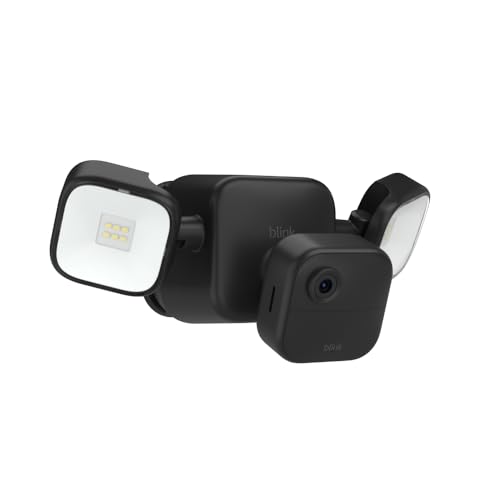
- Best for renters who cannot drill or wire: Blink Outdoor 4 Floodlight Camera — Check on Amazon
- Best balcony picture quality: Arlo Pro 5S 2K Spotlight Camera — Check on Amazon
- Best no-fee kit for a patio plus door: eufy Security eufyCam S330 (eufyCam 3) 2-Cam Kit — Check on Amazon
- Best if your building already has the fixture: Google Nest Cam with Floodlight — Check on Amazon
- Best light for a ground-floor patio: Wyze Cam Floodlight Pro — Check on Amazon
- Best deterrence where wiring is allowed: Ring Floodlight Cam Wired Pro — Check on Amazon
Read the full guide ↓
Disclosure: As an Amazon Associate, dailyhomedecorating.com earns from qualifying purchases. Links to Amazon on this page are affiliate links; they cost you nothing extra. Listing details such as price and availability change often, so check the current Amazon listing before you buy.
The best outdoor security camera for apartments under $300 is not simply a smaller version of the best house camera. Renting rewrites the rules. You probably cannot run new wiring, you may not be allowed to drill into the facade, your outdoor space is likely a balcony, a patio or a shared stoop rather than a yard, and the camera you buy this year needs to unscrew and move with you when the lease ends. A camera that is perfect for a detached house — hardwired into a junction box above a two-car driveway — can be literally uninstallable in a third-floor walk-up. So this guide judges the same proven under-$300 outdoor hardware through an apartment lens: permission, portability, shared-space manners and small-area coverage.
That lens changes the ranking. Battery cameras rise, because a camera that mounts with two small screws or a clamp and runs for months on replaceable cells asks almost nothing of a landlord. The Blink floodlight system and the Arlo Pro 5S lead this list for exactly that reason. Wired floodlight cameras fall — not because they are worse cameras, but because swapping a building’s light fixture is a landlord conversation, an electrician conversation or both. Where a rental already has a suitable fixture and written permission, the Nest, Wyze and Ring become excellent again, and we say so plainly rather than pretending the obstacle does not exist. Between those poles sits the eufy solar kit: no wiring, a hub that lives indoors on your shelf, and two cameras that can watch a door and a patio at once.
Two apartment-specific warnings run through every review below. The first is privacy, yours and everyone else’s: a balcony camera overlooks neighbours, shared walkways and other people’s windows, so aim, motion zones and privacy masking matter more in a building than on a half-acre lot, and audio recording rules vary by place — when in doubt, angle down, mask generously and keep the camera on your own space. The second is subscriptions, stated honestly for each pick: the Ring records nothing without a paid plan, the Arlo and Blink keep their cloud recording and smart detection behind theirs, the Nest gives detection free but charges for long history, and the eufy records locally with no fee at all. Renters move; plans and hubs move differently, and we flag what each system costs you when you pack it into a box next year. For the house-oriented version of this shortlist, see Best Outdoor Security Camera Under $300.
In this guide
Quick Picks
In a hurry before a move-in date? Renters should start at the top of this list: the higher a pick sits, the less it asks of your landlord, your wiring and your deposit.
| Buyer type | Pick | Why it stands out | Link |
|---|---|---|---|
| Best for renters who cannot drill or wire | Blink Outdoor 4 Floodlight Camera | Battery camera plus battery floodlight: mounts in minutes, removes in minutes, leaves almost nothing behind | Check on Amazon |
| Best balcony picture quality | Arlo Pro 5S 2K Spotlight Camera | Wire-free 2K HDR with a 160° view that covers a balcony and the approach to it from one corner | Check on Amazon |
| Best no-fee kit for a patio plus door | eufy Security eufyCam S330 (eufyCam 3) 2-Cam Kit | Two solar cameras and a hub that lives on your shelf, so front door and patio are covered with no plan | Check on Amazon |
| Best if your building already has the fixture | Google Nest Cam with Floodlight | On-device detection that already knows a neighbour from a stranger, with no subscription needed for the smarts | Check on Amazon |
| Best light for a ground-floor patio | Wyze Cam Floodlight Pro | Serious light and a 180° recorded view for ground-floor units whose patio is also their yard | Check on Amazon |
| Best deterrence where wiring is allowed | Ring Floodlight Cam Wired Pro | Radar-precise alerts and the strongest deterrence here, for the minority of rentals where a wired fixture swap is allowed | Check on Amazon |
How we chose
We applied the house guide’s verification — manufacturer specifications, official support pages and current Amazon listings, complete systems only, nothing that secretly needs an unlisted hub — and then re-filtered everything through four renter tests. Can it be installed without new wiring? Can it be removed without a trace worth arguing about at deposit time? Does it behave politely in shared space, with aimable lenses, motion zones and privacy masking? And does its coverage match apartment geometry, where the distance from camera to subject is usually a few paces rather than the length of a driveway?
Specs remain maker specs. Battery-life figures are the manufacturers’ claims under their assumed conditions — modest daily events, default settings, mild weather — and a busy shared courtyard will shorten them. Weather ratings are laboratory ratings from the makers, useful for comparing housings. Where a pick needs something extra to work as reviewed — a plan, a different sync module, a memory card, written landlord permission — the review says so in plain words, because a renter’s scarcest resource is not money. It is permission to modify the building, and this guide spends it carefully.
- Zero-wiring first: Battery and solar picks lead because they install with screws or clamps and leave with you. Wired picks are included honestly, labelled with the permission they require.
- Small-area truth: Apartment outdoor spaces are measured in paces. A modest floodlight and a wide lens at close range beat a driveway flagship aimed at a balcony rail.
- Shared-space manners: Every pick was checked for motion zones or privacy masking, because a camera that records the whole courtyard annoys neighbours and, in some places, breaks rules.
- Move-out maths: We note what each system is like to pack up: batteries and a shelf hub travel in a tote; a hardwired fixture travels only if you reinstall the original light first.
- Recording without ransom: As in the house guide, we state exactly where footage lives and what a subscription gates, pick by pick, in the open.
The result is a list where the cheapest system finishes first — not as a budget consolation, but because for most renters it is genuinely the right tool. Read the wired reviews as conditional recommendations: outstanding cameras, gated by a permission slip.
The 6 best outdoor security cameras for apartments under $300
Blink Outdoor 4 Floodlight Camera
For most renters this is where the search ends. The Blink Outdoor 4 Floodlight Camera system asks for no wiring, no junction box and no electrician: the camera runs on AA lithium cells, the floodlight mount on D cells, and the pair mount with a small bracket that a dab of filler forgives at move-out. Blink’s maker claim of up to two years of battery life under default settings will not survive a busy shared entrance, but even a fraction of it means the camera mostly disappears from your life, which is what rental hardware should do. The 700-lumen floodlight is honestly sized for apartment geography — a stoop, a patio door, a short walkway — rather than pretending to light a yard.
Blink’s terms need the same honesty. Cloud recording and person detection require the Blink Subscription Plan; without it you keep live view, motion alerts and two-way talk but no saved cloud clips. Local storage exists in Blink’s range but not through the Sync Module Core in this box, which has no USB port — local clips need a different Sync Module bought separately. For a renter, the practical read is simple: either keep the modest plan while you live there, or buy the module that stores clips at home. Neither is a reason to skip the system; both are reasons to decide before checkout instead of after the first missed clip.
In a building, the Blink’s manners are good. The 143° view at balcony distance covers your door, your rail and your slice of walkway without needing to swallow the whole courtyard, motion zones let you cut the shared path out of the alert area, and two-way talk handles the daily apartment use case — telling a courier where to leave a parcel — better than any siren ever will. When the lease ends, the whole system is in a tote in ten minutes and working at the next address the same evening. That portability is not a footnote for renters. It is the product.
Who it suits: Renters in units with a stoop, patio or balcony who need a lit, alerting camera with the least possible installation, permission and upkeep.
- No wiring anywhere: battery camera, battery floodlight, minutes to mount and minutes to remove
- Long maker-claimed battery intervals mean it survives being forgotten about
- Right-sized 700-lumen light and 143° view for doors, patios and short walkways
- Grows camera by camera if you move somewhere bigger
Honest limitation: Cloud clips and person detection sit behind the Blink plan, and the included Sync Module Core cannot store clips locally. Decide your storage route up front, and accept that 1080p at courtyard distance identifies clothing better than faces.
Choose it if you want coverage this weekend with no landlord negotiation and a system that moves when you do. Skip it if you need recorded evidence-grade detail across a large shared car park — a wired pick, with permission, serves that better. Check on Amazon
Arlo Pro 5S 2K Spotlight Camera
The Arlo Pro 5S 2K is the balcony camera for renters who care about picture quality. It is fully wire-free, connects directly to your Wi-Fi on either band with no hub to house, and its 160° field of view is the apartment trick that matters: mounted in a balcony corner, one camera watches the sliding door, the rail and the neighbour-side approach in a single frame. The 2K HDR image handles the brutal apartment lighting mix — bright sky, shaded balcony — better than anything else in this list, and the integrated spotlight gives you colour footage after dark at the short ranges renters actually have.
The subscription paragraph matters more for renters, not less. Without Arlo Secure you keep live view, basic motion alerts and two-way audio; cloud recording and person, vehicle, animal and package detection are plan features, and local recording requires a compatible Arlo SmartHub bought separately — one more box to house in a small unit. The realistic renter setups are therefore plan-plus-camera, which is simple and moves house trivially, or camera-plus-hub if you dislike fees. What does not work is camera alone with no plan and no hub: it watches, alerts and remembers nothing.
Battery life is a maker claim based on typical event counts; a balcony over a busy street will ask for a charge far sooner than a quiet patio will, but the battery pops out and swaps in moments, and renters in sunny spots can add Arlo’s solar panel accessory to stretch the interval. Two practical notes: the wide lens sees sideways into neighbouring balconies, so use activity zones and aim with your neighbours in mind; and a camera this portable is also stealable, so mount it out of casual reach. Neither note dents the verdict for quality-first renters.
Who it suits: Renters with a balcony or terrace who want the best wire-free picture and the widest single-camera view, and who will keep the plan or add the hub.
- Completely wire-free with direct dual-band Wi-Fi — nothing to wire, nothing to house
- 160° view covers door, rail and approach from one corner mount
- Best-in-list 2K HDR handling of bright sky against shaded balcony
- Removable battery and optional solar accessory suit rental life
Honest limitation: Recording and smart detection need Arlo Secure, or local recording needs a SmartHub at extra cost. Plan-free and hub-free, it saves nothing — a fact to accept before buying, not after.
Choose it if your outdoor space is one defined area and you want it covered beautifully by a single removable camera. Skip it if you want fee-free recording out of the box — the eufy kit below does that without a hub purchase on top. Check on Amazon
eufy Security eufyCam S330 (eufyCam 3) 2-Cam Kit
The eufyCam S330 kit is the renter’s system play. Two 4K cameras with integrated solar panels plus a HomeBase 3 that sits on a shelf indoors and stores every clip locally: no wiring, no drilling beyond two small mounts, no monthly fee for recording, playback or the face and person recognition the HomeBase performs itself. For an apartment, the two-camera shape is the point — one camera over the front door or stoop, one on the patio or balcony — and the hub means your footage is in your home, under your control, which renters who have argued with a landlord about hallway cameras will appreciate twice over.
Solar in an apartment deserves a straight sentence: it works where the panel sees a few hours of direct sun, which describes many balconies and south-facing patios and does not describe a shaded north-facing rail. The maker’s solar framing assumes that sun; a shaded camera still works, but it joins the occasional-charging club like any battery camera. Position honestly and the interval stretches to seasons. The cameras carry the strongest weather rating in this guide, maker-rated IP67, which shrugs off the wind-driven rain that finds balcony mounts.
Moving house with the eufy is the second-best experience here after the Blink: unscrew two mounts, unplug the hub, and the system is live at the next address the same day, with your archive intact on the HomeBase instead of stranded in a cancelled cloud account. Two cautions: the kit price moves with promotions and lives at the top of this tier, so confirm it sits at or under the ceiling on buying day; and two cameras tempt over-coverage, so aim each at your own thresholds and mask the shared areas out. Judged as a whole — coverage, privacy, no fees, portability — this is the most complete rental system in the guide.
Who it suits: Renters with two thresholds to cover — typically a door and a patio — who want recordings kept at home, no subscription and a system that moves intact.
- Two 4K cameras plus local-storage hub cover both apartment thresholds at once
- No monthly fee for recording, playback or on-hub recognition
- Solar assistance stretches charging to seasons on a sunny balcony
- Archive lives on your hub and moves house with you, intact
Honest limitation: Shaded mounts blunt the solar promise, and the kit price hovers at the ceiling with promotions. Confirm sun and price honestly; a dark balcony makes this a merely good kit instead of a great one.
Choose it if you have a door and a patio to watch and you want the footage — and no bill — to stay yours. Skip it if your only outdoor space is one small shaded balcony, where a single battery camera is simpler. Check on Amazon
Google Nest Cam with Floodlight
The Google Nest Cam with Floodlight enters this list with a condition attached, and the condition is a junction box. It hardwires in place of an existing floodlight, which in rental terms means a landlord’s written permission and usually the building’s existing fixture by a door, a carport or a ground-floor patio. Where that permission exists — and in houses converted to flats and landlord-owned units it often does, because the swap is reversible — the Nest becomes arguably the best-mannered camera in a building. Its person, animal and vehicle detection runs on the device, free, so alerts arrive already sorted: vital when your camera overlooks a shared drive where neighbours, their cars and their cats generate a dozen events an hour.
The free tier’s short event window suits apartment life better than house life: most renters check an alert within the hour, not the week, so the included recent-history window covers the real use case, and Nest Aware is there if you want weeks of memory and familiar faces. There is no local storage option, so footage lives in Google’s cloud; renters should note that ending a tenancy is painless here — the camera stays or goes with the fixture arrangement, and your history is in your Google account rather than on hardware you handed back.
As a fixture it is discreet, which buildings reward: tidy housing, lights that behave like a normal fitting with schedules in the Google Home app, and none of the CCTV-estate look that makes landlords nervous. The video is 1080p HDR with a 130° view — enough at apartment distances, where subjects are close and light is near. If you cannot get the fixture permission, none of this applies and the battery picks above are your list. If you can, the Nest is the polite, accurate, low-drama choice.
Who it suits: Renters who can use an existing floodlight fitting with permission, especially in Google Home households on shared drives and carports.
- Free on-device person, animal and vehicle detection sorts shared-space alerts accurately
- Short free history window matches how renters actually check alerts
- Discreet fixture that looks like a light, not a surveillance project
- Nothing to charge, ever, once installed
Honest limitation: Hardwired install is a permission conversation most renters cannot have, and long history needs Nest Aware. No local storage exists at any price.
Choose it if you have written permission and a fitting by the door or carport, and shared-space alerts are your main headache. Skip it if your lease forbids touching fixtures — stay with the battery and solar picks above. Check on Amazon
Wyze Cam Floodlight Pro
The Wyze Cam Floodlight Pro is the ground-floor renter’s argument for going wired. Three light heads rated by Wyze at 3,000 lumens, a 2.5K camera with a 180° view and microSD recording with no plan required: for a ground-floor flat whose patio doubles as its yard, that is a serious security light and a serious camera in one fixture, at a value position in this tier. The 180° view at patio distances is identifying rather than merely observational, because everyone in frame is close. And the recording arrangement is the renter-friendliest of the wired picks: your clips live on a card in the camera, not in an account you might close when you move.
The conditions are the wired conditions, stated plainly. It replaces an existing floodlight fitting, so it needs the same landlord permission as the Nest and Ring, and in many apartment blocks that permission will not come. Without the paid Cam Plus plan, free alerts are thumbnail-based and person and package labels are plan features, though microSD recording — events or continuous — keeps working regardless, which is the important part. A generous card is a required extra; it is not in the box.
Two building-specific cautions. First, 3,000 lumens aimed carelessly is a neighbour dispute with a power supply: aim the heads down at your own ground, use the scheduling and motion-only behaviour, and remember the flat above has windows. Second, the fixture is bulky and unmistakably a floodlight, which some buildings’ appearance rules will dislike. Where a ground-floor unit has the fitting, the permission and a patio worth lighting, though, nothing else here gives this much recorded, lit coverage for the position in the budget — and when you leave, your footage leaves on your card, not on a server.
Who it suits: Ground-floor renters with a patio or small yard, an existing fitting and permission to swap it, who want maximum light with fee-free recording.
- Brightest light in the guide (maker figure) across three aimable heads
- 180° view identifies at apartment distances, where everyone is close
- microSD recording needs no plan; your footage is on your card when you move
- 2.5K detail at a value position in the tier
Honest limitation: Needs a fitting and permission like every wired pick, and that light output is antisocial if aimed at neighbours. The memory card is an extra you must remember to buy.
Choose it if you are ground-floor with a patio, a fitting and permission, and you want it lit and recorded without fees. Skip it if you are above ground floor, or your building polices exterior appearance — battery picks keep the peace. Check on Amazon
Ring Floodlight Cam Wired Pro
The Ring Floodlight Cam Wired Pro is the best camera in this guide and, for most renters, the least available — and a rental guide that hid that ordering would be lying to you. It hardwires into an existing floodlight junction box, which means landlord permission, a reversible-installation agreement and, in many leases, a simple no. Where it is allowed — a rented house, a landlord-renovated flat with a fitting over its parking space, a long lease where the owner welcomes the upgrade — it delivers what nothing else here matches: Retinal 2K video, 2,000-lumen lights, a siren, and radar-based 3D Motion Detection with Bird’s Eye View that tracks a visitor’s path across a shared car park while ignoring the road beyond your boundary line.
Ring’s subscription terms are the strictest here and renters must price them honestly: there is no local storage, and without a paid Ring plan the camera records nothing at all — no history, no saved clips, no person or package alerts. With the plan it is superb; without it, it is a live-view intercom with very bright lights. For a renter, that also means the system never really becomes yours: cancel when you move and the archive is gone. None of this is hidden by Ring, but it is routinely discovered late by buyers who assumed recording was simply what cameras do.
If you are in the minority who can install it, the daily experience justifies the paperwork. Hardwired power means it is always awake over a carport or shared drive, dual-band Wi-Fi holds up on exterior walls, the lights serve as the space’s real lighting on a schedule, and Audio+ talk is clear at distance. Mount it as the building’s camera rather than yours — agreed in writing, aimed at shared approaches with privacy zones over windows — and it can even be the rare camera a landlord thanks you for. Just go in knowing it is the first pick for houses and the conditional pick for apartments, which is exactly how this list ranks it.
Who it suits: Renters of houses and landlord-approved units with an existing fitting over a drive or carport who want flagship detection and deterrence.
- Radar 3D detection with Bird’s Eye View is unmatched for shared drives and car parks
- 2,000-lumen lights (maker figure) plus siren give real deterrence
- Always-awake hardwired power and dual-band Wi-Fi
- Audio+ two-way talk stays clear at car-park distances
Honest limitation: Hardwired, permission-dependent and subscription-dependent: no plan means no recordings, and no local storage exists. For most apartment leases, one of those three facts ends the conversation.
Choose it if you rent a house or hold written permission for the fitting, and shared-approach coverage is the job. Skip it if your lease is standard apartment stock — the Blink, Arlo and eufy above exist precisely for you. Check on Amazon
Comparison table
For renters, read the power column as a permission column: battery and solar mean ‘install today’, hardwired means ‘ask first’.
| Product | Video and view | Power | Storage and subscription | Link |
|---|---|---|---|---|
| Blink Outdoor 4 Floodlight Camera | 1080p HD video, 700-lumen floodlight, battery power; 143° diagonal field of view | Battery powered: AA lithium cells in the camera and D cells in the floodlight mount | Cloud recording requires the Blink Subscription Plan. The Sync Module Core in this box does not take a USB drive, so local clip storage needs a different Sync Module bought separately | Check on Amazon |
| Arlo Pro 5S 2K Spotlight Camera | 2K HDR video, 160° view, wire-free battery power; 160° diagonal field of view | Rechargeable battery, wire-free | Cloud recording sits in the paid Arlo Secure plan; local recording is only possible through a compatible Arlo SmartHub or base station bought separately | Check on Amazon |
| eufy Security eufyCam S330 (eufyCam 3) 2-Cam Kit | 4K video, integrated solar panel, HomeBase 3 local storage; 135° field of view per camera | Battery with an integrated solar panel | Local storage on the included HomeBase 3 (built-in memory, expandable with a user-supplied drive); recordings stay in your home, not on a rented server | Check on Amazon |
| Google Nest Cam with Floodlight | 1080p HDR video, smart floodlight, wired power; 130° diagonal field of view for the camera | Hardwired to an existing floodlight junction box | Cloud-based through the Google Home app; there is no memory-card slot and no local hub storage | Check on Amazon |
| Wyze Cam Floodlight Pro | 2.5K video, 3,000-lumen floodlights, 180° view; 180° field of view, the widest in this guide | Hardwired to an existing floodlight junction box | Local recording to a microSD card you supply (card not included), plus optional cloud recording through the paid Cam Plus plan | Check on Amazon |
| Ring Floodlight Cam Wired Pro | Retinal 2K HDR video, 2,000-lumen floodlights, hardwired; 140° horizontal field of view | Hardwired (100-240V) or plug-in variant | Cloud only with a paid Ring plan; no local storage and no memory-card slot | Check on Amazon |
How to choose the best outdoor security camera for apartments under $300
Start with your lease, not the spec sheet
Read the clauses about fixtures, drilling and exterior alterations before you read a single camera review, then sort this list by what survives. Most standard leases allow small screw holes and forbid electrical changes, which is why battery and solar cameras lead this guide. If you want a wired pick, get permission in writing, agree that you will reinstate the original fitting when you leave, and keep the old fixture in a labelled box in a cupboard — that one habit prevents the commonest deposit argument in this category.
Ground-floor and house-share renters have more room than they expect: a fitting over your own parking space or patio, swapped reversibly, is a reasonable written request, and landlords say yes to security improvements that cost them nothing more often than renters assume. Third-floor balcony renters should not spend hope there; your camera is battery or solar, and the good news is that the best of those are genuinely good.
Aim at your thresholds, not the building
Apartment coverage is a list of thresholds: your front door, your balcony door, your parking space, your bike store entrance. One camera per threshold, aimed tightly, beats one wide camera grazing all of them. Distances are short, which flatters every pick here — even 1080p identifies well at three paces — and it means the wide lenses of the Arlo and Wyze can cover a balcony or patio completely from a corner. Draw the cone on your phone’s camera first: stand where the camera will sit, take the photo it would take, and check whose windows are in it.
Then set the software to match the ethics and the rules: motion zones clipped to your space, privacy masks over neighbours’ windows and doors, and audio used thoughtfully, since recording conversations is regulated in some places and resented in most. A camera that respects the building gets to stay in the building; one that films the courtyard gets a complaint, then a clause, then removed.
Choose your storage like a tenant
Renters should ask of every system: when I move, what happens to my footage and my hardware? Cloud systems — Ring, Arlo, Blink, Nest — travel as accounts: painless to reinstall, but the Ring records nothing without its plan, the Arlo and Blink gate cloud clips and smart labels behind theirs, and cancelling at move-out can strand or end an archive. The eufy’s HomeBase keeps the archive on your shelf, moving in the same box as the cameras. The Wyze keeps it on a card in your pocket. There is no wrong answer, but there is a wrong surprise, and it always arrives on moving week.
Budget the whole tenancy, not the checkout: camera, plus the plan months you will actually keep, plus the card or module the box omits. The under-$300 ceiling in this guide is hardware; the honest renter comparison is hardware plus the ownership path across a typical lease.
Plan the power rota you will actually keep
Battery claims in this guide are maker claims under assumed conditions. Your real interval depends on how busy your view is: a door camera over a shared entrance wakes hundreds of times a day and will not approach any headline figure, while a quiet patio camera may coast for a season. Choose the pick whose charging rhythm fits your life — Blink’s long intervals for the forgetful, Arlo’s swappable battery for the organised, eufy’s solar for the sunny, wired for those with permission who never want to think about it again.
Height is part of the rota. A battery camera you can reach from a chair gets charged; one that needs a ladder gets postponed. If the only good viewpoint is high, that is an argument for solar assistance or a wired pick, not for optimism.
Balconies, stoops and shared drives: placing a rental camera
The balcony problem
A balcony compresses every camera trade-off. The subject is close, so resolution is plentiful and light is near; the neighbours are also close, so aim and masking are everything. Mount in the corner that sees your door and your rail without centring the adjoining balcony, tilt down so the frame ends at your floor line where possible, and let motion zones finish the job. Battery and solar picks dominate here for a practical reason beyond permission: balcony walls are often the building’s facade, where even screw holes can be contentious, and clamp and rail mounts exist for several systems in this guide.
Remember that a balcony camera’s commonest job is parcels and visitors, not intruders: the alert that matters says someone is at your door now, and the clip that matters shows the courier leaving the box inside the rail. Judge balcony picks by alert speed and close-range clarity — the Arlo’s HDR, the Blink’s simplicity — rather than by driveway metrics.
The shared-drive problem
Shared drives and carports invert the balcony problem: the area is large, the traffic is constant and most of it is not your business. This is where detection quality earns its price — the Nest’s free on-device sorting and the Ring’s radar zones exist to tell your visitor from your neighbour’s third trip to the bins. If your lease and landlord allow a wired fitting here, those two picks justify themselves; if not, a battery camera aimed tightly at your own space, with zones excluding the through-route, is the workable compromise, accepting more alerts as the cost of permission.
Common mistakes
- Drilling first, reading the lease second: Exterior alterations are the clause most likely to cost a deposit. Small screws are usually negotiable; new wiring almost never is. Sort permission before hardware.
- Filming the whole courtyard: A camera that records everyone’s comings and goings creates complaints, and in some places legal exposure. Aim at your thresholds, mask the rest, and be the neighbour whose camera nobody minds.
- Buying a wired flagship for a balcony: No fitting, no permission, no camera — however good the reviews are. The wired picks in this guide are conditional for apartments, and the condition is real.
- Forgetting the plan in the moving budget: Cloud cameras carry their plan with them. If the plan lapses in the chaos of moving month, a Ring records nothing and an Arlo remembers nothing. Set the renewal before the boxes come out.
- Leaving the original light fitting in a skip: If you swap a fitting with permission, keep the original, labelled, with its screws. Reinstating it at move-out is the difference between a thanked tenant and a charged one.
- Mounting within arm’s reach: Portable cameras are portable for thieves too. Mount battery picks high enough to need a stretch, and prefer a viewpoint that a second viewpoint — or a neighbour’s window — overlooks.
Final recommendation
- Most renters: Start with the Blink Outdoor 4 Floodlight system: no wiring, no permission battle, a lit door and a camera that moves when you do. Check on Amazon
- Two thresholds, no fees: The eufyCam S330 kit covers door and patio, keeps footage on your own hub and never bills you monthly. Check on Amazon
- Best balcony picture: The Arlo Pro 5S 2K, with its plan or hub budgeted in, shoots the finest wire-free image here.
- With written permission: The Nest Cam with Floodlight is the best-mannered wired pick for shared space, thanks to free on-device detection.
The renter’s rule is simple: the best camera is the one still mounted, still recording and still yours on the day you hand back the keys. Choose the pick your lease allows, aim it at your own thresholds, set its zones like a good neighbour, and it will earn its place at this address and the next one.
Frequently Asked Questions
Can I install an outdoor camera in a rented apartment at all?
Usually yes, if the installation is minor and reversible — battery and solar cameras on small mounts are the standard renter answer. Anything that changes wiring or replaces a building fixture needs the landlord’s written permission in most leases. Check your lease, ask in writing for anything beyond screws, and keep the exchange; permission you can show is permission you actually have.
Which of these cameras needs no landlord permission?
In most leases, the battery and solar picks — the Blink system, the Arlo Pro 5S and the eufy kit — need no more than the tolerance usually extended to small fixings, because they add no wiring and remove cleanly. The Nest, Wyze and Ring hardwire into an existing light fitting, which is an electrical change and should always be agreed in writing first. Local rules and individual leases vary, so treat your own lease as the authority.
Will a balcony camera upset my neighbours?
It can, if it stares into their space. Aim at your own door and floor area, use privacy masks over adjoining balconies and windows, clip motion zones to your thresholds and skip audio recording of shared areas. Most neighbours accept a camera that visibly minds its own business; most object, reasonably, to one that films their evenings. When in doubt, a word before mounting prevents a dispute after.
What happens to my camera system when I move?
Battery and solar systems unscrew and travel in a box, working the same evening at the new address; the eufy’s archive travels on its HomeBase. Cloud accounts move with you too, but keep any plan active through the move or a Ring will record nothing and other archives may lapse. A wired camera you installed with permission usually means reinstating the original fitting before you leave — another reason to keep it, labelled, from day one.
Do I need a subscription in a rental?
Only where the camera’s design says so. The Ring records nothing without its plan. The Arlo and Blink keep cloud recording and smart detection in theirs, with the Arlo offering a hub route to local recording. The Nest’s detection is free and only long history is paid. The eufy records locally with no fee, and a Wyze with a memory card does the same. For a tenancy of a year or two, that difference can rival the camera’s price, so price the whole stay.
Is a floodlight too much for an apartment?
A small one, no; a big one aimed badly, yes. The Blink’s 700 lumens suit a stoop or patio. The wired Wyze and Ring lights are yard-scale: on a ground-floor patio they are excellent, aimed at your own ground on motion-only settings, and antisocial if they fire into the flat above all night. Match the light to the space and aim it like you live under it — because someone does.


