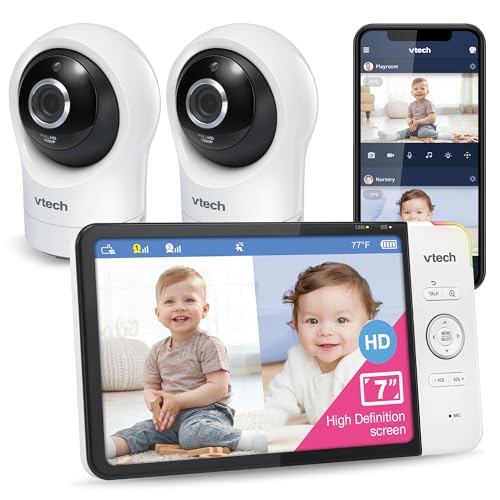
Where to buy
Check the latest price, availability and delivery on Amazon. Orders are placed on Amazon. We may earn a commission from qualifying purchases. A quick honesty note for this tier: under $400 is a ceiling, not a target — several picks below sit well under it, and the guide says plainly which features are included with the hardware and which are subscription features, so you can price the whole ownership, not just the box.
- Best two-camera bundle with a big dedicated parent screen: VTech RM7764-2HD Smart Wi-Fi Baby Monitor with 2 Cameras
- Best no-Wi-Fi monitor with a dedicated parent unit and zero subscription: Infant Optics DXR-8 PRO Video Baby Monitor
- Best for AI covered-face and rollover alerts (maker claim): CuboAi Plus Smart Baby Monitor with Wall Mount
- Best for sleep analytics from an overhead view: Nanit Pro Smart Baby Monitor — Camera & Floor Stand
- Best for contact-free breathing monitoring with no wearable (maker claim): Miku Pro Smart Baby Monitor with Camera
- Best for wearable pulse-rate and oxygen readings alongside video (maker claim): Owlet Dream Duo (Gen 3) — Dream Sock & 2K HD Camera Bundle
Read the full guide ↓
Disclosure: As an Amazon Associate, dailyhomedecorating.com earns from qualifying purchases. Links to Amazon on this page are affiliate links; they cost you nothing extra. Listing details such as price and availability change often, so check the current Amazon listing before you buy.
If this is your first monitor, the best baby security camera for beginners under $400 is not automatically the most advanced one — it is the one you will set up correctly, understand completely, and still be using happily at month six. Beginner-friendly at this tier means three things. The setup is measured in minutes, not in a Saturday. The everyday experience — checking the baby, hearing a cry, talking through the camera — needs no manual and no troubleshooting. And the costs are honest: you should know on day one whether the features you are enjoying are yours forever or are a trial that turns into a subscription.
That is why this ranking leads with the VTech two-camera bundle and the plug-and-play Infant Optics rather than the analytics flagships. They do the core job superbly with nothing to configure beyond placement. The flagships follow, clearly labelled with their homework: the CuboAi’s included premium year and what it unlocks, the Nanit’s Insights trial and what its plans add, the Miku’s careful positioning, and the Owlet’s nightly wearable routine. None of that homework is unreasonable — but a beginner deserves to choose it knowingly rather than discover it.
One reassurance before the details: you cannot really buy a ‘wrong’ monitor from this list, and you do not need the breathing, pulse-rate or sleep-stage features to keep a baby safe. Those are manufacturer-claimed monitoring extras. Safety comes from the unglamorous basics — back to sleep, bare crib, and a camera installed with its cable completely out of reach — and every pick here supports those basics. Buy the monitor whose daily shape fits your life, and let the fancy layers be a bonus, not a burden.
In this guide
Quick Picks
| Pick | Best for | Key spec |
|---|---|---|
| VTech RM7764-2HD (2 cameras) | Best two-camera bundle with a big dedicated parent screen | Two 1080p pan-and-tilt cameras; 7-inch HD parent unit plus Wi-Fi app access; 10x zoom; night vision; two-way talk; temperature and motion detection; soothing sounds |
| Infant Optics DXR-8 PRO | Best no-Wi-Fi monitor with a dedicated parent unit and zero subscription | No Wi-Fi, closed local link to a 5-inch 720p parent display; patented Active Noise Reduction; pan, tilt and zoom; interchangeable lenses; no app, no cloud, no subscription |
| CuboAi Plus | Best for AI covered-face and rollover alerts (maker claim) | 1080p HD Wi-Fi camera with night vision; AI covered-face, rollover and danger-zone alerts (maker claim); cry and temperature detection; two-way audio; wall mount included |
| Nanit Pro with Floor Stand | Best for sleep analytics from an overhead view | 1080p Wi-Fi camera on a floor stand for a true overhead crib view; two-way audio; room temperature and humidity sensing; works with the maker’s Breathing Band for breathing-motion monitoring (maker claim) |
| Miku Pro | Best for contact-free breathing monitoring with no wearable (maker claim) | 1080p Wi-Fi camera; contact-free breathing and sleep monitoring with no wearable (maker claim); real-time alerts; two-way audio; night vision; wall mount and floor stand included in this kit |
| Owlet Dream Duo Gen 3 | Best for wearable pulse-rate and oxygen readings alongside video (maker claim) | Bundle: wearable Dream Sock sensor plus 2K HD Wi-Fi camera; maker states the sock tracks pulse rate, oxygen level and sleep trends with app notifications; two-way talk; room temperature monitoring; cable guards included |
How We Chose
We chose for first-time buyers, which changed the weighting. Ease of setup counted most: in-box completeness, tool-free or single-mount installation, and an app or screen that explains itself. We scored the ‘day thirty’ experience, not the day-one unboxing — what still works without effort, what needs a charged wearable or a renewed plan, and what a tired parent can operate one-handed in the dark. We required pricing honesty in beginner terms: trials named as trials, plan-gated features named as plan-gated. We kept the safety bar identical to the rest of the guide — mountable or stand-based placement with cables fully out of reach — and we treated every health-adjacent feature as a maker claim that prompts a check. Finally, we favoured picks a grandparent or babysitter can use without an account, a password or a tutorial, because beginners rarely monitor alone.
The 6 Picks in Detail
VTech RM7764-2HD Smart Wi-Fi Baby Monitor with 2 Cameras
The VTech RM7764-2HD Smart Wi-Fi Baby Monitor answers a question the flagship analytics cameras dodge: what if you have two rooms to watch? This bundle puts two 1080p pan-and-tilt cameras in the box — twins, a nursery and a toddler room, or a crib and a play space — with a large 7-inch parent unit that shows them at home and an app that shows them away. The cameras pan a full circle and tilt, zoom up to 10x, report temperature, detect motion, play soothing sounds and support two-way talk. It is a lot of hardware for the tier, and for multi-room families it is the most complete out-of-the-box answer in this guide.
The money story is the cleanest here alongside the Infant Optics. There is no analytics subscription standing between you and the features on the box: the parent unit works on a direct local link at home, the app adds remote viewing over Wi-Fi, and the core monitoring you paid for keeps working without a monthly plan. Recording and history depend on how you use the app and the parent unit rather than on a cloud tier you rent, so check the listing for the current storage details if saving clips matters to you. What you give up versus the flagships is the data layer: no sleep analytics dashboards, no breathing monitoring, no AI crib-safety alerts. This is a watch-and-listen monitor, done thoroughly.
Two cameras double the placement homework, and it is worth doing properly. Each camera needs its cable routed down and away, completely out of reach of the crib or bed it watches — a toddler room camera at grabbing height with a loose cable is a hazard, not a feature. Pan-and-tilt means you can mount a little further back and still frame the crib, which is safer than perching a fixed camera on the rail. The 7-inch screen is big enough to genuinely see two feeds, though it is also a bigger slab to carry room to room, and a household that mostly checks a phone may find the app does the daily work while the screen anchors the nightstand.
Choose it if you need two cameras on day one, want a real parent screen and app access together, and want no subscription in your life. Skip it if sleep analytics or breathing-motion features (maker claims on other picks) are your main reason for shopping at this tier.
For a beginner, the VTech’s virtue is that everything is in the box and labelled: two cameras, one big screen, an optional app. You can be monitoring both rooms the same evening you open it, and learn the app later — or never.
Infant Optics DXR-8 PRO Video Baby Monitor
The Infant Optics DXR-8 PRO is the deliberate opposite of everything above it in this guide, and at this tier that is a feature. There is no Wi-Fi, no app, no cloud account and no subscription — ever. The camera talks to its own 5-inch parent display over a closed local link, with patented Active Noise Reduction filtering the hiss and hum that make lesser audio monitors exhausting to sleep next to. It pans, tilts and zooms, takes interchangeable lenses (a wide-angle lens is the popular add-on for a full-room view), and simply works the moment you plug it in, in any house, on any internet connection, including none.
That simplicity defines both its ceiling and its value. The picture is 720p on the parent unit, not the 1080p or 2K of the Wi-Fi flagships. There are no sleep analytics, no breathing features, no covered-face alerts, no recordings in a cloud, and no way to check in from work or share a feed with grandparents — viewing happens on the one screen, at home, within range. Storage is not part of the proposition at all: this is a live monitor, not a recording system. For a great many families, especially by the second child, that list of absences reads as relief rather than lack. Nothing to update, nothing to renew, nothing to troubleshoot at midnight, and a feed that does not travel over the internet at all — a privacy posture the app cameras cannot match.
Placement still matters. The camera should be mounted or set back so its power cable runs down behind furniture or the wall, entirely out of the crib’s reach; a local-link camera is not exempt from cord safety just because it skipped the Wi-Fi. The interchangeable lens system is genuinely useful here: the standard lens for a crib close-up from across the room, the wide lens when the baby becomes a mobile toddler and the ‘room’ is the product. Battery life on the parent unit, screen brightness at night and the noise reduction are the daily details owners praise, and they are the right details for a device whose whole job is to sit on a nightstand and be trusted.
Choose it if you want maximum reliability, zero subscriptions and a feed that never touches the internet. Skip it if remote viewing, recordings or any analytics feature matter to you — this monitor will never grow them.
This is the beginner pick with the shortest learning curve in the guide: plug in the camera, plug in the screen, done. If the phrase ‘firmware update’ makes your shoulders rise, start here and ignore the rest of the tier with a clear conscience.
CuboAi Plus Smart Baby Monitor with Wall Mount
The CuboAi Plus Smart Baby Monitor with Wall Mount is built around a single idea: instead of you watching the screen all night, the camera’s AI watches the crib. The maker says its computer vision can detect a covered face, a rollover onto the stomach, and a baby entering a danger zone you draw near the crib edge, and push an alert with a snapshot to the app. It also detects crying and reports room temperature, streams 1080p video with night vision, and includes a wall mount that positions it for the overhead view its detection is designed for. Treat every one of those detection features as a manufacturer claim. They can prompt you to check; they cannot watch your baby for you, and they do not change safe-sleep rules.
The subscription story needs stating plainly, because it changed over this product’s life and older write-ups get it wrong. CuboAi includes the first year of its Care Premium plan with the camera, starting when you pair it with the app. On the free Basic plan that remains afterwards you keep live video, cry and cough detection and a few days of playback. The AI safety alerts the camera is famous for — covered face, rollover and danger zone — and the sleep analytics sit in the paid Premium tier once the included year ends, with a higher Ultimate tier extending the analytics and reports. So the honest summary is: year one, everything is on; after that, you are paying a yearly plan to keep the alert layer, or dropping back to a good basic Wi-Fi camera.
Storage is cloud-based through the app, with multi-day playback rather than a memory card in the camera, so your history depends on your plan and your connection. The wall mount is the right way to install it: the detection wants a stable overhead angle, and a mounted camera with its cable routed down the wall and away from the crib is also the safe way to run it. Never drape the cable across or inside the crib, and keep every part of the power lead well out of reach of a baby who can pull to standing. The bird-shaped housing is cute, but buy it for the alert system and the clean app, not the styling.
Choose it if proactive crib alerts are the feature you actually want and you are comfortable renewing the plan after the included year. Skip it if subscription renewals are a hard no for you, or if your Wi-Fi is unreliable, because an app-only camera is only as good as its connection.
Beginners drawn to the CuboAi should know its simplicity is front-loaded: pairing and the included premium year are easy, and the homework is a calendar note for when that year ends and the alert features move behind the paid plan.
Nanit Pro Smart Baby Monitor — Camera & Floor Stand
The Nanit Pro Smart Baby Monitor with Floor Stand is the pick that defines the top of this price tier, and it earns that spot with the overhead view. The floor stand places the 1080p camera directly above the crib, looking straight down at the sleep surface. That angle is not a cosmetic extra. It is the angle the maker’s sleep analysis is built around, and it is the angle that shows a rolled blanket, a shifted sleep position or a baby who has scooted to the corner of the crib without the distortion you get from a camera angled in from a shelf. The stand also solves a practical problem: it needs no wall screws, so the camera can move rooms or move house with you.
Be clear about what the subscription does here, because Nanit splits its features more sharply than most. Live video, two-way audio, sound and motion notifications, and temperature and humidity readings work in the app without a paid plan. The paid Insights plans are what unlock the headline analytics: sleep analysis and sleep history, saved video clips and continuous video history, milestone tracking and the smarter alerts such as cry detection. A short trial of the entry Insights plan is included with new overhead setups, and the higher plans lengthen the video history and the sleep-analysis window and add caregiver accounts. In other words, the hardware under $400 buys you an excellent camera; the ongoing plan buys you the data layer. Budget for both if the analytics are why you are buying it.
Storage follows the same split. There is no local memory-card recording doing the heavy lifting here; saved clips and history live in the maker’s cloud under your plan, while live viewing is simply streamed. The breathing-motion feature deserves the same honest framing. With the maker’s Breathing Band worn over sleepwear, Nanit says the camera can track breathing motion and alert you to changes. That is a manufacturer claim about monitoring motion, not a medical measurement, and no camera in this guide is a medical device or a substitute for safe-sleep practice: baby on their back, on a firm flat surface, with nothing soft in the crib. On placement, the floor stand keeps the camera and its cable run behind the stand and away from the crib rails when installed as directed — route the cable fully out of reach, because a standing baby can grab anything left within arm’s length of the rails.
Choose it if you want the strongest sleep-analytics ecosystem in this tier and you accept a subscription as part of the deal. Skip it if you want everything you pay for to work forever with no plan, or if your nursery has no floor space beside the crib for the stand.
The Nanit is a fine beginner purchase if you want to grow into analytics — the app is polished and the stand sets up without tools — but go in knowing the sleep data is a subscription product with a trial, not a feature you simply own.
Miku Pro Smart Baby Monitor with Camera
The Miku Pro Smart Baby Monitor takes the opposite approach to the Nanit and the Owlet: no band, no sock, nothing on the baby at all. The maker says its sensor array and signal processing read the tiny movements of breathing through clothing and blankets, and build sleep analytics from that, with real-time alerts when the pattern changes. This kit includes both the wall mount and a floor stand, streams 1080p video with night vision and two-way audio, and reports room conditions in the app. As with every breathing feature in this guide, file that firmly under manufacturer claim. It is a monitoring aid that may prompt a check; it is not a medical device, it does not diagnose anything, and it never replaces back-to-sleep positioning on a clear, firm crib surface.
Miku built its reputation partly on not gating the core product behind a subscription, and the honest position today is: check the current plan terms on the listing before you buy, because the brand has changed hands and its app offering has evolved. Core live monitoring and breathing tracking have historically been the no-plan proposition, with an optional care plan adding longer history and extras. Whatever the current split, the questions to ask are the same ones this guide asks of every pick: what keeps working if you never pay, how much history is stored, and where. Video and data are handled through the app and the maker’s cloud services rather than a memory card in the camera, so this is an internet-dependent monitor.
In daily use the appeal is real. Nothing to charge, wash, size up or remember to put back on after a 3 a.m. change is a genuine quality-of-life advantage, and the dual mounting kit means you can start with the stand and switch to the wall mount when the baby starts pulling up. That transition matters for safety: once a baby can stand in the crib, the camera must be mounted, not perched, and every cable must be routed completely out of reach. The trade-offs are equally real. An app-only monitor gives you no dedicated screen for the nightstand, and a smaller brand’s app and support are a different bet from the biggest names in this tier.
Choose it if the no-wearable idea is the whole point and you want breathing-motion monitoring (maker claim) without dressing the baby in tech. Skip it if you want a dedicated parent unit, local recording, or the longest-established app ecosystem.
The Miku asks the least of you nightly — nothing to put on the baby — but the most of you at setup: positioning for contact-free sensing (maker claim) rewards patience. Beginners who enjoy dialling in one device properly will like it; beginners who want zero calibration should look up this list.
Owlet Dream Duo (Gen 3) — Dream Sock & 2K HD Camera Bundle
The Owlet Dream Duo (Gen 3) is the bundle for parents who want numbers, not just pictures. It pairs a 2K HD Wi-Fi camera with the Dream Sock, a fabric sock with a sensor worn on the baby’s foot. Owlet states the sock tracks pulse rate and oxygen level as wellness indicators, along with sleep trends, and notifies you through the base station and app when readings move outside preset ranges. The maker describes the sock as FDA-cleared; even so, read it the way this guide reads every health-adjacent feature: these are manufacturer-reported wellness metrics from a consumer wearable, not hospital monitoring, not a diagnosis, and never a reason to relax safe-sleep practice. A sock can fall off, lose contact or misread on a wriggling foot, and the correct response to any alert is to check the baby, not the app.
On money, Owlet is refreshingly different from the analytics subscriptions above: the Dream app is included with the bundle, and the core sock readings, notifications and camera streaming are the product you bought rather than a plan you rent. Confirm the current feature split on the listing, as app features evolve, but there is no headline ‘your alerts stop in year two’ catch of the kind the Nanit and CuboAi carry. What you do take on is wearable upkeep: the sock comes in sizes for the first year and a half or so of life, needs charging, needs washing, and needs to actually be on the correct foot, fitted as directed, every single night you want data.
The camera half of the bundle is a modern Wi-Fi unit with two-way talk, night vision and room temperature reporting, mounted with the included kit. Owlet includes ASTM-certified cable guards in the box, which tells you the brand takes the cord hazard seriously — you should too. Route the camera cable inside the guards, down the wall, and fully out of the crib’s reach zone. There is no dedicated parent screen in this bundle; your phone and the sock’s base station do the alerting, and recordings and history are app-and-cloud based rather than local. For the right family that is fine. For a family that wants a screen that simply works with the router down, it is the wrong shape of product.
Choose it if foot-worn pulse-rate and oxygen trend readings (maker claim) are what will actually help you sleep, and you will keep up with a wearable routine. Skip it if you know a sock will end up in the laundry basket by week two, or if you want a dedicated monitor screen.
The Owlet is the most demanding beginner pick here, not because the app is hard but because a wearable is a routine: sizing, charging, washing, fitting. Choose it only if the sock’s readings (maker claim) are the specific thing you want, and you are happy to run that routine nightly.
Comparison Table
| Pick | Viewing | Storage | Subscription | Check price |
|---|---|---|---|---|
| VTech RM7764-2HD (2 cameras) | 7-inch parent unit + phone app | Local parent unit / app-based; check listing | No required plan for core monitoring | Check on Amazon |
| Infant Optics DXR-8 PRO | 5-inch parent unit only (no Wi-Fi) | Live viewing only, no cloud | None — no app, no cloud, no subscription | Check on Amazon |
| CuboAi Plus | Phone app (Wi-Fi) | Cloud playback in app | Care Premium (first year included) unlocks AI alerts and sleep analytics | Check on Amazon |
| Nanit Pro with Floor Stand | Phone app (Wi-Fi) | Cloud history under plan | Insights plan unlocks analytics, history and smart alerts | Check on Amazon |
| Miku Pro | Phone app (Wi-Fi) | App/cloud services; check current terms | Core monitoring positioned without a required plan; verify current terms on listing | |
| Owlet Dream Duo Gen 3 | Phone app (Wi-Fi) | App/cloud based | Core sock and camera features included with bundle | Check on Amazon |
How to Choose the Best Baby Security Camera for Beginners Under $400
Start with the screen you will actually use. If the idea of another app and another account exhausts you, choose a dedicated parent unit — the Infant Optics for pure simplicity, or the VTech if you want the app as an optional extra. If you live on your phone and want check-ins from anywhere, the app flagships will feel natural. There is no wrong answer; there is only your answer.
Count the nightly steps. A camera-only monitor asks nothing of you each night. A wearable system — the Owlet’s sock, the Nanit’s band — asks for fitting, charging and washing. Contact-free systems ask nothing nightly but more at setup. Beginners consistently overestimate their future diligence at 3 a.m.; choose the routine you will keep in February, not the one you admire in the shop.
Read the subscription line before the feature list. On the CuboAi, your first premium year is included; afterwards the AI alerts and sleep analytics are a paid plan, while live video and cry detection stay free. On the Nanit, the trial unlocks analytics that then need a plan. Put a note in your phone for the month before any trial ends, and decide then with real experience.
Install once, safely, and be done. Follow the mount or stand instructions exactly, position for a clear crib view, and route the power cable down and away — behind the stand, down the wall, inside a guard — so nothing is reachable from the crib. Then stop improving it. A beginner’s monitor should disappear into the routine.
Use the return window deliberately. Live with the monitor for two weeks of real nights. If the app logs you out, the alerts annoy you, or the wearable ends up in a drawer, that is the product telling you the truth — exchange toward simplicity while you can.
What Beginners Actually Use After the First Month
Talk to experienced parents and a pattern emerges: the features that survive the first month are the boring ones. A clear night picture. Sound you can trust, without hiss. A screen or app that opens instantly. Two-way talk, used occasionally and loved when used. Temperature display, glanced at when the weather turns. These are the features this guide’s top beginner picks do best, and they are worth more than any dashboard.
The features that fade are equally predictable. Sleep analytics fascinate until the pattern is known — most babies are gloriously irregular, and the chart eventually just confirms it. Saved video history matters on the day something funny or worrying happens, and not on the ninety ordinary days around it. Wearables get skipped on the nights everyone is exhausted, which are the nights consistency was supposed to matter. None of this makes the flagship features worthless; it makes them optional, and optional features should be bought as options — with trials, not with assumptions.
The beginner’s advantage is that the core job is genuinely simple and every pick here does it. So buy for the boring features, install safely, keep the trial end-dates in your calendar, and let the advanced layers earn their renewal with a month of real use. That is the whole method, and it works at any budget.
Your First Two Weeks With a Baby Monitor: A Beginner’s Timeline
Night one is for the basics only. Camera placed and cabled safely, screen or app open, volume set so a cry carries and room noise does not hiss. Do not enable every alert, dashboard and notification the product offers; you are learning what your baby actually sounds like through this device, and a monitor that cries wolf on night one teaches you to ignore it by night four. If you chose a wearable pick, fit it exactly as directed and accept that the first fit is the slow one — by the end of week one it is a ten-second habit or it is a drawer item, and either answer is useful information while returns are still easy.
Days three to five are for placement truth. You will discover whether the camera’s angle really shows the whole crib, whether night vision washes out a pale blanket, whether the parent unit’s battery reaches morning or wants its charger nightly, and whether the app’s alerts arrive promptly on your phone’s real settings — battery savers and notification permissions are the silent killers of app monitors, and every beginner should test an alert deliberately rather than discover a muted one at 3 a.m. Adjust once, properly: re-aim, re-route any cable you rushed, set the temperature display to the unit your household thinks in.
Week two is for the other people. Show the system to whoever else does nights or babysits, and watch them use it without your narration. Set up shared access on the app picks now, while it is a calm administrative task. Put the trial dates — the CuboAi’s included premium year, the Nanit’s Insights trial — into your calendar with a note of what each plan actually unlocks, copied from this guide’s per-pick sections. Future you, deciding on a renewal with two weeks of real usage behind you, will make a better decision than present you reading marketing copy.
By the end of week two, run the only review that matters. Can you see the baby clearly in the dark? Can you hear a cry over your own sleep? Has anything — a wearable, an app, an alert — annoyed you enough that you have started working around it? Workarounds are the product failing in your house, whatever its reputation. Every pick in this guide is good; the beginner’s job is simply to confirm, inside the return window, that the one on your wall is good for you — and to swap toward simplicity without embarrassment if it is not. That is not a failed purchase. That is the method working.
Common Buying Mistakes
Buying the most advanced monitor because it feels safest. More features do not equal more safety. Safe sleep position, a bare crib and a safely installed camera are the safety features; analytics are information.
Believing health features are medical protection. Breathing, pulse-rate and oxygen features are manufacturer claims about estimates. They can prompt a check. They cannot watch your baby for you, and they never replace checking in person.
Discovering the subscription at renewal time. Trials end quietly and plans renew automatically on many services. Know what your monitor’s plan unlocks and when it starts costing, from day one.
Setting up ‘temporarily’. A camera balanced on the crib rail with its cable nearby ‘just for tonight’ is the classic beginner hazard. Mount or stand it properly the first time; it takes minutes.
Skipping the babysitter test. If a grandparent cannot check the baby without your phone, your password and a phone call to you, the system is too complicated for your real life — however good it looks in the demo.
The Beginner’s Shortlist, If Reading Six Reviews Is Too Many
Fair enough — new parents are the busiest readers on the internet. Here is the whole guide compressed into decisions. If you want the monitor to simply work, with a screen, for one or two rooms, and never bill you again: buy the VTech bundle, or the Infant Optics if one room is all you have. If you find yourself re-reading the alert features — the covered-face and rollover alerts, the danger zone — then the CuboAi is your pick, and your only homework is a calendar note for the end of its included premium year. If it is the sleep data that keeps pulling you back — the charts, the trends, the coaching — then the Nanit is your pick, bought as hardware plus a plan, on purpose.
If what you actually want is a number to look at — a breathing trend with nothing on the baby, or pulse and oxygen trends from a sock — then the Miku and the Owlet respectively are your picks, and both come with this guide’s standing caution in its friendliest form: those numbers are the makers’ estimates, they exist to prompt a look with your own eyes, and the look is the point. Parents who want them tend to know it; parents who are unsure should start simpler and let a month of ordinary nights tell them whether a camera alone settles them. Most find that it does.
And if you are still torn between two, choose by the tiebreaker that predicts satisfaction best: the nightly routine. Count the steps each system asks of you between the crib and your bed — fitting, charging, opening, waiting — and buy the smaller number. Beginners do not abandon monitors because the picture was imperfect. They abandon them because the routine was. Every pick in this guide takes a good picture; buy the routine you will still be running in February, install it safely once, and get on with the actual job, which was never the monitor.
Final Recommendation
Beginners: start with the VTech RM7764-2HD if you want everything in one box — two cameras, a big screen, an optional app, no subscription — or the Infant Optics DXR-8 PRO if you want the simplest trustworthy monitor in the tier. Graduate to the CuboAi or Nanit only when you know the specific alert or analytic you want, and choose the Owlet or Miku only when their particular sensing style (maker claims both) is the thing itself you are shopping for. Simple, safely installed and understood beats advanced, half-configured and quietly expiring — every night of the week.
VTech RM7764-2HD (2 cameras) · Infant Optics DXR-8 PRO · CuboAi Plus
Final-review note (20 November 2026): The Miku Pro baby monitor could no longer be verified in a live Amazon listing at final review, so it is presented prose-only here without a purchase link; its description is kept so you can judge the category, and the linked alternatives are the safer buys.
Related guides
Frequently Asked Questions
I am a first-time parent. Which of these is easiest to set up?
The Infant Optics DXR-8 PRO: plug in the camera and the parent unit and it works, with no Wi-Fi, account or app. The VTech bundle is a close second and adds an optional app and a second camera. The app flagships are guided and polished but involve accounts, pairing and placement calibration.
Do I need the breathing or oxygen features as a beginner?
No. Those features are manufacturer-claimed monitoring extras that can prompt you to check on your baby. They are not medical devices and not a requirement for safe sleep. Many experienced parents choose monitors without them deliberately. If they would help you rest, buy them as a bonus — never as a substitute for safe-sleep basics.
What subscription traps should a beginner watch for?
Two, both disclosed in this guide. The CuboAi includes a first premium year; after it, the AI safety alerts and sleep analytics need the paid plan, while live video and cry detection stay free. The Nanit’s sleep analytics, video history and smart alerts are Insights-plan features after a short included trial. Note the end dates when you set up.
Can grandparents or a babysitter use these monitors?
Easily, with the parent-unit picks: the Infant Optics and VTech screens need no account at all. App-based monitors require sharing access through the maker’s app, which is simple on the major platforms but is one more step — set it up before the babysitter arrives, not during.
Where do I put the camera, in plain beginner terms?
High enough to see the whole crib — on the wall mount, on the floor stand, or on furniture set back from the crib. Then run the power cable down and away so the baby cannot reach any part of it from the crib, using a cable guard if the run is exposed. That single rule is the important one.
Should I buy a two-camera bundle for my first baby?
Only if you have two spaces to watch from day one — twins, or a nursery plus a separate play space. For one baby in one room, a single good camera is simpler and cheaper to run; the VTech bundle earns its top spot here because it stays simple even with two cameras included.


