Where to buy
Check the latest price, availability and delivery on Amazon. Orders are placed on Amazon, and we may earn a commission from qualifying purchases. Every pick in this guide to the best baby security camera for beginners under $150 sits at or under the ceiling at the time of writing; prices in this category move often, so confirm the live listing before you buy.
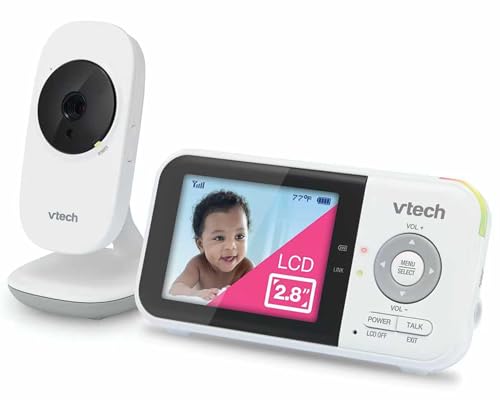
- Best overall for beginners: VTech VM819 — Check on Amazon
- HelloBaby HB6339 — Check on Amazon
- VTech VM350 — Check on Amazon
- VTech VM923 — Check on Amazon
- Infant Optics DXR-8 PRO — Check on Amazon
- Owlet Cam 2 — Check on Amazon
Read the full guide ↓
Disclosure: As an Amazon Associate, dailyhomedecorating.com earns from qualifying purchases. Links to Amazon on this page are affiliate links; they cost you nothing extra. Listing details such as price and availability change often, so check the current Amazon listing before you buy.
If this is your first baby monitor, the best baby security camera for beginners under $150 is not the one with the most features. It is the one that works on the first night, while you are tired, possibly one-handed, and in no mood to read a manual or troubleshoot an app. Beginner-friendly in this category has a specific meaning: the camera and screen arrive already paired, there is no account to create and no password to type on a tiny keyboard, the controls are physical buttons you can find in the dark, and when something looks wrong the fix is usually ‘move it closer’ or ‘charge it’, not a firmware forum. That is why five of our six picks are dedicated monitors with their own parent unit, and why the one Wi-Fi camera is ranked last here despite its excellent picture: its setup is genuinely more involved, and beginners deserve to be told that upfront.
This guide is written for first-time parents, grandparents setting up a nursery corner, and anyone who has bounced off smart-home gear before. Every pick was judged on time-to-first-picture, how much ongoing attention it demands, and how forgiving it is of the classic beginner errors, like placing the camera too close, leaving the parent unit uncharged, or expecting the camera to do jobs it was never designed for. Two expectations are worth setting now. None of these cameras records continuously, and the dedicated ones record nothing at all; they are live windows, not security DVRs. And no camera in this guide monitors health: if a listing uses words like sleep tracking, understand that as the maker’s description of its app features, not a medical measurement.
Our short answer: begin with the VTech VM819. It plugs in, pairs itself, runs for a very long time between charges and asks almost nothing of you. The HelloBaby HB6339 is the beginner pick if you want the camera to move, the VM350 if you want the biggest, easiest-to-read screen, and the VM923 if you would rather buy the steerable camera now than replace a fixed one when your baby starts rolling. The DXR-8 PRO is the premium simple system, and the Owlet Cam 2 is here for beginners who specifically want phone viewing and event clips and are comfortable with an app setup. Each pick below explains, in plain language, what you will actually do with it on day one.
A safety note that applies to every pick in this guide. A baby camera is a convenience for checking in; it is not a medical device, it does not monitor breathing or oxygen, and it never replaces direct supervision or safe-sleep practice. Any sleep or movement insights a maker describes are the maker’s own claims about its app, not medical measurements you should act on. Placement matters more than features: mount or set the camera so that the camera and, above all, its power cord stay well out of your child’s reach. Cords within reach of a crib are a strangulation hazard. Follow the maker’s instruction to keep the camera and cord at least three feet from the crib, route the cord where a standing toddler cannot grab it, and re-check that distance every time your child learns to stand, climb or reach further than last month.
In this guide
Quick Picks
In a hurry? This table matches each system to the situation it handles best in this guide.
| Buyer type | Pick | Why it stands out | Link |
|---|---|---|---|
| Best overall for beginners | VTech VM819 | 2.8-inch parent display, 480p fixed camera, up to 19 hours video streaming (maker claim), temperature sensor | Check on Amazon |
| Easiest steerable camera | HelloBaby HB6339 | 3.2-inch IPS parent display, 720p-listed camera, remote pan-tilt, VOX mode, temperature display | Check on Amazon |
| Easiest big-screen option | VTech VM350 | 5-inch parent display, fixed camera with 2X zoom, 1,000 ft maker-rated range, temperature sensor | Check on Amazon |
| Best step-up when baby starts moving | VTech VM923 | 2.8-inch parent display, remote pan-tilt-zoom camera, 1,000 ft maker-rated range, temperature sensor | Check on Amazon |
| Best premium simple system | Infant Optics DXR-8 PRO | 720p camera, 5-inch parent display, no Wi-Fi (FHSS), interchangeable lenses, Active Noise Reduction | Check on Amazon |
| Best app option, with a learning curve | Owlet Cam 2 | 1080p Wi-Fi camera, app viewing, temperature and humidity sensors, sound, motion and cry notifications | Check on Amazon |
How we chose
We ranked for beginners by simulating the first week, not the spec sheet. Setup came first: factory-paired camera and parent unit, no app, no account and no Wi-Fi password scored highest, and any system needing a phone app was required to earn back those points in picture quality and clips. Controls came second: physical buttons, a readable screen and menus a grandparent can navigate beat touch interfaces and app settings buried three levels deep. Forgiveness came third: long battery life hides a multitude of beginner sins, sound-activated screens prevent the glowing-screen mistake, and a temperature readout answers the most common new-parent question without a separate gadget. We also checked that each maker’s claims were verifiable on its own listing, that no pick hides an essential feature behind a subscription without us saying so, and that every system is a real current product at or under the ceiling. Where a pick asks more of you, its review says so in the first paragraph, not the last.
Detailed reviews
Each system below is judged on the same ground: who it suits, what it genuinely does well, one honest limitation stated plainly, and when to choose it or skip it. Specifications are the makers’ own listing figures; range and battery numbers in particular are best-case maker claims, and real rooms with real walls will trim them.
VTech VM819 — Best overall for beginners
The VM819 is the endurance pick. Its listing leads with battery life: a 2,600 mAh rechargeable parent unit that VTech rates for up to 19 hours of video streaming, or up to 29 hours in audio-only mode, figures the maker describes as best in class. The camera is a fixed 480p unit with automatic night vision and 2X zoom, the link is a private 2.4 GHz FHSS connection with a maker-rated range of up to 1,000 feet, and the parent unit shows a 2.8-inch colour screen with a room-temperature readout, two-way talk, two lullabies and two soothing sounds, plus a sound-activated screen that wakes when the nursery gets loud.
Nothing about the VM819 is glamorous, and that is its strength. It is the monitor you charge on Sunday and stop thinking about, the one grandparents can operate without a tutorial, and the one that keeps working when the home Wi-Fi is down. The 480p picture is noticeably softer than the 720p and 1080p picks here; you can read sleep position, a kicked-off blanket and a standing toddler perfectly well, but fine detail is limited. The honest limitation is that fixed, lower-resolution camera: no remote pan or tilt, no recording, no app. If your nursery is one crib in one place, that trade is usually worth it. If you expect to follow a roamer, step up to the VM923, which shares this unit’s battery philosophy and adds the motorised camera.
Through the beginner lens: the VM819 is the monitor we would hand to a first-time parent at the hospital door. Unbox, plug in the camera, switch on the parent unit, see your baby: that is the whole setup, and its battery is forgiving enough that forgetting to charge it is an inconvenience, not a crisis. It teaches you what you actually use, which is the best foundation for any later upgrade.
- Longest maker-rated battery life in this roundup, in video and audio-only modes
- Dead-simple plug-and-play setup with no Wi-Fi, app or account
- Temperature sensor, lullabies, soothing sounds and sound-activated screen
- Private FHSS link keeps working during internet outages
Honest limitation: 480p fixed camera is the softest picture here, with no pan, tilt or recording.
Choose it if battery life, simplicity and value matter more to you than picture sharpness. Skip it if you want remote pan and tilt, a sharper picture or any recording.
HelloBaby HB6339 — Easiest steerable camera
The HB6339 is HelloBaby’s IPS-screen answer to the VTech pair. The listing pairs a 3.2-inch IPS parent display, which holds its contrast better at off-angles than the basic LCD panels in this class, with a camera listed at 720p capture resolution that pans and tilts remotely from the parent unit. The connection is a no-Wi-Fi FHSS link rated by the maker for up to 1,000 feet, and the feature list includes infrared night vision, two-way talk, a room-temperature display, lullabies and a VOX mode that keeps the screen dark and silent until sound in the nursery crosses the threshold you set.
VOX is the feature tired parents end up loving most, because a monitor that glows and murmurs all night becomes part of the sleep problem it was bought to solve. Set the sensitivity once and the HB6339 behaves like an audio monitor until there is something worth seeing. The IPS panel also makes this the easiest of the compact units to share between two parents at an angle on a nightstand. The honest limitations are brand-scale ones: HelloBaby’s support network and accessory range are smaller than VTech’s, extra cameras must be matched to the exact model variant before ordering, and like every non-Wi-Fi pick here it offers live view only, with no clips and no phone access when you are out of the house.
Through the beginner lens: the HB6339 adds exactly one idea to the VM819 formula, a camera you can steer, and presents it through the same simple parent unit with the addition of a VOX mode that keeps your room dark. If the crib position in your nursery means a fixed camera would miss half the mattress, this is the beginner pick that solves it without adding an app.
- IPS screen stays readable at an angle when two parents share the view
- Remote pan-tilt camera plus VOX sound-activated screen and display sleep
- Temperature display, night vision and two-way talk included
- No Wi-Fi, no app and no subscription costs
Honest limitation: Smaller brand support network than VTech, and extra cameras must match the exact variant.
Choose it if you want an IPS screen, a steerable camera and a VOX mode that keeps your room dark. Skip it if you prefer the larger support and accessory network of a bigger brand.
VTech VM350 — Easiest big-screen option
The VM350 is VTech’s big-screen, keep-it-simple entry: a 5-inch colour parent display paired with a fixed nursery camera, connected over a secure non-Wi-Fi transmission that VTech rates for up to 1,000 feet of range in open conditions. The listing includes automatic infrared night vision, two-way talk, a set of lullabies, a room-temperature sensor with on-screen readout, and a parent-unit battery the maker rates at up to 12 hours of video streaming per charge. The camera itself does not pan or tilt remotely; you angle it by hand at setup and use the 2X digital zoom to tighten the framing afterwards.
That fixed camera is the deliberate trade. In a standard nursery where the crib does not move, a fixed camera aimed once and forgotten is arguably the most reliable design of all, because there are no motors to fail and no reason to touch it again. The large screen makes overnight checks genuinely easy on tired eyes, and the temperature readout answers the most common middle-of-the-night question after ‘is she asleep’, which is ‘is the room too warm’. The honest limitation is coverage: once your baby is a mobile toddler, a fixed lens cannot follow, and there is no recording or app view, so what you see live is all you get. A two-camera version, the VM350-2, exists for families who need a second room covered.
Through the beginner lens: tired eyes are a beginner feature too. The VM350’s 5-inch screen is the easiest here to read at arm’s length at 3 a.m., its camera never needs steering because there is nothing to steer, and its temperature readout is on the screen where you will actually look. It is the pick for parents who know they will not fiddle, and are wise to admit it.
- Large 5-inch screen that is easy to read at arm’s length overnight
- Temperature sensor, lullabies and two-way talk in one no-fuss package
- No Wi-Fi, no app and no subscription; pairing is done at the factory
- Maker-rated battery life covers a full night of video streaming
Honest limitation: Fixed camera cannot pan or tilt to follow a moving toddler, and there is no recording.
Choose it if you want the biggest screen, a temperature readout and a camera that never needs steering. Skip it if your child is already mobile and you need the camera to follow movement around the room.
VTech VM923 — Best step-up when baby starts moving
The VM923 takes the compact 2.8-inch parent unit format and adds the feature the VM819 lacks: a motorised camera you can steer from the sofa. VTech’s listing rates the camera to pan up to 270 degrees side to side and tilt up to 105 degrees up and down, with digital zoom on top, all controlled from the parent unit over the same secure non-Wi-Fi FHSS link rated for up to 1,000 feet. Automatic night vision, two-way talk, lullabies, a temperature sensor and a sound-activated screen are all on the listing, and the maker rates the rechargeable parent unit for up to 19 hours of use between charges.
Remote steering changes how a monitor gets used after the newborn stage. A baby who rolls to the far corner of the crib, and later a toddler who has escaped to the bookcase, can be re-framed without opening the nursery door and undoing twenty minutes of settling. The small screen is the compromise you accept for the price and the battery life: faces are clear enough to read breathing movements and sleep position, but this is not the screen for admiring eyelashes. The honest limitation is that the 2.8-inch display is the joint-smallest here, and the pan range, while generous, still cannot see behind the camera, so placement on a high shelf with a clear sweep matters.
Through the beginner lens: the VM923 is the beginner pick with foresight. Its controls are as simple as the VM819’s, but the steerable camera means the system still fits when your baby starts rolling to the far end of the crib. Buy it if the words ‘we will just upgrade later’ have historically, in your house, meant buying everything twice.
- Remote pan, tilt and zoom from the parent unit at a budget-friendly tier
- Temperature sensor, night vision and two-way talk all included
- Long maker-rated battery life and 1,000 ft rated range
- No Wi-Fi, no app account and no subscription
Honest limitation: Small 2.8-inch screen, and the camera cannot see behind itself, so placement still matters.
Choose it if you want a steerable camera and long battery life at the budget end of the tier. Skip it if a 2.8-inch screen feels too small for comfortable overnight viewing.
Infant Optics DXR-8 PRO — Best premium simple system
The DXR-8 PRO is the closed-circuit flagship in this price band. Infant Optics lists it with a 720p camera feeding a 5-inch parent display over a direct FHSS radio link, which means there is no Wi-Fi network involved, no app account to create and no cloud server between the camera and the screen in your hand. The maker rates its Active Noise Reduction (A.N.R.) system to filter out background hiss from fans and white-noise machines, and the camera supports interchangeable optical lenses, so a wide-angle or zoom lens can be swapped in as the room layout changes. Remote pan, tilt and zoom, infrared night vision and two-way talk round out the listing’s headline features.
In daily use the appeal is steadiness. The feed is live-only: this system does not record clips, does not store anything locally and has nothing to subscribe to, which some families will read as a limitation and others as the entire point. The 5-inch screen is the joint-largest in this roundup, and because the connection never touches the internet, the picture does not depend on your broadband behaving at 3 a.m. The honest limitation is twofold. First, there is no room-temperature readout on this model, a feature several cheaper rivals include. Second, its street price moves around more than any other pick here and sits closest to the under-$150 ceiling, so check the live listing carefully before you buy; if it has drifted above the ceiling on the day you shop, the VTech VM350 below gives you the same screen size for less.
Through the beginner lens: the DXR-8 PRO stays beginner-friendly in operation, with the same plug-in-and-it-works dedicated design, but it asks a little more at setup because its interchangeable lenses are a choice you make rather than a default. The payoff is the clearest picture here and a camera that adapts as rooms change. It is the premium pick for beginners who want simple daily use and are happy to spend ten extra minutes once, at the start.
- 720p picture on a large 5-inch dedicated display, with no app and no account
- Interchangeable lenses adapt the same camera to different rooms and crib positions
- No Wi-Fi, no cloud and no subscription of any kind, ever
- Active Noise Reduction is a maker-rated answer to fan and white-noise hiss
Honest limitation: No temperature sensor, no recording, and a street price that hovers nearest the ceiling of any pick here.
Choose it if you want the clearest dedicated picture, lens flexibility and zero ongoing costs, and its live price is under the ceiling when you order. Skip it if you need a temperature readout or any kind of recording, neither of which this system offers.
Owlet Cam 2 — Best app option, with a learning curve
The Cam 2 is the one true Wi-Fi camera in this roundup, and it plays a different game. Owlet lists 1080p HD video streamed over encrypted Wi-Fi to the Owlet app on your phone, with a wide-angle view, 4X digital zoom, automatic night vision and two-way talk, plus room temperature and humidity sensors and notifications for sound, motion and crying. When an event is detected, the app captures a short video clip you can review later, which none of the dedicated-monitor picks here can do. There is no parent unit in the box; your phone is the screen, and background audio lets you keep listening while the phone does other things.
That architecture brings honest costs the other five picks do not have. Everything depends on your home Wi-Fi and on Owlet’s app and servers, so an outage or an app change is outside your control in a way a direct radio link never is. Owlet has offered optional paid plans around its app features, so check the current terms on the listing and in the app before you buy, and confirm which clip and notification features are included without one. The Cam 2 also does not measure heart rate or oxygen; those are functions of Owlet’s separate sock products, not of this camera, and no camera in this guide is a medical device. Choose the Cam 2 when phone access from anywhere, event clips and humidity data matter more to you than a dedicated screen that simply always works.
Through the beginner lens: honesty requires placing the Cam 2 last for beginners despite its 1080p picture and clever notifications. You will create an account, connect it to Wi-Fi, learn an app and manage plan terms, all before the first nap. If phone viewing from anywhere and event clips are worth that first evening of setup, it rewards you; if not, every pick above it will make you happier, sooner.
- Sharpest picture here at 1080p, viewable from anywhere through the app
- Sound, motion and cry notifications plus reviewable event clips
- Temperature and humidity sensing, not temperature alone
- No extra screen to charge; background audio keeps listening on your phone
Honest limitation: Depends entirely on Wi-Fi and the maker’s app; check current plan terms, and there is no dedicated parent unit.
Choose it if checking in from anywhere, event clips and humidity data matter more than a dedicated screen. Skip it if you want a monitor that works without Wi-Fi, an app account or any plan terms to check.
Live view, recording and subscriptions: the honest version
Beginners are the readers most often caught out by these three ideas, so here they are without jargon. Live view means you see the nursery when you look, and only then. Five of these six systems work exactly like that and record nothing at all; there is no memory card and no cloud copy. That surprises people who expected a camera to behave like a photo library, so decide now whether you need recordings. For watching a sleeping baby, most families do not. The exception is the Owlet Cam 2, which saves short clips in its phone app when it hears or sees an event, and which therefore needs Wi-Fi, an account and the maker’s servers to do its job.
Subscriptions follow the same split. The dedicated monitors have none, in any form: no trial that quietly converts, no premium tier, no monthly anything. The Wi-Fi camera’s maker has offered optional paid plans around its app features, so check the current terms on the listing before you buy and confirm that the notifications and clips you want are included in the tier you are willing to keep. If a feature matters to you, verify it during the return window while changing your mind is still free. Simple products make simple promises, and in this guide the simple products are the five with a screen in the box.
Comparison table
The six systems side by side. Recording and connection type are the two rows that most change daily life, so read those first.
| Pick | Display | Camera | Connection | Recording | Best for |
|---|---|---|---|---|---|
| VTech VM819 | 2.8-inch parent unit | 480p fixed, temperature sensor | No Wi-Fi (FHSS) | None, live view only | Best overall for beginners |
| HelloBaby HB6339 | 3.2-inch IPS parent unit | Pan-tilt, temperature display, VOX | No Wi-Fi (FHSS) | None, live view only | Easiest steerable camera |
| VTech VM350 | 5-inch parent unit | Fixed, 2X zoom, temperature sensor | No Wi-Fi (FHSS) | None, live view only | Easiest big-screen option |
| VTech VM923 | 2.8-inch parent unit | Pan-tilt-zoom, temperature sensor | No Wi-Fi (FHSS) | None, live view only | Best step-up when baby starts moving |
| Infant Optics DXR-8 PRO | 5-inch parent unit | 720p, pan-tilt-zoom, interchangeable lenses | No Wi-Fi (FHSS) | None, live view only | Best premium simple system |
| Owlet Cam 2 | Your phone (app) | 1080p, temp and humidity, notifications | Wi-Fi app | Event clips in app | Best app option, with a learning curve |
How to choose the best baby security camera for beginners under $150
Choose the setup you will actually finish. For most beginners that means a dedicated monitor: camera and parent unit, pre-paired in the box, working minutes after unboxing, with no Wi-Fi password, account or app store involved. Pick the Wi-Fi route only if you can name the specific thing it buys you, usually checking in from outside the home or reviewing event clips, because you will pay for it in setup steps and in dependence on your network and the maker’s app. There is no wrong answer, but there is a wrong order: simple first, smart later, is the sequence that leaves monitors in use rather than in drawers.
Keep the feature list short and physical. As a beginner you need, in order: a picture you can read in the dark, audio you can hear from another room, a screen that does not glow all night, and a battery that forgives you. Temperature display is a genuinely useful fifth. Everything else, steerable cameras, lenses, lullabies, humidity, is a bonus to grow into. Notice what is not on the list: recording. The dedicated picks here record nothing, and beginners are the readers most often surprised by that, so decide now whether live-view-only is fine. For watching a sleeping baby, it almost always is.
Plan the first placement like a beginner, which is to say safely and reversibly. Put the camera on a dresser or shelf with a full view of the crib, at least three feet away from it, with its cord routed down and out of reach behind furniture; never drape the cord over the crib rail or place the camera inside the crib, because a reachable cord is a strangulation hazard. Live with that placement for a week before considering any mount. Most beginners discover the first position was wrong in a small way, and a shelf lets you fix it in seconds.
Finally, build one small habit: charge the parent unit where you brush your teeth. Every beginner monitor failure story is secretly a battery story. The picks here range from generous to exceptional in endurance, and the longest-lasting, the VM819, exists precisely for households still forming the habit. Choose the system whose weaknesses you can live with on your worst night, not whose strengths impress you on your best afternoon, and your first monitor will also be the right one.
Your first week with the monitor: a beginner’s walkthrough
Day one should contain exactly three tasks: unbox, place, and look. Put the camera on the dresser or shelf you chose, at least three feet from the crib with its cord routed down behind the furniture and out of reach, plug it in, switch on the parent unit and confirm you can see the whole mattress. Then do the same check after dark, because the night-vision picture is the one you will live with. If the view crops the crib, adjust the camera’s angle by hand or steer it from the parent unit if yours does that; do not solve a framing problem by moving the camera closer to the crib, because the distance rule is a safety rule, not a suggestion, and a reachable cord is a strangulation hazard. That is the whole of day one, and for the dedicated monitors in this guide it genuinely takes minutes.
Days two and three are for learning your baby’s sounds through the speaker, which is a real skill with a short learning curve. A hungry cry, a tired cry and a startled cry sound different through a small speaker than in the room, and the sound-activated screen exists so you can learn them without watching a glowing display all night. Resist the urge to respond to every stir: babies are noisy sleepers, and part of the monitor’s job is to show you the stirs that resolve themselves, which is how it buys you rest rather than costing you vigilance. Set the volume so a real cry wakes you and a sigh does not, and if your model has VOX or a sound-activated screen, set its threshold once and then leave it alone for a week before judging it.
By the end of the first week, run the small audit that turns beginners into confident owners. Check the parent unit’s battery rhythm: does it last your longest stretch, and is its charging spot established where you will actually use it? Check the temperature readout against how the room feels and adjust bedding or heating accordingly, remembering the readout is a guide to comfort, not a medical instrument. Check the cord route once more, because furniture drifts and babies grow. And check your own expectations: if you have not missed recording anything, live view was the right call; if you have, you now know exactly which feature justifies the Wi-Fi pick, and you can upgrade with knowledge instead of marketing.
One reassurance to end the week: almost every beginner worry about monitors is a placement or battery story in disguise. A frozen picture is usually range, interference or a unit that needs charging. A soft picture at night is usually a camera angled at a pale blanket that floods the infrared. A monitor that seems to wake you constantly is usually a sensitivity setting one notch too eager. Work through placement, power and settings, in that order, before concluding anything is broken, and you will solve nearly everything this category can present, with the calm of someone who has done it before, because by then you have.
What changes as your baby grows: a beginner’s timeline
In the newborn weeks, keep your ambitions small and your setup smaller. The monitor’s job is to let you rest in another room while a sleeping baby does very little, very noisily. You will check the screen often at first, then less, and that decline is healthy and expected; it means the tool is working. Use this stage to learn the controls until they are muscle memory, to settle the parent unit’s charging home, and to confirm that the camera’s placement, three feet from the crib with the cord out of reach, survives real life as comfortably as it survived setup day.
When rolling and sitting arrive, expect to adjust the camera for the first time since installation. The baby who migrates to the crib’s far end is asking you to widen or steer the view, and this is the moment fixed-camera owners meet their system’s one real limit. Do not meet it by moving the camera closer to the crib; the distance rule protects a baby who can now reach further than the newborn you measured for. Widen with zoom, steer if you can, or reposition the shelf, and re-run the cord audit with a ruler and fresh eyes, because this stage’s reach is the one that surprises everyone.
The toddler stage will ask whether you bought a monitor or a phase. A steerable camera follows its subject into the room’s corners; a fixed one becomes a very reliable picture of an empty bed. Two-way talk turns from a soothing trick into a genuine communication channel with a small person who can understand ‘stay in bed’ even while disputing it. Beginners who chose simple, adaptable systems discover the category’s quiet truth: the monitor’s hardest work was never the newborn stage it was marketed for, but the two years after, and the right first purchase is the one still answering questions when the questions have learned to walk.
A short note on maker claims, in plain language
When a listing says a monitor reaches up to 1,000 feet or runs up to 19 hours, the words ‘up to’ are doing heavy work. Those are the maker’s best results in ideal conditions: open space for range, gentle settings for battery. Your home, with its walls, floors and other electronics, will deliver less, and that is normal rather than a fault. Read the figures as comparisons between models, not promises about your house. The same caution applies to any language about sleep or movement insight in an app: it describes what the maker says its software shows, not a measurement of your baby’s health, and no camera in this guide should ever be treated as a health device. Judge a monitor by whether it works in your rooms, on your worst night, with your actual habits, and use the return window to test exactly that, in daylight and at 3 a.m., before the decision becomes permanent.
Common mistakes beginners make with a first baby camera
Buying the app camera for features, then never finishing setup. If account creation and Wi-Fi pairing sound like a bad evening, they are. A dedicated monitor works out of the box; choose it without embarrassment.
Expecting recordings that do not exist. Dedicated monitors are live-view only, with no clips and no memory card. Only the Wi-Fi pick here saves event clips, through its app.
Placing the camera too close to get a better picture. Keep camera and cord at least three feet from the crib and out of reach. A cord a baby can reach is a strangulation hazard, and closeness is never worth it; use zoom instead.
Believing the camera watches health. No camera here measures breathing, heart rate or oxygen, and none replaces supervision or safe-sleep practice. Treat maker language about sleep insight as app marketing, not monitoring.
Letting the parent unit die nightly. Screens left at full brightness on a dresser run down even good batteries. Use the sound-activated screen and charge the unit in one fixed place.
Troubleshooting the monitor before the placement. Frozen or soft pictures are usually distance, interference or a camera aimed at a wall of blanket. Move things first; reset things last.
Final recommendation
Beginners should start with the VTech VM819: nothing to pair, nothing to subscribe to, and a battery that forgives a learning curve. If your nursery needs a steerable camera, the HelloBaby HB6339 adds one without adding complexity. The VM350 suits screen-first parents, the VM923 buys toddler-proofing in advance, the DXR-8 PRO is the premium simple system, and the Owlet Cam 2 is the deliberate choice for phone viewing and clips. Set it up in daylight, place it safely out of reach, charge the screen where you will remember, and let the monitor be the simplest thing in the nursery.
Related guides
Frequently asked questions
What is the easiest baby monitor to set up?
A dedicated monitor with a parent unit, like the VTech VM819. The camera and screen are paired at the factory, so setup is plugging in the camera and switching the screen on. There is no app, no account and no Wi-Fi password. Wi-Fi cameras like the Owlet Cam 2 take longer because they add account creation and network setup.
Do I need Wi-Fi for a baby monitor?
No. Five of the six picks here work without it, using a private radio link between camera and parent unit. You only need Wi-Fi if you want to view the nursery on your phone from outside the home, which is what the Owlet Cam 2 offers.
Will a baby monitor record my baby so I can watch it back?
The dedicated monitors here will not; they are live-view only, with no storage. The Owlet Cam 2 saves short clips in its app when it detects sound, motion or crying. Check its current plan terms, because app features and plans change.
Can a baby camera tell me if my baby stops breathing?
No. No camera in this guide measures breathing, heart rate or oxygen, and a camera is not a medical device. Products that make health-related measurements are separate wearable devices, not cameras. A monitor never replaces direct supervision or safe-sleep practice.
Where do beginners usually put the camera wrong?
Too close to the crib, often with the power cord draped within reach. Keep the camera and cord at least three feet from the crib and out of reach, routed behind furniture, and re-check the distance as your baby learns to stand. A reachable cord is a strangulation hazard.
How long should the parent unit battery last?
Enough to cover your longest stretch away from a charger, ideally a full night of video plus a morning. The maker-rated figures here range from around 12 hours of video streaming to 19 hours, with audio-only modes lasting longer. Treat maker figures as best-case and keep a charging spot by your bed.


