Where to buy
Check the latest price, availability and delivery on Amazon. Orders are placed on Amazon, and we may earn a commission from qualifying purchases. Every pick in this guide to the best baby security camera under $150 sits at or under the ceiling at the time of writing; prices in this category move often, so confirm the live listing before you buy.
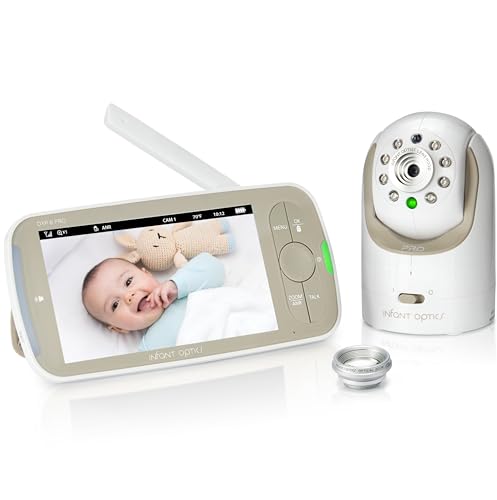
- Best overall: Infant Optics DXR-8 PRO — Check on Amazon
- VTech VM350 — Check on Amazon
- Owlet Cam 2 — Check on Amazon
- VTech VM923 — Check on Amazon
- HelloBaby HB6339 — Check on Amazon
- VTech VM819 — Check on Amazon
Read the full guide ↓
Disclosure: As an Amazon Associate, dailyhomedecorating.com earns from qualifying purchases. Links to Amazon on this page are affiliate links; they cost you nothing extra. Listing details such as price and availability change often, so check the current Amazon listing before you buy.
Finding the best baby security camera under $150 starts with one honest fork in the road, because at this price you are really choosing between two different kinds of product that happen to share a name. On one side sit dedicated baby monitors: a camera in the nursery and a physical parent unit in your hand, linked by a private radio signal, with no Wi-Fi, no app and nothing to subscribe to. On the other side sits the Wi-Fi camera, which streams to an app on your phone, can be checked from anywhere, and can save short clips when it hears or sees something, but which depends on your router, the maker’s servers and, in some cases, an optional paid plan for its fuller feature set. Neither side is simply better. They fail in different ways, they cost you in different currencies, and the right answer depends on whether you value a screen that always works or a feed you can open from the office, the garden or another country.
This guide compares six real systems that sit at or under the ceiling at the time of writing, five dedicated monitors and one Wi-Fi camera, and it judges them on the things that decide whether a monitor is still in use six months later: picture clarity in a dark room, how the screen behaves at 3 a.m., whether the room temperature is shown, how long the parent unit lasts between charges, and what, if anything, the system records. One honesty note before the picks: prices in this category move constantly, and one pick below, the Infant Optics DXR-8 PRO, lives closest to the ceiling. We have kept it in because its street price regularly sits under the line, but check the live listing on the day you buy, and treat the VTech VM350 as the same-screen-size fallback if it has drifted over.
Our short answer is this. Most families should start with the DXR-8 PRO for its 720p picture, big screen and lens flexibility, or the VTech VM350 if they want that screen size with a temperature readout and a calmer price. If checking in from outside the home and reviewing clips matters more than a dedicated screen, the Owlet Cam 2 is the one Wi-Fi pick that earns its place here. If the budget needs to stretch, the VTech VM819 and VM923 and the HelloBaby HB6339 cover the essentials, including night vision, two-way talk and temperature sensing, at the budget end of the tier, with the VM923 adding a motorised camera for toddlers on the move. Every pick is unpacked in full below, with its real limitation stated plainly, because a monitor you trust is worth more than a monitor with the longest feature list.
A safety note that applies to every pick in this guide. A baby camera is a convenience for checking in; it is not a medical device, it does not monitor breathing or oxygen, and it never replaces direct supervision or safe-sleep practice. Any sleep or movement insights a maker describes are the maker’s own claims about its app, not medical measurements you should act on. Placement matters more than features: mount or set the camera so that the camera and, above all, its power cord stay well out of your child’s reach. Cords within reach of a crib are a strangulation hazard. Follow the maker’s instruction to keep the camera and cord at least three feet from the crib, route the cord where a standing toddler cannot grab it, and re-check that distance every time your child learns to stand, climb or reach further than last month.
In this guide
Quick Picks
In a hurry? This table matches each system to the situation it handles best in this guide.
| Buyer type | Pick | Why it stands out | Link |
|---|---|---|---|
| Best overall | Infant Optics DXR-8 PRO | 720p camera, 5-inch parent display, no Wi-Fi (FHSS), interchangeable lenses, Active Noise Reduction | Check on Amazon |
| Best big screen without Wi-Fi | VTech VM350 | 5-inch parent display, fixed camera with 2X zoom, 1,000 ft maker-rated range, temperature sensor | Check on Amazon |
| Best Wi-Fi app camera | Owlet Cam 2 | 1080p Wi-Fi camera, app viewing, temperature and humidity sensors, sound, motion and cry notifications | Check on Amazon |
| Best pan-tilt value | VTech VM923 | 2.8-inch parent display, remote pan-tilt-zoom camera, 1,000 ft maker-rated range, temperature sensor | Check on Amazon |
| Best compact IPS screen | HelloBaby HB6339 | 3.2-inch IPS parent display, 720p-listed camera, remote pan-tilt, VOX mode, temperature display | Check on Amazon |
| Best battery life on a budget | VTech VM819 | 2.8-inch parent display, 480p fixed camera, up to 19 hours video streaming (maker claim), temperature sensor | Check on Amazon |
How we chose
We chose these six by applying the filters parents actually complain about when a monitor disappoints. First, the feed had to be genuinely usable in the dark: infrared night vision is universal here, so we separated picks by screen size and camera resolution, because a 480p picture on a 2.8-inch screen and a 720p picture on a 5-inch screen are different products in practice. Second, the connection had to be honest: dedicated monitors were checked for a private, non-Wi-Fi link and a maker-rated range figure, while the Wi-Fi pick was checked for encrypted streaming and for exactly which features sit behind any optional plan. Third, overnight practicality: parent-unit battery claims, sound-activated screens and temperature readouts were weighted heavily, because those decide how the device behaves at night rather than in a showroom. Fourth, recording truthfulness: five of these systems are live-view only, with no local storage and no cloud, and we say so wherever it matters rather than letting readers assume clips exist. Finally, every system had to be a real, current, verifiable product from an identifiable maker, sold at or under the ceiling at the time of writing, with its key specifications confirmed against the maker’s own listing.
Detailed reviews
Each system below is judged on the same ground: who it suits, what it genuinely does well, one honest limitation stated plainly, and when to choose it or skip it. Specifications are the makers’ own listing figures; range and battery numbers in particular are best-case maker claims, and real rooms with real walls will trim them.
Infant Optics DXR-8 PRO — Best overall
The DXR-8 PRO is the closed-circuit flagship in this price band. Infant Optics lists it with a 720p camera feeding a 5-inch parent display over a direct FHSS radio link, which means there is no Wi-Fi network involved, no app account to create and no cloud server between the camera and the screen in your hand. The maker rates its Active Noise Reduction (A.N.R.) system to filter out background hiss from fans and white-noise machines, and the camera supports interchangeable optical lenses, so a wide-angle or zoom lens can be swapped in as the room layout changes. Remote pan, tilt and zoom, infrared night vision and two-way talk round out the listing’s headline features.
In daily use the appeal is steadiness. The feed is live-only: this system does not record clips, does not store anything locally and has nothing to subscribe to, which some families will read as a limitation and others as the entire point. The 5-inch screen is the joint-largest in this roundup, and because the connection never touches the internet, the picture does not depend on your broadband behaving at 3 a.m. The honest limitation is twofold. First, there is no room-temperature readout on this model, a feature several cheaper rivals include. Second, its street price moves around more than any other pick here and sits closest to the under-$150 ceiling, so check the live listing carefully before you buy; if it has drifted above the ceiling on the day you shop, the VTech VM350 below gives you the same screen size for less.
Through the all-rounder lens: the DXR-8 PRO earns the top spot here because it has no weak leg. The picture is the clearest of the dedicated monitors, the screen is large, the lenses adapt the camera to the room instead of forcing the room to adapt, and the noise reduction tackles the specific hiss that makes audio monitoring tiring. If you buy one monitor and never think about the category again, this is the safest pair of hands, provided its live price is behaving on the day you order.
- 720p picture on a large 5-inch dedicated display, with no app and no account
- Interchangeable lenses adapt the same camera to different rooms and crib positions
- No Wi-Fi, no cloud and no subscription of any kind, ever
- Active Noise Reduction is a maker-rated answer to fan and white-noise hiss
Honest limitation: No temperature sensor, no recording, and a street price that hovers nearest the ceiling of any pick here.
Choose it if you want the clearest dedicated picture, lens flexibility and zero ongoing costs, and its live price is under the ceiling when you order. Skip it if you need a temperature readout or any kind of recording, neither of which this system offers.
VTech VM350 — Best big screen without Wi-Fi
The VM350 is VTech’s big-screen, keep-it-simple entry: a 5-inch colour parent display paired with a fixed nursery camera, connected over a secure non-Wi-Fi transmission that VTech rates for up to 1,000 feet of range in open conditions. The listing includes automatic infrared night vision, two-way talk, a set of lullabies, a room-temperature sensor with on-screen readout, and a parent-unit battery the maker rates at up to 12 hours of video streaming per charge. The camera itself does not pan or tilt remotely; you angle it by hand at setup and use the 2X digital zoom to tighten the framing afterwards.
That fixed camera is the deliberate trade. In a standard nursery where the crib does not move, a fixed camera aimed once and forgotten is arguably the most reliable design of all, because there are no motors to fail and no reason to touch it again. The large screen makes overnight checks genuinely easy on tired eyes, and the temperature readout answers the most common middle-of-the-night question after ‘is she asleep’, which is ‘is the room too warm’. The honest limitation is coverage: once your baby is a mobile toddler, a fixed lens cannot follow, and there is no recording or app view, so what you see live is all you get. A two-camera version, the VM350-2, exists for families who need a second room covered.
Through the all-rounder lens: the VM350 is the pragmatist’s version of the same idea: the same 5-inch screen size, a temperature readout the Infant Optics lacks, and a fixed camera that removes a whole category of fiddling. For a single nursery with a fixed crib, it may honestly be the better buy, and it is the pick we would hand to anyone who found the DXR-8 PRO sitting over budget at checkout.
- Large 5-inch screen that is easy to read at arm’s length overnight
- Temperature sensor, lullabies and two-way talk in one no-fuss package
- No Wi-Fi, no app and no subscription; pairing is done at the factory
- Maker-rated battery life covers a full night of video streaming
Honest limitation: Fixed camera cannot pan or tilt to follow a moving toddler, and there is no recording.
Choose it if you want the biggest screen, a temperature readout and a camera that never needs steering. Skip it if your child is already mobile and you need the camera to follow movement around the room.
Owlet Cam 2 — Best Wi-Fi app camera
The Cam 2 is the one true Wi-Fi camera in this roundup, and it plays a different game. Owlet lists 1080p HD video streamed over encrypted Wi-Fi to the Owlet app on your phone, with a wide-angle view, 4X digital zoom, automatic night vision and two-way talk, plus room temperature and humidity sensors and notifications for sound, motion and crying. When an event is detected, the app captures a short video clip you can review later, which none of the dedicated-monitor picks here can do. There is no parent unit in the box; your phone is the screen, and background audio lets you keep listening while the phone does other things.
That architecture brings honest costs the other five picks do not have. Everything depends on your home Wi-Fi and on Owlet’s app and servers, so an outage or an app change is outside your control in a way a direct radio link never is. Owlet has offered optional paid plans around its app features, so check the current terms on the listing and in the app before you buy, and confirm which clip and notification features are included without one. The Cam 2 also does not measure heart rate or oxygen; those are functions of Owlet’s separate sock products, not of this camera, and no camera in this guide is a medical device. Choose the Cam 2 when phone access from anywhere, event clips and humidity data matter more to you than a dedicated screen that simply always works.
Through the all-rounder lens: the Cam 2 is here so this guide answers the question every parent asks, which is whether to go Wi-Fi at all. It wins on picture resolution, on checking in from anywhere and on being the only pick that can show you what happened, via event clips, rather than only what is happening. It loses on independence: no router, no feed. Buy it with open eyes and it is excellent; buy it expecting a dedicated monitor and you will be annoyed within a week.
- Sharpest picture here at 1080p, viewable from anywhere through the app
- Sound, motion and cry notifications plus reviewable event clips
- Temperature and humidity sensing, not temperature alone
- No extra screen to charge; background audio keeps listening on your phone
Honest limitation: Depends entirely on Wi-Fi and the maker’s app; check current plan terms, and there is no dedicated parent unit.
Choose it if checking in from anywhere, event clips and humidity data matter more than a dedicated screen. Skip it if you want a monitor that works without Wi-Fi, an app account or any plan terms to check.
VTech VM923 — Best pan-tilt value
The VM923 takes the compact 2.8-inch parent unit format and adds the feature the VM819 lacks: a motorised camera you can steer from the sofa. VTech’s listing rates the camera to pan up to 270 degrees side to side and tilt up to 105 degrees up and down, with digital zoom on top, all controlled from the parent unit over the same secure non-Wi-Fi FHSS link rated for up to 1,000 feet. Automatic night vision, two-way talk, lullabies, a temperature sensor and a sound-activated screen are all on the listing, and the maker rates the rechargeable parent unit for up to 19 hours of use between charges.
Remote steering changes how a monitor gets used after the newborn stage. A baby who rolls to the far corner of the crib, and later a toddler who has escaped to the bookcase, can be re-framed without opening the nursery door and undoing twenty minutes of settling. The small screen is the compromise you accept for the price and the battery life: faces are clear enough to read breathing movements and sleep position, but this is not the screen for admiring eyelashes. The honest limitation is that the 2.8-inch display is the joint-smallest here, and the pan range, while generous, still cannot see behind the camera, so placement on a high shelf with a clear sweep matters.
Through the all-rounder lens: the VM923 is the value pick with a future. Newborns do not need a steerable camera, but the toddler yours becomes will reward one, and buying the motorised camera now, at the budget end of the tier, avoids replacing the whole system at fourteen months. The small screen is the price, and for overnight glances it is a price most families will happily pay.
- Remote pan, tilt and zoom from the parent unit at a budget-friendly tier
- Temperature sensor, night vision and two-way talk all included
- Long maker-rated battery life and 1,000 ft rated range
- No Wi-Fi, no app account and no subscription
Honest limitation: Small 2.8-inch screen, and the camera cannot see behind itself, so placement still matters.
Choose it if you want a steerable camera and long battery life at the budget end of the tier. Skip it if a 2.8-inch screen feels too small for comfortable overnight viewing.
HelloBaby HB6339 — Best compact IPS screen
The HB6339 is HelloBaby’s IPS-screen answer to the VTech pair. The listing pairs a 3.2-inch IPS parent display, which holds its contrast better at off-angles than the basic LCD panels in this class, with a camera listed at 720p capture resolution that pans and tilts remotely from the parent unit. The connection is a no-Wi-Fi FHSS link rated by the maker for up to 1,000 feet, and the feature list includes infrared night vision, two-way talk, a room-temperature display, lullabies and a VOX mode that keeps the screen dark and silent until sound in the nursery crosses the threshold you set.
VOX is the feature tired parents end up loving most, because a monitor that glows and murmurs all night becomes part of the sleep problem it was bought to solve. Set the sensitivity once and the HB6339 behaves like an audio monitor until there is something worth seeing. The IPS panel also makes this the easiest of the compact units to share between two parents at an angle on a nightstand. The honest limitations are brand-scale ones: HelloBaby’s support network and accessory range are smaller than VTech’s, extra cameras must be matched to the exact model variant before ordering, and like every non-Wi-Fi pick here it offers live view only, with no clips and no phone access when you are out of the house.
Through the all-rounder lens: the HB6339 splits the difference between the two VTech compacts: a slightly larger, better-angled IPS screen than either, a steerable camera like the VM923, and a VOX mode that keeps your bedroom dark. It is the pick for parents who share the parent unit between two sides of a bed and are tired of squinting at a washed-out panel from an angle.
- IPS screen stays readable at an angle when two parents share the view
- Remote pan-tilt camera plus VOX sound-activated screen and display sleep
- Temperature display, night vision and two-way talk included
- No Wi-Fi, no app and no subscription costs
Honest limitation: Smaller brand support network than VTech, and extra cameras must match the exact variant.
Choose it if you want an IPS screen, a steerable camera and a VOX mode that keeps your room dark. Skip it if you prefer the larger support and accessory network of a bigger brand.
VTech VM819 — Best battery life on a budget
The VM819 is the endurance pick. Its listing leads with battery life: a 2,600 mAh rechargeable parent unit that VTech rates for up to 19 hours of video streaming, or up to 29 hours in audio-only mode, figures the maker describes as best in class. The camera is a fixed 480p unit with automatic night vision and 2X zoom, the link is a private 2.4 GHz FHSS connection with a maker-rated range of up to 1,000 feet, and the parent unit shows a 2.8-inch colour screen with a room-temperature readout, two-way talk, two lullabies and two soothing sounds, plus a sound-activated screen that wakes when the nursery gets loud.
Nothing about the VM819 is glamorous, and that is its strength. It is the monitor you charge on Sunday and stop thinking about, the one grandparents can operate without a tutorial, and the one that keeps working when the home Wi-Fi is down. The 480p picture is noticeably softer than the 720p and 1080p picks here; you can read sleep position, a kicked-off blanket and a standing toddler perfectly well, but fine detail is limited. The honest limitation is that fixed, lower-resolution camera: no remote pan or tilt, no recording, no app. If your nursery is one crib in one place, that trade is usually worth it. If you expect to follow a roamer, step up to the VM923, which shares this unit’s battery philosophy and adds the motorised camera.
Through the all-rounder lens: the VM819 is the set-and-forget floor of this guide. Its picture is the softest and its camera the simplest, but its battery endurance is in another league, and endurance is what overnight monitoring actually runs on. As a first monitor, a travel monitor or a grandparents’-house monitor, it is very hard to beat at the budget end of the tier.
- Longest maker-rated battery life in this roundup, in video and audio-only modes
- Dead-simple plug-and-play setup with no Wi-Fi, app or account
- Temperature sensor, lullabies, soothing sounds and sound-activated screen
- Private FHSS link keeps working during internet outages
Honest limitation: 480p fixed camera is the softest picture here, with no pan, tilt or recording.
Choose it if battery life, simplicity and value matter more to you than picture sharpness. Skip it if you want remote pan and tilt, a sharper picture or any recording.
Live view, recording and subscriptions: the honest version
Because listings in this category blur these three ideas together, here is the plain version for this exact price band. Five of the six systems here, every dedicated monitor, offer live view only. There is no memory card slot doing quiet work in the background, no cloud archive and no timeline to scroll. When you look, you see the nursery now; when you stop looking, nothing is kept. That is not a defect discovered after purchase, it is the design, and it is also why those systems need no subscription and expose nothing to the internet. The sixth system, the Owlet Cam 2, records short event clips in its app when it detects sound, motion or crying, and that convenience is inseparable from its dependence on Wi-Fi, the maker’s servers and the current terms of its app plans, which you should read on the listing before buying.
Subscriptions deserve the same plain treatment. No dedicated monitor here has one, in any form, at any tier: the price of the box is the whole price of the product. For the Wi-Fi pick, treat any optional plan as part of the product’s real cost and decide, before the return window closes, whether the features included without one are the features you actually bought it for. Makers change plan structures over time, which is exactly why this guide refuses to promise a specific included feature set for an app camera and instead tells you where to check. A monitor bought under this ceiling should never surprise you with a monthly bill you did not agree to in advance.
Comparison table
The six systems side by side. Recording and connection type are the two rows that most change daily life, so read those first.
| Pick | Display | Camera | Connection | Recording | Best for |
|---|---|---|---|---|---|
| Infant Optics DXR-8 PRO | 5-inch parent unit | 720p, pan-tilt-zoom, interchangeable lenses | No Wi-Fi (FHSS) | None, live view only | Best overall |
| VTech VM350 | 5-inch parent unit | Fixed, 2X zoom, temperature sensor | No Wi-Fi (FHSS) | None, live view only | Best big screen without Wi-Fi |
| Owlet Cam 2 | Your phone (app) | 1080p, temp and humidity, notifications | Wi-Fi app | Event clips in app | Best Wi-Fi app camera |
| VTech VM923 | 2.8-inch parent unit | Pan-tilt-zoom, temperature sensor | No Wi-Fi (FHSS) | None, live view only | Best pan-tilt value |
| HelloBaby HB6339 | 3.2-inch IPS parent unit | Pan-tilt, temperature display, VOX | No Wi-Fi (FHSS) | None, live view only | Best compact IPS screen |
| VTech VM819 | 2.8-inch parent unit | 480p fixed, temperature sensor | No Wi-Fi (FHSS) | None, live view only | Best battery life on a budget |
How to choose the best baby security camera under $150 for your family
Start with the connection, because it decides everything downstream. A dedicated monitor with a parent unit works the moment it is plugged in, keeps working when your broadband drops, exposes nothing to the internet and never asks for a subscription. Its limits are range, a screen you must keep charged, and the fact that nobody can check it from outside the home. A Wi-Fi camera inverts every one of those points: unlimited viewing distance and phone convenience, paid for with total dependence on your network and the maker’s app, plus plan terms you should read before, not after, purchase. Many families resolve this by deciding who needs to watch. If the audience is two parents in one home, dedicated wins. If a parent travels for work, or a caregiver in another home needs access, Wi-Fi earns its compromises.
Next, be realistic about resolution and screen size as a pair. Camera resolution only matters as much as the screen displaying it. A 720p or 1080p camera feeding a large screen or a modern phone shows a clear benefit; a high-resolution camera squeezed onto a tiny panel does not. For overnight checks, most parents need to confirm sleep position, whether eyes are open, and whether a blanket has migrated, and even the 480p pick here does that. Detail hunger usually fades; battery hunger does not, which is why parent-unit endurance and sound-activated screens deserve more weight than spec-sheet sharpness.
Then decide whether you need the camera to move. Remote pan and tilt is a toddler feature disguised as a baby feature. With a newborn in a fixed crib, a fixed camera aimed once is simpler and cheaper. From rolling onwards, a steerable camera starts earning its keep, and by the climbing stage it can be the difference between seeing your child and seeing the empty corner they left. If your budget forces a choice between a bigger screen and a moving camera, choose based on your child’s current stage, not the newborn photos in the listing.
Finally, understand recording before you assume it. Five of the six systems here record nothing at all: no memory card, no cloud archive, just a live feed and, on the dedicated units, complete privacy as the trade. Only the Wi-Fi pick captures event clips, through its app. If reviewing what happened matters to you, that is a genuine reason to choose Wi-Fi. If it does not, do not pay, in money or in complexity, for a feature you will never open. And whichever you choose, budget ten minutes for safe placement: camera and cord at least three feet from the crib and out of reach, a distance you will need to defend again at every new stage of mobility.
Placement, cords and the first month: getting the setup right
Where the camera sits decides more of your experience than which camera you bought, so treat placement as a small project with a plan rather than a shelf decision made while holding a baby. Start with the view you actually need: the whole crib mattress, edge to edge, with a margin of surrounding floor if the camera can manage it. Test the view in daylight and again in the dark, because infrared night vision changes contrast and a position that looks perfect at noon can glare or crop at midnight. Angle the camera down at the mattress rather than across the room; a shallow angle foreshortens the crib and hides exactly the corner a rolling baby will find. If the picture crops the mattress, change the lens, steer the camera or move the shelf, in that order of effort, before you accept a partial view.
The cord deserves its own paragraph because it is the one part of this purchase that can hurt someone. Route the power cord from the camera straight down behind the furniture it sits on, then along the wall to the socket, never across open space and never within reach of the crib. The working rule from every maker’s manual is the same: camera and cord at least three feet from the crib, out of the child’s reach entirely. Then calendar the re-checks. The day your baby first pulls to standing, the reachable world grows by a foot in every direction, and a cord that was safely distant in the newborn layout may now be a handhold. Standing, climbing and cot-side cruising each redraw the map, and each milestone should trigger a thirty-second cord audit. It is the cheapest safety habit in the nursery and the one most specific to camera ownership.
The first month will teach you your real usage pattern, and it is worth letting it. Most parents discover they use audio far more than video, glancing at the screen for specific questions, is she on her back, has the blanket moved, is that cry escalating, rather than watching continuously. That pattern argues for the features this guide weighted: sound-activated screens that wake for the questions, batteries that survive the day, and audio clean enough to judge a cry through a wall. It also argues against paying for capabilities you will not open. If, a month in, you have never wished for a clip of last night, you bought correctly with a live-view system. If you wish for one weekly, the Wi-Fi route exists and this guide’s Owlet pick is the honest version of it. Either way, let the first month, not the listing page, tell you which family you are.
One last setup ritual pays for itself: the two-parent test. Before the first real night, have both caregivers, and any grandparent who will use the system, perform the five operations that matter: turn the unit on, adjust the volume, talk through it, steer or zoom the camera if yours does, and switch the screen off without switching the audio off. Every monitor in this guide passes that test easily once shown, and almost every 3 a.m. panic in monitor ownership traces back to an operation nobody had practised in daylight. Five minutes of rehearsal is the difference between a tool and a puzzle.
What changes as your baby grows: newborn, roller, toddler
The newborn stage is the monitor’s easiest job and the one listings photograph. Your baby sleeps where placed, the crib does not move, and the questions are simple: asleep or stirring, warm or cool, blanket where it should be. Every pick here answers those questions, which is why newborn-stage buying should weight the parents’ experience, screen manners, battery and audio, over camera gymnastics. It is also the stage where expectations need the most managing: the camera will show you a great deal of normal, noisy, wriggly sleep, and learning which movements are ordinary is the real first-month skill.
The rolling and sitting stages redraw the nursery’s map. The crib’s far corner, previously decorative, becomes a destination, and a fixed camera framed tightly on the newborn spot starts cropping the action. This is where digital zoom earns its keep on fixed models and where steerable cameras begin their long repayment of a modest premium. It is also when the cord audit stops being theoretical: a baby who can roll to the crib rail and pull will, eventually, test everything within a new and larger radius, and the camera’s three-foot cord rule must be re-measured against the child you now have, not the one you brought home.
The toddler stage changes the product’s job description entirely. The crib becomes a bed, the room becomes a world, and the monitor becomes less a sleep tool than a quiet supervisor of a small person with projects. Coverage now beats closeness; a wide or steerable view of the room matters more than a tight view of a mattress. Two-way talk graduates from soothing newborns to negotiating with a person standing in a doorway at 5 a.m. And the systems that survive this stage gracefully are the ones bought with it in mind: steerable or lens-flexible cameras, durable parent units, and no dependence on features locked to the newborn phase. Buy for the newborn, by all means, but buy with the toddler in the room, because the toddler is who the monitor will spend most of its life watching.
Common mistakes when buying a baby camera in this price band
Assuming every camera records. Most dedicated monitors are live-view only. Parents discover this after the first incident they wanted to review. If clips matter, choose the Wi-Fi pick deliberately and confirm its plan terms.
Mounting the camera inside or directly over the crib with the cord in reach. A reachable cord is a strangulation hazard. Keep camera and cord at least three feet from the crib, routed where a standing child cannot grab them, and re-check as reach grows.
Treating a camera as a health monitor. No camera here measures breathing, heart rate or oxygen, and none replaces direct supervision or safe-sleep practice. Maker claims about sleep insight describe app features, not medical monitoring.
Buying resolution instead of battery. The sharpest feed is useless on a dead parent unit. Overnight, endurance and a sound-activated screen matter more than pixels.
Ignoring the subscription question until setup. Wi-Fi cameras may place fuller features behind an optional paid plan. Read the current terms on the listing first so the app holds no surprises.
Placing the camera for the newborn photo, not the toddler. Aim and mounting that suit a still newborn fail a standing one. Choose placement, and ideally a steerable camera, with the next year in mind.
Final recommendation
For most families shopping for the best baby security camera under $150, the Infant Optics DXR-8 PRO is the most complete answer: the clearest dedicated picture, a big screen, flexible lenses and zero ongoing costs, as long as its live price is under the ceiling when you order. If it is not, the VTech VM350 delivers the same screen size with a temperature sensor and no drama. Choose the Owlet Cam 2 if phone access and event clips are your priorities, the VM923 if you want a steerable camera at a budget tier, the HB6339 for its IPS screen and VOX manners, and the VM819 if battery life and simplicity outrank everything. Whichever you pick, place it safely, keep its cord out of reach, and remember it is a window into the nursery, not a substitute for walking through the door.
Frequently asked questions
Do baby monitors under $150 require a subscription?
The five dedicated monitors in this guide never do: there is no account, no cloud and no plan, because the camera talks directly to its parent unit. The Wi-Fi pick, the Owlet Cam 2, works through the maker’s app, and Owlet has offered optional paid plans around its app features, so check the current terms on the listing and confirm which notifications and clip features are included before you buy.
Can a baby camera replace checking on my baby in person?
No. A camera is a convenience for quick check-ins between visits. It is not a medical device, it does not monitor breathing or oxygen, and it never replaces direct supervision or safe-sleep practice. If you are ever worried about your child, go to them; do not rely on a screen.
Which is better, Wi-Fi or a dedicated parent unit?
For most single-home families, a dedicated unit: it works without internet, has no subscription and keeps the feed private. Wi-Fi wins when you need to check in from outside the home or want event clips. The trade is dependence on your router and the maker’s app and servers.
Do these cameras record video I can watch later?
Only the Owlet Cam 2, which saves short event clips in its app when sound, motion or crying is detected. The five dedicated monitors are live-view only, with no local storage and no cloud recording. That is a deliberate privacy and simplicity trade, but you should choose it knowingly.
Where should I place the camera in the nursery?
Where it can see the whole crib while staying safely out of reach. Keep the camera and especially its power cord at least three feet from the crib, following the maker’s instructions, route the cord where a standing toddler cannot grab it, and check the distance again at every new stage of mobility, because cords near a crib are a strangulation hazard.
Is 480p enough, or do I need 720p or 1080p?
For the core job, confirming sleep position, open or closed eyes and blanket position in the dark, even 480p on a small screen is workable, and it is what the longest-battery pick here uses. Higher resolution helps most on larger screens and phones, and when you want to zoom digitally without the picture falling apart.


