Disclosure: As an Amazon Associate, dailyhomedecorating.com earns from qualifying purchases. Links to Amazon on this page are affiliate links; they cost you nothing extra. Prices and availability change often, so check the current Amazon listing before you buy.
The best office chairs for support are the ones whose support you can verify: a lumbar mechanism with a stated adjustment, a headrest with a stated range, a seat whose construction is described in numbers rather than adjectives. “Support” is the most abused word in office seating — printed on chairs with a shaped foam back and nothing that moves — so this guide applies a simple evidentiary rule: a pick earns its place only if its own listing data documents the support hardware it claims. Six chairs passed. They span the precise (Ticova), the adaptive (FLEXISPOT in our sibling guides’ tradition — here represented by Steelcase’s automatic fit), the suspended (Herman Miller Aeron) and the honest budget end (SIHOO), and each review names the exact mechanism doing the supporting, so you can judge the claim rather than the copywriting. Comfort is the subject throughout; nothing here is medical advice.
Use this guide as the support-first cut of the whole chairs program: for back-and-neck emphasis, continue to Best Office Chairs For Back And Neck Support; for the home-office-specific shortlist, Best Home Office Chairs For Back Support; for posture as a system, Best Office Chairs For Comfort And Posture. The through-line in all of them is the rule above — support is a mechanism, not a mood.
Where to Buy
Every pick in this guide is sold on Amazon, where you can check the current price, configuration and availability. Start with the Hbada P5 Ergonomic Office Chair — Check on Amazon. The other five picks: Ticova Ergonomic Office Chair — Check on Amazon; SIHOO M18 — Check on Amazon; HON Ignition 2.0 — Check on Amazon; Steelcase Series 1 — Check on Amazon; Herman Miller Aeron Classic — Check on Amazon.
In this guide
Quick Picks
| Pick | Badge | Why it earns its place |
|---|---|---|
| Hbada P5 Ergonomic Office Chair | Best Overall | An S-curve backrest with adjustable lumbar, a headrest with published height and swivel ranges, and certified testing — support you can itemize. |
| Ticova Ergonomic Office Chair | Best for Precise Support | Lumbar support adjustable in height and depth — the most literal definition of “support” in this guide. |
| SIHOO M18 | Best Budget | Four named support points, adjustable lumbar and a stated 330 lb capacity at a budget tier. |
| HON Ignition 2.0 | Best for Shared Desks | Contract-grade lumbar support and width-adjustable arms, warranted for daily multi-user duty. |
| Steelcase Series 1 | Best Automatic Support | Weight-activated controls deliver support that calibrates itself to whoever sits down. |
| Herman Miller Aeron Classic | Best Premium | Suspension support with lumbar pad, tension control and forward tilt — support as a system, fully loaded. |
Key Takeaways
- Support is verifiable or it is marketing: every pick here names its mechanism and its adjustment in its own listing data.
- The lumbar is the headquarters of support — height adjustment is the minimum, depth (Ticova) and S-curve conformity (Hbada) are the refinements.
- Arms and headrest are support too: unsupported forearms load the shoulders, and a headrest that cannot reach your head supports nothing.
- Automatic support (Steelcase) and suspension support (Aeron) solve the same problem from opposite ends — calibration without effort, support without foam.
- Budget does not excuse absent support: the SIHOO’s adjustable lumbar outperforms decorative shaping at any price.
How These Picks Were Chosen
The evidentiary rule governed everything: to be selected, a chair’s verified listing data had to describe its support hardware concretely — an adjustable lumbar, a headrest with a range, a named suspension or tilt system, a stated capacity or recognized testing (BIFMA, SGS). Chairs whose support story consisted of the word “ergonomic” and a photograph were excluded, however plush. We then diversified the mechanisms deliberately, because support is personal: static-precise, dynamic, automatic, suspended and budget-essential are all legitimate philosophies, and different bodies swear by different ones.
The Hbada P5 leads on a judgment worth explaining: its support story is the most completely itemized in the pool at its tier — an S-shaped backrest described against the spine’s curve, lumbar adjustability, a headrest whose height range (3.94 inches) and swivel (40 degrees) are published numbers, plus SGS certification and BIFMA testing in its data. That is what verifiable support looks like before you ever sit down. The Aeron closes the guide as the premium system against which itemization itself was invented. For larger bodies, the support conversation continues in Best Office Chairs For Large People; for long days, in Best Office Chairs For Long Sitting.
The 6 Best Office Chairs for Support — Reviewed

Hbada P5 Ergonomic Office Chair
Our badge: Best Overall
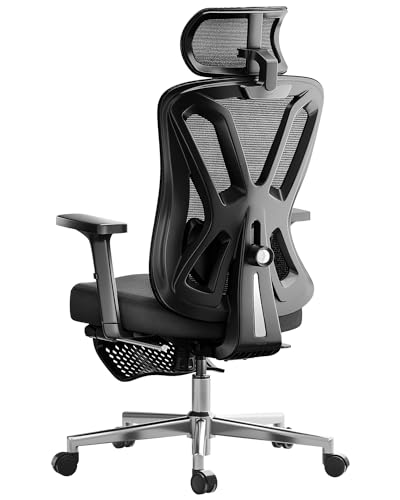
The Hbada P5 leads this guide because its support can be read like a specification sheet. The backrest is S-shaped to conform to the spine’s natural curve, providing support across back, lumbar region, hips and arms; the lumbar support adjusts; the armrests adjust to desk height and sitting position so forearms never dangle; the headrest adjusts across 3.94 inches of height and swivels up to 40 degrees; the seat height spans 3.35 inches; and the backrest reclines to 135 degrees with a footrest for rest positions. Hbada states the chair has passed SGS certification and BIFMA testing, and sizes it for users roughly 5′ to 5’10”.
Strengths
- Published support numbers — headrest travel and swivel, seat-height range, recline angle — instead of adjectives.
- The S-curve backrest supports the whole back’s shape, not only the lumbar point.
- Certification and testing stated in its data (SGS, BIFMA) — the paperwork of real support.
Trade-offs
- The stated fit range excludes taller users — a support chair must fit to support.
- Compact footprint means a narrower sit than the SIHOO’s wide cushion.
- The footrest is for breaks; working support happens with feet on the floor.
| Color | Black |
| Weight | 44 pounds |
In use, the P5’s support feels deliberate. The S-curve meets your back along its length rather than at a single lobbying point, the lumbar firms the foundation, and the headrest — with its unusually published ranges — genuinely arrives at the back of your head when you recline for a call. The armrests complete the circuit: shoulders down, forearms carried, neck unloaded. It is a system in which each part’s job is stated and then done.
Hbada adds the ownership layer support buyers should want: installation guidance and a customer repair service in its listing. Support, in their framing, includes supporting the owner — and at this tier, that framing is rare enough to lead a guide with.
For small and medium frames wanting itemized, certified, adjustable support without a premium toll, the P5 is the most defensible purchase in this guide.
Best for: Users up to about 5’10” who want verifiable, adjustable support at a mid tier / Not suited for: Tall users
Choose it for the complete support sheet; skip it if you are tall — the Ticova and Aeron below fit longer frames. Check on Amazon

Ticova Ergonomic Office Chair
Our badge: Best for Precise Support
The Ticova Ergonomic Office Chair defines support as a place, precisely chosen. Its lumbar support adjusts in height and in depth — you position it in your back’s curve, then set how firmly it meets you — and that two-axis control is the most literal support mechanism in this guide. Around it: a headrest adjustable in height and angle, 3D armrests with thick PU padding, a seat of 3.4-inch high-density foam in a W shape with a waterfall front edge, a breathable high-tensile mesh back, and rocking to 130 degrees with adjustable resilience. Ticova lists BIFMA testing and a static pressure test in its data.
Strengths
- Two-axis lumbar control — the support that can be placed, not merely present.
- The W-shaped seat supports the pelvis, which is where back support actually begins.
- Published foam thickness and testing claims — an itemized support story.
Trade-offs
- Precision requires patience: the fitting week is part of the product.
- The foam seat runs warmer than full-mesh alternatives.
- The headrest’s curved shape is fixed even as its position adjusts.
| Color | Black |
| Weight | 17.5 kilograms |
The Ticova’s support philosophy is that your back is not the average back, and a support that cannot move in two axes will always be a compromise negotiated at your spine’s expense. Owners who complete the fitting — lumbar placed and deepened gradually, arms set, headrest angled — describe the result in the vocabulary this keyword wants: the chair holds them. Not cushions them, not surrounds them — holds them, at the points they chose.
Its 30-day return policy is the correct companion to that philosophy: judge the fitted chair across real work, and let the verdict be the fit’s, not the first sit’s. For the deliberate buyer, no chair in this guide respects the intelligence of the purchase more.
At its tier, the Ticova’s support kit competes with chairs far above it — which is why it anchors the precise end of this guide’s spectrum.
Best for: Precise fitters who want to place their support in two axes / Not suited for: Set-and-forget buyers
Choose it for control; skip it for automation — the Steelcase below. Check on Amazon

SIHOO M18 Ergonomic Office Chair
Our badge: Best Budget
The SIHOO M18 is where this guide’s evidentiary rule meets the budget tier — and passes. SIHOO describes its support as four points (head, back, hips, hands) with proper lumbar support, and the hardware is itemized: adjustable lumbar support, adjustable headrest, seat-height adjustment, 2D armrests, a breathable mesh back and a wide cushion, for users roughly 5’6″ to 6’2″. The durability paperwork is equally explicit: BIFMA testing, a static pressure test, a stated capacity of 330 lb (150 kg) and a three-year parts promise in its data.
Strengths
- Named support points with adjustable hardware — the budget tier’s most honest support story.
- Stated 330 lb capacity: support for the chair’s own structure, not just yours.
- Mesh back keeps the supported back cool across long sessions.
Trade-offs
- Lumbar adjusts in placement, not depth — the Ticova’s second axis is the upgrade.
- 2D armrests only.
- Petite users may find the wide seat deep.
| Color | Charcoal |
| Weight | 31.53 pounds |
The M18’s support intelligence is allocation: it spends on the lumbar mechanism, the headrest and the rated base — the parts your body files its reports about — and economizes on armrest dimensions and styling. Fitted with the routine in this guide’s how-to section, it delivers the daily fact of support: a back met where it curves, a head restable on calls, arms carried at elbow height.
Assembly is eight steps with clear instructions, and the parts promise means support in year three is a shipment rather than a shopping trip. For first-time support buyers and two-desk households, the M18 is the rational foundation of this entire guide.
Nothing about it apologizes. It is simply the most support that its tier can honestly itemize — and itemization, as this guide has argued from its first paragraph, is the whole game.
Best for: Budget buyers who want named, adjustable support / Not suited for: Petite users or depth-control seekers
Choose it for honest value; skip it only if the premium systems are within reach. Check on Amazon

HON Ignition 2.0 Ergonomic Office Chair
Our badge: Best for Shared Desks
The HON Ignition 2.0 brings the contract world’s definition of support: hardware that supports whoever sits down, all day, every day, warranted accordingly. Its mid-back mesh design promotes airflow; its lumbar support encourages alignment; its arms adjust in height and width — the width axis being support for the shoulders that fixed arms quietly abandon; and its standard tilt encourages movement. HON states a 300 lb capacity and backs the chair with the HON Full Warranty.
Strengths
- Width-adjustable arms — support for forearms across the widest range of bodies and desks.
- Contract-grade durability: stated capacity plus a full manufacturer warranty.
- Breathable mesh back for the long, warm, shared workday.
Trade-offs
- Mid-back coverage ends below the shoulders; no headrest.
- Lumbar support is encouraging rather than deeply adjustable — the Ticova out-tunes it.
- Utilitarian, professional styling.
| Color | Black |
| Dimensions | 28.5 x 27 x 44.5 inches |
The Ignition’s support is institutional: it assumes the chair will be adjusted by strangers, sat in by everyone, and expected to work regardless. That assumption produces a particular kind of reliability — adjustments that survive re-setting, a base that tolerates migration between desks, a warranty that reads like a service plan. In a shared home office or a small business, that is support in its most practical sense.
HON positions it across computer work, study, meetings and administration, and the breadth is earned: this is the support chair for workplaces rather than for a person, and workplaces are where most sitting actually happens.
Buy it when the chair must support a roster rather than an individual, and its virtues — the arms, the warranty, the mesh — will compound daily.
Best for: Shared desks and small offices needing warranted, adjustable support / Not suited for: Solo users wanting deep personal tuning or a headrest
Choose it for the warranty and the arms; skip it for solo precision — Ticova, above. Check on Amazon

Steelcase Series 1
Our badge: Best Automatic Support
The Steelcase Series 1 supports by sensing. Its weight-activated controls read the sitter’s body weight and set the recline behavior automatically, delivering back and arm support calibrated to whoever is in the chair, with no knobs to learn or forget. Adaptive bolstering and flexible seat edges keep the sit pressure-free, optional 4D arm support and an adjustable headrest exist within the line, and the chair — 29 pounds, assembled without tools in under two minutes — is Steelcase’s essential-ergonomics design at its most accessible.
Strengths
- Support that calibrates itself — the answer to every mis-set chair in the world.
- Adaptive bolstering supports movement rather than sculpting a single pose.
- Instant re-fit between users makes it the shared chair that supports everyone.
Trade-offs
- Manual tuners get fewer levers to love.
- Compact frame best suits small-to-average builds.
- Headrest is configuration-dependent; verify the listing before ordering.
| Color | Graphite |
| Dimensions | 23.75 x 27 x 41.25 inches |
| Weight | 29 pounds |
The Series 1’s insight is statistical: most chairs are adjusted once, imperfectly, and then lived in for years — so most “support” in the world is accidental. Steelcase removes the accident. Sit down and the chair reads you; lean and it answers at your weight’s resistance; hand it to a partner and it reads them instead. Across a year of real use, that automatic correctness produces better average support than a theoretically superior chair fitted by hope.
It is also the support chair for the space-constrained: compact, light, quick to assemble, easy to move for cleaning. Support per square foot is a real metric in home offices, and this chair leads the guide in it.
For buyers who want support as an appliance — present, correct, unconsidered — the Series 1 is the answer with a research program behind it.
Best for: Shared chairs, small offices and anyone who will not tune knobs / Not suited for: Large users or meticulous manual fitters
Choose it for effortlessness; skip it for hand-tuning. Check on Amazon
Herman Miller Aeron Classic — Aluminum Frame
Our badge: Best Premium
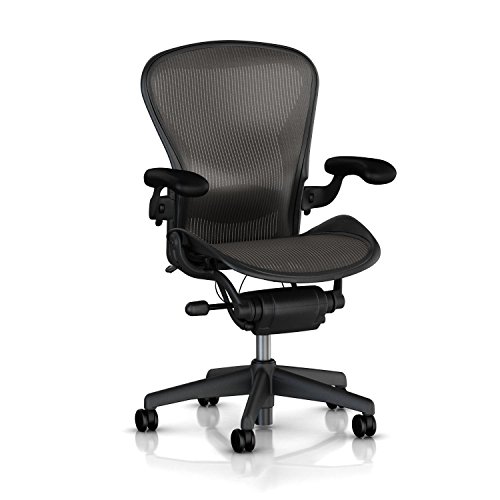
The Herman Miller Aeron Classic closes the guide as support’s system thinker. This fully loaded aluminum configuration lists tension control, rear tilt lock, forward tilt and lumbar support among its features, on the Classic’s suspension design in Size B (Medium) with hardwood-floor casters. Where other chairs support with pads, the Aeron supports with a tensioned Pellicle membrane that distributes pressure across the whole contact surface, and a tilt architecture that keeps the body’s joints in their natural chain as you move.
Strengths
- Suspension support cannot compress out of calibration — the support of year ten is the support of day one.
- Forward tilt supports the perched, focused posture most chairs abandon.
- Tension control and tilt lock let you set the support’s behavior, not just its position.
Trade-offs
- Premium pricing, justified across years rather than weeks.
- Size B fits the middle of the population; outliers must verify fit carefully.
- No headrest — its neck support is postural, through tilt and fit.
| Color | Black |
| Size | Size B (Medium) |
| Dimensions | 16 x 27 x 41 inches |
| Weight | 50 pounds |
The Aeron reframes what support means: not a pad pressing at a point, but a field of tension answering everywhere at once, adjusting its answer as you shift because physics, not a mechanism, is doing the adjusting. That is why its support does not drift, fade or forget — and why, decades into its design life, it remains the chair that support guides end with.
The fully loaded configuration matters for this keyword specifically: the forward tilt and tension control are support features, aimed at the working postures between upright and reclined where most hours actually live. On hardwood floors — this configuration’s stated caster pairing — it is a complete system.
Buy it as the last support chair of a career chapter, fit it once, and let its permanence make the whole question boring — which is the highest compliment support can earn.
Best for: Premium buyers wanting systemic, permanent support / Not suited for: Starter budgets, carpeted rooms without a mat, or headrest hunters
Choose it for the system; skip it if a headrest or a friendly tier tops your list. Check on Amazon
Comparison Table
| Pick | Support Mechanism | Headrest | Evidence in Listing | Check price on Amazon |
|---|---|---|---|---|
| Hbada P5 | S-curve back, adjustable lumbar | Height + 40° swivel, published ranges | SGS, BIFMA stated | Check price on Amazon |
| Ticova Ergonomic | Lumbar height + depth | Height + angle | BIFMA, pressure test stated | Check price on Amazon |
| SIHOO M18 | Adjustable lumbar, 4 support points | Adjustable | BIFMA, 330 lb stated | Check price on Amazon |
| HON Ignition 2.0 | Lumbar support, tilt | None | 300 lb, Full Warranty | Check price on Amazon |
| Steelcase Series 1 | Weight-activated, adaptive bolstering | Optional in line | Steelcase research program | Check price on Amazon |
| Herman Miller Aeron | Suspension + lumbar pad | None (postural) | Fully loaded configuration | Check price on Amazon |
How to Choose an Office Chair for Support
Demand the mechanism’s name and range
For every support claim, ask two questions: what is the mechanism, and what is its range? “Adjustable lumbar support” is a claim; “lumbar adjusts in height and depth” is a specification. The chairs in this guide publish the second kind of sentence. Make every listing you meet do the same, and the category sorts itself in minutes.
Support the pelvis first
Back support begins under you: a seat with real construction — density, shaping or suspension — positions the pelvis, and every support above it inherits that foundation. A brilliant lumbar pad under a collapsing seat is a monument on sand. Grade the seat’s construction with the same suspicion as the back’s.
Count the supported points
The honest makers enumerate: head, back, hips, hands (SIHOO’s four points) or back, lumbar, hips and arms (Hbada’s list). Count the points a listing claims, then verify each has hardware. A point without a mechanism is a wish.
Match the philosophy to your habits
Precise and patient: Ticova. Itemized and complete: Hbada. Automatic: Steelcase. Suspended and permanent: Aeron. Institutional: HON. Essential and budget-true: SIHOO. Support is personal enough that the philosophy matters as much as the specification — buy the one whose daily behavior matches yours.
Read the paperwork as part of the support
BIFMA testing, SGS certification, stated capacities and parts promises are support extended in time: the maker’s commitment that the mechanism you fitted in week one still exists in year three. In a support purchase, the paperwork is not fine print — it is half the product.
How Do You Fit a Support Chair Correctly?
Work from the floor up, one change per day across the first week. Seat height first: feet flat, knees near 90–100 degrees. Seat depth where it adjusts: a fist’s width behind the knee. Lumbar next: into the small of your back, firm enough to feel, gentle enough to forget — then depth, if your chair offers it, until contact is constant through a recline. Armrests: forearms carried, shoulders fully dropped. Headrest last: meeting your head in recline, invisible while you type. Re-torque the bolts after week one, and write the final settings down. Support that was never fitted is support that was never bought, whatever the receipt says.
Problem: The lumbar pad feels like a fist — too high or too deep; lower it toward your back’s curve and ease the depth before judging the chair.
Problem: Your shoulders ache despite a good backrest — your arms are hanging off your neck; raise the armrests until your forearms rest with shoulders down.
Problem: The headrest pushes your head forward — angle it back or lower it; a headrest is recline equipment and should be absent during upright work.
Problem: You slide into a slouch by afternoon — the seat is too deep or the screen too low; fix the geometry before adding cushions.
Support Myths the Listings Won’t Correct for You
Three myths survive because they sell chairs. The first: thicker padding means more support. Padding is comfort’s texture; support is geometry and mechanism, and a thin, well-placed pad outperforms a thick, fixed one every working day. The second: a chair can “correct” your posture. Chairs support positions; they do not train bodies, and any listing implying therapy is telling you it does not understand its own product — this guide’s claims are comfort claims, and honest makers keep theirs there too. The third: one perfect position exists and the right chair will hold you in it. Bodies are built to vary position, and the best support systems in this guide — dynamic, automatic, suspended — are all, underneath their differences, machines for varying comfortably. Shop against the myths and the market’s honest half — the half itemized in these pages — becomes easy to find.
Support Across a Career: Students, Professionals and Second Acts
Support needs are a moving target across a working life, and the wise purchase anticipates the motion. Students need honest hardware at a survivable tier and a chair light enough to move annually — the SIHOO’s chapter. Professionals in their long middle need adjustability that can be re-placed as the body changes — the Ticova’s and Hbada’s chapters — or systems that re-place themselves, the Steelcase’s and Aeron’s. Shared and institutional settings need support that survives strangers — the HON’s chapter. And every chair in this guide has a second act waiting: the home office’s support chair becomes the reading room’s, the student’s becomes the guest room’s. Buy the mechanism for the chapter you are in, from a maker whose parts and warranty respect the chapters coming, and support becomes a property of your household rather than a recurring emergency.
Support Hardware, Part by Part: A Field Guide
Since this guide’s whole argument is that support is hardware, it owes you the hardware tour. The lumbar mechanism comes in four species: the fixed bump (decoration), the height-adjustable pad (the honest minimum, as on the SIHOO and Hbada), the height-and-depth pad (the precision instrument, Ticova), and the dynamic or suspension system that maintains contact by design (the Aeron’s membrane and its kin). The headrest divides into the absent (a legitimate design choice where tilt does the work), the sliding (better than nothing, often badly placed), and the height-and-angle adjustable (Hbada, Ticova) that can actually meet a head. Armrests divide by axes: height only, height and width (HON — the axis shoulders care about), and the full 3D and 4D sets that serve varied desks. The seat divides into foam (grade it by density), mesh (grade it by tension) and suspension (grade it by the maker’s name and warranty). And underneath everything, the tilt mechanism divides into the simple center-pivot, which dumps you backward, and the engineered kinematic systems that keep your feet planted and your back met as you recline. Read any listing with this field guide open and you will know, within a minute, whether its support is a system or a slogan.
When Support Isn’t the Chair’s Fault: A Diagnostic Order
Before any support chair is blamed, this guide insists on an order of operations, because the chair is the most expensive suspect and usually the second or third most likely. First, the screen: too low or too far, it pulls the head and shoulders forward for hours, and no lumbar mechanism ever built can win that tug-of-war — raise it and bring it closer before touching the chair. Second, the desk height and the feet: a chair raised for a high desk, with feet dangling, tilts the pelvis and silently cancels the lumbar support you paid for; a footrest is a ten-minute fix. Third, the fitting itself: most support chairs in the wild are running their factory settings, which fit the factory’s imaginary person — run the week’s fitting ritual before rendering any verdict. Fourth, and only fourth, the chair: its mechanism’s range against your body’s measurements, honestly compared. Households that diagnose in this order routinely discover that their “unsupportive chair” was a supportive chair in an unsupportive room — the cheapest discovery in this entire category, and the one this guide most wants to save you the price of learning twice. The room-by-room version of the same discipline runs through Best Office Chairs For Computer Work, where the workstation is fitted as one system.
Support for Two: When the Chair Is Shared
Shared support chairs fail in a predictable way: they end up fitted to nobody, their adjustments parked at a diplomatic midpoint that serves two bodies badly instead of one body well. The cures are the ones this guide has recommended in its other chapters, collected here because support is where they bite hardest. Choose range over refinement — the chair whose lumbar travels furthest and whose height spans both users. Write both settings down, in numbers where the chair offers them, on a card that lives under the desk; memory negotiates, paper does not. Ritualize the reset at each handover — thirty seconds, the way pilots run a checklist. Or step out of the problem entirely with a self-calibrating chair: the Steelcase’s weight-activated support is, in a shared home, less a feature than a peace treaty. And where two bodies differ so much that no single chair’s range honestly covers both, believe the measurements and buy the second chair — a household with two fitted chairs has spent less, in money and in afternoons, than a household with one expensive compromise and a standing disagreement about whose setting it is on.
The Language of Listings: Translating Support Claims
A short translator’s appendix, because this keyword’s shopping is done in a dialect. “Ergonomic” means nothing — it is the dialect’s definite article. “Lumbar support” alone means a shape; “adjustable lumbar support” means a mechanism; the range, when published, means a serious one. “High back” is a measurement wearing a compliment’s clothes — ask for inches. “Memory foam” describes a material’s first minute, not its third year; density and thickness are the words with futures in them. “Heavy duty” is a mood; a stated capacity is a fact. “Designed for all-day comfort” is a hope; BIFMA testing is an event that either happened or did not. Read every listing — including, we insist, the ones behind this guide’s links — with that translator open, and you will find that the honest chairs announce themselves in the dialect’s factual register, while the others sing in adjectives. Support, in the end, is a factual register purchase.
Keeping the Support You Bought: Maintenance for Mechanisms
Support is a mechanism, and mechanisms are kept, not just bought. The quarterly ritual takes five minutes and protects the entire purchase. Re-torque the assembly bolts — a support chair’s adjustments are only as honest as its frame is tight, and daily load cycles loosen what the first week settled. Work each adjustment through its full range once: lumbar height and depth, armrest axes, headrest travel, recline tension — mechanisms that are never moved seize at exactly the setting you will someday need to leave. Vacuum the tilt mechanism and the tracks where dust becomes grinding paste. Check the lift with one deliberate sit-and-rise; a cylinder that sighs or sinks is a warranty conversation held early, while the paperwork is warm. Annually, re-run the fitting ritual from this guide’s how-to section, because the body the chair was fitted to in January is not quite the body of December, and support that is not re-earned quietly becomes support for a person you used to be. The makers in this guide publish parts promises and warranties precisely so this calendar is cheap to keep — a chair whose support can be maintained is, across a career, a different and better product than a chair whose support can only be replaced.
A Support Buyer’s Pre-Purchase Checklist
Everything this guide argues, compressed into the ten minutes before you order. One: write down your own measurements — seated hip breadth, lower-leg length, back height — because support is fitted to a body and yours is the only one in the transaction. Two: for each candidate, find the lumbar mechanism’s name and range in the maker’s data; strike any chair where you cannot. Three: confirm the seat’s construction — density, thickness, mesh or suspension — in the same data. Four: check the stated fit range against your measurements, and the stated capacity for margin. Five: read the testing and warranty statements; note the parts promise’s length. Six: verify the return window covers a full fitting week of real work. Seven: measure the desk — its height, its depth, the screen’s distance — because the chair is half the system. Eight: decide the philosophy that matches your habits — precise, automatic, suspended, institutional — and let it break ties. A buyer who runs this checklist will land, with very high probability, on one of the chairs in this guide or its honest equivalent — and will know exactly why, in the factual register, which is the only register support has ever spoken.
Common Buying Mistakes
Believing the word “support” on the box
The word is unregulated. The mechanism’s name and range are the support; anything else is a label. Count verbs and numbers, discount adjectives.
Buying padding instead of placement
A fixed, thick back fits the showroom’s average body. Adjustable hardware fits yours. The difference is the whole keyword.
Skipping the fitting week
Most “support chairs don’t work” stories are unfinished fittings. One change a day, a full workday per change — then judge.
Forgetting the arms in a support purchase
Unsupported forearms load the neck and shoulders all day. Armrests that reach your forearms at a relaxed height are support equipment, full stop.
Ignoring the paperwork
Testing, capacities and parts promises are the support story told in advance. A maker who will not publish them is asking you to fund the experiment.
Final Recommendation
For most buyers, the Hbada P5 is the support purchase to make: an itemized, certified, adjustable system — S-curve back, adjustable lumbar, a headrest with published ranges — at a mid tier. If your fitting style is precise and patient, the runner-up may be your true first choice: Check on Amazon for the Ticova and its two-axis lumbar. Budget buyers should take the SIHOO without a flicker of doubt, sharers the Steelcase or HON, and premium buyers the Aeron. Whichever you choose, fit it across a week — support is a mechanism plus a ritual, and the ritual is yours to keep. Buy the mechanism in the factual register, keep the ritual for one honest week, and the word “support” will stop being a claim on a box and become a fact of your working day.
Frequently Asked Questions
What is the most important support feature in an office chair?
A lumbar support you can place in your own back’s curve — height adjustment at minimum, depth if you can get it (Ticova). It is the headquarters from which all other support is organized.
How can I tell if a chair’s support claims are real?
Look for the mechanism’s name, its adjustment range in numbers, and testing or capacity statements in the manufacturer’s own data. The six chairs in this guide all publish that evidence; listings that offer only the word “ergonomic” are telling you the answer.
Do I need a headrest for good support?
Only if your day includes reclined work — calls, reading, thinking. Upright typists can skip it (the Aeron does, by design). If you do need one, it must adjust to meet your head in recline, as the Hbada’s and Ticova’s do.
Is a firmer chair more supportive?
Not inherently. Support is placement and geometry; firmness is a texture preference. A well-placed adjustable pad on a medium chair supports more backs than a hard, fixed slab supports anyone’s.
Can a budget chair provide real support?
Yes — the SIHOO M18 in this guide itemizes four support points with adjustable lumbar and headrest at a budget tier, with testing and a stated capacity behind it. Budget limits refinement, not honesty.
Should a support chair feel firm?
It should feel placed. A well-fitted support chair’s first impression is usually quieter than buyers expect — contact where the body curves, freedom where it does not — rather than a dramatic sensation of being held. Judge it by the afternoon’s account, not the first sit’s theater: support that performs at hour six is the kind this keyword is actually about.
What is the fastest way to compare two support chairs?
Side by side, on paper: list each chair’s lumbar mechanism and range, seat construction, fit range, stated capacity and testing, in two columns. The comparison takes ten minutes and is brutally clarifying — adjectives evaporate, and the chair with the longer factual column is, with rare exceptions, the chair with the longer support career. This guide’s comparison table is exactly that exercise, done once for its six finalists.
Is it worth paying for 4D armrests in a support chair?
Only if your work varies — drafting, calls, reading, gaming — enough that your forearms genuinely change position through the day. For a single, stable typing posture, height-and-width adjustment (the HON’s specification) covers the support that matters. Axes you never move are not support; they are inventory. Buy the axes your day will actually use, and let the savings fund the fitting week’s other half: the screen stand and the footrest.
What if my desk and chair disagree about height?
The chair wins the body’s argument and the desk must be adapted: raise the screen on a stand or books, and if the desk is too high for feet-flat sitting at the correct chair height, add a footrest rather than perching. Geometry is a system, and the cheapest component should always be the one that adjusts.
When should a support chair be replaced rather than re-fitted?
When the mechanism itself has confessed: a lumbar pad that will not hold its placement, a lift that sinks through the day, a tilt that lists or grinds, a seat compressed to its frame. Re-fitting cures settings; it cannot cure hardware. Confirm the symptom across a week, check the warranty and parts promise before shopping — a covered mechanism is a shipment, not a purchase — and replace without nostalgia when the support itself, rather than its adjustment, has failed.
How long does it take to know if a support chair works for me?
About a week of real work with patient, one-at-a-time fitting. Judge the fitted chair, not the first sit — the difference between those two verdicts is where most returns, and most regrets, are born.


