Where to buy
Choosing the best outdoor security camera for beginners under $300 is mostly about avoiding the three surprises in the fine print. Check the latest price, availability and delivery on Amazon. Orders are placed on Amazon. We may earn a commission from qualifying purchases. Every pick below is a complete outdoor camera or a complete camera kit that can be bought on its own — check the listing carefully so the box, mount and any hub in the title match what the review describes.
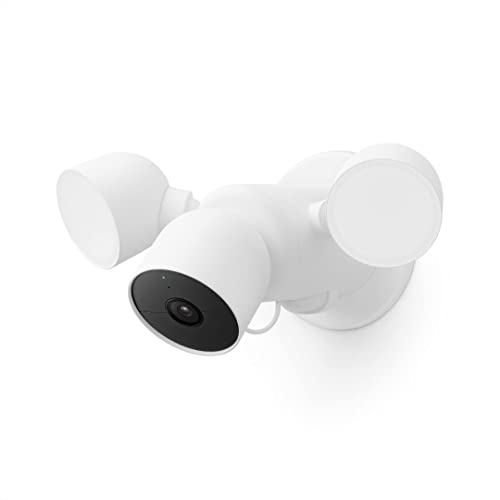
- Easiest smart camera to live with: Google Nest Cam with Floodlight — Check on Amazon
- Easiest camera to install: Blink Outdoor 4 Floodlight Camera — Check on Amazon
- Easiest camera to own long-term: eufy Security eufyCam S330 (eufyCam 3) 2-Cam Kit — Check on Amazon
- Best step-up picture, still simple: Arlo Pro 5S 2K Spotlight Camera — Check on Amazon
- Best if you want maximum deterrence: Ring Floodlight Cam Wired Pro — Check on Amazon
- Best for tinkerers on a budget: Wyze Cam Floodlight Pro — Check on Amazon
Read the full guide ↓
Disclosure: As an Amazon Associate, dailyhomedecorating.com earns from qualifying purchases. Links to Amazon on this page are affiliate links; they cost you nothing extra. Listing details such as price and availability change often, so check the current Amazon listing before you buy.
If this is your first camera, the best outdoor security camera for beginners under $300 is not the one with the longest spec sheet. It is the one still working, still recording and still understood three months after you fitted it. Beginners do not fail with cameras because the picture was not sharp enough. They fail because the free trial ended and the recordings quietly stopped, because the battery went flat at a height nobody wanted to climb to, or because the app sent so many pointless alerts that the whole system got muted by February. This guide is written against those three failures. Every pick below is a complete, proven outdoor system, and every review explains — in plain language, before the praise — exactly what it needs from you to keep working.
A short vocabulary lesson pays for itself, so here it is. Resolution (1080p, 2K, 4K) is how much detail the picture holds: more helps identify faces further away. Field of view is how wide the camera sees, in degrees: wider covers more yard and identifies less at distance. Night vision is either infrared, which shows a black-and-white picture in the dark, or colour, which needs a spotlight or floodlight to work. Storage is where recordings live: in the maker’s cloud, on a hub in your home, or on a memory card in the camera. And a subscription is a monthly plan that some cameras require for recording itself — not an optional extra, whatever the box implies. Hold those five ideas and every review below will make sense.
The ranking is a beginner ranking. The Nest leads because its smartest feature is free and its app is calm. The Blink follows because fitting it is a ten-minute job with no wiring. The eufy kit is third only because two cameras and a hub are more boxes on day one — after that day it is the lowest-maintenance system here, with no plan at all. The Arlo, Ring and Wyze are excellent cameras whose one beginner trap — a plan you must keep, in the Ring’s case for any recording at all — we state in the first paragraph of each review rather than the last. If you are also weighing a straightforward house setup, our main guide Best Outdoor Security Camera Under $300 ranks the same hardware by performance instead of friendliness.
In this guide
Quick Picks
New to all of this? Start at the top. This list is ordered by how forgiving each system is in its first ninety days, not by raw power.
| Buyer type | Pick | Why it stands out | Link |
|---|---|---|---|
| Easiest smart camera to live with | Google Nest Cam with Floodlight | It already knows a person from a cat from a car, free, and explains itself in an app many beginners already have | Check on Amazon |
| Easiest camera to install | Blink Outdoor 4 Floodlight Camera | Batteries in, bracket up, app paired: the gentlest first installation in this guide | Check on Amazon |
| Easiest camera to own long-term | eufy Security eufyCam S330 (eufyCam 3) 2-Cam Kit | Two cameras and a hub that stores everything at home, so there is no plan to understand, trial to watch or bill to forget | Check on Amazon |
| Best step-up picture, still simple | Arlo Pro 5S 2K Spotlight Camera | Premium 2K HDR pictures from a camera that mounts anywhere, with one honest catch about its plan, explained below | Check on Amazon |
| Best if you want maximum deterrence | Ring Floodlight Cam Wired Pro | The strongest lights, siren and motion tracking here, with the strictest subscription rule, also explained below | Check on Amazon |
| Best for tinkerers on a budget | Wyze Cam Floodlight Pro | Huge light and a huge view with recording on a memory card, for beginners happy to learn one busier app | Check on Amazon |
How we chose
We verified the hardware the same way as in our other guides — manufacturer specifications, official support documentation and current Amazon listings, complete systems only — and then applied a beginner filter with four tests. Could a first-timer install it in under an hour with the tools in a kitchen drawer? Does the app explain itself, or does it assume you already speak fluent smart-home? What happens, precisely, when any free trial ends? And what is the recurring chore — charging, paying, clearing storage — that the owner must actually keep doing?
All specifications are the makers’ own. Battery-life numbers are claims based on each maker’s assumed conditions, not promises about your driveway. Weather ratings are the makers’ laboratory ratings. Prices move, so the guide never prints one: it tells you to check the live listing against the ceiling instead. What we can promise is structural honesty: if a camera stops recording without a plan, this guide says so in its review, in its comparison row and again in its mistakes section, because that is the sentence beginners most need and marketing least wants to write.
- The trial test: Every pick was judged by what still works the month after any free trial ends. That single question eliminates most beginner regret in this category.
- The ladder test: If a camera needs charging, how often, and from how high? Wired and solar picks score because the honest answer is ‘rarely or never’.
- The alert test: A first camera that cries wolf gets muted. Picks with accurate detection — free where possible — rank above picks that alert for every passing shadow.
- The plain-English test: We favoured systems whose storage story fits one sentence: ‘clips live in the app’, ‘clips live on the hub’, ‘clips live on the card’. If it needs a diagram, it lost points.
- Complete-box honesty: Anything the review assumes — a plan, a memory card, an existing light fitting — is named in the review, not discovered by you at the door with a screwdriver.
One more beginner principle shaped the order: your first camera should teach you what you actually want. The forgiving picks at the top leave room to learn; the demanding picks at the bottom reward readers who already know their priorities — deterrence, say, or fee-free recording — and choose them on purpose.
The 6 best outdoor security cameras for beginners under $300
Google Nest Cam with Floodlight
The Google Nest Cam with Floodlight is the easiest smart camera here to live with, and for a beginner that beats being the sharpest. Its headline trick costs nothing and needs no setup wisdom: the camera itself can tell a person from an animal from a vehicle, so the alerts on your phone arrive already labelled with the thing you actually care about. A beginner’s first month with most cameras is a flood of ‘motion detected’ for every cat and car; with the Nest, the flood arrives pre-sorted. A short recent window of recordings is also included free, which covers the beginner’s real question — what just happened? — without any plan decision on day one.
The paid part is easy to understand, which is itself a beginner feature. Nest Aware buys memory: weeks of event history instead of hours, plus familiar-face recognition. Nothing you rely on daily is taken away if you never pay; the camera just forgets faster. There is no memory card and no home hub, so recordings live in Google’s cloud and the Google Home app is where you will watch them — an app many households already open for other things, with sharing for a partner built in rather than bolted on.
Installation is the one grown-up step: it hardwires in place of an existing outdoor light fitting, so you need such a fitting where you want the camera, and confidence — or an electrician — for the swap. After that day there is nothing to charge and nothing to maintain. The picture is 1080p HDR with a 130° view: not the sharpest here, but at beginner distances, over a door or drive, entirely sufficient, and the floodlights give it colour footage at night. Choose it if you want the camera to do the thinking while you learn what you actually need.
Who it suits: First-time buyers, especially in Google Home households, who want accurate alerts and a calm app more than maximum resolution.
- Person, animal and vehicle detection is built in and free — alerts arrive pre-sorted
- Free recent-history window answers ‘what just happened?’ with no plan decision
- No charging or maintenance after the one wired installation
- Google Home app is familiar, shareable and calm to live with
Honest limitation: It must be wired into an existing light fitting, which is the biggest installation step in this guide, and long recording history needs the paid Nest Aware plan. Resolution is a step below the 2K and 4K picks.
Choose it if you want the camera to be clever so you do not have to be, and you have a light fitting where you want it. Skip it if you have nowhere to wire it, or you want recordings stored at home rather than in a cloud. Check on Amazon
Blink Outdoor 4 Floodlight Camera
The Blink Outdoor 4 Floodlight Camera is the easiest camera in this guide to install, full stop. No wires, no fitting, no electrician: batteries in the camera, batteries in the floodlight mount, a small bracket on the wall, pair it in the app with the included Sync Module Core, and you have a lit, alerting camera over your door in minutes. For a beginner whose real fear is the installation itself, that matters more than any specification. Blink’s maker claim of up to two years of battery life under default settings is a claim, not a promise — a busy doorway will shorten it — but even a healthy fraction of it means your first camera asks almost nothing of you between seasons.
Now the sentence to read twice. Saved cloud recordings and person detection need the Blink Subscription Plan. Without it you can watch live, get motion alerts and talk through the camera, but clips are not kept in the cloud. There is a local-storage route in Blink’s range, but not through the module in this box: the Sync Module Core has no USB socket, so local clips require a different Sync Module, bought separately. Beginners trip over exactly this point, so decide now: keep the modest plan, or buy the module that stores clips at home. Either is fine. Drifting plan-free and assuming clips exist is not.
The camera itself is deliberately simple: 1080p video, a 143° view, infrared night vision and a 700-lumen floodlight that suits a door, a porch or a small patio rather than a field. At beginner distances — the length of a path, not a driveway — that is the right scale, and the system’s simplicity means the app has little to confuse you with. When you move or your confidence grows, you add cameras to the same module one at a time. As a first rung, nothing here is kinder.
Who it suits: Beginners who want a working, lit camera today with the simplest possible installation and upkeep, at a door or porch.
- Minutes to install with no wiring and no tools beyond the basics
- Long battery intervals under the maker’s default-settings claim
- Small, friendly system that grows one camera at a time
- Floodlight sized for doors and porches, where beginners actually mount cameras
Honest limitation: Cloud clips and person detection need the paid plan, and the included module cannot store clips locally. Pick your storage route deliberately, and expect porch-range detail rather than driveway-range identification.
Choose it if your priority is a painless first install over a door or porch, with a plan or module decision made up front. Skip it if you want recordings guaranteed with no plan and no extra module — the eufy kit below is built for that. Check on Amazon
eufy Security eufyCam S330 (eufyCam 3) 2-Cam Kit
The eufyCam S330 kit asks the most of you on day one and the least of you ever after, which is why so many beginners end up loving it. Day one means two cameras to mount and a HomeBase 3 to plug in indoors. Every day after that means: nothing. The cameras run on batteries topped up by their own solar panels, the HomeBase stores all recordings on memory inside your home — expandable later with a drive you add — and the person and face recognition runs on that hub, locally. There is no subscription to understand, no trial counting down, no month-two surprise. For a beginner whose deepest wish is ‘just record, please, forever’, this is the most honest system in the guide.
Two beginner translations are needed. First, solar: the maker’s solar framing assumes each panel sees a few hours of direct sun a day, so a camera on a sunny wall may go seasons between charges while a shaded one still needs an occasional manual top-up — plan the sunny spot if you can. Second, the kit shape: two cameras is not extravagance, it is how houses work — one over the front door, one over the back — and beginners who buy a single camera usually buy the second viewpoint within a year. The kit simply starts where experience ends. The cameras record in 4K, the sharpest here, and carry the strongest maker weather rating in this guide.
The ownership details are beginner-friendly in the ways that compound: your archive sits on your shelf, immune to lapsed cards and cancelled accounts; the app has no paywall countdown; and moving house means unplugging one hub. The kit’s price moves with promotions and sits at the top of this tier, so check the listing on the day and make sure the kit is at or under your ceiling. If the two-box start feels like a lot, the Blink above is gentler. If you can manage one slightly busier Saturday, this is the system you will still be happily ignoring in five years.
Who it suits: Beginners who want to skip subscriptions entirely and cover front and back at once, and who can manage a slightly bigger first installation.
- No subscription, no trial, no countdown: recording and smart recognition are included
- Two 4K cameras cover front and back from day one
- Recordings live on a hub in your home, under your control
- Solar panels stretch charging intervals on sunny mounts
Honest limitation: The busiest first day in this guide, and shaded mounts weaken the solar benefit. The kit price also hovers at the ceiling with promotions, so verify it on buying day.
Choose it if you want to pay once, install once and never think about plans, trials or cloud bills again. Skip it if you want the absolute simplest single-camera start — begin with the Blink and add later. Check on Amazon
Arlo Pro 5S 2K Spotlight Camera
The Arlo Pro 5S 2K is the beginner’s step-up picture in a beginner-friendly shape. It mounts anywhere — no wires at all — connects straight to your Wi-Fi on either band with no hub to set up, and its 160° view is wide enough that a first-timer’s imperfect aim still catches the door, the path and the gate. The 2K HDR picture is the finest of any battery camera here, handling the classic beginner viewpoint, a bright drive against a shaded porch, without blowing out either half. An integrated spotlight gives colour footage at night, and the battery removes and swaps in moments when charging day comes.
Here is its one beginner trap, stated early as promised. Live view, basic motion alerts and two-way talk work with no plan. But cloud recordings and the clever detection that labels people, vehicles, animals and packages live inside the Arlo Secure plan — and local recording exists only through a separate Arlo SmartHub, an extra purchase with its own storage to manage. So a beginner has two honest ways to own this camera: with the plan, which is simple, or with the hub, which is fee-free but fiddlier. The dishonest way — no plan, no hub, assuming it records — is the single commonest disappointment in this entire category.
Battery expectations need the same plain treatment: the maker’s figures assume typical event counts, and a camera over a busy street will want charging far sooner than one over a quiet gate. Neither fact should scare a beginner off; both should be known before the box opens. What you get in return is the most polished app-and-camera combination among the battery picks, activity zones when you subscribe, and a camera that can move from the front door to the garden shed in a year without any wiring at all. Buy it for the picture and the freedom, with the plan decision made on purpose.
Who it suits: Beginners who want the best battery-powered picture and total mounting freedom, and who are happy to keep a plan or add a hub.
- Superb 2K HDR picture, the best of any wire-free pick here
- 160° view forgives first-timer aiming and covers two walls from a corner
- No hub required and dual-band Wi-Fi make setup genuinely simple
- Swappable battery keeps the charging chore to moments
Honest limitation: Recordings and smart labels need the paid plan, or local recording needs a SmartHub bought separately. Without one of those, it watches but does not remember — decide which you are buying before checkout.
Choose it if you want premium pictures and total placement freedom, with the plan-or-hub choice made deliberately. Skip it if you want recording guaranteed with nothing extra to buy or keep — that is the eufy kit’s whole design. Check on Amazon
Ring Floodlight Cam Wired Pro
The Ring Floodlight Cam Wired Pro is a superb camera that this guide deliberately ranks fifth for beginners, and the reason fits one sentence: it records nothing at all without a paid Ring plan. No local storage, no memory card, no free history — live view and alerts only, until the plan is active. Experienced buyers who know that rule get a magnificent system. Beginners who miss it get a month of confusion and a support call. So consider this paragraph the one the box should have printed, and judge the camera with it in mind from the start.
With the plan active, what you get is the most capable deterrent here. It replaces an existing outdoor light fitting, so installation is a wiring job — yours if you are confident, an electrician’s if you are not, and genuinely not a first-ever DIY project. From that fitting it delivers Retinal 2K video, two floodlight heads rated by Ring at 2,000 lumens, a siren you can trigger from the app, and radar-based 3D Motion Detection with Bird’s Eye View, which shows a visitor’s path across your property on a little map. That precision means fewer pointless alerts, which beginners value more than they expect: a camera that only speaks when it matters keeps being listened to.
Daily life with it is effortless in the ways beginners appreciate — hardwired power means it is always awake and never needs charging, dual-band Wi-Fi is forgiving on outside walls, and the lights double as your scheduled yard lighting. The homework is the ownership shape: the plan is forever, the archive lives and dies with it, and the fitting must exist before the camera can. If your beginner priority is ‘make my home look properly defended and tell me precisely what happened’, and you accept the plan as part of the purchase, this is a first camera you will not outgrow. If the plan surprises you, it will sour everything — which is why it is ranked here, with the warning first.
Who it suits: Beginners whose top priority is deterrence and precise alerts, who have an existing light fitting and who accept the plan as part of the price.
- Radar motion tracking with a path view gives the most precise alerts here
- Powerful floodlights and a siren make the home look actively defended
- Hardwired: always awake, never charged, lights on a schedule
- Dual-band Wi-Fi and clear two-way talk at driveway distance
Honest limitation: No plan means no recordings whatsoever — the strictest rule in this guide — and installation is a real wiring job into an existing fitting. Beginners must buy it with both facts front of mind.
Choose it if you want maximum deterrence and precision and you are content to keep the plan for as long as you own it. Skip it if you dislike subscriptions on principle, or the word ‘wiring’ already worries you — both reactions are correct here. Check on Amazon
Wyze Cam Floodlight Pro
The Wyze Cam Floodlight Pro is the enthusiast’s bargain, and beginners who enjoy learning a gadget will get remarkable value from it. Three floodlight heads rated by Wyze at 3,000 lumens — the most light here — a 2.5K camera seeing a full 180°, and recording to a microSD card in the camera, with no plan required for that recording to happen. It wires into an existing floodlight fitting, like the Nest and Ring, and once fitted it asks little: the card records events or continuously, and you review footage in the app. For a beginner whose home has a big dark yard, nothing else at this level lights and records so much for its position in the tier.
Its beginner homework is honest and specific. You must buy the memory card — it is not in the box — and you must decide about Cam Plus with clear eyes: without it, alerts arrive as thumbnails and the person and package labels are switched off, while your card recordings continue regardless; with it, cloud clips and smart labels switch on. That is a fair deal, fairly stated. The app is the busiest here, with more menus and more settings than a first-timer strictly needs, and Wi-Fi is 2.4 GHz only, so the fitting needs a decent signal from the house.
Why is it last for beginners if it is this capable? Because its virtues reward fiddling — aiming three light heads, tuning detection, managing a card — and its vices punish the set-and-forget owner. The fixture is also bulky and unmistakably industrial, which some homes wear better than others. But a beginner who reads this far and thinks ‘that sounds fun, actually’ has self-identified correctly: you will get the brightest, widest, fee-free floodlight camera in the guide, and you will enjoy setting it up. Everyone else should start higher up this list and meet the Wyze later, as a second camera, with confidence already earned.
Who it suits: Beginners who enjoy technology and have a large, dark area to light, plus an existing fitting to wire into.
- Most light in the guide (maker figure) and the widest 180° view
- Memory-card recording works with no plan at all
- 2.5K detail at a value position in the tier
- On-device processing can fire lights for people and vehicles specifically
Honest limitation: The busiest app here, a memory card to remember to buy, 2.4 GHz Wi-Fi only and a wired install. Beginners who want calm should start with the Nest or Blink instead.
Choose it if you like setting things up, your yard is big and dark, and fee-free recording matters to you. Skip it if you want the quietest possible first ninety days — this camera rewards attention rather than ignoring. Check on Amazon
Comparison table
For a first camera, the middle columns matter most: what powers it decides your chores, and the storage column decides your surprises.
| Product | Video and view | Power | Storage and subscription | Link |
|---|---|---|---|---|
| Google Nest Cam with Floodlight | 1080p HDR video, smart floodlight, wired power; 130° diagonal field of view for the camera | Hardwired to an existing floodlight junction box | Cloud-based through the Google Home app; there is no memory-card slot and no local hub storage | Check on Amazon |
| Blink Outdoor 4 Floodlight Camera | 1080p HD video, 700-lumen floodlight, battery power; 143° diagonal field of view | Battery powered: AA lithium cells in the camera and D cells in the floodlight mount | Cloud recording requires the Blink Subscription Plan. The Sync Module Core in this box does not take a USB drive, so local clip storage needs a different Sync Module bought separately | Check on Amazon |
| eufy Security eufyCam S330 (eufyCam 3) 2-Cam Kit | 4K video, integrated solar panel, HomeBase 3 local storage; 135° field of view per camera | Battery with an integrated solar panel | Local storage on the included HomeBase 3 (built-in memory, expandable with a user-supplied drive); recordings stay in your home, not on a rented server | Check on Amazon |
| Arlo Pro 5S 2K Spotlight Camera | 2K HDR video, 160° view, wire-free battery power; 160° diagonal field of view | Rechargeable battery, wire-free | Cloud recording sits in the paid Arlo Secure plan; local recording is only possible through a compatible Arlo SmartHub or base station bought separately | Check on Amazon |
| Ring Floodlight Cam Wired Pro | Retinal 2K HDR video, 2,000-lumen floodlights, hardwired; 140° horizontal field of view | Hardwired (100-240V) or plug-in variant | Cloud only with a paid Ring plan; no local storage and no memory-card slot | Check on Amazon |
| Wyze Cam Floodlight Pro | 2.5K video, 3,000-lumen floodlights, 180° view; 180° field of view, the widest in this guide | Hardwired to an existing floodlight junction box | Local recording to a microSD card you supply (card not included), plus optional cloud recording through the paid Cam Plus plan | Check on Amazon |
How to choose the best outdoor security camera for beginners under $300
Answer the subscription question before any other
Every camera here can show you a live picture. They differ in what it takes to keep recordings. Learn your pick’s rule before you buy: the Ring records only with its plan; the Arlo and Blink record to the cloud only with theirs; the Nest detects free and charges for long memory; the eufy and the Wyze-with-a-card record locally with no plan at all. Write your pick’s rule on the box when it arrives. In three months, when a neighbour asks why their camera stopped saving clips, you will be the one who knows.
Then decide like an adult, once: keep the plan as a running cost, like a streaming service, or choose a local-recording pick and skip plans forever. Both are respectable. The only bad outcome is drifting — letting a trial lapse by accident and discovering the gap on the one day you needed footage. Beginners do not need the cheapest ownership model; they need the one they will actually maintain.
Pick your installation honestly
There are two installation families here. Battery and solar cameras — Blink, Arlo, eufy — mount with a small bracket and pair with an app: an hour at most, kitchen-drawer tools, no wiring. Wired floodlight cameras — Nest, Wyze, Ring — replace an existing outdoor light fitting: deeply satisfying and permanent, but it is electrical work, and if the phrase ‘junction box’ is new to you, hiring an electrician for the swap is money well spent, not a defeat. What you must not do is buy a wired camera for a spot with no fitting and improvise.
Also be honest about height and future you. A battery camera above ladder-free reach is a camera that will one day be flat and ignored. Mount battery picks where a step stool reaches, wired and solar picks where they can be forgotten, and take a phone photo from the mounting spot first to confirm the view is the view you wanted.
Learn the five settings that matter
Whatever you buy, the same five settings decide your first month. Motion zones: draw them over your property and off the street, or you will be alerted for every passer-by. Sensitivity: start in the middle, then tune once after a week of real life. Privacy zones: black out any neighbour’s window or door in frame — good manners and, in places, the law. Schedules: quiet the alerts, not the recording, while you are home and awake if the app allows it. And notifications: give the app permission to actually reach you, then check that it does with a walk-test on day one.
Do the walk-test properly: arm the camera, walk the path a visitor would take, at day and again after dark, and watch what arrives on your phone. Every beginner problem — bad angle, slow alert, blown-out night picture — announces itself in that test while it is still free to fix. Ten minutes of theatre on day one saves the discovery that your camera filmed a month of hedge.
Start with one viewpoint, learn, then grow
Resist the urge to cover everything at once. One camera over the main approach — the door visitors and parcels actually use — teaches you your real traffic: who comes, when, from where, and which alerts you act on. That knowledge makes the second camera obvious rather than guessed. Kits like the eufy front-load the second viewpoint sensibly, at door and back door; ecosystems like Blink and Arlo let you add it later. Either path works if the first viewpoint is the important one.
Keep the receipt, the box and the original fittings for the first month, whatever you buy. Beginners change their minds about placement, not usually about the camera — and a system you can still return or remount is a system you will tune instead of tolerate.
Your first ninety days: what actually happens
Weeks one and two: the noisy fortnight
Every new camera over-alerts at first, because it does not yet know your street and you do not yet know its settings. Expect the fortnight of false alarms — the neighbour’s cat, the bin lorry, the tree that waves — and treat it as calibration, not failure. Tighten zones, drop sensitivity a notch, angle down a degree. Owners who quit in week two own a muted camera forever; owners who tune through it end up with a system that speaks rarely and means it. The picks at the top of this list shorten the fortnight: the Nest by sorting alerts itself, the Ring by tracking paths precisely, all of them by offering zones worth drawing.
Month two and three: the habit forms
By month two the chores reveal themselves. Battery owners learn their real interval — and whether the maker’s claim bore any relation to their street. Plan owners meet their first renewal and decide, consciously this time, whether the history is worth it. Local-storage owners forget storage exists, which is the point. This is also when placement regrets surface: the camera that watches the drive beautifully and the door not at all. Forgive yourself, remount or add the second viewpoint, and know that every experienced owner you ask has exactly this story. The beginner systems in this guide were ranked, in large part, on how gentle this season is.
Common mistakes
- Letting the trial lapse by accident: The camera keeps smiling while the recordings stop. Decide your plan or local-storage route in week one, while the trial still covers you, and set a reminder for the day it ends.
- Mounting too high to maintain: A battery camera beyond comfortable reach becomes a flat camera. If the viewpoint needs height, choose solar assistance or a wired pick instead of optimism.
- Judging by the first day’s alerts: Day-one alerts are untuned alerts. Give zones and sensitivity a week of adjustment before concluding the camera is noisy — or quiet.
- Forgetting the memory card: The Wyze records locally to a card that is not in the box, and the eufy’s expansion needs a drive. Add the storage to the same order, or your fee-free system records nothing on day one.
- Buying a wired camera for a spot with no fitting: Wired picks replace an existing light. No fitting means an electrician and a bigger project — fine if planned, miserable if discovered with the box open.
- Sharing access with nobody: A camera only you can see fails when you are on a plane. Share the app with your household on day one and test their login too.
Final recommendation
- Start here: The Nest Cam with Floodlight is the calmest first camera: free smart detection, a familiar app and nothing to charge. Check on Amazon
- Simplest install: The Blink floodlight system is fitted in minutes and asks almost nothing of you afterwards — with its storage route chosen up front. Check on Amazon
- No plans, ever: The eufyCam S330 kit records to its own hub with no subscription, covering front and back from day one.
- Best pictures, one decision: The Arlo Pro 5S 2K is the step-up for picture quality — just make the plan-or-hub decision on purpose.
Your first camera does not need to be your forever camera. It needs to be fitted this weekend, understood by next weekend and still recording next season. Pick the system whose chores match your life, do the walk-test, tune it for a fortnight — and you will be the beginner whose camera actually has the footage when it matters.
Frequently Asked Questions
I have never had a security camera. Which type should I start with?
Start with the ownership model, not the brand. If you want the camera to think for you, the Nest’s free detection is the gentlest start. If you want the easiest fitting, a battery system like the Blink wins. If you hate subscriptions, the eufy kit or a Wyze with a memory card record locally with no plan. All three starts are respectable; the reviews above match each to the beginner it suits.
What does a subscription actually pay for?
It depends on the brand, which is why this guide states it per camera. On the Ring it pays for recording itself — without it, nothing is saved. On the Arlo and Blink it pays for cloud recordings and smart labels like ‘person’ or ‘package’. On the Nest it pays for a longer memory. On the eufy and Wyze, recording works without one, and the optional plan only adds cloud extras. Same word, four different meanings: always ask what stops without it.
How hard is installation, really?
Battery and solar cameras are a bracket, a few screws and an app pairing — most beginners finish within the hour. Wired floodlight cameras replace an existing outdoor light fitting, which is real electrical work: confident DIYers do it routinely, and everyone else should hire an electrician for that one swap and enjoy never charging anything afterwards. The hard rule is that wired picks need an existing fitting where you want the camera.
What do 2K, 4K and 1080p mean for a beginner?
They describe how much detail the picture holds. At the distance from a door camera to a visitor, all three identify people well. The higher numbers earn their keep at longer range — across a drive, say — where 1080p faces soften sooner than 2K or 4K ones. Beginners should treat resolution as a range question: the further your camera watches, the more detail is worth having, and light and angle matter as much as the number.
How often will I have to charge a battery camera?
Battery figures are the makers’ claims under their assumed conditions — a set number of events a day at default settings. A camera over a quiet gate may approach the claim; one over a busy street in winter will need charging much sooner. Practical beginner advice: mount battery cameras within step-stool reach, watch the app’s battery gauge for the first month to learn your real interval, and consider solar assistance or a wired camera for busy viewpoints.
Can I add more cameras later?
Yes — every system here grows. Blink and Arlo add cameras to the same account or module, the eufy HomeBase accepts more cameras, and Ring, Nest and Wyze households commonly mix a floodlight camera with simpler cameras elsewhere. That is why this guide urges one good first viewpoint: learn your home’s traffic, then expand on evidence instead of guesswork.


