Where to buy
Check the latest price, availability and delivery on Amazon. Orders are placed on Amazon. We may earn a commission from qualifying purchases. Every camera in this guide sits under $150 at its normal street position, but check the live listing, because indoor cameras are discounted often and bundles change what you actually pay.
- Best overall for evidence-quality video: eufy Security Indoor Cam S350 — Check on Amazon
- Best with a siren and automated shield: Arlo Essential Indoor Camera 2K (2nd Gen) — Check on Amazon
- Best local recording for security: TP-Link Tapo C225 — Check on Amazon
- Best smart alerts for Google homes: Google Nest Cam (Indoor, Wired, 2nd Gen) — Check on Amazon
- Best tracking coverage per camera: Wyze Cam Pan v3 — Check on Amazon
- Best inside a Ring Alarm household: Ring Indoor Cam (2nd Gen) — Check on Amazon
Read the full guide ↓
Disclosure: As an Amazon Associate, dailyhomedecorating.com earns from qualifying purchases. Links to Amazon on this page are affiliate links; they cost you nothing extra. Listing details such as price and availability change often, so check the current Amazon listing before you buy.
Shopping for the best indoor security camera for home security under $150 is a different exercise from shopping for a pet camera, and this guide treats it that way. When the camera’s job is security, the questions sharpen: will the recording exist when you need it, will it be clear enough to identify a person, will the alert reach you in time to matter, and will the system keep working if the internet drops or the camera is spotted? A camera that charms you with pet clips can fail every one of those tests, usually through its storage model rather than its lens. That is why this guide leads with recording integrity and treats picture quality as the second question, not the first.
The under-$150 ceiling is not a limitation here. It covers a dual-lens 4K camera that records locally with no subscription, a 2K camera with an integrated siren and a physical privacy shield, and pan-and-tilt models that patrol a room automatically. What it does not remove is the category’s central trade: cloud cameras are effortless and rented, local cameras are yours and need a memory card. For security use that trade has a sharper edge than usual, because the footage you most need is the footage of the worst night, and whether it exists depends entirely on which side of that line your camera sits and whether the subscription was active.
Our short answer: the eufy Indoor Cam S350 is the security pick we would install first, because its dual lenses produce the most identifiable images in this price band and its recordings live on a card or a HomeBase in your house, immune to lapsed plans and broadband outages. The Arlo Essential Indoor 2K is the pick when an audible deterrent and an automated privacy shield matter as much as the picture. A scope note: this guide covers indoor monitoring of doors, rooms and valuables; it is not a nursery guide, and it does not replace an alarm system. It will, however, tell you plainly which of these cameras keeps evidence and which merely watches.
One framing note before the picks: an indoor camera is a witness, not a guard. It cannot stop an intruder, and no camera in this guide should be your only layer of security; locks, lighting and, where justified, an alarm do the preventing. What a good indoor camera does is collapse uncertainty: it tells you within seconds that something is wrong, shows you who it is, and preserves the evidence in a form that insurers and police can use. We judged every pick against that witness role, which is why this guide talks more about recording models, alert labelling and night performance than about megapixels, and why a camera’s behaviour during an internet outage appears in every review.
In this guide
Quick picks
| Camera | Best for | Key spec |
|---|---|---|
| eufy Security Indoor Cam S350 | Best overall for evidence-quality video | Dual cameras: 4K wide-angle + 2K telephoto, 8x hybrid zoom, 360-degree pan/tilt, dual-band Wi-Fi 6 |
| Arlo Essential Indoor Camera 2K (2nd Gen) | Best with a siren and automated shield | 2K video (2560 x 1440), 130-degree field of view, automated privacy shield, integrated siren, night vision |
| TP-Link Tapo C225 | Best local recording for security | 2K QHD (4MP) video, 360-degree pan and 149-degree tilt, starlight colour night vision, Apple HomeKit support |
| Google Nest Cam (Indoor, Wired, 2nd Gen) | Best smart alerts for Google homes | 1080p HDR video, 135-degree diagonal field of view, person and animal alerts built in, Google Home app |
| Wyze Cam Pan v3 | Best tracking coverage per camera | 1080p HD, 360-degree pan and 180-degree tilt, automatic motion tracking, IP65 weather resistance |
| Ring Indoor Cam (2nd Gen) | Best inside a Ring Alarm household | 1080p HD video, colour night vision, two-way talk, manual audio and video privacy cover |
How we chose
We judged these cameras as security devices, which reorders every priority. Recording integrity came first: does the camera record without a subscription, does it keep recording during an internet outage, and what exactly is lost if a plan lapses? On those tests the field splits cleanly: eufy, Tapo and Wyze record locally to memory cards and keep working offline; Google keeps a three-hour free cloud window; Ring and Arlo make recording itself the subscription, which is a legitimate model but one a security buyer must choose deliberately, never discover afterwards.
Identification quality came second, judged at the distances that matter: a face crossing a hallway, a person at the inside of the front door. Resolution, the second lens on the S350, night-vision type and field of view were weighed for that task rather than for spec-sheet bragging. Third came deterrence and response: two-way talk, integrated sirens, spotlight, and how quickly a labelled alert, person rather than generic motion, reaches your phone. Fourth, coverage mechanics: pan, tilt and tracking to follow an intruder’s path through a room instead of losing them at the frame’s edge. Fifth, privacy engineering, because a security camera that the household unplugs in irritation protects nothing; physical shutters and shields were scored as uptime features. Finally, ecosystem and alarm integration, where Ring’s connection to its alarm system is a genuine structural advantage for the households that have it.
The cameras in detail
eufy Security Indoor Cam S350
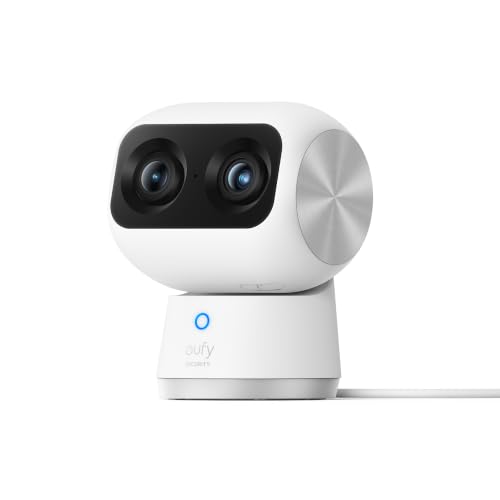
For security work, the eufy Indoor Cam S350’s dual-lens design is not a novelty; it is an identification system. The 4K wide-angle lens holds the whole room, the entry, the windows, the valuables, while the 2K telephoto lens supplies the close view that turns ‘a person was in my house’ into a face that can actually be recognised. That pairing, with up to 8x hybrid zoom by eufy’s spec, addresses the oldest failure of indoor cameras: footage that proves a burglary happened and identifies nobody. Add a pan-and-tilt head with automatic tracking, and the camera follows a subject’s route through the room rather than recording their exit from a fixed frame.
Its recording model is the other half of the security case. Footage goes to a memory card in the camera or to a eufy HomeBase elsewhere in the house, which matters: a HomeBase in a cupboard keeps recording even if the camera itself is found and removed, and none of it depends on a subscription being active or the broadband holding up. Detection of people and pets runs on the device at no charge, dual-band Wi-Fi reduces the dropout risk that plagues far-from-router cameras, and two-way talk lets you challenge an intruder or reassure a household member from anywhere.
The limitations are the honest ones. There is no siren built in, so deterrence is your voice through the speaker rather than an alarm tone; the Arlo below covers that gap. There is no physical privacy shutter, so household acceptance rests on app control and scheduling, and there is no HomeKit support. None of that dents its position here: for the core security tasks, identifying a person and guaranteeing the recording exists, the S350 is the strongest camera under $150 we can point to. Install it covering the main entry route, pair it with a HomeBase if the budget stretches, and it is a genuine security device rather than a webcam with ambitions.
Consider also how the S350 changes the value of a second position. Because the main room is covered with identification-grade detail, the rest of a security budget can go to cheap, wide coverage elsewhere rather than to another flagship: the system becomes one excellent witness plus simple sentries. That is a more rational architecture than two mid-range cameras that each identify nobody quite well enough. If you build in stages, as most households do, the S350 is the right foundation stone: the camera covering the most likely entry route, with its recordings on a card or a HomeBase that no subscription lapse can touch.
Storage and subscriptions, honestly: Local: microSD card or eufy HomeBase 3. No subscription is required for recording, playback or its on-device human and pet detection; an optional eufy cloud plan exists but nothing core is locked behind it.
Privacy: Privacy is handled in the app: you can switch the camera off, schedule it, and set privacy zones. There is no physical shutter, so when privacy matters you are trusting the software state and the status light rather than a cover you can see.
Arlo Essential Indoor Camera 2K (2nd Gen)
The Arlo Essential Indoor Camera 2K (2nd Gen) is the security pick for buyers who want the camera to participate, not just observe. Its integrated siren can be triggered from the app or set to respond, which changes the arithmetic of a break-in in progress: a recording helps afterwards, a siren helps now. The 2K picture from a 130-degree view is sharp enough for identification at room distances, night vision is clear, and Arlo’s person, package and animal recognition, when the subscription is active, produces the well-labelled alerts that let you judge an event from the notification itself.
Its automated privacy shield deserves its place in a security guide for an unexpected reason: uptime. The shield physically closes over the lens when the system is disarmed and opens when armed, so the household never has to choose between privacy and protection, and the camera stays plugged in and trusted. Cameras that annoy the people who live with them get switched off, and a switched-off camera has a perfect privacy record and a useless security one. Arlo’s shield, moving on its own with an audible, visible action, is the most complete answer here to the acceptance problem.
The condition is absolute, and a security buyer must weigh it without flinching: after the included trial, an Arlo Secure subscription is required for recordings and for the smart recognition. There is no memory-card slot on the camera. Without the plan, your security camera cannot show you what happened. If you accept the plan as the price of the siren, the shield and Arlo’s alert quality, this is a coherent and capable system. If your security philosophy is that evidence should never depend on a direct debit, the eufy above and the Tapo below exist precisely for you. Choose Arlo for active deterrence inside a subscription you have chosen on purpose.
Arlo’s recognition deserves a precise word, because for security it is the subscription’s best justification. Person, package, animal and vehicle alerts, with rich notifications that show you the event in the alert itself, shorten the distance between ‘something moved’ and ‘I am calling someone’. In a genuine incident that speed has value that a memory card cannot provide. The honest summary is that Arlo sells response quality rather than recording access, and buyers who understand they are purchasing the response, siren, shield and alert intelligence as one rented service will be satisfied; buyers who thought they were purchasing a recorder will not.
Storage and subscriptions, honestly: Cloud-first: after the included trial, an Arlo Secure subscription is required to store and review recordings and to use person, package and animal recognition. There is no memory-card slot on the camera, so treat the plan as part of the purchase, not an optional extra.
Privacy: The automated privacy shield is the headline: a physical cover closes over the lens when the camera is disarmed, and you can hear and see it move. It is privacy you can verify, controlled from the app or by schedule.
TP-Link Tapo C225
The TP-Link Tapo C225 is the quiet professional of this security list. Its 2K QHD sensor resolves faces well at hallway distances, its pan-and-tilt head with motion tracking follows a subject across the room at up to 120 degrees per second by TP-Link’s spec, and its starlight sensor delivers colour night vision in light levels where infrared cameras have already given up to grey, which matters because colour, a jacket, a bag, is identifying detail. Person, pet and vehicle detection run on the camera itself, free, so the alert that wakes you is labelled by subject rather than by hope.
For security purposes its storage is the headline: a memory card up to 512GB by maker spec records locally, keeps recording through an internet outage, and owes nothing to any subscription. Tapo Care cloud is available for buyers who want an off-site copy, and for a front-door camera that is a genuinely sensible belt-and-braces option, but it is an addition to a working system, not the price of one. The camera also speaks to HomeKit, Alexa and Google Home, so it can sit inside whichever platform runs the rest of the house.
Its privacy mode completes the security picture in the way described throughout this guide: the lens rotates physically into the body when you are home, so the camera’s off state is mechanical and visible, and the household keeps it armed when it counts instead of unplugging it in frustration. There is no built-in siren, and the Tapo app is more engineer than concierge. But judged purely as a recording security device, local, sharp, tracking, fee-free, the C225 is the value anchor of this list, and the camera we would choose to cover a second entry point after the S350 takes the main room.
A detail security buyers should not skip: the C225’s on-device detection includes the categories that generate false alarms elsewhere, and because it runs locally it keeps working, and keeps labelling, when the internet does not. A camera that can still tell a person from a pet during a broadband outage, and record them to its card in colour at night, is a camera whose evidence chain has no monthly or meteorological weak link. For a back door, a side entry or a garage interior, positions where flagship money feels wasted, the C225 is not the budget option; it is simply the correct specification.
Storage and subscriptions, honestly: Local: microSD card up to 512GB by maker spec, so weeks of event clips can live on the camera itself. Tapo Care cloud storage is optional; person, pet and vehicle detection are handled on-device without it.
Privacy: This is the privacy pick of the group: Privacy Mode physically rotates the lens down into the camera body, so the lens is visibly covered. It is the strongest kind of indoor privacy control because you can confirm it with your eyes.
Google Nest Cam (Indoor, Wired, 2nd Gen)
The Google Nest Cam (indoor, wired) contributes one security capability that outclasses everything else here: the quality of its judgement. Google’s built-in intelligence separates people from animals and general motion with a reliability, by design, that produces fewer false alarms and faster trust. In security, alert trust is not a soft metric. The household that believes its camera responds to the 2 a.m. notification; the household that has been cried-wolf at by curtain movements sleeps through the real one. The Nest Cam’s person alerts, free of any subscription, plus its wide 135-degree view and clean Google Home integration, make it the best early-warning camera in this six.
As an evidence camera, though, it has the weakest hand here, and a security buyer should see it clearly. There is no local storage at all. The free tier keeps a rolling three hours of event history, enough to review an alert you acted on quickly, not enough to discover a problem after a weekend away. Nest Aware extends the history to weeks and adds familiar-face alerts, which in a security context moves from nice-to-have to effectively required, so price this camera as hardware plus plan from the start.
Choose the Nest Cam as the alerting layer of a Google household’s security, the camera whose notifications you will actually obey, ideally alongside a locally recording camera elsewhere in the house. Its 1080p HDR picture is adequate rather than leading, it does not pan, and it offers no siren or physical shutter. Within its design it is excellent; the design simply prioritises knowing over keeping. For pure home security on a single-camera budget, the eufy and Tapo picks protect more. For a Google home that wants the calmest, smartest alerts and accepts the plan, nothing else here feels as finished.
There is a deployment pattern where the Nest Cam’s design makes complete security sense: as the always-believed alerting camera in a house whose evidence is kept by something else. A Nest Cam watching the hall, with its calm, accurate person alerts, paired with a locally recording camera on the main room, gives a Google household both halves of the witness role, detection you trust and recordings you own. Judged alone it is an incomplete security camera; judged as the alerting layer of a two-camera system, it is arguably the best component in this guide. Buy it for the role it is designed for.
Storage and subscriptions, honestly: Cloud only, with no local storage option. Google includes a rolling 3 hours of event video history free; a Nest Aware subscription extends that history and adds familiar-face alerts. Without the plan, anything older than that short free window is gone.
Privacy: There is no physical shutter. Google Home offers a home/away routine that can switch the camera with your presence, which is convenient, but the lens is never physically covered.
Wyze Cam Pan v3
The Wyze Cam Pan v3 makes a security argument based on coverage and continuity. Its head pans a full 360 degrees and tilts through 180, tracks movement automatically, and can patrol between set viewpoints with Pan Scan, so one camera watches a room the way a guard would, by looking around it. For a long open-plan space, a basement, or a ground-floor room with several windows, that movement closes the blind-spot problem that fixed cameras solve only by multiplying. Its IP65 weather resistance also makes it the one pick here that can later move to a covered porch or garage without being replaced.
Its continuity case is the memory card. Local recording, event or continuous, runs without any subscription and keeps running if the internet fails, which is exactly the failure mode a security camera must survive. The paid Cam Plus tier adds person detection and cloud event copies, and for security use that cloud copy has a specific value: if the camera is stolen or destroyed, the cloud event survives it. A thoughtful setup uses both, card for completeness, cloud for the events that matter, but the essential point stands: the recording exists without the plan, and the plan is armour rather than oxygen.
The compromises are picture and polish. At 1080p it is the least sharp camera in this security six, and at the far end of a large room its identifications are softer than the S350’s or C225’s. The tracking motor can be heard in a quiet house, and 2.4GHz Wi-Fi asks more of your router placement. Privacy Mode folds the lens into the base, a genuine physical gesture. Choose the Pan v3 to secure a big, awkward space on a budget, or as the second camera in a system whose main room is covered by something sharper; as a whole-property answer it is outgunned, but as coverage per pound it is unmatched here.
The Pan v3’s patrol also has a deterrent quality worth naming: a camera that visibly turns to follow movement announces that the house is awake. Intruders who notice a tracking camera notice a system, and opportunistic crime is often decided by exactly such impressions. Combined with its local recording and its ability to keep working through an outage, the Pan v3 is the security overachiever of this list: not the sharpest witness, but a tireless one. In a large ground-floor space, a workshop or a garage, its coverage argument can outweigh the sharper cameras’ identification argument, especially as a second or third unit.
Storage and subscriptions, honestly: Local: microSD card recording works without a plan. Be clear-eyed about the split, though: Wyze’s Cam Plus subscription is what unlocks person detection and full cloud event recording; without it you get motion alerts with still-image thumbnails and your card footage.
Privacy: Privacy Mode points the lens down into the base and stops recording, a physical gesture you can verify at a glance, though the microphone state follows the app setting rather than a hardware switch.
Ring Indoor Cam (2nd Gen)
The Ring Indoor Cam (2nd Gen) earns its security place through the system around it. Alone, it is a simple 1080p fixed camera. Inside a household with Ring Alarm and a Ring doorbell, it becomes a node in one app, one alert stream and one subscription, and that integration is a real security property: events from the door, the hallway and the alarm arrive together, live view is fast, and checking a camera from an Echo Show takes a sentence. If your home already runs Ring, adding this camera is the lowest-friction security upgrade in this guide, and its manual privacy cover, swivelled over the lens to cut camera and microphone together, keeps the household on side when everyone is home.
The security caveat is the one repeated throughout this guide because for this lens it matters most: Ring records nothing you can review without Ring Protect. No card slot, no local fallback, no free history. A security camera whose evidence depends entirely on a subscription is a defensible choice inside a Ring household already paying for the doorbell, where the marginal cost is zero and the plan’s coverage is household-wide. As a standalone purchase, the same model asks you to rent your own recordings indefinitely, and the eufy and Tapo cameras above refuse that bargain at similar hardware prices.
Its picture is also the most modest here, adequate for recognising a familiar person in a hallway, less convincing for identifying a stranger across a large room, and it neither pans nor sounds a siren of its own, though it can trigger Alexa routines and Ring Alarm responses within that ecosystem. Choose it when the ecosystem is the point: Ring households extending a system they trust. Choose almost anything else in this six if you are starting from zero and evidence-keeping is your first principle, because in security, the recording you cannot watch is the same as the recording that never happened.
Within a Ring Alarm household, one more integration deserves mention: Ring cameras can be set to respond to the alarm’s state, recording when the system is armed and resting when it is not, which aligns the camera’s behaviour with the household’s security posture automatically. That kind of system-level coherence is what Ring households are actually buying, and it is genuinely valuable. It does not transfer, however: a standalone Ring Indoor Cam has none of that context, all of the subscription dependence, and the most modest picture here. The ecosystem is the product; buy the camera only if you already own, or are deliberately buying into, the ecosystem.
Storage and subscriptions, honestly: Cloud only, and this is the honest catch: there is no microSD slot and no local recording. Without a Ring Protect subscription you get live view and motion alerts but you cannot watch recorded video back; the subscription is what unlocks video history and rich notifications. Budget for the plan as part of the real cost.
Privacy: The manual privacy cover is excellent: swivel it over the lens and it physically blocks the camera and switches off the microphone. It is simple, visible and needs no app, though you do have to remember to open it again before you leave.
Comparison table
| Camera | Video | Movement | Local storage | Plan needed for playback |
|---|---|---|---|---|
| eufy Security Indoor Cam S350 | 4K wide + 2K telephoto | Pan and tilt | microSD / HomeBase 3 | No |
| Arlo Essential Indoor Camera 2K (2nd Gen) | 2K | Fixed | None on camera | Yes, Arlo Secure after trial |
| TP-Link Tapo C225 | 2K QHD (4MP) | Pan and tilt | microSD up to 512GB | No |
| Google Nest Cam (Indoor, Wired, 2nd Gen) | 1080p HDR | Fixed | None | Free 3-hour history; Nest Aware for more |
| Wyze Cam Pan v3 | 1080p | Pan and tilt | microSD | Only for smart detection / cloud |
| Ring Indoor Cam (2nd Gen) | 1080p | Fixed | None | Yes, Ring Protect |
How to choose the best indoor security camera for home security under $150
Decide where your evidence lives before you decide anything else. Local recording, eufy, Tapo and Wyze on memory cards, keeps working through internet outages and lapsed subscriptions, and its weakness is physical: the card sits in the camera unless you use a hub like eufy’s HomeBase elsewhere in the house. Cloud recording, Ring, Arlo and Nest, survives the camera being taken but exists only while the plan and the broadband do. Serious setups layer both; a single-camera buyer should choose the failure they fear less and buy accordingly.
Place for the choke point, not the room. Security footage earns its value at doors, hallway junctions and the path between the entry and the valuables, because every intruder crosses those lines and crosses them facing predictable directions. One camera covering the inside of the main door at head height will identify more people in a year than three cameras admiring living rooms. Pan-and-tilt models widen the choke point’s coverage; fixed cameras guard it more cheaply. Either way, aim for faces at doorways, not views of sofas.
Then weight alert quality as a security feature in itself. Person detection, on-device and free on the eufy and Tapo picks, plan-based on Arlo and Wyze, built-in on Nest, decides whether your phone’s buzz means ‘someone’ or ‘something’. Set activity zones on the door and the approach, exclude the street-facing window and the pet’s highway, and test at night, because infrared range and night colour are where budget cameras separate. A camera that alerts accurately at 2 a.m. is a security device; one that alerts constantly is a hobby you will abandon.
Finally, protect the protector. Use a strong, unique password and two-step verification on the camera account, keep firmware updated, and give the camera an off state the household respects, a physical shutter or shield where possible, so it stays installed and armed. Check recordings monthly to confirm the card is recording and the view has not drifted. Security cameras fail silently more often than they fail dramatically, and a five-minute monthly check is the cheapest insurance in this entire guide.
One more security habit separates protected homes from filmed ones: test the failure, not just the function. Once the camera is installed, unplug your router for ten minutes and confirm what your camera did during the silence; check whether the event you staged is waiting for you afterwards. Walk the route at night and watch the footage as a stranger’s evidence, not as your own memory. Homes that run this drill once know exactly what their system is. Homes that skip it are trusting a spec sheet with their worst night, and the spec sheet was written by the marketing department.
Consider, too, the second position before you need it. Most homes that take security seriously end with two indoor cameras: one on the main entry route, one on the secondary route, a back door, a garage entry, a ground-floor window line. The discipline is to buy the first camera for the primary route with no compromises on recording, live with it through a full month of nights and weekends, and only then choose the second with the evidence of what the first one missed. The picks in this guide combine well for exactly that staged approach: an S350 or C225 as the witness, a Wyze Pan v3 as the wide second eye, a Nest Cam as the alerting layer in a Google house. What does not work is buying two identical mid-range cameras on day one and discovering together that both share the same blind spot in their storage model.
Common mistakes
Assuming a camera records just because it detects
Detection and recording are separate products at several brands. Ring detects and alerts without a plan but keeps no viewable video; Arlo’s recordings stop with its subscription; Nest’s free memory is three hours. For security use, verify the exact sentence ‘I can watch last night’s event back’ for your camera and your plan status before you rely on it.
Covering rooms instead of routes
A beautiful wide shot of an empty living room identifies nobody. Intruders enter through doors and move along paths; cameras belong on those paths, at heights that catch faces rather than the tops of heads. Walk your own home as a stranger would, from each door to the stairs and the valuables, and place cameras on that walk.
Letting privacy frustration disarm the system
The most common real-world security failure is a camera unplugged by a household member who felt watched. Physical privacy, a rotating lens, a cover, an automated shield, is therefore a security feature, not a concession. Buy the camera your household will leave armed, and set its home schedule the day it arrives.
Ignoring the outage case
Broadband fails, routers reboot, and a determined intruder may cut power or internet first. Local-recording cameras keep their evidence through an internet outage; cloud-only cameras go blind. If your threat model includes anything beyond casual opportunism, at least one camera in the house should record locally, and its card should be checked, not assumed.
Skipping account security
An indoor camera on a weak or reused password is a liability pointed at your own life. Use a unique password, turn on two-step verification in the app, keep firmware current, and remove old shared users when circumstances change. The camera’s own security is part of your home security, not an IT footnote.
Trusting the trial month as the product
Security buyers are the worst victims of the trial trap, because the camera feels complete precisely while its recording is a free sample. The month the trial ends is the month your evidence silently stops. Decide the subscription question at purchase, set the payment or the memory card up deliberately, and never let a security system’s core function depend on a promotional period you have forgotten about.
Final recommendation
For home security, the hierarchy of virtues is unfashionable but clear: the recording must exist, it must identify, and the alert must be believed. The eufy Indoor Cam S350 leads this guide because it is the only camera under $150 that maximises all three at once, dual lenses for identification, local or hub recording that no lapsed plan can erase, and on-device detection that labels alerts honestly. The Tapo C225 is its closest rival and the better buy for a second position, trading the second lens for a physical privacy mode and a lower price position.
The Arlo is the choice when deterrence now matters as much as evidence later, provided its subscription is accepted as part of the system. The Nest Cam is the alerting layer for Google homes, the Wyze Pan v3 the coverage bargain for big awkward rooms, and the Ring the natural extension of a Ring household rather than a standalone security buy. Whichever you install, place it on the route, not the room, fit the card, test the night view, and check the recordings monthly. Security is a habit the camera supports, not a product the box delivers.
Start with the eufy Security Indoor Cam S350 if you want one decision and no second-guessing: Check on Amazon and check the current listing before you buy. If its one real limitation is the thing you care about most, the Arlo Essential Indoor Camera 2K (2nd Gen) is the alternative we would buy instead.
FAQ
Which indoor camera records without a subscription?
The eufy S350 and E220, the Tapo C225 and the Wyze cameras record to a memory card with no plan required, and keep recording during an internet outage. Ring and Arlo require their subscriptions to store and review recordings, and Google’s Nest Cam includes three hours of free event history before Nest Aware is needed. For security use, that distinction decides whether your evidence exists at all.
Is 1080p enough to identify an intruder indoors?
At hallway and doorway distances, 1080p usually identifies a person, especially someone familiar. 2K adds margin across a large room, and the eufy S350’s second telephoto lens provides the clearest close views in this group. Placement beats resolution: a 1080p camera aimed at a face at the door outperforms a 4K camera aimed at the back of a head across a lounge.
Do I need a camera with a siren?
A siren helps in the moment rather than after it: the Arlo Essential Indoor 2K has one built in, and the Wyze Cam v4 carries a small siren and spotlight. Two-way talk on every camera here also lets you challenge someone directly. If your home already has an alarm system, camera sirens matter less; in a flat or a house without an alarm, they are a genuine deterrent layer.
What happens to my recordings if the camera is stolen?
With local-only recording, the card goes with the camera, unless the camera records to a separate hub in the house, as eufy’s HomeBase allows. Cloud cameras keep their recordings on the company’s servers, and Wyze’s optional plan keeps cloud copies of events alongside card recording. Buyers who fear camera theft should choose a hub-based or cloud-backed setup deliberately.
Can an indoor camera work as my whole security system?
It is a layer, not a system. A camera detects, records and alerts; it does not lock doors, sense broken glass throughout the house or call for help by itself. Combined with good locks, lighting and, where wanted, an alarm, one or two well-placed indoor cameras cover the identification and evidence role very well for under $150 each.
Where should I place an indoor security camera first?
Cover the inside of the main entry door from a shelf or high corner, angled to catch faces of people entering, with the hallway or main route in frame. Add a second camera for the ground-floor rear entry or the room with valuables only after the first position has proven itself for a week of day and night footage.
Should my indoor security camera record continuously or only on motion?
Motion-event recording is enough for most homes and makes footage far easier to review; continuous recording, available on memory-card cameras like the Wyze and Tapo models, suits high-risk positions such as a ground-floor entry. Continuous recording wears cards faster, so use a high-endurance card. Either way, confirm the recording is actually happening with a monthly playback check.
How long should an indoor security camera keep its recordings?
Long enough to cover a holiday plus the time it takes to notice a problem: two to four weeks of event history is a sensible target. Memory-card cameras reach that easily with a large card, since event clips are small; cloud plans define it by tier, which is another reason to read the plan before relying on it. Whatever the medium, download and save any clip that matters the moment you identify it, because every system eventually overwrites its oldest footage.


