Where to buy
Shopping for the best outdoor security camera for home security under $150? Check the latest price, availability and delivery on Amazon. Orders are placed on Amazon. Prices and stock change often at this tier, so confirm the current listing — and, for the Blink pick, whether a hub is included — before you buy. We may earn a commission from qualifying purchases.
- Best overall: Wyze Cam Floodlight v2 — Driveways that need light as well as video
- Best value: TP-Link Tapo C120 — Free smart detection without a subscription
- Best alternative: Wyze Cam v4 — Sharpest wired picture on a tight budget
- Best for coverage: eufy SoloCam S220 — Solar power with no monthly fee
- Best for flexibility: Blink Outdoor 4 — Longest battery claim and simplest app
- Best specialist: Ring Outdoor Cam (Stick Up Cam) Battery — Alexa homes that want flexible placement
Check price: Wyze Cam Floodlight v2 · Check price: TP-Link Tapo C120 · Check price: Wyze Cam v4 · Check price: eufy SoloCam S220 · Check price: Blink Outdoor 4 · Check price: Ring Outdoor Cam (Stick Up Cam) Battery
Read the full guide ↓
Disclosure: As an Amazon Associate, dailyhomedecorating.com earns from qualifying purchases. Links to Amazon on this page are affiliate links; they cost you nothing extra. Listing details such as price and availability change often, so check the current Amazon listing before you buy.
Judging the best outdoor security camera for home security under $150 requires saying the quiet part first: a camera is not an alarm system. It does not detect someone inside your home, it does not summon help on its own, and no camera in this guide — or any guide — replaces locks, lighting and, where you want one, a monitored alarm. What a good outdoor camera does do, it does well: it watches the approaches, creates a time-stamped record, sends an alert while an event is still unfolding, and, with light and sound, persuades a meaningful share of opportunistic intruders and package thieves to choose an easier house. This guide ranks the six strongest options at this tier by that honest job description, with particular attention to coverage, evidence quality and what each brand charges you to keep the evidence.
Coverage thinking separates a security purchase from a gadget purchase. Houses are approached through a small set of predictable routes — front door and drive, side gate, back door, garage — and a camera earns its keep by owning one route completely: the right height to capture faces rather than scalps, the right resolution to identify at the route’s real distance, night performance that survives a moonless yard, and recording that is actually retrievable after the event. That last clause is where this guide is strictest. A security camera whose history sits behind a plan you declined has not failed politely; it has failed at the exact moment it was for. Every review below therefore leads with storage and subscription truth before picture praise.
The ranking that follows puts deterrence and evidence first. The Wyze Floodlight v2 leads because light plus a wide 2K camera plus a siren is the most complete single-point security upgrade at this tier. The Tapo C120 follows as the evidence bargain — free detection and fee-free local recording mean the record exists and costs nothing to keep. The Wyze v4 offers the sharpest identification detail, the eufy covers the unwired flank without fees, and the Blink and Ring cameras close the list as ecosystem plays whose security value depends, transparently, on keeping their paid plans active.
In this guide
Quick picks
Six cameras, six different answers to the same budget. The table is the map; the reviews that follow are the territory, including the subscription and storage conditions that decide real ownership cost.
| Camera | Best for | Key spec |
|---|---|---|
| Wyze Cam Floodlight v2 | Driveways that need light as well as video | 2K, hardwired floodlight, very wide view |
| TP-Link Tapo C120 | Free smart detection without a subscription | 2K QHD, wired, free person/pet/vehicle detection |
| Wyze Cam v4 | Sharpest wired picture on a tight budget | 2.5K QHD, wired, color night vision |
| eufy SoloCam S220 | Solar power with no monthly fee | 2K, solar plus battery, built-in local storage |
| Blink Outdoor 4 | Longest battery claim and simplest app | 1080p HD, battery powered, needs a Sync Module |
| Ring Outdoor Cam (Stick Up Cam) Battery | Alexa homes that want flexible placement | 1080p HD, removable battery, indoor/outdoor |
How we chose
Our security filter had five gates. Deterrence: does the camera change behavior — spotlight, floodlight, siren, visible presence — or only observe? Evidence: resolution, night performance and field of view judged at realistic approach distances, using maker specifications as specifications. Retrievability: where recordings live, what reviewing them costs, and whether the record survives the camera being stolen or the internet dropping. Reliability of power: wired and hardwired designs cannot die quietly in month three; battery and solar claims were read as maker claims under stated conditions. And alert quality: detection that distinguishes a person from a shrub is a security feature, which is why free on-camera person detection scored as heavily as it did.
We also weighted honest limits. Event-only battery cameras can clip the start of a fast approach; cloud-only cameras hold nothing if the connection dies mid-event; local-only cameras lose their footage if the unit itself is taken. No design at this price escapes all three, so the reviews name each camera’s failure mode and the sensible mitigation — hub backup, a second angle, mounting out of reach — rather than pretending any single device is a perimeter.
As everywhere in this batch, prices are left to the live listing, headline figures are maker specifications, and every pick is a real, verifiable product sold for outdoor use. A camera that could not pass the retrievability gate without a plan is still listed if its ecosystem earns it a place — but it is listed with the condition stated in the first paragraph of its review, not the last.
Detailed reviews
Wyze Cam Floodlight v2
Who it suits: The driveway or back yard that is currently dark: the single highest-impact security upgrade in this guide, where an existing fixture can be swapped.
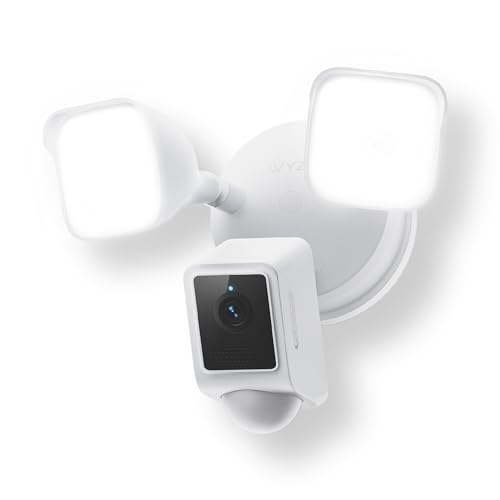
The Wyze Cam Floodlight v2 is two products sharing one junction box: a 2K camera with a very wide 160-degree view, and a bright LED floodlight array that fires on motion. For driveways, side gates and back yards, the light is not a gimmick — it improves the footage itself, because a lit subject records in color with faster shutter behavior than a subject at the edge of infrared range, and it changes behavior, because most casual trespass and package probing stops when a yard lights up and a siren is available. The camera records locally to a microSD card with no fee, or to the cloud with the optional Wyze Cam Plus plan, and two-way talk plus that loud maker-rated siren give you active responses, not just evidence. The honest costs are installation and commitment. Hardwired means it replaces an existing floodlight fixture or needs new electrical work — this is not a renter camera and not a ten-minute job, and local electrical rules may require a qualified installer. It is also a fixed installation: if you move, it stays. Judge the headline brightness and siren figures as manufacturer ratings, and plan on the 2.4 GHz Wi-Fi reach to your mounting point before you open the box.
Power and weather: Hardwired to an existing floodlight junction box. Weather-resistant outdoor housing (maker rated for outdoor use). Battery and solar figures quoted by makers assume typical use under stated conditions; treat them as claims to plan around, not guarantees.
Storage and subscription, plainly: Local microSD recording (card sold separately) or optional Wyze Cam Plus cloud. Local recording works without paying anything. Wyze Cam Plus, a paid plan, adds cloud event history and smarter detection labels. The floodlight itself is a maker-rated bright LED array, so judge brightness claims as manufacturer figures.
Choose / skip: Choose it to turn a dark approach into a lit, recorded, siren-backed one. Skip it where no fixture exists or wiring is impractical — cover that route with the Tapo or eufy instead.
In daily ownership: The floodlight asks the most on day one and the least thereafter: once wired, it is light and camera in a single fixture, with a card to check seasonally and a junction box you will hopefully never open again.
TP-Link Tapo C120
Who it suits: The front approach on a wired budget: free person detection for meaningful alerts, local recording that keeps the evidence with no ongoing cost.
The TP-Link Tapo C120 is the value pick that embarrasses cameras costing far more, for one reason: the smart detection is free. Person, pet and vehicle detection run on the camera and are included without a subscription, so the alert that reaches your phone can already say what moved instead of forcing you to open every clip of a swaying shrub. The 2K QHD picture is crisp, the dual spotlights support genuine color night vision rather than a token glow, and an invisible infrared mode exists for spots where visible light would annoy neighbors or wildlife. Storage is equally honest: record locally to a microSD card and pay nothing ongoing, or add the optional Tapo Care cloud plan only if you want off-site backup. The C120 is wired and plug-in, with a generously long power cable in the box, and its magnetic base makes aiming unusually painless for a camera at this price. Its honest limits are range and ecosystem: it is a Wi-Fi camera that wants a decent 2.4 GHz signal, and while it works with Alexa and Google Assistant for voice viewing, it does not join every smart-home platform, so check compatibility if your home runs on something else.
Power and weather: Wired (plug-in adapter with a long cable in the box). IP66 weather resistance (maker rating). Battery and solar figures quoted by makers assume typical use under stated conditions; treat them as claims to plan around, not guarantees.
Storage and subscription, plainly: Local microSD recording or optional Tapo Care cloud; person, pet and vehicle detection are included free on the camera. Core detection is free, which is rare at this price. Tapo Care, a paid plan, adds cloud clip storage and richer notifications, but the camera stays fully useful on local storage alone.
Choose / skip: Choose it for the strongest free evidence chain. Skip it only where power cannot reach; its detection and storage story is the benchmark the others are measured against here.
In daily ownership: Ownership rhythm here is close to zero: the camera is wired, detection is free, and the card quietly cycles — your only recurring task is confirming, now and then, that the clips you expect are the clips being kept.
Wyze Cam v4
Who it suits: The identification post: a door or drive where describing a face or reading a plate later is the entire point of the camera.
The Wyze Cam v4 is a small wired cube that punches well above its price on picture quality. Its 2.5K QHD sensor is the sharpest in this roundup, and that extra resolution is not a spec-sheet vanity: it is the difference between a face that is a smudge and a face you can actually describe, and between a license plate that is grey blur and one with readable characters at driveway distance. Color night vision is the other headline. With even modest ambient light — a porch bulb, a street light, moonlight on a pale driveway — the v4 keeps recording in color long after cheaper cameras have switched to grainy black-and-white infrared, and color is what makes clothing, vehicle color and package details usable the next morning. A built-in spotlight and siren can be triggered on motion, which gives you a deterrent that pure recording cameras lack. The trade-offs are physical, not digital. This is a wired camera: it needs continuous USB power from an indoor or covered outdoor outlet, so placement is dictated by cable reach and by where you can safely run and protect that cable. It has no battery to fall back on during an outage. It is also a 2.4 GHz Wi-Fi device, so a weak signal at the far corner of a house will hurt it more than any setting can fix.
Power and weather: Wired (USB power adapter). IP65 weather resistance (maker rating). Battery and solar figures quoted by makers assume typical use under stated conditions; treat them as claims to plan around, not guarantees.
Storage and subscription, plainly: Local microSD recording (card sold separately, supports large cards) or optional Wyze Cam Plus cloud. Free tier covers live view, motion alerts and local recording. Wyze Cam Plus, a paid plan, unlocks cloud event history and the smartest person, pet, package and vehicle detection labels.
Choose / skip: Choose it where identification distance is longest. Skip it if you need its smartest detection labels with zero willingness to consider the optional plan.
In daily ownership: In daily ownership the v4 is the set-and-forget member of this group: no batteries to schedule, a card to check occasionally, and a plan decision you can postpone indefinitely because the free tier already records.
eufy SoloCam S220
Who it suits: The exposed flank with no power: side gate, detached garage, garden wall — watched fee-free, powered by sun, within event-recording limits.
The eufy SoloCam S220 solves the two annoyances that kill most budget outdoor cameras: charging and subscriptions. A solar panel is built into the top of the camera, and eufy states that a few hours of direct sunlight a day can keep the battery topped up under typical use — treat that as a maker claim that depends entirely on your climate, season and mounting angle, because a north-facing wall in a grey winter will harvest a fraction of what a sunny southern exposure collects. Recordings are stored on memory built into the camera, and eufy sells this model explicitly as a no-monthly-fee camera: you can review your events without a plan. The 2K picture is clean, the body is compact enough to disappear under an eave, and pairing it later with a eufy HomeBase adds expanded local storage and smarter processing if you grow into a bigger system. The limitations are real. Built-in storage cannot be expanded with a card, so heavy-motion locations will cycle through old clips sooner. Solar dependence means a badly shaded mount quietly becomes a camera you have to take down and charge by cable. And like most battery cameras, it records events rather than continuous video, so a slow-moving subject can occasionally be clipped at the edges of an event.
Power and weather: Solar panel built in plus rechargeable battery. Weather-resistant outdoor housing (maker rated for outdoor use). Battery and solar figures quoted by makers assume typical use under stated conditions; treat them as claims to plan around, not guarantees.
Storage and subscription, plainly: Built-in local storage on the camera itself, with no monthly fee for basic use; can also pair with a eufy HomeBase for expanded local storage (sold separately). eufy markets this camera as no-monthly-fee: recorded events are stored locally on the device. Optional cloud plans exist, but reviewing your clips does not depend on one.
Choose / skip: Choose it to close an unwired gap without fees. Skip it as your only camera on a high-traffic approach, where built-in storage and event recording are stretched thinnest.
In daily ownership: Living with the S220 means watching a sun budget instead of a battery gauge: a glance at the app after a grey week tells you whether the mount’s exposure is honest, and a shaded winter may ask for one cable top-up.
Blink Outdoor 4
Who it suits: Calm perimeters and patient owners: several low-traffic angles where long battery claims hold up and plan-based review is an accepted cost.
The Blink Outdoor 4 is built around one promise: put it up and forget it. Blink rates the battery life at up to two years on the included AA lithium batteries under default settings — a maker claim that assumes modest motion traffic, short clips and a strong connection to its hub, and which heavy-traffic placements will shorten considerably. The 1080p picture is a step behind the 2K cameras here on fine detail, but the 143-degree diagonal view is wide, infrared night vision is dependable, and the Blink app is among the simplest to live with. The architecture is the catch you must understand before buying. The Outdoor 4 talks to a Blink Sync Module, not directly to your router, and this particular listing is an add-on camera: the Sync Module is required and is not in the box, so first-time Blink buyers need a system bundle or a module separately. Money is the second catch. Saving and reviewing clips in the cloud, and person detection, sit behind the paid Blink Subscription Plan; the subscription-free path is local backup through a Sync Module 2 with a USB drive, which is workable but less convenient than cloud review. Buy this camera for battery life and simplicity, with your eyes open about the hub and the plan.
Power and weather: Two AA lithium batteries (included). Weather-resistant outdoor housing (maker rated for outdoor use). Battery and solar figures quoted by makers assume typical use under stated conditions; treat them as claims to plan around, not guarantees.
Storage and subscription, plainly: Cloud storage with a Blink Subscription Plan, or local backup through a Sync Module 2 and a USB drive (Sync Module and drive sold separately where not bundled). A Blink Subscription Plan, a paid plan, is what unlocks cloud clip storage, clip review from anywhere and person detection. Without it you still get live view and motion alerts, and local backup is possible with the right Sync Module. Note: this listing is an add-on camera, so a Sync Module is required and is not included.
Choose / skip: Choose it for breadth across quiet angles, hub and plan accepted. Skip it as a primary evidence camera if cloud-plan dependence for history bothers you.
In daily ownership: Daily life with Blink is an exercise in calm: rare battery attention, an app that stays out of the way, and a standing awareness that the plan and the hub are quiet members of the household infrastructure.
Ring Outdoor Cam (Stick Up Cam) Battery
Who it suits: Ring-and-Alexa households that want cameras, doorbell and alerts in one security app — with the plan treated as a standing security expense.
The Ring Outdoor Cam — the battery model long sold as the Stick Up Cam — is the flexible-placement option for homes already living in the Alexa and Ring ecosystem. Its Quick Release battery pack slides out for charging without unmounting the camera, it can sit on a flat surface or mount to a wall, and it works indoors or out, which makes it the easiest pick here to redeploy as your needs change. Video is 1080p HD with color night vision, live view is quick, and motion alerts integrate with the Ring doorbells and Alexa announcements many homes already use. Now the disclosure that matters most in this entire guide: this camera has no local storage at all. Recorded video lives only in the cloud, and reviewing, saving or sharing it requires a paid Ring Home plan. Without the plan you get live view and instant alerts, but the event you were alerted about is gone once it passes. That does not make it a bad camera — the ecosystem, the app polish and the mounting flexibility are genuinely good — but it does mean the true cost of ownership includes a subscription for as long as you want a history, and no honest guide should let you discover that after mounting it.
Power and weather: Removable Quick Release battery pack (rechargeable). Weather-resistant outdoor housing (maker rated for outdoor use). Battery and solar figures quoted by makers assume typical use under stated conditions; treat them as claims to plan around, not guarantees.
Storage and subscription, plainly: No local storage. Recorded video is stored in the cloud and requires a Ring Home plan to save and review it. Be clear-eyed here: without a paid Ring Home plan you get live view and real-time alerts, but you cannot save, review or share recorded events later. The plan is effectively part of the cost of owning this camera if history matters to you.
Choose / skip: Choose it for ecosystem unity and fast live response. Skip it the moment the plan lapses from your budget — without it, this camera keeps no past at all.
In daily ownership: Owning this camera means owning its plan as a utility: keep it active and the camera is a polished, flexible sentinel; let it lapse and you own live view only, a distinction to revisit honestly at every renewal.
Comparison table
| Camera | Resolution | Power | Storage |
|---|---|---|---|
| Wyze Cam Floodlight v2 | 2K HD | Hardwired to an existing floodlight junction box | Local microSD recording (card sold separately) or optional Wyze Cam Plus cloud |
| TP-Link Tapo C120 | 2K QHD | Wired (plug-in adapter with a long cable in the box) | Local microSD recording or optional Tapo Care cloud; person, pet and vehicle detection are included free on the camera |
| Wyze Cam v4 | 2.5K QHD | Wired (USB power adapter) | Local microSD recording (card sold separately, supports large cards) or optional Wyze Cam Plus cloud |
| eufy SoloCam S220 | 2K | Solar panel built in plus rechargeable battery | Built-in local storage on the camera itself, with no monthly fee for basic use; can also pair with a eufy HomeBase for expanded local storage (sold separately) |
| Blink Outdoor 4 | 1080p HD | Two AA lithium batteries (included) | Cloud storage with a Blink Subscription Plan, or local backup through a Sync Module 2 and a USB drive (Sync Module and drive sold separately where not bundled) |
| Ring Outdoor Cam (Stick Up Cam) Battery | 1080p HD | Removable Quick Release battery pack (rechargeable) | No local storage. Recorded video is stored in the cloud and requires a Ring Home plan to save and review it |
Compare the leaders directly: Wyze Cam Floodlight v2 · TP-Link Tapo C120 · Wyze Cam v4.
How to choose the best outdoor security camera for home security under $150
Plan coverage as overlapping approaches, not isolated cameras. List your routes in — front, drive, side, back, garage — and assign the strongest camera to the route an intruder or thief is most likely to use, which for most homes is the front door and driveway in daylight and the darkest side or back route at night. A second camera should cover a different route, not duplicate the first one’s view at a slightly different angle. Two routes owned completely beat four routes glimpsed.
Engineer for the evidence moment. The footage that matters is a face at conversational distance or a plate at the curb, in the worst light your property offers. That argues for mounting at choke points at moderate height, choosing the 2K and 2.5K cameras where distance is unavoidable, and preferring light-assisted color night vision — spotlight or floodlight — on the approach where night identification matters most. Test with a walk-past at night and judge the recording the next morning; that single drill exposes more than any specification table.
Decide where evidence lives, and protect it. Local recording is free and private but shares the camera’s physical fate, so mount local-storage cameras out of easy reach and consider hub or cloud backup for the primary approach. Cloud recording survives theft but rents your own history back to you monthly — sustainable only if you treat the plan as permanent, which Ring owners must, since their cameras keep no local copy at all. Whichever you choose, choose it as a system property, not a per-camera afterthought.
Respect the limits in your wider setup. Cameras complement locks, exterior lighting and, if you want response, a monitored alarm; they replace none of them. Keep expectations lawful and neighborly too: record your approaches, mask neighboring property where the app allows, and know that audio recording is regulated more strictly than video in many places — when in doubt, keep audio off on boundary cameras. A security setup you understand, aimed at your own ground, will still be running — and still have its footage — on the one night you need it.
Common mistakes
Treating a camera as an alarm system. A camera alerts and records; it does not detect intrusion throughout a home or dispatch help. Homes that need response need a monitored layer as well. Budget and plan for the system, not the gadget.
Owning footage you cannot retrieve. History behind a declined plan, a full card nobody formatted, a stolen camera with the only copy inside — each is the same failure at the worst moment. Audit retrievability before the incident, not after.
One camera, whole house. A single wide view monitors everything and identifies nothing. Cover the primary approach properly first; add routes one camera at a time rather than stretching one camera across four jobs.
Height that defeats identification. Roofline mounts see hats and hoods. The evidentiary money shot is a face at a gate, door or path pinch-point, from a moderate height and a slight angle. Mount for the face, then check with a night walk-past.
Darkness where it matters most. Infrared range shrinks fast in real yards. The approach you most fear at night deserves light — a spotlight camera at minimum, the floodlight where a fixture allows — because lit color footage identifies and infrared silhouettes mostly describe.
Ignoring the camera’s own security. A reachable camera can be stolen, turned or blinded, and a default-password camera can be watched by strangers. Mount out of casual reach, update firmware, use a unique password and two-factor sign-in on the account.
Insurance, police reports and what footage must do to help
Households sometimes ask whether camera footage changes anything official, and the honest answer is: it can, if it meets the standard the moment demands. Insurers and officers do not need cinema; they need a time-stamped, exportable record in which a person, a vehicle or a sequence of events is identifiable, plus an owner who can produce it promptly and explain the setup that made it. That standard is quietly embedded in this guide’s ranking: choke-point placement for identifiability, retrievable storage for producibility, exported originals preserved before a card overwrites them. What footage rarely does is equally worth knowing: it seldom lowers a premium by itself, it does not substitute for the locks an insurer actually specifies, and an unexportable clip behind a lapsed plan assists no one. Treat your cameras as documentation infrastructure — maintained, retrievable, honestly aimed — and they will be ready for the one report you hope never to file.
Lighting the approaches your cameras cannot save
The cheapest security upgrade in this entire guide is not a camera; it is the light the cameras wish you had. A motion light over the side path, a porch bulb that actually burns, a lit number by the door — each one multiplies the value of hardware you already own, because lit approaches produce color footage, honest faces and deterred visitors before any recording starts. This is also why the floodlight camera leads a security ranking: it refuses to separate the two purchases. For the approaches a floodlight cannot reach, judge your existing lighting by a midnight walk with your phone camera: where the phone struggles, your security camera struggles harder, and a modest fixture or bulb is a better spend than a resolution upgrade. Security is a system of small cooperating decisions — locks that resist, light that reveals, cameras that remember — and the households that grasp the cooperation get more safety from this tier than any single device, however clever, can sell them.
Designing the two-camera core most houses actually need
If this guide’s ranking tempts you toward a single heroic camera, consider the two-camera core that security thinking actually recommends at this budget. Camera one owns the public face: the front door and drive, where deliveries, visitors and vehicles concentrate in daylight. It should be the strongest evidence camera you can wire — the Tapo for free detection and local proof, or the Wyze v4 where the drive stretches. Camera two owns the dark flank: the side gate, back door or yard approach that nobody watches and everybody could use. It should bring its own light or its own power independence — the floodlight where a fixture exists, the solar eufy where it does not. Together they cover the two genuinely different problems a house presents, daylight evidence and night deterrence, for less than most single premium cameras. A third camera is a luxury for detached garages and long plots; a fourth is usually a confession that the first two were placed by enthusiasm rather than by approach. Build the core, live with it through a season, and expand only where an incident or a near-miss has argued the case.
Evidence discipline: keeping footage findable, shareable and safe
Footage you cannot find, export or protect is surveillance theater, so adopt three habits from the first week. Know your retrieval path cold: which app screen, which export button, which card or cloud folder — rehearsed once in calm conditions, because the first real incident is the wrong classroom. Protect the originals: when something matters, export the clip the same day to a second location, since local cards overwrite, cloud plans expire and cameras themselves can be taken. And guard the account that guards the cameras: a unique password and two-factor sign-in on the camera app, firmware left on automatic update, and old phones removed from the account when they leave the household. None of this is technical heroism; it is the difference between a household that owns a record and a household that owns a memory of a notification. The cameras in this guide all support this discipline — the plan-gated ones only while their plans live, which is why their reviews state that condition before praising anything else.
The honest ceiling of camera-based security
A mature security setup knows what its cameras cannot do, and plans around the gaps instead of denying them. Cameras cannot see through a house: an intruder who enters unwatched from an uncovered side is a locks-and-alarm problem, not a lens problem. Cameras cannot guarantee identification: hoods, angles, weather and distance conspire, which is why choke-point placement and light matter more than resolution bravado. Cameras cannot respond: the alert reaches a phone that may be asleep, in a meeting or out of coverage, and any setup whose safety depends on a human watching a feed in real time is a hope, not a system. What cameras do superbly is deter the opportunist, document the event, and inform the response — three jobs that measurably change outcomes for the most common household incidents, from package theft to trespass to the disputed delivery. Buy them for those jobs, pair them with locks, light and, where response matters, monitoring, and you have built something honest: not a fortress, but a house that is watched, lit and remembered.
Setup notes that save a second ladder trip
Signage is part of the system. A small, honest notice that recording is in use changes casual behavior at a gate or drive and costs nothing. It also keeps your setup transparent to neighbors and delivery drivers, which matters for the relationships your security depends on.
Protect the account like a house key. The app account sees every camera you own: unique password, two-factor authentication, and prompt firmware updates are security measures, not IT chores. Most real-world camera compromises enter through accounts, not through lenses.
Give the primary camera a second witness where you can. Two cameras whose views overlap at one choke point — door and drive, for example — mean a single stolen, blinded or flat camera never leaves the key approach completely unwatched.
Review on a rhythm, not on a panic. A monthly five-minute check — storage health, battery or solar state, a recent night clip from each camera — catches the silent failures (full cards, flat batteries, shifted mounts) while they are still chores instead of losses.
Final recommendation
For home security at this tier, build around light and retrievable evidence. The Wyze Floodlight v2 on the dark main approach and the Tapo C120 on the front route give most homes a genuinely capable two-point setup with no required fees — deterrence where it is dark, free detection and local evidence where it is busy. Add the Wyze v4 where identification distance grows, and the eufy where wiring ends.
The Blink and Ring cameras join a security setup honestly only with their plans active; count that cost as security spending, because without it their contribution shrinks to live viewing. Above all, keep the hierarchy straight: locks and light first, cameras as the watching and remembering layer, an alarm if you want response. Chosen that way, this tier punches well above its price.
FAQ
Can an outdoor camera replace a home alarm system?
No. A camera watches approaches, records events and sends alerts. It does not detect entry throughout the house, contact a monitoring center or satisfy alarm requirements for insurance. It is the evidence and awareness layer of home security, and a strong one — but a layer.
Which camera here is best for evidence after a break-in attempt?
The one whose recording you can actually retrieve: the Tapo and Wyze cameras keep local copies with no plan, and the floodlight adds light for identifiable night footage. Ring keeps no local copy and needs its plan for any history; Blink’s history needs its plan or hub backup.
Is cloud or local storage safer for security footage?
They fail differently. Cloud footage survives the camera being stolen but depends on internet and an active plan. Local footage is free and connection-independent but can be taken with the camera. For a primary approach, many households pair local recording with some form of backup.
Do floodlight cameras really deter intruders?
Light is the most consistently supported deterrent in this category: it removes darkness, signals occupancy and improves footage at the same time. It will not stop a determined intruder, and no honest guide promises otherwise — it raises effort and evidence, which is what deterrence means.
How many cameras does a house actually need?
Most homes are well served by two: the front approach and the darkest secondary route. Add a third for a detached garage or a long side yard. Beyond that, returns diminish fast compared with improving placement, light and retrievability of the cameras you have.
What should I check after installing for security?
Do a night walk-past on every route, review it next morning, and confirm faces are identifiable at the choke point. Check that alerts arrive promptly, that recordings are where you expect them, and that the camera cannot be reached and turned from the ground.
Security, done honestly, is a posture rather than a product: a house that is locked without thought, lit without waste, and watched with its limits understood. The cameras in this guide serve that posture best when they are bought as its servants — the floodlight owning the dark approach, the Tapo keeping free and retrievable evidence at the front, a solar eye on the flank nobody wired. Bought as substitutes for the posture, the same cameras disappoint, because no lens has ever locked a door. So let the final recommendation be a sequence rather than a SKU: walk your approaches tonight, note the darkest and the busiest, assign light to the first and evidence to the second, and only then let this page’s ranking spend your budget. A household that shops in that order ends up, a month later, with something rarer than footage — the settled knowledge of exactly what watches what, where the record lives, and what happens next if the record is ever needed. That knowledge is the real product; the cameras are how you install it.


