Where to buy
Check the latest price, availability and delivery on Amazon for every pick below. Each camera was shortlisted for this guide to the best outdoor security camera for apartments under $200 at the time of research; street prices move, so confirm the current listing still sits under $200 before you buy. Orders are placed on Amazon. We may earn a commission from qualifying purchases.
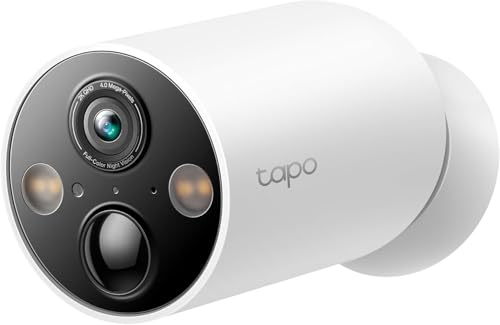
- Best overall for renters: TP-Link Tapo C425 Wire-Free MagCam — Check on Amazon
- Ring Spotlight Cam Plus, Battery — Check on Amazon
- Wyze Battery Cam Pro — Check on Amazon
- eufy SoloCam S340 — Check on Amazon
- Arlo Pro 5S 2K Spotlight Camera — Check on Amazon
- Reolink Argus 4 Pro with Solar Panel — Check on Amazon
Read the full guide ↓
Disclosure: As an Amazon Associate, dailyhomedecorating.com earns from qualifying purchases. Links to Amazon on this page are affiliate links; they cost you nothing extra. Listing details such as price and availability change often, so check the current Amazon listing before you buy.
The search for the best outdoor security camera for apartments under $200 starts with a constraint homeowners never face: you probably cannot drill, you definitely cannot rewire, and anything you install has to come down cleanly when the lease ends. Apartment outdoor space is also different in kind — a balcony, a small patio, a front door opening onto a shared landing — which means the camera’s job is narrower and more personal: watch your door, your parcels and your small patch of outside, without filming the neighbours’ lives or starting a dispute with the landlord.
That is why this guide ranks the six cameras differently from a general roundup. Mounting flexibility comes first: magnetic bases, clamp-friendly bodies and mounts that work with a couple of screws you are actually allowed to use — or none. Portability comes second, because a camera that moves flat with you is worth more than a marginally better one you abandon. The usual serious questions still apply, and we answer them in full: which of these cameras keeps recording if you refuse a subscription, which store footage locally on the device or a card, and which rely on battery, solar or swappable packs to survive on a balcony with no outdoor socket.
A note on courtesy and rules before the picks. Many leases and building rules restrict cameras in shared areas, and some restrict drilling into exterior walls or railings. Check your lease and, if in doubt, ask — a camera aimed at your own door from your own balcony is a very different proposition from one overlooking a shared courtyard. Every camera here can be aimed tightly at your own space using its app and activity zones. Specifications such as weather ratings and battery life are the makers’ published figures, quoted as claims under their test conditions, not guarantees for your balcony.
In this guide
Quick Picks
| Camera | Best for | Key spec |
|---|---|---|
| TP-Link Tapo C425 Wire-Free MagCam | Best overall for renters | 2K QHD video, magnetic mount, rechargeable battery, microSD local storage, free on-device person, pet and vehicle detection |
| Ring Spotlight Cam Plus, Battery | Best for deterring at a balcony or entry | 1080p HD video with HDR, LED spotlights, colour night vision, security siren, Quick Release battery pack |
| Wyze Battery Cam Pro | Best value for a first rental camera | 2.5K HDR video, radar plus PIR motion detection, removable rechargeable battery, integrated spotlight and siren, microSD local recording |
| eufy SoloCam S340 | Best for a sunny balcony or terrace | 3K wide + 2K telephoto dual lenses, pan and tilt, removable solar panel, 8GB built-in local storage |
| Arlo Pro 5S 2K Spotlight Camera | Best image for tricky apartment Wi-Fi | 2K HDR video, 160-degree field of view, dual-band Wi-Fi, integrated spotlight and siren, removable rechargeable battery |
| Reolink Argus 4 Pro with Solar Panel | Best for a ground-floor patio with a wide view | 4K dual-lens 180-degree panoramic view, ColorX colour night vision, battery plus 6W solar panel, microSD local storage |
How we chose
We shortlisted only true outdoor cameras — maker-rated for weather — whose standard single-camera configuration sits under $200, then re-ranked them for rental life. Mounting without permanent alteration scored heavily: the Tapo’s magnetic base leads this guide precisely because it can be repositioned endlessly and removed without a trace beyond its small plate. Battery and solar power mattered more than for a house, because apartment balconies rarely offer an outdoor outlet and running a cable through a window frame is nobody’s idea of a good afternoon.
Fees were judged by a renter’s arithmetic. A subscription is a second rent — small, monthly and easy to forget when you move — so cameras that record locally with no required plan score well here, while the two that stop recording without a plan are included with that cost stated plainly, because their deterrent lights and ecosystems genuinely suit some renters. We also valued compact bodies and honest fields of view: in a small space, a 180-degree panorama is usually wasted, and a camera that watches your door and your parcel spot precisely beats one that records the whole car park badly.
The 6 best picks in detail
TP-Link Tapo C425 Wire-Free MagCam
The Tapo C425 is the friendliest camera in this tier to actually live with. Its party trick is the magnetic base: the camera snaps onto a small mounted plate and can be pulled down by hand for charging or repositioning, then clicked back at a slightly different angle in seconds. Behind the trick is a serious spec sheet — 2K QHD video, colour night vision with a starlight sensor and built-in spotlights, and a wide view that suits porches, balconies and garden gates.
The running-cost story is one of the best here. Person, pet and vehicle detection runs on the device and is free, and recording goes to a microSD card in the camera with no subscription required; TP-Link’s optional Tapo Care plan adds cloud storage and richer notifications for people who want them, but it is genuinely optional. That local-plus-free-detection combination is rare at any price and almost unheard of in the value half of this tier.
TP-Link rates the large built-in battery for very long standby-style endurance as a maker claim — up to around 300 days under the maker’s lab conditions with light triggering — and real life with daily motion, cold weather and frequent live view will be shorter, as with every battery camera. An optional solar panel can be added later. The housing carries a maker-rated IP66 weather resistance. The magnetic mount’s one caveat is reach: mount it high or out of easy grabbing range, because what you can pull down in two seconds, someone else theoretically could too.
For renters, the C425’s magnetic mount is not a convenience, it is the whole argument. The small base plate can be fixed with a single modest screw — the kind most landlords tolerate and any filler fixes at move-out — or mounted with outdoor-rated adhesive solutions where even that is too much, and the camera itself snaps on and off by hand. Re-aiming after you rearrange the balcony takes seconds, charging means carrying the camera indoors to a normal socket, and when you move, everything leaves with you. Add free detection and local recording, and no other camera here fits the rental brief as completely.
- Magnetic mount makes charging and re-aiming genuinely effortless
- Free on-device person, pet and vehicle detection
- Local microSD recording with no required subscription
- Strong 2K image with colour night vision
Honest limitation: The magnetic mount should be placed out of easy reach, and the very long battery figures are maker lab claims that busy, cold or frequently viewed installations will not match.
Choose it if you want the easiest mount to install, adjust and remove without trace, with no subscription. Skip it if your only mounting spot is within easy reach of passers-by.
TP-Link Tapo C425 Wire-Free MagCam — Check on Amazon
Ring Spotlight Cam Plus, Battery
Ring’s Spotlight Cam Plus is built around deterrence you can see. Two LED spotlights switch on with motion, the camera records 1080p HD video with colour night vision, and a remote-activated siren, two-way talk and motion warnings let you speak to whoever is at the gate from the app. For households already using a Ring doorbell or Alexa displays, it slots into the same app, the same routines and the same voice controls with almost no learning curve.
The subscription disclosure matters more here than anywhere else in this guide. Ring cameras do not record to local storage at all — there is no memory card and no hub recording — and saving, reviewing and sharing video requires a Ring Protect subscription (now sold under Ring’s home plan naming). Without a plan you still get live view and real-time motion alerts, but no recorded history: the moment passes and it is gone. With a plan, you get the recorded library and richer features. Neither is a trick, but you should choose with your eyes open, because the plan is effectively part of this camera’s price for as long as you own it.
Power comes from a Quick Release Battery Pack — one is included and the housing holds two, so adding a second pack roughly doubles the time between charges as a maker-described configuration; an optional solar panel exists too. Battery endurance is a maker claim that depends heavily on how often the spotlights fire. Resolution is the trade-off against the sharper 2K, 3K and 4K cameras here: you are paying for the ecosystem, the lights and the siren rather than pixel count.
A balcony or ground-floor entry is exactly where visible deterrence earns its keep, and the Spotlight Cam Plus is the most visibly deterrent camera in this guide: lights that fire on motion, a siren you can trigger, and a design neighbours and passers-by recognise. Renters already paying for a Ring doorbell plan get recording folded into a familiar app. The cautions are rental-specific: the mount expects screws, the spotlights will annoy a close neighbour if aimed carelessly, and the recording plan is a commitment that follows you from flat to flat whether you want it to or not.
- Bright motion-activated spotlights plus a siren deter actively
- Seamless fit for homes already using Ring or Alexa
- Battery housing holds a second pack to stretch time between charges
- Simple, well-supported app and accessories
Honest limitation: No local storage option at all, and recorded video requires a Ring subscription; without one you only get live view and alerts. Video is 1080p in a tier where rivals offer 2K and above.
Choose it if visible lights and a siren matter and you already live in Ring’s app. Skip it if your lease forbids screws and subscriptions alike.
Ring Spotlight Cam Plus, Battery — Check on Amazon
Wyze Battery Cam Pro
The Wyze Battery Cam Pro is the value pick that refuses to feel cheap. It records 2.5K HDR video with colour night vision, carries an integrated spotlight and siren, and detects motion with a radar-plus-PIR pairing that Wyze uses to cut the false alerts that plague purely heat-based sensors — the passing-car and waving-branch alerts that train people to ignore their cameras. The battery is removable and rechargeable, so a spare pack turns a charging gap into a ten-second swap.
Wyze’s fee structure needs the same honesty as Arlo’s and Ring’s, in miniature. Local recording to a microSD card works without any plan, and basic motion alerts are free. But Wyze’s Cam Plus subscription is what unlocks person, pet and package detection, full-length cloud event recording and the smart notification labels; without it, cloud event clips and detection intelligence are limited and the camera is noticeably dumber. The plan is inexpensive by category standards, yet it is still a plan — count it if you want the smart features in the brochure.
The housing is maker-rated IP65 for outdoor use, no hub is required, and an optional solar panel can keep the battery topped up on a sunny wall. What you give up versus the top of this tier is refinement: the app and firmware experience is more utilitarian than Arlo’s or Ring’s, and the brand’s cloud-first history means privacy-minded buyers should read the current policy and lean on local recording. For the money under this ceiling, though, the hardware-per-dollar is hard to beat.
The Battery Cam Pro suits the renter who wants to spend the least money learning whether a camera helps at all. It mounts simply, its battery pops out for charging at a kitchen socket, and its local recording means a short tenancy does not oblige you to any plan. If the experiment works, it becomes the camera you take to the next place; if the building installs its own system next year, you have lost the least. Its radar-assisted detection is a particular blessing in shared spaces, where purely heat-based sensors alert on every neighbour who passes your door.
- Radar-assisted detection reduces nuisance alerts
- Removable battery and optional solar panel keep power flexible
- Local microSD recording works without a subscription
- Spotlight, siren and 2.5K video at a value-tier position
Honest limitation: Person and package detection and full cloud recording sit behind the Cam Plus subscription; without it the smart features are limited even though local recording still works.
Choose it if you want the cheapest sensible start with local recording and a swappable battery. Skip it if you need person detection without paying for the smart tier.
Wyze Battery Cam Pro — Check on Amazon
eufy SoloCam S340
The SoloCam S340 is the camera that makes the under $200 tier feel like a step up rather than a compromise. It carries two lenses on one motorised head: a 3K wide-angle lens that watches the whole scene and a 2K telephoto lens that zooms toward faces and number plates at the same time, with hybrid zoom and detail at distance that eufy rates to about 40 feet as a maker specification. The head pans a full circle and tilts, and on-device detection for people and vehicles lets it follow movement across a driveway or garden instead of staring at one fixed patch of wall.
Power is the second half of the pitch. A removable solar panel tops up the built-in rechargeable battery, and eufy rates standalone battery life at around three months as a maker claim under typical conditions, with the panel extending that indefinitely in a sunny mounting spot. Because the panel detaches, you can put the camera in shade and the panel in sun a short cable run away. Weather resistance is rated IP65 by the maker, which covers rain jets and dust for ordinary exposed mounting.
On money after purchase, this is the cleanest story in the group. Recording goes to 8GB of built-in local storage on the camera itself and eufy sells this model with no monthly fee required for recording, playback or its on-device person and vehicle detection. An optional HomeBase S380 can add much larger central storage and extra recognition features, but it is an upgrade, not a ransom: the camera works on its own out of the box. There is no memory card slot to budget for, though the fixed built-in capacity means heavy-traffic spots cycle through older clips sooner.
The S340 is the balcony-and-terrace specialist in this list. If your outdoor space gets real sun, its removable solar panel can sit on the railing in the light while the camera watches from shade, and the pan-and-tilt head covers a wraparound balcony or an L-shaped terrace from one position — valuable when you are allowed exactly one inconspicuous mount. It needs a screwed mount, so it suits longer leases and relaxed landlords better than strict no-holes buildings, and its size is the least discreet here. For a townhouse-style rental with a proper patio, it is superb.
- Dual lenses record a wide view and a zoomed view at once
- Solar panel removes most battery-charging chores in sunny spots
- No subscription required for recording or smart detection
- Pan and tilt covers a corner or driveway from one mount
Honest limitation: The built-in 8GB of storage is fixed and not expandable on the camera itself, so a very busy street-facing mount recycles footage quickly unless you add a HomeBase.
Choose it if your balcony or terrace gets sun and one moving camera should cover it all. Skip it if your building bans visible fixtures or any screws at all.
eufy SoloCam S340 — Check on Amazon
Arlo Pro 5S 2K Spotlight Camera
The Arlo Pro 5S is the polished all-rounder of this tier: 2K video with HDR for scenes that mix bright driveways and shaded porches, a wide 160-degree field of view, colour night vision helped by an integrated spotlight, a siren, and two-way talk. Its dual-band Wi-Fi is a genuine practical advantage — it can use a 5GHz network where many battery cameras are stuck on crowded 2.4GHz bands — and the removable battery pack swaps in seconds if you keep a spare charged.
Now the honest part, because Arlo’s running costs are the highest in this group. Cloud recording, the searchable video history, rich notifications with thumbnails and the smart object detection that tells a person from a parcel are Arlo Secure subscription features. Without a plan, after any included trial ends, you get live view and basic motion alerts, but the camera does not save the library of clips most people buy it for, and this model has no memory card slot of its own; local recording only enters the picture with a separate Arlo SmartHub setup. Budget the plan into the real price of owning this camera.
Weather resistance, mounting and the app experience are all mature: the camera is built for exposed outdoor mounting as a maker-rated weather-resistant housing, the magnetic and screw mounts are well sorted, and the app is one of the most refined here. If you accept the subscription as part of the deal — the way you would with Ring — the Pro 5S delivers the most complete mainstream package under the ceiling. If you refuse monthly fees on principle, look at the eufy, Reolink or Tapo picks instead.
Apartment Wi-Fi is a special kind of bad: dozens of neighbouring networks fighting in the same air. The Pro 5S’s dual-band radio, able to use the quieter 5GHz band where range allows, is a real answer to that, and its image quality leads the group for faces at a shared entry. The renter’s objection is the running cost — the subscription that recording depends on is exactly the kind of monthly commitment that outlives a lease and gets forgotten. Choose it for the picture and the radio, with the plan counted as part of your housing costs.
- Excellent 2K HDR image with a very wide view
- Dual-band Wi-Fi copes better with busy home networks
- Spotlight, siren and polished app in one package
- Removable battery makes swaps quick
Honest limitation: Cloud recording and smart detection require an Arlo Secure subscription after the trial; without a plan the camera does not keep a recorded video history.
Choose it if congested apartment Wi-Fi and image quality top your list and the plan is acceptable. Skip it if a forgotten monthly charge is your nightmare — recording depends on it.
Arlo Pro 5S 2K Spotlight Camera — Check on Amazon
Reolink Argus 4 Pro with Solar Panel
The Argus 4 Pro solves the oldest outdoor-camera problem — the blind spot at the edge of the frame — by stitching two lenses into a single 180-degree panoramic image. One camera watches an entire side of a house, a full garden width or both directions of a corner at once, in 4K resolution as the maker specifies it. Its ColorX night vision uses a very fast lens and a large sensor to keep night footage in colour without leaning on a spotlight, which matters if you want to describe a jacket or a car colour after dark.
This listing bundles the camera with Reolink’s solar panel, so the rechargeable battery is topped up by daylight and manual charging becomes an occasional event rather than a routine; as with every battery camera here, endurance figures are maker claims that depend on how much motion the camera sees and how cold the winter gets. The housing is rated IP66 by the maker, a notch above most rivals here for driving rain. Dual-band Wi-Fi, including Wi-Fi 6 support as specified by Reolink, helps on congested home networks.
Recording is local-first: clips save to a microSD card in the camera (budget for a card, since one is not the point of this bundle), and Reolink does not require a subscription for recording, playback or its person, vehicle and animal detection. An optional Reolink Cloud plan and the optional Home Hub exist for people who want off-camera backup, and FTP support suits tinkerers, but nothing essential is locked behind a plan. That combination — panoramic 4K, colour night vision and no required fee — is why it anchors the top of this tier.
The Argus 4 Pro is a conditional pick for apartments: most balconies cannot use a 180-degree view, and aiming one across a shared courtyard raises the privacy questions this guide urges you to avoid. It earns its place for the minority of renters with a ground-floor patio, a wide private terrace or a parking spot in full view of their own window line, where one panoramic camera replaces two and its colour night vision identifies a car properly after dark. If your outdoor space is private and wide, it is excellent; if it is a standard balcony, the cameras above serve you better.
- One camera covers a full 180-degree width with no side blind spots
- Colour night vision without depending on a bright spotlight
- No subscription required; local microSD recording included by design
- Solar panel bundled in this listing
Honest limitation: The stitched panoramic image can look stretched at the far edges, and the camera sits near the top of this budget, so check the current listing price before assuming it fits under the ceiling on a given day.
Choose it if you rent somewhere with a genuinely wide, private outdoor view. Skip it if you have a standard narrow balcony; its panorama is wasted and can overlook neighbours.
Reolink Argus 4 Pro with Solar Panel — Check on Amazon
Comparison table
| Camera | Video | Power | Storage | Subscription |
|---|---|---|---|---|
| TP-Link Tapo C425 Wire-Free MagCam | 2K QHD | Built-in rechargeable battery | microSD local (card separate) | None required |
| Ring Spotlight Cam Plus, Battery | 1080p HD with spotlights | Quick Release battery (holds two) | No local storage | Ring plan required for recording |
| Wyze Battery Cam Pro | 2.5K HDR | Removable rechargeable battery | microSD local (card separate) | Cam Plus for smart detection |
| eufy SoloCam S340 | 3K wide + 2K telephoto | Battery + removable solar panel | Built-in 8GB local | None required |
| Arlo Pro 5S 2K Spotlight Camera | 2K HDR, 160 degrees | Removable rechargeable battery | Cloud via plan; no card slot | Arlo Secure required for recording |
| Reolink Argus 4 Pro with Solar Panel | 4K panoramic, 180 degrees | Battery + bundled solar panel | microSD local (card separate) | None required |
Renters should read subscription terms as mobility terms. The eufy, Reolink and Tapo cameras keep your recordings on storage you physically own, so moving house means unplugging nothing and cancelling nothing; your history travels in the camera. The Wyze splits the difference — local clips are yours free, smart labels are rented. Arlo and Ring tie recording to an account plan, which is painless while you stay and quietly expensive across the years and addresses a renting life accumulates. None of this makes the plan cameras bad; it makes the plan part of the rent, to be budgeted like it.
Local storage has one apartment-specific virtue worth underlining: your footage of a shared entry stays on your device rather than a distant server, which many renters and their neighbours simply prefer. Balance that against the familiar weakness — a stolen camera takes its card with it — by mounting out of casual reach and, where a brand offers it cheaply, keeping cloud backup for the door camera only. The deliberate choice is the point; the worst outcome is discovering your camera stopped recording in March because a trial ended in February.
Installing in a rental: the no-trace method
Begin with permission, in writing where your landlord is formal about it. A short message describing a battery camera, its mount and the fact that it films only your own door usually resolves the question in your favour — landlords object to holes and to liability, and a removable camera aimed at your own entrance raises neither. Photograph the mounting area before you touch it. Those photographs, plus the camera’s removability, are your deposit protection.
Mount temporarily before you mount at all. The Tapo’s magnetic base can sit on its plate fixed with a single screw or a heavy-duty outdoor adhesive pad for a trial week; other cameras can perch on a railing clamp or a balcony shelf while you learn the view. Watch the feed across a full day: the delivery hour, the evening light, the moment the landing light comes on. Apartment sightlines are full of surprises — a neighbour’s door inside your frame, a security light that blinds the lens at midnight — and every one of them is cheaper to discover before the screws go in.
Finish by tightening the camera’s world to your own threshold. Draw the activity zone around your door and your parcel spot only, exclude the shared landing beyond, and set the camera to person alerts where that feature is free or already in your plan. Then tell the neighbour opposite, briefly and cheerfully, that the camera watches your door. In practice that one conversation prevents nearly every complaint an apartment camera ever causes, and it turns a potential critic into someone glad the landing is watched.
How to choose the best outdoor security camera for apartments under $200
Begin with your lease, not a shopping tab. Establish what you may fix to walls, railings and door frames, whether cameras facing shared areas are restricted, and whether your building already provides entry security your camera would duplicate. Then measure your actual outside: most apartment cameras watch a door, a parcel spot and a few metres of balcony. That small, specific job rewards a well-aimed 2K camera with good detection far more than a panoramic flagship, and it keeps you on the right side of neighbours whose doors your lens should never include.
Choose power for a home with no outdoor socket. Solar suits any balcony that sees direct sun for part of the day; a removable battery suits any mount you can reach from inside your own space; a magnetic mount suits everyone, because charging becomes a two-second grab rather than a ladder job. Decide your subscription position with the same honesty: if a monthly plan would be your third forgotten direct debit, buy local recording. Finally, set activity zones the day you install, tightened to your door and your floor area — in shared buildings, restraint is both good manners and better battery life, because a camera that wakes for every neighbour is a camera that is always charging.
Living with a balcony camera: power, weather and neighbours
Apartment cameras live harder lives than their maker claims assume. A shared landing or a street-facing balcony generates motion all day, so batteries drain toward the fast end of every estimate in this guide, and a camera that alerts on all of it trains you to ignore it within a month. The countermeasures are settings, not hardware: tight zones, person-only alerts where available, and sensitivity that treats the far pavement as scenery. Do that on day one and a balcony camera becomes a quiet appliance instead of a needy one.
Power logistics favour the renter who plans them once. If your balcony gets a few hours of direct sun, a solar-compatible model removes charging from your life entirely; if it does not, choose a camera you can bring indoors without tools — the magnetic Tapo, or a swappable-battery model — and charge it beside the kettle like a phone. What you must avoid is the camera whose charging requires a ladder, an extension lead through a window and a free Saturday: in a rental, that camera spends its life at low battery.
Weather on a balcony is gentler than on an exposed gable — most apartment cameras live under some shelter — but wind-driven rain still finds them, and maker IP ratings assume the housing’s seals are seated and the charging port cover is closed after every top-up. Make closing that cover part of the charging ritual. And when the tenancy ends, the whole system should leave in one hand: camera, mount, plate, cable. If your installation cannot do that, it was the wrong installation for a rental, whatever the picture quality.
Sharing, privacy and the people you live among
Apartment cameras sit inside a social system as much as a technical one, and the apps give you tools worth using deliberately. Most picks here let you share access with a partner or flatmate at different permission levels — viewing live and clips is shareable; changing settings and deleting footage should stay with one account holder. Set that structure up on day one rather than sharing a password, because shared passwords outlive relationships, tenancies and flatmate arrangements with depressing reliability.
Privacy zones deserve the same deliberateness as activity zones. Where a brand offers them, mask the neighbour’s balcony and the landing windows out of the recorded image entirely, not merely out of the alert logic — a masked area is never recorded, which is a stronger promise to the people around you than a zone that merely stays silent. Combined with an aim that favours your own doorstep, this is how a renter keeps both the security benefit and the goodwill of the corridor.
Finally, think about the camera’s place in the building’s wider arrangements. Many blocks already record the entrance and the car park; your camera’s unique contribution is the last few metres — your door, your balcony, your parcels. Duplicating the building’s coverage adds alerts without adding safety. Aim where the building’s system cannot see, coordinate rather than compete, and your small camera becomes the missing piece of a larger picture instead of a second, worse version of it.
Common mistakes
Drilling first and reading the lease later. Exterior walls, railings and window frames are common lease flashpoints. Magnetic, clamp and minimal-screw mounts exist precisely for renters; use them, and photograph the spot before and after for your deposit records.
Filming the neighbours by accident. A wide lens on a small balcony easily includes the next balcony or the landing opposite. Aim at your own door and floor, use privacy and activity zones, and tell close neighbours the camera watches your entrance only.
Forgetting the subscription when you move. Plan-based cameras keep charging through every address change. If you rent a camera ecosystem, put its renewal in the same checklist as your mail redirection.
Mounting where the building’s own lights blind it. Landing lights and security floods can wash out a small camera all night. Test the view after dark before fixing anything permanently — another reason magnetic and temporary mounts win for renters.
Buying a panorama for a shoebox balcony. Ultra-wide cameras cost more, drain faster on busy views and record mostly other people’s space in a flat. Match the field of view to the few metres that are actually yours.
Final recommendation
For most renters, the Tapo C425 is the answer: it mounts and moves like it was designed by someone who has lost a deposit, detects people free, records locally and asks for no subscription. The Wyze is the budget way into the same fee-free life, the eufy owns sunny terraces, and Ring and Arlo serve renters already committed to their plans who want deterrence or image quality respectively. The Argus 4 Pro waits for the rare rental with a wide private outlook. Whichever you choose, choose the one that leaves with you — in rental life, portability is a feature, not a footnote.
One last renter-specific thought on value. Because an apartment camera’s world is small, you will likely own it across two or three homes, and that changes what ‘worth it’ means: the camera that survives moves — unmounted in seconds, unpaired in the app, reinstalled on a new balcony the same evening — repays its price in a way a marginally sharper but permanently installed rival never can. Judge this shortlist by that standard and the ranking explains itself. The Tapo leaves no trace, the Wyze leaves no debt, the eufy leaves no charging chore on a sunny terrace, and even the plan-based Ring and Arlo travel in your account rather than on your wall. Buy the one whose departure from this flat is as clean as its arrival, and your camera becomes part of your household goods — not part of the flat you hand back.
And if you take one practical step today, make it this: photograph your door and balcony from the pavement, the landing and the neighbour’s side before you order anything. Those three photographs will tell you your true field of view, your light after dark and your privacy obligations more honestly than any product page, and they will still be useful evidence of the untouched wall when the tenancy ends and the deposit conversation begins.
Start with the TP-Link Tapo C425 Wire-Free MagCam if you want the safest single buy, and keep the Ring Spotlight Cam Plus, Battery on your shortlist as the strongest alternative for the situations described above.
Frequently asked questions
Can I install an outdoor camera in a rented apartment without drilling?
Often, yes. The Tapo C425’s magnetic base needs only a small plate, and several cameras here can be mounted with minimal screws or placed to watch a door from your own balcony furniture line. Always check your lease first, since exterior fixings are a common restriction.
Do apartment cameras need a subscription?
Only some. The Tapo, eufy and Reolink picks record locally with no required plan, and the Wyze records locally free while charging for smart detection. Ring and Arlo cameras require a plan to save recorded video after their trials.
Is it legal to point a camera at a shared apartment landing?
Rules vary by place and by lease, and this guide is not legal advice. The safe practice is to aim only at your own door and immediate area, use activity zones to exclude neighbours’ doors, and check your lease and local rules before installing.
How do I power a camera on a balcony with no outdoor socket?
Battery and solar are the standard answers. Solar panels suit sunny balconies, removable batteries suit reachable mounts, and the Tapo’s magnetic base lets you bring the camera indoors to charge in seconds.
Will a camera drain its battery fast in a busy apartment building?
It can. Every passing neighbour is a motion event. Tight activity zones, sensible sensitivity and radar-assisted detection like the Wyze’s all help, and maker battery claims assume far quieter scenes than a shared landing.
Can I take my camera with me when I move?
Yes — that is a core reason to choose battery models with simple mounts. Local-recording cameras keep your footage on the device, while plan-based cameras need the subscription managed at the new address so recording continues.
Will my landlord definitely allow a camera?
No guide can promise that; leases differ. Battery cameras with removable, minimal mounts are the easiest to get approved because they alter nothing permanently. Ask first, describe the mount honestly, and keep the approval with your lease paperwork.
Can a balcony camera see well enough at night in a shared courtyard?
Yes, within its maker’s night-vision range, and courtyard lighting usually helps rather than hinders. The bigger risk is a nearby security light washing out the image; test the night view during your trial mounting before fixing anything.


