Disclosure: As an Amazon Associate, dailyhomedecorating.com earns from qualifying purchases. Links to Amazon on this page are affiliate links; they cost you nothing extra. Prices and availability change often, so check the current Amazon listing before you buy.
If you are searching for the best chairs for shoulder pain, the problem is rarely the seat — it is everything above it. Shoulders ache at a desk when armrests sit too high and shrug the shoulders upward, when they sit too low and leave the arms dangling, when a headrest pushes the head forward, or when a backrest ends at the shoulder blades and leaves the upper back to hold itself up all day. This guide answers the search directly: six chairs from a single verified product pool, ranked for shoulder-friendly desk sitting, with the adjustment details that actually move the needle and the compromises stated plainly. Readers whose ache sits lower down may also want to compare Best Computer Chairs For Back, because the right fix depends on where the chain breaks first.
Every specification quoted below comes from verified listing data — nothing is estimated or invented. Where a chair’s design works against sore shoulders, the review says so and explains who should skip it. Read the Quick Picks table for the short answer, the full reviews for the reasoning, and the setup sections for the armrest and headrest positions that make any of these chairs work harder for you.
Where to Buy
All six picks are sold on Amazon. Check the current listing for the latest price, colour and size options, delivery timing and availability before you buy, because all of these change often.
- Hbada P5 Ergonomic Office Chair — our first choice for shoulder-friendly adjustability. Check on Amazon
- Herman Miller Classic Aeron Chair-Aluminum — Check on Amazon
- Secretlab Titan Evo Black Gaming Chair – Regular — Check on Amazon
- Respawn 110 Pro Ergonomic Gaming Chair with Footrest and Recline — Check on Amazon
- Homall Gaming Chair — Check on Amazon
- VINGLI Mid-Century Modern Accent Chair — Check on Amazon
In this guide
Quick Picks
| Pick | Badge | Why it earns its place |
|---|---|---|
| Hbada P5 Ergonomic Office Chair | Best Overall | Adjustable arms, lumbar and headrest let you set a neutral shoulder line without premium pricing. |
| Herman Miller Classic Aeron Chair-Aluminum | Best Premium | Precise tilt and tension control keeps shoulders relaxed through movement, not just in one pose. |
| Secretlab Titan Evo Black Gaming Chair – Regular | Best for Fine-Tuning | 4D armrests and a magnetic head pillow dial in elbow and neck position precisely. |
| Respawn 110 Pro Ergonomic Gaming Chair with Footrest and Recline | Best for Recline Breaks | A 155-degree recline with footrest lets shoulders fully unload between work blocks. |
| Homall Gaming Chair | Best Budget | Headrest, lumbar pillow and recline at an entry price — the shoulder basics on a budget. |
| VINGLI Mid-Century Modern Accent Chair | Best High-Back Accent | A high back that actually reaches the shoulders, for reading away from the desk. |
Key Takeaways
- Start with the Hbada P5: its adjustable armrests are the single most useful feature for sore shoulders in this pool.
- Armrest height is the shoulder decision — elbows should rest with shoulders relaxed and level, not shrugged or dangling.
- A headrest should meet the back of the head, not push it forward; adjustable height and angle matter more than padding.
- Recline breaks unload the shoulders completely; two picks here recline past 135 degrees with footrests.
- Every pick is specified from verified data only; check the Amazon listing for current price and availability.
- If your pain pattern is higher and tighter, compare Best Desk Chairs For Upper Back Pain for a ranking weighted to back height.
How These Picks Were Chosen
The pool for this guide was fixed before writing began: chairs with Amazon listings whose titles, brands and specifications could be verified. From that pool, chairs were shortlisted only if their design could plausibly help someone sit with relaxed shoulders — which meant adjustable or well-placed armrests, a back tall enough to support the shoulder blades, a headrest that supports without pushing, or a recline that allows genuine breaks. Low accent chairs that end mid-back, however attractive, were filtered out of the top ranks on exactly that basis, and the one accent chair that remains earns its place with an unusually high back.
The research method deserves a plain statement: this guide is built from verified manufacturer and listing data — dimensions, weights, materials and stated features — analysed against established desk-ergonomics principles. It does not claim hands-on laboratory testing or medical authority, and it makes no medical claims: shoulder pain has many causes, and a chair is a comfort measure, not a treatment. You will find no prices printed here because they change, and no popularity figures because they would be stale before you read them. Where the buying guide uses numbers — elbow angles, desk heights, break intervals — those are widely accepted ergonomic benchmarks offered so you can measure your own setup.
One more principle shaped the ranking: the evening matters as much as the workday. Shoulder sufferers frequently undo a well-set desk chair by collapsing into a low sofa or a shallow accent chair for three hours of reading or television, shoulders rolled forward around a book or a phone. That is why a high-backed accent chair appears in this desk-focused guide at all — the two-chair strategy, a tuned task chair for work and a genuinely supportive chair for rest, protects the shoulder line around the clock rather than for the working hours only. When you read the reviews, judge each chair by the part of the day it is actually for, and be suspicious of any single chair that claims to be ideal for both work and collapse; the postures are opposites, and honest chairs choose.
Badges were assigned after ranking, not before. Best Overall goes to the chair a reader with no other information should buy; the remaining badges name the specific job each runner-up does best, and the same badge follows each chair into its full review. If two chairs seem close, read their trade-off lists — that is where the real difference lives. Readers who sit for a living in a broader sense should also see Best Chairs For Working Long Hours, where the ranking weighs all-day durability more heavily than shoulder-specific adjustment.
The 6 Best Chairs for Shoulder Pain — Reviewed

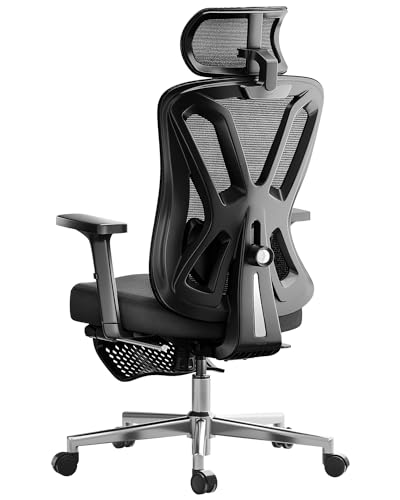
Hbada P5 Ergonomic Office Chair
Our badge: Best Overall
The Hbada P5 Ergonomic Office Chair earns the top spot because it attacks the shoulder problem at its source: adjustability. Its armrests raise and lower so your elbows can rest with your shoulders level, its lumbar support travels up and down, and its 2D headrest adjusts in height and swivels up to 40 degrees, so it can meet the back of your head instead of nudging it forward. The S-shaped mesh back follows the spine’s curve while letting air move, which matters in hour six.
Strengths
- Adjustable armrests prevent the dangling-arm and shrugged-shoulder positions that drive shoulder ache
- 2D headrest adjusts in height and angle for neck support that does not push the head forward
- Mesh back breathes through long, warm work sessions
Trade-offs
- Mesh feel is firmer and less plush than foam chairs
- Sized best for users roughly five feet to five-nine in height
- Footrest configuration adds bulk some small desks cannot spare
| Color | Black |
| Size | 27.56 x 27.56 x 49.41 inches |
| Dimensions | 10.85039368972 x 10.85039368972 x 19.45275588567 inches |
| Weight | 44 pounds |
| Product Group | Furniture |
Setup is where this chair repays ten minutes of attention. Set the seat height so your feet rest flat, then set the armrests so your forearms rest lightly with your shoulders completely relaxed — if you feel your shoulders lift, the rests are too high; if your elbows hang, they are too low. The listing states an adjustable height range of 3.35 inches and a backrest that reclines to 135 degrees, and the lumbar unit can be moved up or down so it meets your lower back rather than your shoulder blades. That separation matters: lumbar support belongs at the waist, and a pad that rides too high pushes the whole upper back forward and loads the shoulders.
Across a working week, the P5’s virtue is that small corrections stay possible. Shoulders that ache on Monday can be answered with a centimetre of armrest height on Tuesday, rather than with a new chair. The chair has passed SGS certification and BIFMA testing according to its listing, and Hbada provides installation guidance and repair support. It is not the plushest seat here, and taller users should read the verdict carefully, but for the specific geometry of shoulder comfort it is the most complete tool in the pool.
Best for: Desk workers whose shoulders ache from armrest and headrest mismatch / Not suited for: Very tall users, who will run out of headrest and back height
Choose it if you want adjustment you will actually use at a fair price; skip it if you are well over average height and look at the Secretlab instead. Check on Amazon
Herman Miller Classic Aeron Chair-Aluminum
Our badge: Best Premium
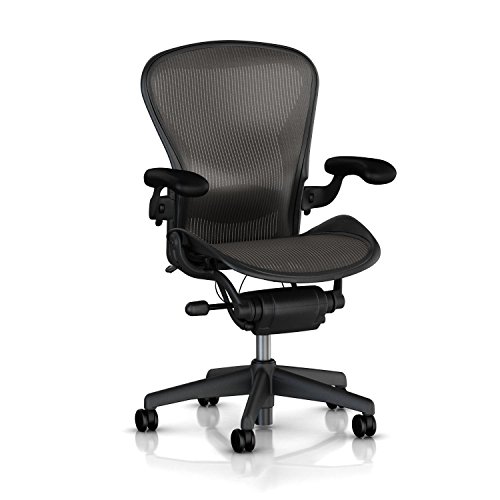
The Herman Miller Classic Aeron Chair-Aluminum is the reference point for ergonomic seating, and for shoulders its gift is movement. Tension control, a rear tilt lock, forward tilt and lumbar support let the chair follow you from upright typing to leaned-back thinking, so your shoulders are not locked into a single loaded position for eight hours. This listing is Size B, the medium, with hardwood-floor casters specified.
Strengths
- Tension control, tilt lock and forward tilt give precise movement control
- Lumbar support and breathable suspension keep long days comfortable
- Hardwood-floor casters are specified for finished floors
Trade-offs
- Size B medium will not fit very tall or very small users correctly
- Controls take a weekend to learn and set properly
- Aluminum build at 50 pounds is not a chair you move casually
| Color | Black |
| Size | Size B (Medium) |
| Dimensions | 16 x 27 x 41 inches |
| Weight | 50 pounds |
| Product Group | Furniture |
| Binding | Kitchen |
The Aeron’s shoulder story is indirect but real. Shoulder tension builds when the rest of the body is braced — when the pelvis is unsupported, the trunk stiffens, and the shoulders join in. A chair that supports the pelvis and lets the back move through a controlled tilt range reduces that whole-body bracing. Forward tilt deserves special mention for shoulder sufferers: it keeps the back supported while you lean into detailed work, instead of the perch-and-reach posture that loads the front of the shoulder.
The honest caveats are fit and commitment. Size B suits the middle of the population; if you are far from it, no amount of adjustment compensates, and the listing’s sparse feature set means you should confirm the exact configuration — arms, tilt options — on the Amazon page before ordering. This is also a chair that rewards a dedicated desk: at 50 pounds with its tuning ritual, it is not for shared hot-desks. For a single user who will set it once and sit for years, it remains the benchmark.
Best for: Dedicated home offices and anyone who sits eight-plus hours daily / Not suited for: Shared or temporary setups where nobody will tune the chair
Choose it if you want the movement benchmark and your build suits Size B; skip it if you need a headrest, which this configuration does not centre. Check on Amazon

Secretlab Titan Evo Black Gaming Chair – Regular
Our badge: Best for Fine-Tuning
The Secretlab Titan Evo Black Gaming Chair – Regular is engineered like equipment. Its 4D armrests move up, down, forward, back and side to side, so elbow support can be placed with unusual precision; its memory-foam magnetic head pillow slides over a wide range and snaps into place; and its built-in lumbar support and cold-cure foam hold a consistent shape. For shoulders that ache because standard armrests never land in the right place, that precision is the point.
Strengths
- Cold-cure foam holds its shape and support for years
- Magnetic memory-foam head pillow adjusts over a wide range
- 4D armrests and built-in lumbar support dial in a precise fit
Trade-offs
- At 76 pounds it is the heaviest desk chair in this guide
- Premium positioning means you must check the listing carefully against your budget
- Regular size will feel snug for very tall or broad users
| Color | Black |
| Size | Regular |
| Dimensions | 19.291338563 x 22.047244072 x 53.937007819 inches |
| Weight | 76.05948039 pounds |
| Product Group | Furniture |
| Binding | Home |
Cold-cure foam is moulded rather than cut, so the seat and back keep the density the designer intended instead of softening unevenly — support in month twelve resembles support in week one. The listing rates the Regular size to 285 pounds, and the tall backrest means the shoulder blades are supported rather than left at the top edge of the chair, a common hidden cause of upper-back and shoulder fatigue in shorter chairs. Spend the first session adjusting methodically: seat height, then armrest height and width so the elbows rest without shrugging, then the head pillow so it cradles the head when you lean back.
The Titan’s weight is a lifestyle decision. At just over 76 pounds it stays where you put it, which suits a permanent gaming or work station and frustrates anyone who rearranges rooms. Its leatherette surface wipes clean and feels cooler than fabric for some users, warmer for others. If your shoulder ache comes with a long torso and a precise streak, this is the chair in the pool most likely to fit you exactly.
Best for: Serious desk workers and gamers who want a fit they can fine-tune / Not suited for: Buyers who move chairs between rooms often, or very large frames beyond the Regular size
Choose it if precision fit is your priority; skip it if you need a chair you can carry upstairs alone. Check on Amazon

Respawn 110 Pro Ergonomic Gaming Chair with Footrest and Recline
Our badge: Best for Recline Breaks
The Respawn 110 Pro Ergonomic Gaming Chair with Footrest and Recline makes its shoulder case through rest rather than posture. Its backrest reclines to 155 degrees with an infinite angle lock, a reinforced retractable footrest carries your legs, and dual-density foam with lumbar support and a cushioned headrest covers the working hours. When shoulders are loaded, the fastest relief is a genuine recline — and this chair reclines further than anything else here.
Strengths
- 155-degree recline with infinite angle lock is the deepest here
- Retractable footrest is reinforced with multi-point brackets
- Dual-density foam and fabric upholstery stay cooler than PU leather
Trade-offs
- Supports up to 275 lb, less headroom than rivals for larger users
- Fabric needs more care than wipe-clean leatherette
- Large footprint needs a proper desk bay, not a cramped corner
| Color | Gray Fabric |
| Size | 28.50″ D x 26.75″ W x 51.50″ H |
| Dimensions | 28 x 26.4 x 51.2 inches |
| Weight | 46.3 pounds |
| Product Group | Furniture |
| Binding | Kitchen |
The workday pattern this chair invites is block-and-release: ninety minutes upright with tilt control and height set properly, then five minutes reclined with the footrest out and the shoulders completely unloaded. That rhythm suits shoulder sufferers better than any single perfect posture, because no posture stays comfortable for eight hours. The gray fabric finish also makes it the easiest gaming chair here to place in a shared living space without it dominating the room.
Check the two honest limits before ordering. The 275-pound capacity is lower than several rivals, so larger users should look at the Secretlab or Homall instead. And the recline needs clearance: measure the space behind your desk, because a 155-degree backrest plus extended footrest describes a long piece of furniture. Within those limits, the Respawn is the break chair this guide would choose.
Best for: Long work-and-play days where you recline properly between tasks / Not suited for: Very large users, or tiny desks with no recline clearance
Choose it if scheduled recline breaks fit your routine; skip it if your desk bay is shallow. Check on Amazon

Homall Gaming Chair
Our badge: Best Budget
The Homall Gaming Chair covers the shoulder basics at an entry price: a flexible headrest, a massage lumbar pillow, a 135-degree recline and a slide-out footrest, with high-density foam under a PU leather cover and a BIFMA-certified metal base rated to 300 pounds. The massage pillow is a comfort extra rather than a medical device, but as a prompt to shift position and relax the lower back, it earns its place.
Strengths
- Slide-out footrest and 135-degree recline support real breaks
- Massage lumbar pillow and headrest included in the box
- High-density foam and BIFMA-certified metal base feel solid
Trade-offs
- Racing style looks out of place in a calm, traditional office
- PU leather can feel warm during summer study marathons
- Footrest is for breaks, not for working with your feet up all day
| Color | White |
| Size | 19.7 inches x 18.5 inches x 50.4 inches |
| Dimensions | 18.5 x 20.9 x 50.4 inches |
| Weight | 39.7 pounds |
| Product Group | Furniture |
| Binding | Kitchen |
The listing gives unusually complete dimensions — seat width 19.7 inches, seat depth 18.5 inches, back height 33.1 inches — and that tall back is relevant here: your shoulder blades rest against the chair rather than below its top edge. The 360-degree swivel and Class 3 gas lift cover the everyday mechanics. Assembly is by numbered and lettered parts with instructions the listing promises are quick to follow.
Set expectations honestly. The armrests are not the multi-direction units of the Secretlab, so elbow placement is less precise, and PU leather will feel warm in a summer room. But for a student or gamer whose shoulders ache after long sessions and whose budget is real, the Homall delivers the three interventions that matter most — headrest, recline, footrest — in one box.
Best for: Students and gamers who study, play and rest in the same chair / Not suited for: Formal home offices that need a restrained, professional look
Choose it if budget leads and you still want a headrest and recline; skip it if precise armrest adjustment is your main need. Check on Amazon

VINGLI Mid-Century Modern Accent Chair
Our badge: Best High-Back Accent
The VINGLI Mid-Century Modern Accent Chair is the exception that proves the accent-chair rule. Most accent chairs stop at the shoulder blades; this one keeps going, with a high back, pocket coils plus high-density foam, metal back support and a sturdy wooden frame. As a reading and recovery chair away from the desk — the second chair in a shoulder sufferer’s day — it has a genuine role.
Strengths
- High back supports shoulders and upper back better than low accent chairs
- Pocket coils plus high-density foam give structured, lasting comfort
- Breathable linen suits long sitting in warm rooms
Trade-offs
- At over 49 pounds it is one of the heavier accent chairs here
- Green colourway is a strong style commitment
- Assembly requires checking all parts carefully before starting
| Color | Green |
| Size | Medium (M) |
| Dimensions | 31 x 31.1 x 35.8 inches |
| Weight | 49.27 pounds |
| Product Group | Furniture |
Why include an accent chair in a shoulder guide at all? Because desk workers with sore shoulders often make their evenings worse in a low lounge chair that lets the shoulders roll forward around a book or phone. The VINGLI’s angled backrest and armrests are designed for relaxation while still supporting the full back, and the linen upholstery stays cool through a long film or chapter. It is not a desk chair and this guide does not pretend otherwise — there is no height adjustment, no swivel, no armrest tuning.
Its weight cuts both ways: planted and reassuring in place, annoying to move. Check all parts against the manual before assembly, as the listing advises. As the away-from-desk half of a two-chair strategy — a pattern the buying guide below recommends — it is the strongest accent option in the pool for shoulders.
Best for: Tall readers and anyone who wants upper-back coverage from an accent chair / Not suited for: Small rooms where a high, wide chair overwhelms the layout, or desk work of any kind
Choose it as your reading and recovery chair; skip it as your only chair if you work at a desk. Check on Amazon
Comparison Table
| Pick | Dimensions | Weight | Colour | Check price on Amazon |
|---|---|---|---|---|
| Hbada P5 Ergonomic Office Chair | 10.85039368972 x 10.85039368972 x 19.45275588567 inches | 44 pounds | Black | Check price on Amazon |
| Herman Miller Classic Aeron Chair-Aluminum | 16 x 27 x 41 inches | 50 pounds | Black | Check price on Amazon |
| Secretlab Titan Evo Black Gaming Chair – Regular | 19.291338563 x 22.047244072 x 53.937007819 inches | 76.05948039 pounds | Black | Check price on Amazon |
| Respawn 110 Pro Ergonomic Gaming Chair with Footrest and Recline | 28 x 26.4 x 51.2 inches | 46.3 pounds | Gray Fabric | Check price on Amazon |
| Homall Gaming Chair | 18.5 x 20.9 x 50.4 inches | 39.7 pounds | White | Check price on Amazon |
| VINGLI Mid-Century Modern Accent Chair | 31 x 31.1 x 35.8 inches | 49.27 pounds | Green | Check price on Amazon |
Read the table as a filter, not a league table: eliminate any chair whose dimensions do not fit your space or whose weight rules out the way you plan to move it, then choose among the survivors on the strengths and trade-offs in their reviews. Prices are deliberately not printed — check the current Amazon listing for each finalist.
How to Choose the Best Chairs for Shoulder Pain
Start With the Armrests
For sore shoulders, armrest geometry outranks every other feature. Your elbows should rest on the pads with your shoulders completely relaxed and your upper arms hanging vertically — forearms roughly horizontal, elbows bent at about a right angle. Armrests that are too high shrug the shoulders toward the ears; too low, and the arms dangle, dragging on the shoulder joint all day; too wide, and you lean sideways to reach them. Adjustable height is the minimum; adjustable width and depth, as on the Secretlab’s 4D rests, is the luxury that solves awkward desk widths. If a chair’s armrests are fixed, measure their height against your seated elbow height before buying.
Width deserves its own sentence, because it is the armrest dimension nobody lists prominently and many bodies notice. If the rests are too wide apart, you will lean or reach outward to use them, trading a shrug for a sideways load; too narrow, and broader users perch their elbows on the inner edges. Pivoting and sliding rests solve this quietly. Also check pad length: a pad that ends before your elbow when you recline abandons you exactly when you lean back to rest. Finally, consider whether the rests can move out of the way entirely — for musical instruments, some crafts and certain mobility needs, a chair whose arms lift or remove is worth more than a fourth adjustment direction. Match the armrest brief to your actual day, not to a generic office photograph.
Place the Headrest Behind the Head, Not Under the Neck
A headrest should contact the back of your head when you lean back, supporting its weight so the neck and shoulder muscles can release. A rest that sits at the neck pushes the head forward and increases the load the shoulders carry. Look for height adjustment first and angle adjustment second — the Hbada’s swivelling rest and the Secretlab’s sliding magnetic pillow solve the same problem two ways. If you never recline, a headrest matters less; if you take calls leaning back, it matters daily.
Check Back Height Against Your Shoulder Blades
Measure from your seat to the top of your shoulder blades and compare it with the chair’s back height. A backrest that ends below the shoulder blades leaves the upper back unsupported and the shoulders to stabilise themselves; one that reaches or passes them lets you rest the whole back. This is why the tall-backed gaming chairs and the VINGLI accent chair appear in a shoulder guide while prettier low chairs do not. Readers weighing a fuller ergonomic brief should cross-check Best Office Chairs For Support, where back height is scored alongside the whole support chain.
Treat Desk and Screen as Part of the Chair
No chair can out-adjust a bad workstation. A desk that is too high forces shrugged shoulders whatever the armrests do; a screen that is too low or too far pulls the head and shoulders forward. Set the screen top near eye level and about an arm’s length away, keep the keyboard close so elbows stay by your sides, and then tune the chair to that geometry. If your desk is fixed and high, a chair with a greater seat-height range plus a footrest is the honest workaround.
Plan Breaks Into the Purchase
Shoulders unload when posture changes, so build the break into the chair choice: a deep recline with a footrest, a second chair for reading, or simply a chair that makes standing easy. The Respawn and Homall reclines exist in this guide precisely because scheduled five-minute resets beat eight hours of one perfect posture. Set a timer if your work swallows time; the chair can only help when you use the positions it offers.
How Should You Set Up a Chair to Ease Shoulder Strain?
Work from the floor up. Feet flat, with the seat height set so knees sit near a right angle. Seat depth next: sit fully back and check for a small gap behind the knees. Then the back: lumbar support at the waist curve, not under the shoulder blades. Armrests after that, raised until they just meet your elbows with shoulders relaxed — this is the step most people skip and the one that matters most here. Headrest last, positioned to meet the back of the head when you lean back. Change one thing at a time and sit for several minutes between changes, because bodies report novelty before they report fit.
Then live with the setup for several days before revisiting it, and keep a short note of what you changed. Shoulders adapt slowly; a setting that feels strange on day one may be correct by day four. If the chair is shared, record each user’s settings where the design allows. Readers furnishing a whole room around recovery and rest sometimes also look at Best Sofas For Older Adults, where supportive seating for the rest of the household is the brief.
Problem: Shoulders creep up toward your ears by mid-afternoon — Your armrests are too high, or your desk is. Lower the rests until the shoulders drop, and if the desk forces the height, raise the chair and add a footrest instead of shrugging.
Problem: One shoulder aches more than the other — Look for asymmetry: a mouse placed too far right, a phone cradled on one side, a bag carried on one shoulder. Centre the keyboard, bring the mouse close, and alternate any one-sided habits.
Problem: The headrest pushes your head forward — Lower it, tilt it back, or remove it if the design allows. A headrest should only touch your head when you deliberately lean back.
Problem: Ache arrives during calls, not typing — You are probably perching without back contact while you talk. Recline slightly, rest your back fully, and let the headrest take your head’s weight.
How Often Should You Reset Your Sitting Position?
More often than feels necessary. A workable rhythm is a posture change every thirty minutes and a full stand or recline break every hour or two, adjusted to your own tolerance. Use the chair’s range: upright for typing, a slight recline for reading, a deep recline with the footrest for a genuine reset. Set a quiet timer until the rhythm becomes habit. Movement is not a failure of ergonomic setup — it is the point of it, and the chairs in this guide with wide recline ranges and easy tilt make the rhythm pleasant rather than dutiful.
Micro-movements count too. Between formal breaks, shrug your shoulders deliberately and let them drop, roll them slowly in both directions, and let your arms hang completely loose at your sides for twenty seconds so the muscles fully release. These are comfort habits, not exercises or treatment, and they pair naturally with the moments your work already interrupts you — a file saving, a page loading, a colleague answering. Notice also what your shoulders do during concentration: many people discover they brace whenever a task gets difficult, whatever the chair. Awareness plus a chair that does not force bracing is a powerful combination, and it costs nothing. If one position reliably provokes your ache — reaching for a high shelf of files, twisting to a second monitor — rearrange the room before you blame the chair, because rotation and reach are room problems that seating can only soften.
Armrests, Headrests and the Shoulder Line
This is the section most shoulder guides skip, and it is the one that decides outcomes. Your shoulder line — the level at which your shoulders sit when relaxed — is the reference for the whole upper workstation. Armrests exist to hold your elbows at that line; headrests exist to hold your head above it without muscular effort; the backrest exists to support the shoulder blades against it. When any of the three is misplaced, the shoulder muscles quietly take over the job, and they invoice you by evening. That is why this guide ranks an adjustable mid-priced chair first and treats fixed-geometry chairs as matches that must be verified against your own measurements.
The practical takeaway is to measure before you mourn. Seated elbow height, shoulder-blade height and head position are all knowable with a tape measure and a helper. Compare them honestly with the dimensions in each review’s specification box, and let those numbers eliminate chairs before upholstery and style enter the conversation. Readers comparing supportive seating beyond the desk will find Best Orthopedic Sofas a useful neighbouring read for the living-room half of the day.
Desk Height, Screen Height and Chair Height as One System
Ergonomics fails when each item is bought separately and blamed separately. The chair, desk and screen form one geometry: the screen sets your head position, the desk sets your elbow position, and the chair must be able to meet both. If your shoulders ache, audit the system in that order before replacing the chair — a monitor riser or a keyboard tray sometimes solves what a new chair cannot. When the chair genuinely is the weak link — fixed armrests at the wrong height, a back that ends mid-spine — the picks above are ranked to replace it.
Home setups add one more variable: the chair often serves two rooms or two people. Compromise consciously. A chair tuned for one user’s shoulder line will be wrong for a taller partner, so favour quick, repeatable adjustments and agree the settings rather than re-tuning blindly each day. That realism, more than any single feature, is what separates a chair that helps for a week from one that helps for years.
Laptops deserve a specific warning in this system, because they break the geometry twice at once: the screen sits low, pulling the head forward, while the keyboard sits attached to that low screen, forcing a choice between a good head position and a good elbow position. You cannot have both with a laptop alone on a desk. The standard fix — raise the laptop on a stand and use a separate keyboard and mouse — restores the geometry the chair was tuned for, and it is cheaper than any chair in this guide. Docking-station users who alternate between a desk monitor and a bare laptop should notice which setup coincides with their worst evenings; the pattern usually identifies the culprit within a week. Treat the chair as the foundation of the system, by all means — but audit the whole system before spending twice.
Common Buying Mistakes
Buying the Plushest Chair
Soft padding feels kind in a showroom minute and lets the shoulders roll forward by the hour. For shoulder comfort, structure and adjustability beat plushness every time.
Ignoring Armrest Specifications
Buyers compare backs and seats and forget the feature their elbows use all day. If armrest height is fixed, measure it; if it adjusts, that range is a headline feature, not a footnote.
Treating a Headrest as Automatically Good
A badly placed headrest is worse than none. Only count a headrest as a benefit if its height — and ideally angle — can be set to meet the back of your head.
Expecting a Chair to Treat Pain
A chair can remove aggravating positions; it cannot diagnose or treat a shoulder condition. Persistent, worsening or injury-related pain deserves professional assessment, and this guide’s comfort framing is not a substitute.
Setting the Chair Once and Never Again
Bodies, desks and tasks change. Revisit your setup monthly, especially armrest height, and after any change of desk, screen or footwear habits.
Final Recommendation
For most readers searching for the best chairs for shoulder pain, the answer is the Hbada P5 Ergonomic Office Chair: its adjustable armrests and headrest address the actual mechanics of shoulder strain at a fair price. If you want the premium movement benchmark and suit Size B, the runner-up is the Herman Miller Classic Aeron Chair-Aluminum — Check on Amazon. Readers whose day is long as well as painful should cross-check Best Chairs For Working Long Hours before ordering, and everyone should confirm the current price, colour and availability on the Amazon listing, since those details change often and are deliberately not printed here. Whichever you choose, set it up using the floor-up sequence in this guide, then revisit the armrest height after the first week, once your shoulders have delivered their honest verdict on the initial settings.
Frequently Asked Questions
What armrest height is best for sore shoulders?
The height at which your elbows rest on the pads with your shoulders completely relaxed and level — upper arms vertical, forearms roughly horizontal. If you cannot achieve that because the rests are fixed, measure before buying; if they adjust, set them after the seat height, and re-check whenever you change desks.
Can a headrest make shoulder pain worse?
Yes, when it is positioned at the neck or angled so it pushes the head forward. That forward push increases the load carried by the neck and shoulder muscles. Set the rest to meet the back of the head only when you lean back, tilt it rearward if it adjusts, or remove it if the design allows and it cannot be placed correctly.
Is mesh or foam better for shoulder comfort?
Neither directly — shoulders respond to geometry, not upholstery. Mesh breathes and holds a consistent shape; moulded foam like cold-cure foam offers firmer, sculpted support. Choose based on your room temperature and preference, and spend your decision energy on armrest, back-height and headrest fit instead.
How long should I sit before taking a break?
Change posture roughly every thirty minutes and take a full stand, walk or recline break every hour or two. The exact interval matters less than the habit: shoulders unload when position changes, and chairs with easy recline make the habit stick.
Should armrests touch my elbows all day?
They should be available at the right height whenever you want them, but constant contact is not required. Many people rest their elbows while typing and drop the arms while thinking. What matters is that the rests are never so high they shrug you, nor so low you lean to find them.
What is the best first choice for best chairs for shoulder pain?
The Hbada P5 Ergonomic Office Chair is the first choice in this guide, because its adjustable armrests, travelling lumbar support and adjustable headrest meet the demands of shoulder-friendly sitting with the fewest compromises. Check its full review above for the strengths and trade-offs behind that ranking, and confirm current price and availability on Amazon before buying.


