Disclosure: As an Amazon Associate, dailyhomedecorating.com earns from qualifying purchases. Links to Amazon on this page are affiliate links; they cost you nothing extra. Prices and availability change often, so check the current Amazon listing before you buy.
The best computer chairs for back support share one trait that marketing rarely leads with: their support is positioned where your back actually is, and it stays there for the whole session. Computer work holds the spine in a small set of positions for a long time — upright for typing, slightly reclined for reading, leaned-in for detail — so a chair’s lumbar shape, back height, recline behaviour and seat depth matter more than how plush it feels in the first minute. This guide ranks six chairs from a verified product pool on exactly those mechanics, with the adjustment logic explained and the compromises stated plainly. If your discomfort sits higher, between the shoulder blades, Best Desk Chairs For Upper Back Pain re-weights a similar pool toward back height and headrests.
Every specification below comes from verified listing data — dimensions, weights, stated features and capacities exactly as listed, nothing estimated or invented. This guide makes comfort claims, not medical ones: a chair can remove aggravating positions, and persistent back pain deserves professional assessment. Read the Quick Picks for the short answer, the reviews for the support reasoning, and the adjustment sections for the setup sequence that makes any of these chairs support you properly.
Where to Buy
All six picks are sold on Amazon. Check the current listing for the latest price, colour and size options, delivery timing and availability before you buy, because all of these change often.
- Hbada P5 Ergonomic Office Chair — our first choice for adjustable back support. Check on Amazon
- Herman Miller Classic Aeron Chair-Aluminum — Check on Amazon
- Secretlab Titan Evo Black Gaming Chair – Regular — Check on Amazon
- Respawn 110 Pro Ergonomic Gaming Chair with Footrest and Recline — Check on Amazon
- Homall Gaming Chair — Check on Amazon
- VINGLI Mid-Century Modern Accent Chair — Check on Amazon
In this guide
Quick Picks
| Pick | Badge | Why it earns its place |
|---|---|---|
| Hbada P5 Ergonomic Office Chair | Best Overall | Travelling lumbar support and an S-shaped mesh back that follows the spine. |
| Herman Miller Classic Aeron Chair-Aluminum | Best Premium | Suspended support and tilt control that keep the back supported through movement. |
| Secretlab Titan Evo Black Gaming Chair – Regular | Best for Fine-Tuning | Built-in lumbar, cold-cure foam and 4D arms for a precisely dialled fit. |
| Respawn 110 Pro Ergonomic Gaming Chair with Footrest and Recline | Best for Recline Breaks | Dual-density foam and a 155-degree recline to unload the back between blocks. |
| Homall Gaming Chair | Best Budget | A tall 33.1-inch back, lumbar pillow and recline at an entry price. |
| VINGLI Mid-Century Modern Accent Chair | Best Accent Alternative | High-back, coil-supported reading comfort away from the desk. |
Key Takeaways
- Start with the Hbada P5: its lumbar support moves to meet your back rather than hoping your back meets it.
- Lumbar support belongs at the waist curve — a pad under the shoulder blades is a posture problem, not a feature.
- Back height decides upper-back support; measure yours before believing any chair’s claims.
- Recline is a back tool: supported leaning beats unsupported perching for reading and calls.
- Every pick is specified from verified data only; check the Amazon listing for current price and availability.
- Whole-desk shoppers should also compare Best Desk Chairs For Home, where footprint and looks share the ranking.
How These Picks Were Chosen
The pool for this guide was fixed before writing began: chairs with Amazon listings whose titles, brands and specifications could be verified. Shortlisting for back support applied the mechanics in order. First, lumbar: is there a support, where does it sit, and can it move? Second, back height and shape: does the backrest reach the shoulder blades, and does its curve follow the spine or fight it? Third, seat and recline behaviour: does the seat depth park the pelvis against the backrest, and can the chair support a lean as well as an upright sit? Chairs failing the first test entirely — however handsome — were excluded from the desk ranking, which is why one pick here is explicitly an away-from-desk chair and labelled as such.
The method is stated plainly, as throughout this series: verified manufacturer and listing data assessed against established seating ergonomics. No hands-on clinical testing is claimed, and no chair is presented as a treatment. No prices are printed because they change; no popularity figures appear because they would be stale. Where the guide uses numbers — lumbar placement, seat-depth gaps, recline angles — they are widely used fitting benchmarks offered so you can audit your own setup.
Badges follow the ranking: Best Overall for the most complete adjustable support, then premium, fine-tuning, breaks, budget and accent specialists. One theme deserves naming at the top: back support is a chain — feet, pelvis, lumbar, shoulder blades, head — and a chair that perfects one link while ignoring the rest will disappoint in a way that feels mysterious until the chain is understood. The deep-dive sections below walk the chain link by link, and the broader support ranking in Best Office Chairs For Support scores this same pool against the whole chain at once.
The 6 Best Computer Chairs for Back — Reviewed

Hbada P5 Ergonomic Office Chair
Our badge: Best Overall
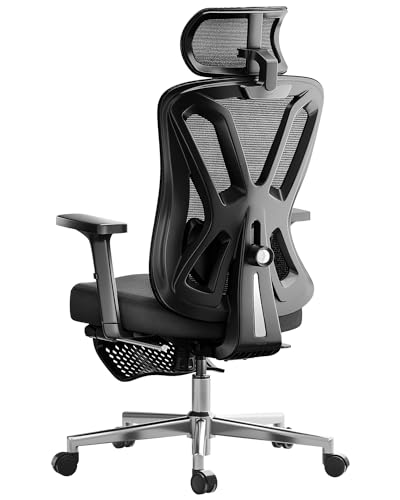
The Hbada P5 Ergonomic Office Chair leads because its lumbar support goes where backs actually are: the support adjusts up and down, so it can be placed at your waist curve whether you are five feet tall or five-nine. The S-shaped backrest follows the spine’s natural profile, the mesh keeps air moving across the back through long sessions, the armrests adjust so shoulders do not undo the back’s good work, and the 2D headrest adjusts in height and angle. The backrest reclines to 135 degrees, the seat height adjusts across a 3.35-inch range, and the listing notes SGS certification and BIFMA testing.
Strengths
- Adjustable lumbar support moves up and down to meet your back
- 2D headrest adjusts in height and angle for neck support
- Mesh back breathes through long, warm work sessions
Trade-offs
- Mesh feel is firmer and less plush than foam chairs
- Sized best for users roughly five feet to five-nine in height
- Footrest configuration adds bulk some small desks cannot spare
| Color | Black |
| Size | 27.56 x 27.56 x 49.41 inches |
| Dimensions | 10.85039368972 x 10.85039368972 x 19.45275588567 inches |
| Weight | 44 pounds |
| Product Group | Furniture |
The setup logic is the review in miniature: seat height first, feet flat; then lumbar, slid until it fills the waist curve with gentle, even pressure — you should feel supported, not pushed; then armrests to elbow height; headrest last, meeting the back of the head only when you lean back. Because every element moves, the P5 can be re-tuned as your body and habits change, which is the real long-term support story: not a perfect factory setting, but a chair that can keep finding your back, month after month.
Its limits are size and feel. The height guidance in the listing suits the middle band of users; taller backs should look to the Titan’s taller frame. And mesh divides opinion — suspended and cool, but firmer than foam devotees expect. For the majority of computer workers with ordinary backs and warm rooms, it is the most complete support-per-price answer in the pool.
Best for: Computer workers who want lumbar support that adjusts to them / Not suited for: Very tall users, or anyone who dislikes a firm mesh feel
Choose it for adjustable support; skip it if your torso outruns its size band. Check on Amazon
Herman Miller Classic Aeron Chair-Aluminum
Our badge: Best Premium
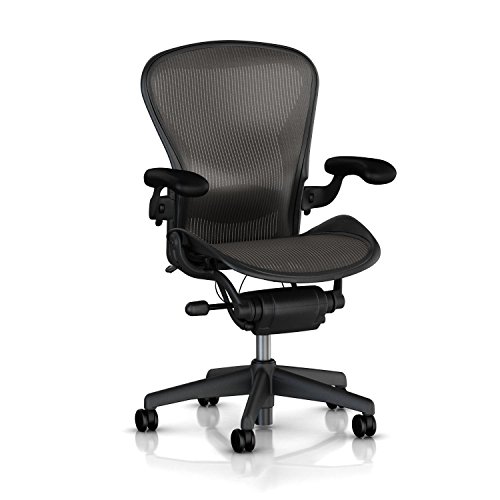
The Herman Miller Classic Aeron Chair-Aluminum supports the back by supporting everything the back rests on: a suspended seat that distributes pelvic weight evenly, lumbar support, and a movement system — tension control, rear tilt lock, forward tilt — that keeps the back in contact and supported as you shift between typing, thinking and leaning in. This listing is Size B, the medium, in aluminum at 50 pounds, with hardwood-floor casters.
Strengths
- Tension control, tilt lock and forward tilt give precise movement control
- Lumbar support and breathable suspension keep long days comfortable
- Hardwood-floor casters are specified for finished floors
Trade-offs
- Size B medium will not fit very tall or very small users correctly
- Controls take a weekend to learn and set properly
- No headrest in this configuration
| Color | Black |
| Size | Size B (Medium) |
| Dimensions | 16 x 27 x 41 inches |
| Weight | 50 pounds |
| Product Group | Furniture |
| Binding | Kitchen |
Forward tilt is the back feature this guide most wants to rescue from obscurity. Computer work constantly tempts a perch — leaning toward the screen, back off the backrest, spine self-supported. Forward tilt brings the support with you into that lean, so the lumbar contact survives the posture you actually adopt for detail work. Combined with a tilt tension set to your weight, the chair turns the day’s micro-movements into supported movement instead of a series of unsupported exceptions.
The conditions are the familiar ones: Size B must fit your seated measurements, the exact configuration should be confirmed on the listing (the pool data is concise), and the chair rewards a dedicated desk and a patient first weekend of tuning. For the correctly sized user whose back is the priority and whose budget allows the benchmark, it remains the support reference against which the rest of this guide is measured.
Best for: Dedicated desk professionals sized for Size B / Not suited for: Users outside the medium band, or anyone needing a headrest
Choose it on measurements; skip it on size mismatch, however tempting the badge. Check on Amazon

Secretlab Titan Evo Black Gaming Chair – Regular
Our badge: Best for Fine-Tuning
The Secretlab Titan Evo Black Gaming Chair – Regular builds its back case from structure: built-in lumbar support, cold-cure foam that holds its moulded shape for years, a tall backrest that reaches the shoulder blades, a memory-foam magnetic head pillow adjustable over a wide range, and 4D armrests that keep the shoulders from sabotaging the back. The listing rates the Regular to 285 pounds.
Strengths
- Cold-cure foam holds its shape and support for years
- Magnetic memory-foam head pillow adjusts over a wide range
- 4D armrests and built-in lumbar support dial in a precise fit
Trade-offs
- At 76 pounds it is the heaviest desk chair in this guide
- Premium positioning means you must check the listing carefully against your budget
- Regular size will feel snug for very tall or broad users
| Color | Black |
| Size | Regular |
| Dimensions | 19.291338563 x 22.047244072 x 53.937007819 inches |
| Weight | 76.05948039 pounds |
| Product Group | Furniture |
| Binding | Home |
The cold-cure point matters specifically for backs: a backrest’s support is its shape, and cut foam loses shape unevenly — softening where load concentrates, which is precisely the lumbar zone. Moulded foam keeps the designer’s curve where your curve needs it, in year three as in week one. The tall back completes the chain for taller torsos, and the head pillow, correctly placed at the back of the head, lets the neck and upper back release during reclined reading and calls.
Its costs are weight, price-tier and size ceiling: at just over 76 pounds it is installed furniture, and users at the extremes of height or breadth should verify the Regular’s intent on the listing. For the long-session computer user who wants one precise fit and the construction to keep it, this is the gaming-format answer to the Aeron’s office-format one.
Best for: Long computer sessions demanding a precise, durable fit / Not suited for: Frequent movers, or frames beyond the Regular size
Choose it for structure that lasts; skip it if you need mesh coolness. Check on Amazon

Respawn 110 Pro Ergonomic Gaming Chair with Footrest and Recline
Our badge: Best for Recline Breaks
The Respawn 110 Pro Ergonomic Gaming Chair with Footrest and Recline supports the back in two modes: dual-density foam, lumbar support and a cushioned headrest for the working hours, and a 155-degree recline with infinite angle lock plus a reinforced retractable footrest for the unloading breaks. Backs do not only need support; they need intervals without load, and this chair’s recline is the deepest in the pool.
Strengths
- 155-degree recline with infinite angle lock is the deepest here
- Retractable footrest is reinforced with multi-point brackets
- Dual-density foam and fabric upholstery stay cooler than PU leather
Trade-offs
- Supports up to 275 lb, less headroom than rivals for larger users
- Fabric needs more care than wipe-clean leatherette
- Large footprint needs a proper desk bay, not a cramped corner
| Color | Gray Fabric |
| Size | 28.50″ D x 26.75″ W x 51.50″ H |
| Dimensions | 28 x 26.4 x 51.2 inches |
| Weight | 46.3 pounds |
| Product Group | Furniture |
| Binding | Kitchen |
Dual-density foam is the quiet support feature: a firmer foundation with a softer contact layer resists the bottoming-out that turns hour six into a slump, while feeling welcoming at hour one. The gray fabric keeps the chair calm in a home office and cooler against the back than PU leather in warm rooms. Used in blocks — upright work, full recline, repeat — it gives the spine the varied loading that a single perfect posture never can.
Mind capacity and clearance: 275 pounds stated, and a long reclined footprint that needs measuring behind the desk. Within those, for the worker whose back asks for real breaks rather than micro-adjustments, the Respawn is the most therapeutic-shaped tool here — in the comfort sense of the word, which is the only sense this guide uses.
Best for: Block-and-break workers who recline properly between tasks / Not suited for: Users over the stated capacity, or shallow desk bays
Choose it for the breaks; skip it if capacity headroom leads. Check on Amazon

Homall Gaming Chair
Our badge: Best Budget
The Homall Gaming Chair makes the budget back case with geometry: a back height of 33.1 inches stated in its listing — tall enough to support the shoulder blades of most users — a massage lumbar pillow, a flexible headrest, a 135-degree recline and a slide-out footrest, over high-density foam and a BIFMA-certified metal base rated to 300 pounds. Seat width 19.7 inches and depth 18.5 inches complete an unusually honest dimension set.
Strengths
- Slide-out footrest and 135-degree recline support real breaks
- Massage lumbar pillow and headrest included in the box
- High-density foam and BIFMA-certified metal base feel solid
Trade-offs
- Lumbar pillow position is manual, not a built-in adjustable system
- PU leather can feel warm during long summer sessions
- Racing style looks out of place in a calm, traditional office
| Color | White |
| Size | 19.7 inches x 18.5 inches x 50.4 inches |
| Dimensions | 18.5 x 20.9 x 50.4 inches |
| Weight | 39.7 pounds |
| Product Group | Furniture |
| Binding | Kitchen |
The lumbar pillow deserves both its credit and its caveat. Credit: a pillow can be placed exactly at your waist curve, raised, lowered or removed — a flexibility built-in systems envy. Caveat: it can also migrate, and a pillow that has slid to mid-back becomes the problem this guide opened with. Anchor it, check it weekly, and treat the massage function as a comfort prompt to shift and settle, not as therapy. With that discipline, the Homall delivers the tall back, the recline and the footrest that backs ask for, at the pool’s friendliest tier.
Assembly is by numbered parts, the lift is Class 3, and the swivel covers desk reach. For a student or first-home-office buyer whose back has begun to complain, it is the correct first intervention — with the premium picks waiting, understood, when the horizon lengthens.
Best for: Budget buyers needing tall-back geometry and a recline / Not suited for: Buyers wanting built-in, set-and-forget lumbar systems
Choose it for value with real dimensions; skip it if pillow discipline sounds unlikely. Check on Amazon

VINGLI Mid-Century Modern Accent Chair
Our badge: Best Accent Alternative
The VINGLI Mid-Century Modern Accent Chair is this guide’s controlled experiment: what does back support look like without a single adjustment? Its answer — a high back reaching the shoulders, pocket coils plus high-density foam, metal back support and a sturdy wooden frame, in breathable linen — is the best fixed-geometry back in the pool, offered here as the reading-and-recovery chair beside a desk setup, not as a desk chair itself.
Strengths
- High back supports shoulders and upper back better than low accent chairs
- Pocket coils plus high-density foam give structured, lasting comfort
- Breathable linen suits long sitting in warm rooms
Trade-offs
- No adjustment at all — the fixed geometry must fit you as it stands
- At over 49 pounds it is one of the heavier accent chairs here
- Green colourway is a strong style commitment
| Color | Green |
| Size | Medium (M) |
| Dimensions | 31 x 31.1 x 35.8 inches |
| Weight | 49.27 pounds |
| Product Group | Furniture |
Its role in a back-conscious household is the posture change: an hour’s reading or a call taken in a chair with a different back angle and a different pressure map rests the desk posture completely, in a way no in-chair fidget achieves. The angled backrest and armrests are designed for that relaxed-but-supported position, and the linen keeps it cool. Check parts carefully before assembly, as the listing advises, and place it within a few steps of the desk so the habit forms.
Do not promote it beyond its role: eight hours of keyboard work in a fixed accent chair would trade one problem for another. As the second chair in a two-chair system — the pattern this site’s long-hours guide also endorses — it is the strongest accent option for backs in the pool. Households furnishing the whole room may also weigh Best Sofas For Older Adults, where supportive fixed seating for the rest of the family is the brief.
Best for: Reading, calls and recovery breaks beside a proper desk chair / Not suited for: Use as your only computer chair
Choose it as the companion; skip it as the main chair. Check on Amazon
Comparison Table
| Pick | Dimensions | Weight | Colour | Check price on Amazon |
|---|---|---|---|---|
| Hbada P5 Ergonomic Office Chair | 10.85039368972 x 10.85039368972 x 19.45275588567 inches | 44 pounds | Black | Check price on Amazon |
| Herman Miller Classic Aeron Chair-Aluminum | 16 x 27 x 41 inches | 50 pounds | Black | Check price on Amazon |
| Secretlab Titan Evo Black Gaming Chair – Regular | 19.291338563 x 22.047244072 x 53.937007819 inches | 76.05948039 pounds | Black | Check price on Amazon |
| Respawn 110 Pro Ergonomic Gaming Chair with Footrest and Recline | 28 x 26.4 x 51.2 inches | 46.3 pounds | Gray Fabric | Check price on Amazon |
| Homall Gaming Chair | 18.5 x 20.9 x 50.4 inches | 39.7 pounds | White | Check price on Amazon |
| VINGLI Mid-Century Modern Accent Chair | 31 x 31.1 x 35.8 inches | 49.27 pounds | Green | Check price on Amazon |
Read the table as a filter: eliminate by size and weight, then choose on the support mechanics in the reviews. Prices are deliberately not printed — check the current Amazon listing for each finalist.
How to Choose the Best Computer Chairs for Back
Lumbar Support: Position Beats Presence
Every chair claims lumbar support; the question is whether it lands on yours. Your lumbar curve sits at the waist, roughly where a belt rides. A support fixed for a different torso, or a pillow that migrates, misses that target by inches and can worsen posture by pushing the mid-back forward. Adjustable height — the Hbada’s travelling unit — is the reliable answer; a well-placed built-in curve, as on the Titan, is the durable one; a pillow, as on the Homall, is the flexible one that demands discipline. Test any chair by sitting fully back and asking where the pressure lives: waist, good; shoulder blades, wrong chair or wrong setting.
Seat Depth Parks the Pelvis
Back support begins before your back touches anything. If the seat is too deep, you perch forward and the backrest might as well not exist; too shallow, and you slide into a slouch. Sit fully back: there should be a small gap — about two fingers — between the seat edge and the back of your knees, with your pelvis in contact with the backrest. That parked pelvis is the foundation every lumbar system assumes. Chairs that publish seat depth, like the Homall, respect this; chairs that hide it make you gamble, and backs pay for lost gambles.
Back Height and the Shoulder-Blade Line
Measure from your seat to the top of your shoulder blades and compare it with candidate back heights. A backrest ending below that line leaves the upper back self-supported — tolerable for short sits, wearing across a workday, and the specific complaint behind the upper-back guide linked at the top of this article. Tall backs with headrests extend the supported zone to the head for reclined work. There is no virtue in a backrest taller than you need, but there is real cost in one shorter.
Recline Is a Support Feature
A supported recline redistributes load from the seat to the backrest and opens the hip angle — which is why reading and calls feel easier leaned back. Judge recline by range, lock quality and whether support contact survives it: on a good chair the lumbar stays with you as you lean; on a poor one you slide out of the support zone. The Respawn’s 155 degrees with an infinite lock is the pool’s extreme; the Aeron’s controlled tilt is its most refined. Either beats the unsupported perch that passes for leaning at most desks. The full-day pattern for using recline well is set out in Best Chairs For Working Long Hours.
Armrests Guard the Back Indirectly
Shoulders and back are one system: armrests at the wrong height shrug or drag the shoulders, the upper back compensates, and by evening the complaint is filed under “back”. Set rests so elbows rest with shoulders relaxed, and prefer chairs whose rests adjust — or, failing that, measure fixed rests against your seated elbow height before buying. It is the cheapest back feature to check and the most commonly skipped.
How Should You Adjust a Computer Chair for Your Back?
Work from the floor up, in this order, changing one thing at a time. Feet flat, seat height set so knees sit near a right angle. Seat depth audited: sit fully back, check the two-finger gap. Lumbar next: place the support at the waist curve, firm enough to feel present, gentle enough to forget. Backrest angle: upright for typing, a slight recline as your neutral if you read often. Armrests: elbows resting, shoulders level and relaxed. Headrest last, and only if you recline: it should meet the back of the head, never push it. Then work a full day before judging, and re-tune once at the week’s end — bodies report novelty first and fit second.
Keep a note of your final settings if the chair is shared, and re-run the sequence after any change of desk, screen or chair position. Most “my chair stopped working” stories are geometry drift, not product failure: a new monitor raised the head, a moved desk changed the reach, and the back noticed before the owner did.
Problem: The lumbar support feels like a fist in your back — It is too high, too proud, or you are sitting forward of it. Lower it to the waist curve, sit fully back so your pelvis meets the backrest, and reduce its prominence if it adjusts; support should feel like a hand, not a knuckle.
Problem: You keep sliding forward out of the support zone — Check seat depth and tilt tension: a too-deep seat or a forward-sloping setup ejects you slowly. Add the two-finger check, level the seat, and let the backrest do its job.
Problem: Upper back aches while the lower back is fine — Your backrest likely ends below the shoulder blades, or your screen is pulling you forward. Raise the screen, bring it closer, and consider a taller-backed pick from this guide.
Problem: Support feels right at 9am and wrong by 4pm — That is fatigue and drift, not a broken chair: build in the posture changes and recline breaks the rhythm section prescribes, and re-check armrest height, which shoulders abandon first.
How Often Should You Change Position at a Computer?
More often than your focus wants to. A sustainable pattern: micro-changes — a lean, a stretch of the legs, a shift of the back’s contact — whenever they occur to you; a posture change roughly every thirty minutes; a stand, walk or full recline break every hour or two. Use the chair’s range as the menu: upright for typing, reclined for reading, footrest out for the reset. The evidence-informed principle behind every pick in this guide is that backs thrive on varied loading. A chair that makes variation easy will outperform a marginally better chair that locks you into one perfect, punishing position.
Lumbar Support: Adjustable, Built-In and Pillow Compared
The three lumbar philosophies in this guide deserve a direct comparison, because the right one depends on your household. Adjustable systems (the Hbada) travel to the user — ideal for shared chairs, changing bodies and anyone whose current chair taught them that fixed support misses. Built-in curves (the Titan, the Aeron’s approach) cannot migrate or be misplaced, hold their shape for years, and suit a single dedicated user whose torso matches the designer’s intent. Pillows (the Homall) are infinitely placeable and infinitely losable — perfect for the disciplined, disappointing for the forgetful.
There is no hierarchy here, only fit between philosophy and person. The mistake is buying a philosophy you will not operate: the adjustable chair never adjusted, the pillow never re-anchored, the built-in curve bought for the wrong torso. Read your own habits as honestly as you read the listings, and let that self-knowledge — a specification no manufacturer can print — make the final call between otherwise close picks.
Mesh Versus Foam for Back Support
Suspended mesh and moulded foam distribute back pressure by opposite means. Mesh tensions across a frame, spreading load broadly and breathing continuously — backs stay cooler, and the support feel is firm and even, with no localised pressure points and no foam to fatigue. Moulded foam sculpts: it can be shaped into pronounced lumbar and lateral contours that mesh cannot match, and cold-cure construction holds those contours for years, at the cost of warmth and eventual, if distant, fatigue. Cut foam is the budget version of the same idea with a shorter honest lifespan.
For backs specifically, the practical difference shows up in hour six: mesh users report coolness and consistency; foam users report cushion and contour. Neither is a medical variable. Choose by your room’s temperature, your preference for firm-even versus soft-shaped, and your horizon — then spend your remaining decision energy on placement, which both materials reward equally and which decides more backs’ days than the mesh-versus-foam debate ever will.
The back’s day does not end at the desk, and neither does this guide’s responsibility. Evenings spent folded into a low sofa undo afternoons of good lumbar placement with the reliability of tide tables, which is why back-conscious households eventually audit the whole sitting landscape: desk chair, reading chair, sofa. The desk end is this article; the reading end is the VINGLI’s role within it; the sofa end is ranked for supportive models in Best Orthopedic Sofas, and the three together form the system your back actually experiences. You do not need to buy all three in a season — but you should know which of the three is currently your weakest link, because that is where the next purchase belongs, and it is not always the chair you sit in for work.
A closing word on evidence and patience. Back comfort responds slowly and honestly: a correctly placed lumbar support can feel merely neutral for the first days, because the body is comparing it with the memory of strain rather than with strain itself. Judge any finalist across two weeks of real work, re-tune once at the midpoint, and keep the simple diary this series keeps recommending — where the ache sits, when it arrives, what changed. Patterns in that diary are worth more than any review, including this one, because they are measured on the only back the purchase actually concerns. Bring the same patience to the buying decision and the same scepticism to any chair — at any price — that promises to fix a back quickly: support is a geometry, maintained daily, and the chairs in this guide were ranked for how well they let you maintain it.
Shared and hot-desking arrangements deserve a final note, because backs suffer quietly in them. A chair tuned for one body is a wrong chair for the next, and in shared setups nobody re-tunes — the adjustment levers might as well be welded. If your computer chair serves two or more people, prioritise adjustments that are fast, obvious and repeatable over those that are precise but fiddly, agree a settings card kept at the desk, and accept a fit that is good for everyone over a fit that is perfect for whoever adjusted it last and wrong for the rest of the week. Households where one chair must serve a whole family’s computing will get more back health from that discipline than from any single product upgrade this guide can offer.
A closing word on evidence, because back-care shopping attracts confident claims the way few categories do. This guide has made none: no chair here is promised to fix, cure or prevent anything, and the strongest statement any review makes is that a given geometry supports a given posture for a given body. That restraint is deliberate, and it is the standard to hold every other source to — including the listing pages themselves, where marketing language runs warmer than this guide’s. Buy geometry, verify fit in your own first week, keep the diary, and involve a professional when the pattern persists. The chair is furniture; the back is yours; the evidence that matters is the evidence your own week produces.
Common Buying Mistakes
Buying Lumbar Support by the Label
“Lumbar support” on a box tells you a component exists, not where it lands. Position and adjustability are the feature; the label is the advertisement for it.
Sitting Forward of the Backrest
The most expensive mistake is free: perching. If your work pulls you forward — screens low, desks deep — fix the geometry, or no chair’s back can reach you.
Ignoring Seat Depth
A deep seat quietly cancels the backrest for shorter users; a shallow one manufactures a slouch. Run the two-finger test before the return window closes, not after.
Expecting a Chair to Treat Back Pain
Chairs remove aggravating positions; they do not diagnose or treat. Persistent, radiating or worsening pain belongs to a professional, promptly — this guide’s comfort framing is not a substitute.
Judging Support in a Ten-Minute Sit
Backs vote at hour six, not minute ten. Give finalists real workdays, re-tune once, and let the second week decide — especially before premium money moves.
Final Recommendation
For most readers searching for the best computer chairs for back support, the answer is the Hbada P5 Ergonomic Office Chair: a lumbar support that travels to your waist, an S-shaped breathing back, and adjustment everywhere the chain needs it, at a fair price. For the premium, movement-based alternative, the runner-up is the Herman Miller Classic Aeron Chair-Aluminum — Check on Amazon — bought on the Size B measurement check its review insists on. Everyone should confirm the current price, colour and availability on the Amazon listing, since those details change often and are deliberately not printed here. Set the chair up floor-first, give it a week, and let your back deliver the verdict it has been waiting to give.
One more audit repays the effort before you spend anything: photograph your current sitting posture from the side, at the end of a real workday, without posing. The photograph is merciless and free — the perch, the slouch, the screen-lean, the feet tucked under the chair — and it converts this guide from general advice into a personal brief. Buy against the photograph. If it shows a pelvis parked and a back in contact, your chair is nearly innocent and your habits need the work; if it shows the classic forward collapse, the chair and the desk geometry share the blame, and the sequence in this guide — depth, lumbar, screen, arms — is the order in which to repay it.
Expect an adjustment period, and do not mistake it for failure. A back accustomed to slouching often reports correct support as merely unfamiliar for the first several days, because its muscles are relearning an easier job. Give any finalist two weeks of real work, re-tune once at the end of week one, and judge at the end of week two — by then novelty has worn off, the diary has a pattern, and the verdict belongs to the chair rather than to first impressions. That patience, applied at purchase, is the difference between a chair that supports you for years and a sequence of nearly-right chairs, each returned or relegated a fortnight too early to have told the truth.
Frequently Asked Questions
Where should lumbar support actually sit?
At the waist curve — the inward curve of the lower back, roughly at belt height when seated. Placed there, it fills the gap between chair and spine and keeps the pelvis upright. Placed higher, it pushes the mid-back forward; lower, it digs at the pelvis. Adjustable supports exist because waist height varies with torso length; set yours by feel, sitting fully back, until the pressure is even and easy to forget.
Is a high back better for back support?
For the upper back, yes by definition: support cannot be given by a backrest that is not there. A back reaching the shoulder blades supports the full spine’s working day, and a headrest extends that to reclined rest. For lower-back-only needs, a mid-back with excellent lumbar placement can serve as well — match the back’s height to where your own support runs out.
Can a gaming chair support my back properly?
Yes — the format is irrelevant, the mechanics are everything. The gaming chairs in this guide earn their places with tall backs, lumbar systems, recline ranges and, in the Titan’s case, moulded foam that outlasts most office chairs. Judge any chair, gaming or office, on lumbar position, back height, seat depth and construction, and ignore the category label entirely.
How do I know if my chair is causing my backache?
Look for the pattern: ache that builds across the sitting day, eases after weekends away from the chair, and localises where your chair’s support is absent — under the shoulder blades with a low back, at the waist with a misplaced lumbar. Then change one variable — borrow a better chair for a week, or fix your current setup with this guide’s sequence — and see if the pattern moves. Persistent pain regardless of pattern deserves professional assessment.
Should my feet be flat or on a footrest?
Flat on the floor is the default the whole geometry assumes. A footrest is the correct correction when the chair must sit high for the desk, and a comfort tool during recline breaks — the built-in rests on two picks here serve that second purpose. What feet should never do is dangle: dangling feet drag the pelvis out of the backrest’s reach and quietly cancel its support.
What is the best first choice for best computer chairs for back?
The Hbada P5 Ergonomic Office Chair is the first choice in this guide, because its travelling lumbar support meets the demands of computer-chair back support with the fewest compromises. Check its full review above for the strengths and trade-offs behind that ranking, and confirm current price and availability on Amazon before buying.


