Disclosure: As an Amazon Associate, reviewstook.com earns from qualifying purchases. Links to Amazon on this page are affiliate links; they cost you nothing extra. Listing details such as price and availability change often, so check the current Amazon listing before you buy.
The simplest upgrade to a bedside table is also the most overlooked: a clock with a USB port built in. You plug your phone cable into the clock, the clock plugs into the wall, and one fewer adapter takes up an outlet. If you are looking for the best alarm clocks with USB ports, the practical questions are how many ports you get, how the clock shows the time, and whether it keeps working when the power blinks.
This guide is for people who charge by cable and have no interest in a wireless pad, plus anyone who wants a straightforward alarm with a useful extra. We compare five models from Emerson, La Crosse and Sangean. For each one we describe what the maker lists, who it fits, and what it leaves out. Charging speed, safety and cable advice always come from the manufacturer’s instructions, so use the listing as your reference.
Quick Comparison
| Product | Best for | Main point | Link |
|---|---|---|---|
| Emerson ER100401 | A no-fuss phone-charging clock | Dual alarm radio with a USB phone port | Check on Amazon |
| Emerson ER100202 | Mixed cable and cable-free charging | USB port plus Qi pad and Bluetooth | Check on Amazon |
| La Crosse 617-1485B | Colorful display and temperature | Multi-color LED clock with a USB port | Check on Amazon |
| La Crosse 617-249 | A curved LED look | Curved-face LED clock with USB charging | Check on Amazon |
| Sangean RCR-20 | Radio fans who also charge by cable | Digital tuner, Bluetooth and a USB charger | Check on Amazon |
In this guide
How These Options Were Chosen
We used maker pages, retailer listings and published specifications. We have not used any of these clocks ourselves, and we do not report real-world charging times. To qualify, a clock had to have a USB port on the unit, an established brand, a clear model code, and a normal alarm function. We then looked for variety in display style, radio features and extras, so that the five picks cover different bedside habits. Amperage figures differ across listings, and the maker’s page is the final word on what a port can supply.
The Best Alarm Clocks With USB Ports
Emerson SmartSet Dual Alarm Clock Radio with USB Charging Port ER100401
The ER100401 is the model that most people picture when they imagine a clock radio with a phone port. The maker lists a dual alarm, an AM and FM radio, and a USB port described at 2.1A and 5V for phone charging. It sits on the nightstand, shows the time in numbers you can read from bed, and keeps the cable clutter in one spot.
Two alarms make it practical for couples or for different weekday and weekend schedules. The radio gives you a wake-up that does not depend on a phone. For a first bedroom clock, or a replacement for one that died, the layout is familiar and the controls are not hard to learn.
The limits are those of a basic design. There is no wireless pad and no streaming, so music has to come from the radio or from your phone speaker. Look at the listing for the display dimmer and the battery backup details. Skip it if you want Bluetooth, since the ER100202 handles that role in the same family.
Emerson SmartSet Dual Alarm Clock Radio with Bluetooth Wireless Charging and USB Charger ER100202
If one charging method does not cover your household, the ER100202 offers two. A retail listing shows a built-in USB port at 2.1A, plus a Qi pad and Bluetooth. The cable port serves older phones, tablets or a second device, while the pad is there for a handset that supports wireless charging.
This is a useful fit where family members own different phones. One person uses the pad, another uses the cable, and the clock stays the same. It is also a handy fallback: when a phone case blocks the pad, the USB port is still available.
The downside is bulk. With radio, Bluetooth and a pad, the housing is bigger than the ER100401, and its extra functions add menu steps. If you only ever charge by cable, you may be paying for features you will not touch. Skip it if you want the simplest possible clock with a port.
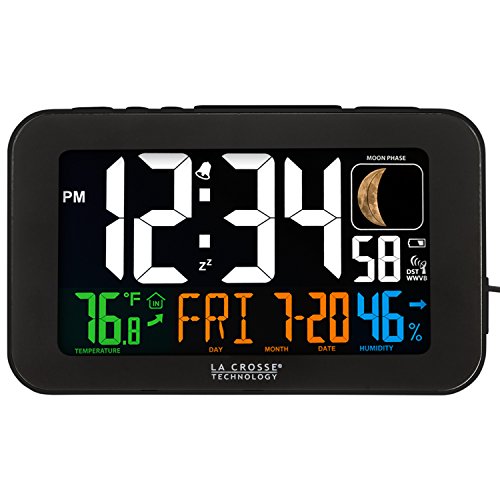
La Crosse Technology Color LED Alarm Clock with USB Charging Port 617-1485B
La Crosse takes a more modern look with the 617-1485B. Retailers list a multi-color LED display, a temperature reading, snooze and a USB charging port, and the maker also describes an automatic time-setting feature that is covered in our atomic clock guide. The color of the numbers can be changed, so you can match a room or choose a shade that is easier on your eyes.
It is well suited to someone who values a clear display. The digits are large, and the layout puts the time first, with the temperature as an extra. For a person who keeps a phone plugged in all night, the clock doubles as a charging station with a neat footprint.
It has no radio and no speaker, so it is strictly a clock with a port. The display glows, so if you sleep with the room fully dark, look at the dimmer options on the page. Skip it if you need a radio alarm or Bluetooth audio.
La Crosse Technology Atomic Curve LED Alarm Clock with USB Charging Port 617-249
The 617-249 is a close relative of the clock above, with a curved front and an LED readout. A retailer lists it as an Atomic Curve LED alarm clock with a USB charging port, which places it in the same family as the 617-1485B but with a different shape. The curved face is the main style difference.
Choose it for the look of the front panel and the straightforward operation. A curved design can make the numbers easier to see from the side, which helps if the clock sits on a low table and you look at it from an angle. As with its sibling, the USB port keeps a phone close to the bed.
Again, there are no audio features, and the plain face means fewer ways to customize. It is a good option for a bedroom or an office desk but not for someone who wants radio, Bluetooth or a color-changing display. Skip it if you prefer the temperature readout and color options of the 617-1485B.
Sangean RCR-20 Digital AM FM RDS Bluetooth Clock Radio with USB Charger
The RCR-20 comes from a company that builds radios, and it brings that background to the bedroom. Retail pages mention an AM and FM digital tuner with RDS, Bluetooth, a USB charger and a battery backup. The tuner and the cabinet are the reasons to consider it.
Think of it as a table radio that also charges a phone. A person who opens the day with the news, wants a decent sound and charges a phone by cable will find the combination convenient. Because it has a dedicated USB charger, you do not need a separate adapter on the nightstand.
Because it is a larger piece, it asks for more space and more time with the manual than the La Crosse units. It also costs more than the simpler clocks on this list, so make sure you will actually use the radio. Skip it if you want a compact clock or if radio does not interest you.
Best Alarm Clocks USB for a Shared Bedroom
The Emerson ER100401 has two alarms, a radio and one port, which covers most shared-room needs. Each person can set a time and one phone can charge. If both of you need to charge, add a second plug for the other device.
Best LED Alarm Clocks With USB Chargers
For a bold LED face, the two La Crosse clocks are the pair to compare. The 617-1485B has color options and a temperature reading, while the 617-249 has a curved look. Neither plays audio, which suits those who just want the time.
Best Alarm Clocks With Phone Charger and Radio
The Sangean RCR-20 is the radio-first choice, and the Emerson models are the practical alternatives. Pick Sangean if you value the tuner, Emerson if you want a simpler layout.
Best for Travelers’ Guest Rooms
A guest room benefits from a clock that visitors can use without learning anything. The ER100401 fits, because the port is obvious and the alarm buttons are labeled. Leave a spare cable beside it for visitors who forgot theirs.
How to Choose
Count your devices first. A single port charges one device at a time, and a clock cannot charge a laptop. If two people need to charge overnight, look for a clock with two ports or add a small power strip, using the maker’s instructions for any plug-in accessories.
Next, think about the display. LED clocks are bright and easy to read, but a bright face may keep some people awake, so check for dimmer settings. A colored display lets you choose a shade that feels calmer, while a curved face may be easier to read from the side.
Consider the alarm. Dual alarms help in shared rooms, and a radio adds a non-phone way to wake up. If you want streaming audio, Bluetooth is available on the Emerson ER100202 and the Sangean RCR-20. The La Crosse pair keep it simple.
Think about backup power. A battery backup helps the clock keep its settings through a short outage. Not every model has it, so confirm on the listing. Without backup, you might need to reset the time after an interruption.
Finally, check the footprint and cord. A large clock radio may crowd a small table. Measure the space, and see where the plug will land. A common error is buying the cabinet first and the length of cable second.
Installation, Safety and Legal Notes
Use the adapter and cable that came with the clock, and follow the maker’s instructions for the maximum output of the port. Do not use damaged cables, and keep the clock away from moisture. If you want to add outlets next to the bed, ask a licensed electrician rather than running extension cords under rugs. Some rented rooms limit what you can plug in, so check any house rules if you live in shared accommodation.
Care and Troubleshooting
| Problem | What to try |
|---|---|
| Phone charges slowly | Use the cable the phone maker supplies and check the port output on the listing |
| Display resets | Replace the backup battery if the model has one |
| Radio is noisy | Move the clock away from routers and chargers |
| Port does not work | Reseat the cable and test with another cable |
Dust the vents gently and wipe the case with a dry cloth. Unplug the clock before cleaning around the ports.
Charging Speed and What the Port Can Really Do
A USB port on an alarm clock is a convenience feature, not a fast charger. Most clocks in this category use the older rectangular USB-A style, and the output is commonly around 1 amp, sometimes more. That is enough to top up a phone overnight, which is exactly what this feature is meant for, but it will not match a modern wall charger. If a phone supports faster charging, it may fall back to a slower rate when plugged into a clock.
It helps to understand the numbers on a spec sheet. Volts multiplied by amps gives watts, the power available. A typical basic port delivers about 5 watts. Tablets and some larger phones can draw more than that, so a tablet may charge very slowly or show a charging-slowly warning. Over eight hours of sleep, though, even a modest rate can put a useful amount of charge into a phone.
- Check whether the port provides a stated current rating, and compare it with your device.
- Remember that the wireless charging pad on the Emerson ER100202 is a separate feature from its USB port, and each has its own output.
- A clock with a single port shares its output when two things are plugged in, if it has more than one.
Display Brightness, Light and Sleep
The display is the part you will see all night, so it deserves as much attention as the charger. A bright red or blue LED can light up a bedroom and disturb sleep, particularly for light sleepers. Look for a dimmer with several levels, and check whether the lowest setting is low enough for a dark room. Some people want the display off entirely, which only a few models allow.
Color can matter too. Red and amber displays are often considered less disruptive at night than white or blue, though individual sensitivity varies. A larger digit size makes it easier to read without glasses but also throws more light. If you are sharing a room with someone who sleeps early, the dimming range may be the deciding factor between two otherwise similar clocks.
Where to put the clock
Placing the clock slightly out of direct line of sight reduces the glow when you are lying down. A nightstand to the side usually works better than a shelf directly in front of the bed. Keep the vents clear so the electronics do not trap heat, and avoid putting a clock next to a radiator or window in direct sun.
Power Backup, Power Cuts and Timekeeping
An alarm that does not sound is the worst failure for this kind of product. Many digital clocks include a battery backup slot, which keeps the time and alarm settings through a short power cut. Some sound the alarm during an outage, and others only hold the settings, so read the listing carefully. If you rely on the alarm for an early flight or shift, backup that actually triggers the alarm is worth looking for.
Timekeeping can also differ. Standard clocks count the mains frequency or use a crystal and may drift by a few minutes over months. The La Crosse model named Atomic Curve suggests radio-controlled timekeeping, which sets itself from a radio time signal where reception is available. Confirm that on the product page. If it does, there is no manual correction after a power cut or daylight saving change, provided the signal reaches your room. Concrete walls, appliances and distance from the transmitter can all weaken reception.
- Set the alarm and check it the first night, rather than assuming it works.
- Replace the backup battery once a year, especially if the clock is used for early alarms.
- Know how to switch between AM and PM, which is the setting most often set wrong.
Sound, Radio and Wake-Up Style
How you want to wake up should shape the choice. A plain buzzer is loud but can feel harsh. A radio alarm lets you wake to music or news but needs decent reception, and weak signal causes static. The Sangean RCR-20 adds Bluetooth, so it can also play audio from a phone. Gradual or dual alarms help couples who wake at different times.
Think about the morning routine as well. If you tend to hit snooze repeatedly, a clock with a long, awkward snooze interval or a separate small button for it can break the habit, while a large snooze bar is easier to find in the dark. If you travel, a compact clock with a reliable battery backup and a simple time-setting process is less frustrating in an unfamiliar room than one with many hidden menu options.
Check for a snooze length you can live with, a volume control that goes low enough for a quiet room and a back-up tone in case the radio station drops out. If you share a room, look for dual alarms, which let each person set their own time. A clear, bold control layout also helps, because you will be using it half-asleep.
The Nightstand Power Audit: Start With the Sockets
Before choosing among these clocks, audit the power situation they will join, because a USB clock is really a small power station with an alarm attached. Count what already competes for the nightstand sockets: the clock’s own plug, a lamp, a phone charger, perhaps a wearable’s charger, a humidifier, a partner’s mirror image of the same list. A clock with a USB port earns its keep precisely when sockets are the scarce resource, absorbing the phone’s overnight charge into its own footprint and returning a socket to the household. If your nightstand already has spare sockets and a fast charger you love, the USB port is a convenience; if it has a waiting list, the port is the point of the purchase.
Cable geography belongs in the same audit. A phone charged from a clock sits where the clock sits, which sounds obvious until the first night you want to read in bed with the phone plugged in and discover the cable’s reach defines your posture. Think about which side of the bed the clock will live on, whether the phone’s owner sleeps on that side, and whether a second phone will be reaching across in the dark. Households with two phones and one clock routinely solve this with the clock on one side feeding its owner’s phone, and a simple long cable from a wall charger serving the other side, rather than demanding one clock run the whole bed’s power grid.
Finally, consider what the phone does while it charges. A phone on the nightstand is a phone within reach, and many households buy a clock partly to demote the phone: charge it from the clock, face down, across the room’s near corner, so the alarm clock becomes the bedside’s public face and the phone stops being the last and first screen of the day. That arrangement is a genuine feature of this category, worth as much as the charging itself, and it favours clocks whose own display and controls are complete enough that the phone is never needed as a flashlight, a backup clock or a radio.
How the Five Picks Divide the USB Territory
The Emerson ER100401 is the straightforward proposition: a dual-alarm clock radio whose USB port exists to serve the phone, with the SmartSet family’s automatic timekeeping removing setup friction. It suits the household that wants the classic clock-radio experience with the modern phone absorbed into it. The Emerson ER100202 adds Bluetooth and wireless charging to the same idea, which changes the nightstand maths again: the phone can rest on the clock itself, cable-free, while the USB port remains for a second device, a partner’s phone, a tablet or a wearable’s cable.
The La Crosse 617-1485B brings a colour display and a design aimed at readability, its USB port serving the overnight charge while the clock serves the room as a small information panel, time and temperature at a glance. The La Crosse Atomic Curve 617-249 adds the atomic time signal to a similar formula, which matters in households that value a clock that is simply always right, resetting itself after outages and seasonal changes without ever being asked. The Sangean RCR-20 stands apart as the listener’s choice, a proper radio with Bluetooth and a USB charger, bought by people for whom the clock is a music and talk device first and a charging station second.
Choosing among the five is therefore a question of emphasis. If the phone’s charge is the headline, the Emersons lead, with the ER100202 the most complete power hub. If the room’s information and effortless correctness headline, the La Crosse pair lead. If sound headlines, the Sangean leads. None of the five is a fast-charging station in the dedicated-charger sense, and the next section explains why that is usually fine, and when it is not.
Charging Expectations: Overnight Is a Long Time
The honest way to judge a clock’s USB port is against the overnight window, not against a rapid charger’s sprint. A phone plugged in at eleven and unplugged at seven has eight hours to charge, a span in which even a modest port fills any modern phone completely, with time to spare. The port’s modest speed only matters in the exceptions: the phone that arrives at the nightstand nearly empty an hour before sleep and must leave full at dawn, the tablet with its larger battery sharing the port, the quick top-up during the day when the clock is pressed into service as a desk charger. Know your exceptions. Households whose phones live the ordinary overnight life will never notice the port’s pace; households with shift patterns and short turnarounds should keep a dedicated fast charger in the kitchen or bag and let the clock do the slow, kind work of the night.
Slow charging has a quiet virtue worth naming: it is gentle. Batteries age fastest under heat and haste, and an overnight trickle at the nightstand is among the kindest charging regimes a phone can live on. Owners who keep phones for many years often deliberately choose the slow port for the nightly charge and reserve fast charging for genuine urgency. The clock on your nightstand, in other words, is not a failed fast charger; it is a successful slow one, and the distinction reframes the whole category.
Heat is the variable to watch regardless of speed. A phone charging under a pillow or buried in bedding is a phone cooking slowly, whatever feeds it. The clock-based setup helps here almost by accident: the phone must sit out in the open to reach the clock’s port or pad, visible and ventilated. Keep that openness as a rule, and the nightstand power system stays as safe as it is convenient.
The Alarm Half of the Bargain
It is easy, in a guide about ports, to forget that the clock must still wake somebody. The alarm features across these five follow the patterns covered earlier in this guide, dual alarms for couples and schedules, radio or tone wake options, dimming displays, and the details that decide daily satisfaction are the tactile ones. Can the alarm be set in the dark without a menu? Can the snooze be found by a hand that is not awake yet? Does the display dim to a level a light-sensitive partner can sleep beside, or turn off entirely while the alarm stands guard? Test these in the first evenings, while an exchange is painless, because they are the features you will use ten thousand times.
Backup behaviour deserves the same early test. Unplug the clock for a minute on a quiet evening and learn what it remembers. The atomic and SmartSet models rebuild their time automatically, which is their quiet glory; battery-backed models hold their settings through the gap. What you are rehearsing is the storm night in February, and the household that has rehearsed it sleeps through the storm without a flicker of doubt about the morning. A clock radio with a phone charging from it carries a second stake in that rehearsal: if the power dies, the phone stops charging too, and the fail-safe morning may need the phone’s own alarm as the independent layer, set on the nights when the weather threatens.
Sound, finally, is the alarm’s voice. Radio wake spreads its character across stations, as the radio guide in this series discusses; tone wake is a known quantity. For the USB clocks, whose buyers often chose them for everything except the alarm, a week of real mornings is the only honest review. Set the alarm for the real time, resist the phone’s backup for a few days where the stakes allow, and let the clock prove itself in the role its name promises.
Households the USB Clock Serves Best
Guest rooms are this category’s showcase. A guest confronted with an unfamiliar house, a dying phone and no spare charger is rescued completely by a clock that offers a port or a pad, and hosts who provide one earn disproportionate gratitude. The guest-room clock should be the simplest to set in the house, because its user is tired, polite and unwilling to wake the household to ask how the alarm works. The Emerson models’ automatic time and the La Crosse models’ legibility both serve this room well, and the Sangean’s radio gives the guest a local station to wake to, a small orientation gift in a strange town.
Teenagers’ rooms are the second showcase, for the opposite reason: the USB clock gives the phone a sanctioned overnight home that is not the bed. House rules about phones charging outside the pillow’s reach become physically easy when the clock provides the port, and the alarm, being a clock, cannot be swiped away, muted by an app setting or left in a school bag. Parents consistently report that the clock’s dumb reliability is the feature: it does one job, in one place, and its very lack of cleverness is what the household needed.
Small flats and bedsits complete the trio. Where the nightstand is also the desk and the charging station for a whole life, a clock that consolidates time, alarm, radio and phone power into one footprint returns precious surface to its owner. In those rooms, choose the most complete hub the budget allows, which in this guide is the ER100202 pattern, wired and wireless charging together, and let one object do the work of four. Consolidation, in a small room, is not a convenience feature. It is the architecture of the room itself.
Keeping the Power Hub Healthy
A clock that charges phones lives a harder electrical life than a clock that merely tells time, and a little care extends it. Keep its vents and speaker grille dusted, since a warm device in a dusty corner ages faster. Use the cable the phone’s maker blesses, or a reputable equivalent, because the cheapest cables are where charging problems, heat and intermittent connections are born, and they are routinely blamed on innocent ports. If a phone ever charges oddly from the clock, test the same cable in a wall charger and the same port with another cable before condemning anything; the two-minute cross-check saves a good clock from an unjust return.
Surge protection, mentioned elsewhere in this series for clocks generally, doubles in importance when the clock is also the phone’s overnight lifeline: one bad surge can take both the alarm and the charge. A protected socket strip behind the nightstand is cheap insurance for the whole system. Beyond that, the USB clock asks nothing exotic. It wants a permanent home, a display brightness the room can sleep beside, and an owner who set its alarms once, properly, and then let it get on with being the hardest-working small object in the bedroom, part clock, part radio, part power station, and entirely taken for granted, which is the surest sign it was chosen well.
Travel, Spare Rooms and the Second Clock Question
Households that fall for a USB clock at the main bedside often ask whether the same model should colonise the rest of the house, and the answer is usually a qualified yes with a twist. Consistency has real value: one set of controls learned once, alarms set by muscle memory in any room, guests and teenagers facing the same friendly interface everywhere. The twist is that different rooms use the formula differently. The spare room values the port above all; the teenager’s room values the alarm’s unarguability; a home office desk values the radio and the top-up charge during the day. Buying the same clock for all three is defensible, but buying each room its emphasis, from the five above, usually serves better for the same total spend.
As a travel companion the bedside USB clock mostly stays home, and rightly: hotels increasingly provide ports, and a dedicated travel clock, covered elsewhere in this series, packs smaller. The exception is the long stay, the rented flat, the month with relatives, where bringing the familiar clock imports a piece of home routine into a strange bedroom and guarantees the phone a charging home that does not depend on borrowed cables. If you do travel with one, pack its power supply in hand luggage and set it up on arrival, in daylight, rather than at midnight in a strange room, which is when unfamiliar clocks win their arguments.
One more household pattern deserves a mention: the clock as the bedside’s diplomat between generations. Grandparents staying over understand a clock instantly and a charging station not at all; children understand the port and ignore the clock. A USB clock speaks to both, offering the older guest a familiar face and the younger one a familiar socket, and in houses that host both ends of the family across a year, that bilingual quality quietly earns the nightstand space no single-purpose device could hold. It is a small thing, like most of what this category does, and like most of them it is noticed only when it is missing.
And a word for the second phone in the bed, the partner’s, which so often ends up charging from a trailing cable on the floor, one bad night away from a cracked screen, a tripped sleeper, a twisted ankle in the dark, or a charger kicked silently out of its socket until morning reveals an empty battery. Even where the clock serves only one phone directly, its arrival usually triggers a general tidying of the bedside power, a small strip fitted, cables shortened and routed, and that tidying, humble as it sounds, is frequently the improvement the household actually remembers a year later.
A Fortnight’s Test for a New USB Clock
Judge a new USB clock across two ordinary weeks rather than the first excited evening. In week one, keep a small mental ledger of the charge: note the phone’s level when it goes on the clock and when it comes off, twice or three times, until you trust the port’s overnight promise completely. Note also the dark test: set and cancel the alarm once with your eyes closed, and find the snooze by touch alone. A clock that passes the dark test has passed the only examination that matters at 6 a.m. in February. In week two, run the outage rehearsal described above, check whether the display’s lowest brightness lets both sleepers sleep, and watch whether the phone’s new home on the clock has actually changed the household’s screen habits, which for many buyers was the hidden point of the purchase.
If the ledger shows a full phone every morning, the dark test is passed, and the rehearsal ends with the clock recovering its time and its temper unaided, you own the right clock and can stop evaluating. That state of finished business, reached by the end of a fortnight, is what distinguishes a considered purchase from a hopeful one, and it is available for every model in this guide provided the emphasis, hub, radio or display, was matched to the household at the start.
When the Port Is Not Enough: Honest Limits
Close with the cases where this category should talk a buyer out of itself. If your phone must fast-charge because your life runs on short turnarounds, a dedicated charger remains essential equipment and the clock’s port becomes a top-up at best; buy the clock then for its alarm and radio, not its amperage. If your nightstand already hosts a multi-device charging station that the household loves, a USB clock duplicates it, and the simpler clocks in this series, judged purely as alarms, may serve better. If two phones, a tablet and two wearables all need overnight power on one side of one bed, no clock in this guide is your power station, and pretending otherwise ends in a tangle of splitters and disappointment.
These limits define rather than diminish the category. For the great middle of households, one or two phones, a socket shortage, a wish to see the phone demoted and the clock promoted, the USB alarm clock is the nightstand’s natural citizen. Choose its emphasis honestly, radio, hub or display, rehearse its backup behaviour once, protect it from surges, and it will repay you the way the best household objects do: by making a small daily system, wake, charge, rise, simply stop being something you think about.
Frequently Asked Questions
Can a clock charge a tablet?
Some can, though charging may be slow. Compare the listed output with what your tablet maker asks for.
Does the USB port work when the clock is off?
That depends on the model. Check the manual for the way the port is powered.
Is a USB clock better than a power strip with a charger?
A clock with a port saves a socket, but a strip is more flexible if you have many devices.
Will the cable fit with a thick phone case?
Most cables fit, but some cases have narrow openings. Test it before bedtime.
Do any of these show the temperature?
The La Crosse 617-1485B lists a temperature display. Check the other pages.
Can I turn the display off?
Many have a dimmer. A full off setting is less common, so check the listing.
Will a clock USB port charge my phone as fast as a wall charger?
Usually not. Clock ports are typically designed for modest output, around 1 amp or about 5 watts, so a phone will charge more slowly than with a modern fast charger. For overnight use, it is normally enough. If you need a quick top-up, use your phone charger and keep the clock for the bedside.
Does an alarm clock with battery backup still ring during a power outage?
It depends on the model. Some use the battery only to keep the time and settings, while others will also sound the alarm. The listing should say which. If you depend on an early alarm, choose a clock that explicitly sounds during an outage, and replace the battery regularly.
What is an atomic alarm clock?
An atomic clock sets itself using a radio time signal sent by a national time authority. It can correct for daylight saving changes and drift without you touching it. Reception depends on your location and the building, so it works better near windows and away from electronics. Without signal, it still behaves like a normal clock.
What display color is best for sleeping?
Many people find red or amber displays less disruptive than blue or white, though comfort varies. What matters most is a dimmer that goes low enough for a dark room, or an option to turn the display off. If a bright display bothers you, place the clock out of direct view.
Bottom Line
For a basic phone-charging clock, the Emerson ER100401 is the easy choice. The ER100202 offers more charging methods, the two La Crosse models offer clear LED faces, and the Sangean RCR-20 suits radio fans. Count your devices, check the power rating on the listing, and follow the maker’s instructions.