Disclosure: As an Amazon Associate, reviewstook.com earns from qualifying purchases. Links to Amazon on this page are affiliate links; they cost you nothing extra. Listing details such as price and availability change often, so check the current Amazon listing before you buy.
A bedside clock can now answer questions. Say a few words and it sets an alarm for the morning, tells you the weather, adds a timer or plays a playlist. The best voice interactive alarm clocks combine a clock face with a speaker and a screen, so a high tech nightstand needs only one device.
This guide is for people who want to set alarms by talking, for households that already use a voice assistant and for anyone who wants a smart alarm clock for productivity, with reminders and routines in the same place as the time. We compare five devices from Amazon and Google, explain the differences in screen, camera and sound, and describe the trade-offs for privacy and for plugging a device into the bedroom. Everything below comes from the makers’ pages.
Quick Comparison
| Product | Best for | Main point | Link |
|---|---|---|---|
| Amazon Echo Spot | A compact round-style clock | Small display built around the time | Check on Amazon |
| Amazon Echo Show 5 (3rd Gen) | A small touch screen | Compact display with a camera shutter | Check on Amazon |
| Amazon Echo Show 8 (3rd Gen) | A larger screen for the kitchen and bedroom | Bigger display and fuller sound | Check on Amazon |
| Amazon Echo Dot with Clock (5th Gen) | A voice speaker with a simple time display | LED display on a speaker | Check on Amazon |
| Google Nest Hub (2nd Gen) | Google Assistant homes | Touch display with no camera | Check on Amazon |
In this guide
How These Options Were Chosen
We used maker pages and published specifications and picked devices that combine a visible clock, a speaker and voice control. We have not used these devices ourselves, so we do not describe how well they hear you from across a room or how the screens look in a dark bedroom.
These products change quickly, and generation names are replaced often. Check each listing for the generation, availability and whether the software support is still being offered for the device you plan to buy.
The Best Voice Interactive Alarm Clocks
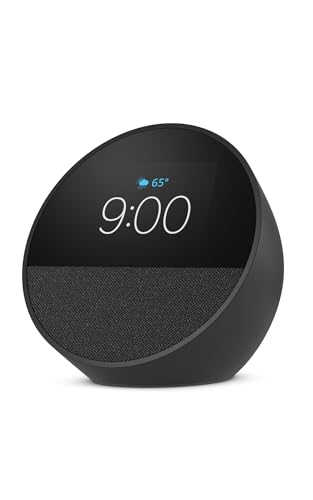
Amazon Echo Spot Smart Alarm Clock with Alexa
The Echo Spot is the Amazon device designed around the bedside role. Its compact display puts the time at the center, and Alexa is built in, so you can say a request for an alarm and have it set. It is smaller and more clock-like than the Echo Show range, which helps on a crowded nightstand.
It suits someone who wants the clock to look like a clock while keeping voice control for the rest. You can ask about the weather before getting out of bed, or ask for a timer while you brush your teeth.
The trade-offs are the usual ones for a smart speaker. It needs power and a wireless connection, and a small screen means you will not watch videos on it. Read the listing for camera and microphone controls, and be aware that it has a microphone listening for a wake word.
Choose it if you want a small smart clock. Skip it if you want a big screen.
Amazon Echo Show 5 (3rd Gen) Smart Display
The Echo Show 5 is a compact smart display with a touch screen of roughly five inches. It can show the time in different clock faces, show the weather and give you touch controls for alarms. Amazon describes a camera with a built-in shutter, and the shutter is the part to read about if you worry about privacy in the bedroom.
It fits the buyer who wants a touch interface, since you can tap the screen to snooze or stop an alarm. The size works on a bedside table without dominating it.
The weakness is that it is a general smart display, so the screen can show more than you want in a dark room. Learn how to lower the brightness, and how to turn off the camera and microphone. Check the listing for how sound is handled, since a small speaker has limits.
Choose it if you want touch plus voice. Skip it if you do not want a camera in the room.
Amazon Echo Show 8 (3rd Gen) Smart Display
The Echo Show 8 is the larger screen in the family, and it is the better fit for a room that serves more than one purpose. In a bedroom with a bench or a dresser, it can show a bigger clock, a slideshow of photos or a video call. Amazon lists fuller sound than the smaller models.
It suits people who want the device to do more than tell the time: playing a podcast, showing a recipe, or acting as the household hub. For an alarm, the large display is easy to read.
The compromise is size. On a small nightstand it looks like a tablet on a stand, and a large screen can be a distraction when you wake in the night. It has a camera, so read the privacy controls before you use it near the bed.
Choose it if the room needs a hub. Skip it if you only want a clock.
Amazon Echo Dot with Clock (5th Gen) Smart Speaker
The Echo Dot with Clock is a spherical speaker with an LED display on the front. The display shows the time, and Amazon says it can also show things such as the temperature, timers and alarms. There is no touch screen and no camera.
It is the most modest way to get a voice-controlled alarm. The speaker is small, so it is better for voice than for music. Many people like that the Dot can be silenced with a tap on the top.
The trade-off is that there is nothing to look at but the numbers. Menus, settings and photo displays are absent, and you manage everything through the app or your voice. If you want a visual interface, choose a Show.
Choose it if you want simple voice control. Skip it if you want a screen.
Google Nest Hub (2nd Gen) Smart Display
Google’s alternative is the Nest Hub, a seven-inch touch display with Google Assistant. It has no camera, which is a selling point for people who prefer not to have a lens in the bedroom. It can show the time, the weather and the alarms you set by voice.
It is the natural choice for a household that uses Google services and Android phones. Calendar, reminders and music from supported services can be requested by voice.
Check the current listing, since Google’s smart display range has changed over the years, and confirm availability and the services you want to use. Read the details on any bedside features, because some require extra settings or permissions.
Choose it if you prefer Google and want no camera. Skip it if your household uses Alexa.
Best for a High Tech Nightstand
The Echo Show 5 offers touch control and voice in a small footprint. You can tap the screen to quiet an alarm and ask the assistant for a timer.
Best for Smart Alarm Productivity
The Echo Show 8 turns the room into a small control center, with a bigger screen for reminders, calendars and routines. It is the one to consider if you want your morning plan on display.
Best for a Plain Look
The Echo Dot with Clock is the least intrusive. It shows the time and nothing else, which suits a shopper who likes a quiet bedside.
Best for Camera-Free Rooms
The Google Nest Hub has no camera, which makes it a natural fit for people who do not want a lens near the bed.
How to Choose
Decide first which voice assistant your household already uses, since the clock is only as useful as its connections to your phone, music and calendar. Then decide how much screen you want.
Screen size and brightness
A big bright screen is great in daytime and bad at night. Look for auto-dimming and a clock-only mode that darkens the display. Low light settings differ by model, so read the listing.
Microphone and camera privacy
Smart speakers listen for a wake word. Most have a physical mute button, and some displays have a camera shutter. Learn where those controls are before you place the device in a bedroom, and review the voice history settings in the app.
Alarm features
Check how alarms work: volume steps, snooze by voice or touch, and whether routines can play music or switch on lights. Test a new alarm on a day when missing it does not matter. Remember that a smart device depends on your Wi-Fi and power, so keep a backup alarm for important days.
Voice control compared with touch
Voice is handy when your hands are full or your eyes are closed, but it is awkward in a shared room at night, because you have to speak out loud. Touch controls are quiet and quick, which is why many people use voice to set an alarm in the evening and a tap to silence it in the morning. A device that offers both gives you the choice, so think about who else sleeps nearby before you decide.
Sound quality
Small speakers are fine for voice, less so for music. If you want to play music at bedtime, a Show 8 may please you more than a Dot.
Support and updates
Cloud-connected devices receive updates, and their features can change. Look at the maker’s support information for how long a device is supported.
Common mistakes
People often choose a device for its screen and then find that the brightness bothers them at night. Others forget to check the privacy controls. A third mistake is relying solely on a connected alarm without a backup.
Installation, Safety and Legal Notes
Follow the maker’s instructions for setup, the power adapter and Wi-Fi. Use the supplied adapter, keep the device away from water, and do not cover the vents or the speaker. If you need an outlet near your bed, a licensed electrician should handle any wiring work.
Privacy rules differ by place, and families should talk about where microphones and cameras are allowed. Be careful about guests and children in rooms with a listening device, and review your account settings.
Care and Troubleshooting
| Problem | What to check |
|---|---|
| Alarm did not play | Check the Wi-Fi connection and the alarm volume in the app |
| Voice not recognized | Reduce background noise and check that the microphone is not muted |
| Screen too bright | Lower the brightness or turn on the night mode |
| Wrong time | Check the time zone in the device settings |
Wipe the screen with a dry microfiber cloth and unplug before cleaning.
What a Smart Clock Needs From Your Home Network
A voice clock is two devices in one: a clock that keeps time locally and a connected speaker that relies on the internet. Understanding which functions need the network helps you plan for the nights when it fails.
- Voice requests, such as asking for an alarm, a timer or the weather, are generally processed in the cloud. Without a connection, the assistant may not respond.
- Alarms you have already set may continue to work from the device, but behavior differs between models, so check the maker’s help pages for details.
- Music and news streams need both a connection and the right account or subscription.
- Software updates arrive over the network, and they can change menus, add features or remove old ones.
A stable signal at the bedside is more important than any spec on a product page. If your router is far from the bedroom or walls interfere, the device may drop off at the worst time. Moving the router, adding a mesh node or placing the clock in a stronger spot is a cheaper fix than switching products. Because a smart device can fail, a simple battery or plug-in clock tucked in a drawer is a cheap safety net for travel days, early flights and job interviews.
Ecosystem Fit: Choosing by What You Already Own
The assistant matters more than the screen size. If your household already uses a particular set of devices, that choice usually settles the question.
- Amazon Echo devices work with Alexa, and they connect with a large set of smart plugs, lights and routines. The Spot, the Show models and the Dot with Clock all fit this group.
- The Google Nest Hub uses Google Assistant, which pairs naturally with Android phones, Google calendars and Google’s music and video services.
- Mixed households, for example one person on an iPhone and another on Android, can still use either, but some features, such as calendar or messaging links, vary. Check what each assistant supports for your phone before you buy.
- Smart-home gear you already have, such as bulbs, plugs or thermostats, may work better with one ecosystem. Look for a compatibility list on the maker’s site.
Switching ecosystems later can mean rebuilding routines and re-linking accounts, so it is worth choosing with the long view.
Questions to Ask Before You Order
- Which assistant does the device use, and which accounts do I need to set it up?
- Is a clock-only or night display mode listed, and can I schedule it?
- Is there a physical switch for the microphone, and for the camera if one is present?
- Can more than one person set separate alarms, and how are they labeled?
- Does the device support a wired power adapter only, or can it run on a battery?
- What happens to saved alarms and routines if I reset the device?
- How long does the maker say it will provide updates, and is that stated anywhere?
Answers are often buried in help pages, so a few minutes of searching before you order can prevent disappointments after setup.
Budget Versus Premium: Where the Money Goes
The least expensive route to a voice alarm is a speaker with a small clock display, like the Echo Dot with Clock. It gives you the core abilities: set alarms by voice, ask for the time and run routines. Spending more adds a screen, which brings visual alarms, photos, video calls and touch controls. The Show models and the Nest Hub live in this bracket, and a larger screen generally brings a bigger speaker as well.
Whether the extra is worth it depends on how you will use the room. If the clock is purely for waking up and checking the time, the added screen can become a distraction and a source of light at night. If the device also serves as a kitchen display or a family calendar, the larger screen gives you more for your money. Think about whether you will really use the extra features, since paying for capabilities that go unused is the most common way people overspend on smart devices.
Finally, consider the lifespan. Connected devices can lose features as services change, so a lower-cost device you can replace without regret may be wiser than a premium one you expect to keep for a decade.
Common Mistakes With Smart Alarm Clocks
Buyers often choose by screen size and later find that a bright display bothers them in a dark room. Others skip the privacy controls until after setup, when a mute switch is easier to learn first. Some rely entirely on a connected alarm for important mornings, which is risky when Wi-Fi drops. Another common error is forgetting the shared household: voice commands at night may wake a partner, so learn the touch or app controls too. Finally, avoid placing the device near a window or radiator, where heat and sun can affect it.
Building Morning Routines That a Voice Clock Can Run for You
The feature that separates a voice interactive clock from a plain alarm is the routine: a chain of actions that starts when the alarm stops. Setting one up well takes about ten minutes, and it is worth doing in layers rather than all at once. Start with the alarm itself and a weather summary. Live with that for a few days. Then add the pieces you actually miss when they are absent, such as a calendar read-out, a traffic note for the commute, or the lights coming up slowly in the hallway. A routine that tries to do everything on day one usually gets switched off by day four, because one annoying step makes the whole sequence feel like a chore.
Keep weekday and weekend routines separate. Most of the devices in this guide let you attach an alarm to specific days, and the routine follows the alarm, so a Saturday wake-up can skip the traffic report and start music instead. If you share the room, agree on whose calendar gets read aloud. Hearing a partner’s meeting titles at full volume is a fast way to fall out of love with a smart clock. A quieter approach is to keep personal items on your phone and let the clock handle shared things only: weather, timers, lights and music.
Making the Alarm Itself Kinder
Volume ramping is the setting most people overlook. Where the device supports it, let the alarm start softly and build, and pair it with a light if the clock controls smart bulbs. Voice clocks also make it easy to set a second, later alarm as a safety net, and to cancel it by voice on mornings when the first one does the job. That flexibility beats the old habit of setting one harsh alarm and snoozing it five times. If you do snooze, say the snooze out loud rather than tapping blindly, because the screen will confirm the new time and you will know exactly how much extra sleep you bought.
Evening routines matter just as much. A wind-down sequence that dims the display, lowers the volume and starts a sleep sound at a set time trains the same habit from the other end of the night. Several picks in this guide can run a bedtime routine from a single phrase, and the touch display models let you start it with a tap when you do not want to talk in a quiet house.
Living With a Microphone on the Nightstand
A voice clock is always ready to listen, and that deserves a calm, practical response rather than either blind trust or refusal. Every model in this guide has a physical way to mute the microphone, and on the camera models there is a shutter or an electronic disconnect described in the earlier sections. Learn where those controls are before the clock goes on the nightstand, and use them when guests stay over or when a conversation is private. Muting takes a second and unmuting is just as quick, so it can be a habit rather than a statement.
Review your voice history now and then in the companion app. Both major ecosystems let you hear what the device heard, delete recordings and set automatic deletion. This is also where you catch the funny mistakes, like a television in the next room setting a timer nobody wanted. If children use the clock, turn on the kids’ settings where offered, set explicit-content filters for music, and disable voice purchasing or protect it with a code. A clock that can order things by voice should never sit in a child’s room with purchasing wide open.
Placement Choices That Protect Privacy and Sleep
Position affects both privacy and performance. A clock wedged behind books hears you poorly and answers at higher volume than you want at night. Give it a clear spot at roughly pillow height, a little distance from the wall so the speakers are not boomy, and keep it out of direct line with a television that might trigger it. If the display bothers you, use the night mode described for each pick rather than covering the screen, because covering a device with a camera or light sensor can confuse its automatic brightness. Households that prefer a camera-free bedroom already have two clear options in this guide, and choosing one of those is a simpler answer than buying a camera model and keeping it shuttered forever.
How the Picks in This Guide Differ in Daily Use
On paper the five clocks overlap a lot, so it helps to think about the three moments that define a bedside clock: waking, glancing and asking. For waking, all five handle alarms, timers and routines, and the differences are small. For glancing, the screen models pull ahead. The Echo Show 8 gives the largest, easiest read from across a bed and doubles as a small photo frame during the day, while the Echo Show 5 and the Echo Spot keep the footprint closer to a traditional clock. The Echo Dot with Clock shows the time through its fabric in a deliberately simple way, which some people prefer because there is nothing bright or busy to look at. The Nest Hub sits in the middle, with a display that adjusts its colour and brightness to the room in a way owners tend to praise at night.
For asking, the ecosystem decides more than the hardware. If your home already runs on Alexa routines, lights and plugs, the Echo models slot in without friction. If your household lives in Google services, the Nest Hub answers in that language and shows Google Photos and calendar information naturally. Mixing ecosystems on one nightstand works, but you will feel it every time a routine needs the other platform’s devices. Sound follows size: the Show 8 fills a room best, the smaller clocks are fine for news, podcasts and alarm tones, and none of them replaces a dedicated speaker for serious music listening. Choose by the glance and the ecosystem first, and the rest of the differences shrink to preference.
Voice Clocks for Different People in the Same House
One clock often serves several people, and the settings that delight one user can irritate another, so it is worth walking through the household before settling on a pick. For older relatives, the winning traits are a large, high-contrast time display, an alarm that can be set without remembering exact phrasing, and a screen that does not demand swiping through menus at midnight. The Echo Show 8 and the Nest Hub, with their bigger displays, tend to suit that user best, and a short practice session — setting an alarm together, cancelling it, asking for the time — does more for confidence than any manual. Write the two or three most useful voice phrases on a card by the bed for the first week. It feels old-fashioned and it works, because the barrier is rarely the technology; it is remembering the words when half asleep.
For children, the calculus flips. A voice clock in a child’s room is entertainment, homework help and alarm in one, and the controls that matter are the parental ones: content filters, a bedtime routine that ends rather than extends the evening, and purchasing locked down tight. The smaller Echo models in this guide are the usual choice, placed where small hands cannot easily reach the power cable. Agree the house rule early — the clock goes quiet at lights-out except for alarms — and let the morning routine be the fun part, with a favourite song as the reward for getting up. Teenagers, meanwhile, mostly want the clock to be a speaker with an alarm attached, and for them the sound quality and the phone-free wake-up matter in equal measure; a display model that shows the time without showing notifications is the sweet spot this guide’s picks keep circling.
When the Household Has Two Ecosystems
Mixed homes are now normal: one partner arrives with Alexa devices, the other with Google speakers, and the nightstand becomes a border dispute. The peaceful settlement is to divide by room rather than by person. Let one platform run the bedroom, where alarms and routines live, and the other run the kitchen or study. What you must avoid is two voice clocks within earshot of each other in different ecosystems, because a command meant for one will be answered, or half-answered, by both. If you inherit that situation, rename wake words where the platform allows it and move one device to another room. The picks in this guide are all good citizens inside their own ecosystem; the friction only appears at the border, and borders are a placement problem, not a product problem.
Troubleshooting the Annoyances Owners Actually Meet
Most smart clock complaints are small, recurring and fixable, and it helps to meet them in advance. The clock that answers a television is suffering from enthusiasm, not malfunction: move it further from the TV’s speakers, lower its wake-word sensitivity if the app offers the setting, and remember that adverts deliberately include trigger phrases more often than anyone would like. The clock that plays the wrong music is usually obeying an old default service setting buried in the app; change the default once and the problem ends. The clock whose display wakes you at night has its night mode scheduled rather than automatic, or its ambient sensor covered by a book — check both before concluding the model is too bright for bedrooms, because for the picks in this guide the dimming systems are genuinely good when they are allowed to work.
Alarms deserve their own troubleshooting note, because a missed alarm is the one failure nobody forgives. If an alarm fails, work the checklist in order: was it set for the right day, since weekday-only alarms are the number one cause of Saturday surprises and Monday disasters alike; was the volume left low after an evening of quiet music; did a routine replace the alarm tone with something too gentle; and is the device mid-update, which occasionally shifts settings. Set a quarterly habit of reviewing alarms the way you review smoke detector batteries. And keep the humility rule from earlier in this guide: for the mornings that truly matter — flights, exams, weddings — a second alarm on a second device is not paranoia, it is engineering.
What to Do When You Replace or Give Away a Clock
Voice clocks hold your account, your routines and your voice data, so treat a change of ownership like a change of phone. Deregister the device from your account in the app, which wipes your details and unlinks your services, then factory reset it from its own settings menu for good measure. If you are upgrading within the same ecosystem, your alarms and routines usually follow your account to the new clock, which makes the Echo-to-Echo or Nest-to-Nest move painless and is a soft argument for staying in one ecosystem at replacement time. The old clock, reset and rehomed to a kitchen or a guest room, often has years of timer-and-radio duty left in it — a better end than a drawer.
Matching the Clock to the Sleeper: A Final Walkthrough
End the decision where it should have started: with the sleeper, not the spec sheet. The heavy sleeper needs redundancy more than features — a voice clock for the routine and the pleasantries, plus permission to keep a second, dumber alarm across the room for the mornings that count. Among this guide’s picks, the Echo Show models serve that sleeper best because the screen confirms at a glance that the alarm exists, which removes the 11 p.m. anxiety of wondering whether the assistant heard you. The light sleeper needs the opposite virtues: a display that truly disappears at night, an alarm that can begin at a whisper, and no camera light or status glow — the Echo Dot with Clock’s minimal face and the Nest Hub’s ambient dimming are the two natural answers, and choosing between them is choosing an ecosystem, nothing more.
The shift worker needs a clock that respects irregular time: alarms that can be set in a string of one-offs without disturbing the standing ones, a display readable in a blacked-out room at noon, and routines that do not assume the world wakes at seven. Every pick here can do the alarms; the display models do the rest more gracefully. The anxious sleeper — the one who checks the time at 3 a.m. and does the maths of doom — should consider the strangest advice in this guide: choose the clock whose time display can be turned off entirely, and let the voice answer only when asked. A clock that hides the hour is a feature, not a lack, for the sleeper whose enemy is arithmetic. And the household that simply wants the radio, the weather and a reliable alarm, without a relationship with a voice assistant, should buy the simplest pick that does those three things and enjoy the money and attention saved. Features you never use are not a bargain at any discount; they are clutter with a power cord.
A Word on Sound: Podcasts, Radio and Falling Asleep to Voices
Many owners discover, a month in, that the clock’s most-used feature is none of the ones they bought it for: it is the bedtime audio. A voice clock makes a superb sleep-timer device, because the command to play a podcast or a radio station for a set period and then stop requires no screen, no phone and no light. Spoken content at low volume, stopping dead at a chosen time, suits the edge of sleep better than music for most people, and the morning self is grateful that nothing played to an empty room at 4 a.m. Experiment with volume one notch below what sounds right while you are awake; the sleeping ear needs less than the waking one, and a partner will thank you for the discovery.
The same feature serves the household’s other end of the day. News briefings while dressing, a timer chorus while cooking with the clock relocated to a kitchen for a party, traffic before a journey — a voice clock is a small radio with opinions and a memory, and households that treat it as a room device rather than a bedside ornament get the most from the picks in this guide. Wherever yours finally lives, the alarm you bought it for will still be there, set by a sentence, cancelled by a word.
Frequently Asked Questions
Can I set an alarm with my voice?
Yes. You can ask the assistant to set an alarm for a specific time, and you can usually cancel it the same way.
Do smart clocks work without Wi-Fi?
Some functions will not. Check the maker’s instructions to learn what is available when the network is down.
Which has no camera?
The Echo Dot with Clock and the Google Nest Hub are listed without a camera, while the Echo Show models include one. Check the Echo Spot listing for its current details.
Are these devices good for heavy sleepers?
They are not designed for that. Check the alarm volume, and add a louder backup clock if you need one.
Can I use routines in the morning?
Yes, both ecosystems support routines that combine actions such as the weather, music and smart home controls.
Is it safe to keep a speaker by the bed?
Follow the maker’s instructions and use the privacy controls. Mute the microphone if you prefer.
Do smart alarm clocks work with an iPhone?
Many do for basic functions like alarms, timers and music playback through the maker’s app. Some features, such as calendar links or messaging, vary by assistant. Check the maker’s compatibility page before buying.
Can two people have separate alarms on one smart clock?
Usually yes, since you can create several alarms with different labels or times. Voice recognition for individual users may be available on some devices. Check the help pages to see how it works with your model.
How do I stop a smart display from lighting up my bedroom?
Look for a night mode, a clock-only face or a brightness schedule in the settings. You can also place the device out of direct view. Some people switch the display off entirely at bedtime.
What should I do if my smart alarm does not go off?
Check the Wi-Fi connection, the volume, the time zone and whether the alarm is set for the correct day. If problems continue, restart the device. For important mornings, set a backup alarm on another device.
Will the alarm still sound if the internet drops overnight?
An alarm that is already set is stored on the device and will sound even if the connection drops, on the models in this guide. What you lose without a connection are the voice follow-ups: weather, news and routine steps that need the cloud. For a critical morning, a simple backup on a phone is still sensible.
Can two people in the same room set different alarms?
Yes. You can stack several alarms on one clock, and voice profiles on the main platforms can link some content to the person speaking. In practice most couples set named alarms, such as one for the early shift and one for the school run, and cancel by voice when plans change.
Can I use one of these clocks as a Bluetooth speaker?
The Echo models in this guide can pair with a phone as Bluetooth speakers, and they can also play streaming services directly by voice. The Nest Hub focuses on casting from compatible apps. Either way, a bedside clock sounds best with spoken content and background music rather than loud listening.
Does the clock record everything said in the bedroom?
No. These devices listen locally for their wake word and only send audio to the cloud after they hear it, and the apps let you review and delete what was captured. The mute control cuts the microphone at the hardware level for times when you want certainty rather than settings.
What happens after a power cut?
The clock resets its time automatically once power and Wi-Fi return, which is one advantage over a basic clock that needs manual setting. Alarms are stored in your account and restored. If power cuts are common where you live, a battery-backed simple clock as a backup is a cheap belt-and-braces step.
Can I turn off the display completely at night but keep the alarm?
Yes. The display models in this guide offer night modes or a screen-off command while alarms and voice control keep working. The Echo Dot with Clock can dim its LED display to near invisibility, which is why light-sensitive sleepers often land on it.
Will a voice clock work in a house with unreliable internet?
Alarms and timers already set will still sound, but voice control, streaming and routines need the connection. In a home with frequent dropouts, favour the clock for alarms and local controls, and keep expectations of its smart features modest on bad-connection days.
Can I connect a voice clock to external speakers or headphones?
Some models offer Bluetooth output or an audio socket, varying by model and generation, so check the specific pick’s listing details. Many owners instead group the clock with a larger speaker in the same ecosystem for music, keeping the clock as the controller on the nightstand.
Can I set a different alarm tone for different days?
On the main platforms, yes — alarms can carry their own sounds or start a routine, so a workday can open with news while a Saturday opens with music. Set it up in the app where the choices are clearest, then test each alarm once on a safe day.
What if two voice clocks in different rooms hear me at once?
The platforms are designed to let the nearest device answer, and it usually works. If double answers persist, the devices are too close or the rooms are too open; move one, or give the bedroom clock a different wake word where the platform allows it.
Bottom Line
The Echo Spot is the most clock-like choice, and the Echo Show 5 and 8 add touch and larger screens. The Echo Dot with Clock keeps things plain, and the Nest Hub suits Google homes with no camera. Match the assistant to your household, check privacy controls and keep a backup alarm for the days that matter.