Best 10-Inch Miter Saws: Compound, Fixed, and Sliding Models
The best 10-inch compound miter saws include fixed-head and sliding designs for trim, framing, shelving, flooring, and other crosscut work. A compact blade can suit a smaller shop, but the saw’s capacity still depends on the head design, slide rails, fence, and bevel range. The size does not determine the saw’s capacity by itself. A fixed-head 10-inch saw, a sliding 10-inch saw, and a dual-bevel slider have different work envelopes, fences, weight, and setup needs. Some 10-inch sliders can crosscut surprisingly wide stock; a larger blade on a fixed saw may still have less crosscut width.
This guide groups the related searches for 10-inch compound, sliding compound, sliding, and woodworking miter saws into one buying topic. It focuses on how to choose between fixed and sliding 10-inch designs, what capacity charts mean, how bevel direction affects work, and how blade, support, and layout influence safe cuts. It is research-based guidance, not hands-on testing or a live ranking. Confirm current specifications, package contents, and manual instructions for the exact model before purchase.
Affiliate disclosure: DailyHomeDecorating.com may earn a commission from qualifying purchases through links in this article. This does not change the price you pay.
Amazon product examples to compare

ASIN: B07P7LX9DF

ASIN: B073K99HWJ

ASIN: B0000223I4
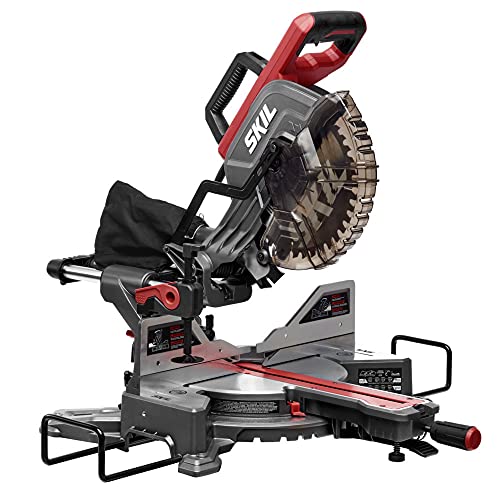
ASIN: B08J7N3VYW

ASIN: B0CZNSJMPH
Certain content that appears on this site comes from Amazon. This content is provided “as is” and is subject to change or removal at any time. Product examples and images are supplied through Amazon Creators API; confirm specifications and availability on the current listing.
Table of contents
- Quick answer
- Why choose a 10-inch saw?
- Fixed, sliding, compound, and dual bevel
- Read capacity charts correctly
- What to compare
- 10-inch model examples
- Blade and finish choices
- Setup and safe operation
- Frequently asked questions
Quick answer: buy for the cuts you repeat
Choose a fixed-head 10-inch saw if your work is mostly narrow stock and ordinary crosscuts, and you value a simpler mechanism and smaller operating footprint. Choose a slider if your regular cut list includes wider boards than the fixed saw can handle. Add compound and dual-bevel functions when you repeatedly make angled cuts that combine miter and bevel settings, such as trim work. Do not pay for slide travel or dual bevel just because a feature appears higher in a product list; it must solve a real part of your workflow.
Before shopping, write down the widest and tallest material you will cut, the angles you use, and the room available behind and around the saw. Then compare the manufacturer’s capacity chart at those exact settings. If one occasional project exceeds a smaller saw’s capacity, rental or a different tool may be more practical than buying the largest machine for that one task.
Why choose a 10-inch miter saw?
The 10-inch size can balance useful cut depth with blade availability, portability, and shop fit. A 10-inch saw may be easier to transport or store than a similarly configured larger saw, though weight varies widely by design. It also uses a specific blade diameter and arbor size, so blade compatibility must be checked rather than assumed.
For homeowners, remodelers, and small-shop woodworkers, the 10-inch category includes basic compound saws, sliding compound models, corded and cordless options, and saws with different bevel arrangements. Product naming is not consistent: listings may say “compound miter saw,” “sliding compound,” or “dual-bevel sliding.” Confirm the exact head motion, bevel direction, blade size, capacity, and included accessories in the specification sheet.
Blade diameter is not crosscut capacity
A 10-inch blade does not mean the saw can cut a 10-inch-wide board, and it does not by itself say how tall a board fits against the fence. Capacity comes from the saw’s geometry, sliding travel, fence shape, table, and head position. Miter and bevel settings also change the cut envelope. A 10-inch sliding saw can have a wider crosscut capacity than a fixed-head saw with a larger blade.
When 10 inches may not be enough
Compare a larger size if the work regularly includes thick or tall material, broad crown molding, or wide stock that exceeds every 10-inch model’s verified capacity. A 12-inch saw is not automatically better: it may be larger, heavier, and need broader support, while some 10-inch sliders already cover many common boards and trim cuts. Our 12-inch miter saw guide explains what the larger blade category changes and how to compare its capacity.
Fixed, sliding, compound, and dual-bevel designs
Fixed-head 10-inch saws
A fixed-head saw pivots down into the work without sliding forward or backward. Its mechanism is straightforward, and it can be compact to store. Its crosscut width is limited by the blade and head geometry, so check capacity carefully if you cut wider boards. A fixed-head saw can still bevel if it is a compound model; “fixed” refers to the lack of slide travel, not a lack of angle functions.
Sliding 10-inch saws
A slider moves the blade head on rails or a linkage to extend crosscut width. Rail location affects the operating footprint; some designs need clearance behind the saw, while others are intended to sit closer to a wall. Verify the required space in the manual and measure the machine in its cutting position. Slides introduce extra moving surfaces and locks, so keep them clean and verify alignment after moving the tool.
Follow the exact manual’s cutting sequence. Many sliding saw instructions direct the operator to pull the head toward the front, lower the blade, and push through the stock toward the fence. Do not use a generic technique that conflicts with the model instructions. Lock the slide for a chop cut when the manual calls for it.
Compound and dual-bevel capability
A compound saw combines table rotation for a miter with blade tilt for a bevel. A single-bevel saw tilts in one direction; the operator may need to flip the workpiece for the opposite bevel. A dual-bevel saw tilts both left and right, reducing repositioning for repeated mirrored cuts. Dual bevel can save time, but it adds adjustments and does not guarantee accuracy. The work still needs stable support and a verified angle.
If your projects mostly use square crosscuts, a simple fixed-head or single-bevel saw may suit better. If you frequently install trim, casing, or crown molding, compare whether dual bevel and sliding travel make the repeated operations easier. Our compound miter saw guide compares bevel direction, slide mechanisms, capacity, and workspace tradeoffs.
Read capacity charts correctly
Manufacturers often publish multiple cut capacities for one model. Look for crosscut width and height at 0-degree miter and 0-degree bevel, then check values for the angles you will use. A miter cut rotates the table; a bevel tilts the blade; a compound cut does both. The blade may clear less material at those angles, and left and right bevel capacities may differ.
Record the workpiece orientation
Baseboard can be cut standing vertically against the fence or laid flat on the table. Crown molding can be nested at a spring angle or laid flat and cut with compound settings. The manufacturer’s published capacities are tied to a specific orientation. A tall “vertical capacity” number does not mean that same stock width can be crosscut flat.
For crown, spring angle, crown profile, fence height, and saw orientation all matter. Use the exact manufacturer’s chart and test on scrap with the same setup. Our crown molding saw guide focuses on nested and flat cutting geometry.
Make a capacity checklist
- Maximum flat crosscut at 0-degree miter and bevel.
- Capacity at the common 45-degree miter, if used.
- Capacity at the bevel angles and compound angles in the cut list.
- Vertical baseboard capacity against the fence.
- Nested crown capacity and the spring angle it assumes.
- Whether capacity depends on moving a fence or using a slide feature.
Use actual material dimensions, not nominal lumber labels alone. A board may be bowed, twisted, or wider than expected. Leave a margin so the material fits without forcing it against the saw. If a capacity is essential, make a test cut in scrap after setup rather than relying on a single headline number.
What to compare before buying
1. Fence support and adjustment
A straight fence supports the workpiece and creates a repeatable reference. On sliders, fences may move to clear the blade on bevel cuts. Check that they lock securely and return to position. A tall fence can help support baseboard, but height claims depend on board orientation and bevel setting. Look for accessible locks and a design that keeps the work flat against both table and fence.
2. Miter and bevel controls
Readable scales, positive stops, and simple locks make repeated cuts easier. Detents mark common angles but are not proof that the saw is perfectly calibrated. Check alignment with a reliable square or gauge, then make a sample cut. If the saw offers detent overrides, know how they work before making a precision cut.
3. Blade visibility and cutline aids
A shadow line, laser, or work light can help identify where the blade approaches the stock. Treat it as a reference aid, not an accuracy guarantee. Confirm the kerf position with the blade disconnected from power and use the manual’s alignment procedure. Keep hands clear of the blade path while checking. The lower guard must move freely and return to cover the blade.
4. Dust collection
Miter saws can scatter chips and fine dust even with a bag attached. Compare dust port shape, vacuum adapter availability, and the space required for a hose. If you work indoors, plan ventilation, cleanup, and respiratory protection suitable for the material. A dust bag does not make the work area dust-free. Do not cut material that the saw or blade is not intended to handle.
5. Weight, stand, and operating envelope
Check the machine’s weight and lifting points. A sliding 10-inch saw may weigh more than a fixed saw, and stand bundles vary. Include the stand, extensions, clamp, blade, and dust adapter in the total package. A compact head can still need long support for boards and extra room for slide travel. Measure the whole operating envelope, not only the saw body.
6. Power source and circuit
Corded models avoid battery run time and charging; cordless models can help on mobile jobs. Confirm whether batteries and charger are included, whether they fit your existing platform, and what the manufacturer says about permitted battery packs. For corded models, confirm voltage and current requirements and follow the manual on extension cords. Keep cords away from the blade, stock, and operator’s feet.
7. Package contents, parts, and service
Retail listings may differ in included blade, clamp, dust bag, stand, and accessories. Check the exact model number, not a similar model with an extra suffix. Confirm replacement parts, service, warranty, and local availability of compatible blades. If buying used, inspect the guard, slide play, fence, arbor, cord, detents, and signs of impact or unauthorized repair.
10-inch model examples: compare design, not marketing rank
Official manufacturer pages show how two 10-inch saws can serve different jobs. These examples are not based on hands-on testing, and they are not endorsements or a promise about price or stock. Check current model details and manuals before purchase.
- DEWALT DWS713: DEWALT lists this as a corded, 15-amp, single-bevel 10-inch compound miter saw. Its manufacturer page lists 14 miter detents and specifies crosscut capacity separately from its vertical fence support. It is a fixed-head example for users whose work does not need sliding width.
- Makita LS1019L: Makita lists this as a 10-inch dual-bevel sliding compound saw. Its two-rail design is described as reducing rear clearance, and the manufacturer publishes capacities for crosscuts, crown, and baseboard. It illustrates a feature-rich slider, not a universal best choice.
- Makita LS1040: Makita’s product page describes a 10-inch compound model intended for several jobsite and finishing applications. Verify current availability and the exact model configuration; product line status can change.
Use model examples as a prompt to compare your own cut list against verified specifications. A listed 12-inch crosscut on one slider does not establish that every 10-inch saw can make that cut. Nor does a fixed-head model’s lower capacity make it poor if it covers your actual work with less setup and weight.
Blade fit and finish quality
Use only a blade approved for the exact saw. Check diameter, arbor-hole size, speed rating, kerf thickness, blade plate, and material rating in both the saw and blade manuals. A blade that fits physically may still be unsuitable if its speed rating or kerf conflicts with the machine’s limits. Never add an improvised bushing or remove a guard to make a blade fit.
Tooth count and purpose
More teeth can produce a smoother finish in many crosscut applications, while fewer teeth can cut faster but may leave more tear-out. Tooth geometry, blade quality, and material all matter. For fine trim, choose a blade designed for the material and desired finish. For framing, a general-purpose blade may be reasonable. For laminate, aluminum, plastic, or other non-wood material, confirm the saw manual permits the operation and select a blade specifically rated for it.
Keep the blade sharp and clean. Vibration, burning, missing teeth, excessive force, or worsening finish are signs to stop and inspect. Disconnect power before cleaning or changing blades. Our miter-saw blade guide covers blade selection by material and finish.
Setup and safe operation
A miter saw exposes a rotating blade and can cause serious injury. Read the exact manual and keep all guards in working order. OSHA’s guidance for miter saws emphasizes effective guarding, sharp blades, and keeping hands a safe distance from the cutting zone. Wear eye and hearing protection appropriate to the job, tie back long hair, remove jewelry, and wear fitted clothing.
Before the first cut
- Mount the saw on a stable, level bench or approved stand and secure it as directed.
- Leave enough room for the head, rails, fence, board supports, and safe operator position.
- With power disconnected, inspect the blade, guard return, fence locks, table, slide locks, cord or battery, and clamps.
- Install a compatible blade using the manufacturer’s instructions and correct rotation.
- Check fence, miter, and bevel alignment according to the manual.
- Support long stock at table height and clamp the workpiece where the manual calls for it.
- Make a test cut on scrap and measure the angle and fit before cutting finished material.
During the cut
- Keep the work flat against the table and fence. Do not hold stock with a hand near the blade.
- Use the cut motion prescribed by the manual, particularly for sliding saws.
- Wait for full speed before entering the material and do not force a stalled or binding blade.
- Keep fingers outside the marked danger zone and use a clamp for awkward pieces.
- Wait for the blade to stop completely before raising the head or removing offcuts.
- Disconnect power before clearing a jam, adjusting the fence, changing the blade, or cleaning.
Short offcuts can be difficult to control. Use an appropriate jig or stop only if the manual and geometry permit it, and avoid arrangements that trap the offcut. If the saw binds, release the switch, maintain control, and wait for all movement to stop before investigating. Never reach around a moving blade or defeat a guard for convenience.
Common mistakes when shopping for a 10-inch saw
- Assuming 10-inch means 10-inch width. Check the saw’s capacity chart at the exact angles you use.
- Buying the most features instead of the needed features. Sliding and dual bevel add cost, weight, and setup steps.
- Ignoring rear clearance. Some sliders need more room behind the saw than the body dimensions suggest.
- Trusting the detent without testing. Verify the angle with a square and a scrap cut.
- Forgetting blade compatibility. Diameter, arbor, kerf, speed, and material limits all matter.
- Assuming a dust bag is enough indoors. Plan a vacuum, ventilation, and cleanup.
- Buying around one rare oversized cut. Rent a larger saw or use a different tool if the need is occasional.
- Overlooking the exact SKU. Similar model numbers may have different bevel, slide, or bundle details.
Research method and primary sources
This guide is based on official manufacturer product information and manuals for representative 10-inch models, plus OSHA material for general miter-saw safety. It does not claim hands-on testing, product ranking, or current price comparison. Models and packages can change, so verify current information for your exact market and model number.
- DEWALT DWS713 official product page and manual links
- Makita LS1019L official product page and specifications
- Makita LS1019/LS1019L instruction manual
- Makita LS1040 official product page
- OSHA eTool: miter saw guarding and safety measures
Frequently asked questions
Are 10-inch miter saws good for woodworking?
They can be a good fit for trim, framing, furniture parts, shelving, and general crosscut tasks when the exact capacity covers the work. Choose fixed or sliding based on board width, and use a suitable blade for the material and finish.
Is a 10-inch sliding saw better than a 12-inch fixed saw?
Not universally. Sliding travel can increase crosscut width, while blade diameter influences cut depth and compatible blade options. Compare actual model capacities, weight, footprint, and the angles you use rather than comparing size labels alone.
Do I need a sliding 10-inch miter saw?
Choose a slider if you regularly crosscut material wider than a fixed-head model can handle. If your stock is narrow, a fixed saw may be lighter, simpler, and easier to fit in a small shop.
Should I choose a single-bevel or dual-bevel 10-inch saw?
Single bevel can cover many basic cuts and is usually simpler. Dual bevel helps when you repeat opposing bevel cuts and want to avoid flipping the workpiece. The right choice depends on your cut list and capacity needs.
Can a 10-inch saw cut crown molding?
Many models can cut some crown molding, but capacity depends on the saw, spring angle, nesting position, and fence setup. Follow the exact manufacturer’s chart and test on scrap. Do not assume a crown capacity from a different 10-inch model transfers to yours.
Can a 10-inch saw cut a 2-by-6?
Some models can crosscut a 2-by-6 at 90 degrees, while others may not, and angle cuts can reduce capacity. Check the exact manufacturer’s specification for the stock orientation and cut angle.
Are 10-inch miter saw blades easy to find?
Blade availability varies by region and material. Check local and online availability for the diameter, arbor, kerf, speed rating, and tooth design that the saw permits before purchase.
Can I use a 10-inch blade on a 12-inch saw?
Only if the saw manufacturer explicitly permits that blade size and specifies a compatible setup. A smaller blade may change cut capacity and guard coverage. Never assume a blade is acceptable because it mounts on the arbor.
How much room does a 10-inch sliding saw need?
It depends on the rail design and the length of stock. Measure the operating dimensions in the manual and include room behind or in front of the saw, extension supports, and the full board path.
Does a laser make a 10-inch miter saw more accurate?
A laser can help visualize a cut line but does not ensure square fences, calibrated detents, or a straight blade. Verify alignment with a square and a test cut on scrap.
Final decision
The right 10-inch miter saw is the design whose verified capacity, bevel range, slide travel, blade compatibility, and footprint match your regular work. Fixed-head saws suit narrower cuts and compact spaces; sliding and dual-bevel features help with wider or repetitive angled work when the added size is worthwhile. Read the exact manual, set up stable support, check alignment on scrap, and keep guards and hands positioned safely for every cut.
This article is general buying guidance. The current manual for your exact saw and blade governs capacity, compatibility, and operation.