Where to buy
Apartment rules shape this list: every pick works without permanent wiring, the indoor models sit on shelves or use removable-friendly mounts, and each is a single camera or one-camera system within the under $150 budget. Check the current price and what is in the box on Amazon, and check your lease before anything is screwed to a wall.
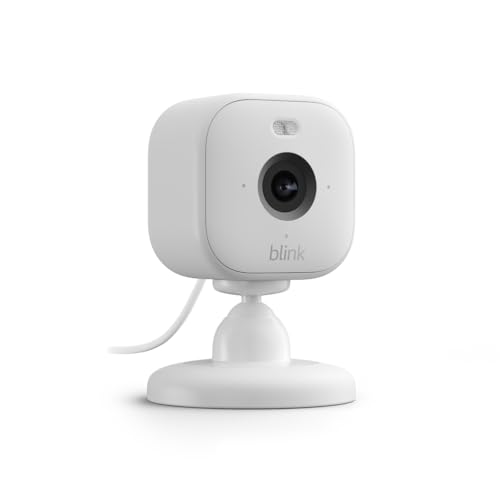
- Best for shelf placement with no drilling: Blink Mini 2 — 1080p HD, 143-degree view, plug-in, built-in spotlight
- Best one-camera room coverage: eufy Indoor Cam E220 — 2K, pan 360 and tilt 96 degrees, motion tracking, microSD local storage
- Best no-fee wired pick: Tapo C120 — 2K QHD, IP66, wired, free AI detection, microSD local storage
- Best video quality at the door: Wyze Cam v4 — 2.5K QHD, IP65, wired, microSD local storage
- Best for a balcony or entry alcove: Blink Outdoor 4 (1-Camera System) — 1080p HD, wire-free, maker-claimed up to two-year battery, sync module system
- Best for a sunny private balcony: eufy SoloCam S220 — 2K, integrated solar panel, built-in 8GB local storage, no monthly fee
Read the full guide ↓
Disclosure: As an Amazon Associate, dailyhomedecorating.com earns from qualifying purchases. Links to Amazon on this page are affiliate links; they cost you nothing extra. Listing details such as price and availability change often, so check the current Amazon listing before you buy.
The search for the best security camera for apartments under $150 starts with a document most camera guides never mention: your lease. Rental homes come with rules about drilling, wiring and what may be attached to shared walls and exterior surfaces, and they come with a second, quieter constraint, which is that everything you install must one day be removed without trace. Add the realities of apartment geography, one main room doing triple duty, an entry door that opens onto a shared hallway rather than your own porch, neighbours close enough to feature in your footage, and the apartment camera brief becomes quite specific. It must be small, reversible, considerate and still genuinely useful as part of a whole-home view of a small home.
That is why this guide treats the apartment as a complete little system rather than a single viewpoint. In most rentals the coverage map is short: the entry door from inside, the main living space, and, for some, a balcony or a parking spot visible from a window. Two cameras usually complete that map, three at the most, and every position is indoors or in a semi-sheltered spot rather than on an exposed exterior wall you do not own. The pool below is therefore led by indoor cameras, a compact plug-in model that sits on a shelf and a pan-and-tilt model that covers a whole open-plan room alone, followed by two wired indoor and outdoor models for renters whose door area has an outlet and a forgiving landlord, and two wire-free outdoor models included honestly for the minority of rentals with a private balcony, terrace or ground-floor patio where an outdoor camera is both permitted and useful. If your budget stretches further, the companion guide Best Security Camera For Apartments Under $200 applies the same system thinking at the next tier.
The same honesty rules as the rest of this series apply, sharpened for renters. Subscription and storage facts are stated per brand, because a renter paying a monthly plan for a camera that will move house in a year deserves to know exactly what stops working if the plan lapses: on Blink, recorded clips and person detection are plan features, while the Tapo, Wyze and eufy picks record locally without one. Battery and solar figures are maker claims, not promises about your balcony. And an ethical note runs through the apartment lens in particular: your camera’s view should stop at your own threshold wherever possible, because the hallway, the landing and your neighbours’ doors are their private lives, not your security perimeter.
In this guide
Quick Picks
Short on time? This table matches each camera to the job it does best in this guide. Every pick is then reviewed in full below, with its storage and subscription position stated plainly.
| Best for | Pick | Key spec | Link |
|---|---|---|---|
| Best for shelf placement with no drilling | Blink Mini 2 | 1080p HD, 143-degree view, plug-in, built-in spotlight | Check on Amazon |
| Best one-camera room coverage | eufy Indoor Cam E220 | 2K, pan 360 and tilt 96 degrees, motion tracking, microSD local storage | Check on Amazon |
| Best no-fee wired pick | Tapo C120 | 2K QHD, IP66, wired, free AI detection, microSD local storage | Check on Amazon |
| Best video quality at the door | Wyze Cam v4 | 2.5K QHD, IP65, wired, microSD local storage | Check on Amazon |
| Best for a balcony or entry alcove | Blink Outdoor 4 (1-Camera System) | 1080p HD, wire-free, maker-claimed up to two-year battery, sync module system | Check on Amazon |
| Best for a sunny private balcony | eufy SoloCam S220 | 2K, integrated solar panel, built-in 8GB local storage, no monthly fee | Check on Amazon |
How we chose
Lease compatibility was the first filter, applied before any specification. A pick had to install without new wiring, without an electrician and, for the lead indoor models, without screws at all or with mounts a renter could plausibly agree with a landlord. Cameras were credited for small footprints, stands that work on shelves and bookcases, and designs that pack into a moving box in minutes. Anything requiring a drilled exterior mount as its only option was pushed down the order and labelled for the specific rental situations, balconies and patios, where it still makes sense.
The second filter was coverage per camera, because apartment budgets buy fewer cameras for fewer, harder-working positions. A wide fixed view and a pan-and-tilt mechanism were valued over raw resolution for the main room, while the entry position rewarded sharp wired video that can identify a face at the door. Storage and subscriptions were audited exactly as in the main guide: local recording without a plan on the Tapo, Wyze and eufy models, with each maker’s optional cloud offer named; Blink’s plan-gated recording and person detection stated without varnish, balanced against its unmatched shelf-friendly indoor model and its wire-free outdoor option for permitted spaces.
Finally, we considered the neighbours. Apartment cameras live close to other people’s lives, so models with activity zones, privacy scheduling and sensible fields of view scored well, and the guide’s advice consistently aims cameras inward at your own space rather than outward at shared areas. Portability closed the assessment: every pick had to make sense as something you would take to the next apartment and reinstall in an afternoon, because a rental security system is a travelling system by definition.
Apartments also imposed a noise and light discipline on the judging that houses rarely need. Cameras with status lights that cannot be dimmed, chimes that announce themselves to the whole landing, or spotlights aimed across a shared courtyard create friction in dense buildings, so we favoured models whose lights and sounds can be tamed in the app and whose night modes offer an infrared option that does not advertise itself. The wired picks’ spotlights are best treated as indoor or private-balcony tools in a block of flats, while the indoor cameras’ softer colour night view, helped by ordinary room lighting, is usually the considerate choice after dark. Security that annoys the neighbours is security the building eventually asks you to remove.
Detailed reviews
Each review states where the camera belongs, indoors, outdoors or either, what it records without payment, and the one limitation we would want to know before buying. Battery, solar and weather figures are maker claims from the manufacturer’s own specifications.
Blink Mini 2 — Best for shelf placement with no drilling
Where it belongs: Indoor (plug-in; outdoor only with separate weather-resistant adapter). Recording position: Cloud recording and person detection need Blink Subscription Plan; no on-camera card slot.
The Blink Mini 2 is the indoor half of a Blink household: a compact plug-in camera with 1080p HD video, a wide 143-degree diagonal field of view from the maker’s specification, colour night view from a built-in spotlight, two-way audio and a stand that doubles as a wall mount. One Mini 2 composed from a corner shelf covers a typical living room wall to wall, which is why it pairs so naturally with the Outdoor 4 in a mixed system: same app, same alert style, same subscription decision, one camera language inside and out. It is also the natural second or third camera in this pool, the one you add for the nursery, the home office or the hallway once the entrances are covered.
The subscription story is the same Blink story, and it applies indoors exactly as it does outside. Person detection and saved video history in the cloud are Blink Subscription Plan features; without the plan the Mini 2 is a live-view and motion-alert camera, with local clip storage possible only through a compatible sync module setup elsewhere in the system. That is a reasonable trade at this size and price class, but it must be a conscious one: if you want an indoor camera that records locally to its own card with no plan at all, the eufy E220 and the wired Tapo and Wyze picks in this guide do that and the Mini 2 does not.
One placement warning matters more than any spec: the Mini 2 is an indoor camera. Blink offers outdoor use only with a separate weather-resistant power adapter, and even then it belongs under cover, not screwed to a fence in the rain. Used as intended, on a shelf or screwed high in a corner with its cable tidied to the skirting, it is discreet, silent and quick to install, and its spotlight makes night checks of a sleeping child or a restless pet a colour picture instead of a grey infrared guess. For renters it has a further quiet virtue: the stand needs no screws at all, so it can watch a room for a year and leave no trace when the lease ends.
For renters this is the default first camera: it sits on a shelf, needs no screws in stand mode, watches the entry and living space in one wide view, and leaves with you in a coat pocket on moving day. If your lease forbids fixings entirely, start and possibly finish here, with a second unit for the bedroom end of the flat.
Honest limitation: no on-camera local storage of its own and person detection locked behind the Blink subscription, plus it is indoor-first, so it cannot substitute for a true outdoor camera at an exposed mounting point.
eufy Indoor Cam E220 — Best one-camera room coverage
Where it belongs: Indoor (plug-in, pan and tilt). Recording position: Local microSD recording, no subscription required; optional cloud available.
The eufy Indoor Cam E220 solves the fixed-camera problem by moving: it pans a full 360 degrees and tilts 96 degrees on the maker’s specification, tracks motion across a room automatically, and records 2K video while doing it. One E220 in the middle of an open-plan space does the coverage work of two fixed cameras, following a toddler, a dog or an unexpected visitor from the door to the kitchen without you touching the app. On-device AI distinguishes people and pets for alerts, and it works with Alexa, Google Assistant and HomeKit ecosystems, which makes it the most platform-flexible indoor pick in this pool.
eufy’s storage position is the mirror image of Blink’s. The E220 records to a microSD card in the camera, card sold separately, with no subscription required for recording, playback or its core detection features, and it can also pair with a HomeBase 3 for centralised local storage if you grow into the wider eufy system. An optional cloud plan exists for buyers who want off-site copies, but nothing about normal daily use is locked behind it. For a mixed indoor and outdoor system built on local storage, the E220 inside and its solar sibling the SoloCam S220 outside are the only pair in this guide that share one app and one no-fee philosophy.
The limits are about physics and placement. It is indoor-only and plug-in powered, so it needs an outlet and a surface or bracket with a commanding view; pan and tilt cannot see through a badly chosen corner, and the tracking motor, while quiet, is not silent in a bedroom at night. It also cannot watch the yard: the moment a camera must survive rain, this is the wrong tool and the outdoor picks take over. Judged as an indoor camera, though, it offers the most coverage per camera in the pool, and for pet owners its tracking clips are the ones people actually end up watching.
In an open-plan studio or one-bed, the E220 is the closest thing to a whole-apartment camera: place it centrally, let it pan between door, windows and living area, and you may genuinely need nothing else indoors. Its bracket can be shelf-sitting too, so the no-drill rule survives.
Honest limitation: strictly indoor and outlet-dependent, and its moving lens covers one room brilliantly but cannot be in two places at once, so multi-room homes still need a camera per key room.
Tapo C120 — Best no-fee wired pick
Where it belongs: Indoor or outdoor (wired). Recording position: Local microSD recording and AI detection free; optional Tapo Care adds cloud storage.
The Tapo C120 is TP-Link’s wired indoor/outdoor camera, and its headline is what it refuses to charge extra for: person, pet and vehicle detection are handled on the camera and included without a subscription, which is rare in this pool. Video is 2K QHD with colour night vision helped by dual spotlights, the housing carries an IP66 weather-resistance rating from the maker, and a magnetic base with a metal plate in the box makes indoor placement unusually flexible for a camera that can also live outside on a wall or under an eave. Like the Wyze it is plug-in powered, so it watches continuously rather than napping between motion events.
On storage, the C120 records to a microSD card locally with no plan required, and TP-Link’s optional Tapo Care subscription adds cloud storage and richer notification content on top. That ordering matters: the free tier here is genuinely functional, because the AI detection that decides whether an alert is a person or a passing cat is not paywalled. The subscription is therefore a convenience for off-site backup, not the toll gate it is on some rivals. If your house rule is one app and no monthly fees, a matched pair of C120s inside and out is the most straightforward way to honour it at this budget.
The compromises are physical rather than digital. The camera is wired, so placement follows your outlets, and the body is a fixed-view design: no pan or tilt, so one camera covers one composed view and wide rooms may need two. The Tapo app is capable but separate from the Kasa ecosystem some households already run, so check which app your other TP-Link gear uses before building a whole system around it. Within those limits, the C120 is the pool’s best answer to subscription fatigue: sharp video, weather sealing a step above the Wyze on paper, and detection intelligence that stays free after purchase.
Choose the C120 when your rental has an outlet by the door and a landlord relaxed about a small screwed or adhesive-mounted camera, and you want the sharpest no-fee coverage of the entry. Its magnetic base also suits metal shelving and fridge-side placement inside, no holes required.
Honest limitation: fixed view with no pan or tilt, and wired power only, so it cannot follow action across a room or sit somewhere an extension lead cannot reasonably reach.
Wyze Cam v4 — Best video quality at the door
Where it belongs: Indoor or outdoor (wired). Recording position: Local microSD recording free; optional Cam Plus adds cloud events and smart labels.
The Wyze Cam v4 is the wired all-rounder in this pool: a small plug-in camera the maker rates for indoor or outdoor use, with an IP65 weather-resistance rating on the housing, 2.5K QHD video, enhanced colour night vision, a motion-activated spotlight and a built-in siren. Because it runs on continuous USB power rather than a battery, it never sleeps through the start of an event to save charge, and it can record around the clock to a microSD card instead of only waking for motion clips. Wyze lists local recording support for cards up to 512GB, sold separately, which is the largest local capacity in this group and the reason this camera suits buyers who want long on-camera history without paying for cloud space.
Storage and subscriptions need stating plainly, because Wyze splits them clearly. Local microSD recording works without any plan: motion events and continuous recording stay on the card, and you review them in the app. The optional Cam Plus subscription is what adds cloud-stored event video and the smarter person, pet, package and vehicle classifications, along with longer cloud history. Without the plan you still get motion alerts and local playback, but the camera is less clever about telling a person from a swaying branch, and there is no cloud copy if the camera itself is stolen or damaged. Treat the subscription as an intelligence upgrade, not a requirement, and budget the microSD card as part of the real purchase.
Power is the honest trade-off. The v4 needs an outlet within cable reach of the mounting point, and outdoor runs need the maker’s outdoor-rated power arrangement rather than a random indoor adapter left in the rain. In exchange you get the sharpest video in this pool, a spotlight that makes night footage usable for identifying faces and clothing, and two-way talk for speaking to a delivery driver or telling a dog to get off the sofa. It works with Alexa and Google Assistant for voice viewing on smart displays, which makes it an easy single-ecosystem anchor: buy one for the front door, and its indoor twin is the same camera, same app, same settings.
The v4 is the upgrade pick for renters who work from home or receive valuable deliveries: put its 2.5K wired eye on the entry or the office corner, record locally around the clock, and accept the visible cable as the price of the best identification footage in this pool.
Honest limitation: it is wired only, so a mounting point with no outlet nearby is a non-starter, and the smartest detection labels sit behind the optional Cam Plus plan even though local recording does not.
Blink Outdoor 4 (1-Camera System) — Best for a balcony or entry alcove
Where it belongs: Outdoor (wire-free battery). Recording position: Cloud recording and person detection need Blink Subscription Plan; local via sync module USB.
The Blink Outdoor 4 is the wire-free outdoor anchor of this pool: a battery camera that mounts with screws in minutes, needs no outlet and no cable run, and talks back to a sync module inside the house. Video is 1080p HD with infrared night vision and two-way talk. The maker’s headline claim is battery life of up to two years from the included AA lithium batteries under default settings and typical use, and that figure must be read as a maker claim, not a promise: heavy motion traffic, long live-view sessions, cold weather and weak Wi-Fi all shorten real intervals between battery swaps, sometimes dramatically.
Blink is also the pool’s clearest example of subscription gravity, so here is the honest split. Without a Blink Subscription Plan you get live view and motion notifications, and that is close to the whole story: saving and reviewing recorded clips in the cloud, extended history and person detection are subscription features. Local storage exists as an escape hatch through a sync module with a USB drive attached, which keeps clips in the house instead of the cloud, but it is a more manual arrangement than a microSD card inside the camera and the exact module in the box varies by kit, so check the listing for the system you are buying. Many owners happily pay the plan for the polish; just price it into the system before comparing sticker prices.
Choose the Outdoor 4 for the places wiring cannot go: a gate, a side fence, a detached garage corner, a tree line at the end of the drive. Its enhanced motion detection and adjustable zones help it ignore the street while watching the path, and because cameras are added one sync module at a time, a single outdoor camera today can become the perimeter of a larger Blink system later. What it will not do is match the wired cameras here for sheer detail: 1080p across a wide yard view identifies that someone is there more readily than exactly who, so pair it with a sharper wired camera at the door itself if identification matters most.
Only some rentals can use this: a private balcony, terrace or ground-floor patio where the lease or landlord allows an exterior fixing and the view is your own outdoor space. There, wire-free mounting and no cable through the wall are exactly what renting demands, and it shares an app and plan with a Mini 2 indoors.
Honest limitation: the features most people picture when they buy a camera, recorded cloud clips and person detection, require the paid Blink plan or a local-storage workaround, and the two-year battery figure is a best-case maker claim that busy locations will not see.
eufy SoloCam S220 — Best for a sunny private balcony
Where it belongs: Outdoor (wire-free, solar-assisted). Recording position: Built-in 8GB local storage, no subscription required; optional cloud available.
The eufy SoloCam S220 is the outdoor camera for people who dislike both cables and battery chores: wire-free like the Blink, but with an integrated solar panel on its top surface that the maker says keeps the internal battery topped up with a few hours of direct sunlight a day under typical conditions. That sunlight figure is a maker claim with an obvious condition attached: a camera mounted under a deep porch roof or on a shaded north wall may harvest too little light and still need occasional USB recharging, so mounting position is part of the product. Video is 2K, a clear step above the Blink’s 1080p, with on-device person detection and two-way talk.
Storage is where the S220 makes its stand. It carries built-in 8GB local storage inside the camera, no card to buy and no hub required for basic use, and eufy sells it explicitly as a no-monthly-fee camera: recording, detection and playback work without a subscription, with an optional cloud plan and HomeBase 3 compatibility available for buyers who want more. Eight gigabytes is finite, so the camera overwrites its oldest clips as it fills, and busy driveways cycle history faster than quiet side gates; that is the honest cost of built-in storage, and it is still a fundamentally different deal from a camera whose recordings stop entirely when a plan lapses.
As the outdoor half of an eufy mixed system it mirrors the E220’s philosophy in weather-sealed form, and as a standalone it is the pool’s lowest-maintenance perimeter camera: no ladder trips with a battery pack every season, no cable through the wall, no plan renewal. What it asks in return is sun and a sensible view: mount it where the panel sees sky, aim it so the detection zone covers the approach rather than the street, and accept that a wire-free camera records events rather than continuous footage. For a front path, a garden gate or a driveway corner, that trade is usually the right one.
The S220 suits the same permitted-outdoor minority, with one extra condition: the balcony or patio must actually receive sun for the solar claim to mean anything. A bright private terrace gets a fee-free 2K outdoor eye; a shaded north balcony gets a camera that still needs charging, so judge your light honestly.
Honest limitation: the solar claim depends entirely on mounting sunlight, and the fixed built-in 8GB storage cannot be expanded in the camera itself, so high-traffic spots keep a shorter rolling history than card-based rivals.
Comparison table
| Pick | Where it belongs | Key spec | Recording and subscription position |
|---|---|---|---|
| Blink Mini 2 | Indoor (plug-in; outdoor only with separate weather-resistant adapter) | 1080p HD, 143-degree view, plug-in, built-in spotlight | Cloud recording and person detection need Blink Subscription Plan; no on-camera card slot |
| eufy Indoor Cam E220 | Indoor (plug-in, pan and tilt) | 2K, pan 360 and tilt 96 degrees, motion tracking, microSD local storage | Local microSD recording, no subscription required; optional cloud available |
| Tapo C120 | Indoor or outdoor (wired) | 2K QHD, IP66, wired, free AI detection, microSD local storage | Local microSD recording and AI detection free; optional Tapo Care adds cloud storage |
| Wyze Cam v4 | Indoor or outdoor (wired) | 2.5K QHD, IP65, wired, microSD local storage | Local microSD recording free; optional Cam Plus adds cloud events and smart labels |
| Blink Outdoor 4 (1-Camera System) | Outdoor (wire-free battery) | 1080p HD, wire-free, maker-claimed up to two-year battery, sync module system | Cloud recording and person detection need Blink Subscription Plan; local via sync module USB |
| eufy SoloCam S220 | Outdoor (wire-free, solar-assisted) | 2K, integrated solar panel, built-in 8GB local storage, no monthly fee | Built-in 8GB local storage, no subscription required; optional cloud available |
Read the comparison table through a landlord’s eyes and its order explains itself. The top rows are the cameras that can be installed during a lunch break and removed during a commercial break, leaving paint, plaster and deposit exactly as they were. The middle rows trade a small amount of that reversibility for sharper, always-on door coverage, a trade worth making only when an outlet and a permission already exist. The bottom rows are conditional tools, excellent on the minority of rentals with private outdoor space and the right light or the right lease clause, and pointless purchases without them. That is the honest shape of apartment security: the best system is the best one your tenancy allows, run entirely inside your own rooms and your own permissions, and the table’s real message is that this constraint costs you almost nothing in coverage. A shelf camera at the entry plus, where the layout asks for it, a panning camera in the main room sees everything an apartment system legitimately needs to see, and when the tenancy ends the entire apparatus fits in a shoebox, ready to do the same job in the next home before the kettle has boiled.
How to choose the best security camera for apartments under $150
Begin with the lease, not the listings. Read the clauses on alterations, fixings and anything attached to doors, windows and exterior walls, and if the wording is grey, ask the landlord in writing about a small camera inside your own entry. Most landlords object to holes and exterior clutter, not to a shelf camera, so lead with the least invasive option: a stand-sitting indoor camera aimed at your door from inside. That single position, watching your own threshold from your own room, answers the commonest apartment questions: did the package arrive inside, did the cleaner come, is the dog walker real, and did anyone try the door while you were away.
Then compose views that respect the building. Inside, aim across your own space and let walls and furniture bound the frame; avoid a camera whose main view is out of a window onto a neighbour’s balcony or into the flat opposite. At the entry, an inward-facing camera over or beside your door records visitors to your home without turning the shared hallway into your surveillance zone, which matters both ethically and, in many buildings, under house rules. Use activity zones to trim the frame to your doorway and floor area, and set indoor cameras to sleep or privacy mode when you are home if constant recording makes the flat feel watched by its own furniture.
Plan the move-out on the day you install. Keep every box, bracket and cable, photograph your placements so the next flat takes an hour to set up, and favour adhesive and stand mounts whose removal needs nothing more than warmth and patience. Check Wi-Fi at the entry position before choosing a wired camera for it, since apartment routers often live at the far end of the flat from the door. Finally, decide the subscription question as a renter: a plan you can cancel at the end of a tenancy, as with Blink, is a different commitment from hardware that records locally forever, as with the Tapo, Wyze and eufy picks, and the right answer depends on whether you value off-site clips or zero ongoing cost more during a possibly short stay.
Think about the deposit as a line item in the camera budget, because in a rental it is one. Every fixing you make is a future repair you owe, so the true cost of a screwed mount includes filler, paint and time at the end of the tenancy, while a shelf camera’s true cost is the camera alone. That arithmetic is why this guide’s order is not a pure performance ranking: the Mini 2 and the shelf-friendly E220 lead because their installed cost and their removal cost are both effectively zero, and the screwed outdoor models trail not because they are worse cameras but because, in a home you do not own, their full price includes making good afterwards. When a landlord does agree to fixings in writing, that arithmetic changes at once, and the wired picks become as cheap to own as they are to buy.
Plan for the building’s shared infrastructure as carefully as for your own flat. Apartment Wi-Fi often comes from a router you control, but the entry position may sit behind two fire doors and a lift shaft from it, so the signal test at the door matters more in a block than in a house. Communal power is the other trap: a camera plugged into a hallway or landing socket is using the building’s electricity and will be unplugged by the first cleaner who needs the outlet, which is why every recommended position in this guide lives inside your own four walls or on your own balcony, on your own supply. A camera that stays plugged in, on your network, inside your lease’s permissions, is worth more than a cleverer one living on borrowed infrastructure.
Apartments concentrate a particular anxiety that cameras genuinely soothe: other people legitimately hold keys to your home. Landlords, building managers, cleaners, dog walkers and maintenance contractors all enter rentals in ways house owners rarely experience, and an entry camera converts that background unease into simple facts, who came, when, and whether the door was locked behind them. That is not suspicion as a lifestyle; it is the ordinary record-keeping of a home you do not exclusively control, and it has a civilising effect on everyone, including you, because visits get announced, kept tidy and kept honest on both sides of the door.
Common mistakes
Drilling first, reading the lease later. Deposit deductions for unauthorised fixings cost more than any camera in this guide. Shelf stands, magnetic bases and adhesive mounts cover almost every apartment position, so screws should be the last resort, agreed in writing, not the default.
Filming the shared hallway as your main view. A camera trained on communal space records your neighbours’ daily lives, invites complaints and may breach building rules. Aim inward at your own door and rooms; the security value survives and the conflict does not start.
Buying an outdoor camera for a flat with no outdoor space. If your rental has no balcony or patio, an outdoor camera has nowhere legitimate to live. Spend the money on a second indoor angle or the pan-and-tilt pick instead, and revisit outdoor coverage if you move somewhere with private outdoor space.
Forgetting the camera on moving day, digitally. Before you leave, remove the cameras from the old address in the app, reset them, and delete stored clips you no longer need. A camera left paired to a previous home’s network or account is a privacy problem travelling with you.
Assuming the plan travels free. Subscriptions are usually tied to an account and address, and features pause the moment payment lapses. If your tenancy is short, weigh the local-storage picks heavily, so the end of a lease never means the end of your recordings.
Sound deserves a mention in flats, where walls are thin and cameras hear as well as see. Two-way talk is genuinely useful for greeting a courier through the door or calming a pet, but ambient audio recording of conversations drifting from neighbouring homes is neither useful nor kind. Most apps let you mute audio recording while keeping talk functions, and in a dense building that setting is worth finding on day one. A camera that watches your threshold and minds its own business audibly as well as visually is the difference between security equipment and a nuisance your neighbours can legitimately resent.
Final recommendation
Most renters should start with the Blink Mini 2 on a shelf facing the entry: no fixings, no fuss, one wide view of the door and the main room, live in ten minutes. If your flat is open-plan and one camera must do everything, step up to the eufy E220 and let its pan and tilt patrol the whole space while recording locally with no plan. Renters with an outlet at the door and a relaxed landlord can choose the sharper wired route, Tapo C120 for the fee-free system or Wyze Cam v4 for the best identification video, and those with a permitted, preferably sunny private balcony can add the Blink Outdoor 4 or the eufy SoloCam S220 outside in the same app as their indoor camera. Every route stays under $150 a camera and comes down without a trace when the lease ends, which is the whole point of apartment security done properly.
One last piece of advice applies whichever route you choose: photograph your finished views and save the screenshots, together with a note of which mounts you used where. On moving day that little record turns reinstallation in the next flat from a fresh design project into a copying exercise, and it proves, if a deposit conversation ever needs it, exactly how the cameras were fitted and how cleanly they came away. A rental system that travels well is a system you only have to buy once, however many homes it guards along the way.
Our shortlist to check first:
- Blink Mini 2 — best for shelf placement with no drilling
- eufy Indoor Cam E220 — best one-camera room coverage
- Tapo C120 — best no-fee wired pick
Frequently asked questions
Can I install a security camera in a rented apartment?
Indoors, usually yes, especially a stand-sitting camera that needs no fixings, but your lease and building rules govern anything screwed, glued to shared surfaces or placed outside your door. Read the alterations clause, favour no-drill options from this guide, and get written agreement for anything beyond a shelf camera.
What is the best camera position in a small flat?
Inside the entry, angled to cover your front door and as much of the main room as the view allows. It verifies visitors, deliveries brought inside, cleaners and pet sitters, and it does so while filming your own space rather than the shared hallway. A pan-and-tilt model like the eufy E220 stretches that single position furthest.
Do I need an outdoor camera for an apartment?
Only if you have private outdoor space such as a balcony or patio and permission to use it. Most apartment coverage maps are entirely indoor: entry, main room and perhaps a bedroom hallway. The outdoor picks in this guide are included for the balcony minority, not as a default.
Will a camera subscription follow me when I move?
The account and app travel with you, and the cameras reinstall at the new address, but check how your plan handles address changes and what happens to stored clips if you pause payment between tenancies. Local-storage cameras sidestep the question entirely, which is one reason renters favour them.
How do I avoid filming my neighbours?
Aim cameras inward, compose the frame tightly on your own rooms and doorway, use activity zones to exclude windows that overlook other homes where the app allows, and never point a camera at a neighbour’s door or balcony as its main subject. Consideration here is both good manners and good compliance with building rules.
Can a camera help with package theft in apartment buildings?
An indoor camera cannot watch a shared mail area you do not control, but it confirms whether a parcel made it inside your door, and it records anyone entering your flat. For the building’s communal spaces, the fix is collective: raise delivery lockers or a lobby camera with your landlord or residents’ association rather than filming shared areas yourself.


