Where to buy
Check the latest price, availability and delivery on Amazon for every pick below. Each camera was shortlisted for this guide to the best outdoor security camera under $200 at the time of research; street prices move, so confirm the current listing still sits under $200 before you buy. Orders are placed on Amazon. We may earn a commission from qualifying purchases.
- Best overall: eufy SoloCam S340 — Check on Amazon
- Reolink Argus 4 Pro with Solar Panel — Check on Amazon
- Arlo Pro 5S 2K Spotlight Camera — Check on Amazon
- Ring Spotlight Cam Plus, Battery — Check on Amazon
- TP-Link Tapo C425 Wire-Free MagCam — Check on Amazon
- Wyze Battery Cam Pro — Check on Amazon
Read the full guide ↓
Disclosure: As an Amazon Associate, dailyhomedecorating.com earns from qualifying purchases. Links to Amazon on this page are affiliate links; they cost you nothing extra. Listing details such as price and availability change often, so check the current Amazon listing before you buy.
Finding the best outdoor security camera under $200 used to mean choosing which compromise you could live with: soft video, a battery that died monthly, or a cheap camera whose useful features all hid behind a subscription. That is no longer the shape of this tier. Under $200 now buys dual-lens 3K cameras that pan and tilt, 4K panoramic models that watch a whole side of a house at once, and established names with spotlights, sirens and genuinely good apps. The differences that matter have moved elsewhere — to what each brand charges you after the box arrives, where your recordings actually live, and how the camera keeps itself powered through a wet winter.
This guide compares six outdoor cameras that earn their place under the ceiling on hardware, then separates them on the three questions buyers ask too late. First, the fee question: which features keep working if you never pay a monthly plan, and which brands stop recording altogether without one. Second, the storage question: local recording on the camera or a card keeps footage in your hands and costs nothing monthly, while cloud-only designs are simpler but rented forever. Third, the power question: battery, battery-plus-solar and removable packs all work, but they suit different mounting spots and different tolerances for climbing a ladder with a charging cable.
One boundary before the picks. These are all outdoor cameras, built and maker-rated for exposed mounting in rain and dust. They are not indoor cameras pressed into service under an eave, and they are not a monitored alarm system: they record, alert and deter, and they work best as one layer alongside locks, lighting and, where it matters, a proper alarm. Every specification quoted here — resolution, field of view, weather rating, battery endurance — is the maker’s published specification, and battery figures in particular are claims made under the maker’s test conditions, not promises about your street, your traffic and your January.
In this guide
Quick Picks
| Camera | Best for | Key spec |
|---|---|---|
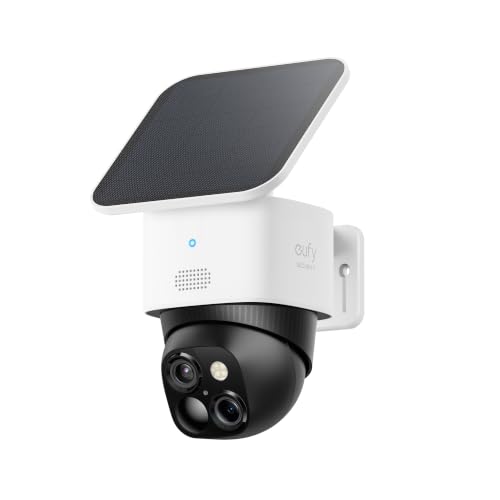
| eufy SoloCam S340 | Best overall | 3K wide + 2K telephoto dual lenses, pan and tilt, removable solar panel, 8GB built-in local storage |
| Reolink Argus 4 Pro with Solar Panel | Best for wide yards and corners | 4K dual-lens 180-degree panoramic view, ColorX colour night vision, battery plus 6W solar panel, microSD local storage |
| Arlo Pro 5S 2K Spotlight Camera | Best polished mainstream pick | 2K HDR video, 160-degree field of view, dual-band Wi-Fi, integrated spotlight and siren, removable rechargeable battery |
| Ring Spotlight Cam Plus, Battery | Best for Ring and Alexa homes | 1080p HD video with HDR, LED spotlights, colour night vision, security siren, Quick Release battery pack |
| TP-Link Tapo C425 Wire-Free MagCam | Best no-fuss mount and free detection | 2K QHD video, magnetic mount, rechargeable battery, microSD local storage, free on-device person, pet and vehicle detection |
| Wyze Battery Cam Pro | Best value | 2.5K HDR video, radar plus PIR motion detection, removable rechargeable battery, integrated spotlight and siren, microSD local recording |
How we chose
We shortlisted cameras that are genuinely sold as outdoor models, are maker-rated for weather exposure, and sit under $200 in their standard single-camera configuration at the time of research. Multi-camera kits, indoor-only models and cameras whose normal single price lives above the ceiling were excluded, however good they are. Within the tier we weighted five things: image usefulness after dark as much as at noon, honest detection that labels people rather than alerting on every shadow, a power arrangement you can sustain without weekly ladder trips, storage you control, and a total cost of ownership that stays honest once subscriptions are counted.
Subscription treatment decided several places in the order. Two of the six cameras effectively stop recording without a paid plan, and we say so plainly in their reviews rather than burying it; they are still here because their ecosystems are excellent for households already invested in them. The other four record locally with no required fee, and two of those also include person detection free, which five years ago would have been unthinkable at this price. We also favoured cameras whose makers publish clear specifications — IP weather ratings, storage behaviour, what a plan unlocks — over cameras that hide the fee structure until the trial expires.
The 6 best picks in detail
eufy SoloCam S340
The SoloCam S340 is the camera that makes the under $200 tier feel like a step up rather than a compromise. It carries two lenses on one motorised head: a 3K wide-angle lens that watches the whole scene and a 2K telephoto lens that zooms toward faces and number plates at the same time, with hybrid zoom and detail at distance that eufy rates to about 40 feet as a maker specification. The head pans a full circle and tilts, and on-device detection for people and vehicles lets it follow movement across a driveway or garden instead of staring at one fixed patch of wall.
Power is the second half of the pitch. A removable solar panel tops up the built-in rechargeable battery, and eufy rates standalone battery life at around three months as a maker claim under typical conditions, with the panel extending that indefinitely in a sunny mounting spot. Because the panel detaches, you can put the camera in shade and the panel in sun a short cable run away. Weather resistance is rated IP65 by the maker, which covers rain jets and dust for ordinary exposed mounting.
On money after purchase, this is the cleanest story in the group. Recording goes to 8GB of built-in local storage on the camera itself and eufy sells this model with no monthly fee required for recording, playback or its on-device person and vehicle detection. An optional HomeBase S380 can add much larger central storage and extra recognition features, but it is an upgrade, not a ransom: the camera works on its own out of the box. There is no memory card slot to budget for, though the fixed built-in capacity means heavy-traffic spots cycle through older clips sooner.
For a general buyer with one important spot to watch — a driveway, a front path, a side gate — the S340’s combination is hard to argue with: one mount covers a wide area because the head moves, the zoom lens answers the ‘who was that’ question the wide lens raises, and the solar panel means the battery mostly looks after itself on any wall that sees a few hours of sun. It is the only camera here that pairs this hardware with zero required fees, which is why it leads the guide rather than merely appearing in it.
- Dual lenses record a wide view and a zoomed view at once
- Solar panel removes most battery-charging chores in sunny spots
- No subscription required for recording or smart detection
- Pan and tilt covers a corner or driveway from one mount
Honest limitation: The built-in 8GB of storage is fixed and not expandable on the camera itself, so a very busy street-facing mount recycles footage quickly unless you add a HomeBase.
Choose it if you want one camera to cover a driveway or garden with no subscription and minimal charging. Skip it if you need continuous 24/7 recording — like every battery camera here, it records motion events, not an unbroken stream.
eufy SoloCam S340 — Check on Amazon
Reolink Argus 4 Pro with Solar Panel
The Argus 4 Pro solves the oldest outdoor-camera problem — the blind spot at the edge of the frame — by stitching two lenses into a single 180-degree panoramic image. One camera watches an entire side of a house, a full garden width or both directions of a corner at once, in 4K resolution as the maker specifies it. Its ColorX night vision uses a very fast lens and a large sensor to keep night footage in colour without leaning on a spotlight, which matters if you want to describe a jacket or a car colour after dark.
This listing bundles the camera with Reolink’s solar panel, so the rechargeable battery is topped up by daylight and manual charging becomes an occasional event rather than a routine; as with every battery camera here, endurance figures are maker claims that depend on how much motion the camera sees and how cold the winter gets. The housing is rated IP66 by the maker, a notch above most rivals here for driving rain. Dual-band Wi-Fi, including Wi-Fi 6 support as specified by Reolink, helps on congested home networks.
Recording is local-first: clips save to a microSD card in the camera (budget for a card, since one is not the point of this bundle), and Reolink does not require a subscription for recording, playback or its person, vehicle and animal detection. An optional Reolink Cloud plan and the optional Home Hub exist for people who want off-camera backup, and FTP support suits tinkerers, but nothing essential is locked behind a plan. That combination — panoramic 4K, colour night vision and no required fee — is why it anchors the top of this tier.
Choose the Argus 4 Pro when the shape of your property is the problem: a wide frontage, an L-shaped garden, a corner plot where one fixed camera always leaves a flank unwatched. The panoramic stitch replaces what would otherwise be two cameras and two mounts with one of each, and its colour night vision is the best here for identifying clothing and vehicles after dark. It asks a little more of your Wi-Fi and your wallet than the value picks, and it rewards you with the most capable single viewpoint in the group.
- One camera covers a full 180-degree width with no side blind spots
- Colour night vision without depending on a bright spotlight
- No subscription required; local microSD recording included by design
- Solar panel bundled in this listing
Honest limitation: The stitched panoramic image can look stretched at the far edges, and the camera sits near the top of this budget, so check the current listing price before assuming it fits under the ceiling on a given day.
Choose it if one wide viewpoint must replace two cameras, or colour detail at night matters most. Skip it if your mounting spot has weak Wi-Fi — a panoramic 4K stream is the most demanding feed in this group.
Reolink Argus 4 Pro with Solar Panel — Check on Amazon
Arlo Pro 5S 2K Spotlight Camera
The Arlo Pro 5S is the polished all-rounder of this tier: 2K video with HDR for scenes that mix bright driveways and shaded porches, a wide 160-degree field of view, colour night vision helped by an integrated spotlight, a siren, and two-way talk. Its dual-band Wi-Fi is a genuine practical advantage — it can use a 5GHz network where many battery cameras are stuck on crowded 2.4GHz bands — and the removable battery pack swaps in seconds if you keep a spare charged.
Now the honest part, because Arlo’s running costs are the highest in this group. Cloud recording, the searchable video history, rich notifications with thumbnails and the smart object detection that tells a person from a parcel are Arlo Secure subscription features. Without a plan, after any included trial ends, you get live view and basic motion alerts, but the camera does not save the library of clips most people buy it for, and this model has no memory card slot of its own; local recording only enters the picture with a separate Arlo SmartHub setup. Budget the plan into the real price of owning this camera.
Weather resistance, mounting and the app experience are all mature: the camera is built for exposed outdoor mounting as a maker-rated weather-resistant housing, the magnetic and screw mounts are well sorted, and the app is one of the most refined here. If you accept the subscription as part of the deal — the way you would with Ring — the Pro 5S delivers the most complete mainstream package under the ceiling. If you refuse monthly fees on principle, look at the eufy, Reolink or Tapo picks instead.
The Pro 5S is the pick for buyers who value polish over thrift: the app, the HDR image, the dual-band radio and the general sense that everything has been thought through. It is also the camera whose five-year cost is highest once its subscription is counted, and this guide treats that as a buying decision rather than a footnote. If you already pay for Arlo elsewhere, or you simply want the most refined mainstream experience under the ceiling and accept the plan as the price of it, this is your camera.
- Excellent 2K HDR image with a very wide view
- Dual-band Wi-Fi copes better with busy home networks
- Spotlight, siren and polished app in one package
- Removable battery makes swaps quick
Honest limitation: Cloud recording and smart detection require an Arlo Secure subscription after the trial; without a plan the camera does not keep a recorded video history.
Choose it if you want the most polished app and image and you accept the subscription as part of the price. Skip it if you refuse monthly fees; without a plan it does not keep recordings.
Arlo Pro 5S 2K Spotlight Camera — Check on Amazon
Ring Spotlight Cam Plus, Battery
Ring’s Spotlight Cam Plus is built around deterrence you can see. Two LED spotlights switch on with motion, the camera records 1080p HD video with colour night vision, and a remote-activated siren, two-way talk and motion warnings let you speak to whoever is at the gate from the app. For households already using a Ring doorbell or Alexa displays, it slots into the same app, the same routines and the same voice controls with almost no learning curve.
The subscription disclosure matters more here than anywhere else in this guide. Ring cameras do not record to local storage at all — there is no memory card and no hub recording — and saving, reviewing and sharing video requires a Ring Protect subscription (now sold under Ring’s home plan naming). Without a plan you still get live view and real-time motion alerts, but no recorded history: the moment passes and it is gone. With a plan, you get the recorded library and richer features. Neither is a trick, but you should choose with your eyes open, because the plan is effectively part of this camera’s price for as long as you own it.
Power comes from a Quick Release Battery Pack — one is included and the housing holds two, so adding a second pack roughly doubles the time between charges as a maker-described configuration; an optional solar panel exists too. Battery endurance is a maker claim that depends heavily on how often the spotlights fire. Resolution is the trade-off against the sharper 2K, 3K and 4K cameras here: you are paying for the ecosystem, the lights and the siren rather than pixel count.
The Spotlight Cam Plus earns its place through presence rather than pixels. The spotlights change behaviour — people look up, move on, or at least become visible in colour — and for the large number of homes that already run a Ring doorbell, adding the same brand’s camera keeps everything in one app with one plan. Judge it as an ecosystem purchase: bought alone, its 1080p video and mandatory recording plan are weaker value than the local-storage rivals; bought as part of a Ring household, it is the obvious fit.
- Bright motion-activated spotlights plus a siren deter actively
- Seamless fit for homes already using Ring or Alexa
- Battery housing holds a second pack to stretch time between charges
- Simple, well-supported app and accessories
Honest limitation: No local storage option at all, and recorded video requires a Ring subscription; without one you only get live view and alerts. Video is 1080p in a tier where rivals offer 2K and above.
Choose it if your home already uses Ring or Alexa, or visible spotlights matter for deterrence. Skip it if you want local storage or the sharpest video — it offers neither.
Ring Spotlight Cam Plus, Battery — Check on Amazon
TP-Link Tapo C425 Wire-Free MagCam
The Tapo C425 is the friendliest camera in this tier to actually live with. Its party trick is the magnetic base: the camera snaps onto a small mounted plate and can be pulled down by hand for charging or repositioning, then clicked back at a slightly different angle in seconds. Behind the trick is a serious spec sheet — 2K QHD video, colour night vision with a starlight sensor and built-in spotlights, and a wide view that suits porches, balconies and garden gates.
The running-cost story is one of the best here. Person, pet and vehicle detection runs on the device and is free, and recording goes to a microSD card in the camera with no subscription required; TP-Link’s optional Tapo Care plan adds cloud storage and richer notifications for people who want them, but it is genuinely optional. That local-plus-free-detection combination is rare at any price and almost unheard of in the value half of this tier.
TP-Link rates the large built-in battery for very long standby-style endurance as a maker claim — up to around 300 days under the maker’s lab conditions with light triggering — and real life with daily motion, cold weather and frequent live view will be shorter, as with every battery camera. An optional solar panel can be added later. The housing carries a maker-rated IP66 weather resistance. The magnetic mount’s one caveat is reach: mount it high or out of easy grabbing range, because what you can pull down in two seconds, someone else theoretically could too.
The C425 is the quiet overachiever of the tier. Buyers who compare spec sheets often scroll past it toward bigger brands, then discover it offers the same 2K resolution, free smart detection and local recording that rivals either charge for or omit. Its magnetic mount sounds like a gimmick until the first time you take the camera down to charge it one-handed, or nudge its angle after the bins move. For a porch, a balcony rail or a garden gate, it may be the most liveable camera here.
- Magnetic mount makes charging and re-aiming genuinely effortless
- Free on-device person, pet and vehicle detection
- Local microSD recording with no required subscription
- Strong 2K image with colour night vision
Honest limitation: The magnetic mount should be placed out of easy reach, and the very long battery figures are maker lab claims that busy, cold or frequently viewed installations will not match.
Choose it if you want free smart detection, local recording and the easiest mount to live with. Skip it if the mount must be reachable-proof at ground level, or you want a big-brand ecosystem.
TP-Link Tapo C425 Wire-Free MagCam — Check on Amazon
Wyze Battery Cam Pro
The Wyze Battery Cam Pro is the value pick that refuses to feel cheap. It records 2.5K HDR video with colour night vision, carries an integrated spotlight and siren, and detects motion with a radar-plus-PIR pairing that Wyze uses to cut the false alerts that plague purely heat-based sensors — the passing-car and waving-branch alerts that train people to ignore their cameras. The battery is removable and rechargeable, so a spare pack turns a charging gap into a ten-second swap.
Wyze’s fee structure needs the same honesty as Arlo’s and Ring’s, in miniature. Local recording to a microSD card works without any plan, and basic motion alerts are free. But Wyze’s Cam Plus subscription is what unlocks person, pet and package detection, full-length cloud event recording and the smart notification labels; without it, cloud event clips and detection intelligence are limited and the camera is noticeably dumber. The plan is inexpensive by category standards, yet it is still a plan — count it if you want the smart features in the brochure.
The housing is maker-rated IP65 for outdoor use, no hub is required, and an optional solar panel can keep the battery topped up on a sunny wall. What you give up versus the top of this tier is refinement: the app and firmware experience is more utilitarian than Arlo’s or Ring’s, and the brand’s cloud-first history means privacy-minded buyers should read the current policy and lean on local recording. For the money under this ceiling, though, the hardware-per-dollar is hard to beat.
The Battery Cam Pro is where the budget half of this tier stops feeling like a punishment. It undercuts the premium picks while keeping the features that matter — sharp video, a spotlight, a siren, local recording — and its radar-assisted detection addresses the single biggest annoyance of cheap cameras, the hourly false alert. It is the natural second camera, the garage camera, the ‘let’s try one and see’ camera, and for plenty of homes it will simply be the camera, full stop.
- Radar-assisted detection reduces nuisance alerts
- Removable battery and optional solar panel keep power flexible
- Local microSD recording works without a subscription
- Spotlight, siren and 2.5K video at a value-tier position
Honest limitation: Person and package detection and full cloud recording sit behind the Cam Plus subscription; without it the smart features are limited even though local recording still works.
Choose it if value matters and you want strong hardware with local recording from day one. Skip it if you want the smartest detection without paying anything — that intelligence is the subscription part.
Wyze Battery Cam Pro — Check on Amazon
Comparison table
| Camera | Video | Power | Storage | Subscription |
|---|---|---|---|---|
| eufy SoloCam S340 | 3K wide + 2K telephoto | Battery + removable solar panel | Built-in 8GB local | None required |
| Reolink Argus 4 Pro with Solar Panel | 4K panoramic, 180 degrees | Battery + bundled solar panel | microSD local (card separate) | None required |
| Arlo Pro 5S 2K Spotlight Camera | 2K HDR, 160 degrees | Removable rechargeable battery | Cloud via plan; no card slot | Arlo Secure required for recording |
| Ring Spotlight Cam Plus, Battery | 1080p HD with spotlights | Quick Release battery (holds two) | No local storage | Ring plan required for recording |
| TP-Link Tapo C425 Wire-Free MagCam | 2K QHD | Built-in rechargeable battery | microSD local (card separate) | None required |
| Wyze Battery Cam Pro | 2.5K HDR | Removable rechargeable battery | microSD local (card separate) | Cam Plus for smart detection |
Read the comparison table’s last two columns as the real price list of this guide. The eufy, Reolink and Tapo cameras record to storage you own and ask for nothing monthly; their makers sell optional cloud or hub upgrades, but the cameras remain fully themselves without them. The Wyze sits in between: local recording is free forever, while the smart detection and full cloud recording are rented. Arlo and Ring sit at the far end — after their trials, recorded history itself is the subscription product, and both cameras should be priced in your head as hardware plus a plan for as long as you own them.
Local storage has honest downsides worth naming. A card or built-in memory inside a camera that gets stolen takes its footage with it, capacity cycles older clips away on busy streets, and reviewing footage means using each brand’s app rather than one central archive. Cloud storage answers all three points, which is exactly why brands charge for it. The mature position is not ‘fees bad, local good’ — it is knowing precisely which features you are renting, which you own, and choosing the split deliberately instead of discovering it when a trial ends the week something happens in your driveway.
Setting up your camera: a first-weekend walkthrough
Installation follows the same rhythm for all six picks. Charge the camera fully indoors first — every battery model here arrives part-charged, and starting at full separates genuine battery behaviour from shipping charge. Fit the memory card now if your model uses one, format it in the app, and run through setup at the kitchen table: account, Wi-Fi password, firmware update, and a test clip you deliberately trigger. Cameras that update firmware on a ladder, in the rain, over a weak signal are how installations earn their bad reputation.
Mount in two passes. On the first pass, fix the mount temporarily — a single screw, a clamp, even strong temporary tape for a daylight test — and live-view the scene at noon, at dusk and after dark. Check three things: the approach you care about sits in the middle half of the frame, the sun’s path does not blast the lens at the hour people come home, and the night view shows faces rather than a glowing forehead under your porch light. Only then fix the mount permanently, drill the remaining holes, and seal exterior fixings if the maker advises it.
Finish with the settings pass that decides whether the camera earns its keep. Draw activity zones over your property and off the public street, set sensitivity so a person crossing the zone alerts but a cat does not, and walk the approach yourself at a normal pace while a partner watches the phone: note the alert delay, check your face is recognisable in the saved clip, and read a number plate if the driveway is in view. Save that test clip. It is your baseline — if quality ever seems worse months later, you will know whether the camera changed or your memory did.
How to choose the best outdoor security camera under $200 for your home
Start with the viewpoint, not the brand. Stand where the camera will mount and look at what it must see: a narrow side path suits almost anything here, a wide driveway argues for the panoramic Reolink or the panning eufy, and a front door with a shaded porch argues for strong HDR like the Arlo’s. Resolution only helps if the lens covers the right area; a 4K view of the wrong wall loses to a 2K view of the gate every time. Note where the sun sits at midday too, because a camera staring into low sun will struggle whatever its spec sheet says, and a solar panel needs the opposite treatment — as much direct light as the site allows.
Next, decide your fee position before you fall for hardware. If the camera must never cost another penny, your shortlist is the eufy, Reolink and Tapo, with the Wyze included if local-only recording satisfies you. If you already pay Ring or Arlo for a doorbell, consolidating on that plan can be rational rather than wasteful. Then match power to the mount: solar where sun reaches, a removable battery where the mount is reachable, and a second battery pack anywhere you would rather swap than wait. Finally, check your Wi-Fi at the mounting spot with your phone before drilling anything — most ‘bad camera’ stories are weak-signal stories, and the dual-band and Wi-Fi 6 models here exist precisely for difficult spots.
Battery, solar and weather in real life
Battery endurance is the specification most distorted by laboratory conditions, so translate maker claims into your own arithmetic. A camera on a quiet side path may wake twenty times a day; the same camera over a busy pavement wakes hundreds of times, records longer clips, fires its spotlight, and streams live view to curious owners — and its battery life divides accordingly. Cold compounds it: lithium batteries deliver less in a hard frost, which is why a camera that coasted through autumn can demand charging twice in January. None of this is a defect; it is physics, and the defence is architectural — solar where sun reaches, a spare swappable pack where hands reach, and sensitivity settings that stop the camera working for the whole street.
Solar deserves one honest paragraph of its own. A panel does not power the camera directly so much as erase the deficit on sunny days; a string of overcast winter weeks can still draw the battery down, especially on the pan-and-tilt eufy that spends energy moving. Mount panels with a clear view of the midday sky, angled to shed rain, and treat the cable run as part of the weatherproofing — a chafed cable is the most common silent failure in solar setups a year later.
Weather ratings, finally, describe the camera body, not the whole installation. IP65 and IP66 maker ratings cover rain and dust at the housing; they do not cover a mount that channels water behind the camera, a charging port left unsealed after a top-up, or a lens that fogs because the camera was brought from a warm house into cold damp air and sealed with the moisture inside. Let a new camera acclimatise outdoors before final tightening, keep port covers seated, and wipe the lens with a microfibre cloth when you pass with the ladder — a thirty-second habit that does more for image quality than any resolution upgrade.
Night vision, compared honestly
Night is where this tier separates, and the makers use three different strategies. The Reolink’s ColorX approach gathers available light through a fast lens and large sensor, producing colour footage without adding light of its own — discreet, and excellent where street lighting or porch spill gives it something to work with. Spotlight cameras — Arlo, Ring, Wyze and Tapo in different degrees — manufacture their own light, which guarantees colour detail at close range and doubles as deterrence, at the cost of announcing the camera and spending battery. Infrared, fitted to all of them as a fallback, is the frugal monochrome mode: less identifying colour, but no visible glow and the gentlest battery drain.
The eufy plays a fourth card: its telephoto lens with spotlight support trades breadth for reach, pulling a usable face or plate from the far end of a drive where a wide lens records a figure. None of these strategies is simply best. A lit suburban street flatters ColorX; an unlit rural gate needs a spotlight’s own light; a camera beside a bedroom window argues for infrared’s discretion. Judge night claims by your darkness, not by the demo reel, and remember every figure in a maker’s night-vision specification is measured under their conditions, on their test scene.
Whichever you choose, two placement rules govern all of them. Keep the camera’s night view free of near-field obstructions — a wall edge or railing inside the frame will catch infrared or spotlight light and bloom white, blinding the rest of the scene. And expect range to shrink in rain and fog, when every technology here is looking through weather as well as darkness. A camera tested on a clear night and trusted on a filthy one is a camera whose settings — exposure, spotlight behaviour, sensitivity — deserve a second look each season.
Common mistakes
Buying on resolution alone. A 4K badge does not fix a bad angle, weak Wi-Fi or a lens aimed at a hedge. Viewpoint, night performance and detection quality decide whether footage is useful; pixels come fourth.
Discovering the subscription after the trial. Two cameras in this very guide stop recording when the plan lapses. Decide before purchase which features you are renting, and set a calendar note for any trial’s end date.
Mounting a battery camera somewhere miserable. A camera you dread recharging becomes a camera with a flat battery. Prefer solar at high mounts, removable packs at reachable ones, and never mount above a ladder’s comfortable reach.
Ignoring Wi-Fi until installation day. Outdoor walls, foil insulation and distance murder signal strength. Test at the exact spot first; if it is marginal, choose a dual-band model or move the router before blaming the camera.
Aiming at the street and calling it security. A wide public view generates endless alerts, drains batteries and records your neighbours more than your property. Aim at your gate, your door and your driveway, and use activity zones to trim the rest.
Final recommendation
For most homes, the eufy SoloCam S340 is the under $200 camera to beat: dual lenses, a moving head, solar-assisted power and genuinely no required fees, in one well-made package. The Reolink Argus 4 Pro is the better buy when one camera must swallow a whole wide property, and the Tapo C425 is the best blend of low running cost and everyday convenience below them. Arlo and Ring remain the right answers for households committed to their ecosystems — bought knowingly, with the plan counted. And the Wyze proves the floor of this tier is now remarkably high.
Start with the eufy SoloCam S340 if you want the safest single buy, and keep the Reolink Argus 4 Pro with Solar Panel on your shortlist as the strongest alternative for the situations described above.
Frequently asked questions
Do I need a subscription for an outdoor security camera under $200?
Not necessarily. The eufy, Reolink and Tapo picks in this guide record locally with no required subscription. Arlo and Ring cameras need a paid plan to save recorded video after their trials, and Wyze charges for its smart detection tier while keeping local recording free.
Is local or cloud storage better for an outdoor camera?
Local storage costs nothing monthly and keeps footage on your property, but it can be stolen with the camera and fills up on busy sites. Cloud storage survives theft and is easier to search, but it is rented. Many owners use local recording as the base and add cloud only where it earns its keep.
How long do battery outdoor cameras really last between charges?
Maker claims range from a few months to much longer under light-use lab conditions. Real life depends on motion traffic, live viewing, spotlight use and cold weather. Solar panels and spare removable batteries are the practical answers for busy or high mounts.
Can a battery camera record continuously, 24/7?
Generally no. Battery cameras here record motion-triggered clips to preserve power. If you need unbroken recording, look at wired cameras with continuous power instead of any model in this guide.
What does an IP65 or IP66 rating actually mean?
It is the maker’s certified resistance rating: the first digit covers dust, the second covers water. IP65 resists water jets, IP66 resists stronger jets. Both suit exposed outdoor mounting; neither means the camera should be submerged or pressure-washed.
Will these cameras work if my internet goes down?
Local-recording models typically keep saving motion clips to their card or built-in storage during an outage, though alerts and live view need the connection. Cloud-dependent models are more limited until service returns. Check each maker’s current support notes for the exact behaviour.
Can I add more cameras later from different brands?
Yes, but each brand lives in its own app, so a mixed system means checking two apps and two sets of alerts. Many households start with one brand for the main view and add a value camera elsewhere, accepting the second app as the price of the saving.
Do these cameras work with Alexa, Google or Apple smart homes?
Most picks here support Alexa and Google voice control and viewing on smart displays as maker-listed features; Apple HomeKit support is the exception rather than the rule in this tier. Check the current listing for the exact platform support of the model you choose.


