Where to buy
Shopping for the best outdoor security camera for small homes under $150? Check the latest price, availability and delivery on Amazon. Orders are placed on Amazon. Prices and stock change often at this tier, so confirm the current listing — and, for the Blink pick, whether a hub is included — before you buy. We may earn a commission from qualifying purchases.
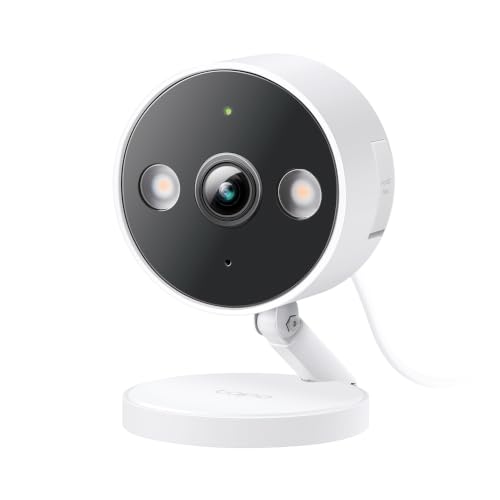
- Best overall: TP-Link Tapo C120 — Free smart detection without a subscription
- Best value: eufy SoloCam S220 — Solar power with no monthly fee
- Best alternative: Wyze Cam v4 — Sharpest wired picture on a tight budget
- Best for coverage: Blink Outdoor 4 — Longest battery claim and simplest app
- Best for flexibility: Ring Outdoor Cam (Stick Up Cam) Battery — Alexa homes that want flexible placement
- Best specialist: Wyze Cam Floodlight v2 — Driveways that need light as well as video
Check price: TP-Link Tapo C120 · Check price: eufy SoloCam S220 · Check price: Wyze Cam v4 · Check price: Blink Outdoor 4 · Check price: Ring Outdoor Cam (Stick Up Cam) Battery · Check price: Wyze Cam Floodlight v2
Read the full guide ↓
Disclosure: As an Amazon Associate, dailyhomedecorating.com earns from qualifying purchases. Links to Amazon on this page are affiliate links; they cost you nothing extra. Listing details such as price and availability change often, so check the current Amazon listing before you buy.
The best outdoor security camera for small homes under $150 is rarely the one with the widest view or the longest feature list, because a small home does not have a coverage problem — it has a proportionality problem. One front approach, one back door, a short drive or a shared side path: the whole exterior can often be watched honestly by a single well-placed camera, and almost always by two. That makes the small-home decision refreshingly different. Instead of stretching a budget across angles, you can spend it on the things that actually determine satisfaction at this scale: picture detail at short distances, alerts that distinguish your household’s rhythm from real events, and ownership with no subscription quietly taxing a small household budget month after month.
Small homes also sit close to their neighbors, and this guide treats that as a design input rather than an afterthought. Your camera will see your neighbor’s drive edge, their path, their comings and goings, unless you aim and mask deliberately. The good news is that compact properties make good-neighbor camera craft easy: distances are short, choke points are obvious, and privacy zones drawn on day one can keep your coverage almost entirely on your own ground. The picks below are therefore judged on how gracefully they fit a small footprint — compact bodies, tidy cable needs, detection you can tune to a small map — alongside the standard audits of storage, subscriptions and power that this batch applies to every camera.
The short answer: the Tapo C120 is the small home’s sweet spot — one wired camera with free detection and fee-free local recording covering a front approach completely. The eufy SoloCam S220 is its mirror for the back of the house, solar and fee-free where wiring does not reach. The Wyze v4 steps in where a longer small-home drive demands detail, Blink and Ring serve specific low-traffic and Alexa-shaped households with their plan conditions stated plainly, and the floodlight earns a place only where a small home’s single dark drive justifies a fixture swap.
In this guide
Quick picks
Six cameras, six different answers to the same budget. The table is the map; the reviews that follow are the territory, including the subscription and storage conditions that decide real ownership cost.
| Camera | Best for | Key spec |
|---|---|---|
| TP-Link Tapo C120 | Free smart detection without a subscription | 2K QHD, wired, free person/pet/vehicle detection |
| eufy SoloCam S220 | Solar power with no monthly fee | 2K, solar plus battery, built-in local storage |
| Wyze Cam v4 | Sharpest wired picture on a tight budget | 2.5K QHD, wired, color night vision |
| Blink Outdoor 4 | Longest battery claim and simplest app | 1080p HD, battery powered, needs a Sync Module |
| Ring Outdoor Cam (Stick Up Cam) Battery | Alexa homes that want flexible placement | 1080p HD, removable battery, indoor/outdoor |
| Wyze Cam Floodlight v2 | Driveways that need light as well as video | 2K, hardwired floodlight, very wide view |
How we chose
We filtered for small-home proportionality. First, sufficiency: could one or two of these cameras honestly cover a compact property’s approaches, at distances where their resolution identifies rather than merely detects? All six can — which freed us to rank on ownership quality. Second, cost discipline: in a small home the camera is a larger share of the security budget, so fee-free local storage and free detection weighed heavily, and plan-dependent designs were ranked with their recurring cost treated as part of the price, because over a few years it can exceed the hardware.
Third, footprint and fit: compact bodies that disappear under a small eave, cable runs that stay short and tidy, solar that suits a small sunny wall, and nothing that visually dominates a modest facade. Fourth, neighborliness: activity zones, privacy masking and tunable detection matter more, not less, when the next house is a few steps away, so we favored cameras whose apps make that tuning easy. The standard checks still applied — maker-rated outdoor construction, at least 1080p, verifiable retail presence — and every headline figure is a maker specification, with battery and solar numbers read as claims tied to conditions.
Within that frame, ordering follows the typical small-home story: the do-everything wired front camera first, the wireless back-of-house answer second, then the detail upgrade, the low-maintenance battery option, the ecosystem option, and finally the one specialist that replaces a light fitting. Prices live on the Amazon listing, where they belong; this guide’s job is to make sure the camera you bring home fits the house you actually have.
Detailed reviews
TP-Link Tapo C120
Who it suits: The one-camera small home: a front door and short drive covered completely, fee-free, from the nearest outlet.
The TP-Link Tapo C120 is the value pick that embarrasses cameras costing far more, for one reason: the smart detection is free. Person, pet and vehicle detection run on the camera and are included without a subscription, so the alert that reaches your phone can already say what moved instead of forcing you to open every clip of a swaying shrub. The 2K QHD picture is crisp, the dual spotlights support genuine color night vision rather than a token glow, and an invisible infrared mode exists for spots where visible light would annoy neighbors or wildlife. Storage is equally honest: record locally to a microSD card and pay nothing ongoing, or add the optional Tapo Care cloud plan only if you want off-site backup. The C120 is wired and plug-in, with a generously long power cable in the box, and its magnetic base makes aiming unusually painless for a camera at this price. Its honest limits are range and ecosystem: it is a Wi-Fi camera that wants a decent 2.4 GHz signal, and while it works with Alexa and Google Assistant for voice viewing, it does not join every smart-home platform, so check compatibility if your home runs on something else.
Power and weather: Wired (plug-in adapter with a long cable in the box). IP66 weather resistance (maker rating). Battery and solar figures quoted by makers assume typical use under stated conditions; treat them as claims to plan around, not guarantees.
Storage and subscription, plainly: Local microSD recording or optional Tapo Care cloud; person, pet and vehicle detection are included free on the camera. Core detection is free, which is rare at this price. Tapo Care, a paid plan, adds cloud clip storage and richer notifications, but the camera stays fully useful on local storage alone.
Choose / skip: Choose it as the default single camera for a small home. Skip it only if the front spot truly has no power path — then start with the eufy instead.
In daily ownership: Ownership rhythm here is close to zero: the camera is wired, detection is free, and the card quietly cycles — your only recurring task is confirming, now and then, that the clips you expect are the clips being kept.
eufy SoloCam S220
Who it suits: The back door, garden gate or sunny side wall of a small home — the angle the wired camera cannot reach, watched without fees or charging.
The eufy SoloCam S220 solves the two annoyances that kill most budget outdoor cameras: charging and subscriptions. A solar panel is built into the top of the camera, and eufy states that a few hours of direct sunlight a day can keep the battery topped up under typical use — treat that as a maker claim that depends entirely on your climate, season and mounting angle, because a north-facing wall in a grey winter will harvest a fraction of what a sunny southern exposure collects. Recordings are stored on memory built into the camera, and eufy sells this model explicitly as a no-monthly-fee camera: you can review your events without a plan. The 2K picture is clean, the body is compact enough to disappear under an eave, and pairing it later with a eufy HomeBase adds expanded local storage and smarter processing if you grow into a bigger system. The limitations are real. Built-in storage cannot be expanded with a card, so heavy-motion locations will cycle through old clips sooner. Solar dependence means a badly shaded mount quietly becomes a camera you have to take down and charge by cable. And like most battery cameras, it records events rather than continuous video, so a slow-moving subject can occasionally be clipped at the edges of an event.
Power and weather: Solar panel built in plus rechargeable battery. Weather-resistant outdoor housing (maker rated for outdoor use). Battery and solar figures quoted by makers assume typical use under stated conditions; treat them as claims to plan around, not guarantees.
Storage and subscription, plainly: Built-in local storage on the camera itself, with no monthly fee for basic use; can also pair with a eufy HomeBase for expanded local storage (sold separately). eufy markets this camera as no-monthly-fee: recorded events are stored locally on the device. Optional cloud plans exist, but reviewing your clips does not depend on one.
Choose / skip: Choose it for the second angle or the unwired first angle. Skip it for a shaded wall or a busy front street where its storage and event recording work hardest.
In daily ownership: Living with the S220 means watching a sun budget instead of a battery gauge: a glance at the app after a grey week tells you whether the mount’s exposure is honest, and a shaded winter may ask for one cable top-up.
Wyze Cam v4
Who it suits: A small home with a longer drive or a street-facing frontage, where identification distance stretches beyond a compact camera’s comfort.
The Wyze Cam v4 is a small wired cube that punches well above its price on picture quality. Its 2.5K QHD sensor is the sharpest in this roundup, and that extra resolution is not a spec-sheet vanity: it is the difference between a face that is a smudge and a face you can actually describe, and between a license plate that is grey blur and one with readable characters at driveway distance. Color night vision is the other headline. With even modest ambient light — a porch bulb, a street light, moonlight on a pale driveway — the v4 keeps recording in color long after cheaper cameras have switched to grainy black-and-white infrared, and color is what makes clothing, vehicle color and package details usable the next morning. A built-in spotlight and siren can be triggered on motion, which gives you a deterrent that pure recording cameras lack. The trade-offs are physical, not digital. This is a wired camera: it needs continuous USB power from an indoor or covered outdoor outlet, so placement is dictated by cable reach and by where you can safely run and protect that cable. It has no battery to fall back on during an outage. It is also a 2.4 GHz Wi-Fi device, so a weak signal at the far corner of a house will hurt it more than any setting can fix.
Power and weather: Wired (USB power adapter). IP65 weather resistance (maker rating). Battery and solar figures quoted by makers assume typical use under stated conditions; treat them as claims to plan around, not guarantees.
Storage and subscription, plainly: Local microSD recording (card sold separately, supports large cards) or optional Wyze Cam Plus cloud. Free tier covers live view, motion alerts and local recording. Wyze Cam Plus, a paid plan, unlocks cloud event history and the smartest person, pet, package and vehicle detection labels.
Choose / skip: Choose it when your small home’s distances are not small. Skip it if the front approach is short — the Tapo covers it with free detection included.
In daily ownership: In daily ownership the v4 is the set-and-forget member of this group: no batteries to schedule, a card to check occasionally, and a plan decision you can postpone indefinitely because the free tier already records.
Blink Outdoor 4
Who it suits: A quiet small home — a cottage, a bungalow on a calm street — where traffic is light, the battery claim holds, and simplicity rules.
The Blink Outdoor 4 is built around one promise: put it up and forget it. Blink rates the battery life at up to two years on the included AA lithium batteries under default settings — a maker claim that assumes modest motion traffic, short clips and a strong connection to its hub, and which heavy-traffic placements will shorten considerably. The 1080p picture is a step behind the 2K cameras here on fine detail, but the 143-degree diagonal view is wide, infrared night vision is dependable, and the Blink app is among the simplest to live with. The architecture is the catch you must understand before buying. The Outdoor 4 talks to a Blink Sync Module, not directly to your router, and this particular listing is an add-on camera: the Sync Module is required and is not in the box, so first-time Blink buyers need a system bundle or a module separately. Money is the second catch. Saving and reviewing clips in the cloud, and person detection, sit behind the paid Blink Subscription Plan; the subscription-free path is local backup through a Sync Module 2 with a USB drive, which is workable but less convenient than cloud review. Buy this camera for battery life and simplicity, with your eyes open about the hub and the plan.
Power and weather: Two AA lithium batteries (included). Weather-resistant outdoor housing (maker rated for outdoor use). Battery and solar figures quoted by makers assume typical use under stated conditions; treat them as claims to plan around, not guarantees.
Storage and subscription, plainly: Cloud storage with a Blink Subscription Plan, or local backup through a Sync Module 2 and a USB drive (Sync Module and drive sold separately where not bundled). A Blink Subscription Plan, a paid plan, is what unlocks cloud clip storage, clip review from anywhere and person detection. Without it you still get live view and motion alerts, and local backup is possible with the right Sync Module. Note: this listing is an add-on camera, so a Sync Module is required and is not included.
Choose / skip: Choose it for calm-street simplicity, hub and plan understood. Skip it on a busy small-home frontage, where traffic shortens battery life and multiplies alerts.
In daily ownership: Daily life with Blink is an exercise in calm: rare battery attention, an app that stays out of the way, and a standing awareness that the plan and the hub are quiet members of the household infrastructure.
Ring Outdoor Cam (Stick Up Cam) Battery
Who it suits: The Alexa-run small home, where doorbell, speakers and camera already speak one language and the plan is a known, accepted line.
The Ring Outdoor Cam — the battery model long sold as the Stick Up Cam — is the flexible-placement option for homes already living in the Alexa and Ring ecosystem. Its Quick Release battery pack slides out for charging without unmounting the camera, it can sit on a flat surface or mount to a wall, and it works indoors or out, which makes it the easiest pick here to redeploy as your needs change. Video is 1080p HD with color night vision, live view is quick, and motion alerts integrate with the Ring doorbells and Alexa announcements many homes already use. Now the disclosure that matters most in this entire guide: this camera has no local storage at all. Recorded video lives only in the cloud, and reviewing, saving or sharing it requires a paid Ring Home plan. Without the plan you get live view and instant alerts, but the event you were alerted about is gone once it passes. That does not make it a bad camera — the ecosystem, the app polish and the mounting flexibility are genuinely good — but it does mean the true cost of ownership includes a subscription for as long as you want a history, and no honest guide should let you discover that after mounting it.
Power and weather: Removable Quick Release battery pack (rechargeable). Weather-resistant outdoor housing (maker rated for outdoor use). Battery and solar figures quoted by makers assume typical use under stated conditions; treat them as claims to plan around, not guarantees.
Storage and subscription, plainly: No local storage. Recorded video is stored in the cloud and requires a Ring Home plan to save and review it. Be clear-eyed here: without a paid Ring Home plan you get live view and real-time alerts, but you cannot save, review or share recorded events later. The plan is effectively part of the cost of owning this camera if history matters to you.
Choose / skip: Choose it for one-app living in an Alexa home. Skip it if the plan might lapse — a small home’s only camera must never be one that keeps no history.
In daily ownership: Owning this camera means owning its plan as a utility: keep it active and the camera is a polished, flexible sentinel; let it lapse and you own live view only, a distinction to revisit honestly at every renewal.
Wyze Cam Floodlight v2
Who it suits: The small home with one genuinely dark drive or yard and an existing fixture: a single swap that lights and watches the whole rear approach.
The Wyze Cam Floodlight v2 is two products sharing one junction box: a 2K camera with a very wide 160-degree view, and a bright LED floodlight array that fires on motion. For driveways, side gates and back yards, the light is not a gimmick — it improves the footage itself, because a lit subject records in color with faster shutter behavior than a subject at the edge of infrared range, and it changes behavior, because most casual trespass and package probing stops when a yard lights up and a siren is available. The camera records locally to a microSD card with no fee, or to the cloud with the optional Wyze Cam Plus plan, and two-way talk plus that loud maker-rated siren give you active responses, not just evidence. The honest costs are installation and commitment. Hardwired means it replaces an existing floodlight fixture or needs new electrical work — this is not a renter camera and not a ten-minute job, and local electrical rules may require a qualified installer. It is also a fixed installation: if you move, it stays. Judge the headline brightness and siren figures as manufacturer ratings, and plan on the 2.4 GHz Wi-Fi reach to your mounting point before you open the box.
Power and weather: Hardwired to an existing floodlight junction box. Weather-resistant outdoor housing (maker rated for outdoor use). Battery and solar figures quoted by makers assume typical use under stated conditions; treat them as claims to plan around, not guarantees.
Storage and subscription, plainly: Local microSD recording (card sold separately) or optional Wyze Cam Plus cloud. Local recording works without paying anything. Wyze Cam Plus, a paid plan, adds cloud event history and smarter detection labels. The floodlight itself is a maker-rated bright LED array, so judge brightness claims as manufacturer figures.
Choose / skip: Choose it to solve darkness and coverage in one install. Skip it if your small home’s exterior is already well lit — a plain camera does the job for less effort.
In daily ownership: The floodlight asks the most on day one and the least thereafter: once wired, it is light and camera in a single fixture, with a card to check seasonally and a junction box you will hopefully never open again.
Comparison table
| Camera | Resolution | Power | Storage |
|---|---|---|---|
| TP-Link Tapo C120 | 2K QHD | Wired (plug-in adapter with a long cable in the box) | Local microSD recording or optional Tapo Care cloud; person, pet and vehicle detection are included free on the camera |
| eufy SoloCam S220 | 2K | Solar panel built in plus rechargeable battery | Built-in local storage on the camera itself, with no monthly fee for basic use; can also pair with a eufy HomeBase for expanded local storage (sold separately) |
| Wyze Cam v4 | 2.5K QHD | Wired (USB power adapter) | Local microSD recording (card sold separately, supports large cards) or optional Wyze Cam Plus cloud |
| Blink Outdoor 4 | 1080p HD | Two AA lithium batteries (included) | Cloud storage with a Blink Subscription Plan, or local backup through a Sync Module 2 and a USB drive (Sync Module and drive sold separately where not bundled) |
| Ring Outdoor Cam (Stick Up Cam) Battery | 1080p HD | Removable Quick Release battery pack (rechargeable) | No local storage. Recorded video is stored in the cloud and requires a Ring Home plan to save and review it |
| Wyze Cam Floodlight v2 | 2K HD | Hardwired to an existing floodlight junction box | Local microSD recording (card sold separately) or optional Wyze Cam Plus cloud |
Compare the leaders directly: TP-Link Tapo C120 · eufy SoloCam S220 · Wyze Cam v4.
How to choose the best outdoor security camera for small homes under $150
Start with the one-camera question, because many small homes can honestly answer yes. Stand at your front boundary and identify the single choke point everything passes: the gate, the path pinch, the door itself. A camera owning that point at moderate height, with the drive and door in frame, covers the large majority of what a small home needs to see. Buy that camera first — for most readers it is the Tapo — live with it for a month, and let evidence, not anxiety, tell you whether a second angle is a need or a notion.
Place for short distances and enjoy the dividend. Small-home approaches are close, which means even the 1080p cameras here recognize familiar people easily, and the 2K options deliver genuinely identifying detail without strain. It also means mounting can be lower and tidier — under the porch roof, beside the door, on the garden wall — with cable runs measured in steps rather than ladders. Use that closeness: aim deliberately, draw privacy zones that stop at your boundary on day one, and have the brief neighbor conversation that keeps a small street friendly.
Keep ownership small too. A compact property deserves a compact bill: the fee-free local-storage cameras in this guide cost nothing after purchase, which suits a household that bought one or two cameras precisely because the budget was finite. If you choose a plan-based camera, choose it knowing the plan is effectively permanent rent on your own history — a rational trade for ecosystem polish in an Alexa home, a poor one for a single camera bought to save money. Either way, decide with the arithmetic in front of you.
Plan the pair, even if you buy one. The natural small-home system is a wired front camera and a solar or battery back camera: no duplicated strengths, no uncovered flank, one app. Choosing your brand family with that pair in mind — Tapo front and eufy back are different apps, note, while doubling down on one brand keeps one app — is the last real decision. Make it consciously, mount the first camera this weekend, and let the second wait for the month of evidence that tells you exactly where it belongs.
Common mistakes
Buying a wide-view camera to cover a postage stamp. Ultra-wide views shrink everything in frame. On a small property that turns identifiable visitors into distant figures. A standard field of view, aimed at the choke point from a few steps away, is the sharper tool.
Covering the neighbor’s house better than your own. Close quarters make overshoot easy and friction easier. Aim at your boundary, mask beyond it, and check the live view from the street: if you can read their door, so can your recordings — re-aim.
Paying a plan forever for one small camera. Subscription arithmetic is cruelest at small scale: a few years of plan can cost more than the camera. Fee-free local storage exists at this tier — take it, unless an ecosystem genuinely earns the rent.
Two cameras, one job. Duplicating the front view from two angles adds cost and alerts without adding coverage. The second camera belongs on the second approach — back door, side gate, garden — or in the drawer until evidence asks for it.
Ignoring the back because the front feels main. Small homes are often most approachable from the quiet rear. If you buy one camera, front is right; if incidents or deliveries move, the unwatched back is where a solar second camera earns its place.
Letting a small home’s tidy scale excuse sloppy setup. Zones unset, sensitivity at maximum, night test skipped — small properties forgive none of it, because every alert covers a larger share of your life. Twenty minutes of tuning is the whole difference.
The total-cost ledger for a one-camera household
Run the small home’s arithmetic across a few years and the ranking in this guide explains itself. A fee-free local camera costs its hardware, a memory card, and nothing else, indefinitely. A plan camera costs its hardware plus a subscription that renews whether the street was interesting or not — and across a typical ownership span that second figure can quietly overtake the first, which matters in a household that chose one camera precisely because the budget had edges. This is not an argument that plans are foolish: in an Alexa-integrated home the Ring plan buys a coherence some households gladly rent. It is an argument for doing the multiplication before the mounting, while both futures are still available. The small home’s advantage is that its security needs are genuinely satisfiable at the fee-free end of this tier — one Tapo, honestly placed, is a complete answer — so any recurring cost you accept should be buying something you can name, not something you failed to notice.
When the small home is not a house
Small homes arrive in more shapes than the detached cottage this guide mostly pictures, and the picks bend well to the variants. A townhouse adds a shared wall and often a rear lane: the solar eufy owns the lane gate fee-free, while the front follows the standard wired playbook. A duplex adds a neighbor through the wall and a shared drive: aim narrower, mask earlier, and have the camera conversation before the install, not after the first complaint. A small home on a busy road inverts the usual advice — traffic punishes battery claims and alert sanity alike, so the wired Tapo’s free detection and endless power become even more clearly the default. And a rural small home stretches distances back out: longer drives and darker yards argue for the Wyze v4’s detail or the floodlight’s reach of light. The lens stays the same — proportionality, honest ownership, neighborly aim — because a small home, whatever its shape, is still a place where one or two right cameras beat a sprawling system every time.
The small-home placement atlas
Compact properties reward a short, deliberate atlas of positions. The porch-adjacent mount — beside the door, under the roof’s shelter — is the small home’s throne: close to subjects, close to power, protected from the worst rain, and aimed down the path every visitor must walk. The eave corner is the diplomat: it sees front and side in one frame, at the price of distance, and suits the 2K cameras whose detail survives the extra steps. The garden-wall or gate post is the back door’s answer, solar country for the eufy, watching the approach owners forget. The garage or shed gable covers a drive from its own structure when the house wall cannot. Notice what is absent: the roofline panorama and the tree mount, positions that flatter wide properties and waste small ones. On a compact plot every position is close to the action, so choose by approach and power, not by altitude — and walk each candidate spot with your phone at dusk, checking both the view and the signal, before a single screw turns.
Alert tuning for a house where everything is near
Proximity cuts both ways: your camera is close to your life, so it hears all of it. The school run, the neighbor’s dog, your own household’s dozen daily crossings — an untuned small-home camera alerts on the rhythm of the street until its owner mutes it into furniture. The cure is cartographic. Draw the activity zone to end at your boundary stones, not at the pavement. Let person detection — free on the Tapo, the small home’s default — separate the courier from the cat. Schedule the camera’s chattiness around your household’s predictable absences rather than demanding silence and vigilance simultaneously. And accept the small home’s secret advantage: because distances are short and the map is small, a tuned camera here achieves an accuracy that sprawling properties envy, alerting rarely and meaning it. Twenty minutes with zones, sensitivity and a night walk-past is the entire curriculum; the diploma is a phone that buzzes only when a small-home owner would want it to.
Growing from one camera to a pair without waste
The small home’s upgrade path is refreshingly free of dead ends, if the first purchase is made with the second in mind. Buy the first camera for the front approach and for the app you are willing to live in, because the second camera should join the same system — one app, one storage story, one set of alert rules. When the month of evidence arrives, let it name the second position: the back gate that rattles, the side path the first camera’s frame just misses, the garage the street cannot see. Solar and battery designs make that second position cheap to serve, since it rarely sits near an outlet. Resist the symmetrical temptation to duplicate the front view for depth; a small home gains nothing from two opinions about its doorstep and everything from one opinion about its rear. And keep the paperwork of the system — positions, storage per camera, account details — in a single household note, so the pair remains an appliance the whole home understands, not a hobby one person maintains.
Setup notes that save a second ladder trip
Porch geometry is a gift on small homes: a camera tucked under the porch roof beside the door is sheltered from the worst weather, close to its subjects, and near the indoor outlet on the other side of the wall. It is the single easiest high-quality install in this entire guide.
Deliveries define the front camera’s real job on most small homes. Angle to include the exact spot parcels land, low enough to see a face above a box, and let person detection — free on the Tapo — do the filtering between a courier and a cat.
A small home’s side path is its most forgotten approach and often its darkest. If you add one improvement after the first camera, make it light on that path — even before a second camera — because light helps every camera you already own.
Keep the system documented in one note: camera positions, account, storage type per camera, and when batteries or cards were last checked. On a small system this takes five lines, and it turns every future troubleshooting session into a two-minute job.
Final recommendation
Small homes are the happiest hunting ground at this tier: distances are kind, approaches are few, and one honest camera can do the whole job. Make that camera the Tapo C120 — free detection, local recording, no rent on your own footage — and add the solar eufy at the back when a month of living says the flank deserves eyes. That pair, carefully aimed, is a complete small-home setup with no ongoing cost at all.
Reach for the Wyze v4 if your drive stretches, Blink if your street is calm and simplicity is king, Ring if Alexa already runs your home and its plan is budgeted like a utility. The floodlight waits for the one dark drive that needs it. Proportionality is the whole secret: buy for the house you have, aim at the ground that is yours, and this budget will protect a small home out of all proportion to its size.
FAQ
How many cameras does a small home actually need?
Usually one, honestly placed at the front choke point, covers the main approach completely. Most small homes that add a second put it at the back door or garden gate. Beyond two, returns diminish quickly on a compact property — spend on placement and light first.
Which camera here has no monthly cost at all?
The Tapo C120, Wyze Cam v4, Wyze Floodlight v2 and eufy SoloCam S220 all record locally with no required plan. Blink charges for cloud review and person detection, with a hub-based local alternative. Ring requires a paid plan for any saved, reviewable history.
Is 1080p enough for a small home?
At small-home distances, largely yes for recognition of familiar people and events. The 2K and 2.5K picks add identifying detail — faces of strangers, plates at the curb — which is worth having at a street-facing frontage or a longer drive, and unnecessary at a porch a few steps wide.
How do I avoid filming my neighbors?
Aim the camera at your own approach, keep the frame inside your boundary where you can, and use the app’s privacy zones and activity zones from day one. A quick word with the neighbors about what the camera covers prevents most friction on a close street.
Battery, solar or wired for a small home?
Wired where the outlet is close — small homes usually have one near the front door — for zero maintenance. Solar for the sunny back wall. Battery for the calm, awkward corner. Small properties make all three easy; choose per spot, not per house.
Can I start with one camera and add another brand later?
You can, but you will run two apps and two storage stories. If a pair is likely, choosing one brand family from the start keeps life simpler. The exception is a deliberate best-of-each pairing — just make it a decision, not an accident.
There is a particular satisfaction available to the small-home owner that larger properties cannot buy at any tier: completeness. One camera, honestly placed, can genuinely finish the job — not approximate it, not cover the important seventy percent, but watch the approach, keep the evidence and close the question, for a one-time cost with no subscription trailing behind it. This guide’s whole argument has been that you should claim that satisfaction deliberately: the fee-free Tapo at the choke point, zones drawn at your own boundary stones, a night walk-past to prove the picture, and a solar second eye only if a month of living argues for the back gate. Resist the sprawl of angles and plans that the market will happily sell a small house; proportionality is not settling, it is fit. A year from now, the measure of this purchase will not be how much of your street the camera saw, but how rarely it spoke and how completely it was believed when it did — the small home’s quiet standard, and one this budget meets in full.


