Where to buy
Shopping for the best outdoor security camera under $150? Check the latest price, availability and delivery on Amazon. Orders are placed on Amazon. Prices and stock change often at this tier, so confirm the current listing — and, for the Blink pick, whether a hub is included — before you buy. We may earn a commission from qualifying purchases.
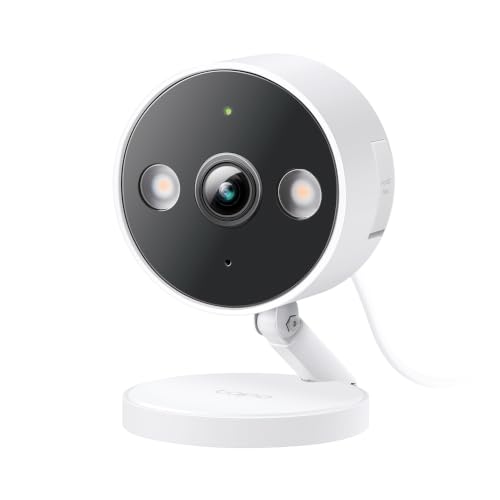
- Best overall: TP-Link Tapo C120 — Free smart detection without a subscription
- Best value: Wyze Cam v4 — Sharpest wired picture on a tight budget
- Best alternative: eufy SoloCam S220 — Solar power with no monthly fee
- Best for coverage: Blink Outdoor 4 — Longest battery claim and simplest app
- Best for flexibility: Ring Outdoor Cam (Stick Up Cam) Battery — Alexa homes that want flexible placement
- Best specialist: Wyze Cam Floodlight v2 — Driveways that need light as well as video
Check price: TP-Link Tapo C120 · Check price: Wyze Cam v4 · Check price: eufy SoloCam S220 · Check price: Blink Outdoor 4 · Check price: Ring Outdoor Cam (Stick Up Cam) Battery · Check price: Wyze Cam Floodlight v2
Read the full guide ↓
Disclosure: As an Amazon Associate, dailyhomedecorating.com earns from qualifying purchases. Links to Amazon on this page are affiliate links; they cost you nothing extra. Listing details such as price and availability change often, so check the current Amazon listing before you buy.
Finding the best outdoor security camera under $150 used to mean accepting a blurry picture, a mandatory subscription, or both. That trade-off has collapsed. At this budget you can now choose between wired cameras with sharp 2K and 2.5K sensors and genuinely free smart detection, solar cameras that store video on the device and charge themselves, and battery cameras from the big ecosystems that trade a little picture detail for years of claimed battery life. What has not changed is the fine print, and the fine print is where this guide spends its energy: which features stop working when you decline the paid plan, where your video is actually stored, what powers the camera and for how long under real conditions, and what the weather rating on the box does and does not promise.
One boundary first, because it shapes every pick below. An outdoor camera is not an indoor camera moved outside, and it is not the same purchase as a general-purpose security camera you might point through a window. Outdoor models carry maker-rated weather resistance for rain and temperature swings, lenses and night vision tuned for yards and driveways rather than nursery distances, and power designs — long cables, big batteries, solar panels, hardwired fixtures — built around the reality that exterior walls rarely have a convenient spare outlet. If your real need is a hallway or a baby’s room, an indoor model will serve you better and cost less; this guide is strictly about cameras designed to live outside and watch the approaches to your home.
Our short answer: most households should start with the Tapo C120 for its free detection and fee-free local recording, or the Wyze Cam v4 if maximum wired sharpness matters more. Choose the eufy SoloCam S220 when an outlet is out of reach and you refuse monthly fees on principle. The Blink and Ring cameras earn their places through battery convenience and ecosystem polish, but both ask for a paid plan to unlock their full recording history, and we say so plainly in their reviews rather than in a footnote. Read the subscription and storage notes in every review before you fall in love with a price, because at this tier the camera is rarely the whole cost.
In this guide
Quick picks
Six cameras, six different answers to the same budget. The table is the map; the reviews that follow are the territory, including the subscription and storage conditions that decide real ownership cost.
| Camera | Best for | Key spec |
|---|---|---|
| TP-Link Tapo C120 | Free smart detection without a subscription | 2K QHD, wired, free person/pet/vehicle detection |
| Wyze Cam v4 | Sharpest wired picture on a tight budget | 2.5K QHD, wired, color night vision |
| eufy SoloCam S220 | Solar power with no monthly fee | 2K, solar plus battery, built-in local storage |
| Blink Outdoor 4 | Longest battery claim and simplest app | 1080p HD, battery powered, needs a Sync Module |
| Ring Outdoor Cam (Stick Up Cam) Battery | Alexa homes that want flexible placement | 1080p HD, removable battery, indoor/outdoor |
| Wyze Cam Floodlight v2 | Driveways that need light as well as video | 2K, hardwired floodlight, very wide view |
How we chose
We chose these six by applying four filters in order. First, outdoor fitness: every pick is sold and maker-rated for outdoor use, with weather-resistant housing and night vision designed for exterior distances. Second, total cost of ownership at this tier: we mapped exactly what each brand locks behind its paid plan — cloud clip review, person or vehicle detection, saved history — and what keeps working for free, because a camera that is cheap to buy and expensive to own is not a budget pick. Third, storage honesty: local recording to a card or built-in memory, cloud-only storage, and hub-based backup are three very different ownership experiences, and each review states which one you are getting. Fourth, power realism: wired, battery, solar and hardwired designs each fail differently, so we weighed the maker battery and solar claims as claims, tied to stated conditions, not as guarantees.
Within those filters we ranked picture quality by sensor resolution and night-vision approach rather than marketing names, preferring cameras whose color night vision is supported by a real spotlight or strong ambient-light performance. We also favored honest field-of-view figures published by the maker over vague wide-angle language, and we treated every headline number in this guide — resolution, viewing angle, light output, battery life, weather rating — as a manufacturer specification, which is the correct way to read any camera box.
Finally, we required a real, verifiable US retail presence for every pick and a price position consistent with this tier at the time of research; prices move, which is why this guide tells you to check the current price on Amazon rather than printing figures that would be stale within weeks. Six cameras survived. Each is the right answer for a different house, which is why the reviews below lead with who each camera suits instead of pretending one winner fits every wall.
Detailed reviews
TP-Link Tapo C120
Who it suits: Start here if you want the most complete camera with the least ongoing cost: a wired position near an outlet, a driveway or front walk to watch, and no appetite for subscriptions.
The TP-Link Tapo C120 is the value pick that embarrasses cameras costing far more, for one reason: the smart detection is free. Person, pet and vehicle detection run on the camera and are included without a subscription, so the alert that reaches your phone can already say what moved instead of forcing you to open every clip of a swaying shrub. The 2K QHD picture is crisp, the dual spotlights support genuine color night vision rather than a token glow, and an invisible infrared mode exists for spots where visible light would annoy neighbors or wildlife. Storage is equally honest: record locally to a microSD card and pay nothing ongoing, or add the optional Tapo Care cloud plan only if you want off-site backup. The C120 is wired and plug-in, with a generously long power cable in the box, and its magnetic base makes aiming unusually painless for a camera at this price. Its honest limits are range and ecosystem: it is a Wi-Fi camera that wants a decent 2.4 GHz signal, and while it works with Alexa and Google Assistant for voice viewing, it does not join every smart-home platform, so check compatibility if your home runs on something else.
Power and weather: Wired (plug-in adapter with a long cable in the box). IP66 weather resistance (maker rating). Battery and solar figures quoted by makers assume typical use under stated conditions; treat them as claims to plan around, not guarantees.
Storage and subscription, plainly: Local microSD recording or optional Tapo Care cloud; person, pet and vehicle detection are included free on the camera. Core detection is free, which is rare at this price. Tapo Care, a paid plan, adds cloud clip storage and richer notifications, but the camera stays fully useful on local storage alone.
Choose / skip: Choose it for the best balance of sharpness, free detection and zero required fees. Skip it if the mounting spot has no power nearby or your Wi-Fi is weak at the wall you need.
In daily ownership: Ownership rhythm here is close to zero: the camera is wired, detection is free, and the card quietly cycles — your only recurring task is confirming, now and then, that the clips you expect are the clips being kept.
Wyze Cam v4
Who it suits: Choose the v4 when identification detail is the whole point — faces at the door, plates on the drive, package labels on the porch — and you have power within cable reach.
The Wyze Cam v4 is a small wired cube that punches well above its price on picture quality. Its 2.5K QHD sensor is the sharpest in this roundup, and that extra resolution is not a spec-sheet vanity: it is the difference between a face that is a smudge and a face you can actually describe, and between a license plate that is grey blur and one with readable characters at driveway distance. Color night vision is the other headline. With even modest ambient light — a porch bulb, a street light, moonlight on a pale driveway — the v4 keeps recording in color long after cheaper cameras have switched to grainy black-and-white infrared, and color is what makes clothing, vehicle color and package details usable the next morning. A built-in spotlight and siren can be triggered on motion, which gives you a deterrent that pure recording cameras lack. The trade-offs are physical, not digital. This is a wired camera: it needs continuous USB power from an indoor or covered outdoor outlet, so placement is dictated by cable reach and by where you can safely run and protect that cable. It has no battery to fall back on during an outage. It is also a 2.4 GHz Wi-Fi device, so a weak signal at the far corner of a house will hurt it more than any setting can fix.
Power and weather: Wired (USB power adapter). IP65 weather resistance (maker rating). Battery and solar figures quoted by makers assume typical use under stated conditions; treat them as claims to plan around, not guarantees.
Storage and subscription, plainly: Local microSD recording (card sold separately, supports large cards) or optional Wyze Cam Plus cloud. Free tier covers live view, motion alerts and local recording. Wyze Cam Plus, a paid plan, unlocks cloud event history and the smartest person, pet, package and vehicle detection labels.
Choose / skip: Choose it for the sharpest wired picture in the group. Skip it if you need battery freedom, hate visible cable runs, or want detection labels without any paid plan.
In daily ownership: In daily ownership the v4 is the set-and-forget member of this group: no batteries to schedule, a card to check occasionally, and a plan decision you can postpone indefinitely because the free tier already records.
eufy SoloCam S220
Who it suits: Pick the S220 for the spot with no outlet and good sun: a garden gate, a side fence, a detached garage wall where running cable is a weekend project you keep postponing.
The eufy SoloCam S220 solves the two annoyances that kill most budget outdoor cameras: charging and subscriptions. A solar panel is built into the top of the camera, and eufy states that a few hours of direct sunlight a day can keep the battery topped up under typical use — treat that as a maker claim that depends entirely on your climate, season and mounting angle, because a north-facing wall in a grey winter will harvest a fraction of what a sunny southern exposure collects. Recordings are stored on memory built into the camera, and eufy sells this model explicitly as a no-monthly-fee camera: you can review your events without a plan. The 2K picture is clean, the body is compact enough to disappear under an eave, and pairing it later with a eufy HomeBase adds expanded local storage and smarter processing if you grow into a bigger system. The limitations are real. Built-in storage cannot be expanded with a card, so heavy-motion locations will cycle through old clips sooner. Solar dependence means a badly shaded mount quietly becomes a camera you have to take down and charge by cable. And like most battery cameras, it records events rather than continuous video, so a slow-moving subject can occasionally be clipped at the edges of an event.
Power and weather: Solar panel built in plus rechargeable battery. Weather-resistant outdoor housing (maker rated for outdoor use). Battery and solar figures quoted by makers assume typical use under stated conditions; treat them as claims to plan around, not guarantees.
Storage and subscription, plainly: Built-in local storage on the camera itself, with no monthly fee for basic use; can also pair with a eufy HomeBase for expanded local storage (sold separately). eufy markets this camera as no-monthly-fee: recorded events are stored locally on the device. Optional cloud plans exist, but reviewing your clips does not depend on one.
Choose / skip: Choose it for fee-free solar coverage of a sunny, outlet-free spot. Skip it for shaded north walls, very busy streets where built-in storage cycles fast, or if you need continuous recording.
In daily ownership: Living with the S220 means watching a sun budget instead of a battery gauge: a glance at the app after a grey week tells you whether the mount’s exposure is honest, and a shaded winter may ask for one cable top-up.
Blink Outdoor 4
Who it suits: The Outdoor 4 suits patient minimalists: several quiet angles around a house, modest motion traffic, and a preference for changing batteries rarely over reviewing footage beautifully.
The Blink Outdoor 4 is built around one promise: put it up and forget it. Blink rates the battery life at up to two years on the included AA lithium batteries under default settings — a maker claim that assumes modest motion traffic, short clips and a strong connection to its hub, and which heavy-traffic placements will shorten considerably. The 1080p picture is a step behind the 2K cameras here on fine detail, but the 143-degree diagonal view is wide, infrared night vision is dependable, and the Blink app is among the simplest to live with. The architecture is the catch you must understand before buying. The Outdoor 4 talks to a Blink Sync Module, not directly to your router, and this particular listing is an add-on camera: the Sync Module is required and is not in the box, so first-time Blink buyers need a system bundle or a module separately. Money is the second catch. Saving and reviewing clips in the cloud, and person detection, sit behind the paid Blink Subscription Plan; the subscription-free path is local backup through a Sync Module 2 with a USB drive, which is workable but less convenient than cloud review. Buy this camera for battery life and simplicity, with your eyes open about the hub and the plan.
Power and weather: Two AA lithium batteries (included). Weather-resistant outdoor housing (maker rated for outdoor use). Battery and solar figures quoted by makers assume typical use under stated conditions; treat them as claims to plan around, not guarantees.
Storage and subscription, plainly: Cloud storage with a Blink Subscription Plan, or local backup through a Sync Module 2 and a USB drive (Sync Module and drive sold separately where not bundled). A Blink Subscription Plan, a paid plan, is what unlocks cloud clip storage, clip review from anywhere and person detection. Without it you still get live view and motion alerts, and local backup is possible with the right Sync Module. Note: this listing is an add-on camera, so a Sync Module is required and is not included.
Choose / skip: Choose it for battery simplicity across several calm viewpoints — after confirming your Sync Module situation. Skip it if you want the sharpest footage or refuse cloud-plan pricing for clip history.
In daily ownership: Daily life with Blink is an exercise in calm: rare battery attention, an app that stays out of the way, and a standing awareness that the plan and the hub are quiet members of the household infrastructure.
Ring Outdoor Cam (Stick Up Cam) Battery
Who it suits: Ring’s camera suits Alexa households that already run a Ring doorbell and value one app, fast live view and flexible mounting more than fee-free history.
The Ring Outdoor Cam — the battery model long sold as the Stick Up Cam — is the flexible-placement option for homes already living in the Alexa and Ring ecosystem. Its Quick Release battery pack slides out for charging without unmounting the camera, it can sit on a flat surface or mount to a wall, and it works indoors or out, which makes it the easiest pick here to redeploy as your needs change. Video is 1080p HD with color night vision, live view is quick, and motion alerts integrate with the Ring doorbells and Alexa announcements many homes already use. Now the disclosure that matters most in this entire guide: this camera has no local storage at all. Recorded video lives only in the cloud, and reviewing, saving or sharing it requires a paid Ring Home plan. Without the plan you get live view and instant alerts, but the event you were alerted about is gone once it passes. That does not make it a bad camera — the ecosystem, the app polish and the mounting flexibility are genuinely good — but it does mean the true cost of ownership includes a subscription for as long as you want a history, and no honest guide should let you discover that after mounting it.
Power and weather: Removable Quick Release battery pack (rechargeable). Weather-resistant outdoor housing (maker rated for outdoor use). Battery and solar figures quoted by makers assume typical use under stated conditions; treat them as claims to plan around, not guarantees.
Storage and subscription, plainly: No local storage. Recorded video is stored in the cloud and requires a Ring Home plan to save and review it. Be clear-eyed here: without a paid Ring Home plan you get live view and real-time alerts, but you cannot save, review or share recorded events later. The plan is effectively part of the cost of owning this camera if history matters to you.
Choose / skip: Choose it for ecosystem convenience and grab-and-go placement. Skip it — firmly — if you will not pay for the plan, because without it there is no recorded history at all.
In daily ownership: Owning this camera means owning its plan as a utility: keep it active and the camera is a polished, flexible sentinel; let it lapse and you own live view only, a distinction to revisit honestly at every renewal.
Wyze Cam Floodlight v2
Who it suits: The Floodlight v2 suits a driveway or back yard that is currently dark: one hardwired swap gives you light, a wide camera and a siren where a plain fixture used to hang.
The Wyze Cam Floodlight v2 is two products sharing one junction box: a 2K camera with a very wide 160-degree view, and a bright LED floodlight array that fires on motion. For driveways, side gates and back yards, the light is not a gimmick — it improves the footage itself, because a lit subject records in color with faster shutter behavior than a subject at the edge of infrared range, and it changes behavior, because most casual trespass and package probing stops when a yard lights up and a siren is available. The camera records locally to a microSD card with no fee, or to the cloud with the optional Wyze Cam Plus plan, and two-way talk plus that loud maker-rated siren give you active responses, not just evidence. The honest costs are installation and commitment. Hardwired means it replaces an existing floodlight fixture or needs new electrical work — this is not a renter camera and not a ten-minute job, and local electrical rules may require a qualified installer. It is also a fixed installation: if you move, it stays. Judge the headline brightness and siren figures as manufacturer ratings, and plan on the 2.4 GHz Wi-Fi reach to your mounting point before you open the box.
Power and weather: Hardwired to an existing floodlight junction box. Weather-resistant outdoor housing (maker rated for outdoor use). Battery and solar figures quoted by makers assume typical use under stated conditions; treat them as claims to plan around, not guarantees.
Storage and subscription, plainly: Local microSD recording (card sold separately) or optional Wyze Cam Plus cloud. Local recording works without paying anything. Wyze Cam Plus, a paid plan, adds cloud event history and smarter detection labels. The floodlight itself is a maker-rated bright LED array, so judge brightness claims as manufacturer figures.
Choose / skip: Choose it to replace an existing floodlight over a drive or yard. Skip it if you rent, lack an existing fixture box, or want a camera you can move in minutes.
In daily ownership: The floodlight asks the most on day one and the least thereafter: once wired, it is light and camera in a single fixture, with a card to check seasonally and a junction box you will hopefully never open again.
Comparison table
| Camera | Resolution | Power | Storage |
|---|---|---|---|
| TP-Link Tapo C120 | 2K QHD | Wired (plug-in adapter with a long cable in the box) | Local microSD recording or optional Tapo Care cloud; person, pet and vehicle detection are included free on the camera |
| Wyze Cam v4 | 2.5K QHD | Wired (USB power adapter) | Local microSD recording (card sold separately, supports large cards) or optional Wyze Cam Plus cloud |
| eufy SoloCam S220 | 2K | Solar panel built in plus rechargeable battery | Built-in local storage on the camera itself, with no monthly fee for basic use; can also pair with a eufy HomeBase for expanded local storage (sold separately) |
| Blink Outdoor 4 | 1080p HD | Two AA lithium batteries (included) | Cloud storage with a Blink Subscription Plan, or local backup through a Sync Module 2 and a USB drive (Sync Module and drive sold separately where not bundled) |
| Ring Outdoor Cam (Stick Up Cam) Battery | 1080p HD | Removable Quick Release battery pack (rechargeable) | No local storage. Recorded video is stored in the cloud and requires a Ring Home plan to save and review it |
| Wyze Cam Floodlight v2 | 2K HD | Hardwired to an existing floodlight junction box | Local microSD recording (card sold separately) or optional Wyze Cam Plus cloud |
Compare the leaders directly: TP-Link Tapo C120 · Wyze Cam v4 · eufy SoloCam S220.
How to choose the best outdoor security camera under $150
Start with the job, not the camera. Walk your property at dusk and name the two or three approaches that actually matter: the front door and its package zone, the driveway where vehicles sit overnight, the side gate or back door nobody uses but everybody could. One well-aimed camera on a real approach beats three cameras watching lawn. Note, for each spot, the distance to the furthest point you need to identify — that distance, more than any other number, decides whether 1080p is enough or whether the sharper 2K and 2.5K sensors in this guide earn their place.
Next, audit power before you fall for a picture. For each spot ask what reaches it: an outlet within a protected cable run favors the wired Tapo and Wyze v4 and removes charging from your life entirely. No outlet but reliable sun favors the solar eufy. No outlet and no sun means battery, which means accepting event recording and a maintenance rhythm. An existing floodlight fixture is a gift — it is power, height and position already solved, which is exactly what the Floodlight v2 exploits. Choosing the power source first eliminates half the catalogue honestly, instead of after a frustrating install.
Then decide your subscription philosophy in writing, because the brands will not decide it for you. If you want zero ongoing cost, your shortlist is the cameras with real local storage: the Tapo, both Wyze models and the eufy. If you accept a paid plan, you are buying cloud review from anywhere and, on Blink, person detection — legitimate conveniences, as long as you count the plan as part of the purchase. Ring sits at the far end of this spectrum: the plan is not an upgrade, it is the difference between having history and not having it. None of these positions is wrong; buying one while believing you bought another is the only failure mode.
Finish with the unglamorous checks. Confirm your Wi-Fi reaches the mounting wall — hold your phone there and run the camera app’s own signal test during setup, and remember these are 2.4 GHz devices that trade speed for range. Read the weather rating as the maker test it is: higher IP figures describe better sealing against jets and dust, but no rating licenses mounting a camera in direct sprinkler fire or flood lines. And plan the angle for privacy as well as coverage: aim at your approaches, use privacy zones where the app offers them, and keep a neighbor’s windows and yard out of frame where you reasonably can.
Common mistakes
Buying the add-on camera and discovering the hub later. The Blink listing in this guide is an add-on unit that requires a Sync Module. First-time buyers who miss that line end up with a camera that cannot come online. Always check whether a listing is a complete system or an expansion unit before ordering.
Assuming alerts mean you have recordings. Live view and motion alerts are commonly free; reviewing what actually happened is where plans diverge. On Ring, history itself is plan-gated; on Blink, cloud review is. Confirm where your clips live and what it costs to see them again.
Believing the battery number on the box. Multi-year battery claims assume default settings, gentle temperatures and light motion traffic. A camera over a busy sidewalk with long clips and a weak hub connection can drain in a fraction of the headline time. Treat the claim as a best case, not a schedule.
Mounting for the widest view instead of the most useful one. A camera mounted very high sees roofs of heads and the tops of caps. Choke points — gates, doors, the narrow part of a drive — at moderate height produce the identifiable footage people actually need after an incident.
Ignoring the sun’s path for solar cameras. A solar camera mounted under a deep eave or on a shaded wall is a battery camera with extra steps. Check the spot at several times of day and across seasons before trusting the panel to do the charging.
Forgetting that outdoor is a different product class. Pointing an indoor camera through glass fails at night when infrared reflects back, and an indoor body outdoors voids any weather expectation. Buy the class designed for the placement.
Costs beyond the camera, itemized honestly
The shelf price is the beginning of the arithmetic, not the end. Memory cards are the smallest line: the local-storage cameras need one each, sized to your traffic, and they are consumables that eventually wear. Hubs are the surprise line for Blink newcomers, since the add-on camera in this guide cannot work without a Sync Module, and households expanding later should price the system, not the unit. Plans are the permanent line where you choose them: a Blink or Ring subscription is modest monthly and meaningful across years, and the honest way to compare a plan camera against a fee-free one is to add several years of plan to the plan camera’s side of the ledger before judging which was cheaper. Installation consumables — an outdoor-rated extension solution for a wired camera, a better mount, cable clips and covers — are the final line, small individually and routinely forgotten. None of this makes the tier expensive; all of it makes the tier predictable, which is what a budget is actually for.
A word on warranties, weather and winter
Outdoor electronics live a harder life than their indoor cousins, and two ownership habits protect your purchase. Keep the receipt and register the product where the maker offers it, because warranty service on a camera that dies in its second winter starts with proof you may otherwise have to excavate from email. And think seasonally: lithium battery performance dips in deep cold, solar harvest shrinks with the days, and autumn leaves find every lens eventually. A twice-yearly rhythm — clean the lens, check the mount’s tightness, glance at storage health, confirm a recent night clip still looks right — catches the slow failures while they are still chores. The cameras in this guide are maker-rated for outdoor life, but ratings describe a new unit on a test bench; the rhythm above is how a real unit, on a real wall, stays worthy of the rating.
Reading the three ownership models in this guide
Every camera in this roundup belongs to one of three ownership models, and naming them makes the whole page easier to shop. The first model is local-first: the Tapo, both Wyze cameras and the eufy record to a card or to memory inside the camera, the footage lives in your home, and the paid plan — where one exists — is an optional extra for cloud backup and smarter labels. The second model is hub-and-plan: Blink’s camera records through its Sync Module, offers a local-backup path for owners who assemble it, but reserves its smoothest experience — cloud review anywhere, person detection — for subscribers. The third model is cloud-only: Ring’s camera holds nothing locally at all, so the plan is not an enhancement but the recording system itself. None of these models is a scam and none is free of trade-offs; local-first asks you to manage storage and accept that footage shares the camera’s physical fate, while cloud models convert a one-time purchase into a permanent household utility bill. The mistake is never the model — it is buying one model while budgeting and expecting another.
What resolution buys you at real distances
Resolution arguments online tend to be abstract, so make them concrete with your own tape measure. At the distance from a porch camera to a face at the door — a few steps — every camera here, 1080p included, recognizes a familiar person and describes a stranger usefully. At the distance from an eave to a vehicle at the curb, the 1080p cameras begin to trade certainty for impression: you will know a plate was there more often than you will read it. That is the territory where the 2K Tapo and Floodlight and the 2.5K Wyze v4 earn their keep, holding edges and characters together several steps further out. Beyond that — across a large yard, down a long drive — no camera at this tier reads plates reliably, and the honest fix is position, not pixels: move the camera to the choke point the vehicle or visitor must pass. Buy resolution for the distance you cannot change, and placement for the distance you can.
Night performance, decoded honestly
Three different technologies hide behind the words night vision, and they are not interchangeable. Infrared sees in complete darkness but renders the world in black and white, with range that shrinks quickly in real yards full of fences and foliage. Spotlight-assisted color — the Tapo’s dual lights, the Wyze v4’s built-in spotlight — trades a pool of visible light for color footage at modest range, which is why those cameras identify clothing and vehicle color that infrared cannot. The floodlight is the same idea at architectural scale: enough light to make the whole approach a color scene. Ambient-light color modes split the difference where a street light or porch bulb already burns. When you compare the picks, compare the night technology to your darkest approach, not the marketing name — and remember every range figure in this guide is a maker figure measured under favorable conditions.
Setup notes that save a second ladder trip
Placement height is a negotiation between coverage and identification. Mount around head-and-a-half height at a choke point and you trade a sweeping panorama for faces you can actually use; mount high on a gable and you gain the panorama and lose the faces. Most households need the faces.
Night footage deserves a test before you finalize screws. Record a walk-through after dark on your first evening, check it the next morning, and adjust the angle while the ladder is still out. Infrared glare from a nearby wall or soffit is the most common night flaw, and a small tilt usually cures it.
Motion settings are a battery and sanity budget. Every passing car your camera dutifully records is a clip you will never watch, a slice of storage, and — on battery models — a piece of the battery claim spent. Draw activity zones tightly around your property line and let the street belong to the street.
Think about theft of the camera itself. A camera reachable from the ground without tools is a camera that can leave with the intruder, taking local footage with it. Mount out of casual reach, use the security screws provided, and prefer cloud or hub backup for the camera that watches your most exposed approach.
Final recommendation
If you buy one camera from this page, make it the Tapo C120: free smart detection, fee-free local recording and a sharp 2K picture make it the most honest total package at this tier. If your priority is identifying detail and you have power at the spot, the Wyze Cam v4’s sharper sensor is the connoisseur’s wired choice. For the outlet-free sunny corner, the eufy SoloCam S220’s solar, fee-free design is genuinely liberating.
The Blink Outdoor 4 and Ring Outdoor Cam are good cameras wrapped in paid-plan economics — buy them for battery life and ecosystem respectively, and budget the plan as part of the purchase. The Wyze Floodlight v2 is the specialist: where a dark driveway needs light anyway, nothing else here does both jobs in one install. Match the camera to the approach, the power and your subscription philosophy, and this tier will serve you well for years.
FAQ
Do I need a subscription for an outdoor security camera under $150?
Not always. The Tapo C120, Wyze Cam v4, Wyze Floodlight v2 and eufy SoloCam S220 can record locally with no required plan. Blink gates cloud review and person detection behind its paid plan, with a local-backup alternative through its hub. Ring requires its paid plan to save and review any recorded video.
Is local storage or cloud storage better?
Local storage has no monthly cost and keeps footage in your home, but the clips leave with the camera if it is stolen and capacity is finite. Cloud storage survives theft and is reviewable anywhere, but it is a recurring cost and depends on your internet connection. Several picks here let you start local and add cloud later.
How long do battery outdoor cameras really last?
Makers quote best-case figures under default settings and light use — up to two years in Blink’s case. Busy placements, long recordings, cold weather and weak signals shorten real life substantially. Solar models like the eufy offset this where sun is reliable, which is a maker claim tied to exposure, not a promise.
What does an IP weather rating actually mean?
It is a standardized maker test of sealing against dust and water. Higher numbers indicate stronger protection, and the wired picks here are rated IP65 or IP66. It does not mean the camera can be submerged, pressure-washed or mounted in the direct path of sprinklers.
Can one camera cover my whole yard?
A wide field of view covers a lot of ground but identifies very little of it at distance. One camera can monitor a compact yard or a single approach well. Larger properties are better served by two cameras on the two real approaches than by one camera stretched thin.
Will an outdoor camera replace an alarm system?
No. A camera watches, records and alerts; it does not detect intrusion through walls, summon help by itself or satisfy monitored-alarm requirements. Treat it as the eyes of a home-security setup, not the whole setup — a point we return to in our home-security-focused guide.
A last word on expectations, because this tier rewards realistic ones. No camera in this guide — and none at several times the budget — watches a whole property, identifies every visitor at every distance, or removes the need for locks, light and judgment. What the best of these six do is narrower and genuinely valuable: they watch the approach you chose, in detail you can use, with footage you can actually retrieve, at a total cost you understood before you bought. If you take one discipline from this page, let it be the order of decisions: approach first, power second, storage and subscription third, resolution last. Readers who decide in that order almost never regret a purchase at this tier, because each camera above is excellent at the job its design describes. Readers who decide by headline specification first spend the following month discovering the other three decisions the hard way. The guide has given you the honest version of all six; the wall, the sun and the street outside your home will do the rest of the choosing, if you let them.


