Where to buy
Shopping for the best baby security camera for apartments under $500? Check the latest price, availability and delivery options on Amazon before you buy — prices and stock in this category move often, and orders are placed on Amazon. One honest note before the list: the under $500 figure in this guide is a ceiling, not a target. No single baby camera below needs the whole amount, so treat the headroom as your budget for a second camera, an add-on, a memory card or a funded subscription year, and check the current price of each pick on Amazon rather than assuming the most expensive option is the right one.
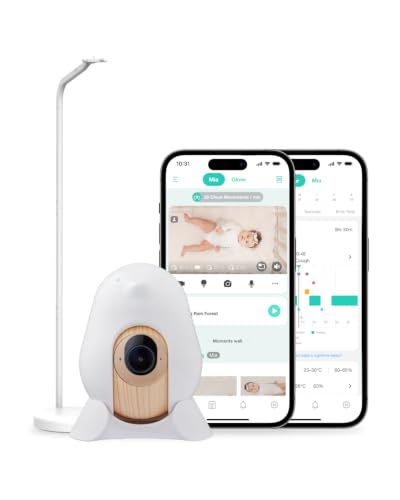
- Best for renters overall: CuboAi Smart Baby Monitor 3 — Floor Stand Set — Check on Amazon
- Nanit Pro Smart Baby Monitor — Camera & Floor Stand — Check on Amazon
- eufy Baby Monitor E21 — 4K Camera with 5-Inch Display — Check on Amazon
- Lollipop Baby Monitor (Cotton Candy) — Check on Amazon
- Owlet Cam 2 (Gen 2) — Check on Amazon
- Infant Optics DXR-8 PRO — Check on Amazon
Read the full guide ↓
Disclosure: As an Amazon Associate, dailyhomedecorating.com earns from qualifying purchases. Links to Amazon on this page are affiliate links; they cost you nothing extra. Listing details such as price and availability change often, so check the current Amazon listing before you buy.
Finding the best baby security camera for apartments under $500 is really a negotiation with your lease. The best nursery cameras in the world assume you can drill above the crib, run cable where you like and put the nursery a respectful distance from your bedroom. Apartments offer none of that: walls you may not mark, a crib that shares a wall with your neighbour’s television, a router doing its best through three other units’ worth of competing Wi-Fi, and a landlord who will absolutely notice four anchor holes at move-out. The good news is that this budget is a ceiling, not a target — no single camera needs all of it — and the current flagship generation has quietly become renter-friendly, with floor stands, wrap mounts and battery bridges designed for homes where nothing permanent is allowed.
Apartment specifics shape every pick below. Both flagship systems here — CuboAi and Nanit — sell floor-stand sets that deliver the overhead crib view with zero drilling, and the stands move with you when the lease ends. The eufy E21’s camera runs on a built-in battery for naps in rooms with one awkward outlet, and its parent screen works without Wi-Fi, which matters when the building’s evening bandwidth collapses. The Lollipop wraps onto furniture you already own. Even the offline Infant Optics earns its place: in a thin-walled building, a closed radio link to its own screen is immune to the congestion that makes app cameras stutter at 7 p.m. What an apartment camera must never do is create deposit damage, depend on wiring you cannot change, or leave its cord where a small tenant can reach it.
One honesty note before the picks, because it matters in small spaces most of all: these are video monitors with smart alerts, not medical devices. Breathing-motion and covered-face features are maker-described detection on a camera feed — prompts to go and look, which in an apartment is a short walk — and they never replace safe-sleep practice or your own checks. Subscriptions are flagged wherever they hide, because a renter’s budget has enough recurring surprises already. Read on for the six systems that respect both your baby and your lease.
In this guide
Quick picks
| Pick | Best for | Key spec |
|---|---|---|
| CuboAi Smart Baby Monitor 3 — Floor Stand Set | Best for renters overall | 2.5K QHD Wi-Fi, floor stand, maker AI alerts, humidity sensor |
| Nanit Pro Smart Baby Monitor — Camera & Floor Stand | Best no-drill flagship data | 1080p Wi-Fi, floor stand, app, temp and humidity |
| eufy Baby Monitor E21 — 4K Camera with 5-Inch Display | Best screen for thin walls | 4K camera, 5-inch display, hybrid Wi-Fi/no-Wi-Fi, pan-tilt, local recording |
| Lollipop Baby Monitor (Cotton Candy) | Best no-mount flexibility | 1080p Wi-Fi, flexible wrap mount, crying detection, lullabies |
| Owlet Cam 2 (Gen 2) | Best compact second camera | 1080p Wi-Fi app camera, 130-degree view, temp and humidity, cry notifications |
| Infant Optics DXR-8 PRO | Best offline, landlord-proof | 720p, 5-inch display, no Wi-Fi, interchangeable lenses, pairs up to 4 cameras |
How we chose
The first criterion for this lens was renter legitimacy: no pick could require drilling, wall anchors or permanent wiring to deliver its headline features. That ruled the wall-mount-only configurations out and put floor stands, wrap mounts, shelf placement and battery operation at the centre of the list. Every pick below can be installed in an afternoon and removed without a trace — the move-out test — and we note wherever a maker’s favourite product photo quietly assumes a screw.
Second, we weighted performance on congested networks. Apartment Wi-Fi is a shared battlefield, and app-only cameras live or die by it; we favoured systems with strong local fallbacks — the eufy’s Wi-Fi-off parent screen, the Infant Optics’ fully offline link — and treated app flagships’ dependence honestly rather than pretending a signal bar in the hallway predicts the feed at midnight. Where a pick records locally instead of the cloud, that counted in its favour for small homes where the router and the crib may be one room apart but the internet is still the weakest link.
Third, space and noise. Apartment nurseries are often a corner of the parents’ bedroom or a converted dining nook, so camera size, stand footprint and the ability to see a crib from close range with a wide lens all mattered; so did audio behaviour, because a monitor that hisses all night in the same room you sleep in is a monitor you will mute, and a muted monitor is furniture. Active noise reduction and sound-activated screens scored accordingly.
Finally, the standing checks for this whole guide: total cost of ownership including any subscription, stated plainly; storage location and what happens to footage; and cord safety, which in an apartment means routing cable away from a crib that may sit against the only available wall, using guards where provided, with stands placed so they cannot tip into the sleep space. Maker health claims were treated as maker claims throughout — detection features, not medical monitoring.
The picks in detail
CuboAi Smart Baby Monitor 3 — Floor Stand Set
Key spec: 2.5K QHD Wi-Fi camera, floor stand included, covered-face and rollover alerts (maker AI), cry detection, humidity sensor, multi-day playback.
The CuboAi Smart Baby Monitor 3 is the challenger built around one idea: proactive alerts. Its 2.5K QHD camera watches the crib and, per the maker, uses AI detection to flag a covered face or a rollover onto the stomach, to distinguish a true cry from background noise, and to warn you if your baby enters a danger zone you draw in the app once they start standing and roaming. This floor-stand set puts the camera on a tall stand behind the crib for the overhead angle those alerts are designed around, with no drilling and nothing attached to the crib itself. Two-way audio, lullabies, night vision with no visible red glow, a room humidity sensor and multi-day video playback round out a nursery package that is deliberately the least clinical-looking device in this guide.
The honest framing for those headline alerts matters more at this price than anywhere else: they are manufacturer-described detection features, not medical monitoring. A covered-face alert is a prompt to go and look — it is not a guarantee of detection in every bedding arrangement, lighting condition or network state, and CuboAi does not sell this camera as a medical device. Treat the AI as an extra set of eyes that sometimes blinks, keep the crib bare following safe-sleep guidance, and never let an app notification substitute for your own checks. On ownership cost, CuboAi has historically kept its core alerts and a rolling multi-day playback window usable without a mandatory paid tier, with an optional premium plan adding longer history and extras; published reviews note advanced features can move behind that plan after an included first period, so check the current plan page before you buy, because app packaging in this category changes often. Video runs through CuboAi’s cloud app — there is no local memory-card recording and no dedicated parent unit.
Setup is genuinely renter- and grandparent-friendly: assemble the stand, place it so its base cannot be pulled into the crib, route the cable down the stand and away from small hands, and keep the whole assembly far enough back that a standing toddler cannot grab the camera or the cord. The floor stand also makes the CuboAi easy to move between rooms or take to a caregiver’s house, though the overhead alerts are calibrated for the stand’s crib view and will not perform the same way aimed across a playroom. Picture quality from the QHD sensor is a real step up from 1080p when you pinch-zoom on a phone screen, which is how most parents actually check whether eyes are open or closed — and at this budget, that sharpness is one of the few upgrades you can genuinely see.
- Covered-face and rollover alerts are the headline act (maker AI claims)
- Floor stand included — overhead view with no drilling
- 2.5K QHD picture is visibly sharper when zooming on a phone
- Multi-day playback has historically been included without a mandatory plan (verify current terms)
Honest limitation: No local storage and no parent screen: if your Wi-Fi or CuboAi’s cloud stumbles, so does your monitor.
Choose the CuboAi 3 if proactive crib alerts matter more to you than sleep diaries, and you want the overhead view without touching a wall. Skip it if you want recordings kept inside your home, or a screen that works when the internet does not.
Nanit Pro Smart Baby Monitor — Camera & Floor Stand
Key spec: 1080p Wi-Fi camera, ASTM-certified floor stand included, app viewing, two-way audio, temperature and humidity sensing, split-screen for a second camera.
The Nanit Pro with the floor stand is the flagship configuration this tier is built around, and it exists to solve the one problem the wall-mount version creates: not every nursery wall can or should be drilled. The stand is a tall, weighted ASTM-certified frame that positions the 1080p camera directly above the crib for the true overhead view Nanit’s software is designed around, then the feed runs over Wi-Fi to the Nanit app with two-way audio, background audio, a built-in nightlight and white-noise sounds, and live temperature and humidity readouts. There is no dedicated parent screen in the box — your phone or tablet is the monitor — and the app supports a split-screen view if you add a second Nanit camera later, which is exactly where a budget this size starts to make sense.
The money conversation with Nanit is never just the hardware. Live video, sound, motion and cry notifications, two-way talk and the maker’s breathing-motion monitoring (which works with Nanit’s Breathing Wear garments, sold separately) run without a paid plan. Sleep analytics, saved video history and clips, milestone tracking and the deeper smart alerts sit behind the Nanit Insights subscription, billed annually; a trial of the entry plan is included with a new camera and renews automatically unless you cancel. So the honest way to price this pick is hardware plus at least a year of the plan if the sleep diary is why you are buying it. Nanit also states plainly that the camera is not a medical device: breathing-motion monitoring is a maker-described awareness feature, not a health or life-safety guarantee, and it never replaces safe-sleep practice or checking on your baby in person.
Living with the floor stand version is mostly about placement discipline. The stand’s base must sit where it cannot be tipped or pulled toward the crib, and the power cord has to be routed down the stand and completely out of the crib and out of reach — a loose cable anywhere near a crib is a genuine strangulation hazard, and Nanit’s own mounting guidance treats cord management as part of the installation, not an afterthought. The overhead angle is not optional decoration, either: the sleep and breathing-motion features are calibrated for that top-down view, so a Nanit parked at an angle on a dresser will not deliver the analytics the price promises. Video is cloud-assisted through the app rather than stored on a local card, so your Wi-Fi quality and your comfort with a cloud account are part of the purchase.
- True overhead crib view with no drilling, thanks to the included floor stand
- Deepest sleep-tracking ecosystem here when paired with an Insights plan
- Split-screen support makes a second camera a clean upgrade path
- Background audio, nightlight and white noise built in
Honest limitation: The features most buyers want most — sleep analytics and video history — need the paid Insights plan after the trial ends.
Choose the floor-stand Nanit if you want the full data-driven flagship and a no-drill install, and you accept an annual plan as part of the real cost. Skip it if you refuse subscriptions, if a stand behind the crib does not fit your room, or if you want a screen that is not your phone.
eufy Baby Monitor E21 — 4K Camera with 5-Inch Display
Key spec: 4K UHD camera, 5-inch 720p parent display, hybrid Wi-Fi and no-Wi-Fi modes, pan-tilt, 8x zoom, local recording, built-in camera battery.
The eufy E21 is the pick for parents who want flagship picture quality without handing the nursery to a subscription. The camera shoots 4K UHD and pans and tilts under remote control with up to 8x zoom, while the box includes a proper 5-inch parent display — so the monitor keeps working on its own screen even if you never connect it to Wi-Fi at all. That hybrid design is the E21’s signature: run it as a closed local system on the included display, or link it to the eufy app for phone viewing and round-the-clock recording in the app when you want remote access. Active noise reduction keeps nursery sound from turning into a hiss of white noise on the parent unit, and the camera itself carries a built-in battery, so it can ride out a short outage or work for naps in a room with an awkward outlet. eufy also sells an add-on camera for this system, and the display can show two rooms on a split screen — the cleanest two-room path in this guide.
On the money question, the E21 is refreshingly plain: the maker states that all of its features are free to use with no monthly fee, and recording is handled locally rather than sold back to you as a cloud plan. That changes the real cost of ownership across two or three years of use more than any single feature on this page, and it is why this pick anchors the value end of a tier where rivals keep charging rent on their own hardware. The trade-offs are equally plain. The parent display is 720p, so the 4K detail is best appreciated in the app feed and in zoomed views rather than on the handheld screen, and families who want sleep analytics, cry diaries or milestone tracking will find none of that here — eufy sells you an excellent camera and screen, not a data service. eufy is also explicit that this is a video and audio monitor: it does not measure breathing, heart rate or oxygen, and nothing it shows should be treated as a health reading.
In daily use the E21 behaves like the grown-up security-camera brand it comes from: motion and sound alerts, two-way talk, temperature awareness and straightforward pan-tilt controls. The camera needs a stable perch or mount with its power cable dressed safely away from the crib — the battery is a bridge for outages and travel, not a way to leave a camera loose within reach, and a camera within grabbing range of a standing baby will eventually be grabbed. For twins or a nursery-plus-playroom setup, the add-on camera route means the second room costs a camera, not a second full system, which is precisely how a generous budget should be spent. If your shortlist question is which of these will still be fully yours in three years with no monthly bill, the E21 is the answer in this tier.
- Best-in-guide camera resolution with pan, tilt and 8x zoom
- Included 5-inch display works with Wi-Fi switched off entirely
- No subscription needed for core monitoring or local recording
- Add-on camera and split-screen viewing for a second room
Honest limitation: No sleep analytics or smart diary features, and the parent screen is 720p despite the 4K sensor.
Choose the E21 if you want premium hardware, a real parent screen and zero ongoing fees, and you do not care about sleep data. Skip it if nightly sleep reports are the whole point of spending at this tier.
Lollipop Baby Monitor (Cotton Candy)
Key spec: 1080p Wi-Fi camera, flexible wrap-around mount, true crying detection (maker), two-way audio, infrared night vision, in-app plan extras.
The Lollipop is the design object of the group: a 1080p Wi-Fi camera on a flexible, bendable stem that wraps around a shelf edge, a floor lamp or a stand, or stands on a surface with its tail as a tripod. That mount is not a gimmick — it solves the most common nursery problem, which is that the perfect camera position is rarely where a shelf happens to be. The maker’s headline software feature is true crying detection, designed to distinguish an actual cry from a barking dog or a door slam before it pings your phone, alongside two-way audio, infrared night vision, lullabies and white-noise playback, and event clips in the app. There is no parent unit; like the Nanit and Owlet, your phone is the screen. In this tier it plays the flexible-second-camera role: the one that travels, covers the playroom, and goes where the fixed mounts cannot.
Two honesty notes belong with the Lollipop. First, the app sells an optional paid plan that unlocks extras such as the maker’s breathing-monitoring and sleep-tracking features — maker-described, camera-based estimates, not medical measurements, and no substitute for safe sleep or in-person checks; the camera’s core live view and crying detection are the free foundation, but confirm the current plan split on the maker’s page before purchase, because the line between free and paid has moved before. Second, the wrap mount tempts people to attach the camera directly to the crib rail with its cable nearby — resist sloppy versions of this. The camera body may grip a rail or shelf, but the power cable must still be routed away from the crib interior and out of reach, and once your baby can stand and grab, a rail-mounted camera is within range of determined hands; move it further back and re-check the view. Cloud dependence applies here too: no local card recording, so the app and your Wi-Fi are the whole system.
Where the Lollipop shines is flexibility across the first two years: crib-side now, playroom shelf later, wrapped around a travel crib at a relative’s house in between. Its picture and night vision are solid rather than class-leading, and data people will find its sleep features thinner than Nanit’s. But as the one camera in this guide that can perch almost anywhere without a stand, a shelf or a drill, it solves real rooms that defeat fixed-mount rivals — which is why it closes out this pool. Bought as a second camera beside a flagship, it turns the leftover budget into coverage of the room the flagship cannot see, and that is a better use of the money than a marginally fancier single camera.
- Flexible stem mounts almost anywhere — no shelf, stand or drilling needed
- True crying detection aims to cut false alerts (maker feature)
- Doubles as a travel and playroom camera as your child grows
- Lullabies and white noise built in
Honest limitation: Best extras sit in a paid in-app plan, and there is no local recording or parent screen.
Choose the Lollipop if your rooms defeat fixed mounts and you need the mount itself to be the solution — especially as a flexible second camera. Skip it if you want deep sleep analytics or an offline fallback screen.
Owlet Cam 2 (Gen 2)
Key spec: 1080p Wi-Fi camera, 4x zoom, 130-degree wide-angle view, two-way talk, sound/motion/cry notifications, temperature and humidity sensor, cable guards included.
The Owlet Cam 2 is the compact, good-looking Wi-Fi camera in this tier — a small 1080p unit with a 130-degree wide-angle lens, 4x digital zoom, night vision, two-way talk and sound, motion and cry notifications through the Owlet Dream app, with temperature and humidity sensing built in. In a guide about a generous ceiling, its role is the second-camera and travel role: it is the camera you add for the playroom, the grandparents’ house or the bassinet by your bed while the flagship covers the nursery, or the single camera for families who would rather bank most of this budget than spend it. It is the camera-only member of a family whose famous sibling is a wearable sock, sold separately and not part of this pick; judged purely as a camera, its appeal is a clean picture, a tidy magnetic-base design that sits neatly on a shelf or wall mount, and an app built for exhausted one-handed use at 3 a.m. The box includes cable guards — a small, telling detail, because the maker expects the cord to be covered and routed away from the crib as part of a safe install.
Cost honesty for the Owlet: live viewing and basic alerts in the Dream app are the free foundation, and the maker offers an optional paid tier (Owlet360) that extends how long event video clips are stored — a short window of clip storage is included, longer history is the upgrade. Check the current app plan page before you buy and confirm which features are free today, because packaging in this category shifts. Also be clear-eyed about what a camera can and cannot tell you: cry and motion notifications are convenience alerts, and any breathing or wellness language around the wider Owlet ecosystem refers to separate wearable products with their own instructions and limitations — the Cam 2 on its own is a video monitor, not a health device, and nothing it shows replaces safe-sleep practice or your own checks. Video is encrypted in transit per the maker, and there is no parent screen and no local memory-card slot, so the Cam 2 is a cloud-app monitor through and through.
Living with the Cam 2 is easy in the ways that matter nightly: background audio options, quick talk-back, and a picture that holds up well in a dark room. Its weaknesses are the category’s usual ones — total dependence on your Wi-Fi and phone, no offline fallback screen for a sitter who does not have the app, and no sleep analytics depth to rival the Nanit if data is your thing. Mount it or place it with the cable routed down, covered by the included guards, and away from the crib, never draped where a standing child can reach it. As a first smart camera for parents who want the nursery on their phones and nothing more complicated — or as the affordable second eye in a two-camera home — it earns its place here on simplicity.
- Clean 1080p picture with a genuinely useful wide-angle lens
- Temperature and humidity sensing plus cry notifications in one tidy unit
- Cable guards included in the box for a safer install
- Small, neat design that disappears on a shelf
Honest limitation: App-only viewing: no parent screen, no local recording, and longer clip history sits in the optional paid tier.
Choose the Cam 2 if you want a straightforward phone-based monitor, or an affordable second camera alongside a flagship. Skip it if you want recordings stored at home or a screen a babysitter can use without your phone.
Infant Optics DXR-8 PRO
Key spec: 720p camera with dedicated 5-inch display, no Wi-Fi, Active Noise Reduction, pan-tilt-zoom, interchangeable lenses, pairs up to four cameras.
The DXR-8 PRO is the veteran of this roundup and, in a guide about a very generous budget, its role is specific: it is the offline half of a two-system strategy. There is no Wi-Fi, no app, no account and no subscription — the camera talks directly to its dedicated 5-inch parent display over a closed second-generation FHSS wireless link, and that is the entire system. Resolution is 720p, which sounds modest next to 4K badges, but the PRO’s party trick is Active Noise Reduction, which filters the hiss, hum and static that make most audio monitors fatiguing to listen to all night. Interchangeable lenses — a standard lens in the box, with optical zoom and wide-angle lenses available from the maker — let you tune the view to a small nursery or a wide toddler room, the camera pans, tilts and zooms from the parent unit, and one display can pair with up to four cameras.
Why does a 720p offline monitor belong in an under-$500 guide at all? Because at this budget the smart move is often two monitors, not one: a connected flagship for your phone, plus this as the always-works screen for the nightstand, the babysitter and the grandparents’ house. It removes every recurring complaint about smart cameras — nothing to reach through the home network, nothing that stops when the internet drops, no plan quietly renewing, no firmware update changing the app the week the baby arrives — and a screen that is always a screen, never a phone you also need for everything else. The honest limitations are the mirror image of those strengths: you cannot check in from work or the driveway, there are no cry-detection smarts, no sleep data, no recordings to review, and the picture will not reward pinch-zooming the way the eufy or CuboAi will. Range is also a physical fact: thick walls and distance between nursery and parent unit matter in a way they do not for Wi-Fi systems.
Setup is the simplest here: place the camera where it sees the crib, keep it and its cord well out of reach — the same cord discipline applies, out of the crib, secured, at least a full arm’s length plus growing margin from small hands — pair nothing, create no account, and you are monitoring in minutes. Battery life on the parent unit, the second-camera pairing for siblings, and the lens options are the three things to verify on the listing for your household’s layout. Bought alone it leaves much of this budget unspent, and that is fine: the leftover buys the add-on camera, the wide-angle lens and years of zero running costs. As the second monitor in a house that already owns a smart camera, it has no real rival in this guide.
- Completely offline: no Wi-Fi, no app, no account, no subscription, ever
- Active Noise Reduction makes overnight audio far less fatiguing
- One display pairs with up to four cameras for multi-room coverage
- Interchangeable lenses adapt it from crib close-up to whole-room view
Honest limitation: 720p picture, no remote viewing, no recordings and no smart alerts of any kind.
Choose the DXR-8 PRO if privacy, simplicity and zero running costs outrank apps and analytics — especially as the dedicated-screen half of a two-system home. Skip it as your only monitor if you need to see the nursery from outside the home or want any form of sleep tracking.
Side-by-side comparison
| Pick | Viewing | Storage | Subscription | Best for |
|---|---|---|---|---|
| CuboAi Smart Baby Monitor 3 — Floor Stand Set | Phone/tablet app | Cloud app, multi-day playback | Core alerts and multi-day playback included; optional premium tier for extended history | Best for renters overall |
| Nanit Pro Smart Baby Monitor — Camera & Floor Stand | Phone/tablet app | Cloud app history (plan tiers) | Insights plan unlocks sleep analytics and video history after the included trial | Best no-drill flagship data |
| eufy Baby Monitor E21 — 4K Camera with 5-Inch Display | 5-inch display + app | Local recording | No subscription — all features included, local recording | Best screen for thin walls |
| Lollipop Baby Monitor (Cotton Candy) | Phone app | App event clips | Optional in-app plan unlocks breathing/sleep extras; live view and cry detection included | Best no-mount flexibility |
| Owlet Cam 2 (Gen 2) | Phone app | App event clips (short window included) | Optional paid tier extends clip storage; live view and alerts included | Best compact second camera |
| Infant Optics DXR-8 PRO | 5-inch dedicated display | None — live only | No subscription, no account, no recording — live view only | Best offline, landlord-proof |
How to choose the best baby security camera for apartments under $500
Start with your walls, because they eliminate half the market. If drilling is forbidden or simply not worth it, your flagship choice is between the two floor-stand systems: the CuboAi 3, built around proactive covered-face and rollover alerts with the sharpest zoom picture here, and the Nanit Pro floor stand, built around sleep analytics behind its Insights plan. Both stands need floor space behind or beside the crib and a base position a toddler cannot pull over — pace out that footprint before ordering, because in a small nursery the stand competes with the glider, the dresser and the door swing.
Next, decide how much of your monitoring should survive the building’s Wi-Fi. If the evening freeze is a real pattern in your home, weight the eufy E21 heavily: its screen works with Wi-Fi off, its camera battery bridges naps anywhere, and its local recording never queues behind a neighbour’s download. If your signal is strong and you want to check the nursery from work or the lobby, the app flagships earn their keep. Many apartment families land on one of each — an app camera for the crib and the offline Infant Optics for travel and grandparents — and this budget, uniquely, lets you do exactly that without compromise.
Consider the room your baby actually sleeps in. In a shared parental bedroom, a camera is close to the crib by definition, so wide lenses (the Owlet’s 130-degree view, the CuboAi’s wide angle) beat long zooms, and a sound-activated screen that stays dark matters more than anywhere else. In a converted nook with no shelf, the Lollipop’s wrap mount is not a compromise — it is the only pick that fits. Match the mount to the furniture you own, not the furniture in the product photos.
Finally, run the safety pass with apartment geometry in mind. Cribs in small rooms sit close to walls, stands and cords, so route every cable completely out of the sleep space and out of reach, guard it where guards are provided, and place stands where a tip lands away from the crib. Re-check when your baby pulls to standing — in a small room, everything is suddenly within reach of everything else. And keep the honest frame: alerts are prompts, the bare crib is the real safety device, and in an apartment the person responding to the prompt is never more than a few steps away.
Apartment realities: Wi-Fi, walls and the move-out test
The single most common apartment disappointment with a smart baby camera is not picture quality — it is the feed freezing during the evening congestion peak, when every unit in the building streams at once. You cannot fix building bandwidth, but you can choose systems that degrade gracefully. A hybrid like the eufy E21 keeps its parent screen live on a local link even when the app struggles, and the Infant Optics never touches the internet at all. If you choose an app-only flagship, place your router with the nursery in mind, prefer the camera’s recommended band, and test the feed at the crib, door closed, at the busiest hour, during the return window — not at noon on a quiet Tuesday.
Walls cut both ways in an apartment. Thin walls mean your monitor’s audio picks up the neighbour’s dog and the neighbour hears your white-noise machine; they also mean the walk to check a alert is ten steps, which is the correct response to every notification these cameras send. Thick old masonry, common in pre-war buildings, does the opposite: it strangles dedicated-screen radio range, so measure the DXR-8 PRO’s real reach in your unit rather than trusting any maker’s open-field figure. Either way, the apartment advantage is proximity — no system here needs to work across a house, and paying for extreme range is wasted money in a two-bedroom flat.
Then there is the move-out test, which this budget makes easy to pass. Floor stands disassemble. Wrap mounts unwrap. Battery cameras unplug. The only picks that could cost you deposit money are ones installed against their instructions — a wall mount screwed in ‘just for a year’ — and both flagships in this guide sell the stand specifically so you never face that choice. Keep the boxes, keep the cable guards, photograph the walls before and after if your building is strict, and the whole nursery system leaves with the crib. A camera you can take with you is worth more to a renter than a marginally better camera you have to abandon or repair walls for.
Common mistakes
Drilling for a wall mount ‘just this once’. Both flagships sell floor stands precisely so renters never choose between the overhead view and the security deposit. A year of tenancy is not worth anchor holes, patching and a landlord dispute.
Testing the feed at midday. Apartment Wi-Fi fails at 7 p.m., not noon. Test any app camera at the crib, door closed, at peak hour, inside the return window — or choose a system with a local screen that ignores the problem.
Putting the stand where it fits instead of where it is safe. A floor stand wedged where a toddler can grab it, or where a tip falls toward the crib, trades one hazard for another. If the safe footprint does not exist, choose the wrap-mount or shelf pick instead.
Assuming the neighbour’s noise is your baby. Thin walls feed other households into your monitor’s audio and its motion alerts. Tune sensitivity, use cry-specific detection where offered, and treat every alert as a reason to look — which, in an apartment, costs you ten steps.
Paying flagship money for range you cannot use. Maker range figures describe open fields, not your flat. In a two-bedroom apartment, spend on lens width, audio behaviour and mount flexibility instead — the things small rooms actually reward.
Letting the cord take the shortest path. Small rooms tempt short, sloppy cable runs past the crib. Route the long way, guard it, remove the slack, and re-check at standing age, when the whole room shrinks to grabbing distance.
Final recommendation
For most renters, the CuboAi Smart Baby Monitor 3 floor-stand set is the apartment pick of this tier: the overhead view with no drilling, the sharpest zoom picture here, proactive alerts to prompt your short walk to the crib, and a stand that leaves with you at move-out. If sleep data matters more than alerts, swap it for the Nanit Pro floor stand and budget honestly for its Insights plan — the same no-drill logic applies, and the leftover budget covers the plan’s first stretch with room to spare.
If your building’s Wi-Fi has already taught you distrust, build around the eufy E21 instead: a flagship camera, a screen that ignores the internet entirely, local recording and a battery that frees the camera from your one good outlet. Add the Lollipop when a second room or a trip needs covering, and the whole system still lands under the ceiling. Whichever route you take, the apartment rule holds: nothing in the walls, nothing within reach of the crib, and nothing between you and a ten-step check when the alert sounds.
Check the CuboAi Smart Baby Monitor 3 — Floor Stand Set on Amazon · Check the Nanit Pro Smart Baby Monitor — Camera & Floor Stand on Amazon · Check the eufy Baby Monitor E21 — 4K Camera with 5-Inch Display on Amazon
Frequently asked questions
Can I get the overhead crib view without drilling into my walls?
Yes — that is exactly what the floor-stand sets are for. Both the CuboAi Smart Baby Monitor 3 and the Nanit Pro are sold in floor-stand configurations that position the camera above the crib with no screws, no anchors and no trace at move-out. The Lollipop’s wrap mount and the eufy E21’s battery operation are the other no-drill routes in this guide.
Will a Wi-Fi baby camera work well in a building with congested Wi-Fi?
It depends on the hour, which is why this guide includes fallbacks. App-only cameras can stutter during evening congestion. The eufy E21’s parent screen works with Wi-Fi switched off, and the Infant Optics DXR-8 PRO never uses Wi-Fi at all. If you choose an app flagship, test the feed at the crib during peak hours before the return window closes.
Do any of these cameras require a subscription?
The Nanit Pro’s sleep analytics, video history and milestone features sit behind its annual Insights plan after a trial; live viewing is free. CuboAi’s core alerts and multi-day playback have historically been included, with an optional premium tier. The Owlet offers an optional paid tier for longer clip storage. The eufy E21 and Infant Optics charge nothing ongoing. Check current plan pages before buying, as packaging changes.
Are the breathing and covered-face alerts reliable enough to trust?
They are maker-described detection features on a video feed — useful prompts to go and check, not medical monitoring and not guarantees. No camera in this guide is a medical device or measures vital signs. Keep the crib bare, follow safe-sleep guidance, and treat every alert as a reminder to use your own eyes; in an apartment, that check is only steps away.
What happens to my deposit if I install a floor stand?
Nothing — a floor stand touches only the floor. It assembles beside or behind the crib, holds the camera overhead, and disassembles at move-out with no marks. Keep the box for transport, route the cable down the stand and away from the crib, and place the base where it cannot be pulled over.
Which pick suits a baby sleeping in the parents’ bedroom?
Close-range picks win: the Owlet Cam 2’s wide 130-degree lens covers a nearby crib from a nightstand, the Lollipop wraps onto existing furniture, and any system with a sound-activated screen (the Infant Optics, the eufy) stays dark until there is something to see. Wide angle and quiet audio behaviour matter more than zoom or range in a shared room.


