Best Table Saws for Dado Blades: How to Choose a Compatible Saw
The best table saws for dado blades are the saws whose manufacturer explicitly approves the dado set, arbor configuration, maximum stack width and diameter, insert, and non-through-cut setup. A stack that physically fits over an arbor is not proof that the saw is designed for it. The arbor may be too short for secure nut engagement; the throat plate may not clear the cutters; the guard and riving knife may not be usable in the dado configuration; or an electronic brake may be incompatible.
This guide helps buyers identify those compatibility limits before purchasing a saw or dado set. It explains stacked dado terminology, arbor and throat-plate checks, manual language, safety-system changes, and alternatives when a saw does not support the operation. It is not a how-to for making a dado cut, and it does not claim hands-on testing or rank models by unverified performance. A dado operation is a non-through cut that can expose more of the blade than a standard guarded cut. Use only equipment and procedures approved by the exact saw and dado-set manufacturers, and get qualified instruction if the manual or setup is unclear.
Affiliate disclosure: DailyHomeDecorating.com may earn a commission from qualifying purchases through links in this article. This does not change the price you pay.
Amazon product examples to compare
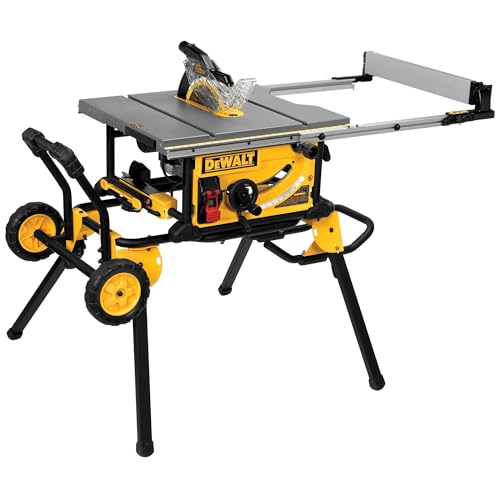
ASIN: B00F2CGXGG

ASIN: B0GCZS47KK
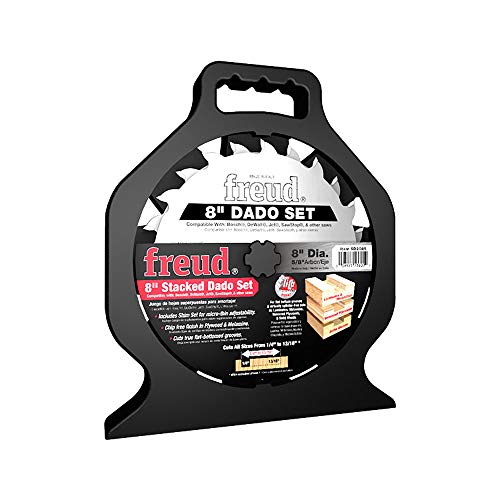
ASIN: B072MJ2V9J
Certain content that appears on this site comes from Amazon. This content is provided “as is” and is subject to change or removal at any time. Product examples and images are supplied through Amazon Creators API; confirm specifications and availability on the current listing.
Table of contents
- Quick compatibility checklist
- What a dado set is—and what the term means
- Start with the saw manual
- Arbor length, stack width, diameter, and nut engagement
- Throat plates, guards, and riving knives
- Safety systems and the limits of dado compatibility
- Portable, benchtop, hybrid, and cabinet saw considerations
- How to compare and buy
- Alternatives if your saw does not support dado stacks
- Frequently asked questions
Quick compatibility checklist
| Check | What to confirm | Why it matters |
|---|---|---|
| Explicit approval | The exact saw manual states that dado sets may be used | Physical fit alone does not mean the saw is approved |
| Maximum stack width | The maker’s limit includes the full installed stack | Too-wide cutters can leave inadequate arbor thread or unsafe clearance |
| Dado diameter | Maximum set diameter and any required blade size | Diameter affects speed, clearance, and guard geometry |
| Arbor and nut | Approved flange, washer, nut, and full thread engagement | The stack must be retained exactly as the maker specifies |
| Throat plate | Compatible dado insert with proper clearance and support | A standard plate may bind, contact cutters, or leave an unsafe opening |
| Guard and riving components | Manual-approved configuration for non-through cuts | Some ordinary safety devices cannot be used with the stack |
| Brake and special technology | Compatibility with brake, sensors, switches, or saw-specific systems | Some systems require a dedicated mode or prohibit dado sets |
| Region and workplace | Current local rules and worksite requirements | Accessory permissions and safety obligations can vary |
If any check is missing, unclear, or contradictory, treat the set as unsupported until the saw manufacturer confirms compatibility in writing. Do not test the limit by installing the stack and seeing whether the nut tightens. If a saw does not explicitly approve dado sets, use a router, a suitable router table, or another method that the manufacturer permits.
What a dado set is—and what the term means
Stacked dado sets
A stacked dado set is an assembly of two outer saw blades and intermediate chippers or spacers designed to cut a wider groove than a single kerf blade. The complete assembly mounts on the saw arbor and is intended for a non-through groove or a shoulder/rabbet operation when the tool manual allows it. Different sets provide different components and width increments. Use only the parts and configurations specified by the dado-set manufacturer.
Cut width is the overall width of the installed cutter stack, not simply the nominal label on the box. Outer blades, chipper teeth, shims, and setup can affect the actual groove. A test piece can be used to verify fit and dimensions only after the saw and stack are confirmed compatible and correctly installed. Never add washers or improvised spacers to reach a desired width unless the manufacturers explicitly prescribe them.
Dado, groove, rabbet, and non-through cut
Woodworkers use “dado” to describe a channel across the grain, while a groove generally follows the grain and a rabbet removes material along an edge. A stacked set may be used for these joinery operations when the saw permits the configuration. The essential safety point is that a dado stack makes a non-through cut: the blade does not pass all the way through the workpiece. That changes guarding and workholding. A dado stack is not a substitute for a regular blade on ordinary through cuts.
Use a dado set only for operations described in the manual. Do not make stopped cuts, narrow pieces, or complex jigs until you understand the saw’s approved procedures and have suitable training. A wider cutter can remove material quickly and may create different forces than a standard blade. If a project only requires a few grooves, a router and guide may be easier to control and may avoid compatibility limitations.
Dado plate versus dado set
A dado insert or throat plate has a wider opening to clear the stack. It is a separate saw accessory, not part of the cutting stack. The plate must fit the saw and support the work around the opening. Some saws require a dedicated insert with a specific width or shape. A standard throat plate is not necessarily safe for a wide stack and may contact the cutters or allow stock to catch at the opening.
Do not enlarge a standard plate by cutting it unless the saw manufacturer specifically describes that method and the result meets its requirements. A homemade zero-clearance plate may be suitable for some ordinary blade operations but cannot be assumed safe for dado use. Confirm the insert part number and configuration from the saw manual or manufacturer support.
Start with the saw manual
Find the model-specific accessory section
Before comparing saws, download the exact manual for the model and region being sold. Look for terms such as “dado,” “stacked dado,” “non-through cut,” “grooving,” “accessories,” “arbor,” and “throat plate.” A manual may state a maximum set diameter, maximum width, required insert, compatible blade, and steps to change guards. It may also prohibit dado sets entirely. If it says only “use accessories specified by the manufacturer,” do not infer support from a retailer listing or a third-party forum.
Manuals can differ between model generations, voltage versions, and countries, even when product names look similar. Verify the complete model number and type number on the saw and manual. If the model page and manual disagree, contact the maker’s support and get the answer for that exact version. A retailer’s generic product description is not a substitute for the manual.
How manufacturer manuals show different limits
Model-specific limits vary. For example, the current DEWALT DWE7491 manual states its own dado diameter and maximum width, requires a special dado insert, and describes a guard/riving-knife configuration for the dado operation. Grizzly’s support documentation for different saw models lists different allowable stack widths and inserts. Those examples demonstrate why compatibility is model-specific; their limits must not be copied onto another saw.
Read the DEWALT DWE7491RS manual for its specific configuration and the manufacturer’s Grizzly G0869/G0870 compatibility information for those models. They are examples, not general recommendations. Always use the manual and support answer for the saw you intend to buy.
What to do when product pages and manuals conflict
Some product listings advertise a dado plate as an included accessory or mention dado capability in a title. That is useful evidence to investigate, but it does not override a manual for a different model or revision. Confirm the plate part number, maximum stack, approved configurations, and safety procedure. If the manual prohibits dado use, do not rely on a sales listing to make the operation acceptable.
Record the exact model and accessory information when contacting manufacturer support. Ask specifically about the maximum outside diameter, total stack width, arbor hardware, throat plate, guard and riving knife, brake compatibility, and any regional restrictions. Save the written answer with the manual. Vague claims such as “accepts dado” are insufficient without the conditions and limits.
Arbor length, stack width, diameter, and nut engagement
Arbor length and thread engagement
A dado stack is thicker than a standard blade. The arbor must have enough usable length for the approved stack and the specified flange and nut to engage correctly. Do not measure only the exposed shaft and assume that the stack fits. The manual may require a particular flange, washer, or nut and a minimum amount of thread engagement. Follow those instructions exactly. If the stack leaves too little thread for the nut or requires omitting hardware the manual says to use, it is not a safe fit.
Never remove, reverse, grind, or substitute arbor hardware unless the manufacturer explicitly says to do so for the dado setup. Do not add a second washer, a spacer ring, or a different nut to make a wider set fit. A stack that appears tight may still have inadequate retention. When the allowable combination is unclear, ask the saw maker; do not rely on a physical trial.
Maximum dado width
Maximum width is a hard limit set by the saw’s arbor and hardware, motor, guard configuration, and manufacturer testing. It is not the width of the throat plate opening. A plate may have a larger opening than the saw’s maximum supported stack because clearance is needed around the cutters. Use the manual’s maximum width and never exceed it.
For instance, manufacturer support pages give different limits for different saws: one benchtop model family may allow a narrower stack, while a hybrid or jobsite saw may specify another maximum. Do not conclude that a wider insert means a wider stack is safe. Confirm the maximum stack for the exact saw model and the blade set’s assembled width.
Maximum diameter and operating speed
A dado set has a specified outside diameter and maximum speed. The saw manual may limit the dado diameter independently from the standard blade diameter. The entire assembly must be rated for the saw’s operating speed and fit under the guard or approved alternate setup. Do not install a larger stack because its arbor hole matches. It may exceed the saw’s clearance or speed design.
Use the blade set’s maximum RPM rating and the saw’s specifications together. If either maker prohibits the combination, do not use it. Inspect outer blades and chippers for cracks, missing teeth, warped plates, or damage before installation. A damaged component can fail at speed. Replace components only with the exact type the dado-set maker specifies.
Arbor, flange, washer, and nut are a system
The mounting system holds the stack under load. Flange direction, nut type, wrench torque, and any approved washer arrangement matter. Each saw’s design can differ. Do not apply generic instructions from another brand’s video. Follow the sequence in the exact saw and cutter manuals, and check that the assembly clears the table opening and any surrounding parts before connecting power.
After installation, inspect and verify only in the way the manufacturer instructs. Many manuals call for checking clearance with power disconnected. Do not rotate or handle sharp teeth carelessly. If there is contact, interference, looseness, or uncertainty, stop and consult the manual or manufacturer before operating.
Throat plates, guards, and riving knives
The dado insert must match the saw and stack
A dado insert provides a wider opening while supporting stock near the cutters. It must lock or seat as intended and must not sit proud of the table or rock during use. Confirm the exact insert part number, permitted stack width, and whether it is included with the saw. Some inserts are sold separately. A generic plate can have the wrong dimensions, support, or locking arrangement even if it appears to fit.
Do not use a plate with an opening wider than the manufacturer allows, a cracked edge, or a loose fit. Avoid a setup where a narrow workpiece can drop into the opening. For a specialty operation that needs a different insert, follow the manual’s instructions for that insert and the intended stock. If the required plate is unavailable, consider the saw unsupported for that operation until the manufacturer confirms an alternative.
Guard and riving-knife configuration
A dado stack is wider than a single blade and does not cut through the board, so the normal guard and riving knife may not fit the operation. Some manuals direct users to remove the blade guard assembly or standard riving knife and use a different non-through-cut procedure. That change exposes more of the cutter and requires careful workholding and training. The manufacturer’s specific procedure controls. Never assume that a standard guard can be forced over a stack or that a riving knife can be left in place if it contacts the cutters.
Do not remove guards or safety parts for convenience. If the manual does not explicitly describe a dado configuration, do not devise one yourself. Read the saw maker’s explanation of alternate guarding and applicable workplace rules. OSHA’s table-saw hazard guidance discusses point-of-operation and kickback hazards; workplace safeguarding requirements depend on the operation and jurisdiction.
Clearance, fence, and workpiece support
Compatibility is not limited to the arbor and insert. The cutter must clear the table, fence, guard components, and any auxiliary fixture across the approved range of blade height and tilt. The fence must be positioned and locked according to the manual for the intended groove. The stock must have stable support before, during, and after the cut. Long or wide stock may need infeed and outfeed support, but stands must not pull material out of alignment.
A dado stack can create a wide opening in the workpiece; small parts and narrow strips may be difficult to control. Follow the manufacturer’s workholding instructions and any safety devices required for the operation. Do not crosscut against a rip fence unless the manual explicitly describes a safe setup. If the workpiece is too small or awkward to guide safely, use a different process or have the groove milled by a professional shop.
Safety systems and the limits of dado compatibility
Non-through cuts change the risk profile
A non-through cut leaves the blade exposed above the stock for the duration of the operation, and a wide dado stack has more cutting edges than a standard kerf blade. The risks include contact with exposed teeth, kickback, pinching, workpiece lifting, and ejected material. A supported saw is not automatically safe for an inexperienced user. Read and understand the exact procedure before buying the accessory or attempting the cut.
If the manual requires the guard and riving knife to be removed for the dado configuration, take that requirement seriously. The saw may require an alternate guard, hold-down, featherboard, or other approved control, depending on model and procedure. Do not improvise a substitute and assume it offers equivalent protection. If the manual’s instructions appear incomplete or the required parts are missing, contact the manufacturer or select another method.
Brake systems and electronic safeguards
Some saws use blade-brake or detection systems that depend on a specific blade, cartridge, or configuration. A dado stack can be incompatible, require a dedicated brake cartridge, or be prohibited. The details vary. Check the current manual and manufacturer support for the exact saw and accessory. Do not disable a safety system, defeat a sensor, or install a third-party workaround to make a dado stack operate.
Before buying, confirm compatibility of the complete stack—not just the saw brand. Ask whether the system supports the dado set, whether a special cartridge or mode is needed, whether stack width affects the system, and whether using the accessory changes the warranty or required safety procedure. Get the answer in writing if the documentation is ambiguous.
Do not start with dado work as a beginner
Groove cutting requires knowledge of non-through operations, feed direction, stock support, blade height, workholding, and the saw’s safety configuration. If you are learning table-saw basics, practice only the operations recommended for beginners in your manual and training. Our beginner table saw guide explains why dadoes, narrow rips, and stopped cuts are not suitable first operations.
When in doubt, choose an alternative. A router with a suitable bit and guide, a router table, or a professional cabinet shop can produce a groove without requiring an unsupported dado stack. The best method is the one you can execute with the correct equipment, training, and safeguards.
Portable, benchtop, hybrid, and cabinet saw considerations
Portable and jobsite saws
Some portable saws expressly support dado stacks and offer a dedicated insert; others prohibit them or support only certain widths and diameters. Portability does not determine compatibility. Look for model-specific manual language and confirm that the saw can be mounted securely and supported in the dado configuration. A lightweight saw may need a stable stand, but the stand does not change the arbor limit.
For example, DEWALT’s DWE7491RS manual provides explicit limits and a required dado insert for that model. The maker’s instructions also describe removal of certain safety assemblies for that operation and restoration afterward. This is not a blanket recommendation; it demonstrates how much detail an adequate manual should provide. See the current DWE7491RS manual before evaluating that saw or any other model.
Benchtop saws
Some benchtop models accept only a narrower dado stack than larger saws, even if the insert opening appears wider. Grizzly’s official FAQ for its G0869/G0870 models, for example, explains the supported stack width, maximum diameter, and why the insert opening does not equal arbor capacity. The limits are specific to those models; check the exact saw documentation. See the Grizzly compatibility FAQ.
Benchtop saws may have less table area and a shorter arbor than larger cabinet saws. Consider how the insert is supported, whether the fence locks securely, and whether the saw can be fixed to a bench. A dado operation with small pieces may be especially difficult to guide on a compact surface. Do not extend the saw’s limits because the project appears small.
Hybrid and cabinet saws
Hybrid and cabinet saws may provide more arbor length, heavier tables, or dado accessories, but no category guarantees support. Some models include a dado insert; others require a separate part. Maximum stack width, diameter, and safety configuration still vary. Confirm the manual, arbor, brake system, and throat plate for the exact model.
Our cabinet table saw guide covers stationary saw construction and shop considerations, and the general table saw guide compares broader categories. For dado selection, treat those categories as context only; choose by explicit compatibility documentation.
How to compare and buy a table saw for dado work
Step 1: write down the actual joinery requirements
List the groove width and depth required by the project, material, number of pieces, and whether a stopped end or through groove is needed. A stacked dado set may be unnecessary for a narrow groove that a router bit can make. Do not select a saw based on a hypothetical future maximum unless you can confirm the saw and cutter support it.
Step 2: verify the saw manual and current model number
Download the manual from the manufacturer’s official site. Confirm the full model, type, and region. Search the manual for dado and non-through operation. If the operation is not stated, ask manufacturer support. Avoid relying on retailer filters or product descriptions that omit manual conditions.
Step 3: verify the cutter set and accessories as a package
Check the dado set’s diameter, maximum RPM, total width range, component list, arbor requirements, and approved saw type. Confirm that the saw’s specified dado insert is available and fits the model. Verify the retaining hardware and any brake cartridge or alternate safety parts. Do not assume two products from the same brand are automatically compatible.
Step 4: compare saw style only after compatibility
Once support is confirmed, compare fence quality, table size, dust collection, power, stability, electrical needs, serviceability, and cost. If the saw will be used mainly for dadoes, consider whether the fence and support surfaces suit your stock and shop. If dadoes are occasional, a router-based process may be a simpler system. Our table saw guide and cabinet saw guide can help compare saw types beyond dado compatibility.
Step 5: include training and setup equipment in the budget
Account for the dado set, dedicated insert, guard or alternate control accessories, push devices, stock supports, dust collection, and training. A dado-compatible saw can still be a poor purchase if the operation exceeds your experience or the shop cannot support the stock safely. Include local workplace requirements for professional use.
Alternatives if your saw does not support dado stacks
Router and straightedge or guide
A router with a straight bit and edge guide can create a groove or dado when used with appropriate workholding and a suitable pass plan. A router table may be more repeatable for small parts when the setup is designed for the cutter and stock. Follow the router, bit, and fixture manuals. Use dust extraction and take passes appropriate to the tool and material. Do not assume a router is automatically safer; it has its own hazards.
Professional milling or pre-grooved stock
For a few parts, a cabinet shop can cut grooves using equipment and guards designed for the job. This may cost less than buying a saw and dado stack. Suppliers may also sell pre-grooved components, shelving, or joinery stock that meets the project’s needs. Check dimensions and material before committing.
Single-blade methods
Some grooves can be cut with multiple passes using a standard blade and an approved fence or fixture, but this is not a generic procedure. Repeated passes can introduce misalignment, trapping, or kickback hazards. Use only a method described in your saw manual or taught by a qualified instructor. Do not improvise a partial-depth method because a dado stack is unsupported.
Research method and scope
This guide uses manufacturer manuals and support pages to explain model-specific compatibility limits, plus OSHA’s table-saw hazard overview for general point-of-operation and kickback context. It does not claim that a particular saw is universally safe for dado use, does not compare hands-on performance, and does not make current price claims. Manufacturer pages can change; verify current documentation for the exact model before buying.
Primary sources include the DEWALT DWE7491RS manual, Grizzly’s benchtop saw compatibility FAQ, and OSHA’s table-saw hazard guidance. The manuals describe their own products only. This article is not a substitute for the saw manual, training, or applicable workplace rules.
Frequently asked questions
Can every table saw use a dado stack?
No. Some saws explicitly support dado sets with stated limits, while others prohibit them or do not provide compatibility information. Use a dado stack only when the exact saw manual approves it.
Does a wider dado insert mean the saw supports a wider stack?
No. The insert opening may provide clearance beyond the saw’s arbor or maximum stack width. Use the manufacturer’s dado-width limit, not the insert opening, to determine compatibility.
How do I know if the arbor is long enough?
Check the manual’s maximum stack width and required arbor hardware. The retaining nut must engage exactly as specified. Do not estimate from exposed arbor length or omit hardware to make a stack fit.
Do I need a special throat plate for dado blades?
Many saws that support dado stacks require a dedicated dado insert. Confirm its part number, fit, and stack-width compatibility in the manual. Do not use a standard plate unless the manufacturer approves it for that configuration.
Can I use a dado stack if the guard or riving knife must be removed?
Only if the exact manual permits the configuration and explains the required safeguards and procedure. Removing a guard changes the exposure to the cutter. Do not improvise or proceed without understanding the maker’s instructions and getting qualified training.
Are dado stacks legal everywhere?
Rules and workplace requirements can vary by jurisdiction and application. Check local regulations and workplace safety requirements before buying or using a dado set. Manufacturer approval alone does not replace applicable rules.
Can a dado set be used on a contractor or jobsite saw?
Some models in those categories support dado stacks; others do not. Category names do not establish compatibility. Verify the exact model manual, arbor, insert, maximum width and diameter, and safety configuration.
Can I use a dado stack on a saw with an electronic blade brake?
Compatibility depends on the saw’s specific brake system and accessory configuration. Some makers require special parts or prohibit dado use. Check the current manual and manufacturer support; never bypass a brake or sensor.
Is a wobble dado blade a good alternative?
Do not assume a wobble head is safer or more compatible. Use only cutters expressly approved by the saw manufacturer and compatible with the manual’s limits. If the documentation does not approve a cutter type, do not use it.
What can I use instead of a dado stack?
A router and guide, router table, pre-grooved stock, or professional milling may suit the project. Select an alternative based on the workpiece, tool capacity, and your training, and follow that tool’s safety instructions.
Conclusion
The best table saw for dado blades is the saw whose exact manual explicitly supports the accessory and explains the complete setup. Verify stack width and diameter, arbor and nut engagement, dado insert, guard and riving-knife configuration, and any brake or regional restrictions. Never treat physical fit, a product-card claim, or a wide insert opening as proof of compatibility.
If your saw does not clearly support dado use, choose a router-based method or have the work milled. Compatibility and safe setup matter more than maximum width or a broad “dado capable” label.
This guide is general buying information, not operating instruction. Follow the exact saw and dado-set manuals and get qualified training before attempting non-through cuts.