Where to buy
Check the latest price, availability and delivery on Amazon — every pick below was chosen as a security layer, not a gadget, and the checkout price is the one that counts. Orders are placed on Amazon.
- Best pick under $300: Wyze Cam Floodlight v2 — check price on Amazon
- Blink Outdoor 4, 3-Camera System — check price on Amazon
- eufy Security Indoor Cam S350 with HomeBase 3 — check price on Amazon
- eufy SoloCam S220 — check price on Amazon
- Wyze Cam Pan v3, 2-Pack — check price on Amazon
- Ring Indoor Cam (2nd Gen), 3-Pack — check price on Amazon
Read the full guide ↓
Disclosure: As an Amazon Associate, dailyhomedecorating.com earns from qualifying purchases. Prices and availability change; the price at checkout is the final word.
Choosing the best security camera for home security under $300 means asking harder questions than a casual buyer asks. Not ‘is the picture sharp?’ but ‘will there be usable footage, stored somewhere safe, after the worst ten minutes of the year?’ That shift — from gadget to evidence system — changes what wins. Deterrence becomes a feature, so the floodlight leads this guide. Storage location becomes a security decision, so cloud and hub architectures are compared as risk models, not conveniences. And coverage becomes a map problem: the approaches, doors and interior chokepoints an intruder would actually use, watched by cameras placed where they cannot be casually reached, swatted or unplugged.
The six picks form a layered pool. Outside: a hardwired floodlight that announces itself with light and sound, a three-camera battery kit that covers multiple approaches at once, and a solar camera that guards one exposed point indefinitely. Inside: a hub-based flagship whose zoom reads faces across a room and whose footage never has to leave the house, a pan-and-tilt pair that sweeps interior chokepoints, and a three-pack that puts a cloud-backed camera in every key room. Each review labels its placement plainly — indoor, outdoor or both — because a security plan built on a camera dying in its first rainstorm is not a plan.
Disclosures, stated as plainly as the stakes deserve. Subscriptions: Ring’s indoor camera records nothing without a Ring Home plan; Blink’s cloud history and person detection require its plan, with USB backup through its hub as a local alternative; Wyze gates cloud clips and smart labels behind Cam Plus while local recording stays free; both eufy picks record locally with no fee. Battery life, solar performance, floodlight brightness and weather ratings are manufacturer claims and specifications under the makers’ stated conditions — a deterrent that goes flat in a cold snap is a failed control, so the reviews translate those conditions into placement advice. Read the fees and the fine print here, in the guide, rather than discovering either during an incident review.
In this guide
Quick Picks
Ordered as a security plan reads: deter at the perimeter, cover the approaches, hold one tireless sentinel, then secure the interior layers. The best-for column is written in security roles, not marketing categories.
| Camera | Best for | Key spec |
|---|---|---|
| Wyze Cam Floodlight v2 | Best active deterrent for the main approach | 2K, maker-rated 2,800-lumen floods, 105 dB siren (maker) |
| Blink Outdoor 4, 3-Camera System | Best perimeter coverage — three approaches at once | 3 cameras, 1080p, 143° view, hub included |
| eufy Security Indoor Cam S350 with HomeBase 3 | Best interior evidence camera, fee-free | 4K + 2K telephoto zoom, local hub storage |
| eufy SoloCam S220 | Best tireless sentinel for one exposed point | 2K, solar charging, built-in 8GB storage |
| Wyze Cam Pan v3, 2-Pack | Best interior chokepoint sweep (pair) | 2 cameras, 1080p PTZ, IP65 maker rating |
| Ring Indoor Cam (2nd Gen), 3-Pack | Best cloud-backed interior layer (plan required) | 3 cameras, 1080p, cloud-only recording |
How These Picks Were Chosen
Security value was scored on four axes, in this order: deterrence, coverage, evidence survivability, and identification quality. Deterrence — does the device change an intruder’s decision before entry — put the floodlight first: light and sound at the moment of approach is the only feature in this guide that acts before an incident. Coverage — how many realistic approaches are watched — elevated the three-camera Blink kit above every single-lens product regardless of resolution. A security camera that watches one door beautifully while the back door stands open is a documentation tool for the front of the house only.
Evidence survivability asked where the footage lives at the worst moment. Cloud recording (Ring entirely; Blink and Wyze by plan) survives a stolen or smashed camera — a genuine security property, not a luxury. Local recording (eufy’s hub or onboard storage, Wyze microSD, Blink’s USB backup) survives an internet outage and costs nothing monthly, but shares fate with its hardware, which is why hub placement advice — discreet, indoors, away from the cameras it serves — appears in the setup section. Both architectures are defensible; an indefensible one is not knowing which you bought, so every review states its model in its opening paragraphs.
Identification quality replaced raw resolution as the picture criterion. Faces at the door and plates on the driveway are the evidentiary currency; that means night performance (the floodlight’s colour image under its own light out-identifies infrared at the same distance), zoom where range demands it (the S350’s telephoto lens is the only true identification-at-distance tool here), and placement geometry — cameras angled across approaches at eight to ten feet, not staring down from eaves at the tops of heads. Maker claims were handled as claims: floodlight output and siren volume are manufacturer figures, battery and solar endurance are manufacturer figures under stated conditions, and weather resistance is a maker rating, not a guarantee.
The subscription audit ran as a security audit too. A plan that lapses silently is a control that fails silently: Ring’s cameras stop recording altogether without one, so a Ring-based security layer must treat the subscription as part of the security budget, permanently. Blink and Wyze degrade more gracefully — live view and local recording respectively continue — and eufy’s picks do not degrade at all. Reliability across years, not features across a brochure, decided the ordering of the interior picks.
The 6 Best Security Cameras for Home Security Under $300
Read these as layers of one system, not rivals: the strongest real-world setup under this ceiling combines two or three of them. Each review states placement, evidence model and the limitation a security-minded buyer most needs to know.
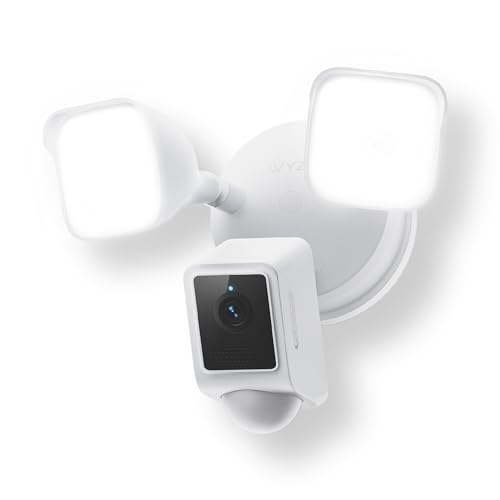
Wyze Cam Floodlight v2
Who it suits: The main approach — driveway, garage front, back door — anywhere an existing light fixture watches the ground an intruder must cross, and where being seen matters as much as being recorded.
Deterrence is the floodlight’s whole design. Motion triggers twin LED panels Wyze rates at 2,800 lumens — a maker figure, but unambiguously a wall of light — plus a 2K camera recording in colour under that light and a siren the maker rates at 105 dB if you choose to sound it. An opportunist lit up, filmed in colour and aware of it usually chooses another house; that decision, made on your driveway, is worth more than any footage reviewed afterwards. The 160-degree lens covers the approach and its edges, and hardwiring means the one security device you most need awake at 3 a.m. in February has no battery to be flat — mains power is a security property, not a convenience.
Evidence handling follows Wyze’s split: a microSD card records locally with no plan — footage that survives an internet outage but shares the camera’s fate if it is ripped down, which its height and hardwired mount make a noisy, conspicuous job. The optional Cam Plus plan adds cloud copies, which for this camera specifically is worth considering: off-site backup converts its evidence from good to theft-proof, and adds person and vehicle labels that speed up reviewing a night’s events. The limitations are position and singularity — the fixture’s location dictates the view, installation is a real wiring job (breaker off, or an electrician), and one floodlight guards one approach. As the anchor of an outdoor layer, nothing else here does its job.
- Light + colour recording + siren deters before entry
- Mains-powered: cannot go flat, cannot be unplugged quietly
- Colour night evidence identifies better than infrared grey
- Local recording free; cloud backup available via plan
Honest limitation: Fixed to its fixture’s viewpoint and needs mains wiring; one approach only.
Choose it if one approach carries most of your risk and you want it actively defended. Skip it if you rent without wiring permission, or your risk is spread across several approaches — start with the Blink kit.
Blink Outdoor 4, 3-Camera System
Who it suits: Whole-perimeter coverage on a budget: front, back and side approaches watched simultaneously, for homes where the honest risk assessment is ‘any door, any night’.
Security incidents do not schedule themselves in front of your best camera. Three weather-resistant 1080p cameras with 143-degree views, plus the Sync Module 2 hub in the box, let you hold the front door, the back door and the driveway or side gate at once — the coverage geometry that actually matches how homes are entered. Blink’s maker claim of up to two years per set of AA lithium batteries (default settings, moderate traffic) matters in security terms: a camera that needs charging every few weeks will, in real households, spend some of its life flat, and gaps are what an evidence system exists to prevent. Busy approaches will shorten that figure substantially — place the kit’s hardest-working camera where its batteries are easiest to reach.
The evidence model needs a deliberate choice. Live view is free; cloud saving and person detection require Blink’s subscription after the trial; the hub can back clips up to a USB drive you supply, which keeps a local copy but is a backup routine rather than an app library. For a security-first setup, the plan earns its keep here — cloud clips survive a camera being torn down, and person alerts cut the noise that makes owners mute their systems. 1080p is the honest weakness: at driveway distances you will identify clothing, build and vehicle well before faces and plates. Coverage first, identification at the chokepoints — that is the correct priority order, and this kit embodies it.
- Three approaches covered simultaneously, hub included
- Long maker-claimed battery life minimises coverage gaps
- Cloud plan makes evidence theft-proof; USB backup option
- Weather-resistant, discreet, quick to mount high
Honest limitation: 1080p limits face/plate identification at range; cloud history is a subscription feature.
Choose it if your risk is spread across several doors and approaches. Skip it if one approach dominates and needs deterrence plus identification — the floodlight, backed by the S350 indoors.
eufy Security Indoor Cam S350 with HomeBase 3
Who it suits: The interior evidence layer: one main room — living room, hall junction, office with equipment — documented in high detail, recorded to a hub in the home, with no subscription that can lapse.
If an intruder gets inside, the evidentiary question becomes identification, and this is the best identification tool in the guide. The S350’s dual lenses — 4K wide plus a 2K telephoto with up to 8x hybrid zoom per eufy’s specifications — on a head that pans 360 degrees mean a face crossing the room stays readable instead of smearing. Footage records to the included HomeBase 3 hub: 16GB of local storage, expandable, sitting discreetly indoors where an intruder is unlikely to find or take it, and the whole chain — recording, person and pet detection, alerts — runs with no monthly fee, which in security terms means no lapse risk, no trial expiring quietly in month two, no card-on-file failure turning your evidence system off.
The architecture’s weakness is the mirror of its strength: local footage shares the hub’s fate, so hide the hub like it matters — a closet shelf, not the hallway table beside the camera it serves. The camera is wired and indoor-only, one room per unit, so it is a layer, not a system; pair it with any outdoor pick here and the two layers cover approach and interior. Privacy mode turns the lens away when the household is home, which keeps the camera a security tool rather than a domestic surveillance argument. For buyers who distrust subscriptions on principle, this bundle is the principled option that also happens to take the best pictures.
- Best identification detail here: 4K + real telephoto zoom
- No subscription — no lapse can silently disable recording
- Hub storage sits hidden indoors, away from the camera
- Anchors a wider fee-free eufy system over time
Honest limitation: Indoor and wired only; footage is local, so hub concealment is part of the security design.
Choose it if interior identification matters and you want it fee-free and lapse-proof. Skip it if you need outdoor coverage first — this camera cannot go outside at all.
eufy SoloCam S220
Who it suits: One exposed point that other cameras can’t reach — a side gate, a garden office, a bin store, a far fence line — where power is unavailable and visits to recharge would be rare in practice.
Every security plan has a weak point too far from an outlet for wired cameras and too tedious for battery ones. The S220 exists for that point: eufy’s maker claim is that its integrated solar panel, given a few hours of direct sun a day, keeps the battery topped up indefinitely, and it records 2K video to 8GB of storage built into the camera with person detection and alerts — all with no monthly fee. A sentinel that never sleeps for charging is a real control; the most common failure of remote cameras is not image quality, it is the dead battery nobody noticed for a month.
Judge the claim by your sky. A shaded or north-facing mount will not deliver the maker’s solar figures, and a dark winter turns it back into a battery camera with a long interval — still useful, honestly framed. The 8GB rolling storage is the second limit: on a busy outlook it holds days of events, so for a high-traffic point, treat it as a tripwire that alerts you live rather than an archive you review next month. It also pairs with HomeBase 3, so if the S350 bundle above anchors your interior, this camera’s footage can consolidate onto the same hub. One point, tirelessly watched, fee-free — within a layered plan, that is a precise and valuable role.
- Solar top-up (maker claim) guards remote points indefinitely
- No subscription; storage and detection are on-camera
- 2K detail for identification at gate distance
- HomeBase 3 compatible — consolidates with the hub layer
Honest limitation: Solar fails in shade; 8GB is a short rolling archive on busy outlooks.
Choose it if a sunny, remote weak point needs a permanent watch. Skip it if the spot is shaded, or the point is high-traffic and needs long archives — wire or hub it instead.
Wyze Cam Pan v3, 2-Pack
Who it suits: Interior chokepoints on a budget: the hallway every intruder must cross and the room with the valuables, swept by two pan-and-tilt cameras that follow movement instead of staring at one corner.
Fixed indoor cameras watch a cone; these watch a room. Per Wyze’s specifications each Pan v3 rotates 360 degrees, tilts through 180 degrees and auto-tracks motion, so a figure crossing the hallway is followed, not glimpsed at the frame’s edge — and with two in the box, the entry hall and the main living space are both swept for less than any other interior option here. The maker rates the housing IP65, so a covered porch position watching the door from outside is also legitimate. Local microSD recording runs with no plan — an evidence layer that cannot lapse — and Privacy Mode rotates the lens down when the home is occupied, the correct default for a family house.
The security caveats are resolution and the alert layer. 1080p through a moving head identifies ‘who, roughly’ rather than ‘who, exactly’ at room scale — for courtroom-grade faces indoors, the S350 is the upgrade. And while local recording is free, the person/pet/package labels that make alerts reviewable at speed sit behind the optional Cam Plus plan; without it, expect raw motion alerts and more of them. As affordable, lapse-proof interior coverage beneath a stronger identification camera, the pair is excellent value; as your only identification layer, it is the pool’s compromise pick, honestly labelled.
- Two rooms swept with motion-tracking PTZ coverage
- Local recording with no subscription to lapse
- Maker-rated weather resistance allows covered-porch duty
- Lens-down privacy mode for occupied hours
Honest limitation: 1080p limits fine identification; smartest alerts need the optional plan.
Choose it if you need lapse-proof interior coverage of two chokepoints on a budget. Skip it if interior face identification is the priority — step up to the S350 bundle.
Ring Indoor Cam (2nd Gen), 3-Pack
Who it suits: Homes already committed to Ring — typically with a Ring doorbell as the outer layer — that want the interior covered in the same app and the same cloud, with the subscription understood as a permanent security cost.
As an interior layer inside a Ring household, this pack is coherent: three 1080p cameras for hall, living room and landing, colour night vision, two-way talk, and footage stored in the same cloud as your doorbell’s, reviewable in one timeline in one app. Cloud storage is a genuine security property — a camera can be found and destroyed and its last minutes still exist — and the physical privacy cover on each unit is the right answer to indoor cameras in lived-in rooms: slide it shut and lens and microphone are mechanically off. If the household already pays for Ring’s plan at the doorbell tier that covers all devices, the marginal cost of this layer may already be spent.
The condition is absolute, and a security buyer must price it as such: without a Ring Home plan these cameras record nothing — no local storage exists on the model at all. A lapsed card, a cancelled plan, an expired trial, and your interior layer is live-view only precisely when you assumed it was archiving. That fragility is manageable — plenty of households run Ring for years without a lapse — but it must be managed consciously, with the plan treated as a non-negotiable line in the security budget. Bought that way, by a Ring home, it is a tidy layer; bought casually, it is the riskiest architecture in this guide.
- Cloud evidence survives destruction of the camera
- One app and timeline with a Ring doorbell layer
- Physical privacy covers for lived-in rooms
- Three rooms covered uniformly
Honest limitation: Recording is wholly subscription-dependent — a lapsed plan means no footage at all.
Choose it if you’re a Ring household treating the plan as a permanent security cost. Skip it if any chance the plan lapses — eufy and Wyze layers keep recording regardless.
Comparison Table
The security ledger: placement, evidence storage and plan reality side by side. In a security purchase the third column is a control, not a footnote — read it as one.
| Camera | Placement | Headline spec (maker) | Storage | Plan reality |
|---|---|---|---|---|
| Wyze Cam Floodlight v2 | Outdoor, hardwired at an existing fixture box | 2K HD, 160° wide view, twin LED floods (maker-rated 2,800 lumens), 105 dB siren (maker figure) | Local microSD recording; optional Cam Plus cloud | No plan required for local recording; Cam Plus adds cloud history and smart detection labels |
| Blink Outdoor 4, 3-Camera System | Outdoor (also usable indoors) | 1080p HD, 143° diagonal field of view, infrared night vision, two-way talk | Cloud via Blink Subscription Plan; local clip backup via Sync Module 2 + USB drive (sold separately) | Plan required for cloud history and person detection; live view free |
| eufy Security Indoor Cam S350 with HomeBase 3 | Indoor (camera) + indoor hub | Dual cameras: 4K wide + 2K telephoto, 8x hybrid zoom, 360° pan / 75° tilt | Local on HomeBase 3 (16GB built in, expandable); optional eufy cloud | No plan required for recording or core AI alerts |
| eufy SoloCam S220 | Outdoor, wire-free | 2K resolution, integrated solar panel, two-way talk, works with HomeBase 3 | Built-in 8GB local storage on the camera; no cloud required | No monthly fee for core recording and alerts |
| Wyze Cam Pan v3, 2-Pack | Indoor or sheltered outdoor (IP65, maker rating) | 1080p pan/tilt/zoom, 360° pan, colour night vision, motion tracking | Local microSD recording on each camera; optional Cam Plus cloud | No plan required for local recording; Cam Plus gates cloud event video and person/pet/package detection |
| Ring Indoor Cam (2nd Gen), 3-Pack | Indoor only | 1080p HD, colour night vision, manual privacy cover, two-way talk | Cloud only — no local storage on this model | Ring Home plan required to record and review video at all |
How to Choose the Best Security Camera for Home Security Under $300
Build the plan the way an intruder reads your house: from the street inward. The five steps below follow that path — deter, cover, survive, identify, sustain — and each maps to specific picks above, so the shopping follows the thinking instead of replacing it.
Step 1: Deter at the perimeter before you document the interior
The cheapest incident is the one that doesn’t happen. Visible deterrence — the floodlight’s light and siren at the main approach, cameras mounted visibly rather than hidden — redirects opportunists, who commit most residential break-ins, toward easier targets. Spend the first dollars where deterrence lives: the driveway and main door. Hidden cameras have their place in evidence-gathering, but a beginner security budget should buy the visible kind first.
Step 2: Cover every realistic approach, then argue about quality
Walk the property as a stranger: front door, back door, side gate, ground-floor windows, garage link door. Each is a viewpoint or an accepted gap — and accepted gaps should be decisions, not discoveries. This is the arithmetic that makes a three-camera 1080p kit a stronger security purchase than one 4K camera: coverage is the probability an incident is seen at all, and it dominates every other variable. Interior chokepoints — the hall all routes cross — come next, before any second camera in a single room.
Step 3: Choose where evidence survives
Decide, per camera, what happens to footage when things go wrong. Camera stolen or smashed: cloud survives, local dies with the hardware — argue for cloud (or a plan’s cloud backup) on the most exposed cameras. Internet cut: local keeps recording, cloud-only cameras go blind — argue for local on interior layers. Subscription lapsed: Ring stops entirely, Wyze keeps local recording, eufy never had the dependency. There is no universally right answer; there is only the answer you chose on purpose, per position, before the incident grades your homework.
Step 4: Buy identification where identification happens
Faces are identified at doors and across main rooms, plates on driveways — at ranges of a few metres to perhaps fifteen. Match the tool: the floodlight’s colour-under-light image at the driveway, the S350’s telephoto zoom across the big room, the kit’s adequate 1080p everywhere else. Manufacturer resolution figures are ceilings measured in good light; night, distance and motion all tax them. Spend identification money only at the positions where identification is realistically possible, and let coverage picks cover the rest.
Step 5: Sustain the system for years, not weeks
A security system fails by neglect more often than by attack: flat batteries, muted alerts, lapsed plans, a hub unplugged for a games console. Prefer architectures whose upkeep matches your household — mains and solar where chores are unlikely, long-life batteries where access is easy, fee-free recording where a subscription might lapse, plans where the household reliably pays for polish. And rehearse the system: check one clip a month, confirm alerts arrive, confirm the footage you’d need actually exists. That five-minute habit is the difference between owning cameras and having security.
What Cameras Can and Cannot Do: An Honest Security Briefing
Begin with the limit, because every purchasing decision in this guide hangs off it: none of these cameras is an alarm system. Nothing here is monitored by a response centre, nothing verifies an emergency, nothing dispatches police, and no camera physically prevents entry. Insurers and police treat consumer cameras as evidence sources, not protective systems. If your risk assessment says response matters — a remote property, a vulnerable occupant, prior incidents — the correct purchase is a monitored alarm, with cameras as its witness layer. Anyone who sells you a camera as a substitute for that is selling you a feeling, and this guide declines to.
What cameras genuinely provide is threefold. Deterrence: visible cameras and especially active deterrents like the floodlight measurably change opportunist behaviour at the approach — most residential intrusion is opportunistic, so this is the largest real-world effect, and the least measurable on a spec sheet. Awareness: alerts and live view convert ‘something happened while we were away’ into ‘we knew within a minute’, which changes outcomes for everything from parcels to burst pipes to a door left ajar. Evidence: footage that identifies, timestamps and sequences — the material police reports, insurance claims and neighbour disputes actually run on. The picks here were ranked on those three honest functions, in that order.
The subscription question, viewed through the security lens, is about failure modes. Every architecture fails somehow: cloud fails when the internet or the payment does; local fails when the hardware is taken; battery fails when maintenance lapses; solar fails in shade and deep winter — and every one of those figures in this guide is a manufacturer claim under stated conditions, not a field guarantee. Mature security design doesn’t find the architecture with no failure mode; it layers two with different ones. That is why this guide’s natural recommendation is a pairing — a cloud-or-deterrent layer outside, a local fee-free layer inside — rather than six copies of any single pick.
Finally, legality and proportion, briefly: cameras should watch your property and its approaches. Recording the public street incidentally is normal; aiming into neighbours’ homes, or running audio recording where local law restricts it, creates liabilities that outlast any incident. Set activity zones to your ground, keep audio decisions deliberate, and tell household members and regular visitors the cameras exist. A system that is lawful, proportionate and honestly understood will still be running — trusted, maintained, recording — on the one night it is needed. That, and not any specification, is the goal.
A note on retention, the least marketed and most consequential setting in any of these systems. Footage you cannot retrieve is footage you do not have, and every architecture here overwrites or expires its archive on a clock: local storage rolls over when it fills — days on an 8GB camera watching a busy gate, weeks on a hub with a drive fitted — while cloud plans retain event clips for the window your tier specifies, then delete them whether or not anyone watched. Incidents are often discovered late: the scratch on the car noticed at the weekend, the neighbour’s report filed next week. Set retention deliberately — the largest local capacity your architecture accepts, the cloud tier whose window matches your discovery habits — and export any clip that matters the day you learn of the incident, because the overwrite clock does not negotiate.
Interoperability deserves one clear-eyed paragraph. These six picks live in four separate apps and four separate clouds or hubs; none of them natively pools its footage with the others, and no unified timeline exists across brands. For a layered security plan that is an acceptable cost — each layer is checked in its own app, and an incident is reconstructed across two timelines by timestamp — but it should be a chosen cost. Households that prize a single pane of glass should build within one brand’s ecosystem (the two eufy picks plus their wider battery range, or Ring’s doorbell-plus-interior world) and accept that brand’s fee model as the price of coherence. Households that prize best-in-role hardware per layer should accept the multi-app reality and rehearse it, so that the night the footage matters is not the night you learn which app holds it.
Placement Doctrine: Where Cameras Earn Their Keep
Mount for faces, not for views. Eight to ten feet up, angled across the approach so a visitor’s face turns into the lens, beats a panoramic eaves shot of hat-tops every time. The floodlight’s position is fixed by its fixture, so verify the frame in the app before final tightening; battery cameras should be trialled with adhesive or a temporary mount for a day before screws commit. Indoors, the hall chokepoint outranks the valuables’ room: every route through a house crosses the hall, while a camera in the study only sees the study’s incident.
Protect the system itself. Hubs live discreetly — the HomeBase or Sync Module on a closet shelf records the house without advertising where the evidence sleeps. Battery cameras at reachable heights get swatted; mount them high or accept the risk knowingly. Cables to plug-in cameras should run where a casual tug can’t silence them. And the Wi-Fi is part of the perimeter: a camera at the edge of coverage drops events and drains batteries retrying, so test signal at each mount point and treat a weak far corner as a placement problem to solve, not a camera fault to tolerate.
Tune for signal, not noise. A security system that alerts two hundred times a day trains its owners to ignore it — the most dangerous state a system can be in. Draw activity zones to your doors, paths and driveway; exclude the street and the neighbour’s garden; enable person detection wherever your architecture includes it; set the floodlight’s sensitivity so its light means something when it fires. Then audit monthly: open the app, confirm each camera’s latest clip exists and is watchable, confirm batteries and storage are healthy. Five minutes, monthly, is the maintenance contract that makes everything else in this guide true.
Record the system’s existence where it helps and hide it where it doesn’t. Visible cameras and, where local rules encourage it, a small notice that recording is in progress strengthen deterrence and keep the setup proportionate; the locations of hubs, recorders and the one discreet interior camera are not information a visitor needs. Tell the household, regular cleaners and tradespeople that cameras operate — surprise corrodes trust and, in some jurisdictions, audio recording without notice creates legal exposure that video alone would not. Security that is lawful, disclosed to the right people and silent to the wrong ones is the durable kind; the hardware in this guide supports that posture, but only the owner’s habits deliver it.
Common Buying Mistakes
Mistaking cameras for an alarm system. No pick here monitors, verifies or dispatches. If response matters, buy monitoring and let cameras witness. If evidence and deterrence suffice, buy cameras — knowingly.
One superb camera, three open doors. Coverage probability beats per-camera quality. The incident will choose the unwatched approach; spread the budget across approaches first.
Local footage stored beside the front door. A hub in plain sight next to the camera it serves is a gift to a thorough intruder. Hide hubs; consider cloud backup for the most exposed camera.
Letting the plan lapse unknowingly. On Ring’s architecture, a lapsed plan means zero recording. Treat security subscriptions like insurance premiums — budgeted, auto-paid, audited — or choose fee-free architectures.
Mounting for the panorama. Wide scenic shots identify nobody. Angle across approaches at face height ranges, and let zoom or light do identification work at the two or three positions where it matters.
Alert fatigue by default settings. Untuned cameras cry wolf until muted, and a muted system is no system. Zones, person detection and sensitivity tuning in week one are security work, not optional polish.
Final Recommendation
Build in layers, in this order. First the deterrent at the main approach: the Wyze Floodlight v2, hardwired, always awake, changing decisions on the driveway. Then coverage: the Blink three-camera kit across the remaining approaches — or, where sun and a single weak point argue for it, the SoloCam S220 as the tireless sentinel. Then the interior evidence layer: the eufy S350 bundle, fee-free and lapse-proof, identifying faces in the main room from a hidden hub. That stack — deter, cover, document — is a complete under-$300 architecture, and any two of its layers still outperform any single camera in this guide bought alone.
Deviations are legitimate when they are deliberate. A Ring household that treats its plan as a permanent security premium can swap the interior layer to the Ring three-pack and gain one-app coherence with its doorbell. A budget-stretched household can open with the Wyze Pan v3 pair indoors and add the perimeter later. What is not legitimate is the accidental system: cameras bought by spec sheet, placed by convenience, funded by a trial subscription, and discovered wanting on the only night that mattered. Buy the layers, place them by doctrine, audit them monthly — that is home security at this price, honestly delivered.
- Wyze Cam Floodlight v2 — layer one, deterrence — light, siren and colour evidence at the main approach
- Blink Outdoor 4, 3-Camera System — layer two, coverage — every remaining approach watched at once
- eufy Security Indoor Cam S350 with HomeBase 3 — layer three, evidence — fee-free interior identification on a hidden hub
Frequently Asked Questions
Can these cameras replace a burglar alarm?
No. They deter, alert and record, but nothing here is monitored, verifies an emergency or dispatches help. If response matters to your risk assessment, pair cameras with a monitored alarm and treat the cameras as its evidence layer. For many homes, deterrence plus evidence is a rational complete answer — chosen knowingly, not by confusion.
Which storage is safer: cloud or local?
Safer against different threats. Cloud footage survives a stolen or destroyed camera but depends on internet and an active subscription. Local footage (hub, memory card, built-in) survives internet outages and never lapses, but shares its hardware’s fate. Layered setups use both: cloud or deterrent outside, local inside, hub hidden.
What actually deters intruders most at this budget?
Visibility and light. The floodlight — motion-triggered illumination, a siren option and colour recording — acts before entry, which no silent camera does. Beyond it, cameras mounted visibly at approaches deter opportunists; hidden cameras document instead. Most residential intrusion is opportunistic, so deterrence is the highest-value layer per dollar here.
Are battery and solar cameras reliable enough for security?
Within their maker-claimed conditions, yes — and those conditions are the caveat. Battery life assumes default settings and moderate traffic; solar assumes real daily sun. A busy, cold or shaded position shortens both dramatically. For the positions that matter most, prefer mains (floodlight, plug-in indoor) or solar with genuine sun, and audit battery health monthly.
Will the footage actually identify someone?
At the right positions, yes: faces at door range under the floodlight’s colour light, or across a main room with the S350’s telephoto zoom, are identification-grade. At driveway distance on a 1080p kit camera, expect build, clothing and vehicle identification rather than faces. Identification is a placement-and-light outcome more than a resolution number — the setup section’s doctrine exists for this reason.
What happens to my security system if the internet goes down?
Local-recording cameras (eufy picks, Wyze on microSD) keep recording and reconcile later; live view and remote alerts pause. Cloud-dependent recording (Ring; Blink without local backup habits) cannot save new footage until service returns. If outages are common where you live, weight the local architectures more heavily — another reason this guide layers them.


