Where to buy
Shopping for the best security camera for beginners under $500? Treat that figure as a ceiling, not a target — a beginner’s first system should cost far less than this, because the right way to learn what you need is to live with one or two cameras before buying five. Every pick below is genuinely beginner-manageable: app-guided setup, no recorders to configure, no cable runs. The guide explains the handful of ideas that actually matter — storage, subscriptions, power — in plain language, and shows a starter path that can grow later without wasting money.
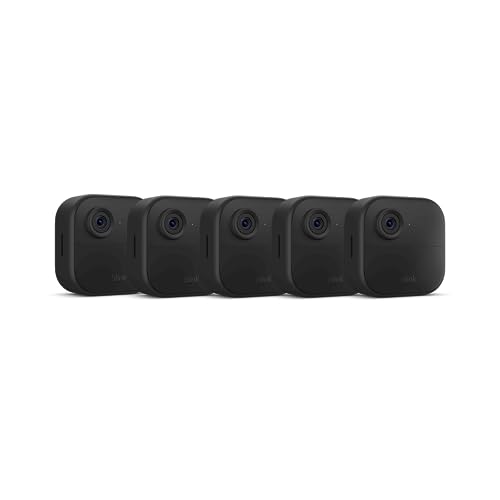
- Easiest whole-home starter kit: Blink Outdoor 4 (5 Camera System) — Check on Amazon
- Best no-monthly-fee starter system: eufyCam S330 (eufyCam 3) 2-Cam Kit with HomeBase 3 — Check on Amazon
- Best low-risk first camera: Wyze Cam v4 — Check on Amazon
- Best simple door camera, detection included: TP-Link Tapo C120 — Check on Amazon
- Best first indoor camera: eufy Indoor Cam E220 — Check on Amazon
- Best for privacy-wary households: Ring Indoor Cam (2nd Gen) — Check on Amazon
Read the full guide ↓
Disclosure: As an Amazon Associate, dailyhomedecorating.com earns from qualifying purchases. Links to Amazon on this page are affiliate links; they cost you nothing extra. Listing details such as price and availability change often, so check the current Amazon listing before you buy.
If you are looking for the best security camera for beginners under $500, here is the advice this whole guide is built on: do not spend $500. Not yet. A first camera system teaches you what your home actually needs — which door matters, whether alerts annoy you, whether you ever watch the footage back — and those lessons are cheapest at one or two cameras. This budget is a ceiling that gives you room to grow into a full system over time, not a target for day one, and every pick below was chosen to be a safe first step: simple to install, honest about its running costs, and part of an ecosystem you can expand rather than replace.
Beginners usually arrive with three questions, so let us answer them before any product names. First: where does the video go? Either it stays in your home — on a memory card in the camera or a small hub box — or it goes to the maker’s cloud over your internet. Home storage usually means no monthly fee; cloud storage usually means a subscription for the features people actually want, like looking back at saved clips. Second: how is it powered? Plug-in cameras never need charging but need an outlet nearby; battery cameras can go almost anywhere but sleep between events and need recharging sometimes. Third: what does it watch? Outdoor cameras are weather-sealed; indoor cameras are not, and using one in the other’s place is the most common beginner mistake of all. Every review below answers these three questions for its pick in plain terms.
The subscription trap deserves its own paragraph, because it catches more first-time buyers than any hardware flaw. Many cameras arrive with a free trial of the maker’s plan, and during that trial everything works beautifully: clips save themselves, alerts tell you a person rather than a moth is at the door. When the trial ends, cameras from cloud-first brands can quietly become live-view-only devices unless you start paying. Nothing about that is dishonest — it is printed in the product details — but a beginner comparing cameras during trial week is not comparing the cameras they will own in month two. This guide states, for every pick, exactly what keeps working if you never pay a cent per month, so you can choose your running costs with your eyes open.
Installation difficulty is the other beginner filter, and it is why you will not find a wired recorder kit in this pick list. Those systems are excellent for confident DIYers — our general guide recommends one — but they ask a first-timer to run cables through walls and configure a recorder before seeing a single picture. Every pick here instead sets up the modern way: scan a code, connect to your Wi-Fi, follow the app. The most technical task in this entire guide is putting two screws into a wall, and several picks do not even ask for that. If a camera cannot be running within half an hour of opening the box by someone who has never done this before, it did not belong in a beginners’ guide.
One expectation to set honestly: these cameras watch, record and send alerts to your phone. They are not an alarm service — nobody is dispatched, nothing is monitored by a company, and a camera does not replace a working lock. What a first camera genuinely gives a beginner is awareness: knowing the parcel arrived, seeing that the noise was the cat, having a recording if something real happens. That is a worthwhile purchase at a fraction of this ceiling. Our starter recommendation is simple — begin with the Blink five-camera system if you want the whole house covered the easy way, or the eufy two-camera kit if avoiding monthly fees matters most, and add indoor coverage from the value picks as you learn.
In this guide
Quick Picks
New to this? Start with the table: each pick is matched to the kind of beginner it suits, and all six set up through a phone app with no recorder, no wiring jobs and no prior experience assumed.
| Buyer type | Pick | Where it works | Why it stands out | Link |
|---|---|---|---|---|
| Easiest whole-home starter kit | Blink Outdoor 4 (5 Camera System) | Outdoor (wire-free battery; also usable indoors) | 1080p HD, maker-claimed up to two-year battery life, Sync Module 2 included, subscription or USB local storage | Check on Amazon |
| Best no-monthly-fee starter system | eufyCam S330 (eufyCam 3) 2-Cam Kit with HomeBase 3 | Outdoor (wire-free, solar-assisted) | 2x 4K wire-free cameras, integrated solar panels, HomeBase 3 local storage, face recognition AI, no monthly fee | Check on Amazon |
| Best low-risk first camera | Wyze Cam v4 | Indoor or outdoor (wired) | 2.5K QHD, IP65, wired, microSD local storage up to 512GB, optional Cam Plus subscription | Check on Amazon |
| Best simple door camera, detection included | TP-Link Tapo C120 | Indoor or outdoor (wired) | 2K QHD, IP66, wired, person/pet/vehicle detection included free, microSD local storage | Check on Amazon |
| Best first indoor camera | eufy Indoor Cam E220 | Indoor (plug-in, pan and tilt) | 2K, 360-degree pan, motion tracking, microSD local storage, no subscription required | Check on Amazon |
| Best for privacy-wary households | Ring Indoor Cam (2nd Gen) | Indoor (plug-in) | 1080p HD, manual privacy cover, colour night vision, Ring subscription required to save video | Check on Amazon |
How These Picks Were Chosen
The first test was the half-hour test: could a complete beginner, alone with a phone, get this camera mounted and recording within roughly thirty minutes of opening the box? App-guided setup, clear mounting hardware and sensible defaults were required. Anything needing a recorder configuration, a cable run, an electrician or a networking vocabulary was excluded from the picks — including systems we recommend to experienced buyers in sibling guides — because a beginners’ guide that begins with a drill and a ladder has failed before it starts.
The second test was honesty of ownership. We recorded for every pick what works with no subscription, what the optional or required plan adds, and where footage lives. Picks that keep recording for free were credited; picks that need a plan were kept only where their simplicity genuinely compensates, and their reviews say so in the first paragraphs rather than the fine print. A beginner cannot comparison-shop running costs they are never told about.
Third, every product was verified against its Amazon listing and maker documentation, and maker figures are labelled as maker claims throughout — most importantly battery life, which is always quoted for quiet locations and gentle settings, and which a busy front door will reduce substantially. Finally, we favoured ecosystems a beginner can grow: a first camera that becomes useless when a second viewpoint is wanted is a false economy, so each pick here belongs to a family with indoor and outdoor siblings sharing one app.
We also weighted the quality of the surrounding help: a clear app, plain-language alerts and setup guidance written for non-technical owners. A beginner does not experience a camera as a specification sheet; they experience it as the app on their phone at the moment something moves outside. Picks whose software assumes expertise were marked down even when their hardware was strong, because in a first system the software is the product.
The 6 Best Security Cameras for Beginners Under $500
Blink Outdoor 4 (5 Camera System)
The Blink Outdoor 4 (5 Camera System) is the easiest complete answer in this guide: five wire-free cameras and the hub they talk to, in one box, designed to be installed by someone who has never installed anything. You put batteries in, stick the hub near your router, and mount each camera with two screws wherever it is needed — front door, back door, garage, side gate — with no outlets to find and no cables at all. Video is 1080p HD, which is a step below the sharpest picks here, but entirely adequate for seeing who is at a door, and the cameras’ headline claim, battery life of up to two years from the included AA lithium batteries, is a maker figure for typical use: a quiet side gate may approach it, a busy front door will not, and cold weather and frequent live viewing shorten it further.
The part a beginner must understand before buying is Blink’s storage arrangement, because it is the one real complication in an otherwise simple system. This kit’s Sync Module 2 hub can save clips locally to a USB drive you supply, which keeps recording free of any subscription. Blink also offers a subscription plan that stores clips in the cloud and adds person detection — the camera telling you a person, specifically, is outside. Without the plan and without a USB drive in the hub, the system sends motion alerts and shows live view but does not build you a library of saved clips. Decide which of those three modes you will actually run — plan, USB drive, or alerts-only — before the box arrives, and the system will meet your expectations exactly.
As a first system it has a gentle learning curve and a forgiving shape: start with two cameras mounted, live with them for a week, then place the remaining three where experience says they belong, instead of guessing all five positions on day one. The app is built for non-technical owners, the cameras work indoors as happily as outdoors, and the whole perimeter of a typical home is covered for well under this guide’s ceiling, leaving budget for the USB drive and a spare set of batteries. For a beginner who wants the whole job done in one purchase, this is the pick to beat.
Honest limitation: 1080p video is the softest in this guide, and the saved-clips experience needs either the subscription or a USB drive in the hub — out of the box, neither is automatic.
Choose it if you want one box that covers the whole home, installed in an afternoon, with no cables anywhere. Skip it if you want the sharpest possible footage or you dislike the idea of choosing between a plan and a USB drive.
eufyCam S330 (eufyCam 3) 2-Cam Kit with HomeBase 3
The eufyCam S330 (eufyCam 3) 2-Cam Kit with HomeBase 3 is the beginner pick for people whose first question is ‘will this cost me money every month?’ — because its answer is no. Two battery cameras with 4K video on the maker’s specification, each topped with a solar panel, connect to a HomeBase 3 hub that stores your footage inside your home. Recording, playback and smart alerts — including face recognition that learns the household — all run on that local storage with no subscription, and eufy’s optional cloud plan is exactly that: optional. For a first-time buyer wary of signing up for a bill disguised as a camera, this is the most reassuring system in the guide.
Setup is nearly as gentle as the Blink’s: the hub plugs into your router, the cameras mount with screws, and the app walks you through pairing. The solar panels are the beginner-friendly detail — mounted where they see daylight, they keep the batteries topped up, so the charging chore that battery cameras usually impose mostly disappears. Mostly is the honest word: a camera on a shaded wall or under a deep porch roof will still need an occasional USB charge, and the maker’s battery endurance figures assume typical, fairly quiet use. Like all battery cameras, these record events when they detect motion rather than filming continuously, which is the right trade for almost every home and worth understanding before you buy.
What makes this kit a good first system rather than merely a good camera is its growth path. The same hub accepts eufy’s indoor cameras — the pan-and-tilt models in this guide’s sibling pages — and more outdoor cameras, all in one app, all fee-free. A beginner can start with the front and back doors covered, add a living-room camera at Christmas, and never change platforms or start a subscription. The up-front cost is higher than the Blink system’s, and in exchange you get sharper video, local storage included rather than improvised, and no monthly decision hanging over the purchase. For many beginners that trade is the right one.
Honest limitation: solar charging depends on where you can mount, and shaded positions quietly turn it back into a camera you must remember to charge.
Choose it if avoiding monthly fees is a firm rule and you have reasonably sunny mounting points for the front and back of the home. Skip it if your only mounting points are shaded, or you want more than two viewpoints covered on day one for the same money.
Wyze Cam v4
The Wyze Cam v4 is the beginner pick for people who want to learn with training wheels priced accordingly: it costs so little of this budget that a first camera becomes an experiment rather than a commitment. It is a small plug-in camera the maker rates for indoor or outdoor use, recording 2.5K QHD video — sharper than the Blink system above — with colour night vision helped by a small spotlight, and a siren you will probably use once, on a family member, as a joke. Because it plugs in, it never sleeps to save battery and can record continuously to a memory card, which makes it an unusually capable teacher: a beginner can review a full day’s footage and learn what actually happens at their door.
Its storage lesson is the friendliest version of the industry’s big split. Put a microSD card in the camera — buy one, because the camera records nothing without it — and recording works completely with no subscription: events and continuous footage live on the card and play back in the app. Wyze’s optional Cam Plus plan adds cloud copies of events and smarter labels that identify people, pets and packages instead of just ‘motion’. A beginner can run the free version indefinitely and upgrade only if the generic alerts start to annoy, which is exactly how a subscription should be sold. The one structural caveat: footage on a card leaves with the camera if the camera is stolen, a risk indoor placements mostly avoid.
The beginner-relevant limits are placement and polish. It is wired, so the camera lives within cable reach of an outlet, and outdoor use needs the maker’s outdoor-rated power arrangement. The app is capable but busier than Blink’s or Ring’s, and the fixed lens sees one view. None of that stops it being the smartest first purchase in this guide for the cautious: buy one, learn your home’s patterns for a month, and let that experience — not a product page — decide whether your second camera should be a kit, a hub system or two more of these.
Honest limitation: it needs an outlet and a memory card you buy separately, and without the optional plan its alerts cannot tell a person from a pet.
Choose it if you want the lowest-risk way to learn what a camera does for your home before committing to a system. Skip it if your chosen viewpoint has no outlet nearby, or you want a camera you can stick anywhere without a cable.
TP-Link Tapo C120
The TP-Link Tapo C120 is the beginner pick for anyone who read the subscription warnings above and wants the simplest possible answer: a camera whose clever features are included in the box price, permanently. Its person, pet and vehicle detection runs on the camera itself and is free, so the alert that matters — someone at the door — never depends on a plan. It records 2K QHD video with colour night vision from built-in spotlights, carries a maker weather-resistance rating for indoor or outdoor use, and mounts indoors on a magnetic base that makes repositioning a ten-second job while you learn where a camera actually wants to sit.
Storage is equally uncomplicated. A microSD card in the camera records events with no subscription, and TP-Link’s optional Tapo Care plan adds cloud storage only for buyers who want an off-site copy. That ordering — full function free, cloud as a bonus — makes the C120 the easiest ownership story in this guide after the eufy kit, and its price leaves most of this ceiling untouched. A beginner can buy one for the door, one for the living room later, and still have spent a fraction of the budget, all inside one app with no account upgrades lurking in the settings.
The practical limits are a fixed view — it cannot pan to follow action, so placement matters and wide rooms may eventually want two — and wired power, so the camera follows your outlets. TP-Link also runs a second smart-home brand, Kasa, with a different app; if your home already has Kasa plugs or bulbs, check before building your camera system in Tapo. For a first camera at a door with an outlet beside it, though, the combination of sharp video, free detection and card recording makes the C120 the pick we hand to beginners who ask for the least to think about after setup day.
Honest limitation: fixed view and wired only, so it teaches you one viewpoint at a time and cannot be placed where an outlet cannot reach.
Choose it if you want smart alerts and recording with no subscription and no hub, at a front door with power nearby. Skip it if you need one camera to sweep a whole room, or a wire-free camera for an outlet-free spot.
eufy Indoor Cam E220
The eufy Indoor Cam E220 is the beginner’s indoor specialist, built around the problem every first-time buyer discovers in week one: a fixed camera in a corner misses the moment the action moves. The E220 pans a full circle and tilts on the maker’s specification, follows motion across the room automatically, and records 2K video while doing it — so one camera on a shelf covers a living room the way two fixed cameras would, tracking a toddler, a dog or an unexpected visitor from door to sofa. For pet owners it is the pick whose clips people actually end up watching, and its on-device detection tells people from pets for alerts.
It shares the eufy philosophy that suits beginners who fear subscriptions: a microSD card in the camera records everything with no monthly fee, an optional cloud plan exists but gates nothing essential, and it can join a HomeBase 3 hub later if you grow into the eufy outdoor kit above. It also works with the major voice-assistant ecosystems, so a beginner with a smart display can pull up the camera by asking. Setup is plug-in simple — find an outlet, place it high with a view down the room, pair it in the app — and the pan-and-tilt controls make aiming forgiving while you learn, since you can correct the view from your phone instead of remounting.
Its limits define its job. It is strictly an indoor camera with no weather rating, so it cannot graduate to a porch; it needs mains power; and a moving lens still watches one room, so a home with two key interior spaces needs two cameras whatever the brochure implies. The tracking motor is quiet but audible in a silent bedroom, which is one reason living spaces suit it better. As the indoor half of a beginner system — E220 inside, Wyze or Tapo at the door — it offers the most coverage per camera in this guide, and the gentlest possible introduction to living with a lens in the house.
Honest limitation: indoor-only, and its following act covers one room at a time — it cannot be watching the nursery and the front door simultaneously.
Choose it if your first camera is for a living room or a pet, and you want one device to cover the whole space without a subscription. Skip it if the camera must live outdoors, or your key rooms are separate and equally important.
Ring Indoor Cam (2nd Gen)
The Ring Indoor Cam (2nd Gen) is in this guide for the beginner whose real obstacle is not technology but trust: a partner, flatmate or parent who hears ‘indoor camera’ and pictures being watched in their own home. This camera’s signature feature is a physical privacy cover you swing over the lens with a finger, which also cuts the microphone — privacy you can see and touch, not a setting buried in an app. Behind the cover it is a straightforward plug-in camera with 1080p HD video, colour night vision and two-way talk, running in the Ring app that a beginner with any interest in a future video doorbell will find the most familiar name in this guide.
Its ownership terms are the ones a beginner must weigh most carefully here. The Indoor Cam has no local storage: to save, review or share video you need a Ring subscription, and without one the camera provides live view and motion alerts only. If you already pay for Ring at a doorbell, this camera joins that plan at no extra cost and becomes an easy recommendation; if this is your first and only Ring device, compare it honestly with the Tapo C120, which records to a card and detects people for free. Neither answer is wrong, but they are different purchases wearing similar price tags.
As a learning device it is otherwise gentle: shelf or screw mounting, mature app guidance, and privacy scheduling for households that want the camera active only when the home is empty. It is indoor-only and fixed-view, and its resolution is a step below the 2K picks here, which matters little for a hallway and more for a large living room. Choose it when the privacy cover is the feature that gets an indoor camera accepted in your home at all — for many beginners sharing space, that acceptance is the difference between a system that exists and one that gets unplugged.
Honest limitation: every saved clip depends on the Ring subscription — let the plan lapse and the camera keeps no recordings at all.
Choose it if a physical lens cover will make an indoor camera welcome in your home, or you already use Ring. Skip it if you want recordings kept without a monthly fee.
Comparison Table
For a beginner, compare these three things first: how it is powered, where recordings live, and what still works if you never pay a subscription. Everything else is refinement.
| Pick | Where it works | Power | Storage | Subscription needed? |
|---|---|---|---|---|
| Blink Outdoor 4 (5 Camera System) | Outdoor (wire-free battery; also usable indoors) | Battery (AA lithium, included) | Hub: USB drive you supply, or cloud plan | Partly — person detection and cloud clips need the plan |
| eufyCam S330 (eufyCam 3) 2-Cam Kit with HomeBase 3 | Outdoor (wire-free, solar-assisted) | Battery with integrated solar top-up | Local: HomeBase 3 hub | No — optional cloud plan only |
| Wyze Cam v4 | Indoor or outdoor (wired) | Plug-in wired power | Local microSD; optional cloud with plan | No — smarter labels need Cam Plus |
| TP-Link Tapo C120 | Indoor or outdoor (wired) | Plug-in wired power | Local microSD; optional cloud plan | No — detection included free |
| eufy Indoor Cam E220 | Indoor (plug-in, pan and tilt) | Plug-in mains power | Local microSD or HomeBase 3 | No — optional cloud plan only |
| Ring Indoor Cam (2nd Gen) | Indoor (plug-in) | Plug-in mains power | Cloud only — no local storage | Yes — saved video needs a Ring plan |
How to Choose the Best Security Camera for Beginners Under $500
Start with one viewpoint, not a system. The beginner’s classic error is covering everything at once and learning nothing. Pick the single place you most want to see — for most homes the front door, inside or outside — and put your first camera there. Live with it for a few weeks. You will learn how many alerts a day feels helpful versus noisy, whether you check footage or ignore it, and whether night quality at your real distances is enough. Those lessons, which no review can give you, should choose your second camera.
Decide your subscription position before you fall in love with a camera. There are only two honest models. In the first, recording and detection are included and footage lives on a card or hub in your home — the eufy and Tapo picks, and Wyze in its free mode. In the second, the camera is a window into a paid cloud service — Ring, and Blink’s cloud mode — and the plan is a permanent part of the product’s cost. Both models have happy owners. The unhappy owners are the ones who discovered their model from an email saying their trial had ended.
Match power to the spot, simply. Near an outlet, choose plug-in: no charging, no sleeping, continuous recording possible. Away from outlets, choose battery, and place the camera where you can reach it without a ladder, because you will be recharging it — whatever the brochure’s best-case battery claim says, and busy doors shorten every claim. Solar-assisted cameras forgive forgetfulness where the sun reaches. What a beginner should not do is run extension cords across rooms or through windows to make a wired camera fit a wire-free job.
Keep the whole system in one app. Every brand here is an ecosystem with indoor and outdoor siblings, and your second and third cameras should join the first one’s app, account and storage model. The exception is a deliberate specialist — a floodlight, a doorbell — bought knowingly. Beginners who mix three brands own three apps, three sets of alerts and three subscription decisions, and usually end up using none of them well.
Budget like a beginner, which at this ceiling means spending a third or less at first. A starter camera or two, the memory cards they need, and a year of any plan you have chosen deliberately — that is a complete, honest first purchase. Keep the remainder for the expansion your experience will specify: the side-door camera, the indoor pan-and-tilt, the bigger card. A beginner who spends the whole ceiling on day one has bought a system designed by a stranger’s floor plan — their own guesses, before they had any.
One more beginner-specific check: your Wi-Fi is part of the camera system whether you like it or not. Cameras at the far end of a house, or outside a brick wall, live or die by signal strength, and a camera that drops offline nightly is usually a router problem wearing a camera costume. Before ordering, stand at your intended mounting points with your phone and check the signal honestly; if it is weak, a mesh node near that side of the house will do more for your ‘camera quality’ than upgrading the camera itself. The hub-based picks here help — their hubs relay for their cameras — but no camera outperforms the network underneath it.
Your First Week With a Camera: Settings That Matter
The defaults are a starting point, not a destination, and four settings repay ten minutes of attention in week one. Motion sensitivity decides whether you get twenty alerts a day or two; start in the middle and adjust toward the number you will actually read. Activity zones — the areas of the picture the camera should care about — are how you tell a door camera to ignore the street and watch the path. Alert schedules stop the indoor camera announcing your own evening back to you. And retention settings decide how far back your footage reaches before the oldest recordings are overwritten; know your window before you need it, not after.
Also decide, as a household, the social settings. Who else gets the app? Are indoor cameras active when people are home, and does everyone know the privacy routine — covers closed, modes on, schedules set? How long do you keep clips of visitors, and would you share one if a neighbour asked about an incident on your street? None of these questions has a universal right answer, but a beginner who answers them in week one owns a tool the household trusts; a beginner who never answers them owns a small, blinking source of arguments.
Expect one surprise in week one, because nearly everyone gets it: your camera will show you your home’s secret life, and most of it is weather, wildlife and your own family coming home late. That is not a malfunction — it is the raw material the settings above exist to shape. Give the system a fortnight of tuning before judging it. Beginners who return a camera on day three because it alerted them about a spider’s web have usually bought the right camera and skipped the setup conversation; beginners who tune patiently end up with the quiet, useful awareness they actually wanted from the purchase.
Common Buying Mistakes
Buying five cameras before owning one. You do not yet know your home’s patterns, your alert tolerance or your app preferences. Start with one viewpoint or one small kit, learn, then expand inside the same ecosystem.
Judging a camera during its free trial. Trial weeks show you the subscription product, not the camera. Check what still records after the trial — this guide’s comparison table answers it for every pick — before deciding the camera is wonderful.
Believing battery headlines. Maker battery figures assume quiet spots and default settings. A busy door, cold weather and live viewing all cut them down, sometimes drastically. Mount battery cameras where recharging them is easy.
Using an indoor camera outdoors. Indoor picks like the E220 and Ring Indoor Cam have no weather rating. A porch roof is not indoors. Match the rating to the mounting point or expect a short, damp career.
Skipping the memory card. Card-based cameras record nothing until a card is in them, and the card is rarely in the box. Add it to the order, or your first camera’s first week will be a live-view-only week.
Mixing ecosystems for no reason. Three brands means three apps and three bills-or-not. Consolidate unless one specific viewpoint truly needs a specialist from another family.
Final Recommendation
If you read nothing else: the safest first purchase in this guide is Blink Outdoor 4 (5 Camera System) if you want the whole home covered in one gentle step, or eufyCam S330 (eufyCam 3) 2-Cam Kit with HomeBase 3 if you want two sharp cameras, local storage and a firm guarantee of no monthly fee. Either can be running this weekend, by you, with no experience — which is the entire point.
If even a kit feels like a leap, start with a single Wyze Cam v4 or Tapo C120 at the front door, run it for a month, and let what you learn choose the expansion. Choose the eufy E220 when the first camera’s job is a living room or a pet, and the Ring Indoor Cam when a physical privacy cover is what gets a camera accepted in your home. Whichever you pick, spend well under the ceiling, keep the system in one app, and know — before the trial ends — exactly what your camera does for free.
Frequently Asked Questions
I have never installed anything. Can I really set these up myself?
Yes — that was the entry requirement for this guide. Every pick pairs with a phone app by scanning a code, connects to your home Wi-Fi, and mounts with at most two screws; several sit on a shelf with no tools at all. The systems deliberately excluded here — wired recorder kits and hardwired floodlight cameras — are the ones that ask for cable runs or electrical work, and a beginner can graduate to those later with confidence earned on these.
What is the difference between local and cloud storage, in plain terms?
Local storage keeps your recordings on a memory card in the camera or a hub in your home: no monthly fee, and the footage is yours, but it can be lost if the device is taken. Cloud storage keeps recordings on the maker’s computers: you can see them from anywhere and they survive a stolen camera, but the features usually need a paid plan, and on some brands recording stops without one. This guide labels every pick so you know which you are buying.
Do I need a subscription for a security camera?
Only for some brands. The eufy and Tapo picks here record and detect people with no plan at all, and Wyze and Blink offer free local-recording modes with limits. Ring cameras, and Blink’s cloud features, need their plans for saved video. Read the comparison table’s last column before buying — it is the single most important line in this guide for a beginner’s wallet.
How many cameras should a beginner start with?
One or two. A front-door camera teaches you almost everything about living with a system: alert volume, night quality, app habits. Add cameras viewpoint by viewpoint as real needs appear — a back door, a living room — staying inside the same brand’s app. The Blink system in this guide is the exception that proves the rule: it is a multi-camera kit simple enough for day one, but even its owners should mount two cameras first and place the rest after a week of experience.
Will a battery camera really last as long as the box says?
Treat the figure as a best case, because that is what it is: makers measure battery life at default settings in typical, fairly quiet conditions. A camera over a busy street, in a cold winter, or watched live several times a day will need charging much sooner. Solar-assisted models like the eufy kit reduce the chore where sunlight reaches; plug-in cameras remove it entirely. Mount any battery camera where you can reach it without heroics.
Can a beginner’s camera replace an alarm?
No, and be suspicious of any product page implying otherwise. These cameras watch, record and alert your phone; nobody monitors them and nobody is dispatched. They are an awareness tool that pairs well with good locks and lighting. If your situation genuinely needs a monitored response, that is a separate purchase — a camera system can complement it, not substitute for it.
Related Guides
Ready to compare other budgets and household types? These sibling guides cover the same camera group at the same ceiling.


