Where to buy
This guide to the best baby security camera for home security under $300 — what it buys, what it costs to own, and which model fits which home — starts with the shortlist. Check the latest price, availability and delivery options on Amazon for each pick below. Prices and stock change often, so confirm the current listing before you buy — every pick in this guide was chosen to sit at or under the $300 ceiling in its standard single-camera form, and where a popular bundle runs over that ceiling we say so in the review rather than hide it. Orders are placed on Amazon. We may earn a commission from qualifying purchases.
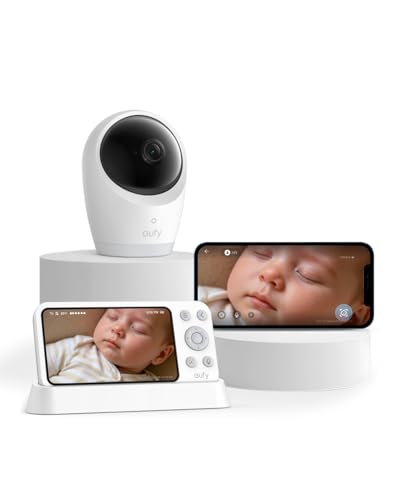
- Best security-grade hardware: eufy Baby Monitor E21 — 4K Camera with 5-Inch Display — Check on Amazon
- Best recorded history (with plan): Nanit Pro Smart Baby Monitor — Camera & Wall Mount — Check on Amazon
- Best event alerts: CuboAi Smart Baby Monitor 3 — Floor Stand Set — Check on Amazon
- Best discreet app camera: Owlet Cam 2 (Gen 2) — Check on Amazon
- Best flexible placement: Lollipop Baby Monitor (Cotton Candy) — Check on Amazon
- Best off-grid room monitor: Infant Optics DXR-8 PRO — Check on Amazon
Read the full guide ↓
Disclosure: As an Amazon Associate, dailyhomedecorating.com earns from qualifying purchases. Links to Amazon on this page are affiliate links; they cost you nothing extra. Listing details such as price and availability change often, so check the current Amazon listing before you buy.
Searching for the best baby security camera for home security under $300 means you want one device to do two jobs: watch the nursery like a baby monitor, and behave like a security camera while it does it — recorded evidence, dependable alerts, sensible storage, and a system that still makes sense when the crib becomes a toddler bed and then a playroom. That dual brief changes the ranking. Sleep scores matter less here; what matters is whether footage exists when you need it, where that footage lives, who can access it, and whether the camera keeps working when the internet does not.
So let us set the security ground rules honestly. A nursery camera is not an alarm system and does not summon help; its security value is awareness and record — seeing an event as it happens and being able to review it afterwards. That makes storage the central question: cloud history you rent by the year, local recording you control, or no recording at all. It also makes account security part of the product: any camera on your network deserves a unique password, two-factor sign-in where offered, and current firmware, and we note the exposure each design carries. A camera that never touches the internet cannot be reached through it — for some households that settles the argument by itself.
Our security-first ranking puts the eufy E21 at the top: 4K evidence-grade picture, pan and tilt to interrogate a room, local recording, and a dedicated screen that works with Wi-Fi off. The Nanit follows for households that want continuous cloud history and will pay its plan for it; the CuboAi brings the sharpest event alerts; the Owlet and Lollipop cover app-based room coverage with different mounts; and the Infant Optics closes the list as the deliberate off-grid choice — no footage, but also no attack surface, which is a legitimate security posture for a nursery.
Calibrate your expectations to the room’s real risk, too. For most family homes the nursery camera’s security role is modest and specific: know if the door opened, see who is in the room when the house should be empty, have a clip if something is ever questioned. It is not guarding valuables and it is not a substitute for locks, lighting and an alarm where those are warranted. Bought for the modest job and set up with the hygiene described below, the cameras in this tier do it well — and then go on doing it in a toddler’s room for years, which is where their security value quietly compounds.
In this guide
Quick Picks
In a hurry? This table matches each camera to the job it does best in this guide. Every model is reviewed in full below, including its subscription and storage arrangements.
| Best for | Pick | Why it stands out | Link |
|---|---|---|---|
| Best security-grade hardware | eufy Baby Monitor E21 — 4K Camera with 5-Inch Display | 4K UHD camera, 5-inch 720p parent display, hybrid Wi-Fi and no-Wi-Fi modes, pan-tilt, 8x zoom, local recording, built-in camera battery | Check on Amazon |
| Best recorded history (with plan) | Nanit Pro Smart Baby Monitor — Camera & Wall Mount | 1080p Wi-Fi camera, overhead wall mount, app viewing, two-way audio, temperature and humidity sensing | Check on Amazon |
| Best event alerts | CuboAi Smart Baby Monitor 3 — Floor Stand Set | 2.5K QHD Wi-Fi camera, floor stand included, covered-face and rollover alerts (maker AI), cry detection, humidity sensor | Check on Amazon |
| Best discreet app camera | Owlet Cam 2 (Gen 2) | 1080p Wi-Fi camera, 4x zoom, wide-angle view, two-way talk, sound/motion/cry notifications, temperature and humidity sensor | Check on Amazon |
| Best flexible placement | Lollipop Baby Monitor (Cotton Candy) | 1080p Wi-Fi camera, flexible wrap-around mount, true crying detection (maker), two-way audio, infrared night vision, in-app plan extras | Check on Amazon |
| Best off-grid room monitor | Infant Optics DXR-8 PRO | 720p camera with dedicated 5-inch display, no Wi-Fi, Active Noise Reduction, pan-tilt-zoom, interchangeable lenses | Check on Amazon |
How we chose
For the home-security lens we scored four things above nursery niceties. First, evidence: resolution, zoom and field of view sufficient to identify what happened in the room, not merely that something moved. Second, record: whether the camera records continuously or on events, where that recording lives, and what it costs per year to keep. Third, resilience: whether monitoring survives an internet outage, a router reboot or a cloud incident. Fourth, exposure: what an attacker would have to reach — an internet account, a home network, or nothing at all — and whether the maker supports basics like two-factor sign-in and firmware updates.
We also kept the nursery non-negotiables from the rest of this series: alerts and any maker-described detection features are described as exactly that, never as protection guarantees; every camera must install with its cable out of the crib and out of reach; and two-way audio and night vision had to be genuinely usable, since a security-minded parent will use this camera for toddler rooms and playrooms long after the crib stage. Models whose only storage story was ‘trust the cloud, pay forever’ were marked down unless the rest of the package justified it.
A note on language, because it matters in this category: where a maker describes a detection or monitoring capability — crying detection, covered-face alerts, breathing-motion monitoring — we describe it as a maker claim. None of the cameras in this guide is a medical device, none of them can guarantee an outcome, and none replaces safe-sleep practice or a parent checking in person. We also verified every model, specification and ASIN in this guide against the maker’s materials or the live retail listing before including it; the companion sources file for this article records what we checked for each pick.
eufy Baby Monitor E21 — 4K Camera with 5-Inch Display
The eufy E21 is the pick for parents who want flagship picture quality without handing the nursery to a subscription. The camera shoots 4K UHD and pans and tilts under remote control with up to 8x zoom, while the box includes a proper 5-inch parent display — so the monitor keeps working on its own screen even if you never connect it to Wi-Fi at all. That hybrid design is the E21’s signature: run it as a closed local system on the included display, or link it to the eufy app for phone viewing and 24/7 recording in the app when you want remote access. Active noise reduction keeps nursery sound from turning into a hiss of white noise on the parent unit, and the camera itself carries a built-in battery, so it can ride out a short outage or work for naps in a room with an awkward outlet.
On the money question, the E21 is refreshingly plain: no subscription is required for its core monitoring, and recording is handled locally rather than sold back to you as a cloud plan. That changes the real cost of ownership across two or three years of use more than any single feature on this page. The trade-offs are equally plain. The parent display is 720p, so the 4K detail is best appreciated in the app feed and in zoomed views rather than on the handheld screen, and families who want sleep analytics, cry diaries or milestone tracking will find none of that here — eufy sells you an excellent camera and screen, not a data service. App features also depend on eufy’s ecosystem and account, so read the current privacy and app terms the way you would for any connected camera, and keep firmware updated.
In daily use the E21 behaves like the grown-up security-camera brand it comes from: motion and sound alerts, two-way talk, temperature awareness and straightforward pan-tilt controls. The camera needs a stable perch or mount with its power cable dressed safely away from the crib — the battery is a bridge, not a lifestyle, and a camera within grabbing range of a standing baby will eventually be grabbed. For twins or a nursery-plus-playroom setup, confirm how many cameras the display and app support before building a multi-room plan around it. If your shortlist question is “which of these will still be fully mine in three years with no monthly bill,” the E21 is the answer in this tier.
As a security device the E21 is the most complete here: pan-tilt to check the whole room, zoom to read a situation, local recording under your control, and a screen that keeps the feed inside your house when you want it there. It is the camera we would keep on duty after the nursery years.
What we like:
- Best-in-guide camera resolution with pan, tilt and 8x zoom
- Included 5-inch display works with Wi-Fi switched off entirely
- No subscription needed for core monitoring or local recording
- Built-in camera battery bridges outages and awkward outlets
Honest limitation: No sleep analytics or smart diary features, and the parent screen is 720p despite the 4K sensor.
Choose it if: Choose the E21 if you want premium hardware, a real parent screen and zero ongoing fees, and you do not care about sleep data.
Skip it if: Skip it if nightly sleep reports are the whole point of spending at this tier.
Nanit Pro Smart Baby Monitor — Camera & Wall Mount
The Nanit Pro is the camera this price tier is really about. It mounts on the wall directly above the crib and looks straight down, so instead of the angled, half-obscured view you get from a camera parked on a dresser, you see the entire mattress in one frame. The feed is 1080p over Wi-Fi to the Nanit app, with two-way audio, background audio so you can listen while your phone does other things, a built-in nightlight and white-noise sounds, plus temperature and humidity readouts for the nursery. There is no dedicated parent screen in the box; your phone or tablet is the monitor, which is either the Nanit’s biggest convenience or its biggest drawback depending on how you feel about handing your phone a full-time job overnight.
What separates the Nanit from cheaper Wi-Fi cameras is the layer of software sold as Nanit Insights, and this is where you must read the fine print before you buy. Live video, sound and motion alerts, two-way talk and the maker’s breathing-motion monitoring (which works with Nanit’s Breathing Wear garments, sold separately) run without a paid plan. But sleep analytics, saved video history and clips, milestone tracking and smart alerts such as cry detection sit behind the Insights subscription, which is billed annually; a short trial of the entry plan is included with a new camera and then renews automatically unless you cancel. In plain terms: the hardware price buys an excellent camera, and the ongoing plan buys the diary. Budget for both, or be honest with yourself that you will use it as a live monitor only. Nanit also states plainly that the camera is not a medical device; its breathing-motion feature is a maker-described convenience for awareness, not a health or life-safety guarantee, and it never replaces safe-sleep practices or checking on your baby in person.
Practical notes matter with an overhead mount. The wall mount needs a wall you are allowed to drill into and an outlet within cord reach, and the cord must be routed completely out of the crib and out of reach, secured flat to the wall — a dangling cable near a crib is a genuine strangulation hazard, and Nanit’s own mounting guidance treats cord management as part of the install, not an afterthought. Sleep features also require that overhead view, so a Nanit perched on a shelf at an angle will not deliver the analytics you paid for. Video is cloud-assisted through the app rather than stored on a local card, so your home Wi-Fi quality and your comfort with a cloud account are part of the purchase.
The Nanit’s security value is its history: with an Insights plan you can scroll back through continuous footage rather than hoping an event clip caught the moment. Without the plan that value mostly evaporates, so security buyers should price the plan as mandatory, not optional.
What we like:
- True overhead view of the whole crib from the included wall mount
- Deepest sleep-tracking ecosystem in this roundup when paired with an Insights plan
- Background audio, nightlight and white noise built in
- Temperature and humidity sensing in the app
Honest limitation: The features most people buy it for — sleep analytics and video history — require the paid Insights plan after the trial; live viewing alone does not.
Choose it if: Choose the Nanit if you want the data: nightly sleep summaries, a growth-and-moments record, and the clearest overhead picture of the crib, and you accept an annual plan as part of the real cost.
Skip it if: Skip it if you refuse subscriptions on principle, if you cannot drill into the nursery wall, or if you want a screen that is not your phone.
CuboAi Smart Baby Monitor 3 — Floor Stand Set
The CuboAi Smart Baby Monitor 3 is the challenger built around one idea: proactive alerts. Its 2.5K QHD camera watches the crib and, per the maker, uses on-device AI to flag a covered face or a rollover onto the stomach, to distinguish a true cry from background noise, and to warn you if the baby enters a danger zone you draw in the app once they start standing and roaming. This floor-stand set puts the camera on a tall stand behind the crib for the overhead angle those alerts are designed around, with no drilling. Two-way audio, lullabies, night vision and a room humidity sensor round out the nursery basics, and the bird-shaped camera is deliberately the least clinical-looking device in this guide.
The honest framing for those headline alerts: they are manufacturer-described detection features, not medical monitoring. A covered-face alert is a prompt to go and look — it is not a guarantee of detection in every bedding arrangement, lighting condition or network state, and CuboAi does not sell this as a medical device. Treat the AI as an extra set of eyes that sometimes blinks, keep the crib bare per safe-sleep guidance, and never let an app notification substitute for your own checks. Where CuboAi scores well on ownership cost is that its core alerts and a rolling window of playback have historically been usable without a mandatory paid tier, with an optional premium plan adding longer history and extras; check the current plan page before buying, because app feature packaging in this category changes often. Video runs through CuboAi’s cloud app — there is no local memory-card recording and no dedicated parent unit — so, like the Nanit, it lives or dies by your Wi-Fi and your feelings about cloud accounts for nursery footage.
Setup is genuinely renter- and grandparent-friendly: assemble the stand, place it so its base cannot be pulled into the crib, route the cable down the stand and away from small hands, and keep the whole assembly far enough back that a standing toddler cannot grab the camera or the cord. The floor stand also makes the CuboAi easy to move between rooms or take to a caregiver’s house, though the overhead alerts are calibrated for the stand’s crib view and will not perform the same way aimed across a playroom. Picture quality from the QHD sensor is a real step up from 1080p when you pinch-zoom on a phone screen, which is how most parents actually check whether eyes are open or closed.
The CuboAi’s danger-zone and motion alerts make it the most proactive notifier in the pool — useful when the ‘nursery’ becomes a toddler’s room with a door that should stay shut. Its record still lives in the maker’s cloud, which is the compromise to accept knowingly.
What we like:
- Covered-face and rollover alerts are the headline act (maker AI claims)
- Floor stand included — overhead view with no drilling
- 2.5K QHD picture is visibly sharper when zooming on a phone
- Core alerts usable without a mandatory subscription (verify current plan terms)
Honest limitation: No local storage and no parent screen: if your Wi-Fi or CuboAi’s cloud stumbles, so does your monitor.
Choose it if: Choose the CuboAi 3 if proactive crib-safety alerts matter more to you than sleep diaries, and you want the overhead view without touching a wall.
Skip it if: Skip it if you want recordings kept inside your home, or a screen that works when the internet does not.
Owlet Cam 2 (Gen 2)
The Owlet Cam 2 is the compact, good-looking Wi-Fi camera in this tier — a small 1080p unit with a wide-angle lens, 4x digital zoom, night vision, two-way talk and sound, motion and cry notifications through the Owlet app, with temperature and humidity sensing built in. It is the camera-only member of a family whose famous sibling is a wearable sock (sold separately and not part of this pick); judged purely as a camera, its appeal is a clean picture, a tidy magnetic-base design that sits neatly on a shelf or wall mount, and an app experience built for exhausted one-handed use at 3 a.m. Video is encrypted in transit per the maker, and the app is where everything lives: there is no parent screen and no local memory-card slot, so the Cam 2 is a cloud-app monitor through and through.
Cost honesty for the Owlet: the camera itself has historically worked without a mandatory subscription for live viewing and basic alerts, and Owlet has been adding optional in-app extras over time — so check the current app plan page before you buy and confirm which features are free today, because packaging in this category shifts. Also be clear-eyed about what a camera can and cannot tell you: cry and motion notifications are convenience alerts, and any breathing or wellness language around the wider Owlet ecosystem refers to separate wearable products with their own instructions and limitations — the Cam 2 on its own is a video monitor, not a health device, and nothing it shows replaces safe-sleep practice or your own checks. The wide-angle lens is a genuine practical plus in small nurseries, where a camera often sits closer to the crib than the textbooks assume and narrower lenses crop the mattress edges.
Living with the Cam 2 is easy in the ways that matter nightly: background audio options, quick talk-back, and a picture that holds up well in a dark room. Its weaknesses are the category’s usual ones — total dependence on your Wi-Fi and phone, no offline fallback screen for a sitter who does not have the app, and no sleep analytics depth to rival the Nanit if data is your thing. Mount it or place it with the cable routed down and away from the crib, never draped where a standing child can reach it. As a first smart camera for parents who want the nursery on their phones and nothing more complicated, it earns its place here on simplicity.
The Owlet is a discreet, ordinary-looking camera for a room you also want an eye on during the day, with encrypted streaming per the maker and alerts through its app. It records nothing locally, so treat it as live awareness rather than an evidence system.
What we like:
- Clean 1080p picture with a genuinely useful wide-angle lens
- Temperature and humidity sensing plus cry notifications in one tidy unit
- Small, neat design that disappears on a shelf
- Simple app that is easy to operate one-handed overnight
Honest limitation: App-only viewing: no parent screen, no local recording, and feature packaging can change with app updates.
Choose it if: Choose the Cam 2 if you want a straightforward phone-based monitor from an established nursery brand and do not need sleep analytics.
Skip it if: Skip it if you want recordings stored at home or a screen a babysitter can use without your phone.
Lollipop Baby Monitor (Cotton Candy)
The Lollipop is the design object of the group: a 1080p Wi-Fi camera on a flexible, bendable stem that wraps around a crib rail, a shelf edge or a floor lamp, or stands on a surface with its tail as a tripod. That mount is not a gimmick — it solves the most common nursery problem, which is that the perfect camera position is rarely where a shelf happens to be. The maker’s headline software feature is true crying detection, designed to distinguish an actual cry from a barking dog or a door slam before it pings your phone, alongside two-way audio, infrared night vision, lullabies and white-noise playback, and event clips in the app. There is no parent unit; like the Nanit and Owlet, your phone is the screen.
Two honesty notes belong with the Lollipop. First, the app sells an optional paid plan that unlocks extras such as the maker’s breathing-monitoring and sleep-tracking features (maker-described, camera-based estimates — not medical measurements, and no substitute for safe sleep or in-person checks); the camera’s core live view and crying detection are the free foundation, but confirm the current plan split on the maker’s page before purchase, because the line between free and paid has moved before. Second, the wrap mount tempts people to attach the camera directly to the crib rail with its cable nearby — resist sloppy versions of this. The camera body may grip the rail, but the power cable must still be routed away from the crib interior and out of reach, and once your baby can stand and grab, a rail-mounted camera is within range of determined hands; move it further back and re-check the view. Cloud dependence applies here too: no local card recording, so the app and your Wi-Fi are the whole system.
Where the Lollipop shines is flexibility across the first two years: crib-side now, playroom shelf later, wrapped around a travel crib at a relative’s house in between. Its picture and night vision are solid rather than class-leading, and data people will find its sleep features thinner than Nanit’s. But as the one camera in this guide that can perch almost anywhere without a stand, a shelf or a drill, it solves real rooms that defeat fixed-mount rivals — which is why it closes out this pool.
Placement is a security feature: the Lollipop can perch where a fixed camera cannot — a playroom shelf today, a hallway-adjacent rail tomorrow. Its in-app extras cost extra, and like the Owlet it is a live-and-clips device rather than a recorder.
What we like:
- Flexible stem mounts almost anywhere — no shelf, stand or drilling needed
- True crying detection aims to cut false alerts (maker feature)
- Doubles as a travel and playroom camera as your child grows
- Lullabies and white noise built in
Honest limitation: Best extras sit in a paid in-app plan, and there is no local recording or parent screen.
Choose it if: Choose the Lollipop if your nursery has no good shelf or wall for a camera and you need the mount itself to be the solution.
Skip it if: Skip it if you want deep sleep analytics or an offline fallback screen.
Infant Optics DXR-8 PRO
The DXR-8 PRO is the veteran of this roundup and the value pick at this tier: a deliberately offline monitor in a lineup of cloud cameras. There is no Wi-Fi, no app, no account and no subscription — the camera talks directly to its dedicated 5-inch parent display over a closed wireless link, and that is the entire system. Resolution is 720p, which sounds modest next to 4K badges, but the PRO’s party trick is Active Noise Reduction, which filters the hiss, hum and static that make most audio monitors fatiguing to listen to all night. Interchangeable lenses (a standard lens in the box, with optical zoom and wide-angle lenses available from the maker) let you tune the view to a small nursery or a wide toddler room, and the camera pans, tilts and zooms from the parent unit.
Why does a 720p offline monitor belong in an under-$300 guide at all? Because for a large group of parents it removes every recurring complaint about the smart cameras: nothing to hack through the home network, nothing that stops working when the internet drops, no plan quietly renewing, no firmware update changing the app the week the baby arrives, and a screen that is always a screen — never a phone you also need for everything else. Grandparents and babysitters can use it with zero instruction, which is a feature no app has ever matched. The honest limitations are the mirror image of those strengths: you cannot check in from work or the driveway, there are no cry-detection smarts, no sleep data, no recordings to review, and the picture will not reward pinch-zooming the way the eufy or CuboAi will. Range is also a physical fact — thick walls and distance between nursery and parent unit matter in a way they do not for Wi-Fi systems.
Setup is the simplest here: place the camera where it sees the crib, keep it and its cord well out of reach (the same cord discipline applies — out of the crib, secured, at least a full arm’s length plus growth margin from small hands), pair nothing, create no account, and you are monitoring in minutes. Battery life on the parent unit, the availability of a second camera for siblings, and the lens options are the three things to verify on the listing for your household’s layout. As the second monitor in a house that already owns a smart camera — the travel unit, the grandparents’ house unit, the just-works backup — it has no real rival in this guide.
The DXR-8 PRO records nothing and connects to nothing — which is precisely its security argument. If your threat model says the nursery should have no internet-facing camera at all, this is the pick, with the honest cost that there is never any footage to review.
What we like:
- Completely offline: no Wi-Fi, no app, no account, no subscription, ever
- Active Noise Reduction makes overnight audio far less fatiguing
- Instant, babysitter-proof setup on a dedicated screen
- Interchangeable lenses adapt it from crib close-up to whole-room view
Honest limitation: 720p picture, no remote viewing, no recordings and no smart alerts of any kind.
Choose it if: Choose the DXR-8 PRO if privacy, simplicity and zero running costs outrank apps and analytics in your house.
Skip it if: Skip it if you need to see the nursery from outside the home or want any form of sleep tracking.
Side-by-side comparison
The table below compresses the differences that actually decide this purchase: how you watch, how recordings are kept, and whether a plan is part of the deal. Read it alongside the reviews — the right choice is the row whose compromises you mind least.
| Pick | How you watch | Recording / storage | Plan needed? |
|---|---|---|---|
| eufy Baby Monitor E21 — 4K Camera with 5-Inch Display | Included 5-inch screen + app | Local recording | No |
| Nanit Pro Smart Baby Monitor — Camera & Wall Mount | Phone app (Wi-Fi) | Cloud history with Insights plan | Yes, for sleep analytics & history |
| CuboAi Smart Baby Monitor 3 — Floor Stand Set | Phone app (Wi-Fi) | Cloud app playback | No for core alerts (optional premium) |
| Owlet Cam 2 (Gen 2) | Phone app (Wi-Fi) | App-based, no local card | No for core use (check app extras) |
| Lollipop Baby Monitor (Cotton Candy) | Phone app (Wi-Fi) | App event clips | No for core use; extras are paid |
| Infant Optics DXR-8 PRO | Dedicated 5-inch screen only | None — live only | No, never |
How to choose the best baby security camera for home security under $300
Decide your storage doctrine first, because it is the decision you cannot change later. Local recording keeps footage in your home and off subscription ledgers, but the card or hub is in the same house as the event. Cloud history survives anything that happens to the camera, but it is rented, internet-dependent and only as trustworthy as the maker’s account security — which you partly control with a unique password and two-factor sign-in. No recording at all is the privacy-maximal choice and the evidence-minimal one. Pick the doctrine that matches the room’s real risks, then choose the camera that implements it best.
Second, harden whatever you buy, the same day you install it. Change every default credential, enable two-factor authentication where the app offers it, let firmware update, put cameras on your router’s guest or IoT network if you know how, and review which accounts and family members have viewing access — then review it again whenever a sitter or relative no longer needs it. Position for coverage of the crib and the door rather than the whole room’s prettiest angle, and keep the camera and its cord out of the child’s reach exactly as you would for any nursery install.
Third, plan the camera’s second career. A pan-tilt model can graduate to playroom or entry-adjacent duty; an overhead analytics camera is more nursery-specific; an offline monitor stays a monitor forever. If the security role is the long-term point, weight the ranking toward hardware (sensor, pan-tilt, local record) over nursery software, and set a calendar reminder to re-audit access and firmware every few months.
Living with it: the first month
The first month of security-minded ownership is mostly audit. In week one, walk the system like an inspector: confirm the camera sees the door and the crib, confirm an event actually produces the recording you expect, and confirm you can retrieve that recording from your phone without hunting through menus. In week two, review the access list — every account, every shared login, every old device still signed in — and prune it. Most households find at least one login they had forgotten issuing. That pruning, repeated quarterly, is worth more than any single feature upgrade.
By month two, integrate the camera into the house’s routine rather than treating it as nursery furniture: the same feed that watched the crib can cover the playroom during a party, the front room while you are away, or an elderly relative’s visit. Cameras that pan, tilt and record locally make that second career effortless; app-only cameras do it wherever there is Wi-Fi and a safe perch. Whichever you own, repeat the physical check at every move — mount firm, cord out of reach, view re-aimed — because a camera’s security value is zero on the day it is pointing at a wall.
Common mistakes to avoid
- Assuming a baby camera is an alarm. These cameras notify you; they do not dispatch anyone. If a room needs a real security response, it needs a real alarm system — the camera is its eyes, not its substitute.
- Leaving default passwords and shared logins in place. The most common camera compromises are credential problems, not movie-style hacking. Unique passwords, two-factor sign-in and a tidy list of who has access are the actual security features.
- Discovering your storage needs a plan — after an event. If reviewing footage matters to you, confirm before buying whether history is included, local, or subscription-only, and test retrieving a clip in the first week.
- Letting the camera depend on a network you never maintain. A router that has not been restarted or updated in years undermines every Wi-Fi camera on it. Keep the network as current as the camera.
- Forgetting the physical layer. A camera a toddler can grab, and a cord within reach of the crib, are security and safety failures at once. Mount high, route cables away, re-check at standing age.
Final recommendation
For a security-minded household, the eufy E21 is the clearest buy in this tier: the sharpest evidence picture, recording you control, and a local screen that owes nothing to the internet. Choose the Nanit instead if continuous cloud history is the feature you actually want and you accept its plan as a running cost; choose the CuboAi if proactive alerts matter most. And if your conclusion is that the nursery should simply have no internet camera in it, the Infant Optics is not a lesser choice — it is the same decision made from the other direction.
Whichever doctrine you pick, do the unglamorous work on day one: passwords, two-factor sign-in, firmware, access list, mount, cord. Security in a nursery is ninety percent those habits and ten percent hardware — and the hardware in this guide is more than good enough once the habits are in place.
Our shortlist, in order: eufy Baby Monitor E21 — 4K Camera with 5-Inch Display; Nanit Pro Smart Baby Monitor — Camera & Wall Mount; CuboAi Smart Baby Monitor 3 — Floor Stand Set. Check the current listing for each before you decide, and re-read the subscription and storage notes in their reviews above — at this tier, those two lines matter as much as the camera.
Frequently asked questions
Can a baby camera double as a home security camera?
Yes, within limits: the stronger picks here offer high-resolution video, motion alerts, two-way talk and recording suitable for awareness and review in one room. They do not replace an alarm system, monitored service or proper entry sensors — think of the camera as evidence and awareness, not response.
Is local or cloud storage safer for nursery footage?
They protect against different things. Local recording keeps footage in your home and off the internet, but can be lost with the device. Cloud history survives damage to the camera but depends on the maker’s security and your account hygiene — a unique password and two-factor sign-in are essential. This guide includes both designs so you can choose your doctrine.
How do I keep a Wi-Fi nursery camera secure?
Set a unique password, turn on two-factor authentication if offered, keep firmware updated, limit viewing access to people who currently need it, and consider your router’s guest or IoT network. Review access whenever circumstances change — a new sitter does not need a permanent login, and an old one should not keep one.
Does the camera keep working if the internet goes down?
Designs differ: the eufy E21’s included screen and the Infant Optics’ dedicated link keep local monitoring alive with no internet, while purely app-based cameras pause remote viewing until the connection returns. If outage resilience matters, weight those hybrid and offline models highest.
What resolution do I need to actually identify events?
Higher resolution and real zoom help you read a scene rather than guess at it — one reason the 4K eufy leads this particular ranking. Just as important are placement (covering crib and door), night-vision quality, and whether the moment was recorded at all.
Should the nursery camera stay after the baby stage?
Often, yes: pan-tilt and app cameras graduate naturally to toddler-room and playroom duty. When you move it, re-do the same checks — mount out of reach, cord secured, access list reviewed — because a mobile toddler changes the physical risk picture completely.
Related guides
Still deciding on budget or fit? These companion guides in the same series cover the neighbouring tiers and lenses:


