Disclosure: As an Amazon Associate, dailyhomedecorating.com earns from qualifying purchases. Links to Amazon on this page are affiliate links; they cost you nothing extra. Prices and availability change often, so check the current Amazon listing before you buy.
Finding the best chairs for computer work is rarely about finding a chair at all — it is about fixing drifting posture, unsupported arms and a chair that fights the desk height. If you are shopping for best chairs for computer work, you have probably already discovered that product photos hide the things that matter: how a seat feels in hour three, whether the frame stays silent, and whether the chair still suits you on an ordinary tired Tuesday. This guide is built for anyone who earns a living at a keyboard, in a desk with one or more monitors, and it puts height and arm adjustability, lumbar support and smooth rolling ahead of styling every time.
Below you will find six picks, each chosen for a different kind of buyer, with honest trade-offs stated plainly rather than buried. You will also find a buying guide that shows you how to measure, what to check in the first week, and which mistakes send the most chairs back. Readers comparing neighboring questions often start with Best Office Chairs For Home Working or Best Small Inexpensive Sofas With Chaise, and both are worth a look once you know your own measurements.
One promise before the picks: nothing here is recommended on looks alone, and every chair below has a stated reason you might skip it — the right chair for someone else can be exactly the wrong chair for you.
Where to Buy
Every pick in this guide is sold on Amazon, where you can check the current price, availability, color options and delivery details on the listing itself. Prices and stock change often, so treat the listing — not any roundup, including this one — as the final word before you buy.
- Hbada P5 Ergonomic Office Chair — our lead pick. Check on Amazon
- Herman Miller Classic Aeron Chair-Aluminum — Check on Amazon
- Secretlab Titan Evo Black Gaming Chair – Regular — Check on Amazon
- Respawn 110 Pro Ergonomic Gaming Chair with Footrest and Recline | Ergonomic office chair — Check on Amazon
- Homall Gaming Chair — Check on Amazon
- LSSPAID Modern Accent Chairs — Check on Amazon
In this guide
Quick Picks
| Pick | Badge | Why it earns its place |
|---|---|---|
| Hbada P5 Ergonomic Office Chair | Best Overall | The most complete answer to this brief: it leads on height and arm adjustability, lumbar support and smooth rolling and gives up the least elsewhere. |
| Herman Miller Classic Aeron Chair-Aluminum | Best Budget | The sensible value route — the essentials done properly, without paying for decoration. |
| Secretlab Titan Evo Black Gaming Chair – Regular | Best Premium | The step-up choice for buyers who keep furniture for years and feel every shortcut. |
| Respawn 110 Pro Ergonomic Gaming Chair with Footrest and Recline | Ergonomic office chair | Best for Chairs for Computer Work | Built around the specific demands of this search rather than general-purpose sitting. |
| Homall Gaming Chair | Best Compact | The one to choose when space, storage or moving the chair often is part of the problem. |
| LSSPAID Modern Accent Chairs | Best for Everyday Comfort | The forgiving, low-maintenance option that suits shared homes and everyday mess. |
Key Takeaways
- For most buyers, the Hbada P5 Ergonomic Office Chair is the safest starting point for best chairs for computer work.
- Fit beats features: seat height, seat depth and width matter more than styling for height and arm adjustability, lumbar support and smooth rolling.
- Check the verified capacity and dimensions on the listing against your own measurements before ordering.
- Plan to spend the first week adjusting, tightening and testing through your longest typical session.
- If your needs sit at an extreme — much taller, much heavier, or a very small room — start from the specialist pick in the table rather than the overall winner. Readers with a neighboring brief should also see Best Desk Chairs For Neck Pain.
How These Picks Were Chosen
We started from the problem, not the catalog. The shortlist for best chairs for computer work was filtered first on the things a buyer in a desk with one or more monitors cannot compromise on — height and arm adjustability, lumbar support and smooth rolling — and only then on comfort, build and value. Chairs that looked the part but failed on published dimensions, on a plausible fit for the intended user, or on basic construction were cut early, however attractive their photos.
Each surviving pick was checked against its manufacturer’s published specifications: dimensions, weight and, where the maker states it, capacity. Those verified figures are the only product-specific numbers used in this guide, and they appear in the mini spec box in each review. Where a maker does not publish a figure, this guide says nothing rather than guessing — you will find no invented measurements, no prices and no scores anywhere in these reviews.
We also weighted the unglamorous evidence: how a chair is assembled, whether its parts can be tightened or replaced, how its surface is cleaned, and whether owners with a similar use case tend to keep it or return it. A chair that is wonderful for a month and tiresome for a year is not a good pick, and the reviews below are written on a one-year horizon, not a first-week one.
Finally, the six picks were deliberately spread across buyer types. Most readers will land on the overall or value pick; the specialist picks exist because searches like this one hide very different needs behind the same words, and pretending one chair serves everyone is how buying guides fail their readers.
The 6 Best Best Chairs for Computer Work — Reviewed

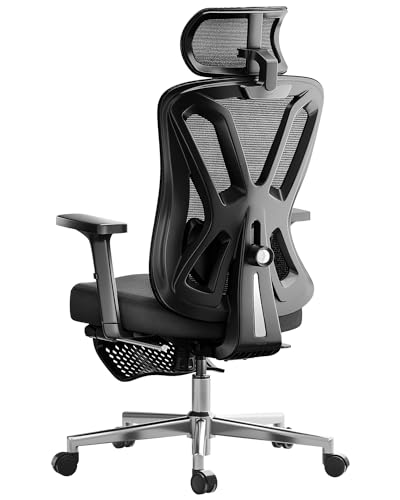
Hbada P5 Ergonomic Office Chair
Our badge: Best Overall
Start with the Hbada P5 Ergonomic Office Chair if your shortlist needs a chair that takes height and arm adjustability, lumbar support and smooth rolling seriously. Made by Hbada, it is the kind of chair that suits anyone who earns a living at a keyboard — not because it shouts about it, but because its basic decisions, from its proportions to its surface, line up with what a desk with one or more monitors actually demands day after day.
Strengths
- Purpose-fit design: 【Reliable Customer Service】This office chair has passed SGS certification and BIFMA test, you can use it with confidence and worry-free. If you choose
- Verified substance: the published figures (Color: Black; Size: 27.56 x 27.56 x 49.41 inches; Dimensions: 10.85039368972 x 10.85039368972 x 19.45275588567 inches; Weight: 44 pounds) describe a chair genuinely sized for a desk with one or more monitors
- Everyday practicality: straightforward assembly and care, so the chair spends its life being used rather than being managed
Trade-offs
- Not a universal fit — buyers well outside the intended size or use should start from a different pick in this guide
- Its strengths lean toward height and arm adjustability; if your priority is the opposite end of the brief, another pick serves you better
- As with every chair here, the listing’s current options and availability should be checked before you commit
| Color | Black |
| Size | 27.56 x 27.56 x 49.41 inches |
| Dimensions | 10.85039368972 x 10.85039368972 x 19.45275588567 inches |
| Weight | 44 pounds |
The honest way to judge a chair like this is by what it asks of your body over time. For height and arm adjustability, lumbar support and smooth rolling, the details that look minor in a product photo — an edge, an angle, a few inches of width — decide whether you stand up refreshed or stiff.
Look closer at what the maker leads with: 【Reliable Customer Service】This office chair has passed SGS certification and BIFMA test, you can use it with confidence and worry-free. If you choose Hbada, we will provide installation guidance and customer repair service. If you encounter any problems in the process of using the office chair, you can contact us, and we will provide you with professional services. That is not marketing garnish — in a desk with one or more monitors, details like this are the difference between a chair you settle into and a chair you tolerate.
A second detail worth weighing: 【Ergonomic Office Chair】The Hbada office chair is ergonomically designed to provide full support for your back, lumbar region, hips, and arms. It features an S-shaped desk chair backrest that perfectly conforms to your back, providing optimal support for your spine and enabling a comfortable and sedentary lifestyle. This ergonomic office chair enhances your sitting posture, allowing you to experience the utmost comfort even during busy workdays.Suitable for people 5′ to 5’85” tall. Picture your longest realistic session in it; if the picture still works, this chair belongs on your shortlist.
Finally, measure before you buy and measure again when it arrives. Seat height against your desk or table, seat depth against your thigh length, overall width against the doorway and the space it must live in — five minutes with a tape measure prevents the most common and most avoidable disappointment in this whole category.
Set against the brief of best chairs for computer work, the case for this chair is coherence: its decisions all point toward height and arm adjustability, lumbar support and smooth rolling, and chairs designed around a clear job rarely disappoint.
Best for: anyone who earns a living at a keyboard who want a dependable answer to best chairs for computer work / Not suited for: buyers whose size, room or routine sits far outside a desk with one or more monitors, or who need a specialist feature this chair does not claim
Choose it if the description above matches your measurements and your routine; skip it if a trade-off named here is your deal-breaker. Either way, decide from the fit, not the photograph.
Herman Miller Classic Aeron Chair-Aluminum
Our badge: Best Budget
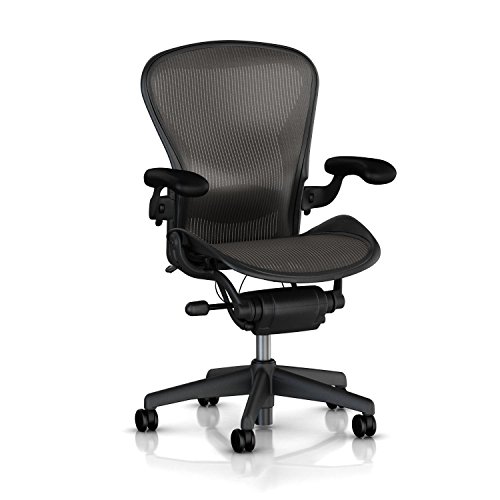
Start with the Herman Miller Classic Aeron Chair-Aluminum if your shortlist needs a chair that takes height and arm adjustability, lumbar support and smooth rolling seriously. Made by Herman Miller, it is the kind of chair that suits anyone who earns a living at a keyboard — not because it shouts about it, but because its basic decisions, from its proportions to its surface, line up with what a desk with one or more monitors actually demands day after day.
Strengths
- Purpose-fit design: Rear tilt Lock/ forward tilt/ lumbar support
- Verified substance: the published figures (Color: Black; Size: Size B (Medium); Dimensions: 16 x 27 x 41 inches; Weight: 50 pounds) describe a chair genuinely sized for a desk with one or more monitors
- Everyday practicality: straightforward assembly and care, so the chair spends its life being used rather than being managed
Trade-offs
- Not a universal fit — buyers well outside the intended size or use should start from a different pick in this guide
- Its strengths lean toward height and arm adjustability; if your priority is the opposite end of the brief, another pick serves you better
- As with every chair here, the listing’s current options and availability should be checked before you commit
| Color | Black |
| Size | Size B (Medium) |
| Dimensions | 16 x 27 x 41 inches |
| Weight | 50 pounds |
Sit in it for a full session before you judge it, because the first five minutes flatter almost any chair. What matters for height and arm adjustability, lumbar support and smooth rolling is how the seat feels in hour three, when your posture drifts and the small design decisions start to add up.
Look closer at what the maker leads with: Rear tilt Lock/ forward tilt/ lumbar support That is not marketing garnish — in a desk with one or more monitors, details like this are the difference between a chair you settle into and a chair you tolerate.
A second detail worth weighing: Tension Control/fully loaded chair Picture your longest realistic session in it; if the picture still works, this chair belongs on your shortlist.
Care is simpler than most owners expect. Dust and crumbs come off upholstery with a soft brush or a vacuum on low; spills should be blotted, never rubbed, and cleaned with a mild solution suited to the fabric. Keep the chair out of harsh direct sun where you can, tighten any bolts after the first month of use, and check casters, glides and feet for trapped grit that can scratch floors.
Set against the brief of best chairs for computer work, the case for this chair is coherence: its decisions all point toward height and arm adjustability, lumbar support and smooth rolling, and chairs designed around a clear job rarely disappoint.
Best for: anyone who earns a living at a keyboard who want a dependable answer to best chairs for computer work / Not suited for: buyers whose size, room or routine sits far outside a desk with one or more monitors, or who need a specialist feature this chair does not claim
Choose it if the description above matches your measurements and your routine; skip it if a trade-off named here is your deal-breaker. Either way, decide from the fit, not the photograph.

Secretlab Titan Evo Black Gaming Chair – Regular
Our badge: Best Premium
Start with the Secretlab Titan Evo Black Gaming Chair – Regular if your shortlist needs a chair that takes height and arm adjustability, lumbar support and smooth rolling seriously. Made by Secretlab, it is the kind of chair that suits anyone who earns a living at a keyboard — not because it shouts about it, but because its basic decisions, from its proportions to its surface, line up with what a desk with one or more monitors actually demands day after day.
Strengths
- Purpose-fit design: ALL-DAY COMFORT FOR WORK & PLAY – PC chair made of cold-cure foam for ideal posture, comes with memory foam magnetic head pillow that can be adjusted
- Verified substance: the published figures (Color: Black; Size: Regular; Dimensions: 19.291338563 x 22.047244072 x 53.937007819 inches; Weight: 76.05948039 pounds) describe a chair genuinely sized for a desk with one or more monitors
- Everyday practicality: straightforward assembly and care, so the chair spends its life being used rather than being managed
Trade-offs
- Not a universal fit — buyers well outside the intended size or use should start from a different pick in this guide
- Its strengths lean toward height and arm adjustability; if your priority is the opposite end of the brief, another pick serves you better
- As with every chair here, the listing’s current options and availability should be checked before you commit
| Color | Black |
| Size | Regular |
| Dimensions | 19.291338563 x 22.047244072 x 53.937007819 inches |
| Weight | 76.05948039 pounds |
The honest way to judge a chair like this is by what it asks of your body over time. For height and arm adjustability, lumbar support and smooth rolling, the details that look minor in a product photo — an edge, an angle, a few inches of width — decide whether you stand up refreshed or stiff.
Look closer at what the maker leads with: ALL-DAY COMFORT FOR WORK & PLAY – PC chair made of cold-cure foam for ideal posture, comes with memory foam magnetic head pillow that can be adjusted over a wide range and snaps into place on your backrest while providing enhanced neck support and pressure relief That is not marketing garnish — in a desk with one or more monitors, details like this are the difference between a chair you settle into and a chair you tolerate.
A second detail worth weighing: ALL-DAY COMFORT FOR WORK & PLAY – PC chair made of cold-cure foam for ideal posture, comes with memory foam magnetic head pillow that can be adjusted over a wide range and snaps into place on your backrest while providing enhanced neck support and pressure relief Picture your longest realistic session in it; if the picture still works, this chair belongs on your shortlist.
Temperature matters more than product pages admit. Breathable fabrics and open designs stay comfortable through a long warm afternoon, while dense foam and leather-look surfaces hold heat. If you run warm, sit for long stretches, or use the chair in a sunny room, put airflow high on your list alongside support.
Set against the brief of best chairs for computer work, the case for this chair is coherence: its decisions all point toward height and arm adjustability, lumbar support and smooth rolling, and chairs designed around a clear job rarely disappoint.
Best for: anyone who earns a living at a keyboard who want a dependable answer to best chairs for computer work / Not suited for: buyers whose size, room or routine sits far outside a desk with one or more monitors, or who need a specialist feature this chair does not claim
Choose it if the description above matches your measurements and your routine; skip it if a trade-off named here is your deal-breaker. Either way, decide from the fit, not the photograph.

Respawn 110 Pro Ergonomic Gaming Chair with Footrest and Recline | Ergonomic office chair
Our badge: Best for Chairs for Computer Work
Start with the Respawn 110 Pro Ergonomic Gaming Chair with Footrest and Recline | Ergonomic office chair if your shortlist needs a chair that takes height and arm adjustability, lumbar support and smooth rolling seriously. Made by RESPAWN, it is the kind of chair that suits anyone who earns a living at a keyboard — not because it shouts about it, but because its basic decisions, from its proportions to its surface, line up with what a desk with one or more monitors actually demands day after day.
Strengths
- Purpose-fit design: ERGONOMIC CHAIR THAT ADAPTS TO YOU: Enjoy customizable comfort with tilt control, height adjustment, and a 155° reclining backrest. This chair adapts
- Verified substance: the published figures (Color: Gray Fabric; Size: 28.50″ D x 26.75″ W x 51.50″ H; Dimensions: 28 x 26.4 x 51.2 inches; Weight: 46.3 pounds) describe a chair genuinely sized for a desk with one or more monitors
- Everyday practicality: straightforward assembly and care, so the chair spends its life being used rather than being managed
Trade-offs
- Not a universal fit — buyers well outside the intended size or use should start from a different pick in this guide
- Its strengths lean toward height and arm adjustability; if your priority is the opposite end of the brief, another pick serves you better
- As with every chair here, the listing’s current options and availability should be checked before you commit
| Color | Gray Fabric |
| Size | 28.50″ D x 26.75″ W x 51.50″ H |
| Dimensions | 28 x 26.4 x 51.2 inches |
| Weight | 46.3 pounds |
The honest way to judge a chair like this is by what it asks of your body over time. For height and arm adjustability, lumbar support and smooth rolling, the details that look minor in a product photo — an edge, an angle, a few inches of width — decide whether you stand up refreshed or stiff.
Look closer at what the maker leads with: ERGONOMIC CHAIR THAT ADAPTS TO YOU: Enjoy customizable comfort with tilt control, height adjustment, and a 155° reclining backrest. This chair adapts to your posture, making it a smart choice for long hours of work or immersive gaming sessions. That is not marketing garnish — in a desk with one or more monitors, details like this are the difference between a chair you settle into and a chair you tolerate.
A second detail worth weighing: RECLINING CHAIR WITH FOOTREST: Relax in this comfortable office chair with a reinforced retractable footrest supported by multi-point brackets and smooth 360° swivel. The infinite angle lock lets you recline securely for work, gaming, or unwinding. Picture your longest realistic session in it; if the picture still works, this chair belongs on your shortlist.
Temperature matters more than product pages admit. Breathable fabrics and open designs stay comfortable through a long warm afternoon, while dense foam and leather-look surfaces hold heat. If you run warm, sit for long stretches, or use the chair in a sunny room, put airflow high on your list alongside support.
Set against the brief of best chairs for computer work, the case for this chair is coherence: its decisions all point toward height and arm adjustability, lumbar support and smooth rolling, and chairs designed around a clear job rarely disappoint.
Best for: anyone who earns a living at a keyboard who want a dependable answer to best chairs for computer work / Not suited for: buyers whose size, room or routine sits far outside a desk with one or more monitors, or who need a specialist feature this chair does not claim
Choose it if the description above matches your measurements and your routine; skip it if a trade-off named here is your deal-breaker. Either way, decide from the fit, not the photograph.

Homall Gaming Chair
Our badge: Best Compact
Start with the Homall Gaming Chair if your shortlist needs a chair that takes height and arm adjustability, lumbar support and smooth rolling seriously. Made by Homall, it is the kind of chair that suits anyone who earns a living at a keyboard — not because it shouts about it, but because its basic decisions, from its proportions to its surface, line up with what a desk with one or more monitors actually demands day after day.
Strengths
- Purpose-fit design: High Quality & Comfort: The cushions, backrests and armrests of computer gaming chair are filled with high-density foam with soft PU leather cover. Si
- Verified substance: the published figures (Color: White; Size: 19.7 inches x 18.5 inches x 50.4 inches; Dimensions: 18.5 x 20.9 x 50.4 inches; Weight: 39.7 pounds) describe a chair genuinely sized for a desk with one or more monitors
- Everyday practicality: straightforward assembly and care, so the chair spends its life being used rather than being managed
Trade-offs
- Not a universal fit — buyers well outside the intended size or use should start from a different pick in this guide
- Its strengths lean toward height and arm adjustability; if your priority is the opposite end of the brief, another pick serves you better
- As with every chair here, the listing’s current options and availability should be checked before you commit
| Color | White |
| Size | 19.7 inches x 18.5 inches x 50.4 inches |
| Dimensions | 18.5 x 20.9 x 50.4 inches |
| Weight | 39.7 pounds |
Chairs in this category live or die on fit. Your height, your weight, the way you actually sit rather than the way posture posters say you should — all of it interacts with the design, and nowhere is that truer than with height and arm adjustability, lumbar support and smooth rolling.
Look closer at what the maker leads with: High Quality & Comfort: The cushions, backrests and armrests of computer gaming chair are filled with high-density foam with soft PU leather cover. Sitting on it gives you a wonderful leisure time. Featuring a BIFMA-certified metal base make the computer chair more sturdy and durable. Class 3 gas lift and upgraded mechanism improve the safety performance. That is not marketing garnish — in a desk with one or more monitors, details like this are the difference between a chair you settle into and a chair you tolerate.
A second detail worth weighing: Cozy Time: At the end of a long video game or work day, with your back against the backrest and adjust the side lever, the reclining game chair is adjustable to 135°. Pull out the footrest with your feet up, turn on your favorite music, and start enjoying the comfort! 360° swivel makes this desk chair perfect for grabbing snacks or gloating at your opponent after an impressive win. Picture your longest realistic session in it; if the picture still works, this chair belongs on your shortlist.
Care is simpler than most owners expect. Dust and crumbs come off upholstery with a soft brush or a vacuum on low; spills should be blotted, never rubbed, and cleaned with a mild solution suited to the fabric. Keep the chair out of harsh direct sun where you can, tighten any bolts after the first month of use, and check casters, glides and feet for trapped grit that can scratch floors.
Set against the brief of best chairs for computer work, the case for this chair is coherence: its decisions all point toward height and arm adjustability, lumbar support and smooth rolling, and chairs designed around a clear job rarely disappoint.
Best for: anyone who earns a living at a keyboard who want a dependable answer to best chairs for computer work / Not suited for: buyers whose size, room or routine sits far outside a desk with one or more monitors, or who need a specialist feature this chair does not claim
Choose it if the description above matches your measurements and your routine; skip it if a trade-off named here is your deal-breaker. Either way, decide from the fit, not the photograph.

LSSPAID Modern Accent Chairs
Our badge: Best for Everyday Comfort
Start with the LSSPAID Modern Accent Chairs if your shortlist needs a chair that takes height and arm adjustability, lumbar support and smooth rolling seriously. Made by LSSPAID, it is the kind of chair that suits anyone who earns a living at a keyboard — not because it shouts about it, but because its basic decisions, from its proportions to its surface, line up with what a desk with one or more monitors actually demands day after day.
Strengths
- Purpose-fit design: Easy to Assemble: Our accent chairs for living room come with simple and easy to understand assembly instructions, allowing you to quickly put them to
- Verified substance: the published figures (Color: Charcoal; Size: Set of 1; Dimensions: 30.5 x 29.5 x 31.5 inches; Weight: 33 pounds) describe a chair genuinely sized for a desk with one or more monitors
- Everyday practicality: straightforward assembly and care, so the chair spends its life being used rather than being managed
Trade-offs
- Not a universal fit — buyers well outside the intended size or use should start from a different pick in this guide
- Its strengths lean toward height and arm adjustability; if your priority is the opposite end of the brief, another pick serves you better
- As with every chair here, the listing’s current options and availability should be checked before you commit
| Color | Charcoal |
| Size | Set of 1 |
| Dimensions | 30.5 x 29.5 x 31.5 inches |
| Weight | 33 pounds |
Sit in it for a full session before you judge it, because the first five minutes flatter almost any chair. What matters for height and arm adjustability, lumbar support and smooth rolling is how the seat feels in hour three, when your posture drifts and the small design decisions start to add up.
Look closer at what the maker leads with: Easy to Assemble: Our accent chairs for living room come with simple and easy to understand assembly instructions, allowing you to quickly put them together; If you encounter any problems during installation, please contact us first, our excellent after-sales team will serve you wholeheartedly That is not marketing garnish — in a desk with one or more monitors, details like this are the difference between a chair you settle into and a chair you tolerate.
A second detail worth weighing: Soft Chenille Upholstery: Our accent chair is made of chenille fabric, which is breathable, skin friendly, and dust-proof; It is comfortable and easy to maintain for daily use, and its stylish appearance easily adapts to home styles, adding a sense of refinement to the space Picture your longest realistic session in it; if the picture still works, this chair belongs on your shortlist.
Noise is a quiet quality marker. A chair that clicks, pops or groans every time you move will annoy you in a quiet room, on a call, or beside a sleeping baby, long before anything actually breaks. Solid joinery and well-fitted mechanisms stay silent, and silence is one of the easiest things to check in the first week of ownership.
Set against the brief of best chairs for computer work, the case for this chair is coherence: its decisions all point toward height and arm adjustability, lumbar support and smooth rolling, and chairs designed around a clear job rarely disappoint.
Best for: anyone who earns a living at a keyboard who want a dependable answer to best chairs for computer work / Not suited for: buyers whose size, room or routine sits far outside a desk with one or more monitors, or who need a specialist feature this chair does not claim
Choose it if the description above matches your measurements and your routine; skip it if a trade-off named here is your deal-breaker. Either way, decide from the fit, not the photograph.
Comparison Table
| Pick | Color | Dimensions | Weight | Check price on Amazon |
|---|---|---|---|---|
| Hbada P5 Ergonomic Office Chair | Black | 10.85039368972 x 10.85039368972 x 19.45275588567 inches | 44 pounds | Check price on Amazon |
| Herman Miller Classic Aeron Chair-Aluminum | Black | 16 x 27 x 41 inches | 50 pounds | Check price on Amazon |
| Secretlab Titan Evo Black Gaming Chair – Regular | Black | 19.291338563 x 22.047244072 x 53.937007819 inches | 76.05948039 pounds | Check price on Amazon |
| Respawn 110 Pro Ergonomic Gaming Chair with Footrest and Recline | Ergonomic office chair | Gray Fabric | 28 x 26.4 x 51.2 inches | 46.3 pounds | Check price on Amazon |
| Homall Gaming Chair | White | 18.5 x 20.9 x 50.4 inches | 39.7 pounds | Check price on Amazon |
| LSSPAID Modern Accent Chairs | Charcoal | 30.5 x 29.5 x 31.5 inches | 33 pounds | Check price on Amazon |
Read the table as a fit filter, not a league table: the right row is the one whose dimensions suit your body and your room. If two rows both fit, let the badge and the review trade-offs decide, and cross-check anything size-critical on the listing itself.
How to Choose the Best Best Chairs for Computer Work
Choosing well for best chairs for computer work is a method, not a hunch. Work through the five factors below in order — each one eliminates a different kind of mistake — and you will arrive at a shortlist of one or two chairs instead of a browser full of maybes. Buyers still torn between two neighboring briefs will find Best Chairs For Big And Tall and Best Sofas That Are Easy To Move useful companion reading.
Start with fit, not features
Measure your own body first: popliteal height for seat height, thigh length for seat depth, and hip width for seat width. A chair whose basic dimensions match your body will outperform a feature-packed chair that is the wrong size, every single day you use it.
Support where you actually need it
Support is not about the thickest padding; it is about contact in the right places. Your lower back should meet gentle, sustained support, your feet should rest flat, and your arms should reach their rests without your shoulders rising. If any of those three fail, keep looking.
Capacity is a safety number, not a suggestion
Where a manufacturer publishes a weight capacity, treat it as a hard ceiling with a sensible margin, not a target. Sitting down is a dynamic load — you land with more force than you weigh standing still — so headroom in that figure is what keeps frames, lifts and joints working for years.
Materials decide the maintenance you will actually do
Match the surface to your household. Smooth faux leathers and plastics wipe clean in seconds; woven fabrics breathe better and hide wear gracefully but ask for blotting and brushing; natural wood shrugs off knocks but dislikes standing water. Choose the upkeep you know you will keep up with.
How to Set Up Your Chair for the First Week
Assembly day sets the tone for the chair’s whole life. Lay out every part, confirm the hardware count against the manual, and assemble on a soft surface so finishes survive the process. Tighten fixings in sequence rather than fully tightening the first bolt you touch, and stop if a part only fits under force — forced fits are how frames start life pre-stressed and squeaky.
Once the chair is standing, set it up where it will actually live, in a desk with one or more monitors, and sit your real sessions in it from day one. Adjust one thing at a time — height before depth, depth before support — and give each change a full session before judging it. Small adjustments feel wrong for the first hour simply because they are new; your body needs a day to report honestly.
At the end of the first week, re-tighten every fixing and check feet and casters; repeat that five-minute check monthly for the first season.
How Often Should You Check and Maintain Your Chair?
Monthly for fixings and casters, seasonally for upholstery and finishes, and immediately whenever something changes — a new noise, a new wobble, a new stain. Chairs rarely fail suddenly; they announce their problems quietly for weeks first, and the owners who hear the announcements are the ones whose chairs last a decade.
Problem: The chair wobbles or creaks when you shift your weight — Stop using it, flip it over, and re-tighten every bolt and screw in sequence; wobble is almost always a loose joint, and continued use wallows out the fixing holes and makes it permanent.
Problem: The seat feels harder or flatter than it did at first — Rotate or fluff removable cushions, check that foam has not slipped inside its cover, and add a thin seat pad rather than replacing the chair — early surface settling is normal, while a sudden change can mean a broken support underneath, which is worth inspecting.
Problem: Casters will not roll or the chair drags — Pull the casters and clear the hair, thread and grit wound around the axles; it is the single most common cause. On carpet, consider larger carpet casters or a chair mat; on hard floors, soft-tread casters roll quieter and protect the surface.
Problem: The chair keeps sliding or will not stay where you put it — Check the feet or glides for wear and replace worn pads; on smooth floors, felt or rubber pads restore grip, and on a slope, repositioning the chair is safer than fighting physics with a doorstop.
Matching the Chair to Your Body, Not the Average Body
Every chair in this guide was designed against an imaginary average person, and no reader is that person. If you are taller, your knees and the seat edge negotiate differently; if you are shorter, a standard seat depth leaves your back choosing between support and circulation; if you carry more weight, load paths and cushion density matter in ways a lighter sitter never notices. This is why the reviews above keep returning to published dimensions: they are the only honest bridge between a designed-for-average chair and your actual body.
The practical method is comparison, not hope. Measure a chair you already sit in comfortably — seat height, depth and width — and use those numbers as your personal baseline. A new chair that matches or thoughtfully improves on your baseline in the dimension that matters for height and arm adjustability, lumbar support and smooth rolling is a rational buy. A chair that contradicts your baseline in two dimensions is a gamble, however glowing its description.
Households complicate this further, because the buyer is rarely the only sitter. When a chair must serve two bodies, prefer the wider adjustment range or the more forgiving shape; when it is truly yours alone, be selfish with the fit.
What a Year of Ownership Actually Looks Like
Month one is adjustment: settings, habits and the small discovery of where the chair helps and where it merely allows. Months two to six are the truth-telling period, when padding either holds its character or begins its slow flattening, when finishes either shrug off daily contact or start to show it, and when you find out whether cleaning the chair is a two-minute habit or a dreaded project.
By month twelve, the chairs worth recommending share a profile: they have gone quiet in your attention. You no longer think about sitting down. That invisibility is the real product — for best chairs for computer work, success is not a dramatic first impression but the absence of a hundred small irritations across a year of ordinary days in a desk with one or more monitors.
This is also why this guide is conservative about novelty: proven constructions, replaceable wear parts and surfaces with a known cleaning routine are worth more, on a one-year horizon, than any single exciting feature.
Common Buying Mistakes
Buying from the photo instead of the dimensions
The consequence is a chair that looks perfect online and fits neither the body nor the room. The better move is unglamorous: tape-measure the space, compare the published seat height, depth and width against your own measurements, and only then fall in love with the styling.
Chasing the softest seat in the showroom
Very soft cushioning feels luxurious for five minutes and then lets you sink into a slumped posture for hours, which is where aches begin. The better move is to choose support that feels almost firm at first sit; it is the seat that still feels kind at the end of a long session.
Ignoring the floor underneath
Hard casters on timber, glides on carpet, bare wood legs on tile — the chair-and-floor pairing decides noise, stability and whether you leave marks. The better move is to choose feet, casters or a chair mat for the exact surface the chair will live on.
Skipping assembly checks and early adjustments
Loose bolts and factory-default settings are behind a surprising share of wobbles, squeaks and ‘uncomfortable chair’ returns. The better move is to assemble slowly, tighten everything, re-tighten after a month, and spend the first week deliberately dialing in every adjustment the chair offers.
Buying one chair for every job
A chair that is perfect for dining is rarely right for eight hours of desk work, and a task chair looks lost at a fireside. The better move is to be honest about the primary job, buy for that, and let other uses be a bonus rather than the brief.
Final Recommendation
For most readers, start with the Hbada P5 Ergonomic Office Chair: it is the most complete answer to best chairs for computer work in this guide, leading on height and arm adjustability, lumbar support and smooth rolling and conceding the least elsewhere. Measure yourself, check the listing, and put it through a full week of real sessions before you judge it.
If your budget, room or body points the other way, the runner-up is the Herman Miller Classic Aeron Chair-Aluminum — Check on Amazon — which trades a little of the winner’s polish for its own distinct strengths, covered honestly in its review above. And if your situation is genuinely specialist, buy the specialist pick and ignore the headline winner entirely; the best chair is the one that fits your life, and readers weighing the closest neighboring question can finish their research with Best Office Chairs For Carpet.
Frequently Asked Questions
What matters most when choosing best chairs for computer work?
Fit and the specific job. For this brief that means height and arm adjustability, lumbar support and smooth rolling, verified against published dimensions and your own measurements. Features only count once the basic fit is right; a perfectly featured chair in the wrong size is the wrong chair.
How long should a good chair last?
With monthly fixing checks and sensible care, a well-built chair should give years of daily service. Wear shows first in cushioning and moving parts, so chairs with replaceable pads, casters or covers have a real longevity advantage.
Should I trust the weight capacity on a listing?
Treat a manufacturer-stated capacity as a ceiling and keep a margin beneath it, because sitting down is a dynamic load. Where no capacity is published, be more conservative, not less, and favor visibly reinforced construction.
How do I know if the chair fits before it arrives?
Compare its published seat height, depth and width with a chair you already sit in comfortably, and check the overall footprint against your room and doorways. That five-minute comparison predicts satisfaction better than any photograph.
What should I do in the first week if the chair feels wrong?
Adjust before you judge: work through each setting in order, re-tighten the fixings, and sit your longest real session before deciding. If it still feels wrong after a genuine week of adjustment, use the return window — that is what it is for.
Is the most expensive option always the best of the best chairs for computer work?
No. Price buys materials, mechanisms and finish, but fit is free to check and priceless in effect. Several mid-priced picks in this guide will serve their intended buyer better than the premium pick would, and each review says plainly who that buyer is.


