Disclosure: As an Amazon Associate, dailyhomedecorating.com earns from qualifying purchases. Links on this page are affiliate links; they cost you nothing extra. Prices and availability change often, so check the current Amazon listing before you buy.
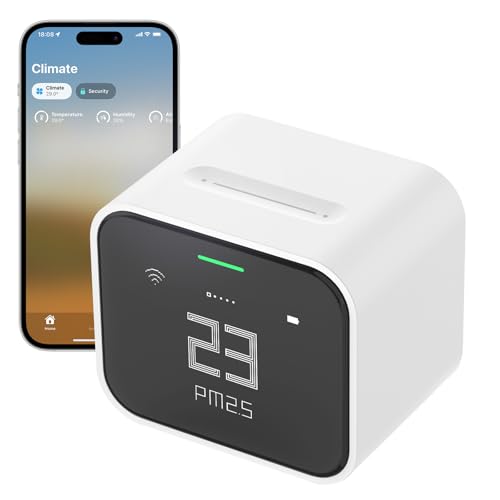
This qingping lite review covers a device that cleans nothing, moves no air, and yet may change how you run every other appliance in the room. The Qingping Air Monitor Lite is a small indoor air quality meter that watches five things — carbon dioxide, fine particles in two sizes, temperature, and humidity — and reports them on a crisp little display and, if you wish, into an Apple HomeKit smart home. It is a measuring instrument, not a remedy, and reviewing it fairly means judging the quality of its information and the usefulness of knowing, hour by hour, what your indoor air is actually doing.
Qingping is a Chinese maker that built its reputation inside Xiaomi’s ecosystem before its monitors found a second life with smart-home enthusiasts abroad, and the Lite is its distilled model: the sensors and the screen, without the larger body and extra features of its bigger siblings. Its appeal is precision of purpose. A great many households now own purifiers, humidifiers, and extractor fans that run on vibes — switched on when the air feels stuffy, off when someone remembers. A monitor replaces vibes with numbers, and the Lite’s particular combination of carbon dioxide and particle sensing covers the two indoor pollutants that household appliances can actually influence.
The reviews below give the Lite its full hearing first, then four verified alternatives that bracket it: Qingping’s own newer Gen 2 monitor, the battery-sipping Aranet4 for carbon dioxide specialists, the broader Airthings View Plus with its radon sensing, and Amazon’s Smart Air Quality Monitor for Alexa households. A buying guide then explains how to read sensor specifications without being misled, a how-to section covers placement and the art of responding to readings without becoming a slave to them, and the FAQ answers the questions monitor owners actually ask after the first fortnight.
Every linked product was confirmed against its current Amazon listing for this guide, title and official image included, and the Lite itself is the headline pick. One caution belongs up front, because it governs everything after it: a monitor’s numbers are only as good as its sensors and its placement, and the cheapest way to ruin a good instrument is to stand it in a bad spot and then make household decisions from its complaints. Placement gets its own section below, and it deserves your attention before the shopping does.
Key takeaways
- The Lite measures CO2, PM2.5, PM10, temperature, and humidity in one small unit.
- HomeKit support makes it the natural monitor for Apple households.
- It is an instrument, not a remedy — its value is the decisions it informs.
- Placement and patience matter more than any single specification.
- Four verified alternatives cover newer, longer-battery, broader, and Alexa-first needs.
In this guide
Quick picks: Qingping Lite Review
The quick list leads with the subject, then the alternatives in the order a shopper usually meets them: the same brand’s newer generation, the carbon dioxide specialist with a battery measured in years, the wide-spectrum monitor that adds radon and pressure, and the voice-assistant household’s own-brand option. Each was verified for this guide; the detailed reviews follow, and none of the five should be bought until you have read the placement section, because the right monitor in the wrong corner is a wrong purchase.
- Qingping Air Monitor Lite — the subject: a Wi-Fi monitor detecting CO2, both particle sizes, temperature, and humidity, with Apple HomeKit compatibility. Check price on Amazon
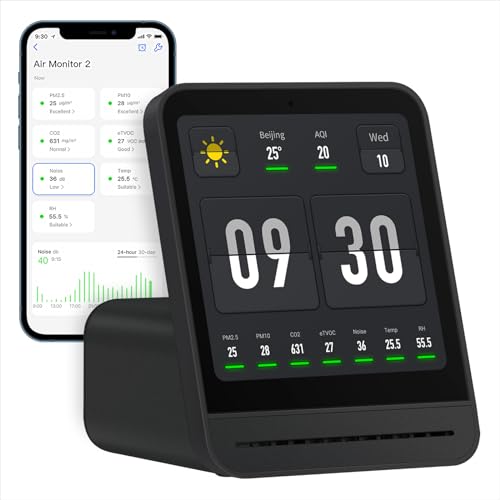
- Qingping Air Quality Monitor Gen 2 — the successor generation from the same maker, adding noise sensing and an alarm clock function to the core five readings. Check price on Amazon
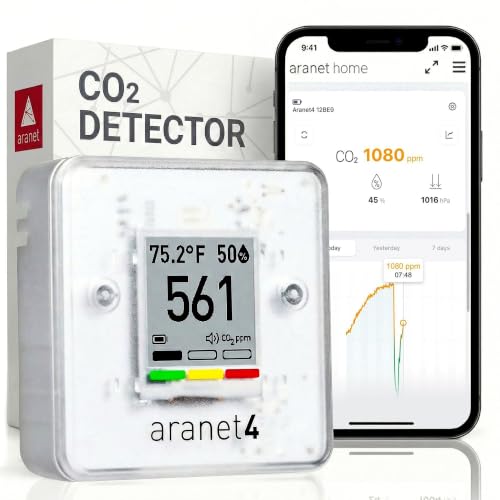
- Aranet4 Indoor Air Quality Monitor — a wireless carbon dioxide specialist with an NDIR sensor, e-ink screen, and battery life measured in years. Check price on Amazon
- Airthings 2960 View Plus — a battery-powered monitor spanning radon, particles, CO2, VOCs, humidity, temperature, and pressure. Check price on Amazon
- Amazon Smart Air Quality Monitor — Amazon’s own monitor, detecting temperature, humidity, carbon monoxide, PM2.5, and VOCs, with Alexa notifications. Check price on Amazon
Five monitors, five philosophies: the Lite’s balanced five readings with HomeKit, the Gen 2’s bedside expansion, the Aranet4’s single-minded CO2 mastery, the View Plus’s full census including radon, and Amazon’s screenless event watcher. The detailed reviews above and the buying guide below share one conviction — that the right choice is determined by the question you are asking of your air, and that most households are asking one of three questions: is my bedroom air fresh enough to sleep in, is my purifier actually working, or is there anything in this house I cannot see that I should know about? Name your question and the shortlist collapses to one or two names.
Qingping Lite Review: the monitors in detail
Each review below follows the same order — what the device measures, how it behaves in a home, where it compromises, and who it suits — and each pick was verified against its live listing, image included, before a word was written. The subject comes first and gets the fullest hearing, as it should.

Qingping Air Monitor Lite
The subject — five readings, HomeKit native, pocketable
The Lite’s design is a study in reduction. A compact body carries a clear display that cycles or settles on the readings you care about, the sensors breathe through discreet vents, and the whole object is small enough to stand on a bookshelf, a desk, or a bedside table without negotiating for territory. There is no fan noise to forgive because there is no fan; particle sensing is optical and silent, and carbon dioxide is tracked by a dedicated sensor rather than estimated from other gases, which is the single most important technical fact about this device and the one that separates real CO2 monitors from the impostors discussed in the buying guide.
HomeKit compatibility is the Lite’s headline integration, and for Apple households it transforms the device from a meter into a trigger. Readings can feed automations — a purifier’s smart plug waking when particles climb, a notification when the bedroom’s carbon dioxide crosses the line where sleep quality starts to fray, a fan answering a humid bathroom’s spill into the hallway. Households outside Apple’s orbit still get the display, the app history, and the numbers themselves; the automations are the bonus, not the substance. The substance is a trustworthy, always-on account of the air in the room where the monitor stands.
Living with it teaches the lessons every monitor teaches, faster because the display is always there. You learn that a closed bedroom with two sleepers sends carbon dioxide climbing all night, that cooking sends particles spiking in ways the extractor’s noise never suggested, that the purifier you run on its lowest, quietest setting is doing less than you assumed. None of these lessons requires the Lite specifically — but the Lite delivers them in a small, good-looking, honestly specified instrument at the accessible end of its maker’s range, which is why it anchors this guide.
At a glance
- Measures: CO2, PM2.5, PM10, temperature, humidity
- Connectivity: Wi-Fi, Apple HomeKit compatible
- Display: on-device readings at a glance
- Power: mains-fed via cable, per its class
- Role: monitoring only — cleans no air itself
Strengths
- Dedicated CO2 sensing, not an estimate from other gases
- HomeKit triggers let readings drive other devices
- Compact and silent enough for a bedside table
Trade-offs
- No radon or VOC channel at this tier
- Wi-Fi and app dependence for history and automations
- One monitor knows one room; the house needs patience or plural units
Best for: an Apple household wanting one honest instrument for a bedroom, nursery, or home office.
Not suited for: anyone seeking radon measurement or a monitor that works for years untethered on a battery.

Qingping Air Quality Monitor Gen 2
Verified alternative — the newer Qingping generation
Qingping’s Gen 2 is the same idea grown slightly upmarket: the same core measurements — particles in two sizes, carbon dioxide, temperature, humidity — joined by a noise sensor and an upgraded alarm clock function that nudges the device toward the bedside. For a household choosing inside the brand, this is the natural step-up, and for readers of our companion review of the original Pro model it is the current-generation Qingping to consider, since it represents where the maker’s line has arrived.
The noise channel is more useful than it first sounds in a bedroom context, because it lets the monitor testify in the household’s oldest argument: whether the street, the purifier, or a partner’s snoring is what actually disturbs the night. Paired with the carbon dioxide trace across the same hours, it turns sleep troubleshooting from folklore into evidence. The alarm clock function is a smaller thing — a reason for the device to earn its bedside place every morning rather than only informing at night — but bedside territory is contested, and dual-purpose devices win it.
Against the Lite, the Gen 2 asks more money for more channels and a more domesticated feature set; the Lite answers with simplicity and a lower tier. Neither is the wrong Qingping. The Lite suits the reader who wants the five core readings and HomeKit in the smallest, plainest form; the Gen 2 suits the reader whose monitor will live by the bed and may as well tell the time, watch the noise, and anchor a small morning routine while it is there.
At a glance
- Measures: PM2.5, CO2, PM10, noise, temperature, humidity
- Extras: alarm clock function, per the verified listing
- Positioning: current-generation Qingping monitor
- Intended room: bedroom first, per the maker
- Role: monitoring and bedside information
Strengths
- Noise sensing adds a genuinely useful bedroom channel
- Alarm function helps it earn contested bedside space
- Same trusted core measurements as the Lite
Trade-offs
- Higher tier than the Lite for overlapping duties
- More features to ignore if you wanted an instrument only
- Bedroom-first design may be wasted in a hallway role
Best for: a bedside-first household wanting Qingping measurements plus noise and alarm duties in one unit.
Not suited for: a purist who wants the plainest five-reading instrument at the lowest tier.
Aranet4 Indoor Air Quality Monitor
Verified alternative — the CO2 specialist with a four-year battery
The Aranet4 makes a bet opposite to the Lite’s: instead of measuring a little of everything, it measures carbon dioxide superbly and treats everything else as supporting cast. Its NDIR sensor — the proper optical method for CO2 — reports alongside temperature, humidity, and pressure on an e-ink screen that sips power so frugally that the battery is rated in years. There are no particles here, and the device does not pretend otherwise; it is the instrument for the household whose question is specifically about ventilation, stuffiness, and the invisible accumulation of exhaled air in closed rooms.
That question turns out to be the most actionable one in indoor air. Carbon dioxide is a proxy for how much of the air in a room has already been breathed, and its trace explains the afternoon slump in a sealed office, the heavy-headed morning after a closed-window night, and the classroom headache that vanishes at break time. An Aranet4 carried from room to room — and its battery freedom makes it a genuinely portable instrument, unlike its mains-tethered rivals — maps a whole house’s ventilation character in a weekend, a job no single fixed monitor can do.
The trade-offs are the bet’s price: no particle sensing means it cannot judge a purifier, a smoky day, or a cooking event, and its e-ink calm will frustrate anyone who wants a colourful live dashboard. But within its chosen discipline it is arguably the most respected consumer instrument in this entire guide, the one schools and offices buy in quantity, and the natural recommendation when a reader’s real concern is the air’s freshness rather than its dust.
At a glance
- Measures: CO2 via NDIR sensor, temperature, humidity, pressure
- Display: e-ink, always readable, minimal power draw
- Battery: rated in years per the verified listing
- Connectivity: wireless, app history available
- Role: ventilation and CO2 specialist
Strengths
- Proper NDIR sensing with a years-long battery
- Portable enough to survey every room in the house
- E-ink display is glanceable without glare at night
Trade-offs
- No particle channel — cannot assess dust or purifiers
- Premium tier for a single-discipline instrument
- E-ink refresh will feel slow to dashboard lovers
Best for: offices, classrooms, and bedrooms where stuffiness and ventilation are the questions that matter.
Not suited for: anyone who needs particle readings to run a purifier sensibly.

Airthings 2960 View Plus
Verified alternative — the broadest sensor net, including radon
The View Plus is the maximalist in this line-up: radon, fine particles, carbon dioxide, volatile organic compounds, humidity, temperature, and pressure, in a battery-powered unit from the Norwegian maker that built its name on radon. Radon is the differentiator that matters — an invisible, naturally occurring gas that accumulates in ground-floor and basement rooms in affected geologies, carries genuine long-term health significance, and cannot be sensed by any other device in this guide. Households in radon country do not have the luxury of treating that channel as a luxury.
Breadth brings its own discipline. A monitor that reports seven quantities invites a household to worry in seven directions at once, and the View Plus is best owned by someone willing to learn which readings demand action — radon averaged over weeks, particles during events, carbon dioxide nightly — and which are weather vanes to glance at and forget. Its battery power keeps placement flexible, its app carries the history that gives radon its meaning over time, and its wave-to-check gesture suits the hallway-and-landing role that broad monitors usually end up serving.
Against the Lite, the comparison is scope against focus. The Qingping is the finer bedside instrument for the five everyday readings and the smarter HomeKit citizen; the Airthings is the house-wide sentinel for the household that wants the full census of its air, including the one gas that genuinely justifies a sentinel. Many serious households end up, over time, with both shapes — a broad monitor downstairs and a focused one by the bed — and this guide’s buying section explains how to sequence that without buying twice.
At a glance
- Measures: radon, PM, CO2, VOC, humidity, temperature, pressure
- Power: battery powered, flexible placement
- Maker: Airthings, radon specialist heritage
- Display: on-device with app history behind it
- Role: whole-home air census in one unit
Strengths
- Radon sensing no rival in this guide offers
- Broadest channel set for a single device
- Battery power frees it from socket geography
Trade-offs
- Top tier pricing in this comparison
- Seven channels can overwhelm a casual owner
- Radon meaning emerges over weeks, not glances
Best for: ground-floor and basement households, especially in radon-affected areas, wanting one broad sentinel.
Not suited for: a buyer who only needs bedroom CO2 and particles, and knows it.

Amazon Smart Air Quality Monitor
Verified alternative — the Alexa household option
Amazon’s entry plays a different game: no screen of its own, because the screen is your phone and its voice is Alexa. The unit senses temperature, humidity, carbon monoxide, fine particles, and VOCs, then reports through the Alexa ecosystem with notifications when air quality drops. For a household already fluent in that ecosystem — Echo speakers in the rooms, routines running the lights — the monitor slots into an existing conversation with the house rather than starting a new one, and its routines can answer a particle spike with a purifier’s smart plug without any further hardware.
The absence of a carbon dioxide channel is the specification to notice, because it defines the device’s philosophy: this is an events monitor, watching for the smoke, fumes, and particle surges that accompany cooking, candles, cleaning products, and wildfire days, rather than a ventilation instrument tracking the slow tide of exhaled air. Households whose concern is events will find it well aimed; households whose concern is the stuffy bedroom should look at the Lite or the Aranet4, whose CO2 sensing addresses exactly that slow tide.
There is also a simplicity dividend. With no display to design around, the unit is a small, unobtrusive object that disappears onto a shelf, and its entire interface is a voice question — asking Alexa for the room’s air — plus the phone’s history. For the right household that invisibility is the feature. For the household that wants to glance at a number while passing with a laundry basket, the Lite’s screen will serve better, and this guide’s recommendation between them is honestly a referendum on ecosystems rather than on sensors.
At a glance
- Measures: temperature, humidity, carbon monoxide, PM2.5, VOCs
- Display: none — reports via Alexa app and voice
- Integration: works with Alexa, notifications on drops
- Power: mains-fed small unit
- Role: event-focused monitoring for Alexa homes
Strengths
- Invisible hardware; the house already has the interface
- Notifications catch events you would otherwise miss
- Routines can trigger purifiers and fans automatically
Trade-offs
- No CO2 channel for ventilation questions
- No on-device display for a passing glance
- Value depends on living inside the Alexa ecosystem
Best for: an Alexa household wanting event alerts and routines more than a bedside instrument.
Not suited for: Apple households, CO2 trackers, and anyone who wants a screen.
What the numbers mean: a short field guide
Carbon dioxide is the reading that surprises new owners most, because it moves so dramatically and means something so specific. Outdoors it sits near the baseline of fresh air; in a closed, occupied bedroom it can climb to several times that level by morning, and while CO2 at household levels is not a poison, it is an honest tracer of stale, already-breathed air, and its elevation tracks the grogginess and broken sleep that people blame on everything else. When the Lite shows you that trace for the first time, the case for a cracked window or a ventilation habit makes itself, in your own bedroom’s handwriting.
Particles — PM2.5 and its coarser sibling PM10 — are the readings your purifier exists to answer. They spike with cooking, candles, vacuuming, open windows on dusty days, and any smoke in the neighbourhood, and they fall when filtration runs at a meaningful speed. A monitor turns purifier ownership from faith into bookkeeping: you can watch a spike decay twice as fast with the machine on turbo as on whisper, and thereby learn the setting your home actually needs, rather than the setting the marketing suggested. That single experiment, run in the first week, justifies a monitor’s existence in a purifier household all by itself.
Temperature and humidity are the quiet channels, and over a season they may matter most. Humidity governs whether a room feels clammy or parched, whether condensation feeds mould on cold walls, and whether the air dries throats and sinuses overnight; temperature traces explain which rooms the heating system has forgotten. None of this is glamorous, and all of it is actionable with cheap, old tools — a window opened, a door left ajar, a humidifier filled, a radiator valve adjusted. The monitor’s job is not to be clever. It is to testify, continuously, so that the household’s small adjustments stop being guesses.
Buying guide: choosing a monitor without being misled
Real CO2 sensing versus the estimate trick
The single most important distinction in this market is between a dedicated NDIR carbon dioxide sensor and a VOC sensor that estimates an equivalent CO2 figure from other gases. The estimate drifts, confuses cleaning-product fumes with human breath, and cannot be trusted for the bedroom-ventilation question that most buyers are actually asking. The Lite and the Aranet4 use real sensing; any monitor you consider should state its method plainly, and one that hides behind the phrase ‘eCO2’ is telling you, in code, that it estimates. For the stuffiness question, buy the real instrument or do not buy at all.
Channels you need versus channels you are sold
Count your questions before counting sensors. A bedroom sleeper needs CO2, particles, temperature, and humidity — the Lite’s exact set. A ground-floor household in granite country needs radon, which only the View Plus here provides. An Alexa household worried about cooking smoke and cleaning fumes is well served by Amazon’s event set. Extra channels are not harmful, but they are not free either: they cost money, battery, and attention, and a monitor whose seventh reading nobody understands will be ignored in all seven within a month.
Display, app, and the glance test
Decide how the numbers will actually enter your life. A bedside or hallway monitor earns its keep through glances — the Lite’s screen, the Gen 2’s clock face, the Aranet4’s calm e-ink — while a screenless unit like Amazon’s bets everything on notifications and voice queries. Households differ honestly here, and the wrong bet is the commonest cause of monitor abandonment: the dashboard enthusiast who never opens the app, the glancer who bought a device with nothing to glance at. Buy for the checking habit you already have, not the one you aspire to.
Power shapes placement more than size does
A mains-fed monitor lives where sockets permit, which in many bedrooms means one wall only; a battery unit like the Aranet4 or the View Plus can stand anywhere, survey every room in turn, and settle where the evidence says it is needed. If your plan is a fixed bedroom sentinel, power hardly matters. If your plan is to understand a whole house — which room traps CO2, which landing gathers dust — battery freedom is worth a premium, because a tethered survey is a survey that quietly never happens.
Ecosystem is a feature, not a footnote
HomeKit, Alexa, and proprietary apps are not interchangeable wrappers; they decide what your readings can do. A HomeKit monitor can trigger the purifier’s plug and log alongside your other home data, an Alexa monitor can announce and routine, a standalone app can only inform. The Lite’s HomeKit support is a genuine part of its value for Apple households and near-worthless to an Android one, and the mirror image holds for Amazon’s unit. Choose the monitor whose ecosystem matches the home you have, because readings that cannot act are only half a system.
Placement and practice: owning a monitor well
Where the Lite should stand
Place a monitor at breathing height in the room it serves — on a bedside table, a desk, a shelf — away from the purifier’s outflow, away from an open window’s direct stream, and away from the sleeper’s face, whose every exhalation would otherwise bully the CO2 reading into theatre. A metre or so of honest distance from both pollution sources and clean-air sources gives the device the room’s average rather than a local extreme, and the room’s average is what your decisions should be based on.
Give any new monitor a settling week before acting on its testimony. Sensors calibrate, households behave oddly around a new gadget, and the first days’ traces are as much about your curiosity as about your air. By the second week the patterns that matter — the nightly CO2 climb, the cooking spike, the purifier’s true effect — will have repeated often enough to trust, and the changes you make in response will be responses to your house, not to a novelty.
Responding without obsessing
The mature relationship with a monitor is a weekly glance and a few standing habits, not a vigil. Let the readings set three or four defaults — the bedroom door ajar at night, the purifier’s evening hour on a real setting, the extractor’s extra ten minutes after frying — and then let the device recede into furniture. Owners who check hourly become anxious connoisseurs of meaningless fluctuation; owners who never check own an expensive ornament. The middle path, like most domestic wisdom, is a rhythm rather than a rule.
When a reading does demand action, let it be the slow ones that move you. A single evening’s particle spike is weather; a month of high bedroom CO2 is architecture, asking for a ventilation habit or a trickle vent. Radon, where measured, is read in months and answered with proper mitigation advice, not with a fan and a hope. A monitor’s gift is the long view of a house’s air, and the households that thrive with one are those that learn to read it at the speed it actually speaks.
Mistakes new monitor owners make
The first mistake is buying a monitor to settle an argument and then arguing with the monitor. Instruments disappoint partisans of every position: the purifier sceptic learns the machine works, the purifier enthusiast learns it works less on whisper mode, and both are tempted to shoot the messenger. The second mistake is sensor tourism — chasing every channel, every spike, every decimal — until the household’s air becomes a source of anxiety rather than information. The third is the opposite sloth: a monitor bought in a health-conscious January, unconsulted by March, its battery or its relevance quietly expired on a shelf.
A fourth mistake is subtler and worth naming in a guide that sells nothing but advice: expecting measurement to be improvement. A monitor changes nothing in the air; it changes what you know, and the value arrives only when a habit, a setting, or a purchase follows the knowledge. Households that buy a Lite alongside a plan — we will learn our bedroom’s CO2, then fix the night ventilation; we will test the purifier’s settings, then run the honest one — get their money’s worth within a month. Households that buy it as a talisman own a very accurate record of air they did nothing about.
Monitors and the purifier household
If this site’s other guides have filled your home with purifiers, a monitor is the missing auditor, and the pairing deserves a direct explanation. Run the experiment every purifier owner should run once: on a day with a visible particle event — cooking, a dusty wind, a vacuumed rug — watch the monitor’s PM trace with the purifier off, then repeat with it on at the setting you actually use overnight. The difference between those two decay curves is the truth about your setup, and it regularly sends households to a higher overnight setting, a better-sealed bedroom door, or a second machine for the room that needed it all along.
The Qingping Lite is particularly well shaped for that auditor’s role in an Apple household, because its readings can close the loop automatically: particles above a line you choose, purifier on; air clear for an hour, purifier down to whisper. Automation built on real sensing is the smart home at its most defensible — not lights that perform, but air that is managed. Even without a single automation, though, the audit habit alone repays the Lite’s tier within a season, in purifier hours not wasted and bedrooms actually cleaned rather than assumed clean.
A month of traces: what owners actually learn
The first lesson arrives on night one, and it is almost always the bedroom curve. The door closes at eleven, two sleepers settle, and the carbon dioxide line begins its patient climb, peaking somewhere in the small hours at a level that would alarm the same people if it appeared in an office. By morning the line has explained, in one graph, a year of heavy sleep and thick-headed waking. The fix the trace suggests is embarrassingly small — a door left open a hand’s width, a window vent unsealed — and the second night’s shallower curve is the most satisfying graph a new owner ever sees.
The second lesson is about cooking, and it belongs to the particles. Frying, grilling, and even enthusiastic toasting send the PM trace vertical in a way that reorders a household’s respect for its extractor hood and its habits: lids on pans, the fan on before the oil rather than after the smoke, a purifier in the kitchen’s orbit on its honest setting for the hour after dinner. Owners describe this lesson as the one that changed their behaviour most, because it repeats three times a day and the monitor is there, keeping score, at every repetition.
The third lesson is slower and concerns humidity’s seasons. A monitor that stays in one room across months watches the house breathe through the year: winter’s dry, centrally heated air parching throats in January, spring’s open windows levelling everything, summer’s humidity pressing at the bathroom walls. Households that keep the trace learn to time their countermeasures — the humidifier’s season, the dehumidifier’s, the weeks when open windows do the work of both — and that seasonal literacy, once learned, is never unlearned. It is the deepest value a monitor offers, and it is invisible in any single day’s numbers.
A fourth lesson, for purifier households, is the audit already described in this guide, but it bears repeating in diary form because it so often surprises: the beloved whisper setting, run for the sake of sleep, shown by the trace to be barely denting a particle event, while one notch up clears the room before midnight and can then be dropped for the quiet hours. Monitors convert purifier settings from superstition into schedule. That conversion, more than any other, is what owners mean when they say the little box changed how the house runs.
The Lite among its siblings and rivals
Qingping’s own range can confuse a shopper meeting it for the first time, so the geography is worth a paragraph. The Lite is the compact, five-reading instrument; the original Pro was the larger, more elaborate flagship of an earlier generation, reviewed separately in this programme, and the Gen 2 is the current bedside-oriented evolution with its noise channel and clock. A buyer choosing inside the brand is really choosing a piece of furniture: the smallest honest meter, or the bedside companion. The measurements at the core do not change with the furniture, which is a credit to the maker and a simplification for the buyer.
Against the wider field, the Lite’s identity is balance. The Aranet4 beats it on carbon dioxide craft and battery, the View Plus buries it in channels, Amazon’s unit vanishes more completely into a voice ecosystem — and the Lite, unmoved, offers the five readings most households need, a real display, and the HomeKit key to Apple’s automations, in one small box at a sane tier. Balanced products rarely win spec-sheet arguments, and they quietly win households, because households are not spec sheets. They are bedrooms and desks where five true numbers, always visible, beat nine numbers nobody checks. That is also why the Lite photographs so unremarkably and reviews so warmly: its virtues are all in the living with it, and the living begins the night it is plugged in. Households shopping for a second monitor rarely replace the Lite; they promote it to the bedroom permanently and let the newcomer roam, which is as clear a verdict as this category produces. It also explains why the Lite so often becomes the reference against which its owners judge every later instrument: not because it measures the most, but because it measured first, in the room that mattered, and taught the household how to read. First instruments hold a place in a home that later, larger ones rarely displace, and the Lite has earned that place in a great many bedrooms by the simple method of being right, visibly, every night.
Reading a monitor with children, guests, and real life in the house
A monitor’s traces become genuinely useful when they are read against the household’s calendar rather than in a vacuum. The particle spike at six is dinner; the same spike at midnight is a neighbour’s fire pit or a window left open to a dusty wind, and the responses differ. The CO2 plateau on a Saturday afternoon is a house full of visitors, not a ventilation failure, and it will cure itself by bedtime. Owners who annotate their expectations this way — this house, these people, these habits — stop being startled by their own lives appearing in graph form, and start seeing the anomalies that actually deserve a response.
Children change the reading in one specific way worth planning for: their rooms are smaller, their doors are more often closed for the sake of sleep, and their air is therefore the house’s most concentrated experiment in overnight accumulation. A monitor that spends a fortnight in a child’s room often produces the household’s most consequential fix — a vent opened, a door habit changed, a small fan rearranged — out of all proportion to the device’s cost. If a Lite rotates through your home, let the children’s rooms be early stops on its tour, and let their traces be read with the seriousness that the smallest lungs in the house deserve.
Guests, finally, are the monitor’s comic relief and its stress test at once. A full house will drive every channel to its holiday extremes, and there is a particular pleasure in watching a good host’s habits — windows thrown open in the morning, the purifier promoted to a real setting, the extractor given its full hour — register on the traces as a house coping gracefully. The monitor cannot make a home hospitable. It can, however, show a household exactly what its hospitality costs the air, and how cheaply that cost is repaid with air movement and attention.
Final recommendation
The Qingping Lite is the monitor this guide would hand to the reader who asked the commonest question — what is my indoor air actually like where I sleep and work? It measures the five quantities that answer that question, senses its carbon dioxide properly, speaks HomeKit fluently, and does all of it in a small, silent, good-looking object that asks only for a sensible shelf and a settling week. As an instrument it is honest, and honesty is the entire product category. It also ages gracefully, having no filter to exhaust and no fashion to chase; a Lite bought this year will be testifying, unchanged, when the purifiers around it have been replaced twice over. That longevity is easy to overlook in a market addicted to novelty, and it is one more reason the Lite, rather than any louder rival, is the monitor this guide is happiest to see a household start with. Start there, and the rest of the air-quality journey — the purifier settings, the ventilation habits, the possible second instrument — arranges itself in the right order, guided by evidence from your own rooms. No brochure can supply that evidence, and no other appliance in the house is collecting it. That, in the end, is the whole case for the little meter on the shelf. It asks for a shelf, a socket, and a week of patience, and it repays all three with the one thing the rest of the air-quality market runs on and rarely supplies: the truth about your own home. Buy it, place it well, and read it kindly — the house has been waiting to tell you these things for years. Its first week of testimony will likely repay the purchase on its own. Everything after that first week is profit, measured in better sleep and better-run machines.
Step to the Gen 2 if the monitor will live by the bed and may as well keep time and watch noise; to the Aranet4 if carbon dioxide is your whole question and you want the finest, freest instrument for it; to the View Plus if radon belongs in your census; to Amazon’s unit if your house already talks to Alexa and your concern is events. But for the balanced five-reading brief, the Lite remains the centre of this comparison — the monitor most households need, measuring what matters, at the tier where measurement should begin. Buy it for the room where you sleep, give it the settling week it asks for, and let its quiet testimony reorganise the habits of the house around evidence rather than folklore — that reorganisation, repeated across a year of nights, is the return on the purchase, and it compounds. Few devices at this tier can say as much, and fewer still can prove it on their own display, in your own bedroom, within the first week of ownership.
Frequently asked questions
Does the Qingping Lite clean the air as well as measure it?
No — it is a measuring instrument only, with no filter and no fan, and that distinction is the foundation of its usefulness. A monitor tells you whether your purifier, your ventilation, and your habits are working; it does the work of none of them. Households sometimes feel cheated by this until the first week of readings rearranges their assumptions, after which the same households tend to call the monitor the most useful air device they own. Knowledge, in this category, is not a consolation prize. It is also worth saying that a monitor holds its value in a way purifiers do not: it has no filter to feed, no consumable clock ticking, and its readings remain useful through every change of the appliances it audits.
How accurate is a consumer monitor like the Lite?
Accurate enough for every household decision this guide discusses: whether the bedroom ventilates, whether the purifier earns its setting, whether cooking overwhelms the extractor. It is not a laboratory reference instrument and should not be quoted like one — treat readings as trustworthy in their patterns and approximate in their decimals. Two monitors side by side will differ slightly and tell the same story, which is the right standard for a device whose job is to guide habits rather than to certify air.
Where should I put a monitor in the bedroom?
At breathing height near the bed but not on the pillow’s doorstep — a bedside table or nearby shelf, roughly a metre from the sleeper’s face, clear of the purifier’s outflow and the window’s draught. Too close to a sleeper and every breath spikes the CO2 trace into melodrama; too close to the purifier and the room always looks innocent. The average air of the room, honestly sampled, is what you are paying to know. In a child’s room, the same logic places the monitor at the height of the bed rather than the height of the door, because it is the child’s air, not the room’s average in the abstract, that you are there to learn about.
Why does bedroom CO2 matter if it is not dangerous at these levels?
Because it is the best available tracer of stale air, and stale air is what closed bedrooms accumulate overnight. Elevated CO2 in the ranges homes actually reach is associated in everyday experience with heavy sleep, morning headaches, and the feeling of having slept in a cupboard — the monitor simply gives that feeling a number and a curve. Ventilation habits that keep the curve modest — a door ajar, a window cracked where climate allows, a vent unblocked — are cheap, and the Lite’s trace is how you verify they work in your room rather than in theory. Parents checking a nursery and shift workers sleeping by day get particular value from that verification, because their sleep is both precious and unconventional, and its enemies are exactly the stale, warm, unventilated conditions a CO2 trace exposes.
Can one monitor serve a whole house?
One monitor serves one room well and a house by rotation. Battery models like the Aranet4 and View Plus are built for that rotation and can survey room by room across a fortnight; a mains-fed unit like the Lite is better treated as a fixed sentinel for the room that matters most, usually the main bedroom. Households that start with one sentinel commonly add a second for the nursery or office within the year — not because the first failed, but because it taught them how differently each room breathes. When that second purchase comes, resist matching models out of tidiness; a CO2 specialist for the study and a five-reading sentinel for the bedroom is often the wiser pair, because rooms have different questions as surely as they have different furniture.
Lite or Gen 2: which Qingping should I buy?
Buy the Lite for the instrument in its purest form — the five core readings, HomeKit, the smallest footprint, the lower tier. Buy the Gen 2 if the device will live on a bedside table and its extra duties appeal: noise sensing for the household’s soundtrack arguments, and an alarm clock that justifies its place in the most contested territory in the home. The core measurements are common to both, so the decision is about furniture and features, not about accuracy — and on that basis, most non-bedside placements argue for the Lite. Whichever you choose, the purchase is best made alongside a decision about where it will stand, because a monitor’s first placement tends to become its permanent one, and the room it watches is the room whose air your household will actually come to understand.