Where to buy
Shopping for the best security camera for small homes under $500? Treat that figure as a ceiling, not a target — and for a small home it is a towering ceiling. A compact house needs two, perhaps three viewpoints: the front approach, the back door, and the main living space they both open into. Every pick below is sized for that reality, and the guide’s honest advice is to buy the two or three cameras your floor plan actually calls for and keep most of this budget. Check the current price on Amazon; the best small-home system here costs a fraction of the ceiling.
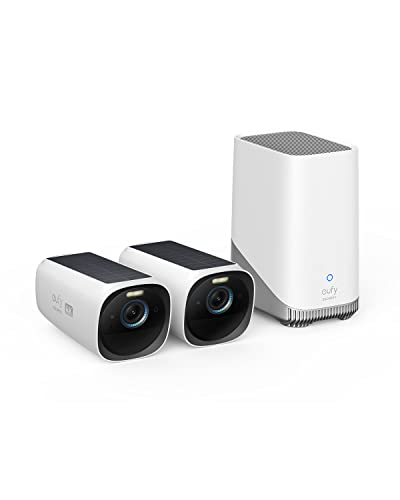
- Best outdoor system for two approaches: eufyCam S330 (eufyCam 3) 2-Cam Kit with HomeBase 3 — Check on Amazon
- Best single indoor camera: eufy Indoor Cam S350 with HomeBase 3 — Check on Amazon
- Best for the leftover angle: Wyze Cam v4 — Check on Amazon
- Best for a combined front approach: Ring Floodlight Cam Wired Pro — Check on Amazon
- Best wired door camera, no plan: TP-Link Tapo C120 — Check on Amazon
- Best for Alexa households: Blink Mini 2 — Check on Amazon
Read the full guide ↓
Disclosure: As an Amazon Associate, dailyhomedecorating.com earns from qualifying purchases. Links to Amazon on this page are affiliate links; they cost you nothing extra. Listing details such as price and availability change often, so check the current Amazon listing before you buy.
The search for the best security camera for small homes under $500 contains a trap, and it is the budget itself. Five hundred dollars is house-system money — enough for a four-camera wired recorder kit or a four-camera wire-free perimeter — but a small home does not have four sides worth watching separately. It has a front door and a back door that may be twenty paces apart, one main living space, and sightlines so short that a single well-placed indoor camera can see both entrances at once. The right system for a small home is therefore a small system, bought deliberately, and this guide’s first job is to talk you out of spending most of the ceiling you arrived with.
Sizing down changes which products make sense. Whole-perimeter kits fall away — not because they are bad, but because a four-camera perimeter on a two-viewpoint home means two cameras watching walls. What rises instead are the flexible components: a two-camera wire-free kit that covers front and back with one hub, a pan-and-tilt indoor camera that surveys the whole living space from one shelf, and inexpensive wired cameras that fill the one awkward angle the others miss. Small homes also enjoy two hidden advantages worth exploiting: Wi-Fi reaches every corner without heroics, so wire-free cameras stay connected, and cable runs for plug-in cameras are short, so wired reliability is easy to achieve.
The indoor/outdoor distinction still matters at small scale — arguably more, because each camera carries more of the total coverage. The outdoor picks here must earn their weather rating at the two approaches, front and back, and the indoor pick must cover a living space that is also, often, the hallway, dining room and office. Each review states plainly where its camera belongs, how it is powered, and where its footage lives. Subscriptions get the same plain treatment: in a small system the monthly plan can quickly cost more per year than a camera did, which makes the fee-free ecosystems in this guide disproportionately attractive for small homes.
One honest boundary before the products: cameras watch, record and alert; they are not an alarm service and nobody is dispatched when they detect motion. For a small home that limitation matters less than the marketing suggests — the real risks at this scale are a tested door handle, a parcel taken from the step, a pet or a pipe misbehaving while you are out — and awareness plus a clear recording answers all of them. Our short answer for most small homes: the eufy two-camera kit outside, the eufy S350 inside if the living space is open, a Wyze or Tapo for the leftover angle — a complete system, one app, no monthly fee, and most of this ceiling still in your pocket.
There is also a small-home-specific reason to resist the big kits: attention is a finite resource, and every camera is a stream of alerts competing for it. A four-camera perimeter on a large property earns its alerts because each camera watches a genuinely separate approach. On a small home, the third and fourth cameras mostly duplicate the first two’s news — the same visitor, from a worse angle, a second later. Alert fatigue is how camera systems quietly die: notifications muted, app unopened, footage unwatched. A correctly sized system stays interesting because nearly every alert it sends is about something that actually happened at a door you care about, and that usefulness, sustained over years, is worth more than any specification in this guide.
What follows is organised to make the sizing decision easy. The reviews are ordered as a small-home buyer should think: outdoor system first, indoor anchor second, then the specialists and gap-fillers, each labelled with where it works and what it costs to own beyond the box. The comparison table reduces the field to power, storage and subscription — the three facts that decide daily life with the system. And the buying guide walks the floor-plan exercise step by step, so by the final recommendation you should know your own system’s shape, whichever brands you choose for it.
A note on reading the prices, since this tier invites confusion: the ceiling describes the most you might spend, and the systems below sit at very different heights beneath it. That spread is information, not inconsistency. A small home whose two approaches face enclosed, overlooked gardens genuinely needs less hardware than one standing alone on a lane, and both are ‘under $500’ homes. Use the where-to-buy list as a menu for assembling your two or three viewpoints, check the current price of each component on Amazon, and judge the total of your actual basket — not the ceiling, and not any single camera’s price — against your own sense of value.
In this guide
Quick Picks
Short on time? Every pick here is matched to a small-home job — front, back, the one big room, or the awkward corner — and none of them requires buying coverage for rooms you do not have.
| Buyer type | Pick | Where it works | Why it stands out | Link |
|---|---|---|---|---|
| Best outdoor system for two approaches | eufyCam S330 (eufyCam 3) 2-Cam Kit with HomeBase 3 | Outdoor (wire-free, solar-assisted) | 2x 4K wire-free cameras, integrated solar panels, HomeBase 3 local storage, face recognition AI, no monthly fee | Check on Amazon |
| Best single indoor camera | eufy Indoor Cam S350 with HomeBase 3 | Indoor (plug-in, pan and tilt) | Dual cameras (4K wide + 2K telephoto), 360-degree PTZ, local storage via microSD or HomeBase 3, no monthly fee | Check on Amazon |
| Best for the leftover angle | Wyze Cam v4 | Indoor or outdoor (wired) | 2.5K QHD, IP65, wired, microSD local storage up to 512GB, optional Cam Plus subscription | Check on Amazon |
| Best for a combined front approach | Ring Floodlight Cam Wired Pro | Outdoor (hardwired floodlight camera) | 2K video, 3D Motion Detection, Bird’s Eye View, dual LED floodlights, siren, Ring subscription for saved video | Check on Amazon |
| Best wired door camera, no plan | TP-Link Tapo C120 | Indoor or outdoor (wired) | 2K QHD, IP66, wired, person/pet/vehicle detection included free, microSD local storage | Check on Amazon |
| Best for Alexa households | Blink Mini 2 | Indoor (plug-in) | 1080p HD, 143-degree view, built-in spotlight, Blink subscription for cloud clips and person detection | Check on Amazon |
How These Picks Were Chosen
The governing test was fit: could this pick justify itself in a home with two exterior approaches and one main living space? Products that only make sense at four-plus viewpoints were excluded from the pick list even when they anchor our general guide — a small-home reader who buys a perimeter kit has purchased charging chores and redundant footage, not security. What survived are two-camera systems, single cameras with room-filling coverage, and value cameras for single angles.
We then verified every product against its Amazon listing and maker documentation, and recorded each brand’s ownership terms in plain language: what records with no subscription, where footage lives, and what the optional plans actually add. In small systems those terms dominate the real cost of ownership, so they were weighted as heavily as resolution. Maker figures — battery endurance, weather ratings, storage limits — are quoted as maker claims throughout, with the conditions attached stated in the reviews rather than the fine print.
Finally, we favoured compactness in the unglamorous senses: one small hub instead of a recorder, cameras that do not dominate a small room’s walls, and systems a household can pack up and take to a larger home later without waste. A small-home system should be a foundation, not a dead end — every ecosystem here expands to house scale, so today’s two cameras can become the core of tomorrow’s five.
We also scored each pick on the quality of its night performance at small-home distances, because compact properties compress the geometry in the buyer’s favour: doors and paths are close, so even mid-range cameras render faces and clothing clearly at the ranges that matter, and spotlight-assisted colour footage is genuinely achievable across this whole pick list. That is another reason the flagship tier is unnecessary here — the expensive cameras’ extra reach and resolution solve problems a small plot does not present.
The 6 Best Security Cameras for Small Homes Under $500
eufyCam S330 (eufyCam 3) 2-Cam Kit with HomeBase 3
The eufyCam S330 (eufyCam 3) 2-Cam Kit with HomeBase 3 is the small home’s outdoor system in a single box, and its two-camera count is exactly right for the brief: one for the front approach, one for the back door, both reporting to a HomeBase 3 hub the size of a paperback that lives by the router. The cameras record 4K video on the maker’s specification, carry integrated solar panels on their top surfaces, a spotlight for colour night footage, and a maker weather rating for outdoor life. Mounting is two screws per camera and no cables at all, which in a small home means the whole exterior is covered in under an hour, with sightlines so short that the hub’s connection is never strained.
The ownership model suits a small budget’s logic. Footage lives on the hub’s local storage — expandable with a separate drive — and recording, person detection and face recognition all run with no monthly fee, so the system’s running cost is zero; eufy’s cloud plan exists only as an option. The conditions are the usual battery-camera physics, softened by scale: solar panels need mounting points that see daylight, and a deeply shaded back door will mean occasional USB charging; battery endurance is a maker claim for typical use, and a front camera on a busy street will need attention more often than a back camera on a quiet garden. In a small home, though, both cameras are a short walk away — no ladder epics, no forgotten corners of a large property.
Strategically, this kit is the foundation pick: the same hub accepts eufy’s indoor cameras, including the S350 reviewed next, so exterior and interior coverage can share one app, one storage box and one fee-free philosophy. Buyers whose small home has only one real approach — a terraced house with an enclosed back garden, say — can run one camera outside and keep the second as a spare or mount it in a garage, rather than inventing a viewpoint to justify it. Coverage honesty like that is what this budget tier is for.
Honest limitation: solar charging depends on the mounting point’s sunlight, and two cameras is a hard ceiling for this box — a home that later grows a side gate habit will be adding cameras, albeit easily.
Choose it if your small home has the classic two approaches, front and back, and you want them covered with no monthly fee. Skip it if both mounting points are permanently shaded, or you would rather wire two cameras and never think about batteries.
eufy Indoor Cam S350 with HomeBase 3
The eufy Indoor Cam S350 with HomeBase 3 is the indoor pick that understands small-home geometry best: in a compact house, the living space is the hallway, and the front and back doors often both open into or beside it. A fixed camera sees a slice of that space; the S350, with dual lenses — a 4K wide camera and a 2K telephoto with maker-rated zoom — on a pan-and-tilt body that rotates a full circle, surveys all of it from one shelf, then zooms to whichever door just opened. On-device AI separates people from pets for alerts, and plug-in power means it is always awake, which an interior camera covering this much of the home must be.
This bundle includes the HomeBase 3 hub, and for a small home that is a tidy piece of consolidation: one small box stores footage from the indoor camera today and from eufy outdoor cameras tomorrow, locally, with no monthly fee for recording or detection — or the camera can record to its own microSD card if you prefer. If you also buy the two-camera kit above, check whether you need the second hub; many households run the whole small system on one. Either way, the interior layer of a small home ends up fee-free, which keeps the system’s total running cost at zero — a meaningful property when the alternative is a plan that out-costs a camera every year or two.
The duties are privacy and placement. An indoor camera that can see both doors sees the household too, so agree its position and the app’s privacy schedule with everyone who lives there, keep it to the shared living space, and never bedrooms. It is strictly indoor equipment with no weather rating. And its moving lens, however wide its patrol, still looks one way at a time — in a small home that is rarely a real limitation, because the room it watches is the room everything passes through. Judged as the single interior eye of a compact house, it has no serious rival in this guide.
Honest limitation: indoor-only and outlet-dependent, and in a small home its wide view makes the household privacy conversation more important, not less.
Choose it if your living space is open-plan and both doors are visible from it — one camera genuinely covers your interior. Skip it if your rooms are small, separate and closed, where two cheap fixed cameras watch more honestly.
Wyze Cam v4
The Wyze Cam v4 is the small home’s problem-solver: the inexpensive wired camera for the one angle the system cameras cannot reach. A utility room, a garage interior, a side window over a narrow passage, the kitchen door in a house where the living camera faces the other way — every small home has one such blind spot, and the v4 covers it for a sliver of this ceiling. It records 2.5K QHD video on the maker’s specification, with colour night vision helped by a motion-activated spotlight, a built-in siren, and a housing the maker rates for indoor or outdoor use. Wired power means it never sleeps, and it can record continuously to a microSD card — in a small home, where the cable run to an outlet is rarely more than a few metres, that wired reliability is easy to claim.
Its storage terms are the friendly version of the industry split. Card recording works fully with no plan; the optional Cam Plus subscription adds cloud copies of events and the smart labels that identify people, pets and packages. Without it, alerts say ‘motion’ and nothing more, which at a contained viewpoint — a garage, a utility room — is usually information enough. Remember the card is a separate purchase and that card footage leaves with the camera if it is ever taken, so keep the v4 on secondary angles and let hub or cloud storage carry the main doors. At its price, those are acceptable terms for the coverage it adds.
For small homes specifically, the v4’s size is a virtue: it disappears on a shelf or high in a corner of a room where a larger camera would dominate. Its fixed lens means the view must be composed carefully at mounting, and its app is a step less polished than the big ecosystems’. But the arithmetic is the argument — a small home can add two of these for less than the cost difference between camera tiers elsewhere, turning a two-viewpoint system into a four-viewpoint one, and still finish far under the ceiling this guide started with.
Honest limitation: wired only, with footage stored on a card inside the camera — fine for secondary angles, not the storage you want guarding the front door’s evidence.
Choose it if you have one or two awkward angles — garage, utility room, side passage — to close out cheaply. Skip it if the angle has no outlet within cable reach.
Ring Floodlight Cam Wired Pro
The Ring Floodlight Cam Wired Pro is the one indulgence this guide permits a small home, and only in a specific situation: where the front approach is also the driveway, the parking spot and the main entrance all in one — a common small-home layout — a single hardwired unit that combines a 2K camera on the maker’s specification, dual LED floodlights, a siren, radar-based 3D Motion Detection and a Bird’s Eye View of a visitor’s path covers that combined approach more completely than any two ordinary cameras. Light does double duty in a small home, serving your own arrivals as much as deterring anyone else’s, and because the unit is hardwired it never sleeps or needs charging.
Its costs must be weighed at small-home scale, where they loom larger. Installation replaces an existing outdoor light fitting — an electrician’s visit if you are not confident with wiring — and Ring’s storage is cloud-only: saving and reviewing video requires a Ring subscription, with no local option. In a small system, that plan is a significant share of total running cost, forever, for one viewpoint. Households already in the Ring ecosystem, perhaps with a Ring doorbell, absorb it easily; households choosing fresh should compare it honestly with the eufy kit, which covers front and back with no fee at all.
The verdict for small homes is therefore conditional. If your front approach is genuinely your home’s whole security story — back enclosed, sides shared walls, interior covered by the S350 — the floodlight is a superb single purchase that anchors the system. If your back door is a real approach too, the two-camera kit protects more home for the commitment, and the floodlight becomes a later upgrade rather than the foundation. Either way, do not let it be your only camera while a back door stands unwatched: presence at the front is wasted if the rear is dark.
Honest limitation: hardwired installation plus a permanently subscription-dependent memory is a heavy commitment for one viewpoint in a small system — it must be the right viewpoint.
Choose it if your front approach combines door, drive and parking in one view and you want light and camera in a single fitting. Skip it if your back door needs covering first — the eufy kit does front and back for the commitment.
TP-Link Tapo C120
The TP-Link Tapo C120 is the wired alternative for the small home’s most important single viewpoint: the front door, covered from inside or under a porch, by a camera whose person, pet and vehicle detection runs on the device and is included free. That last point carries unusual weight at small scale, where a subscription for one or two cameras is the worst-value line in the budget. Video is 2K QHD with colour night vision from dual spotlights, the housing carries a maker weather-resistance rating for indoor or outdoor use, and a magnetic base makes indoor placement — and repositioning as you learn your home’s sightlines — a matter of seconds.
Storage is a microSD card in the camera, recording with no plan; TP-Link’s optional Tapo Care adds cloud storage for buyers who want an off-site copy. The free configuration is complete in a way cloud-first cameras’ free configurations are not, and for a small home built around one or two viewpoints, a C120 at the door plus the S350 or a Wyze inside is a fully fee-free system. Its footage does live on the card in the camera, so mount it out of easy reach and accept that trade knowingly at a primary viewpoint, or pair it with the hub-based eufy picks where the doors matter most.
The limits are a fixed view — it cannot pan, so compose the shot carefully — and wired power, which in a small home is seldom the hardship it is in a large one, since outlets are rarely far from doors. TP-Link’s two app families, Tapo and Kasa, are worth a check if your home already runs the other one. As the small home’s door camera for households allergic to subscriptions, the C120 is the most direct recommendation in this guide: sharp, weather-capable, honest about its storage, and free to own.
Honest limitation: fixed view and card-based storage, so aim it once, aim it well, and mount it high enough that the camera — and its footage — cannot simply be taken.
Choose it if you want the front door covered by a wired camera with free smart detection and no plan. Skip it if the door has no outlet in reach or you need the camera to sweep a room.
Blink Mini 2
The Blink Mini 2 closes this guide as the small home’s ecosystem convenience pick: a compact plug-in indoor camera with 1080p HD video, a wide maker-specified field of view that suits a small living room from a corner shelf, colour night view from a built-in spotlight, and two-way talk. In a compact home its wide view is well matched — one Mini 2 genuinely covers a small main room — and its stand needs no screws, so it can sit on a bookcase and move rooms as the household changes. For homes already running Alexa, it is the camera that simply joins the existing voice routines and screen displays.
Blink’s terms are the consideration. Saved clips and person detection are subscription features; without a Blink plan the Mini 2 offers live view and motion alerts, with local storage possible only through a separate Sync Module elsewhere in the system. In a small home the plan’s cost relative to a one-camera system is the highest in this guide, and the honest comparison is with the Tapo C120 and the eufy picks, which record and detect for free. Households already paying for Blink outdoors will find the marginal cost is zero and the convenience real; households starting fresh should let the comparison table make this decision.
Placement discipline matters: it is an indoor camera, usable outdoors only with a separate weather-resistant adapter and under cover, so it cannot take the back-door job from the eufy kit. Indoors, its small size and silent operation suit the shared living space of a compact home, though it lacks a physical privacy cover — the Ring Indoor Cam in our sibling guides is the pick for households that insist on one. As a simple, wide-view room camera inside an Alexa household’s existing plan, it earns its place; as a fresh small home’s only camera, the fee-free picks serve better.
Honest limitation: no local storage of its own and person detection behind the subscription, so as a standalone it is the most plan-dependent pick in this guide.
Choose it if your home already runs Blink and Alexa and the plan is already paid. Skip it if this would be your only camera — the Tapo or eufy picks record for free.
Comparison Table
In a small system, running cost per camera is the number that matters, so read the subscription column first and the specifications second.
| Pick | Where it works | Power | Storage | Subscription needed? |
|---|---|---|---|---|
| eufyCam S330 (eufyCam 3) 2-Cam Kit with HomeBase 3 | Outdoor (wire-free, solar-assisted) | Battery with integrated solar top-up | Local: HomeBase 3 hub | No — optional cloud plan only |
| eufy Indoor Cam S350 with HomeBase 3 | Indoor (plug-in, pan and tilt) | Plug-in mains power | Local: microSD card or HomeBase 3 | No — optional cloud plan only |
| Wyze Cam v4 | Indoor or outdoor (wired) | Plug-in wired power | Local microSD; optional cloud with plan | No — smarter labels need Cam Plus |
| Ring Floodlight Cam Wired Pro | Outdoor (hardwired floodlight camera) | Hardwired to household mains | Cloud only — no local storage | Yes — saved video needs a Ring plan |
| TP-Link Tapo C120 | Indoor or outdoor (wired) | Plug-in wired power | Local microSD; optional cloud plan | No — detection included free |
| Blink Mini 2 | Indoor (plug-in) | Plug-in mains power | Cloud; local only via separate Sync Module | Yes — clips and person detection need the plan |
How to Choose the Best Security Camera for Small Homes Under $500
Count your approaches, not your rooms. A small home’s camera plan is written on its exterior: the front approach, the back door, and any side access a person could actually use. Most compact homes have two. That count, plus one interior camera for the main living space, is your whole system — three viewpoints, occasionally four with a garage. Any product conversation that starts above that number is selling you coverage of places that do not exist, and every camera beyond your count costs money, charging effort and attention for the rest of its life.
Exploit the small home’s two advantages. First, Wi-Fi: in a compact house every mounting point is close to the router, so wire-free cameras hold strong connections that frustrate larger homes — the eufy kit performs at its best here. Second, short distances: plug-in cameras are rarely more than a short cable from an outlet, so wired reliability and continuous card recording are available almost anywhere, which is why the Wyze and Tapo picks punch above their price in this guide. A small home that uses neither advantage has paid for constraints it does not have.
Run the subscription arithmetic at small scale, because it changes the answer. A plan that is a rounding error on an eight-camera estate can exceed the hardware cost of a two-camera system within a couple of years. Fee-free ecosystems — eufy and Tapo here, Wyze in its local mode — keep a small system’s total cost of ownership close to its purchase price, which is why they dominate this pick list. Choose a plan-based camera only for a specific reason: an ecosystem you already pay for, or the floodlight’s unique combination at a combined front approach.
Keep the system in one app and one storage story. Two or three cameras in one ecosystem means one set of alerts to tune, one place footage lives, and one hub at most. It also means the system can move with you: small homes are often first homes, and every ecosystem in this guide scales up to a larger property, so the kit you buy now becomes the core of the next home’s system rather than a box in the loft. Buy brands you would keep, at counts you actually need.
Finally, redirect the leftover budget where small homes actually benefit. After three viewpoints are covered, the next best security spending is usually not a camera: it is the door hardware, the exterior bulb, the window locks, the small safe. This guide exists to sell you the right cameras, and the right cameras for a small home leave most of this ceiling unspent — treat that as the guide succeeding, not as a reason to keep shopping.
One practical check before ordering anything: stand where each camera will go and look at what it will see, at the times it matters. Small homes have short sightlines and close boundaries, so a badly aimed wide lens can spend its life filming the side of your own shed or the neighbour’s fence while missing the path. Check the view at night as well as midday — a porch light or street lamp in frame can dazzle a sensor that performs beautifully in daylight. Ten minutes of this, phone camera in hand at the mounting height, prevents the most common small-home disappointment: a sharp, expensive picture of the wrong thing.
Small Homes, Close Neighbours: Camera Manners at Short Range
Compact homes stand close to other compact homes, and a camera that would be unremarkable on a large plot can frame a neighbour’s entire garden from a small one. Angle outdoor cameras down at your own doors and paths, use the apps’ privacy masking to blank out neighbouring property, and keep audio recording off where conversations from next door carry — in many places recording them raises legal issues video alone does not. A short conversation with the neighbours when you install is worth more than any setting: people who know a camera watches your back door, and only your back door, tend to regard it as shared security rather than surveillance.
Inside, the small home’s openness cuts both ways. A living-space camera covers more of your life in a compact house, including guests on the sofa and children doing homework, so the privacy routine — schedules, app modes, telling visitors — matters more, not less, than in a big house where a camera can be confined to a hallway. Set the routine on day one, keep cameras out of bedrooms absolutely, and let the system watch the doors and the empty house, which was always the job.
Retention deserves a thought at this scale too. A small system’s storage — one hub, or a card per camera — cycles through its history at a speed set by how busy your doors are, and a quiet small home keeps a surprisingly long archive while a busy one overwrites in days. Neither is wrong, but know which you have: check, a month in, how far back your footage actually reaches, and expand the hub’s storage or fit larger cards if the window is shorter than your peace of mind requires. Discovering your retention window is three days, on the day you need last week’s clip, is the most preventable disappointment in camera ownership.
Common Buying Mistakes
Buying a perimeter kit for a two-door home. Four cameras on a small house means redundant views, double the charging and footage nobody watches. Match the camera count to the approach count.
Spending the ceiling because it is there. A small home’s complete system costs a fraction of this budget. The unspent remainder is not a failure to maximise; it is the correct outcome.
Letting a plan out-cost the cameras. At small scale a subscription can exceed the hardware cost within a couple of years. Do the arithmetic before choosing a plan-based pick for a one- or two-camera system.
Putting the indoor camera in the wrong room. The interior camera belongs in the shared living space the doors open into — not a bedroom, and not a room nobody passes through. One right room beats three wrong ones.
Filming the neighbours by accident. Wide lenses at short range capture next door’s garden as easily as your path. Angle down, mask privacy zones, and check the view from the app before tightening the mount.
Forgetting the system must move house someday. Small homes are often first homes. Favour screw-and-shelf mounting and ecosystems that scale, so the system you buy now is the foundation of the next home’s, not a write-off.
Final Recommendation
If you read nothing else: the small-home system to buy is eufyCam S330 (eufyCam 3) 2-Cam Kit with HomeBase 3 outside and eufy Indoor Cam S350 with HomeBase 3 inside — two approaches and the main living space covered, one hub, one app, no monthly fee, and most of this ceiling unspent. That is not a compromise version of a bigger system; for a compact home it is the complete one.
Add a Tapo C120 if you want the front door wired with free detection, a Wyze Cam v4 for the garage or utility angle, and consider the Ring floodlight only where one combined front approach truly dominates your home’s layout. Choose the Blink Mini 2 when an existing Blink plan makes it effectively free to run. Then stop shopping and spend an hour on placement, privacy settings and the neighbours conversation — in a small home, that hour protects more than any fourth camera would.
Frequently Asked Questions
How many cameras does a small home actually need?
Usually three viewpoints: the front approach, the back door, and the main living space. Many small homes manage with two — an outdoor camera and an indoor one that can see both doors. Add a fourth only for a genuinely separate risk, like a detached garage. More cameras than approaches means redundant footage and extra charging, not extra security.
Is $500 too much to spend on cameras for a small home?
As a spending target, yes — treat it as a ceiling. The complete systems recommended in this guide cost a fraction of it: a two-camera outdoor kit, an indoor pan-and-tilt, and a value camera for the leftover angle. The rest of the budget serves a small home better as door hardware, lighting or savings than as cameras watching walls.
Should a small home choose local or cloud storage?
Local storage suits small systems particularly well: one hub or a card per camera, no monthly fee, and footage that keeps recording if the internet drops. Cloud storage’s main advantage — footage surviving the theft of your equipment — matters less when the plan would cost more than a camera every year or two. If you do choose a cloud pick, choose it for a specific feature, knowing the plan is a permanent cost.
Can one indoor camera really cover a small home?
In an open-plan small home, often yes: a pan-and-tilt camera like the eufy S350 in the living space can survey the whole room and both doors if they open into it. In a small home with closed, separate rooms, no single camera covers them — but two inexpensive fixed cameras usually finish the job. Walk your sightlines from the proposed shelf before deciding; the floor plan, not the brochure, answers this question.
Do small homes need outdoor cameras at all?
If the home has an approach worth watching — a front path, a back door opening on a garden or alley — yes, at least one, because the doorstep is where deliveries, visitors and problems arrive. Homes whose only entrance opens off a shared internal corridor are the exception, where an indoor camera aimed at the door from inside does the whole job. Match the system to the building you actually live in.
Will these cameras work if I move to a bigger home?
Yes — that portability is designed into this pick list. Every ecosystem here expands: the eufy hub accepts more cameras, the value picks become secondary angles, and nothing is wired into the building. A small-home system bought from this guide becomes the core of a larger home’s system, which is one more reason to buy the right two or three cameras now rather than a cheap dead-end set.
Related Guides
Comparing other household types or the general guide? These sibling guides cover the same camera group at the same ceiling.


