Where to buy
Shopping for the best security camera for apartments under $500? Treat that figure as a ceiling, not a target — and for renters it is a very high ceiling. An apartment needs two or three viewpoints, not eight, and every pick below is renter-safe: no hardwiring, no cable runs through walls, nothing that costs you a deposit. The money this budget leaves unspent is deliberate, and the guide explains where a renter’s remaining dollars actually earn their keep: storage, a second angle, and gear that moves with you to the next lease.
- Best for balconies and exterior doors: eufyCam S330 (eufyCam 3) 2-Cam Kit with HomeBase 3 — Check on Amazon
- Best indoor camera for open-plan units: eufy Indoor Cam S350 with HomeBase 3 — Check on Amazon
- Best value second viewpoint: Wyze Cam v4 — Check on Amazon
- Best no-subscription door camera: TP-Link Tapo C120 — Check on Amazon
- Best for Alexa households: Blink Mini 2 — Check on Amazon
- Best for privacy in shared homes: Ring Indoor Cam (2nd Gen) — Check on Amazon
Read the full guide ↓
Disclosure: As an Amazon Associate, dailyhomedecorating.com earns from qualifying purchases. Links to Amazon on this page are affiliate links; they cost you nothing extra. Listing details such as price and availability change often, so check the current Amazon listing before you buy.
The search for the best security camera for apartments under $500 starts with a confession: apartments do not need five hundred dollars of camera. A house might spread that budget across a driveway, two doors, a garden and a garage. An apartment has a front door, a living space, maybe a balcony, and that is close to the whole map. Two or three well-chosen cameras cover it completely, which is why this guide treats the budget as a ceiling to stay well under, not a target to hit — and why the most valuable thing it can do is stop you buying a house-sized system for a renter-sized problem.
Renting rewrites the camera rulebook in ways product pages rarely mention. You cannot hardwire a floodlight camera into a junction box you do not own. You cannot run Ethernet cable through walls for a recorder system, however good that system is — and the best wired kits in our general guide are exactly that good, which is why they are discussed honestly in this guide’s advice sections but appear in the pick list only as a warning. What you can do is mount with screws in some leases, adhesive or a shelf in stricter ones, plug into the outlets you have, and take everything with you when you leave. Every pick below passes that test: battery, solar or plug-in power, no permanent modification, nothing left behind but perhaps two small screw holes your lease may not even prohibit.
Apartments also change what the cameras are for. The front door of an apartment is usually an interior hallway door, not a street-facing entrance, so the classic outdoor camera’s job — watching an approach across a yard — shrinks to watching a door, a balcony, a parking spot or a shared corridor where your building’s rules allow it. Many leases and building policies restrict cameras in common areas and cameras that record neighbours, so check yours before mounting anything outside your own door; a camera inside your unit, aimed at your own entrance from within, is almost always the uncontroversial answer. Audio recording is restricted more tightly than video in some places, which is another reason to know your local rules and your lease before enabling every feature.
Storage and subscriptions matter to renters for a specific reason: portability of cost. A camera ecosystem with no monthly fee — footage on a hub or a card inside your unit — moves to the next apartment with no account surgery and no plan to renegotiate. A cloud ecosystem moves just as easily, but the plan follows you too, and renters who change homes often should count a subscription as a recurring household bill, not a camera feature. Both camps appear below, labelled plainly, because the right answer depends on whether you value a footage copy that survives a stolen camera or a system that costs nothing per month.
One more apartment truth: a camera is not a lock, an alarm or a doorman. These devices watch your door and your rooms, record what happens, and send alerts to your phone. They do not dispatch anyone and they do not replace the building’s own security or a decent lock on your door. What they genuinely deliver — a record of who came to your door, a check on a pet or a delivery, evidence if something goes wrong — is worth having, and at apartment scale it is worth having for far less than this ceiling. Our short answer: start with the eufy two-camera kit if you have a balcony or exterior door you are allowed to watch, the eufy S350 if your world is entirely indoors, and fill gaps with the Wyze or Tapo value picks. The Ring and Blink indoor cameras suit renters already living in those ecosystems.
A final framing note before the picks. Apartment readers sometimes apologise for their smaller brief, as if a two-camera system were a lesser version of a house system. It is not: it is a correctly sized one. The risks an apartment actually faces — an unlocked door tested by a stranger, a parcel taken from a threshold, a leak or a pet incident while you are out — are all visible from one or two viewpoints, and the buildings’ own layers, from lobby doors to neighbours within earshot, already do part of the work a house system must do alone. Buy the two or three cameras that match your actual floor plan, set them up carefully, and let the rest of this generous budget stay in your account for the expenses renting reliably produces.
In this guide
Quick Picks
Short on time? Every pick here is renter-safe — no hardwiring, no through-wall cables — and matched to the apartment situation it handles best.
| Buyer type | Pick | Where it works | Why it stands out | Link |
|---|---|---|---|---|
| Best for balconies and exterior doors | eufyCam S330 (eufyCam 3) 2-Cam Kit with HomeBase 3 | Outdoor (wire-free, solar-assisted) | 2x 4K wire-free cameras, integrated solar panels, HomeBase 3 local storage, face recognition AI, no monthly fee | Check on Amazon |
| Best indoor camera for open-plan units | eufy Indoor Cam S350 with HomeBase 3 | Indoor (plug-in, pan and tilt) | Dual cameras (4K wide + 2K telephoto), 360-degree PTZ, local storage via microSD or HomeBase 3, no monthly fee | Check on Amazon |
| Best value second viewpoint | Wyze Cam v4 | Indoor or outdoor (wired) | 2.5K QHD, IP65, wired, microSD local storage up to 512GB, optional Cam Plus subscription | Check on Amazon |
| Best no-subscription door camera | TP-Link Tapo C120 | Indoor or outdoor (wired) | 2K QHD, IP66, wired, person/pet/vehicle detection included free, microSD local storage | Check on Amazon |
| Best for Alexa households | Blink Mini 2 | Indoor (plug-in) | 1080p HD, 143-degree view, built-in spotlight, Blink subscription for cloud clips and person detection | Check on Amazon |
| Best for privacy in shared homes | Ring Indoor Cam (2nd Gen) | Indoor (plug-in) | 1080p HD, manual privacy cover, colour night vision, Ring subscription required to save video | Check on Amazon |
How These Picks Were Chosen
The first filter was the lease. Any pick requiring hardwired power, junction-box mounting or cable runs through walls was excluded from the pick list, however capable it is for homeowners; that is why you will not find a PoE recorder kit or a wired floodlight camera among the six, even though both anchor our general under-$500 guide. What survived is battery, solar-assisted or plug-in equipment that a renter can install with, at most, a couple of small screws — and in several cases with none at all.
The second filter was apartment scale. Picks had to make sense at two or three viewpoints: an entrance, a main room, a balcony. Whole-house kits were only admitted where a smaller configuration exists, which is why the eufy system here is the two-camera kit rather than its four-camera sibling. A renter who buys coverage for rooms they do not have has not bought security; they have bought storage problems and charging chores.
Third, we verified each product against its Amazon listing and maker documentation, and recorded the subscription position of every brand in plain terms: what records for free, what needs a plan, and where footage lives if a camera is taken. Maker figures — battery endurance, weather ratings, storage limits — are quoted as maker claims, and the reviews say so where a figure is a best case. Finally, we favoured systems a renter can pack into a moving box and reinstall in an afternoon, because an apartment camera that cannot survive a change of address fails the renter’s real test.
We also deliberately left headroom in the budget rather than filling it. Several complete apartment systems can be assembled from these picks for roughly half the ceiling, and a guide that invented reasons to spend the remainder on more cameras would be serving the budget rather than the reader. Where extra spending genuinely helps a renter — a larger memory card, a spare battery, a second angle on the door — the reviews name it; where it does not, this guide says so and stops.
The 6 Best Security Cameras for Apartments Under $500
eufyCam S330 (eufyCam 3) 2-Cam Kit with HomeBase 3
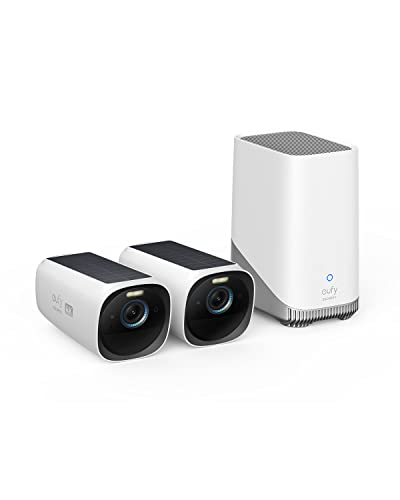
The eufyCam S330 (eufyCam 3) 2-Cam Kit with HomeBase 3 is the closest a renter can get to a house-style perimeter without touching a wire. Two battery cameras with 4K video on the maker’s specification and integrated solar panels mount with screws to a balcony rail post, a door frame surround or an exterior wall where your lease allows fixings, and report to a HomeBase 3 hub that sits inside your unit next to the router, storing footage locally. For an apartment with a balcony, a terrace or a ground-floor patio — the spaces where apartment security actually gets tested — this is the only pick here that watches the outside properly, with a maker weather rating for outdoor exposure and a spotlight for colour footage after dark.
The money story suits renters precisely. Recording, person detection and the hub’s face-recognition features run on local storage with no monthly fee, so the system costs nothing to keep when money is tight between leases, and the hub’s built-in storage expands with a separate drive if your history needs grow. eufy offers an optional cloud plan, but nothing essential is behind it. The honest conditions are sunlight and permission: the solar panels only top the batteries up where the mounting point sees real sun, so a north-facing balcony under a deep overhang will still mean occasional USB charging, and any exterior mounting in a managed building should be cleared against your lease first — two screw holes are trivial in some buildings and a deposit argument in others.
Inside the same ecosystem sits the S350 reviewed next, which shares this hub and app, so a renter can build door-plus-room coverage on one no-fee platform and carry the whole system to the next apartment in a single box. Battery endurance is a maker claim based on typical use; a camera watching a busy shared corridor will need charging far more often than one watching a quiet balcony, which is one more reason to aim exterior cameras at your own spaces rather than common traffic. Judged as the renter’s outdoor option, nothing else in this guide comes close.
Honest limitation: it still needs screw mounting and a lease that permits exterior fixtures, and its solar charging fails quietly on shaded balconies, turning a wire-free camera into a periodically-wired one.
Choose it if you have a balcony, patio or exterior door you are allowed to mount on and want outdoor coverage with no monthly fee. Skip it if your lease bans exterior fixtures entirely — build indoors with the S350 instead.
eufy Indoor Cam S350 with HomeBase 3
The eufy Indoor Cam S350 with HomeBase 3 is the apartment indoor camera we would buy first, because it understands the apartment’s core geometry problem: one open-plan room that is simultaneously kitchen, living room and office, with the front door opening straight into it. Its dual lenses — a 4K wide camera and a 2K telephoto with maker-rated zoom — sit on a pan-and-tilt body that rotates a full circle, so from one shelf it can survey the whole space, then zoom to the door when a delivery arrives or to the pet bed when you are out. On-device AI tells people from pets for alerts, and as a plug-in camera it never sleeps or needs a battery swap.
This bundle includes the HomeBase 3 hub, which does two jobs for a renter. It stores footage locally — or the camera can record to its own microSD card — with no monthly fee for recording, detection or playback, and it becomes the base station for eufy battery cameras later, so the S350 bought today is the foundation of the two-camera outdoor kit above if a future apartment adds a balcony. eufy’s optional cloud plan exists for buyers who want off-site copies, but the system’s daily life is fee-free, which keeps a renter’s recurring bills exactly where they were before the camera arrived.
The placement conversation matters more here than any specification. An indoor camera belongs in shared living space aimed at entrances, not in bedrooms or anywhere a guest would reasonably expect privacy, and the app’s privacy controls and schedules should be configured on day one — flatmates and partners are stakeholders in this purchase, not bystanders. It is also strictly indoor equipment with no weather rating, so it cannot migrate to a balcony. Within those boundaries, one S350 covers an apartment’s interior more completely than two fixed cameras at the same total cost, which is why it anchors this guide.
Honest limitation: one moving lens can only look one way at a time, and it needs an outlet and a shelf or mount with a commanding view — a badly placed S350 is just an expensive fixed camera.
Choose it if your apartment is open-plan and you want one indoor camera to cover the whole living space with no subscription. Skip it if your rooms are separate and closed — two cheaper fixed cameras will watch them better.
Wyze Cam v4
The Wyze Cam v4 is the renter’s gap-filler: inexpensive enough to buy in pairs, small enough to sit on a bookshelf or mount with a single screw, and flexible enough to work indoors or — where a lease and an outlet allow — under a balcony cover or porch. It records 2.5K QHD video on the maker’s specification, with colour night vision helped by a motion-activated spotlight, a built-in siren, and a housing carrying a maker weather-resistance rating. Because it is plug-in powered it never sleeps through the start of an event, and it can record continuously to a microSD card, which makes it a surprisingly serious camera for the smallest line in this budget.
Wyze’s subscription split is the fairest of the cloud-leaning brands. Local card recording works with no plan: events and continuous footage stay on the camera and play back in the app. The optional Cam Plus plan adds cloud-stored event video and the smart labels that identify people, pets, packages and vehicles. Without it, alerts simply say motion — acceptable at a door you mostly monitor for deliveries, less acceptable where you need to ignore a roommate’s cat. Budget the memory card as part of the purchase, since the camera records nothing without one, and note that card footage leaves with the camera if it is ever taken, the structural weakness of all card-based storage.
For apartment layouts, the v4’s best roles are the second and third viewpoints the main camera cannot see: the kitchen window over a fire escape, the hallway by the door, the room a pet actually lives in. Its limits are a fixed lens — one camera, one composed view — and the cable, which must reach an outlet without crossing a walkway. Renters in studios should also know it has no physical privacy shutter, so privacy depends on the app’s controls and unplugging, a point in favour of the Ring Indoor Cam below for the privacy-conscious. As pure coverage per dollar, though, nothing in this guide beats it.
Honest limitation: wired power only and no physical privacy cover, and its smartest detection labels require the optional Cam Plus plan even though local recording does not.
Choose it if you need a second or third viewpoint cheaply, or a first camera for a small unit with an outlet near the door. Skip it if the viewpoint has no outlet in cable reach or you want a physical lens cover.
TP-Link Tapo C120
The TP-Link Tapo C120 earns its place in an apartment guide on one distinction: its person, pet and vehicle detection is handled on the camera and included without a subscription, which is the feature rival brands most often lock behind a plan. For a renter watching a front door, that means the alert that matters — a person at the door, not a passing shadow — is free forever. Video is 2K QHD with colour night vision from dual spotlights, the housing carries a maker weather-resistance rating a step above the Wyze on paper, and a magnetic base with a metal plate in the box makes indoor placement unusually renter-friendly: stick the plate, and the camera can move rooms as your layout changes.
Storage follows the same no-toll philosophy. The C120 records to a microSD card locally with no plan required, and TP-Link’s optional Tapo Care subscription adds cloud storage and richer notifications for buyers who want an off-site copy. Because the detection intelligence is not paywalled, the free configuration here is genuinely complete — a meaningful difference from cameras whose recordings or smarts stop when a trial ends. For a renter building a strict no-monthly-fee apartment, a C120 at the door and an S350 or E220-class camera in the living space is the most straightforward combination in this guide.
The compromises are physical. It is wired, so placement follows outlets; the view is fixed with no pan or tilt, so wide rooms may need two; and TP-Link runs two app ecosystems, Tapo and Kasa, so check which one your other smart gear uses before building around it. It also lacks the eufy system’s hub, so footage lives on the card in the camera. None of that diminishes its central appeal for this audience: sharp video, honest weather sealing, and detection smarts that stay free after purchase — a combination renters on a budget should weight heavily.
Honest limitation: fixed view and wired power, so it cannot follow action across a room or live anywhere an outlet cannot reasonably reach.
Choose it if avoiding subscriptions entirely is your first rule and your door has an outlet nearby. Skip it if you need pan-and-tilt coverage of a whole open-plan room from one camera.
Blink Mini 2
The Blink Mini 2 is the indoor half of the Blink ecosystem, included here because so many apartment households already live in Amazon’s Alexa world, where this camera is the path of least resistance. It is a compact plug-in camera with 1080p HD video, a wide maker-specified field of view that covers a typical living room from a corner shelf, colour night view from a built-in spotlight, and two-way talk. Its stand doubles as a wall mount and needs no screws at all in shelf mode, which makes it the most literally deposit-safe pick in this guide: it can watch a room for a year and leave no trace when the lease ends.
Blink’s subscription terms are the price of that convenience, and they are the strictest of the indoor picks here. Saved cloud clips and person detection are Blink Subscription Plan features; without the plan, the Mini 2 provides live view and motion alerts, with local clip storage possible only through a compatible Sync Module elsewhere in the system — hardware a Mini-only household usually does not own. Renters should therefore price this camera as hardware plus a plan, and compare it honestly against the Tapo and eufy picks whose recording and detection are free. Many Alexa households happily pay for the polish and the single-app life; the mistake is only in not knowing.
One placement warning matters more than any feature: the Mini 2 is an indoor camera. Blink offers outdoor use only with a separate weather-resistant power adapter, and even then it belongs under cover, not on a balcony rail in the rain — apartment readers tempted to stretch it outside should step up to the eufy kit instead. Used as intended, it is a discreet, silent, capable room camera whose wide view suits small spaces, and for a studio renter who wants one camera, one app they already have, and zero installation, it is a defensible first buy — as long as the plan is part of the decision.
Honest limitation: no local storage of its own and person detection behind the Blink subscription, so the free version of this camera is a live-view device more than a recording one.
Choose it if your home already runs on Alexa and Blink and you accept the plan as part of the product. Skip it if you want recordings and smart detection with no monthly fee.
Ring Indoor Cam (2nd Gen)
The Ring Indoor Cam (2nd Gen) is the privacy-first indoor pick, and in shared apartments that is not a niche virtue. Its defining feature is a manual privacy cover you physically swing over the lens, which also disconnects the microphone — a hardware answer to the flatmate question every indoor camera raises. Behind the cover it is a competent plug-in camera: 1080p HD video, colour night vision, two-way talk and motion alerts, in the Ring app that households with a Ring doorbell already use. On a shelf aimed at the apartment’s entrance, it watches the door and nothing else, and when people are home, the cover closes with a click everyone in the room can see and trust.
Ring’s storage position is the counterweight. This camera has no local storage at all: saving, reviewing and sharing video requires a Ring subscription, and without one it is a live-view and alerts camera. That is the same dependency as the Ring floodlight in our general guide, softened only by the plan’s coverage of other Ring devices a household may own. Renters should weigh it directly against the Tapo C120, which records locally and detects people for free, and ask whether the privacy cover and the Ring ecosystem are worth a permanent monthly line item. For households already paying for Ring at a doorbell, adding this camera costs no extra plan and the calculus flips in its favour.
As apartment equipment it is otherwise easy to live with: plug-in power, a small footprint, a mount that works on a shelf without screws, and an app with mature privacy scheduling for households that prefer software controls on top of the physical cover. It is indoor-only, with no weather rating, and its fixed lens covers one view. What it sells is trust inside the home — the one camera in this guide a sceptical flatmate is most likely to accept — and for shared rentals, that acceptance can be worth more than any specification on the box.
Honest limitation: recorded video is entirely subscription-dependent, with no local storage option, so a lapsed plan leaves you with live view only.
Choose it if a physical privacy cover will make an indoor camera acceptable in your shared home, or you already pay for Ring. Skip it if you want fee-free recording — the Tapo and eufy picks do that.
Comparison Table
For renters, the columns that matter are how each pick is powered, where its footage lives, and what stops working if you never pay a subscription — because a plan is a bill that follows you to every future address.
| Pick | Where it works | Power | Storage | Subscription needed? |
|---|---|---|---|---|
| eufyCam S330 (eufyCam 3) 2-Cam Kit with HomeBase 3 | Outdoor (wire-free, solar-assisted) | Battery with integrated solar top-up | Local: HomeBase 3 hub inside your unit | No — optional cloud plan only |
| eufy Indoor Cam S350 with HomeBase 3 | Indoor (plug-in, pan and tilt) | Plug-in mains power | Local: microSD card or HomeBase 3 | No — optional cloud plan only |
| Wyze Cam v4 | Indoor or outdoor (wired) | Plug-in wired power | Local microSD; optional cloud with plan | No — smarter labels need Cam Plus |
| TP-Link Tapo C120 | Indoor or outdoor (wired) | Plug-in wired power | Local microSD; optional cloud plan | No — detection included free |
| Blink Mini 2 | Indoor (plug-in) | Plug-in mains power | Cloud; local only via separate Sync Module | Yes — clips and person detection need the plan |
| Ring Indoor Cam (2nd Gen) | Indoor (plug-in) | Plug-in mains power | Cloud only — no local storage | Yes — saved video needs a Ring plan |
How to Choose the Best Security Camera for Apartments Under $500
Read your lease before you read another product page. The clauses that matter are exterior fixtures, drilling, and cameras in or facing common areas. Many buildings allow interior cameras without discussion, restrict anything mounted outside your door, and prohibit recording shared corridors or neighbours’ doors. Knowing your building’s position converts a pile of maybes into a short list: interior-only, balcony-allowed, or door-mount-allowed. If the lease is silent and the building is managed, ask — a one-line email is cheaper than a deposit dispute.
Map the apartment’s real viewpoints, which are fewer than you think. The entrance from inside is the essential one: a camera in the living space aimed at your own front door records entries, deliveries left inside the door, and anyone who should not be there, all without touching common areas. Add the main living space if it is separate, a balcony or patio if you have one, and a parking spot only if your building permits it and the camera can reach it. Most apartments are fully covered at two or three viewpoints, which is why this budget should remain mostly unspent.
Choose power by placement, not preference. Interior viewpoints near outlets suit plug-in cameras, which never sleep and can record continuously to a card. A balcony without an outlet suits a battery or solar-assisted camera, accepting event-only recording and a charging routine shaped by how much sun the balcony actually gets — be honest about overhangs and orientation, because a solar panel in permanent shade is just a battery camera with extra steps. Avoid any solution that runs a cable through a window or door seal you do not own.
Decide the subscription question as a renter, which means deciding it as a recurring bill. No-fee ecosystems — eufy and Tapo here — record and detect without a plan, and their hubs and cards move house as easily as the cameras. Plan-based ecosystems — Ring and Blink — offer polish and off-site footage, at a monthly cost that continues across every address you live at while you own the cameras. Neither is wrong; what is wrong is discovering the dependency after a trial expires, in a new apartment, with a camera that no longer records.
Finally, buy for the next apartment too. Favour cameras that mount without damage, systems whose hub is small and router-agnostic, and ecosystems you would keep in a house later — the eufy pair in this guide is deliberately chosen so an apartment system becomes the core of a house system rather than a dead end. Keep the boxes and mounts, label the cables, and your security system becomes one of the easiest things you own to move.
Spend what remains on the unglamorous layer: light and locks. Once two or three viewpoints are covered, the next most effective apartment purchases are rarely more cameras. A brighter bulb or a motion light by the door, a door reinforcement strike or an additional lock your lease permits, and a small safe for documents all change your actual security more than a fourth lens pointed at the same hallway. This guide’s job is cameras, but an honest guide at this budget should say plainly when the camera shopping is done — and for nearly every apartment, it is done well before the ceiling is reached.
Apartment Camera Etiquette: Flatmates, Guests and Neighbours
An indoor camera in a shared home is a household decision, not a personal gadget purchase. Flatmates and partners should know where cameras are, what they record, and how privacy modes work; guests should not discover a lens by accident. Keep cameras out of bedrooms and bathrooms without exception, use schedules and privacy covers when people are home, and treat audio recording with extra care — several jurisdictions restrict recording conversations more tightly than video, and building rules may too. A camera that makes your own home feel surveilled has failed at its job, which is to make the home feel safer.
Point exterior cameras at your own spaces only. A balcony camera aimed at your own railing and door is defensible anywhere; one that happens to frame a neighbour’s balcony or the corridor outside other units invites complaints, building sanctions and, in some places, legal trouble. Use motion zones and privacy masking where the app offers them, angle mounts downward onto your own threshold, and if a neighbour raises a concern, adjust first and argue later — the camera’s value is in watching your door, not in winning a dispute about the hallway.
Deliveries deserve a specific mention, because they are the most common reason apartment residents buy a camera at all. A camera inside your door records a parcel only after it crosses your threshold; it cannot watch a package left in a shared lobby, and in most buildings you may not mount one there. The practical renter answers are a camera covering your own door from inside, delivery instructions that route parcels to a locker or front desk where your building has them, and alerts set sensitive enough to catch the door opening. Set expectations accordingly: these cameras document your doorway, and that is a genuinely useful thing, but no indoor camera can guard a shared mail room it is not allowed to see.
Common Buying Mistakes
Buying a house system for an apartment. Four-camera kits and recorder systems are built for perimeters renters do not have and installations leases do not allow. Apartment coverage is two or three viewpoints; spend on those and keep the change.
Hardwiring anything. A wired floodlight or doorbell installed in a rented unit can cost the deposit and the landlord relationship. If it needs an electrician, it does not belong in this guide or in your lease.
Mounting in common areas without checking. Corridors, stairwells and shared entrances are usually the building’s domain, and cameras there can breach the lease even when your intentions are good. Watch your own door from inside instead.
Forgetting the flatmate conversation. An unannounced indoor camera corrodes trust faster than any intruder. Agree placement, privacy modes and who has app access before the camera goes on the shelf.
Paying for a plan you did not choose. Trial subscriptions convert quietly. If you buy a plan-based camera, set a reminder before the trial ends and decide deliberately; if you would rather never decide, buy a no-fee ecosystem.
Ignoring the move-out test. Every camera, mount and cable should be removable in an afternoon without damage. If a setup cannot pass that test, it is a homeowner setup wearing a renter’s budget.
Final Recommendation
If you read nothing else: most apartment readers should buy eufyCam S330 (eufyCam 3) 2-Cam Kit with HomeBase 3 for any balcony or exterior door the lease allows, or start indoors with eufy Indoor Cam S350 with HomeBase 3 if the unit is entirely interior — both run on the same hub, the same app and no monthly fee, and together they cover a typical apartment completely for well under this ceiling.
Add a Wyze Cam v4 or Tapo C120 for the viewpoint the main camera cannot see, choosing the Tapo if free person detection matters and the Wyze if budget does. Choose the Blink Mini 2 or Ring Indoor Cam only when you already live in those ecosystems or — in the Ring’s case — when its physical privacy cover is what makes an indoor camera acceptable in your shared home. And keep the rest of the budget unspent: in an apartment, the best security purchase after two good cameras is usually a better lock, not a fourth lens.
Frequently Asked Questions
Can I install security cameras in a rented apartment?
Interior cameras that sit on shelves or mount without damage are permitted in most leases, but exterior fixtures, drilling and anything recording common areas are often restricted. Check your lease clauses on fixtures and alterations, and building rules on shared spaces, before mounting anything outside your own door. When in doubt, an indoor camera aimed at your entrance from inside is the option almost no lease prohibits.
Will a camera system cost me my deposit?
Only if it damages the property or breaches the lease: hardwired fittings, drilled exterior mounts and holes beyond what your lease allows are the risks. Every pick in this guide is battery, solar or plug-in equipment that installs with at most small screws — and several need none — precisely so a renter can remove it all on moving day and leave the unit as it was found.
Do apartment cameras need a subscription?
Not necessarily. The eufy and Tapo picks here record locally and include their detection without any monthly fee. Ring and Blink cameras record to the cloud and need their plans for saved video and smart detection; without a plan they are mainly live-view devices. Decide which model you prefer before buying, because the plan is a bill that follows you to your next address.
Where should I put a camera in a small apartment?
One camera in the main living space, aimed to include the front door, covers most of what matters in a small unit: entries, deliveries and the room itself. A pan-and-tilt model like the eufy S350 covers an open-plan space from one shelf; a fixed camera like the Tapo C120 suits a door with an outlet beside it. Add a second camera only for a space the first cannot see, such as a balcony or a separate bedroom hallway.
Can I point a camera at my apartment door from the hallway?
That depends on your building. Hallways are common areas in most managed buildings, and cameras there — especially ones that also capture neighbours’ doors — are commonly restricted by lease or house rules, and audio recording can raise separate legal issues. The widely accepted alternative is a camera inside your unit aimed at your own door, which records everyone who enters without recording the corridor.
What happens to my cameras when I move?
That is the advantage of every pick here: they unplug, unscrew or lift off their mounts and move with you. Hub-based systems keep their settings and footage; you reconnect the hub to the new router and remount the cameras in an afternoon. Plan-based cameras move just as easily, though the subscription continues. Nothing in this guide is wired into the building, so nothing gets left behind.
Related Guides
Comparing budgets or covering a different kind of home? These sibling guides stay inside the same security camera group at the same ceiling.


