Where to buy
Check the latest price, availability and delivery on Amazon — every pick below is a current, app-guided model from a major brand, and the checkout price is the one that counts. Orders are placed on Amazon.
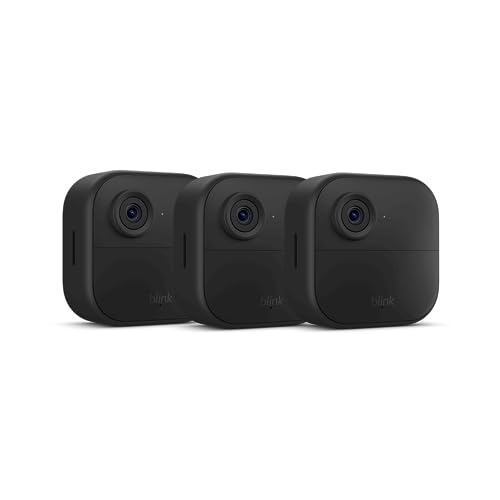
- Best pick under $300: Blink Outdoor 4, 3-Camera System — check price on Amazon
- Wyze Cam Pan v3, 2-Pack — check price on Amazon
- Ring Indoor Cam (2nd Gen), 3-Pack — check price on Amazon
- eufy SoloCam S220 — check price on Amazon
- eufy Security Indoor Cam S350 with HomeBase 3 — check price on Amazon
- Wyze Cam Floodlight v2 — check price on Amazon
Read the full guide ↓
Disclosure: As an Amazon Associate, dailyhomedecorating.com earns from qualifying purchases. Prices and availability change; the price at checkout is the final word.
If you are shopping for the best security camera for beginners under $300, the technology is the easy part — modern cameras pair with an app, show you a picture and send alerts with very little skill required. The genuinely confusing part is everything around the camera: hubs, cloud plans, local storage, battery claims, weather ratings. This guide is written for a first-time buyer, so it explains each of those ideas once, in plain words, and then applies them honestly to six real systems that together cover a home inside and out — because a general camera guide that only covers indoors, or only outdoors, leaves a beginner’s actual house half watched.
Three ideas unlock everything that follows. First, storage: your camera’s video either lives in your home (on a memory card, a hub box, or the camera itself — ‘local storage’, usually free) or on the maker’s computers (‘cloud storage’, usually rented monthly). Second, the plan: brands differ wildly in what the monthly fee buys — for Ring it buys recording itself, for Blink it buys cloud history and smarter alerts, for Wyze it buys cloud clips and labels that tell a person from a pet, and for eufy, in these picks, core recording and alerts cost nothing extra at all. Third, power: some cameras plug in, some run on batteries the maker rates under specific conditions, one sips sunlight, and one wires into your home’s mains. Every figure like battery life, solar charging, light brightness and weatherproofing in this guide is a manufacturer claim or specification, quoted with its conditions — not a promise.
The six picks are ordered by beginner-friendliness, not raw power. The Blink kit leads because three cameras and their hub in one box is the simplest route to covering a house’s main approaches. The Wyze pair follows as the cheapest flexible start indoors. Ring’s pack is the polished option with the biggest asterisk. The solar eufy is the easiest outdoor camera to live with, the hub-based eufy is the best ‘buy once, grow later’ foundation, and the floodlight closes the list as the one pick that involves real installation — included so you know what it is, and clearly labelled as a step beyond beginner setup. And one expectation to set now: none of these is an alarm system. They watch, record and tell you; they do not summon help.
In this guide
Quick Picks
Ranked by how painless each is for a first camera system: fewest decisions, clearest apps, least upkeep. The spec column keeps one headline fact per camera — the deep explanations live in the reviews, where each pick’s fees and limits are spelled out.
| Camera | Best for | Key spec |
|---|---|---|
| Blink Outdoor 4, 3-Camera System | Best first system for a whole house | 3 cameras + hub in the box, 1080p, batteries included |
| Wyze Cam Pan v3, 2-Pack | Best first indoor cameras (pair) | 2 cameras, 1080p, they pan and tilt to follow motion |
| Ring Indoor Cam (2nd Gen), 3-Pack | Best if you already use Ring/Alexa | 3 indoor cameras, 1080p, physical privacy cover |
| eufy SoloCam S220 | Easiest outdoor camera to live with | 2K, solar panel keeps it charged, storage built in |
| eufy Security Indoor Cam S350 with HomeBase 3 | Best foundation to grow a system on | 4K + zoom lens, records to a hub in your home |
| Wyze Cam Floodlight v2 | Best deterrent — but a real install job | 2K camera + bright floodlights, wired into mains power |
How These Picks Were Chosen
Beginner-friendliness was scored on four things a first-time buyer actually feels: how many decisions the purchase forces, how clearly the app explains itself, how much monthly money the system quietly assumes, and how much physical upkeep it demands across a year. Specs came second deliberately — a camera that a beginner unplugs in frustration has worse real-world performance than a simpler camera that stays on. Every pick still had to be a complete, working purchase under the $300 ceiling with its required hub included where one is needed, and every ASIN was verified against a live Amazon US listing or the maker’s documentation.
Fee transparency was weighted like a feature, because for beginners it is one. We mapped, brand by brand, exactly what stops working without a subscription: Ring — recording itself stops. Blink — cloud clip history and person alerts stop, live view continues, and the hub can back up clips to a USB stick. Wyze — cloud clips and the person/pet/package labels stop, recording to a memory card in the camera continues free. eufy — on these two picks, nothing core stops; recording and alerts are local and fee-free. A beginner deserves that map before purchase, in the headline sections, not in a plan’s terms and conditions — so it appears in every review below.
Placement honesty was the third filter. A ‘security camera’ guide that mixes indoor and outdoor models without labelling them sets beginners up to put a non-weatherproof camera outside, where it will fail. Each review here states its placement in plain terms in the opening lines: indoor only, outdoor, covered-outdoor, or both. Power claims were handled the same way — Blink’s ‘up to two years’ of battery and eufy’s solar figures are maker claims under the makers’ conditions (default settings, ordinary traffic, real sunlight), and the reviews translate those conditions into what a busy front door or a shady wall actually means.
Finally, we favoured systems that forgive mistakes. Beginners mount cameras too low, aim them at the street, forget to charge them and mute their alerts — every household does some of this in month one. Picks scored well if they made recovery easy: cameras that can be moved without tools, apps with activity zones to shrink alert noise, physical privacy covers that end arguments, and local recording that keeps working when the Wi-Fi has a bad day. The floodlight scores lowest on forgiveness — it is wired in place — which is exactly why it sits last despite being an excellent product.
The 6 Best Security Cameras for Beginners Under $300
Each review opens with where the camera can live, then what it costs to run, then the one limitation a beginner is most likely to trip over. If you read nothing else, read the ‘Honest limitation’ lines — they are the difference between the right first system and a frustrating one.
Blink Outdoor 4, 3-Camera System
Who it suits: First-time buyers with a house to cover: front door, driveway, back door. If the sentence ‘I just want cameras that work’ describes you, start here.
This is a kit in the true sense: three cameras and the hub they need (Blink calls it a Sync Module) in one box, batteries included. Setup is the gentlest in this guide — plug in the hub, scan codes, stick or screw the cameras up, done — and each camera then watches an approach in 1080p with night vision and two-way talk, per Blink’s specifications, across a wide 143-degree view. Blink’s headline claim is up to two years of battery life from the included AA lithium batteries. That figure is a maker claim under default settings; a camera over a quiet side gate may approach it, a camera over a busy driveway will not — but even much less means charging is a rare chore, which is what beginners need while they learn everything else.
The fee, in plain words: watching live is free forever. Saving clips to review later in the cloud, and alerts that say ‘person’ instead of just ‘motion’, need Blink’s subscription after the free trial. There is a halfway house — the hub can copy clips to a USB stick you plug into it — but it is a backup chore, not an app library. The cameras are weather-resistant for outdoor use and fine indoors too. Beginner verdict: the simplest complete system here, with one honest asterisk — budget for the plan if reviewing clips in the app matters to you, because it probably will.
- Everything needed is in the box, hub included
- Guided app setup; cameras mount in minutes
- Rare battery changes (maker claim, default settings)
- Three viewpoints from day one — real coverage
Honest limitation: Reviewing saved clips in the cloud and person alerts require the subscription after the trial.
Choose it if you want one purchase that covers a house’s approaches with the least learning curve. Skip it if you refuse any monthly fee on principle — both eufy picks below record with no plan at all.
Wyze Cam Pan v3, 2-Pack
Who it suits: First-time buyers starting indoors — a living room, a nursery-adjacent hallway, a home office — who want two cameras for the price of one and the freedom to move them around while learning.
Each Pan v3 can rotate to look around its room — 360 degrees around, 180 degrees up and down per Wyze’s specifications — and will automatically turn to follow motion, which is why one camera per room is genuinely enough for most beginners. You get two in the box. Put one where it sees the front door from inside, one in the room you care about most, plug both into ordinary outlets, and the app handles the rest. Night vision shows colour when there is some ambient light, and a Privacy Mode rotates the lens down into the base — the camera visibly ‘closing its eye’ — which household members tend to trust more than a software switch. The maker rates the body IP65 for weather, so a covered porch within reach of an outlet is also fair game.
Fees, plainly: put a microSD memory card (cheap, bought separately) in each camera and recording is free, forever, including continuous recording if you want it. Wyze’s optional Cam Plus plan adds cloud copies of event clips and alerts labelled person, pet or package — nice, genuinely useful for cutting notification noise, and completely optional. Without it you will get more plain ‘motion’ alerts; in a quiet flat that is fine, in a busy family room you may choose the plan later, and nothing about the hardware changes either way. Limits to know: video is 1080p, not the sharpest here, and the cameras need outlets — ‘wireless’ in camera marketing means the data, never the power, unless batteries are involved.
- Two rooms covered for a beginner-sized price
- Pan-and-follow means no blind corner in the room
- Free local recording on memory cards — plan optional
- Lens-down privacy mode everyone can see and trust
Honest limitation: 1080p detail and outlet-tethered placement; smartest alerts sit behind the optional plan.
Choose it if you’re starting indoors and want maximum learning room for minimum money. Skip it if your first problem is outdoors with no outlet nearby — look at the Blink kit or the solar camera below.
Ring Indoor Cam (2nd Gen), 3-Pack
Who it suits: Beginners whose home already speaks Ring and Alexa — a Ring doorbell, Echo speakers — and who want three indoor rooms added inside the same app, with one important condition understood first.
The cameras themselves are as beginner-friendly as it gets: three identical 1080p indoor cameras, plug in, scan, place on a shelf. Colour night vision, two-way talk, and a privacy cover you physically slide over the lens — a thoughtful touch in living rooms and bedrooms, because everyone in the house can see when the camera is off. If your doorbell is already Ring, these appear in the same app, answer to the same Alexa routines, and show on the same Echo screens. As pure user experience, this is the most polished option in the guide.
And here is the condition, in the plainest words this guide can manage: without a Ring Home subscription, these cameras do not record. Not ‘record less’ — they do not save video at all. There is no memory card slot and no local option; the plan is the recording feature. Live viewing works without paying, but the moment something happens and you want to see it again, the plan is mandatory. That is a legitimate way to sell a camera — cloud video survives even if the camera is stolen — and millions choose it knowingly. A beginner should simply choose it knowingly too: price the plan as part of the camera, for as long as you will own it, before this pack goes in the basket.
- The most polished app and ecosystem experience here
- Three rooms, identical simple setup each time
- Physical privacy cover — off means visibly off
- Cloud clips survive theft of a camera
Honest limitation: Recording itself requires the subscription — no plan, no saved video, no local alternative.
Choose it if you’re already a Ring household and accept the plan as part of the price. Skip it if the words ‘mandatory monthly fee’ end the conversation — Wyze and eufy record for free.
eufy SoloCam S220
Who it suits: Beginners who need one outdoor camera — front path, side gate, bins and bikes — and who know, honestly, that they will never remember to recharge a battery camera.
The S220 has a small solar panel built into its top, and eufy’s maker claim is that a few hours of direct sunlight a day keeps its battery topped up indefinitely — mount it somewhere sunny and the single biggest beginner failure mode, the forgotten recharge, simply disappears. It records 2K video to 8GB of storage built into the camera itself, detects people, and sends alerts with no monthly fee: eufy’s model is local-first, and for a beginner that means one less account, one less trial expiring, one less decision. Two screws, the app, and a sunny wall are the entire installation story, and it can join eufy’s HomeBase hub later if a system grows around it.
The conditions behind the claim matter: a shaded, north-facing or tree-covered spot will not deliver the solar figures, and in a gloomy winter the battery becomes an ordinary battery — plan a rare USB top-up rather than a surprise. The built-in 8GB is a rolling window: on a busy path it may hold days, not weeks, of events before overwriting the oldest. And it is one camera covering one approach — the classic beginner mistake is expecting it to watch the whole property. As a first outdoor camera in a sunny spot, though, nothing here asks less of its owner.
- Solar top-up (maker claim) removes the charging chore
- No subscription: storage and alerts are fee-free
- 2K video, simple two-screw install
- Can join a HomeBase system later as you expand
Honest limitation: Needs real sun to live up to its claim, and 8GB onboard storage is a short history window.
Choose it if one sunny outdoor spot needs watching and you want near-zero upkeep. Skip it if your only spot is shaded all day — the Blink kit’s swappable batteries forgive shade better.
eufy Security Indoor Cam S350 with HomeBase 3
Who it suits: Beginners thinking one step ahead: you want the best indoor camera in this guide now, recording to a hub in your home with no monthly fee, and a foundation that more cameras can join later.
Two ideas in one purchase. The camera, eufy’s S350, carries two lenses — a 4K wide view of the room and a 2K zoom lens (up to 8x hybrid zoom, per the maker) that keeps faces readable across a big space — and it pans a full circle to follow people and pets. The hub, HomeBase 3, is a small box that lives indoors near your router and stores the video: 16GB built in, expandable with a hard drive if you ever need months of history. Recording, smart alerts and app viewing all work with no subscription. For a beginner this is the ‘no rent, ever’ architecture, and the hub is also where eufy’s battery cameras and doorbells join later — this bundle is a first brick, not a dead end.
What makes it fifth rather than first for beginners is not difficulty — setup is app-guided — but commitment and scope. It is one wired indoor camera: it needs an outlet, it cannot go outside, and covering a house means adding cameras over time, each a new purchase decision. The hub is also where your footage lives, so it should sit somewhere discreet; if it were stolen, its recordings would go with it, the standing trade of all local storage. Buy it when you have one important room — a living room, a nursery wing, a home office with equipment — and a deliberate plan to build outward fee-free.
- Sharpest indoor picture here, with real zoom
- No subscription for recording or smart alerts
- Hub stores video at home and anchors future cameras
- Privacy mode turns the lens away when you’re in
Honest limitation: One wired indoor viewpoint to start; growing the system means buying more cameras over time.
Choose it if you want a fee-free foundation and one important room covered superbly. Skip it if you need several viewpoints working this weekend — the Blink kit covers three approaches in one box.
Wyze Cam Floodlight v2
Who it suits: Beginners whose one problem spot is a driveway or back door with an existing outdoor light — and who are comfortable, or can get help, with a wired installation.
Every other pick in this guide is beginner-installed in minutes; this one is a small electrical job, and honesty requires saying so first. The Floodlight v2 replaces an existing outdoor light fixture: power off at the breaker, swap the unit onto the junction box, restore power. If that sentence makes you reach for an electrician’s number, that is the correct instinct — many owners hire one, and it is money well spent. What you get for the effort is the strongest deterrent here: a 2K camera with a very wide 160-degree view, floodlights Wyze rates at 2,800 lumens that fire when motion is detected, a siren the maker rates at 105 dB, and colour recording at night instead of grey infrared — all mains-powered, so it never needs charging, ever.
Running it is simple once installed: a microSD card records locally with no plan required, and Wyze’s optional Cam Plus adds cloud clips and person, vehicle and package labels if you want them. The limitations are permanence and singularity — it watches the one approach its fixture faces, from the position the fixture dictates, so check the view in the app before final tightening. For a beginner whose driveway has already lost a parcel, it can absolutely be the right first camera; it is simply the one pick where ‘beginner-friendly’ describes owning it, not fitting it.
- Light, siren and colour recording actively deter
- Mains power means literally zero upkeep
- Local recording free; smart labels optional via plan
- Very wide view covers a driveway and its edges
Honest limitation: Hardwired installation — an existing fixture box and confidence (or an electrician) required.
Choose it if one wired fixture position guards your problem approach and deterrence matters most. Skip it if you rent, or wiring is out of the question — every other pick here installs with screws or a shelf.
Comparison Table
The beginner’s table: what each camera is, where it can live, and — the column to read twice — what its plan really does. All specifications are maker figures.
| Camera | Placement | Headline spec (maker) | Storage | Plan reality |
|---|---|---|---|---|
| Blink Outdoor 4, 3-Camera System | Outdoor (also usable indoors) | 1080p HD, 143° diagonal field of view, infrared night vision, two-way talk | Cloud via Blink Subscription Plan; local clip backup via Sync Module 2 + USB drive (sold separately) | Plan required for cloud history and person detection; live view free |
| Wyze Cam Pan v3, 2-Pack | Indoor or sheltered outdoor (IP65, maker rating) | 1080p pan/tilt/zoom, 360° pan, colour night vision, motion tracking | Local microSD recording on each camera; optional Cam Plus cloud | No plan required for local recording; Cam Plus gates cloud event video and person/pet/package detection |
| Ring Indoor Cam (2nd Gen), 3-Pack | Indoor only | 1080p HD, colour night vision, manual privacy cover, two-way talk | Cloud only — no local storage on this model | Ring Home plan required to record and review video at all |
| eufy SoloCam S220 | Outdoor, wire-free | 2K resolution, integrated solar panel, two-way talk, works with HomeBase 3 | Built-in 8GB local storage on the camera; no cloud required | No monthly fee for core recording and alerts |
| eufy Security Indoor Cam S350 with HomeBase 3 | Indoor (camera) + indoor hub | Dual cameras: 4K wide + 2K telephoto, 8x hybrid zoom, 360° pan / 75° tilt | Local on HomeBase 3 (16GB built in, expandable); optional eufy cloud | No plan required for recording or core AI alerts |
| Wyze Cam Floodlight v2 | Outdoor, hardwired at an existing fixture box | 2K HD, 160° wide view, twin LED floods (maker-rated 2,800 lumens), 105 dB siren (maker figure) | Local microSD recording; optional Cam Plus cloud | No plan required for local recording; Cam Plus adds cloud history and smart detection labels |
How to Choose the Best Security Camera for Beginners Under $300
You do not need to become a camera expert; you need to answer five plain questions in order. Each one eliminates options, and by the fifth the right first system is usually obvious. Skip ahead to specs — everyone’s instinct — and you will own a wonderful camera that doesn’t fit your home, your lease or your tolerance for monthly fees.
Question 1: Where does it need to watch — inside, outside, or both?
Indoor cameras are not weatherproof and will fail outside; outdoor cameras work anywhere but cost more for their sealing. List your real viewpoints: most beginners need the front approach outside and one main room inside. In this guide, Blink’s kit and the SoloCam are outdoor picks, Ring’s pack and the eufy S350 are indoor picks, the Wyze pair can do either (its maker-rated weather resistance suits covered outdoor spots), and the floodlight is outdoor and wired. Match the list to the labels before anything else.
Question 2: Do you want to pay monthly — and what exactly for?
This is the question the boxes answer worst, so here it is plainly. No-plan-needed: both eufy picks, and Wyze recording to a memory card. Plan for cloud history and smarter alerts: Blink. Plan for recording itself: Ring. A plan is not a scam — cloud video survives a stolen camera and the apps are lovely — but multiply it by three years and compare that total, not the box prices. Beginners most often regret not the fee they chose, but the fee they discovered.
Question 3: How will it get power — and will future-you maintain it?
Plug-in cameras never run flat but live near outlets. Battery cameras go anywhere but need recharging on a cycle the maker’s claim only estimates — default settings and gentle traffic are the claim’s conditions, and a busy door in winter is neither. Solar removes the chore where sun reaches. Hardwired removes it forever at one fixed spot. Be honest about your follow-through: a camera that is flat during the one week it matters is worse than a simpler camera that was plugged in all along.
Question 4: How many viewpoints do you truly need on day one?
Beginners oscillate between one camera (too few — things happen at the other door) and six (too many alerts to ever read). Two to three viewpoints cover most homes’ real risk: the main approach, the back or side door, and one interior chokepoint. That is precisely the shape of the Blink kit and the Wyze pair in this guide. You can always add cameras later within the same brand’s app; you cannot easily un-buy the wrong ecosystem, which is why Questions 2 and 3 come first.
Question 5: Only now — which specs matter?
Far fewer than marketing suggests. Night clarity at your door’s distance beats headline resolution. A field of view that matches the space beats the widest number. Two-way talk matters at doors and is a novelty elsewhere. And the app matters most of all: if checking an alert is annoying, you will stop checking alerts, and an unchecked camera is furniture. Choose the system whose daily experience you will actually live with.
The Three Things Nobody Tells Beginners: Fees, Storage and Power Claims
Fees first, because they are the only cost that grows. Camera brands make money two ways — selling you hardware once, or renting you features monthly — and this guide’s six picks span the whole spectrum honestly. eufy’s model here is the hardware sale: recording and alerts run locally, free, indefinitely. Wyze sells hardware cheaply and rents convenience: cloud copies and smart labels. Blink rents the archive: your clips’ cloud home and person detection. Ring rents the function itself: no plan, no recording. None of these is hidden, exactly — but none is printed on the front of the box either. The beginner’s defence is one habit: before buying any camera, ask ‘what stops working if I never pay?’ and get the answer in writing. Every review in this guide answers it for its pick.
Storage is where that answer lives. Local storage — a memory card in a Wyze, a hub in your hallway for eufy, memory inside the SoloCam, a USB stick in Blink’s hub — means your video is in your home, costs nothing monthly, and can be lost if the hardware is stolen or damaged. Cloud storage means your video is on the brand’s servers: safe from theft, viewable from anywhere, rented monthly, and kept only for the plan’s retention window before it is deleted. Beginners often assume ‘the cloud’ is included forever with the camera; it almost never is. Neither choice is wrong — but they are different products wearing the same name, and the comparison table’s storage column is there so you choose consciously.
Power claims are the third quiet trap, and the kindest way to describe them is ‘true, under conditions’. Blink’s up-to-two-year battery assumes default settings and modest daily activity; eufy’s solar figures assume hours of direct sun; cold weather shortens every battery’s life; a camera that can barely reach its hub radio works harder and drains faster. The makers publish these conditions — in footnotes. This guide has tried to promote the footnotes into the text, because a beginner who expects two years and gets two months concludes the camera is broken, when in fact it was placed in a busy, cold, far-from-the-router spot that no battery camera would forgive. Placement is destiny for battery cameras.
One last piece of beginner honesty: a camera is not an alarm system. Nothing in this guide is monitored, nothing dispatches help, and no camera physically prevents anything — the floodlight’s light and siren deter, the recordings evidence, the alerts inform. Locks, lighting and, if you want response, a monitored alarm do the protecting. Bought with that expectation, a first camera system under $300 is genuinely useful: you will know what happened at your door, you will check on the house from anywhere, and packages will mysteriously stop vanishing. That is the real product. It is enough.
A word about the word ‘wireless’, because it misleads more beginners than any other term in this category. On battery cameras — the Blink kit, the SoloCam — wireless is honest: no cables at all. On plug-in cameras — the Wyze pair, the Ring pack, the eufy S350 — wireless describes only the data: the video travels by Wi-Fi, but the power arrives by a cable to an outlet, and that cable decides where the camera can live. Neither is better; they are different tools. The beginner’s translation is simple: if the product photos show a battery or a solar panel, placement is free and charging is the chore; if they show a plug, placement follows your outlets and there is no chore at all. Check which kind you are buying before the box arrives, and half of all first-camera disappointment never happens.
One last beginner concept, saved for after the basics because it only matters once you own a camera: the ecosystem. Cameras from one brand share its app, its hub and its plan, so your second camera is easiest when it matches your first — same app, same alerts, same settings logic. That is why this guide’s pool is brand-paired: two Wyze picks that can grow together indoors and out, two eufy picks that share a hub, a Blink kit that expands with add-on cameras, a Ring pack that joins a Ring doorbell. You do not need to plan a five-camera future today. Just know that the brand of your first camera is probably the brand of your third, and let that knowledge give the fee and app questions in this guide the weight they deserve at the moment of the first, cheapest decision.
Your First Weekend: Placement and Setup Without Tears
Height and angle, in one rule each. Mount outdoor cameras about eight to ten feet up — out of easy reach, but low enough to see faces rather than hat-tops — and angle them across the path people walk, so faces turn toward the lens. Indoors, high corners win: a camera in the corner above head height sees the door, the room and the route between them, which is the whole story of most incidents. Before any screw becomes permanent, hold the camera in place and check the live view on your phone; thirty seconds of preview saves every beginner’s most common re-do.
Wi-Fi before hardware. Stand where each camera will live and look at your phone’s signal: cameras need a solid connection at their exact spot, and battery models drain faster on a weak one. Hubs (Blink’s, eufy’s) want a central home near the router. If a far corner of the house is a dead zone, put a local-recording camera there — eufy and Wyze models keep recording to their own storage through dropouts — and consider it a prompt to improve the network later, not a failed purchase today.
Tame the alerts before they tame you. Out of the box, every camera here will notify you about shadows, spiders, rain and headlights. In the first week, draw activity zones around the door and path only, turn on person detection where your plan includes it, and lower sensitivity until the alerts that survive are ones you’d get up for. Also set the privacy features — covers, lens-down modes, schedules — while household goodwill is high. A beginner’s system succeeds or fails on this tuning: get it right and you’ll trust the alerts for years; skip it and the app gets muted by Friday.
Common Buying Mistakes
Buying on resolution alone. A 4K badge doesn’t aim the camera, power it or pay its fees. Placement, storage model and upkeep decide whether a camera helps; sharpness is a tie-breaker, not the decision.
Discovering the subscription at the end of the trial. Ring records nothing without its plan; Blink and Wyze reserve their smartest features for theirs. Ask ‘what stops working if I never pay?’ before purchase — this guide answers it per pick.
Putting an indoor camera outside. It will fog, corrode and die, warranty voided. Indoor picks here are the Ring pack and the eufy S350; everything outdoors needs a weather-rated model.
Trusting battery claims without their conditions. ‘Up to two years’ assumes default settings and gentle traffic. A busy, cold, weakly-connected spot can cut that to weeks. Solar, swappable batteries or mains power are the forgiving options.
Aiming at the whole street. You’ll record the public road, alert on every passing car, and learn nothing about your own door. Aim at your approach, zone out the street, and let the camera watch your ground.
Expecting an alarm system. Cameras watch and record; they don’t dispatch help or stop anyone. Keep locks and lighting as your protection, and let cameras do the knowing — that’s the job they’re good at.
Final Recommendation
Start with the Blink Outdoor 4 three-camera system if your home’s risks live outside — three approaches covered in one afternoon, hub in the box, upkeep measured in seasons — and simply decide, with open eyes, whether the cloud plan earns its place for clip history. Start with the Wyze Cam Pan v3 pair if your risks live inside: two rooms, free local recording, and the gentlest possible learning curve. Either is a complete, defensible first system under the ceiling, and both leave budget unspent, which for a beginner is a feature — your second purchase, informed by a month of living with the first, will be smarter than any single splurge today.
Graduate deliberately: the SoloCam S220 when a sunny outdoor spot needs a sentinel, the eufy S350 hub bundle when you’re ready to build a fee-free system around one superb indoor camera, the Ring pack when you’re knowingly buying into Ring’s ecosystem and its plan, and the floodlight when one wired fixture position deserves a deterrent and you’ve arranged the install. And keep the beginner’s north star in view throughout: the best first camera is the one still switched on, still trusted and still understood a year from now.
- Blink Outdoor 4, 3-Camera System — the simplest whole-house start — three viewpoints, hub included
- Wyze Cam Pan v3, 2-Pack — the gentlest indoor start — two rooms, free local recording
- eufy SoloCam S220 — the easiest outdoor add-on — solar-powered, fee-free, two screws
Frequently Asked Questions
I’m a total beginner — which single pick should I buy first?
If your worries are outdoors (doors, driveway, parcels), the Blink three-camera kit: everything is in the box and setup is guided. If your worries are indoors (kids’ rooms’ hallways, pets, an elderly parent’s flat), the Wyze Pan v3 pair. Both are complete systems under the ceiling; choose by where your risk lives, not by specs.
What stops working if I never pay for a subscription?
By brand: Ring’s indoor camera stops recording entirely — the plan is the recording feature. Blink keeps live view but locks cloud clip history and person alerts. Wyze keeps free local recording on a memory card and locks cloud clips and person/pet/package labels. The two eufy picks here keep recording and alerting locally with no fee at all.
Do I need a hub, and what is one?
A hub is a small box that plugs into your router and acts as the system’s home base — Blink’s Sync Module (included in the kit) and eufy’s HomeBase 3 (included in the S350 bundle) are the two here. Hubs store video locally and help battery cameras last longer. The Wyze, Ring and SoloCam picks connect straight to your Wi-Fi without one.
Are the battery-life claims real?
They are manufacturer claims under stated conditions — default settings, moderate daily motion, mild temperatures; solar claims also assume a few hours of direct sun a day. Busy or cold or shaded placements shorten intervals considerably. The claims are best read as ‘up to’, and placement decides how close you get.
Can a beginner install these alone?
Five of the six, yes — shelves, stands, two screws and an app walkthrough cover them, typically in under half an hour per camera. The exception is the Wyze floodlight, which wires into a mains fixture: confident DIYers do it with the power off at the breaker, and hiring an electrician is a perfectly good beginner decision too.
Will these cameras call for help in an emergency?
No. They record, alert your phone and, in the floodlight’s case, deter with light and sound. Nothing here is monitored or dispatches services. Treat cameras as your eyes and memory; locks, lighting and — if wanted — a monitored alarm remain the protection layer.


