Where to buy
Every pick below is a single camera or one-camera system that fits the under $150 budget on its own, so you can start with one position and add more later. Check the current price and kit contents on Amazon before you buy, because bundles and included modules vary by listing.
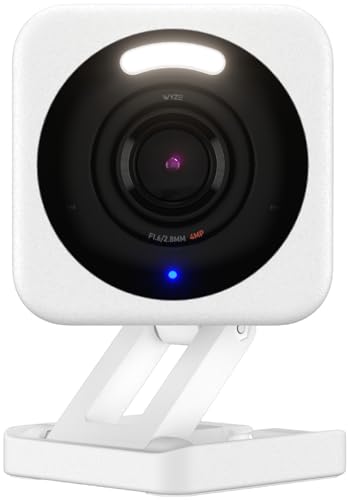
- Best overall wired all-rounder: Wyze Cam v4 — 2.5K QHD, IP65, wired, microSD local storage
- Best for no subscription fees: Tapo C120 — 2K QHD, IP66, wired, free AI detection, microSD local storage
- Best wire-free outdoor coverage: Blink Outdoor 4 (1-Camera System) — 1080p HD, wire-free, maker-claimed up to two-year battery, sync module system
- Best low-maintenance outdoor pick: eufy SoloCam S220 — 2K, integrated solar panel, built-in 8GB local storage, no monthly fee
- Best indoor room coverage: eufy Indoor Cam E220 — 2K, pan 360 and tilt 96 degrees, motion tracking, microSD local storage
- Best compact indoor add-on: Blink Mini 2 — 1080p HD, 143-degree view, plug-in, built-in spotlight
Read the full guide ↓
Disclosure: As an Amazon Associate, dailyhomedecorating.com earns from qualifying purchases. Links to Amazon on this page are affiliate links; they cost you nothing extra. Listing details such as price and availability change often, so check the current Amazon listing before you buy.
Finding the best security camera under $150 used to mean choosing which compromise you could live with: grainy video, a subscription you could not escape, or a battery that died the week something actually happened. That is no longer the shape of this market. At this budget you can now buy 2K and even 2.5K video, colour night vision, on-camera local storage and person detection from mainstream brands, and the real decision has moved somewhere more interesting. The question is no longer which single camera is best in the abstract. It is which mix of indoor and outdoor cameras, wired and wire-free, local and cloud, forms one coherent system for your whole home, in one app, with one honest running cost.
That whole-system view is how this guide is written, and it is what separates it from a simple list of cheap cameras. A house is not one viewpoint. It is a front door where faces and packages matter, a back garden where there may be no power at all, a hallway or living room where a pet or an elderly parent is the real subject, and maybe a driveway where the camera’s job is deterrence as much as evidence. No single camera in this pool does all four jobs well, and pretending otherwise is how people end up with a brilliant front-door camera and total blindness everywhere else. Instead, each pick below is labelled clearly as an indoor camera, an outdoor camera or a wired model that can serve in either place, and the guide shows how they combine into a unified setup that stays under $150 per position. If your budget stretches further, the companion guide Best Security Camera Under $200 applies the same system thinking at the next tier.
Three honest disclosures frame everything that follows. First, subscription and cloud costs differ sharply by brand and decide what a camera really costs over three years: Blink locks recorded cloud clips and person detection behind its paid plan, Wyze and Tapo keep local recording free and sell cloud intelligence as an upgrade, and eufy records locally with no required fee at all, and each review states its brand’s position in plain language. Second, every battery-life, sunlight and weather figure quoted is a maker claim measured under the maker’s own test conditions, not a guarantee about your fence, your winters or your Wi-Fi. Third, a camera system is a witness, not a guard: it records, alerts and deters, and the home security article in this series explains where cameras end and a monitored alarm begins. With those ground rules set, here is how to spend under $150 per camera and end up with a system rather than a drawer of mismatched gadgets.
In this guide
Quick Picks
Short on time? This table matches each camera to the job it does best in this guide. Every pick is then reviewed in full below, with its storage and subscription position stated plainly.
| Best for | Pick | Key spec | Link |
|---|---|---|---|
| Best overall wired all-rounder | Wyze Cam v4 | 2.5K QHD, IP65, wired, microSD local storage | Check on Amazon |
| Best for no subscription fees | Tapo C120 | 2K QHD, IP66, wired, free AI detection, microSD local storage | Check on Amazon |
| Best wire-free outdoor coverage | Blink Outdoor 4 (1-Camera System) | 1080p HD, wire-free, maker-claimed up to two-year battery, sync module system | Check on Amazon |
| Best low-maintenance outdoor pick | eufy SoloCam S220 | 2K, integrated solar panel, built-in 8GB local storage, no monthly fee | Check on Amazon |
| Best indoor room coverage | eufy Indoor Cam E220 | 2K, pan 360 and tilt 96 degrees, motion tracking, microSD local storage | Check on Amazon |
| Best compact indoor add-on | Blink Mini 2 | 1080p HD, 143-degree view, plug-in, built-in spotlight | Check on Amazon |
How we chose
We judged this pool as system building blocks first and gadgets second. The first filter was ecosystem coherence: every pick had to belong to an app ecosystem in which a household could plausibly run both its indoor and its outdoor cameras, because the under $150 shopper is the least likely to tolerate juggling three apps and three subscription decisions. That is why the pool resolves into three pairs, Wyze and Tapo as wired all-rounders that serve inside or out, Blink as a wire-free outdoor camera with a matching plug-in indoor camera, and eufy as a solar outdoor camera with a matching pan-and-tilt indoor camera. Any pair covers a whole small home; any single pick starts a system that can grow without being replaced.
The second filter was storage honesty. Each camera had to offer a workable way to keep recordings, and we recorded exactly what is free and what is not: microSD local recording on the Wyze, Tapo and eufy indoor models, built-in local storage on the eufy outdoor model, and Blink’s split between subscription cloud recording and sync-module local storage. Cameras that record nothing at all without a plan were only admitted, as Blink was, when the plan-free live view still had real value and the limitation could be stated this plainly. Resolution, night vision and field of view were compared from maker specifications, with weather claims for outdoor picks taken from the maker’s stated IP rating where one is published.
Finally, we weighted total cost of ownership over sticker appeal. A camera that needs a subscription to remember anything, a camera that needs a memory card, and a camera that needs neither are three different purchases wearing similar prices, and the reviews price those differences in words since live prices move daily. Power source mattered just as much: wired cameras were credited for continuous recording and never sleeping, wire-free cameras for placement freedom, with the maker’s battery and solar claims always labelled as claims. The result is not six rivals so much as six roles, and the quick picks table assigns each role a name.
One more judging habit is worth recording because it decides real-world satisfaction more than any specification: we read each ecosystem’s alert behaviour as a system property. A household running four cameras from one app receives one combined stream of notifications tuned by one logic, which is manageable; the same four cameras across three apps produce three differently-timed, differently-worded streams that owners quickly mute. Every ecosystem in this pool handles multi-camera alerting coherently, which is a quieter reason the pool is built from pairs. We also favoured brands whose apps let each camera carry its own schedule and sensitivity, since a door camera and a nursery camera in the same home want opposite personalities, and a system that forces one personality on both will be wrong half the time.
Detailed reviews
Each review states where the camera belongs, indoors, outdoors or either, what it records without payment, and the one limitation we would want to know before buying. Battery, solar and weather figures are maker claims from the manufacturer’s own specifications.
Wyze Cam v4 — Best overall wired all-rounder
Where it belongs: Indoor or outdoor (wired). Recording position: Local microSD recording free; optional Cam Plus adds cloud events and smart labels.
The Wyze Cam v4 is the wired all-rounder in this pool: a small plug-in camera the maker rates for indoor or outdoor use, with an IP65 weather-resistance rating on the housing, 2.5K QHD video, enhanced colour night vision, a motion-activated spotlight and a built-in siren. Because it runs on continuous USB power rather than a battery, it never sleeps through the start of an event to save charge, and it can record around the clock to a microSD card instead of only waking for motion clips. Wyze lists local recording support for cards up to 512GB, sold separately, which is the largest local capacity in this group and the reason this camera suits buyers who want long on-camera history without paying for cloud space.
Storage and subscriptions need stating plainly, because Wyze splits them clearly. Local microSD recording works without any plan: motion events and continuous recording stay on the card, and you review them in the app. The optional Cam Plus subscription is what adds cloud-stored event video and the smarter person, pet, package and vehicle classifications, along with longer cloud history. Without the plan you still get motion alerts and local playback, but the camera is less clever about telling a person from a swaying branch, and there is no cloud copy if the camera itself is stolen or damaged. Treat the subscription as an intelligence upgrade, not a requirement, and budget the microSD card as part of the real purchase.
Power is the honest trade-off. The v4 needs an outlet within cable reach of the mounting point, and outdoor runs need the maker’s outdoor-rated power arrangement rather than a random indoor adapter left in the rain. In exchange you get the sharpest video in this pool, a spotlight that makes night footage usable for identifying faces and clothing, and two-way talk for speaking to a delivery driver or telling a dog to get off the sofa. It works with Alexa and Google Assistant for voice viewing on smart displays, which makes it an easy single-ecosystem anchor: buy one for the front door, and its indoor twin is the same camera, same app, same settings.
As the system’s anchor, the v4 is where we would put the front door and, in its second unit, the main living space: the two positions where continuous wired recording and the sharpest video earn their keep. Start the whole system here and every later addition is a satellite to a strong centre.
Honest limitation: it is wired only, so a mounting point with no outlet nearby is a non-starter, and the smartest detection labels sit behind the optional Cam Plus plan even though local recording does not.
Tapo C120 — Best for no subscription fees
Where it belongs: Indoor or outdoor (wired). Recording position: Local microSD recording and AI detection free; optional Tapo Care adds cloud storage.
The Tapo C120 is TP-Link’s wired indoor/outdoor camera, and its headline is what it refuses to charge extra for: person, pet and vehicle detection are handled on the camera and included without a subscription, which is rare in this pool. Video is 2K QHD with colour night vision helped by dual spotlights, the housing carries an IP66 weather-resistance rating from the maker, and a magnetic base with a metal plate in the box makes indoor placement unusually flexible for a camera that can also live outside on a wall or under an eave. Like the Wyze it is plug-in powered, so it watches continuously rather than napping between motion events.
On storage, the C120 records to a microSD card locally with no plan required, and TP-Link’s optional Tapo Care subscription adds cloud storage and richer notification content on top. That ordering matters: the free tier here is genuinely functional, because the AI detection that decides whether an alert is a person or a passing cat is not paywalled. The subscription is therefore a convenience for off-site backup, not the toll gate it is on some rivals. If your house rule is one app and no monthly fees, a matched pair of C120s inside and out is the most straightforward way to honour it at this budget.
The compromises are physical rather than digital. The camera is wired, so placement follows your outlets, and the body is a fixed-view design: no pan or tilt, so one camera covers one composed view and wide rooms may need two. The Tapo app is capable but separate from the Kasa ecosystem some households already run, so check which app your other TP-Link gear uses before building a whole system around it. Within those limits, the C120 is the pool’s best answer to subscription fatigue: sharp video, weather sealing a step above the Wyze on paper, and detection intelligence that stays free after purchase.
In a fee-free build, the C120 replaces the Wyze as anchor and repeats at every wired position, inside and out, giving one app, one free detection behaviour and one storage habit to learn. It is the backbone pick for households that want the system decision to be made once and then forgotten.
Honest limitation: fixed view with no pan or tilt, and wired power only, so it cannot follow action across a room or sit somewhere an extension lead cannot reasonably reach.
Blink Outdoor 4 (1-Camera System) — Best wire-free outdoor coverage
Where it belongs: Outdoor (wire-free battery). Recording position: Cloud recording and person detection need Blink Subscription Plan; local via sync module USB.
The Blink Outdoor 4 is the wire-free outdoor anchor of this pool: a battery camera that mounts with screws in minutes, needs no outlet and no cable run, and talks back to a sync module inside the house. Video is 1080p HD with infrared night vision and two-way talk. The maker’s headline claim is battery life of up to two years from the included AA lithium batteries under default settings and typical use, and that figure must be read as a maker claim, not a promise: heavy motion traffic, long live-view sessions, cold weather and weak Wi-Fi all shorten real intervals between battery swaps, sometimes dramatically.
Blink is also the pool’s clearest example of subscription gravity, so here is the honest split. Without a Blink Subscription Plan you get live view and motion notifications, and that is close to the whole story: saving and reviewing recorded clips in the cloud, extended history and person detection are subscription features. Local storage exists as an escape hatch through a sync module with a USB drive attached, which keeps clips in the house instead of the cloud, but it is a more manual arrangement than a microSD card inside the camera and the exact module in the box varies by kit, so check the listing for the system you are buying. Many owners happily pay the plan for the polish; just price it into the system before comparing sticker prices.
Choose the Outdoor 4 for the places wiring cannot go: a gate, a side fence, a detached garage corner, a tree line at the end of the drive. Its enhanced motion detection and adjustable zones help it ignore the street while watching the path, and because cameras are added one sync module at a time, a single outdoor camera today can become the perimeter of a larger Blink system later. What it will not do is match the wired cameras here for sheer detail: 1080p across a wide yard view identifies that someone is there more readily than exactly who, so pair it with a sharper wired camera at the door itself if identification matters most.
Within the whole-home plan, the Outdoor 4 owns the perimeter positions that wiring cannot reach, and its value multiplies with each added camera on the same sync module. Treat it as the system’s outer ring, and let sharper wired cameras handle identification at the doors it watches over.
Honest limitation: the features most people picture when they buy a camera, recorded cloud clips and person detection, require the paid Blink plan or a local-storage workaround, and the two-year battery figure is a best-case maker claim that busy locations will not see.
eufy SoloCam S220 — Best low-maintenance outdoor pick
Where it belongs: Outdoor (wire-free, solar-assisted). Recording position: Built-in 8GB local storage, no subscription required; optional cloud available.
The eufy SoloCam S220 is the outdoor camera for people who dislike both cables and battery chores: wire-free like the Blink, but with an integrated solar panel on its top surface that the maker says keeps the internal battery topped up with a few hours of direct sunlight a day under typical conditions. That sunlight figure is a maker claim with an obvious condition attached: a camera mounted under a deep porch roof or on a shaded north wall may harvest too little light and still need occasional USB recharging, so mounting position is part of the product. Video is 2K, a clear step above the Blink’s 1080p, with on-device person detection and two-way talk.
Storage is where the S220 makes its stand. It carries built-in 8GB local storage inside the camera, no card to buy and no hub required for basic use, and eufy sells it explicitly as a no-monthly-fee camera: recording, detection and playback work without a subscription, with an optional cloud plan and HomeBase 3 compatibility available for buyers who want more. Eight gigabytes is finite, so the camera overwrites its oldest clips as it fills, and busy driveways cycle history faster than quiet side gates; that is the honest cost of built-in storage, and it is still a fundamentally different deal from a camera whose recordings stop entirely when a plan lapses.
As the outdoor half of an eufy mixed system it mirrors the E220’s philosophy in weather-sealed form, and as a standalone it is the pool’s lowest-maintenance perimeter camera: no ladder trips with a battery pack every season, no cable through the wall, no plan renewal. What it asks in return is sun and a sensible view: mount it where the panel sees sky, aim it so the detection zone covers the approach rather than the street, and accept that a wire-free camera records events rather than continuous footage. For a front path, a garden gate or a driveway corner, that trade is usually the right one.
The S220 is the perimeter pick for a household that has already decided against subscriptions: same local-storage philosophy as the eufy indoor camera, no ladder-and-battery ritual, and 2K detail that makes its event clips genuinely useful rather than merely reassuring.
Honest limitation: the solar claim depends entirely on mounting sunlight, and the fixed built-in 8GB storage cannot be expanded in the camera itself, so high-traffic spots keep a shorter rolling history than card-based rivals.
eufy Indoor Cam E220 — Best indoor room coverage
Where it belongs: Indoor (plug-in, pan and tilt). Recording position: Local microSD recording, no subscription required; optional cloud available.
The eufy Indoor Cam E220 solves the fixed-camera problem by moving: it pans a full 360 degrees and tilts 96 degrees on the maker’s specification, tracks motion across a room automatically, and records 2K video while doing it. One E220 in the middle of an open-plan space does the coverage work of two fixed cameras, following a toddler, a dog or an unexpected visitor from the door to the kitchen without you touching the app. On-device AI distinguishes people and pets for alerts, and it works with Alexa, Google Assistant and HomeKit ecosystems, which makes it the most platform-flexible indoor pick in this pool.
eufy’s storage position is the mirror image of Blink’s. The E220 records to a microSD card in the camera, card sold separately, with no subscription required for recording, playback or its core detection features, and it can also pair with a HomeBase 3 for centralised local storage if you grow into the wider eufy system. An optional cloud plan exists for buyers who want off-site copies, but nothing about normal daily use is locked behind it. For a mixed indoor and outdoor system built on local storage, the E220 inside and its solar sibling the SoloCam S220 outside are the only pair in this guide that share one app and one no-fee philosophy.
The limits are about physics and placement. It is indoor-only and plug-in powered, so it needs an outlet and a surface or bracket with a commanding view; pan and tilt cannot see through a badly chosen corner, and the tracking motor, while quiet, is not silent in a bedroom at night. It also cannot watch the yard: the moment a camera must survive rain, this is the wrong tool and the outdoor picks take over. Judged as an indoor camera, though, it offers the most coverage per camera in the pool, and for pet owners its tracking clips are the ones people actually end up watching.
One E220 covers the main living space of most homes, which makes it the most efficient indoor slot in any of these systems: buy it for the room where life happens, and let cheaper fixed cameras handle narrow hallways if they need covering at all.
Honest limitation: strictly indoor and outlet-dependent, and its moving lens covers one room brilliantly but cannot be in two places at once, so multi-room homes still need a camera per key room.
Blink Mini 2 — Best compact indoor add-on
Where it belongs: Indoor (plug-in; outdoor only with separate weather-resistant adapter). Recording position: Cloud recording and person detection need Blink Subscription Plan; no on-camera card slot.
The Blink Mini 2 is the indoor half of a Blink household: a compact plug-in camera with 1080p HD video, a wide 143-degree diagonal field of view from the maker’s specification, colour night view from a built-in spotlight, two-way audio and a stand that doubles as a wall mount. One Mini 2 composed from a corner shelf covers a typical living room wall to wall, which is why it pairs so naturally with the Outdoor 4 in a mixed system: same app, same alert style, same subscription decision, one camera language inside and out. It is also the natural second or third camera in this pool, the one you add for the nursery, the home office or the hallway once the entrances are covered.
The subscription story is the same Blink story, and it applies indoors exactly as it does outside. Person detection and saved video history in the cloud are Blink Subscription Plan features; without the plan the Mini 2 is a live-view and motion-alert camera, with local clip storage possible only through a compatible sync module setup elsewhere in the system. That is a reasonable trade at this size and price class, but it must be a conscious one: if you want an indoor camera that records locally to its own card with no plan at all, the eufy E220 and the wired Tapo and Wyze picks in this guide do that and the Mini 2 does not.
One placement warning matters more than any spec: the Mini 2 is an indoor camera. Blink offers outdoor use only with a separate weather-resistant power adapter, and even then it belongs under cover, not screwed to a fence in the rain. Used as intended, on a shelf or screwed high in a corner with its cable tidied to the skirting, it is discreet, silent and quick to install, and its spotlight makes night checks of a sleeping child or a restless pet a colour picture instead of a grey infrared guess. For renters it has a further quiet virtue: the stand needs no screws at all, so it can watch a room for a year and leave no trace when the lease ends.
The Mini 2 is the expansion slot: the camera you add in month three for the nursery or the office once the entrances are done, at a size and price class that makes incremental growth painless, provided you have already accepted Blink’s subscription terms for the system as a whole.
Honest limitation: no on-camera local storage of its own and person detection locked behind the Blink subscription, plus it is indoor-first, so it cannot substitute for a true outdoor camera at an exposed mounting point.
Comparison table
| Pick | Where it belongs | Key spec | Recording and subscription position |
|---|---|---|---|
| Wyze Cam v4 | Indoor or outdoor (wired) | 2.5K QHD, IP65, wired, microSD local storage | Local microSD recording free; optional Cam Plus adds cloud events and smart labels |
| Tapo C120 | Indoor or outdoor (wired) | 2K QHD, IP66, wired, free AI detection, microSD local storage | Local microSD recording and AI detection free; optional Tapo Care adds cloud storage |
| Blink Outdoor 4 (1-Camera System) | Outdoor (wire-free battery) | 1080p HD, wire-free, maker-claimed up to two-year battery, sync module system | Cloud recording and person detection need Blink Subscription Plan; local via sync module USB |
| eufy SoloCam S220 | Outdoor (wire-free, solar-assisted) | 2K, integrated solar panel, built-in 8GB local storage, no monthly fee | Built-in 8GB local storage, no subscription required; optional cloud available |
| eufy Indoor Cam E220 | Indoor (plug-in, pan and tilt) | 2K, pan 360 and tilt 96 degrees, motion tracking, microSD local storage | Local microSD recording, no subscription required; optional cloud available |
| Blink Mini 2 | Indoor (plug-in; outdoor only with separate weather-resistant adapter) | 1080p HD, 143-degree view, plug-in, built-in spotlight | Cloud recording and person detection need Blink Subscription Plan; no on-camera card slot |
Read the comparison table as a map of philosophies rather than a league table. The wired pair, Wyze and Tapo, believe a camera should be awake all the time and remember everything locally, and they spend your money on resolution and storage you own outright. The Blink pair believes a camera should go anywhere and be understood instantly, and it spends your commitment instead, a plan that turns placement freedom into polished cloud memory. The eufy pair believes the camera should ask nothing of you after installation, no plan, no cable, sunlight and a moving lens doing the work quietly. A whole-home system built from any one philosophy is coherent; a system built by accident from all three is how households end up with three apps and no idea which one recorded the noise last night. So use the table backwards: decide which philosophy sounds like your household’s temperament, then let the rows inside that philosophy compete on the details, door or garden, fixed or panning, spotlight or infrared. The specifications will rarely separate two cameras as cleanly as the philosophy does, and the purchase you will still be pleased with in year three is the one whose ongoing bargain, fees or no fees, cables or batteries, you chose with your eyes open rather than inherited from a default.
How to choose the best security camera under $150
Start by mapping positions, not products. Walk your home and list the views that matter, usually in this order: the main entrance, the back door or garden, the main living space, then secondary spots such as a driveway, garage or nursery. For each position note two facts: whether an outlet is within cable reach, and whether the camera must survive weather. Those two answers sort every position into wired or wire-free and indoor or outdoor, and only then do brands enter the conversation. Most homes under this budget end up with two to four positions, and a system of matched cameras at under $150 each beats one premium camera and three blind spots every time.
Next, choose your storage philosophy once, for the whole system. Local storage, on a microSD card or built into the camera, means no monthly fee and footage that stays in the house, at the cost of the footage living inside a camera a thief could theoretically take. Cloud subscription storage means an off-site copy and smarter alerts, at a running cost that compounds with every year and, on some platforms, every camera. Mixed households exist, but drifting into a mix by accident is how people end up paying one subscription for the door and hoarding cards for the garden without ever deciding to. Pick the philosophy that matches your temperament, then buy the pair of cameras in this guide that embodies it.
Then check the unglamorous infrastructure. Every camera here is a Wi-Fi device, and outdoor positions are the farthest from the router, so test your phone’s signal standing where each outdoor camera will mount; a weak signal means buffering, missed clip starts and battery drain on wire-free models as they strain to stay connected. Confirm your router can still hand out addresses to a handful of new always-on devices, and decide which phone in the household is the admin before setup day, not during it. Finally, plan the physical details: cable routes that do not cross door swings, mounting heights that see faces rather than the tops of heads, and detection zones drawn to cover approaches while excluding the street, the neighbour’s garden and anything else that is not your business to record.
Budget the second year, not just the first. The honest comparison between these systems is a three-column exercise: what the cameras cost today, what storage costs across the ownership period in cards or plans, and what replacement power costs in batteries for the wire-free positions. Run that exercise and the ranking in this guide often rearranges itself: the fee-free Tapo and eufy combinations pull ahead for set-and-forget households, the Blink pair justifies itself where its placement freedom saves an electrician or a cable run, and the Wyze sits between, its optional plan a choice rather than a toll. None of those outcomes is the wrong answer. The wrong answer is discovering the second and third columns after the cameras are already on the wall, which is why every review in this guide carries its brand’s column in the open.
Leave room in the plan for the camera you have not thought of yet. Systems grow toward predictable places: the garage interior once a freezer or a bike lives there, the side gate after the first parcel goes missing from it, the hallway outside a teenager’s room during the years of late arrivals. Choosing an ecosystem with headroom, sync modules and apps that accept many cameras, cards that can be swapped for larger ones, mounts that match across models, means that growth is an addition rather than a restart. The under $150 tier is generous enough that a household should never need to change platforms mid-story, and the pairs in this guide were selected partly so that the platform chosen on day one is still the right platform on day four hundred.
A word about deterrence, because it is half the reason these cameras exist. A visible camera at an entrance changes behaviour before it records anything: casual opportunists move on, delivery drivers handle packages more carefully, and disputes about what happened at a door tend to end when footage exists. That effect depends on the camera being seen, which is an argument for honest, obvious mounting at entrances rather than concealment, and for the spotlight-equipped models in this pool whose light announces that the doorway is watched. Concealed cameras have narrow legitimate uses inside your own home, such as checking on a pet’s mischief, but at the perimeter, visibility is a feature.
Common mistakes
Buying one of everything. A camera from four different brands means four apps, four alert styles, four storage systems and four subscription decisions. The hardware all works; the household gives up by February. Choose one ecosystem from this pool and let every position speak the same language.
Comparing sticker prices only. The cheapest camera that needs a paid plan to save a single clip can cost more over three years than the dearest camera here that records locally for free. Price the system, including cards, plans and replacement batteries, before declaring a winner.
Mounting for the view, not the face. Cameras screwed as high as possible produce beautiful footage of the tops of heads. For identification, entrances want cameras near head height at an angle to the approach, close enough that a face fills a useful part of the frame.
Ignoring the upload direction. Homes with fast downloads and thin uploads struggle with several cloud cameras at once. If your connection is asymmetric, favour local-storage cameras from this pool and let the network carry alerts and live views rather than every recorded second.
Recording the neighbours. A wide view that takes in the house across the street creates friction and, in some places, legal exposure. Use detection zones, privacy masking where the app offers it, and honest angles that watch your property and the public approach to it.
Privacy inside the system deserves the same planning as coverage. Indoor cameras watch the rooms where your family actually lives, so use the privacy tools each app provides: schedules that pause recording when you are home, physical covers or shutters where the model offers them, and accounts secured with strong unique passwords and two-factor sign-in wherever the brand supports it. Decide as a household which rooms are camera rooms and which never are, tell guests where the cameras are, and review shared access whenever someone moves out or a relationship changes. A system that respects the people inside the home is one the household will keep switched on, and a switched-off system protects nothing.
Final recommendation
If you buy one camera from this guide, buy the Wyze Cam v4 for your main entrance: the sharpest video, continuous wired recording and free local storage make it the strongest single position in the pool, and it starts a system that can grow in any direction. If subscriptions are the thing you are avoiding, build the same plan around the Tapo C120 instead and repeat it at every wired position. If your priority positions have no power, the honest wire-free pair is Blink’s Outdoor 4 outside with the Mini 2 inside on one shared plan decision, or eufy’s SoloCam S220 outside with the E220 inside if you want that same coverage with local storage and no required fee. Any of those three pairs is a real system for under $150 a position, which is exactly what this budget should buy.
One last piece of advice applies whichever pair you choose: photograph your finished views and save the screenshots. They become the reference when a mount gets knocked during cleaning, when a camera is replaced years later, and when you add the next position and want its angle to complement rather than duplicate the existing ones. A system documented in five screenshots is a system that can be maintained by anyone in the household, not just its installer, and that quiet maintainability is worth more over the years than any single specification compared in this guide.
Our shortlist to check first:
- Wyze Cam v4 — best overall wired all-rounder
- Tapo C120 — best for no subscription fees
- Blink Outdoor 4 (1-Camera System) — best wire-free outdoor coverage
Frequently asked questions
Can I really cover a whole home for under $150 per camera?
Yes, if the budget is read per position rather than for the entire system at once. Every pick in this guide is a single camera or one-camera system within the budget on its own, so a typical two-to-four-camera home is built in stages: entrances first, then living space, then secondary spots, all in one ecosystem so nothing is wasted as you add.
Should all my cameras be the same brand?
Strongly consider it. One brand means one app, one alert behaviour, one storage system and at most one subscription. This guide is organised as three indoor and outdoor pairs, Wyze and Tapo wired, Blink wire-free and plug-in, and eufy solar and pan-and-tilt, precisely so a whole home can stay inside one ecosystem.
Which cameras here work without any subscription?
The Tapo C120, Wyze Cam v4 and both eufy models record locally with their core features intact and no plan required, though Wyze reserves its smartest cloud detection labels for its optional plan. Blink is the exception: recorded cloud clips and person detection on the Outdoor 4 and Mini 2 are subscription features, with local sync-module storage as the alternative.
Are battery and solar figures reliable?
They are maker claims under maker test conditions. Blink’s up-to-two-year battery claim assumes default settings and modest traffic, and eufy’s solar claim assumes the panel actually receives a few hours of direct sun daily. Busy, shaded or cold installations will do worse, sometimes much worse, which is why wired cameras remain the reliability benchmark where an outlet exists.
Do I still need an alarm if I have cameras?
Cameras and alarms do different jobs. A camera records, alerts and sometimes deters; it does not summon help, sound a monitored response or satisfy most insurance definitions of a security system. Many households run both, and the home security guide in this series covers that boundary in detail.
What resolution do I actually need?
Enough to identify a face at the distance your camera covers. A 2K or 2.5K wired camera at a door outperforms a 1080p camera across a wide yard for identification, while 1080p is adequate for awareness views such as checking whether a gate is open. Match resolution to the job of each position rather than demanding the highest number everywhere.


