Where to buy
Check the latest price, availability and delivery on Amazon for every pick below. Each camera was shortlisted for this guide to the best outdoor security camera for beginners under $200 at the time of research; street prices move, so confirm the current listing still sits under $200 before you buy. Orders are placed on Amazon. We may earn a commission from qualifying purchases.
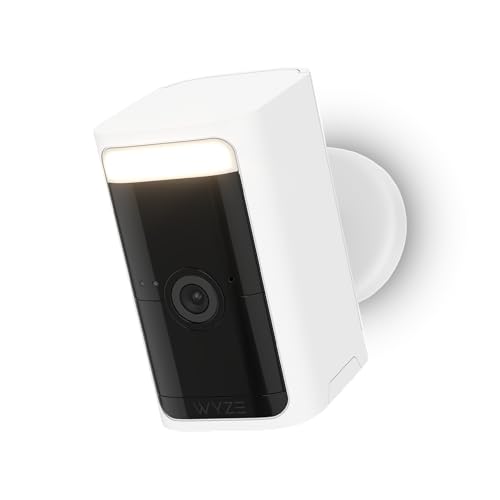
- Best first camera for most beginners: Wyze Battery Cam Pro — Check on Amazon
- TP-Link Tapo C425 Wire-Free MagCam — Check on Amazon
- Ring Spotlight Cam Plus, Battery — Check on Amazon
- eufy SoloCam S340 — Check on Amazon
- Arlo Pro 5S 2K Spotlight Camera — Check on Amazon
- Reolink Argus 4 Pro with Solar Panel — Check on Amazon
Read the full guide ↓
Disclosure: As an Amazon Associate, dailyhomedecorating.com earns from qualifying purchases. Links to Amazon on this page are affiliate links; they cost you nothing extra. Listing details such as price and availability change often, so check the current Amazon listing before you buy.
If you are shopping for the best outdoor security camera for beginners under $200, the jargon is the first obstacle: PIR, HDR, IP66, field of view, cloud versus local, and six brands each insisting their subscription is the friendly one. Here is the beginner’s translation. An outdoor camera watches a door, driveway or garden, records short clips when it senses movement, and pings your phone. Everything else — resolution numbers, night vision styles, storage plans — is about how clear those clips are, how often the camera cries wolf, and what you keep paying after the box is open.
This guide is written for a first purchase. We favour cameras that set up from a phone app in minutes, explain themselves as they go, and do not punish a wrong setting. We are blunt about the two things beginners most often learn the hard way. The first is subscriptions: some cameras in this guide record happily forever with no monthly fee, while two well-known brands stop saving your video the moment a free trial ends unless you pay — neither fact is hidden here. The second is power: every camera below runs on a battery in some form, and the difference between a good first camera and a frustrating one is mostly how rarely it makes you climb up and recharge it.
You do not need to understand networking to use any of these, but one beginner fact matters: they all need a decent Wi-Fi signal where they are mounted, and they all record motion clips rather than filming around the clock — that is how battery cameras survive. Specifications quoted, from weather ratings to battery life, are the makers’ published claims under their own test conditions. Treat them as guidance, expect your busy street to be harder on a battery than a quiet test garden, and you will not be disappointed.
In this guide
Quick Picks
| Camera | Best for | Key spec |
|---|---|---|
| Wyze Battery Cam Pro | Best first camera for most beginners | 2.5K HDR video, radar plus PIR motion detection, removable rechargeable battery, integrated spotlight and siren, microSD local recording |
| TP-Link Tapo C425 Wire-Free MagCam | Best set-and-forget mount | 2K QHD video, magnetic mount, rechargeable battery, microSD local storage, free on-device person, pet and vehicle detection |
| Ring Spotlight Cam Plus, Battery | Best if you already use Alexa or Ring | 1080p HD video with HDR, LED spotlights, colour night vision, security siren, Quick Release battery pack |
| eufy SoloCam S340 | Best step-up with no fees | 3K wide + 2K telephoto dual lenses, pan and tilt, removable solar panel, 8GB built-in local storage |
| Arlo Pro 5S 2K Spotlight Camera | Best app polish, with a plan | 2K HDR video, 160-degree field of view, dual-band Wi-Fi, integrated spotlight and siren, removable rechargeable battery |
| Reolink Argus 4 Pro with Solar Panel | Best for one wide view, slightly advanced | 4K dual-lens 180-degree panoramic view, ColorX colour night vision, battery plus 6W solar panel, microSD local storage |
How we chose
We kept only cameras that are genuinely outdoor models, maker-rated for weather, and under $200 in their normal single-camera form, then ranked them by beginner experience rather than raw specifications. Setup had to be app-led with no hub, no wiring and no tools beyond a screwdriver. Apps were judged on whether a first-timer can find the live view, the clips and the alert settings without a video tutorial, and detection was judged on the beginner’s real enemy — the stream of pointless alerts that makes new owners mute the app within a fortnight.
Fee honesty carried extra weight in this ranking. A beginner does not yet know whether they even want cloud recording, so cameras that work fully on local storage earn their places at the top, and the two plan-dependent cameras appear with their trials and terms explained in plain language rather than fine print. We also favoured forgiving hardware: magnetic or simple mounts, batteries that swap or charge easily, and solar options that quietly remove the whole charging question for sunny spots. Advanced models are included, but labelled as step-ups rather than starting points.
The 6 best picks in detail
Wyze Battery Cam Pro
The Wyze Battery Cam Pro is the value pick that refuses to feel cheap. It records 2.5K HDR video with colour night vision, carries an integrated spotlight and siren, and detects motion with a radar-plus-PIR pairing that Wyze uses to cut the false alerts that plague purely heat-based sensors — the passing-car and waving-branch alerts that train people to ignore their cameras. The battery is removable and rechargeable, so a spare pack turns a charging gap into a ten-second swap.
Wyze’s fee structure needs the same honesty as Arlo’s and Ring’s, in miniature. Local recording to a microSD card works without any plan, and basic motion alerts are free. But Wyze’s Cam Plus subscription is what unlocks person, pet and package detection, full-length cloud event recording and the smart notification labels; without it, cloud event clips and detection intelligence are limited and the camera is noticeably dumber. The plan is inexpensive by category standards, yet it is still a plan — count it if you want the smart features in the brochure.
The housing is maker-rated IP65 for outdoor use, no hub is required, and an optional solar panel can keep the battery topped up on a sunny wall. What you give up versus the top of this tier is refinement: the app and firmware experience is more utilitarian than Arlo’s or Ring’s, and the brand’s cloud-first history means privacy-minded buyers should read the current policy and lean on local recording. For the money under this ceiling, though, the hardware-per-dollar is hard to beat.
The Battery Cam Pro is the gentlest financial start in this guide: buy it, stick a memory card in it, and it records with no plan and no further decisions. Its radar-assisted detection matters more for beginners than for anyone — new owners abandon cameras that alert fifty times a day, and this one is measurably calmer about passing cars and moving trees. When you are ready, the optional smart-detection plan exists as an upgrade rather than a rescue. As a first camera to learn on, it teaches you what you actually need at the lowest cost of finding out.
- Radar-assisted detection reduces nuisance alerts
- Removable battery and optional solar panel keep power flexible
- Local microSD recording works without a subscription
- Spotlight, siren and 2.5K video at a value-tier position
Honest limitation: Person and package detection and full cloud recording sit behind the Cam Plus subscription; without it the smart features are limited even though local recording still works.
Choose it if this is your first camera and you want to learn cheaply with local recording included. Skip it if you want person detection free — that lives in its paid tier.
Wyze Battery Cam Pro — Check on Amazon
TP-Link Tapo C425 Wire-Free MagCam
The Tapo C425 is the friendliest camera in this tier to actually live with. Its party trick is the magnetic base: the camera snaps onto a small mounted plate and can be pulled down by hand for charging or repositioning, then clicked back at a slightly different angle in seconds. Behind the trick is a serious spec sheet — 2K QHD video, colour night vision with a starlight sensor and built-in spotlights, and a wide view that suits porches, balconies and garden gates.
The running-cost story is one of the best here. Person, pet and vehicle detection runs on the device and is free, and recording goes to a microSD card in the camera with no subscription required; TP-Link’s optional Tapo Care plan adds cloud storage and richer notifications for people who want them, but it is genuinely optional. That local-plus-free-detection combination is rare at any price and almost unheard of in the value half of this tier.
TP-Link rates the large built-in battery for very long standby-style endurance as a maker claim — up to around 300 days under the maker’s lab conditions with light triggering — and real life with daily motion, cold weather and frequent live view will be shorter, as with every battery camera. An optional solar panel can be added later. The housing carries a maker-rated IP66 weather resistance. The magnetic mount’s one caveat is reach: mount it high or out of easy grabbing range, because what you can pull down in two seconds, someone else theoretically could too.
The C425 removes the two fiddliest parts of a first installation: aiming and recharging. The magnetic base means your first attempt at an angle does not have to be your final one — pull the camera down, twist, click it back — and the same trick makes charging a indoor job at a normal socket. Its free person and pet detection means the app tells you something useful from day one without a plan decision. For a beginner who wants the camera to simply work while they get on with life, this is the calmest ownership experience here.
- Magnetic mount makes charging and re-aiming genuinely effortless
- Free on-device person, pet and vehicle detection
- Local microSD recording with no required subscription
- Strong 2K image with colour night vision
Honest limitation: The magnetic mount should be placed out of easy reach, and the very long battery figures are maker lab claims that busy, cold or frequently viewed installations will not match.
Choose it if easy mounting, easy charging and free detection matter most. Skip it if the camera must mount within grabbing reach of strangers.
TP-Link Tapo C425 Wire-Free MagCam — Check on Amazon
Ring Spotlight Cam Plus, Battery
Ring’s Spotlight Cam Plus is built around deterrence you can see. Two LED spotlights switch on with motion, the camera records 1080p HD video with colour night vision, and a remote-activated siren, two-way talk and motion warnings let you speak to whoever is at the gate from the app. For households already using a Ring doorbell or Alexa displays, it slots into the same app, the same routines and the same voice controls with almost no learning curve.
The subscription disclosure matters more here than anywhere else in this guide. Ring cameras do not record to local storage at all — there is no memory card and no hub recording — and saving, reviewing and sharing video requires a Ring Protect subscription (now sold under Ring’s home plan naming). Without a plan you still get live view and real-time motion alerts, but no recorded history: the moment passes and it is gone. With a plan, you get the recorded library and richer features. Neither is a trick, but you should choose with your eyes open, because the plan is effectively part of this camera’s price for as long as you own it.
Power comes from a Quick Release Battery Pack — one is included and the housing holds two, so adding a second pack roughly doubles the time between charges as a maker-described configuration; an optional solar panel exists too. Battery endurance is a maker claim that depends heavily on how often the spotlights fire. Resolution is the trade-off against the sharper 2K, 3K and 4K cameras here: you are paying for the ecosystem, the lights and the siren rather than pixel count.
Ring is the beginner pick for households that already speak Alexa. The app is among the most guided here, the doorbell-style setup will feel familiar to millions, and the spotlights give a very visible ‘it is working’ reassurance that first-time owners genuinely value. The beginner trap is the trial: recording feels free for the first weeks, then stops unless the plan starts. Buy this camera only with that sentence understood, and it is a friendly, well-supported choice; buy it unawares, and it is the most common disappointment in the category.
- Bright motion-activated spotlights plus a siren deter actively
- Seamless fit for homes already using Ring or Alexa
- Battery housing holds a second pack to stretch time between charges
- Simple, well-supported app and accessories
Honest limitation: No local storage option at all, and recorded video requires a Ring subscription; without one you only get live view and alerts. Video is 1080p in a tier where rivals offer 2K and above.
Choose it if you already use Ring or Alexa and accept the recording plan from day one. Skip it if a trial ending would feel like a trick — without a plan it saves nothing.
Ring Spotlight Cam Plus, Battery — Check on Amazon
eufy SoloCam S340
The SoloCam S340 is the camera that makes the under $200 tier feel like a step up rather than a compromise. It carries two lenses on one motorised head: a 3K wide-angle lens that watches the whole scene and a 2K telephoto lens that zooms toward faces and number plates at the same time, with hybrid zoom and detail at distance that eufy rates to about 40 feet as a maker specification. The head pans a full circle and tilts, and on-device detection for people and vehicles lets it follow movement across a driveway or garden instead of staring at one fixed patch of wall.
Power is the second half of the pitch. A removable solar panel tops up the built-in rechargeable battery, and eufy rates standalone battery life at around three months as a maker claim under typical conditions, with the panel extending that indefinitely in a sunny mounting spot. Because the panel detaches, you can put the camera in shade and the panel in sun a short cable run away. Weather resistance is rated IP65 by the maker, which covers rain jets and dust for ordinary exposed mounting.
On money after purchase, this is the cleanest story in the group. Recording goes to 8GB of built-in local storage on the camera itself and eufy sells this model with no monthly fee required for recording, playback or its on-device person and vehicle detection. An optional HomeBase S380 can add much larger central storage and extra recognition features, but it is an upgrade, not a ransom: the camera works on its own out of the box. There is no memory card slot to budget for, though the fixed built-in capacity means heavy-traffic spots cycle through older clips sooner.
The S340 is the beginner’s step-up: more camera than a first-timer strictly needs, bought to avoid buying twice. Its moving head means one careful mount covers what might otherwise need repositioning or a second camera, the solar panel removes charging anxiety on sunny walls, and the complete absence of required fees means there is no plan decision lurking at all. Setup is a little more involved than the Wyze or Tapo, and the app offers more settings to ignore happily. If your budget stretches and your spot gets sun, it is the buy-once answer.
- Dual lenses record a wide view and a zoomed view at once
- Solar panel removes most battery-charging chores in sunny spots
- No subscription required for recording or smart detection
- Pan and tilt covers a corner or driveway from one mount
Honest limitation: The built-in 8GB of storage is fixed and not expandable on the camera itself, so a very busy street-facing mount recycles footage quickly unless you add a HomeBase.
Choose it if you want to buy once, cover a wide spot and never meet a subscription screen. Skip it if your only spot is sunless and hard to reach for charging.
eufy SoloCam S340 — Check on Amazon
Arlo Pro 5S 2K Spotlight Camera
The Arlo Pro 5S is the polished all-rounder of this tier: 2K video with HDR for scenes that mix bright driveways and shaded porches, a wide 160-degree field of view, colour night vision helped by an integrated spotlight, a siren, and two-way talk. Its dual-band Wi-Fi is a genuine practical advantage — it can use a 5GHz network where many battery cameras are stuck on crowded 2.4GHz bands — and the removable battery pack swaps in seconds if you keep a spare charged.
Now the honest part, because Arlo’s running costs are the highest in this group. Cloud recording, the searchable video history, rich notifications with thumbnails and the smart object detection that tells a person from a parcel are Arlo Secure subscription features. Without a plan, after any included trial ends, you get live view and basic motion alerts, but the camera does not save the library of clips most people buy it for, and this model has no memory card slot of its own; local recording only enters the picture with a separate Arlo SmartHub setup. Budget the plan into the real price of owning this camera.
Weather resistance, mounting and the app experience are all mature: the camera is built for exposed outdoor mounting as a maker-rated weather-resistant housing, the magnetic and screw mounts are well sorted, and the app is one of the most refined here. If you accept the subscription as part of the deal — the way you would with Ring — the Pro 5S delivers the most complete mainstream package under the ceiling. If you refuse monthly fees on principle, look at the eufy, Reolink or Tapo picks instead.
Arlo’s app polish is real, and for a beginner who values a guided, premium-feeling setup, the Pro 5S delivers the slickest first hour in this guide — followed by the category’s firmest subscription requirement. Treat it like a phone contract: the camera is one price, the service is another, and recording lives in the service. Beginners who accept that knowingly get excellent video and the best-behaved alerts here. Beginners who wanted a one-off purchase should take the hint from its position in this ranking and choose a local-recording camera instead.
- Excellent 2K HDR image with a very wide view
- Dual-band Wi-Fi copes better with busy home networks
- Spotlight, siren and polished app in one package
- Removable battery makes swaps quick
Honest limitation: Cloud recording and smart detection require an Arlo Secure subscription after the trial; without a plan the camera does not keep a recorded video history.
Choose it if you want the most polished app and picture and the plan is fine by you. Skip it if you wanted a single one-off payment — recording is a service here.
Arlo Pro 5S 2K Spotlight Camera — Check on Amazon
Reolink Argus 4 Pro with Solar Panel
The Argus 4 Pro solves the oldest outdoor-camera problem — the blind spot at the edge of the frame — by stitching two lenses into a single 180-degree panoramic image. One camera watches an entire side of a house, a full garden width or both directions of a corner at once, in 4K resolution as the maker specifies it. Its ColorX night vision uses a very fast lens and a large sensor to keep night footage in colour without leaning on a spotlight, which matters if you want to describe a jacket or a car colour after dark.
This listing bundles the camera with Reolink’s solar panel, so the rechargeable battery is topped up by daylight and manual charging becomes an occasional event rather than a routine; as with every battery camera here, endurance figures are maker claims that depend on how much motion the camera sees and how cold the winter gets. The housing is rated IP66 by the maker, a notch above most rivals here for driving rain. Dual-band Wi-Fi, including Wi-Fi 6 support as specified by Reolink, helps on congested home networks.
Recording is local-first: clips save to a microSD card in the camera (budget for a card, since one is not the point of this bundle), and Reolink does not require a subscription for recording, playback or its person, vehicle and animal detection. An optional Reolink Cloud plan and the optional Home Hub exist for people who want off-camera backup, and FTP support suits tinkerers, but nothing essential is locked behind a plan. That combination — panoramic 4K, colour night vision and no required fee — is why it anchors the top of this tier.
The Argus 4 Pro is the one camera here we suggest beginners grow into rather than start with. Its panoramic view is genuinely simple in concept — one camera, whole side of the house — but the stitched image, the more technical app and the Wi-Fi demands make it the least hand-holding option in the group. It is included because some first homes, especially wide or corner plots, truly suit it, and its no-fee local recording is beginner-friendly economics. If the idea of one camera covering everything appeals and you are patient with setup, it rewards you; otherwise start above it in this list.
- One camera covers a full 180-degree width with no side blind spots
- Colour night vision without depending on a bright spotlight
- No subscription required; local microSD recording included by design
- Solar panel bundled in this listing
Honest limitation: The stitched panoramic image can look stretched at the far edges, and the camera sits near the top of this budget, so check the current listing price before assuming it fits under the ceiling on a given day.
Choose it if your property is wide and you are comfortable with a slightly technical setup. Skip it if you want the simplest possible first camera.
Reolink Argus 4 Pro with Solar Panel — Check on Amazon
Comparison table
| Camera | Video | Power | Storage | Subscription |
|---|---|---|---|---|
| Wyze Battery Cam Pro | 2.5K HDR | Removable rechargeable battery | microSD local (card separate) | Cam Plus for smart detection |
| TP-Link Tapo C425 Wire-Free MagCam | 2K QHD | Built-in rechargeable battery | microSD local (card separate) | None required |
| Ring Spotlight Cam Plus, Battery | 1080p HD with spotlights | Quick Release battery (holds two) | No local storage | Ring plan required for recording |
| eufy SoloCam S340 | 3K wide + 2K telephoto | Battery + removable solar panel | Built-in 8GB local | None required |
| Arlo Pro 5S 2K Spotlight Camera | 2K HDR, 160 degrees | Removable rechargeable battery | Cloud via plan; no card slot | Arlo Secure required for recording |
| Reolink Argus 4 Pro with Solar Panel | 4K panoramic, 180 degrees | Battery + bundled solar panel | microSD local (card separate) | None required |
Beginners, memorise this paragraph and the category holds no surprises. Cameras record in one of two places: on storage inside or beside the camera, which you buy once, or in the brand’s cloud, which you rent monthly. The Tapo, eufy and Reolink in this guide use your storage and charge nothing. The Wyze uses your storage free and rents you extra cleverness. Arlo and Ring use their cloud for recording itself, so the plan is not an upgrade — it is the recorder. There is no moral ranking here, only a matching problem: rent if you value the convenience, own if you value the certainty.
Two practical tips follow. First, whatever camera you buy, open its subscription screen during setup and read what happens when the trial ends; every brand in this guide states it, and five minutes there prevents the classic ‘it stopped recording’ support call. Second, if you choose a local-recording camera, buy the memory card with the camera where one is needed, and format it in the app on day one. Beginners postpone the card, rely on a trial, and discover the gap at the worst moment — the entire point of this guide is that you will not.
Your first installation, step by step
Do everything indoors first, at a table, with the kettle on. Charge the camera fully, insert its memory card if it takes one, install the app, create the account, and connect the camera to your Wi-Fi while it sits beside the router where the signal is strongest. Let it update its software. Trigger a test recording by waving at it. Every beginner problem that gets blamed on a camera — it will not connect, it missed the update, the card was never formatted — is painless to fix at this stage and miserable to fix on a ladder.
Take the camera outside and hold it where it will live before drilling anything. Open the live view and look: can you see the door, the path, the place parcels land? Walk the route a visitor walks and watch yourself on the phone. If your head is cut off, lower the camera; if you see mostly hedge, move it. This two-minute rehearsal, done with the camera in your hand, is worth more than an evening of adjusting a fixed mount by guesswork.
Fix the mount, click or screw the camera on, and do the settings immediately, while the ladder is still out: activity zone over your property only, sensitivity in the middle, person alerts on if your camera includes them. Then put a note in your calendar for one week later to review how many alerts you got. Too many means tighten the zone; none at all means check the camera can actually see motion where it matters. That one-week review is the difference between beginners who love their camera and beginners who mute it.
How to choose the best outdoor security camera for beginners under $200
Choose your first camera by the spot, not the spec sheet. Walk outside, stand at your front door or gate, and hold your phone where the camera would go. That view — a door, a path, a driveway apron — is the job. Almost every camera here covers it; what separates them is how the ownership feels. If the spot gets hours of sun, solar models delete charging from your life. If the spot is reachable from a step stool, any battery model is fine. If the spot is high and awkward, favour the biggest battery claims and the easiest mounts, because you will visit it again.
Then make two decisions in order. Storage first: if the words ‘monthly fee’ annoy you, filter to the local-recording cameras and never think about it again; if you already pay Ring or Arlo for a doorbell, staying in that family is simpler than it is wasteful. Alerts second: decide that you will spend ten minutes setting activity zones and sensitivity on installation day. That single chore, more than any price difference, decides whether a first camera becomes a trusted habit or a muted app. Everything else — resolution, night vision style, siren or no siren — is preference, and at this tier every pick is good enough to have preferences about.
The first three months: batteries, alerts and habits
Expect your first month to use more battery than any month after. You will check the live view constantly, the camera will record every visitor twice because you keep walking out to admire it, and its maker-claimed endurance — calculated on a quiet test scene — will look optimistic. This settles. By the second month the novelty checks stop, the zones are tuned, and the battery settles into its real rhythm for your home. Judge a camera’s battery in month three, not week one.
Alerts follow the same curve. A new camera with factory settings reports the world; a tuned camera reports your world. If you are getting dozens of alerts a day, the fix is almost never a different camera — it is a smaller activity zone, one notch less sensitivity, and person-only alerts where your model offers them. Cameras with radar assistance, like the Wyze here, start calmer, but every model in this guide becomes well-behaved once its zone matches your property line.
Build one tiny maintenance habit and the camera will outlast your interest in it: when you notice the battery warning, charge it that evening rather than that weekend, and wipe the lens while it is down. Cameras fail beginners by neglect, not by defect — a flat battery during the one week you are on holiday is the classic story, and it is entirely prevented by charging on the first warning instead of the third.
The three numbers that actually matter, explained
Beginners are sold cameras by numbers, so here are the three worth understanding — and what to ignore. Resolution is the size of the picture, quoted as 1080p, 2K, 3K or 4K. Bigger helps you zoom into a recorded clip and still read a face or a plate, but only within the area the lens actually covers; beyond 2K, placement and light matter more than the number. Buy enough resolution for your distance — a door camera lives happily at 2K — and stop paying the number tax after that.
Field of view is the width of the picture, in degrees. Around 130 degrees suits a door and path; 160 sees a whole driveway apron; 180, the Reolink’s panorama, watches a wide frontage in one frame. Wider is not better by default: the same pixels spread over more degrees means less detail on the person in the middle. Match the width to your space and the detail takes care of itself.
The third number is the one nobody prints: how many days of recordings your setup keeps before overwriting or expiring them. Local cards cycle by capacity and traffic; cloud plans keep a set window by tier. For most homes a few weeks is plenty, but you should know your number, because it is the deadline for saving a clip you care about. Find it in the app during your first week — a beginner who knows their retention window understands their camera better than an expert who merely owns a sharper one.
Common mistakes
Assuming recording is included forever. On plan-based cameras the free trial is doing the recording. When it ends, so does your video history, unless the plan starts. Check what your camera does without a plan before you buy it, not after the first incident.
Skipping the memory card. Local-recording cameras from Reolink, Tapo and Wyze need a card to record onto. It is a small, one-off purchase — buy it in the same order, or your no-fee camera records nothing at all.
Mounting before testing Wi-Fi. Hold your phone at the exact mounting spot and check the signal. Exterior walls block more than beginners expect, and a camera installed beyond its Wi-Fi’s reach fails in ways that look like product faults.
Leaving sensitivity at maximum. Factory settings alert on everything: cars, cats, shadows, rain. Ten minutes with activity zones and sensitivity on day one is the difference between a helpful camera and a muted one.
Expecting a battery camera to film all day. These cameras wake for motion and sleep between events — that is how the battery lasts. If you need continuous recording of a whole street, you need a wired camera and a different guide.
Final recommendation
Beginners should start where the Wyze and Tapo sit: inexpensive or effortless respectively, both recording locally with no plan ambush, both forgiving of a first attempt at mounting and aiming. The eufy is the step-up for sunny spots and buy-once shoppers. Ring and Arlo are good cameras wrapped around a subscription decision — make it deliberately and they will serve you well. Buy the camera whose ongoing demands match your patience, set its zones on day one, and your first camera will feel less like a gadget and more like a habit that quietly works.
A closing reassurance for first-time buyers: nobody in this guide’s audience gets their first camera perfectly right, and you do not need to. The settings can be re-tuned, the angle can be re-aimed, the memory card can be upgraded, and even the brand can be changed next time with everything you have learned. What cannot be retrofitted is the footage from the months before you started — which is why starting now, with a good-enough camera from this shortlist, beats another month of comparison shopping. Pick the one whose fees and charging habits you understand best, install it this weekend, do the one-week settings review, and let experience — the only reviewer whose opinion is about your actual home — take it from there.
If decision fatigue is the real obstacle, use the shortcut this guide was built around: fee-free local recording, a mount you cannot get wrong, and a first month spent tuning rather than troubleshooting. That combination is the Tapo if you value effortlessness, or the Wyze if you value the lowest cost of learning — and either choice leaves you free to upgrade later with knowledge instead of hope, which is the only upgrade that never disappoints.
Start with the Wyze Battery Cam Pro if you want the safest single buy, and keep the TP-Link Tapo C425 Wire-Free MagCam on your shortlist as the strongest alternative for the situations described above.
Frequently asked questions
What is the easiest outdoor camera here to set up?
The Tapo C425 and Wyze Battery Cam Pro are the gentlest starts: app-led setup, no hub, simple mounts. The Tapo’s magnetic base is the most forgiving if your first angle turns out wrong, because re-aiming takes seconds.
Do I have to pay monthly for a beginner security camera?
No. The Tapo, eufy and Reolink picks record to local storage with no required fee, and the Wyze records locally free too. Arlo and Ring cameras need a paid plan to save recordings after their trials end.
What does ‘local storage’ mean in plain English?
Your video clips are saved on a memory card or built-in memory inside the camera itself, in your home, instead of on the company’s computers. You buy the storage once. The trade-off is that if the camera itself is stolen, its clips go with it.
How long will the battery last on my first camera?
Makers claim from a few months upward under their test conditions. Busy doors, cold weather, live viewing and spotlights all shorten it. Solar panels and spare batteries are the easy fixes, and every figure in this guide is a maker claim, not a promise.
Can I watch the camera from my phone away from home?
Yes, all six picks stream live view and send alerts through their apps over the internet. What differs is recording: whether past clips exist for you to review depends on the storage and subscription choices explained in this guide.
What Wi-Fi do I need for an outdoor camera?
A normal home broadband router is fine for most picks; the camera needs a solid signal at its mounting spot. The Arlo and Reolink also support 5GHz or newer Wi-Fi standards as maker-specified, which can help on crowded or modern networks.
I am not technical. Can I really install one of these myself?
Yes. Every pick here is designed for phone-guided self-installation with no wiring and no hub. If you can fit a memory card, join a Wi-Fi network in an app and turn a screwdriver, you have every skill the job requires.
What if I buy the wrong camera?
The beginner-friendly designs here keep the risk low: mounts are simple, cameras unpair from your account in the app, and local-recording models carry no subscription entanglement. Start with one camera on your most important view, learn from it, and expand only if it earns its place.


