Where to buy
Check the latest price, availability and delivery on Amazon. Orders are placed on Amazon. We may earn a commission from qualifying purchases. Security-focused shoppers deserve the plain version of this tier: under $500 is a ceiling, not a target, and no single indoor camera needs it. What the ceiling properly buys for home security is a layered indoor setup — a flagship camera on the main entry route, supporting coverage for the rooms behind it, storage that survives the camera itself, and, for cloud brands, the plan that makes recordings retrievable. Every pick below sits well inside the ceiling at its normal category position, so check the live listing, price the whole arrangement rather than the camera, and keep whatever the system does not need.
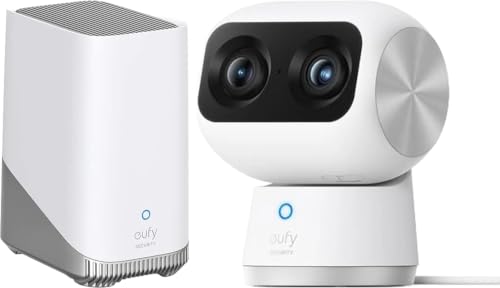
- Best security foundation with hub storage: eufy Security Indoor Cam S350 with HomeBase 3 — Check on Amazon
- Best shielded camera for occupied hours: Arlo Essential Indoor Camera 2K (2nd Gen) — Check on Amazon
- Best for Ring alarm-style households: Ring Indoor Cam (2nd Gen) — Check on Amazon
- Best local-recording camera with visible privacy: TP-Link Tapo C225 — Check on Amazon
- Best coverage extender: Wyze Cam v4 — Check on Amazon
- Best extra viewpoint for Alexa homes: Blink Mini 2 — Check on Amazon
Read the full guide ↓
Disclosure: As an Amazon Associate, dailyhomedecorating.com earns from qualifying purchases. Links to Amazon on this page are affiliate links; they cost you nothing extra. Listing details such as price and availability change often, so check the current Amazon listing before you buy.
The best indoor security camera for home security under $500 is not really a camera question; it is an evidence question. When something happens in your home — a break-in through a side door, a dispute about whether a door was left open, a stranger testing a handle while the house slept — what matters is whether a recording exists, whether it is clear enough to identify a person, whether it survived the event, and whether you can actually retrieve it a week later. Resolution headlines speak to the second of those. This guide is organised around all four, because a security budget this generous fails only when it is spent on the visible specification and not on the chain that turns a lens into evidence.
Start with the tier honesty every security shopper needs: under $500 is a ceiling, not a target, and no single indoor camera in this category approaches it. The flagship bundle in this guide — a dual-lens 4K camera with its own local-storage hub — is the most complete single purchase here, and it leaves much of the ceiling unspent. That remainder is not spare; it is the security budget proper. It buys the second viewpoint covering the route behind the first, the memory cards that make local recording real, and for cloud-first systems the subscription year without which their recordings effectively do not exist. A security plan that prices only cameras is a plan that has not yet met its first incident.
Storage architecture is therefore the first security decision, ahead of any brand. Local storage on a card inside the camera is simple and fee-free, but it shares the camera’s fate: a stolen or smashed camera takes its card with it. Hub storage, the eufy bundle’s design, moves the evidence to a box elsewhere in the home — better, and still inside the building. Cloud storage, the Arlo, Ring and Blink model, puts the evidence beyond the intruder’s reach entirely, at the price of a subscription that must be active when the incident happens, not started after it. Each architecture is defensible; choosing one by accident is not, and the reviews below state each pick’s arrangement without varnish.
Keep the category boundaries clear as well. These are indoor cameras for the inside of the perimeter: entries viewed from within, hallways, living spaces, the rooms an intruder must cross. They complement outdoor cameras and doorbells rather than replacing them, and they are general room cameras, not dedicated baby security cameras — a separate product group that this guide does not pretend to cover. Judged on their actual job — witnessing the interior, identifying a person, preserving the clip — the six picks below are the building blocks of an indoor layer that a security-minded household can rely on.
In this guide
Quick picks
| Camera | Best for | Key spec |
|---|---|---|
| eufy Security Indoor Cam S350 with HomeBase 3 | Best security foundation with hub storage | Bundle: dual cameras (4K wide-angle + 2K telephoto), 8x hybrid zoom, 360-degree pan and tilt, HomeBase 3 hub included for local storage |
| Arlo Essential Indoor Camera 2K (2nd Gen) | Best shielded camera for occupied hours | 2K video (2560 x 1440), 130-degree field of view, automated privacy shield, integrated siren, night vision |
| Ring Indoor Cam (2nd Gen) | Best for Ring alarm-style households | 1080p HD video, colour night vision, two-way talk, manual audio and video privacy cover |
| TP-Link Tapo C225 | Best local-recording camera with visible privacy | 2K QHD (4MP) video, 360-degree pan and 149-degree tilt, starlight colour night vision, physical Privacy Mode, Apple HomeKit support |
| Wyze Cam v4 | Best coverage extender | 2.5K QHD video, enhanced colour night vision, built-in spotlight and siren, Wi-Fi 6, IP65 weather resistance |
| Blink Mini 2 | Best extra viewpoint for Alexa homes | 1080p HD video, colour night view, built-in spotlight, plug-in power, works with Alexa |
How we chose
We chose for evidentiary value. Identification came first: resolution, lens quality and night performance per maker specs, weighted toward the cameras that can resolve a face at room distance rather than merely detect a shape. The dual-lens eufy leads here because its telephoto view exists precisely for identification, pairing the wide room context with a zoomed view of the person in it. Pan-and-tilt models earned credit for following movement across a room instead of losing the subject at the frame’s edge.
Survivability of footage came second, and it reshaped the ranking. Hub and cloud architectures outrank card-in-camera designs for pure security, because evidence that leaves with a stolen camera is not evidence. That is why the eufy bundle, which records to a hub you can place discreetly, tops a list where the Tapo is in many ways the cleverer camera: for the security lens, where the bytes live matters as much as how sharp they are. Cloud picks were credited for off-site storage and debited, openly, for the subscription their history depends on.
The third criterion was behaviour while the home is occupied, because an indoor security camera spends most of its life watching its owners. Arming schedules, home-and-away logic and physical privacy states — the Arlo’s automatic shield, the Tapo’s rotating lens, the Ring’s manual cover — decide whether a system stays armed appropriately or gets disabled in frustration and forgotten. A security camera that its household unplugs protects nothing, so livability was scored as a security feature, not a lifestyle extra.
The 6 best indoor security cameras for home security under $500
eufy Security Indoor Cam S350 with HomeBase 3
Who it suits: Households building a security-first indoor layer who want flagship identification detail in the main room and evidence stored on a hub an intruder is unlikely to find or take.
This bundle is the closest thing in the guide to a complete indoor system in one box. The S350 camera pairs a 4K wide-angle lens that watches the whole room with a 2K telephoto lens that zooms in on a face, a doorway or a pet, and the two views can be shown together so you never choose between context and detail. The HomeBase 3 hub in the box is what turns a good camera into a system: recordings can live on the hub inside your home, on expandable local storage, instead of depending on a cloud account, and the hub becomes the base you add further compatible eufy cameras to later.
Storage and subscriptions, honestly: Local first, and this is the honest headline: recording, playback and the on-device human and pet detection work with no subscription, because footage is stored on the HomeBase 3 or a microSD card in the camera. eufy sells an optional cloud backup plan, but nothing in the core recording path is locked behind it. The one limit to state plainly is that local footage is only as safe as the hub itself, so place the hub somewhere discreet rather than beside the front door.
Privacy: There is no physical shutter on the S350. Privacy is handled in the app: you can switch the camera off, schedule it, and set privacy zones that mask parts of the view. That is a software promise rather than a cover you can see, so in a bedroom or a dressing area, judge this camera by whether your household is comfortable trusting an app state and a status light.
- Dual 4K wide and 2K telephoto lenses with hybrid zoom for faces and detail
- HomeBase 3 hub in the box for local, subscription-free recording
- Full pan and tilt coverage with person and pet tracking, per maker specs
- A genuine expansion base: extra compatible cameras join the same hub
Honest limitation: The camera body is larger than the fixed mini cameras here, there is no physical privacy shutter, and the bundle only makes financial sense if you actually value local hub storage.
Choose / skip: Choose the bundle if you want one purchase that behaves like a system and you prefer footage stored at home. Skip it if a single small camera is all you need, or if your household is already committed to the Ring, Blink or Google app.
Arlo Essential Indoor Camera 2K (2nd Gen)
Who it suits: Households that want security behaviour with occupied-hours manners: smart detection and a siren when armed, a physically closed shield when the family is home.
The Arlo Essential Indoor 2K earns its place on one feature almost nobody else offers: an automated privacy shield that physically closes over the lens when the camera is disarmed, and opens when you arm it. Behind the shield sits a sharp 2K fixed camera with night vision, two-way talk and an integrated siren, aimed squarely at living rooms, hallways and entry-adjacent spaces where a household wants real security behaviour without a camera that stares at family life all day.
Storage and subscriptions, honestly: Arlo is cloud-first and you should buy it with open eyes. Live view and basic motion alerts work without a plan, but after the included trial an Arlo Secure subscription is required to store and review recordings and to use the person, package and animal recognition that makes its alerts genuinely useful. There is no memory-card slot on this camera, so treat the subscription as part of the real cost of the system, not an optional extra.
Privacy: The automated privacy shield is the headline: a physical cover closes over the lens when the system is disarmed, you can hear and see it move, and arming can follow a schedule or your phone’s location. It is the most household-friendly privacy answer here for shared spaces, because nobody has to remember a manual cover.
- Automated physical privacy shield that closes when disarmed
- 2K video with night vision, two-way talk and a built-in siren
- Smart person, package and animal detection on a plan
- Fits the wider Arlo camera and doorbell ecosystem
Honest limitation: Cloud recording and smart detection are subscription features after the trial, there is no local card slot, and the fixed lens cannot pan to follow action across a large room.
Choose / skip: Choose the Arlo if an automatic physical shield matters more to you than avoiding a subscription. Skip it if you want local card recording, pan and tilt coverage, or full history with no monthly fee.
Ring Indoor Cam (2nd Gen)
Who it suits: Homes already running Ring at the door, where indoor cameras should join the same app, the same plan and the same alert logic as the rest of the perimeter.
The Ring Indoor Cam is the ecosystem pick: a compact plug-in camera that drops straight into homes already running a Ring doorbell or Alexa displays. Video is 1080p HD with colour night vision, two-way talk is built in, and the camera is small enough to sit on a shelf or mount on a wall without dominating the room. Bought in multiples, it is how a Ring household covers several rooms while keeping every camera in one familiar app.
Storage and subscriptions, honestly: Cloud only, and this is the honest catch: there is no microSD slot and no local recording option. Without a Ring Protect subscription you get live view and motion alerts, but you cannot watch recorded video back; the subscription is what unlocks video history and richer notifications. If you already pay for a Ring plan at your address, extra cameras usually slot into that same household coverage, which softens the cost; if you do not, budget for the plan as part of the purchase.
Privacy: The manual privacy cover is excellent: swivel it over the lens and it physically blocks the camera and switches off the microphone. It is simple, visible and needs no app. The discipline it asks for is human rather than technical: someone has to remember to open it again before the house empties.
- Manual privacy cover that blocks the lens and mutes the microphone
- Deep Ring doorbell and Alexa ecosystem integration
- Compact plug-in design that suits shelves and multi-room setups
- Colour night vision and two-way talk, per maker specs
Honest limitation: No local storage at all and no recorded history without a subscription; resolution is 1080p where rivals here offer 2K or more, and the cover is manual rather than automatic.
Choose / skip: Choose the Ring Indoor Cam if your home already runs on Ring and Alexa. Skip it if subscription-free recording is a hard requirement or you want the sharpest possible picture.
TP-Link Tapo C225
Who it suits: Security shoppers who insist on fee-free local recording but want pan-and-tilt pursuit and a lens that visibly stands down when the home is occupied.
The Tapo C225 is the privacy-and-value pick that keeps embarrassing the expensive cameras. Its 2K QHD sensor uses a large-aperture starlight design for colour night vision, the head pans a full circle and tilts widely, and TP-Link builds person, pet and vehicle detection into the camera itself rather than reserving it for subscribers. It is also the rare indoor camera that speaks to Apple HomeKit alongside Alexa and Google displays, which makes it the natural bridge pick for mixed-platform homes.
Storage and subscriptions, honestly: Local: a microSD card up to 512GB by maker spec sits in the camera, so event clips and continuous recording can live in your home with no plan at all. Tapo Care cloud storage is offered as an optional extra for off-site backup; the detection features and local playback do not depend on it. Buy the card with the camera, because the slot is empty in the box.
Privacy: This is the strongest privacy design in the guide alongside the Arlo shield: Privacy Mode physically rotates the lens down into the camera body, so the lens is visibly covered and you can confirm it with your eyes from across the room. For a camera that may sit in a living room all day and a bedroom corridor all night, that mechanical gesture matters more than any settings page.
- Physical Privacy Mode that visibly rotates the lens into the body
- Local microSD recording and on-device detection with no required plan
- 2K QHD starlight colour night vision and wide pan and tilt range
- Works with HomeKit, Alexa and Google displays, per maker specs
Honest limitation: The Tapo app is less polished than the Ring or Google apps, the card is sold separately, and HomeKit video has its own recording rules set by Apple rather than by TP-Link.
Choose / skip: Choose the C225 if visible privacy and subscription-free local recording top your list. Skip it if you want a hub-based system, a fully cloud-managed history, or the simplest possible app.
Wyze Cam v4
Who it suits: Households extending coverage to secondary routes — the back hallway, the side room, the garage-adjacent door — where an affordable second and third viewpoint beats one perfect one.
The Wyze Cam v4 is the value engine of this guide: a small wired camera with 2.5K QHD resolution, enhanced colour night vision, a motion-activated spotlight and two-way audio, positioned at the budget end of the category. In a guide defined by a generous ceiling, its role is specific and important: it is the camera you buy in multiples, covering the rooms a single flagship cannot, while the money it saves pays for memory cards and the cameras themselves stay genuinely capable rather than cut-down.
Storage and subscriptions, honestly: Local storage is a genuine strength. The v4 records to a microSD card, up to 512GB by maker spec, with continuous or event recording and no plan required. Wyze’s Cam Plus subscription adds cloud event videos and richer person detection, but unlike the cloud-only brands here, the camera’s core recording does not stop without it. Keep the usual caveat in mind: footage on a card inside the camera leaves with the camera if the camera is taken.
Privacy: There is no lens cover or privacy shutter. You can turn the camera off in the app, set schedules and disable the microphone, but nothing physically blocks the lens. In shared or sensitive rooms, treat placement and scheduling as your privacy tools, or choose the shielded Arlo or the rotating Tapo from this guide.
- 2.5K QHD video and colour night vision at a budget-tier position
- microSD local recording works without any subscription
- Spotlight and siren features that are unusual at this level
- Low unit cost makes genuine multi-room coverage realistic
Honest limitation: No physical privacy shutter, the richest smart detection sits behind the optional Cam Plus plan, and the fixed lens cannot pan across a wide room.
Choose / skip: Choose the Wyze Cam v4 if you want the most rooms covered with card recording included. Skip it if you want a physical privacy shutter, pan and tilt movement, or a premium app experience.
Blink Mini 2
Who it suits: Alexa households adding a simple extra witness to a low-traffic room, accepting a plan-based history in exchange for the smallest possible device and setup.
The Blink Mini 2 is the smallest, simplest camera in the guide: a tiny plug-in unit with 1080p HD video, colour night view from a built-in spotlight, two-way audio and a wide view that suits corners and shelves. It is the camera people buy in multiples for an Alexa home: one for the front room, one for the hallway, one watching a pet’s favourite corner, all managed in one app with Echo Show viewing a voice command away.
Storage and subscriptions, honestly: Blink’s storage story has two halves and both deserve honesty. Cloud recording, saved clip history and person detection sit behind the Blink Subscription Plan; a trial is typically included, after which those features stop if you do not subscribe. The local alternative is real but conditional: a separate Blink Sync Module with USB or card storage can hold clips locally, which is an extra purchase. Without either a plan or the right module, you have live view and motion alerts rather than a reviewable history.
Privacy: There is no privacy shutter or lens cover on the Mini 2. The app lets you arm and disarm the camera and set privacy zones, so privacy is a settings choice rather than a physical one. That is adequate for entryways and pet corners, and a weaker answer than the Arlo shield or Ring cover for bedrooms.
- Tiny plug-in design with a wide field of view for corners and shelves
- Budget-tier position makes multi-room coverage realistic
- Local clip storage possible via a separate Sync Module
- Straightforward Alexa and Echo Show integration
Honest limitation: Person detection and cloud history need a subscription, local storage depends on owning the correct Sync Module hardware, and there is no physical privacy cover.
Choose / skip: Choose the Blink Mini 2 for simple, affordable coverage of several rooms inside an Alexa home. Skip it if you want card-in-camera local recording, a privacy shutter, or resolution above 1080p.
Comparison table
| Camera | Video | Movement | Local storage | Plan needed for playback | Link |
|---|---|---|---|---|---|
| eufy Security Indoor Cam S350 with HomeBase 3 | 4K wide + 2K telephoto | Pan and tilt | HomeBase 3 hub / microSD | No | Check on Amazon |
| Arlo Essential Indoor Camera 2K (2nd Gen) | 2K | Fixed | None on camera | Yes, Arlo Secure after trial | Check on Amazon |
| Ring Indoor Cam (2nd Gen) | 1080p HD | Fixed | None | Yes, Ring Protect for history | Check on Amazon |
| TP-Link Tapo C225 | 2K QHD (4MP) | Pan and tilt | microSD up to 512GB | No | Check on Amazon |
| Wyze Cam v4 | 2.5K QHD | Fixed | microSD up to 512GB | Only for smart detection / cloud | Check on Amazon |
| Blink Mini 2 | 1080p HD | Fixed | Via separate Sync Module | Yes, Blink plan for clips | Check on Amazon |
Building layers, not trophies: the leftover budget under $500
Security spending under this ceiling should follow the evidence chain. The first layer is the primary viewpoint: the flagship camera or bundle on the main entry route, chosen for identification quality. The second layer is the route behind it — the hallway or room an intruder crosses next — covered by a value camera from the same ecosystem, because an incident rarely stays in one room and a single viewpoint rarely tells the whole story. The third layer is storage integrity: the hub placed discreetly if your system has one, cards sized generously if it does not, and the cloud plan’s first year counted as a security cost for Arlo, Ring and Blink systems, because an inactive plan on the night it matters is indistinguishable from no camera.
What the leftover budget should not buy is a second flagship for a low-value room, or resolution for its own sake in a viewpoint that exists to confirm movement. Match the spending to the risk of each space: identification money on the entry route, confirmation money on the rooms behind it, and integrity money underneath both. Households that allocate this way finish with a system whose weakest link is genuinely hard to find — and, once again at this tier, frequently with money unspent, which can sit in reserve for the plan renewals that keep the cloud parts of the system alive in year two.
How to choose the best indoor security camera for home security under $500
Plan viewpoints as an intruder’s route, not as a decorator’s layout. Enter your own home as a stranger would: through the main door, then toward the rooms where valuables, bedrooms and exits concentrate. Your primary camera belongs where that route is narrowest and best lit — often a hallway mouth or the living-room corner facing the entry — because a chokepoint view identifies a person once, clearly, instead of glimpsing them in three rooms badly. Supporting cameras cover the route’s branches. This single exercise improves real security more than any resolution upgrade.
Choose the storage architecture as a security decision, with the theft scenario stated out loud. Ask: if this camera is ripped down in the first ten seconds, what do I still have? With card storage, nothing after that moment and possibly nothing at all. With hub storage, everything the hub received, provided the hub itself survives undiscovered. With cloud storage, everything uploaded, provided the plan was active. Pick the answer your household can live with, then place and conceal accordingly: hubs belong in unremarkable places, and cameras belong high enough that reaching them takes time and makes noise.
Set detection for identification, not for entertainment. Person detection should be on; generic motion alerts should be tuned until the system notifies on people and not on light changes, pets wandering their own home, or curtains. Position cameras to capture faces at natural height rather than the tops of heads from a ceiling corner, and check the night view specifically, because most incidents that matter happen in the dark and infrared range shrinks a camera’s useful identification distance considerably. Test by walking the route at night and reviewing your own footage with a stranger’s eyes.
Finally, rehearse retrieval. A security system you cannot operate under stress is a hobby system: know how to find, save and export a clip, know where the hub or cards are, and make sure a second household member knows too. Check monthly that every camera is still recording — silent failures, full cards and expired trials are discovered after incidents by households that never check, and before them by households that do. That habit, free and unglamorous, is worth more than the difference between any two cameras in this guide.
Layering the indoor system with the rest of the perimeter
An indoor camera layer earns its keep as part of a sequence, and security-minded households should place it consciously in that sequence. Outside the home, a doorbell camera witnesses the approach and the doorstep; outdoor cameras, where a property has them, witness the perimeter. The indoor layer begins where those end: the moment a door or window gives way and a person is inside. Its job is not to deter from the street but to identify within the home and to preserve the record of what happened there. Households that understand this division buy indoor cameras for interior chokepoints rather than duplicating the doorbell’s view from a worse angle, and the system’s total story — approach, entry, movement, exit — becomes coherent.
Coherence has a practical side: alerts should escalate in a way a household can read at a glance. A doorbell’s person alert means someone is at the threshold; an indoor camera’s person alert, in an empty home, means someone has crossed it. When both live in one app with one alert logic — the strongest argument for the Ring route in this guide, and for single-ecosystem discipline generally — that escalation is legible in a single notification list at a stressful moment. When the layers live in different apps, the same event arrives as two unrelated noises, and seconds of interpretation are spent that a coherent system would have saved.
It is equally important to state what the indoor layer is not. It is not a monitored alarm: no pick here summons anyone, and a camera’s siren is a local deterrent, not a response service. It is not a substitute for locks, lighting or a household’s ordinary caution. And it is not surveillance of the home’s own people, which is why the occupied-hours privacy behaviour of these picks — shields, rotating lenses, covers, schedules — is treated throughout this guide as part of the security design rather than a concession. A system the household trusts is a system that stays armed, and a system that stays armed is the only kind that witnesses anything.
Evidence drills: making sure the record will be there
Security professionals test systems; households usually install and hope. Borrow the professional habit at household scale with a quarterly drill that takes ten minutes. First, confirm every camera shows live and has recorded a recent event — silent failures, from a full card to a dropped Wi-Fi connection, announce themselves only to people who look. Second, trigger each viewpoint deliberately, walk its route as an intruder would, and review the footage with identification in mind: could you describe this person to someone who was not there? If a viewpoint fails that test at night, fix its height, angle or lighting before the next quarter, not after an incident.
Third, rehearse the export. Save one clip from each storage type you own — pull it from the app, from the hub, from the cloud history — and confirm the file plays outside the app and can be shared. Incidents create urgency, and urgency is a terrible time to learn a menu. Fourth, check the subscriptions and trials with the same honesty: a cloud layer whose plan lapsed last month is a gap in the perimeter wearing a camera’s shape. Put the drill on the calendar that already holds your other household maintenance, because that is what it is — maintenance of the evidence chain this whole budget was spent to build.
Finally, review the privacy side of the drill with the household, not just the hardware. Confirm the armed schedule still matches real life — work patterns change, children age, a home office appears in what was a spare room — and confirm everyone still knows how each camera shows that it is off. Security systems decay socially before they decay technically: a shield nobody trusts gets overridden, a schedule nobody updated cries wolf at a teenager’s midnight snack, and trust, once spent, is the hardest component in this entire guide to replace. The drill protects the trust as deliberately as it protects the footage.
Deterrence, detection and response: what indoor cameras can and cannot do
Security language gets inflated, so let this section deflate it accurately. Deterrence is discouraging the attempt: visible outdoor devices and signage do most of that work, and an indoor camera, usually discovered only once someone is inside, deters mainly through the possibility that footage already exists elsewhere — one more reason hub and cloud storage outrank a card in the camera for the primary viewpoint. Detection is noticing the event while it can still matter, and it is where person detection, sensible zones and honest alert tuning earn their cost: a system that notifies on a human in an empty home within moments has done the most valuable thing a camera can do.
Response is where honesty is compulsory. No camera in this guide summons help by itself. Response means a person — you, a household member, a neighbour you call — receiving a trustworthy alert, opening a clear live view, and deciding what to do, with a recording preserved whatever the decision. Sirens on the Arlo and Wyze picks can startle and shorten an intrusion, and two-way talk lets you speak into the room, which occasionally ends an opportunistic entry by itself. But the system’s core promise is narrower and stronger: it will notice, it will show you, and it will remember. Households that buy for that promise are satisfied; households that buy an imagined guard service are not, and no specification in this category will close that gap.
Measured against that promise, the ranking logic of this guide should now be fully legible. The eufy bundle leads because it detects on-device, shows two lenses’ worth of view, and remembers onto a hub that survives the camera. The Arlo follows because it detects smartly and remembers off-site, for a fee that keeps the memory alive. The Tapo and Wyze remember locally and independently, trading survivability for freedom from fees. The Ring and Blink remember inside ecosystems many homes already trust. Choose the version of notice-show-remember that fits your home, fund its storage honestly, and the indoor layer will do its real job on the one night it is needed.
Common mistakes
Judging security cameras by resolution alone
A sharp clip that was never recorded, was stored in a stolen camera, or sits behind an expired trial has an evidentiary value of zero. Buy the chain — detection, storage, retrieval — and let resolution be one link in it, not the whole purchase.
Storing the only copy inside the camera
Card-in-camera recording is honest and fee-free, but it shares the camera’s fate. For a primary security viewpoint, prefer hub or cloud storage, or at least understand that the card design trades survivability for independence.
Letting the subscription lapse on a cloud system
For Arlo, Ring and Blink cameras, the plan is the recording system. A lapsed plan means live view and alerts but no history — a fact households tend to learn on the worst possible morning. Count renewals as part of the security budget from the start.
Aiming for coverage instead of identification
A camera that sees a whole room often identifies nobody in it. Favour chokepoint placement and face-height views on the entry route, and let wide coverage be the supporting cameras’ job.
Disabling the system because it annoys the household
False alerts and a lens that never stands down train families to unplug cameras. Use person detection, zones, schedules and the physical privacy states these picks offer, so the system can stay armed without making home life feel observed.
Forgetting the inside layer is one layer
Indoor cameras witness the interior; they do not watch the street, the porch or the yard, and they are not baby security cameras for a nursery. Build the indoor layer well, and let doorbells and outdoor cameras do their own jobs in their own guides.
Final recommendation
Build the indoor layer around the eufy S350 bundle: flagship identification detail on the main route, recordings centralised on a hub that can be placed out of sight, and no subscription whose lapse could quietly disarm your history. Add a Wyze or a second eufy viewpoint behind it if your route branches, and the system is complete at well under the ceiling. Households already committed to Ring should mirror the same architecture inside that ecosystem rather than mixing apps mid-route.
The Arlo is the alternative foundation when occupied-hours privacy is the household’s sticking point, accepting its subscription as the price of an automatic shield and off-site history. Whichever foundation you choose, rehearse retrieval, check recordings monthly, and remember what this tier is really buying: not a camera, but the confidence that if the worst evening happens, the evidence will exist, will identify, and will be there when you reach for it.
Start with the eufy Security Indoor Cam S350 with HomeBase 3 if you want one decision and no second-guessing. If its one real limitation is the thing you care about most, the Arlo Essential Indoor Camera 2K (2nd Gen) is the alternative we would buy instead.
FAQ
Which storage type is safest for security footage?
Cloud storage survives anything that happens inside the home, but depends on an active subscription. Hub storage, like the eufy bundle’s HomeBase 3, keeps footage in the home yet separate from the camera, and needs no fee. Card storage is the most independent and the most vulnerable, since it leaves with a stolen camera. For a primary viewpoint, hub or cloud is the safer architecture.
Do I need a subscription for a security camera to be useful?
For the cloud-first picks — Arlo, Ring and Blink — yes, for recordings: without the plan you have live view and alerts but no history to review after an incident. The eufy bundle, Tapo and Wyze record locally with no plan, which is why security shoppers who dislike subscriptions build around them.
How many indoor cameras make a home secure?
Indoor cameras are one layer, and two or three viewpoints usually complete it: the entry route, the hallway or stair chokepoint, and one supporting room. More important than count is that each viewpoint can identify a person and that its footage survives. A rehearsed two-camera system beats an untested five-camera one.
Should indoor security cameras record all the time?
Continuous recording fills storage quickly and watches your family constantly; event-based recording with good person detection is the usual household compromise, and hub or large-card systems make longer retention practical. Whichever you choose, set a privacy state for occupied hours and make sure everyone at home knows it.
Can an indoor camera identify someone at night?
Within its night-vision range, yes, if it is placed for it: face-height, at a chokepoint, close enough that infrared illumination still resolves features. Colour night vision from the Tapo’s starlight sensor or a spotlight model like the Wyze can add clothing and colour detail. Walk your own route at night and judge the footage yourself before trusting it.
What if the intruder unplugs or takes the camera?
That is exactly the scenario storage architecture answers. Cloud systems keep what was uploaded; hub systems keep what the hub received, if the hub stays hidden; card systems lose what was in the camera. Place cameras out of easy reach, conceal hubs, and treat any camera’s final transmitted frames as part of the evidence.


