Where to buy
Check the latest price, availability and delivery on Amazon. Orders are placed on Amazon. We may earn a commission from qualifying purchases. Apartment shoppers should read this tier plainly: under $500 is a ceiling, not a target, and no single indoor camera needs anything close to it. In a rental, that headroom is best spent on a small, lease-friendly system: one good camera for the main room, a second viewpoint if your layout needs it, the memory cards or hub that make recording real, and nothing that drills, sticks permanently or follows you to a deposit dispute. Every pick below is plug-in, removable and sized for rented space, and each sits well inside the ceiling at its normal category position — check the live listing before you buy.
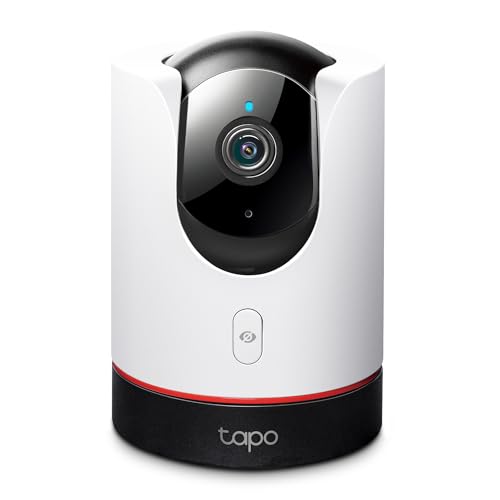
- Best overall for apartments: TP-Link Tapo C225 — Check on Amazon
- Best hub system for a settled rental: eufy Security Indoor Cam S350 with HomeBase 3 — Check on Amazon
- Best value second camera: Wyze Cam v4 — Check on Amazon
- Best for Ring households in rentals: Ring Indoor Cam (2nd Gen) — Check on Amazon
- Best automatic privacy for shared flats: Arlo Essential Indoor Camera 2K (2nd Gen) — Check on Amazon
- Best tiny camera for a studio corner: Blink Mini 2 — Check on Amazon
Read the full guide ↓
Disclosure: As an Amazon Associate, dailyhomedecorating.com earns from qualifying purchases. Links to Amazon on this page are affiliate links; they cost you nothing extra. Listing details such as price and availability change often, so check the current Amazon listing before you buy.
Searching for the best indoor security camera for apartments under $500 means solving two problems at once, and renters feel both of them sharply. The first is the ordinary camera problem: which lens, which storage, which subscription. The second is the lease problem: nothing drilled, nothing hardwired, nothing that marks a wall or starts a conversation with a landlord, and everything removable on moving day without a trace. The good news hidden inside this generous ceiling is that an apartment rarely needs much hardware. One or two rooms genuinely matter, the distances are short, and the whole system can be plug-in, shelf-sitting and packed into a single box when the lease ends.
Say the quiet part plainly, because this tier invites overspending: under $500 is a ceiling, not a target, and no single indoor camera for an apartment comes close to needing it. Even the flagship bundle in this guide — a dual-lens camera with its own storage hub — sits well inside the ceiling, and the value cameras cost a fraction of it. What the headroom is actually for, in a rental, is completeness rather than luxury: the memory cards that make local recording real instead of theoretical, a second viewpoint for the entry if your layout separates it from the living room, and the first year of a cloud plan if you deliberately choose a cloud-first brand. Spend on completeness and the system feels finished; spend on a hero camera and you own an expensive lens watching a small room while its card slot sits empty.
Apartments also change the privacy calculation. Your camera watches a compact home where living, working and sleeping may happen within a few metres of the lens, and in a shared flat it watches other people’s lives too. That is why this apartment guide leads with the Tapo C225 and its physically rotating lens, scores the Arlo’s automatic shield highly for shared homes, and treats the Ring’s manual cover as a real feature rather than an accessory. A camera a flatmate can see is off is a camera a flatmate will tolerate, and tolerance is a genuine specification in rented, shared space.
A scope note before the picks: these are general indoor room cameras, judged for living rooms, entries and hallways. They are not dedicated baby security cameras — a separate product group with nursery-specific design — and they are not outdoor cameras for balconies or parking areas, which need weatherproofing and a different conversation with your lease entirely. Within their proper job, though, the six picks below cover every apartment shape we meet: the studio that needs one discreet lens, the one-bedroom that needs an entry view, and the shared flat that needs privacy everyone can verify.
In this guide
Quick picks
| Camera | Best for | Key spec |
|---|---|---|
| TP-Link Tapo C225 | Best overall for apartments | 2K QHD (4MP) video, 360-degree pan and 149-degree tilt, starlight colour night vision, physical Privacy Mode, Apple HomeKit support |
| eufy Security Indoor Cam S350 with HomeBase 3 | Best hub system for a settled rental | Bundle: dual cameras (4K wide-angle + 2K telephoto), 8x hybrid zoom, 360-degree pan and tilt, HomeBase 3 hub included for local storage |
| Wyze Cam v4 | Best value second camera | 2.5K QHD video, enhanced colour night vision, built-in spotlight and siren, Wi-Fi 6, IP65 weather resistance |
| Ring Indoor Cam (2nd Gen) | Best for Ring households in rentals | 1080p HD video, colour night vision, two-way talk, manual audio and video privacy cover |
| Arlo Essential Indoor Camera 2K (2nd Gen) | Best automatic privacy for shared flats | 2K video (2560 x 1440), 130-degree field of view, automated privacy shield, integrated siren, night vision |
| Blink Mini 2 | Best tiny camera for a studio corner | 1080p HD video, colour night view, built-in spotlight, plug-in power, works with Alexa |
How we chose
The lease test came first. Every pick is plug-in, freestanding or shelf-placed, removable without tools beyond what ships in the box, and leaves no mark a deposit could argue with. Cameras that assume wall-mounting as their only sensible placement, or ecosystems built around hardwired hubs and drilled sensors, were set aside no matter how good their video was. In a rental, the best camera is the one that improves the home without ever becoming a negotiation.
Size and discretion came second. Apartment cameras live close to the people they watch, on shelves and bookcases rather than in distant corners, so compact bodies, quiet operation and a feed you can pull up on a kitchen display all counted. Pan-and-tilt models earned their place by replacing two fixed cameras in open-plan layouts, which is a real saving in a small home — one outlet used, one device to pack, one lens to keep clean.
Storage honesty and privacy hardware were judged together, because renters move and share. Local-recording picks — the Tapo, the eufy bundle and the Wyze — keep footage in the unit with no monthly fee, which suits renters who do not want another subscription tied to an address they may leave. Cloud-first picks — the Ring, Arlo and Blink — are labelled with exactly what stops working without a plan. And every review states plainly whether privacy is a physical lens movement you can see or a software state you have to trust, because in a shared flat that distinction decides whether the camera stays plugged in.
The 6 best indoor security cameras for apartments under $500
TP-Link Tapo C225
Who it suits: Renters who want one camera to do the whole apartment job — pan-and-tilt coverage, card recording with no subscription, and a lens that visibly rotates away when everyone is home.
The Tapo C225 is the privacy-and-value pick that keeps embarrassing the expensive cameras. Its 2K QHD sensor uses a large-aperture starlight design for colour night vision, the head pans a full circle and tilts widely, and TP-Link builds person, pet and vehicle detection into the camera itself rather than reserving it for subscribers. It is also the rare indoor camera that speaks to Apple HomeKit alongside Alexa and Google displays, which makes it the natural bridge pick for mixed-platform homes.
Storage and subscriptions, honestly: Local: a microSD card up to 512GB by maker spec sits in the camera, so event clips and continuous recording can live in your home with no plan at all. Tapo Care cloud storage is offered as an optional extra for off-site backup; the detection features and local playback do not depend on it. Buy the card with the camera, because the slot is empty in the box.
Privacy: This is the strongest privacy design in the guide alongside the Arlo shield: Privacy Mode physically rotates the lens down into the camera body, so the lens is visibly covered and you can confirm it with your eyes from across the room. For a camera that may sit in a living room all day and a bedroom corridor all night, that mechanical gesture matters more than any settings page.
- Physical Privacy Mode that visibly rotates the lens into the body
- Local microSD recording and on-device detection with no required plan
- 2K QHD starlight colour night vision and wide pan and tilt range
- Works with HomeKit, Alexa and Google displays, per maker specs
Honest limitation: The Tapo app is less polished than the Ring or Google apps, the card is sold separately, and HomeKit video has its own recording rules set by Apple rather than by TP-Link.
Choose / skip: Choose the C225 if visible privacy and subscription-free local recording top your list. Skip it if you want a hub-based system, a fully cloud-managed history, or the simplest possible app.
eufy Security Indoor Cam S350 with HomeBase 3
Who it suits: Renters settled for a longer lease who want a proper hub-based system: flagship detail in the main room and recordings centralised on a hub that moves house with them.
This bundle is the closest thing in the guide to a complete indoor system in one box. The S350 camera pairs a 4K wide-angle lens that watches the whole room with a 2K telephoto lens that zooms in on a face, a doorway or a pet, and the two views can be shown together so you never choose between context and detail. The HomeBase 3 hub in the box is what turns a good camera into a system: recordings can live on the hub inside your home, on expandable local storage, instead of depending on a cloud account, and the hub becomes the base you add further compatible eufy cameras to later.
Storage and subscriptions, honestly: Local first, and this is the honest headline: recording, playback and the on-device human and pet detection work with no subscription, because footage is stored on the HomeBase 3 or a microSD card in the camera. eufy sells an optional cloud backup plan, but nothing in the core recording path is locked behind it. The one limit to state plainly is that local footage is only as safe as the hub itself, so place the hub somewhere discreet rather than beside the front door.
Privacy: There is no physical shutter on the S350. Privacy is handled in the app: you can switch the camera off, schedule it, and set privacy zones that mask parts of the view. That is a software promise rather than a cover you can see, so in a bedroom or a dressing area, judge this camera by whether your household is comfortable trusting an app state and a status light.
- Dual 4K wide and 2K telephoto lenses with hybrid zoom for faces and detail
- HomeBase 3 hub in the box for local, subscription-free recording
- Full pan and tilt coverage with person and pet tracking, per maker specs
- A genuine expansion base: extra compatible cameras join the same hub
Honest limitation: The camera body is larger than the fixed mini cameras here, there is no physical privacy shutter, and the bundle only makes financial sense if you actually value local hub storage.
Choose / skip: Choose the bundle if you want one purchase that behaves like a system and you prefer footage stored at home. Skip it if a single small camera is all you need, or if your household is already committed to the Ring, Blink or Google app.
Wyze Cam v4
Who it suits: Renters adding a second viewpoint — the entry, the hallway, the pet’s room — without a second subscription or a second ecosystem to learn.
The Wyze Cam v4 is the value engine of this guide: a small wired camera with 2.5K QHD resolution, enhanced colour night vision, a motion-activated spotlight and two-way audio, positioned at the budget end of the category. In a guide defined by a generous ceiling, its role is specific and important: it is the camera you buy in multiples, covering the rooms a single flagship cannot, while the money it saves pays for memory cards and the cameras themselves stay genuinely capable rather than cut-down.
Storage and subscriptions, honestly: Local storage is a genuine strength. The v4 records to a microSD card, up to 512GB by maker spec, with continuous or event recording and no plan required. Wyze’s Cam Plus subscription adds cloud event videos and richer person detection, but unlike the cloud-only brands here, the camera’s core recording does not stop without it. Keep the usual caveat in mind: footage on a card inside the camera leaves with the camera if the camera is taken.
Privacy: There is no lens cover or privacy shutter. You can turn the camera off in the app, set schedules and disable the microphone, but nothing physically blocks the lens. In shared or sensitive rooms, treat placement and scheduling as your privacy tools, or choose the shielded Arlo or the rotating Tapo from this guide.
- 2.5K QHD video and colour night vision at a budget-tier position
- microSD local recording works without any subscription
- Spotlight and siren features that are unusual at this level
- Low unit cost makes genuine multi-room coverage realistic
Honest limitation: No physical privacy shutter, the richest smart detection sits behind the optional Cam Plus plan, and the fixed lens cannot pan across a wide room.
Choose / skip: Choose the Wyze Cam v4 if you want the most rooms covered with card recording included. Skip it if you want a physical privacy shutter, pan and tilt movement, or a premium app experience.
Ring Indoor Cam (2nd Gen)
Who it suits: Renters whose door already wears a Ring doorbell, or whose kitchen display is an Echo Show, and who want the indoor view inside the same app and plan.
The Ring Indoor Cam is the ecosystem pick: a compact plug-in camera that drops straight into homes already running a Ring doorbell or Alexa displays. Video is 1080p HD with colour night vision, two-way talk is built in, and the camera is small enough to sit on a shelf or mount on a wall without dominating the room. Bought in multiples, it is how a Ring household covers several rooms while keeping every camera in one familiar app.
Storage and subscriptions, honestly: Cloud only, and this is the honest catch: there is no microSD slot and no local recording option. Without a Ring Protect subscription you get live view and motion alerts, but you cannot watch recorded video back; the subscription is what unlocks video history and richer notifications. If you already pay for a Ring plan at your address, extra cameras usually slot into that same household coverage, which softens the cost; if you do not, budget for the plan as part of the purchase.
Privacy: The manual privacy cover is excellent: swivel it over the lens and it physically blocks the camera and switches off the microphone. It is simple, visible and needs no app. The discipline it asks for is human rather than technical: someone has to remember to open it again before the house empties.
- Manual privacy cover that blocks the lens and mutes the microphone
- Deep Ring doorbell and Alexa ecosystem integration
- Compact plug-in design that suits shelves and multi-room setups
- Colour night vision and two-way talk, per maker specs
Honest limitation: No local storage at all and no recorded history without a subscription; resolution is 1080p where rivals here offer 2K or more, and the cover is manual rather than automatic.
Choose / skip: Choose the Ring Indoor Cam if your home already runs on Ring and Alexa. Skip it if subscription-free recording is a hard requirement or you want the sharpest possible picture.
Arlo Essential Indoor Camera 2K (2nd Gen)
Who it suits: Shared flats and privacy-sensitive renters who want the camera to close its own shield when the home is occupied, with no flatmate having to remember anything.
The Arlo Essential Indoor 2K earns its place on one feature almost nobody else offers: an automated privacy shield that physically closes over the lens when the camera is disarmed, and opens when you arm it. Behind the shield sits a sharp 2K fixed camera with night vision, two-way talk and an integrated siren, aimed squarely at living rooms, hallways and entry-adjacent spaces where a household wants real security behaviour without a camera that stares at family life all day.
Storage and subscriptions, honestly: Arlo is cloud-first and you should buy it with open eyes. Live view and basic motion alerts work without a plan, but after the included trial an Arlo Secure subscription is required to store and review recordings and to use the person, package and animal recognition that makes its alerts genuinely useful. There is no memory-card slot on this camera, so treat the subscription as part of the real cost of the system, not an optional extra.
Privacy: The automated privacy shield is the headline: a physical cover closes over the lens when the system is disarmed, you can hear and see it move, and arming can follow a schedule or your phone’s location. It is the most household-friendly privacy answer here for shared spaces, because nobody has to remember a manual cover.
- Automated physical privacy shield that closes when disarmed
- 2K video with night vision, two-way talk and a built-in siren
- Smart person, package and animal detection on a plan
- Fits the wider Arlo camera and doorbell ecosystem
Honest limitation: Cloud recording and smart detection are subscription features after the trial, there is no local card slot, and the fixed lens cannot pan to follow action across a large room.
Choose / skip: Choose the Arlo if an automatic physical shield matters more to you than avoiding a subscription. Skip it if you want local card recording, pan and tilt coverage, or full history with no monthly fee.
Blink Mini 2
Who it suits: Studio renters and minimalists who want the smallest possible camera on a shelf corner, inside an Alexa home, for the least possible fuss.
The Blink Mini 2 is the smallest, simplest camera in the guide: a tiny plug-in unit with 1080p HD video, colour night view from a built-in spotlight, two-way audio and a wide view that suits corners and shelves. It is the camera people buy in multiples for an Alexa home: one for the front room, one for the hallway, one watching a pet’s favourite corner, all managed in one app with Echo Show viewing a voice command away.
Storage and subscriptions, honestly: Blink’s storage story has two halves and both deserve honesty. Cloud recording, saved clip history and person detection sit behind the Blink Subscription Plan; a trial is typically included, after which those features stop if you do not subscribe. The local alternative is real but conditional: a separate Blink Sync Module with USB or card storage can hold clips locally, which is an extra purchase. Without either a plan or the right module, you have live view and motion alerts rather than a reviewable history.
Privacy: There is no privacy shutter or lens cover on the Mini 2. The app lets you arm and disarm the camera and set privacy zones, so privacy is a settings choice rather than a physical one. That is adequate for entryways and pet corners, and a weaker answer than the Arlo shield or Ring cover for bedrooms.
- Tiny plug-in design with a wide field of view for corners and shelves
- Budget-tier position makes multi-room coverage realistic
- Local clip storage possible via a separate Sync Module
- Straightforward Alexa and Echo Show integration
Honest limitation: Person detection and cloud history need a subscription, local storage depends on owning the correct Sync Module hardware, and there is no physical privacy cover.
Choose / skip: Choose the Blink Mini 2 for simple, affordable coverage of several rooms inside an Alexa home. Skip it if you want card-in-camera local recording, a privacy shutter, or resolution above 1080p.
Comparison table
| Camera | Video | Movement | Local storage | Plan needed for playback | Link |
|---|---|---|---|---|---|
| TP-Link Tapo C225 | 2K QHD (4MP) | Pan and tilt | microSD up to 512GB | No | Check on Amazon |
| eufy Security Indoor Cam S350 with HomeBase 3 | 4K wide + 2K telephoto | Pan and tilt | HomeBase 3 hub / microSD | No | Check on Amazon |
| Wyze Cam v4 | 2.5K QHD | Fixed | microSD up to 512GB | Only for smart detection / cloud | Check on Amazon |
| Ring Indoor Cam (2nd Gen) | 1080p HD | Fixed | None | Yes, Ring Protect for history | Check on Amazon |
| Arlo Essential Indoor Camera 2K (2nd Gen) | 2K | Fixed | None on camera | Yes, Arlo Secure after trial | Check on Amazon |
| Blink Mini 2 | 1080p HD | Fixed | Via separate Sync Module | Yes, Blink plan for clips | Check on Amazon |
Spending the leftover budget in a rental under $500
In a rental, the leftover budget has a specific shopping list, and it is not a more expensive camera. First come the memory cards: every card-based camera in your plan needs one, bought in the same order, because a local-recording camera without a card is a live-view toy. Second comes the second viewpoint, if your layout separates the entry from the living space — in most one-bedroom flats a single pan-and-tilt camera honestly covers both, and the honest advice is to skip the extra camera entirely. Third, if you chose a cloud-first brand, comes the first year of its plan, counted as system cost rather than discovered as a renewal.
What should never absorb a renter’s leftover budget is mounting hardware, long cables snaking across skirting boards, or a camera tier bought for status. Apartment cameras are temporary residents by design: the whole system should unplug, pack and reinstall in the next home in under an hour. Money spent on permanence is money spent against the lease. Money left unspent is equally respectable — deposits, moving costs and the next home’s different layout all compete for it, and a camera system that cost less than its ceiling has lost nothing at all.
How to choose the best indoor security camera for apartments under $500
Begin with the entry, because in an apartment the entry is the security story. Most rented units have exactly one door that matters, and the best camera position is usually not facing it from across the room but covering the space a person must cross after entering: the hallway mouth, the living-room corner with a view of the door, the shelf that sees both the entry and the main room. A pan-and-tilt camera placed there follows movement across the whole open space, which is why one good camera so often finishes the apartment job on its own.
Check your outlets before your resolution. Rental living rooms are famously outlet-poor, and camera cables are finite; measure from the shelf you want to the socket you can spare, and prefer the camera whose cable and plug fit the real geometry. Consider, too, which outlet the wall switch controls in fixture-free units, because a camera on a switched outlet will die every time someone flips the wrong switch — a comedy in a lamp, a genuine failure in a security camera.
Decide the household’s privacy rule before the camera arrives, and choose hardware that can keep it. A workable rental rule sounds like this: cameras armed when the home is empty or at night, visibly off when everyone is in. The Tapo keeps that rule mechanically, the Arlo keeps it automatically, the Ring keeps it if someone remembers the cover, and the software-only cameras keep it by schedule. In a shared flat, write the rule down and let every flatmate see the camera obey it; a camera that surprises a flatmate once will be unplugged forever, and an unplugged camera has the worst specifications in this guide.
Finally, think about the move while you are still buying. Keep the boxes. Prefer shelf placement over the optional wall mount, even when the mount is included, because the shelf version leaves nothing behind. Favour the ecosystem you will still want in the next home, since the cameras will move with you even though the layout will not. An apartment camera system is a travelling system; buy it like one.
Studios, one-bedrooms and shared flats: three different apartment jobs
A studio is the purest apartment camera problem: one room that is simultaneously living room, bedroom and office, with the entry opening directly into it. The camera’s job there is narrow and specific — watch the door and the space in front of it — and its privacy job is the hardest in this guide, because the lens is always in the room where life happens. This is why the Tapo leads for studios: a single pan-and-tilt unit covers the whole volume, and its rotating lens gives the resident a visible, physical off state for the hours when the room is a bedroom. A studio system should be one camera, perfectly placed, and nothing more; the ceiling’s remainder is not needed and should not be spent to feel thorough.
A one-bedroom flat adds exactly one complication: a door between the living space and the sleeping space, and usually an entry that opens into a small hallway rather than the main room. The main camera still belongs on the living side, covering the entry’s inner side and the room an entrant must cross. Whether a second viewpoint earns its place depends on a single question — can the main camera see the flat’s door, directly or on its pan sweep? If yes, the second camera is a luxury the budget does not need. If the hallway bends and hides the door, a compact fixed camera like the Wyze or the Blink Mini 2 closes that one gap, and the system is done at two.
A shared flat is a social system before it is a camera system. The cameras belong in genuinely shared space — the entry, the living room, the kitchen’s outer edge — and never in sightlines of private rooms, however technically convenient the angle. Every flatmate should know where each camera is, what its armed hours are, and how its off state looks, and the picks with physical privacy states make that conversation demonstrably easier: a rotated lens or a closed shield is a promise the whole household can inspect. Flats that skip this conversation tend to lose their cameras to quiet sabotage; flats that have it keep a system everyone trusts, which is the only kind that stays plugged in.
Moving day, deposits and the travelling system
Renters change homes, and an apartment camera system should be judged partly as luggage. The ideal rental system unplugs in minutes, packs into one box with its cards and hub, and reinstalls in the next home the same evening with nothing but shelf placement. Every pick in this guide was chosen to travel that way. What does not travel well is permanence bought accidentally: wall mounts screwed into plaster, adhesive pads that take paint with them, cable runs stapled along skirting. The optional mounts in some boxes are for owners; renters should leave them in the box and let the shelf do the work, because the shelf leaves no evidence and asks no permission.
Deposits deserve a specific mention, because camera-related deductions are always about marks, not devices. A freestanding camera on furniture is legally and practically indistinguishable from a lamp: it is your property, in your rented space, altering nothing. The moment a bracket’s screw enters a wall, the conversation changes. This guide’s insistence on plug-in, shelf-first placement is not aesthetic fussiness; it is the difference between a security system and a move-out negotiation, and at this budget no camera’s marginal placement improvement is worth a deposit argument.
Finally, let the system be re-planned at each move rather than recreated. The next home’s entry will sit differently, its outlets will hide in new places, and the corner that was perfect in the old flat will not exist. The cameras, the hub, the cards and the app all carry over; only the map changes. Renters who internalise that — system permanent, placement temporary — get homeowner-grade security out of hardware that never once touches a wall, which is the entire promise of this category when it is bought well.
Wi-Fi, outlets and the realities of rented infrastructure
Apartment infrastructure deserves its own honest section, because rentals concentrate the two resources cameras consume — outlets and Wi-Fi — in exactly the places the tenant controls least. Routers in rentals often live where the provider’s socket dictated, not where coverage is best, and a camera at the far end of a long flat may sit at the edge of the signal while looking perfect on a floor plan. Test before you commit to a position: stand at the intended shelf with your phone on the home network and load a video; if it stumbles, the camera will too, and the fix is a nearer position or a pan-and-tilt camera whose sweep compensates for a closer corner. Dual-band support, like the eufy bundle’s Wi-Fi 6 radio, helps on crowded building networks where dozens of neighbouring routers compete, and it is one of the few specifications that matters more in an apartment block than in a detached house.
Outlets tell a similar story. The camera’s included cable reaches a few metres, and rental shelves are rarely where the sockets are. Measure the real route — down behind the bookcase, along the skirting, up to the socket that is not already carrying the television, the router and two chargers — and let that measurement veto placements before your heart sets on them. Power strips solve capacity but add a failure point and a visual mess; a camera on a strip that a flatmate switches off has the same uptime as a camera unplugged. The calm solution is usually the boring one: the camera goes where power and signal already agree, and its pan range covers the distance to where you wished it could go.
None of this requires landlord involvement, special equipment or spending beyond the cameras and cards already discussed — which is precisely the point. Apartment camera success is mostly logistics performed honestly: signal checked, cable measured, outlet audited, privacy rule agreed. Do those four things and even the simplest pick in this guide will perform like a considered system; skip them and the flagship bundle will underperform a well-placed budget camera every single evening.
A note on doors, windows and what apartment cameras should not watch
One last apartment discipline, because rentals make it easy to get wrong: point cameras at your own interior life, not through it. A camera aimed out of a window at a shared courtyard, a parking area or a neighbour’s door stops being an indoor camera in every way that matters — legally, socially and practically, since glass ruins its night picture anyway. Keep the lens on the entry’s inner side and the rooms you rent, angle it away from any window that frames another home, and let the building’s own arrangements handle the shared spaces. That restraint is not a limitation on the system; it is what keeps the system unambiguously yours, welcome in the building and defensible in any conversation a rental can produce.
Common mistakes
Drilling or hardwiring in a rental
No pick in this guide needs it, and no deposit survives it happily. If a camera plan involves holes, anchors or wiring, it is a homeowner plan wearing a rental budget. Plug in, place on a shelf, and keep the landlord out of your security decisions.
Buying a system sized for a house
Three entrances, a garage and a garden are not your floor plan. Most apartments need one or two viewpoints; the rest of the ceiling belongs in cards, a hub, a plan year — or back in your pocket.
Forgetting the flatmate test
A camera that only its buyer understands will be resented, covered or unplugged. Choose visible privacy hardware, agree the arming rule together, and let everyone in the home verify the camera is off when it claims to be.
Placing the camera on a switched outlet
Fixture-free rentals often run one outlet from the wall switch. A camera on that outlet loses power on a guest’s casual switch-flip. Test the outlet with a lamp before the camera takes up residence.
Paying for a cloud plan by accident
Trials start quietly and renew the same way. If you choose a cloud-first camera, decide deliberately, count the year inside your ceiling, and set a calendar note before the trial ends — renters have enough address-bound subscriptions already.
Watching the balcony with an indoor camera
Indoor models are not weatherproofed for exposed outdoor use, and balcony monitoring raises separate lease and neighbour questions. Keep indoor cameras on their indoor job, where every pick in this guide performs honestly.
Final recommendation
For most apartments, the Tapo C225 is the recommendation: one camera that pans across the whole living space, records to its own card with no subscription following you from address to address, and rotates its lens visibly away when the home is occupied. It passes the lease test, the flatmate test and the moving-day test in a single product. Renters settled for a longer term who want a system that can grow should look at the eufy bundle instead, whose hub centralises recordings and accepts more cameras over time.
Whichever you choose, keep the renter’s discipline: no holes, no hero camera, storage bought in the same basket, and the privacy rule agreed before the first recording. The ceiling will take care of itself — most good apartment systems finish well under it, and that is a success, not a shortfall.
Start with the TP-Link Tapo C225 if you want one decision and no second-guessing. If its one real limitation is the thing you care about most, the eufy Security Indoor Cam S350 with HomeBase 3 is the alternative we would buy instead.
FAQ
Will an indoor camera upset my landlord?
A plug-in, freestanding camera is furniture, not a fixture: it alters nothing, attaches to nothing and leaves with you. Every pick in this guide works that way. Problems only begin with drilling, hardwiring or cameras pointed into shared hallways and neighbours’ space, none of which this guide recommends.
How many cameras does an apartment actually need?
Usually one, sometimes two. A pan-and-tilt camera covering the entry-adjacent living space handles most studios and one-bedroom flats. Add a second fixed camera only when the entry cannot be seen from the main room, or for a pet’s separate territory.
Which pick is best for a shared flat?
The Arlo, for its automatic shield, and the Tapo, for its visibly rotating lens, are the two easiest cameras to live with as a flatmate, because their off state is physical and obvious. Agree the arming schedule together, whichever you choose.
Do I need a subscription in a rental?
Not if you build around local recording: the Tapo, the eufy bundle and the Wyze all record to a card or hub with no monthly fee. Ring, Arlo and Blink cameras need their plan for recorded history, so count that cost deliberately if you choose them.
Can I take the system to my next apartment?
Yes — that is the design assumption of this whole guide. Everything here unplugs and packs, the hub and cards travel with the cameras, and the only thing that changes is placement. Keep the original boxes and the move takes minutes.
Is a camera in the living room a problem when guests visit?
It can be if its state is ambiguous. Use the privacy mode, shield or cover when guests are in, and say so casually; people relax around a camera that is visibly off. A lens rotated into its body or a closed shield ends the conversation before it starts.


