Where to buy
Check the latest price, availability and delivery on Amazon. Orders are placed on Amazon. We may earn a commission from qualifying purchases. Read this tier honestly before anything else: under $500 is a ceiling, not a target. No single indoor camera in this guide needs anything close to the whole budget, and we have not padded the list with overpriced hardware to pretend otherwise. What this budget actually buys is a system: a flagship camera or a camera-and-hub bundle for the main room, plus money left over for a second or third camera, memory cards and, where a brand needs one, a storage hub. Every pick below sits well inside the ceiling at its normal category position, so check the live listing, count the whole system you are building, and keep the change.
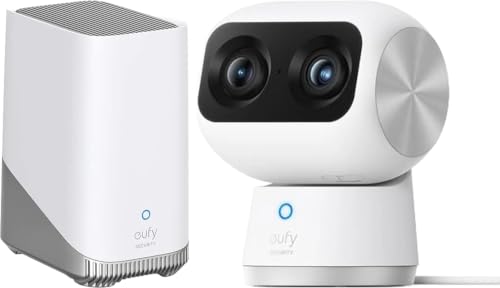
- Best complete system in one box: eufy Security Indoor Cam S350 with HomeBase 3 — Check on Amazon
- Best for privacy and local recording: TP-Link Tapo C225 — Check on Amazon
- Best automatic privacy shield: Arlo Essential Indoor Camera 2K (2nd Gen) — Check on Amazon
- Best for Ring and Alexa homes: Ring Indoor Cam (2nd Gen) — Check on Amazon
- Best value for multi-room coverage: Wyze Cam v4 — Check on Amazon
- Best tiny camera for extra rooms: Blink Mini 2 — Check on Amazon
Read the full guide ↓
Disclosure: As an Amazon Associate, dailyhomedecorating.com earns from qualifying purchases. Links to Amazon on this page are affiliate links; they cost you nothing extra. Listing details such as price and availability change often, so check the current Amazon listing before you buy.
Finding the best indoor security camera under $500 starts with a truth the product pages will not tell you: this is the wrong budget for a single camera, and the right budget for a whole indoor system. Indoor cameras are small, plug-in devices, and even the flagship dual-lens models in this category sit at a fraction of this ceiling. Nobody needs to spend the full amount on one lens watching one room. What a generous ceiling like this actually unlocks is coverage: the living room watched in high detail, the hallway and the entry covered as well, footage stored the way you want it stored, and no corner of the buying decision — cards, hubs, subscriptions — left as an unpleasant surprise after checkout.
That is why this guide is built differently from a lower-tier roundup. The six picks below are not six ways to spend the same money on one camera; they are the building blocks of a system that fits under $500 in total. There is a camera-and-hub bundle that behaves like a complete local-recording system in one box. There is a privacy-first pan-and-tilt camera that records to its own memory card. There are ecosystem cameras for Ring and Alexa homes that make sense bought in pairs or triples. And there are value cameras whose whole purpose at this tier is to cover the second and third rooms while the flagship covers the first. Mix them carelessly and you will own three apps and two subscriptions; mix them deliberately, inside one ecosystem, and the ceiling buys you a genuinely complete setup.
One distinction matters before you spend anything. This guide covers general indoor security cameras: room cameras for living spaces, hallways, entries and pet corners. It does not cover dedicated baby monitors or baby security cameras, which are a separate product group with their own criteria around nursery audio, lullabies and dedicated parent screens, and it does not cover outdoor cameras, which need weatherproofing these indoor models mostly do not have. If a camera here happens to be marketed for pet or nursery check-ins as a secondary use, we judge it as a room camera first, because that is the job this keyword describes.
The short answer is this. If you want one purchase that already thinks like a system, start with the eufy S350 bundle with its HomeBase 3 hub: local recording, no required subscription, and a hub you can expand. If visible privacy matters most, the Tapo C225 and the Arlo Essential Indoor 2K answer it in two different ways — one rotates its lens away, the other closes a shield automatically. If your home already runs on Ring or Alexa, the Ring Indoor Cam and Blink Mini 2 extend that system room by room. And if you simply want the most rooms covered for the money, the Wyze Cam v4 is the value engine. The sections below explain the storage and subscription truth behind each badge, because at this budget the camera is the cheap part of the decision; the ongoing arrangement is the real one.
In this guide
Quick picks
| Camera | Best for | Key spec |
|---|---|---|
| eufy Security Indoor Cam S350 with HomeBase 3 | Best complete system in one box | Bundle: dual cameras (4K wide-angle + 2K telephoto), 8x hybrid zoom, 360-degree pan and tilt, HomeBase 3 hub included for local storage |
| TP-Link Tapo C225 | Best for privacy and local recording | 2K QHD (4MP) video, 360-degree pan and 149-degree tilt, starlight colour night vision, physical Privacy Mode, Apple HomeKit support |
| Arlo Essential Indoor Camera 2K (2nd Gen) | Best automatic privacy shield | 2K video (2560 x 1440), 130-degree field of view, automated privacy shield, integrated siren, night vision |
| Ring Indoor Cam (2nd Gen) | Best for Ring and Alexa homes | 1080p HD video, colour night vision, two-way talk, manual audio and video privacy cover |
| Wyze Cam v4 | Best value for multi-room coverage | 2.5K QHD video, enhanced colour night vision, built-in spotlight and siren, Wi-Fi 6, IP65 weather resistance |
| Blink Mini 2 | Best tiny camera for extra rooms | 1080p HD video, colour night view, built-in spotlight, plug-in power, works with Alexa |
How we chose
We chose for a system budget, not a single-camera budget. Every pick had to earn its place in a whole-home plan that totals under $500: either as the flagship camera for the main room, as the hub-based foundation other cameras join later, or as an honest value pick that covers additional rooms without wasting the ceiling. Models whose only claim was a high price were excluded, because in this category price and capability stopped travelling together long ago; a dual-lens 4K camera with local storage costs less than some cloud-dependent 1080p cameras once a year of subscription is counted.
Storage and subscriptions were judged as first-class criteria, stated per pick rather than buried. Three honest models exist here. Local-first cameras — the eufy bundle, the Tapo and the Wyze — record to a card or a hub in your home and keep working fully with no monthly fee. Cloud-first cameras — the Arlo, the Ring and the Blink — are built around a subscription: live view is free, but recorded history and the smartest detection sit behind a plan after any trial ends. Neither model is automatically wrong, but they are different purchases, and at this budget you can afford to choose deliberately instead of discovering the arrangement after the trial expires.
Indoor privacy was the third filter, because a camera inside a home is pointed at your own life. We favoured designs with a physical answer: a lens that rotates into the body, a shield that closes automatically, or a cover you swivel by hand. Software-only privacy — an off switch in an app — is recorded as exactly that in each review, never dressed up as a shutter. Finally, we checked the basics that decide daily satisfaction: resolution and night vision per maker specs, pan and tilt where a single camera must cover a wide room, two-way talk, and which smart-home displays each camera can actually show its feed on.
The 6 best indoor security cameras under $500, reviewed as a system
eufy Security Indoor Cam S350 with HomeBase 3
Who it suits: Households building their first real indoor system who want the main room covered in maximum detail and every recording stored at home from day one.
This bundle is the closest thing in the guide to a complete indoor system in one box. The S350 camera pairs a 4K wide-angle lens that watches the whole room with a 2K telephoto lens that zooms in on a face, a doorway or a pet, and the two views can be shown together so you never choose between context and detail. The HomeBase 3 hub in the box is what turns a good camera into a system: recordings can live on the hub inside your home, on expandable local storage, instead of depending on a cloud account, and the hub becomes the base you add further compatible eufy cameras to later.
Storage and subscriptions, honestly: Local first, and this is the honest headline: recording, playback and the on-device human and pet detection work with no subscription, because footage is stored on the HomeBase 3 or a microSD card in the camera. eufy sells an optional cloud backup plan, but nothing in the core recording path is locked behind it. The one limit to state plainly is that local footage is only as safe as the hub itself, so place the hub somewhere discreet rather than beside the front door.
Privacy: There is no physical shutter on the S350. Privacy is handled in the app: you can switch the camera off, schedule it, and set privacy zones that mask parts of the view. That is a software promise rather than a cover you can see, so in a bedroom or a dressing area, judge this camera by whether your household is comfortable trusting an app state and a status light.
- Dual 4K wide and 2K telephoto lenses with hybrid zoom for faces and detail
- HomeBase 3 hub in the box for local, subscription-free recording
- Full pan and tilt coverage with person and pet tracking, per maker specs
- A genuine expansion base: extra compatible cameras join the same hub
Honest limitation: The camera body is larger than the fixed mini cameras here, there is no physical privacy shutter, and the bundle only makes financial sense if you actually value local hub storage.
Choose / skip: Choose the bundle if you want one purchase that behaves like a system and you prefer footage stored at home. Skip it if a single small camera is all you need, or if your household is already committed to the Ring, Blink or Google app.
TP-Link Tapo C225
Who it suits: Anyone whose first question is not about resolution but about privacy: households that want a camera which visibly stops watching when the family is home.
The Tapo C225 is the privacy-and-value pick that keeps embarrassing the expensive cameras. Its 2K QHD sensor uses a large-aperture starlight design for colour night vision, the head pans a full circle and tilts widely, and TP-Link builds person, pet and vehicle detection into the camera itself rather than reserving it for subscribers. It is also the rare indoor camera that speaks to Apple HomeKit alongside Alexa and Google displays, which makes it the natural bridge pick for mixed-platform homes.
Storage and subscriptions, honestly: Local: a microSD card up to 512GB by maker spec sits in the camera, so event clips and continuous recording can live in your home with no plan at all. Tapo Care cloud storage is offered as an optional extra for off-site backup; the detection features and local playback do not depend on it. Buy the card with the camera, because the slot is empty in the box.
Privacy: This is the strongest privacy design in the guide alongside the Arlo shield: Privacy Mode physically rotates the lens down into the camera body, so the lens is visibly covered and you can confirm it with your eyes from across the room. For a camera that may sit in a living room all day and a bedroom corridor all night, that mechanical gesture matters more than any settings page.
- Physical Privacy Mode that visibly rotates the lens into the body
- Local microSD recording and on-device detection with no required plan
- 2K QHD starlight colour night vision and wide pan and tilt range
- Works with HomeKit, Alexa and Google displays, per maker specs
Honest limitation: The Tapo app is less polished than the Ring or Google apps, the card is sold separately, and HomeKit video has its own recording rules set by Apple rather than by TP-Link.
Choose / skip: Choose the C225 if visible privacy and subscription-free local recording top your list. Skip it if you want a hub-based system, a fully cloud-managed history, or the simplest possible app.
Arlo Essential Indoor Camera 2K (2nd Gen)
Who it suits: Security-minded households that want a camera behaving like part of an alarm-style system, with a shield that closes itself when the home is occupied.
The Arlo Essential Indoor 2K earns its place on one feature almost nobody else offers: an automated privacy shield that physically closes over the lens when the camera is disarmed, and opens when you arm it. Behind the shield sits a sharp 2K fixed camera with night vision, two-way talk and an integrated siren, aimed squarely at living rooms, hallways and entry-adjacent spaces where a household wants real security behaviour without a camera that stares at family life all day.
Storage and subscriptions, honestly: Arlo is cloud-first and you should buy it with open eyes. Live view and basic motion alerts work without a plan, but after the included trial an Arlo Secure subscription is required to store and review recordings and to use the person, package and animal recognition that makes its alerts genuinely useful. There is no memory-card slot on this camera, so treat the subscription as part of the real cost of the system, not an optional extra.
Privacy: The automated privacy shield is the headline: a physical cover closes over the lens when the system is disarmed, you can hear and see it move, and arming can follow a schedule or your phone’s location. It is the most household-friendly privacy answer here for shared spaces, because nobody has to remember a manual cover.
- Automated physical privacy shield that closes when disarmed
- 2K video with night vision, two-way talk and a built-in siren
- Smart person, package and animal detection on a plan
- Fits the wider Arlo camera and doorbell ecosystem
Honest limitation: Cloud recording and smart detection are subscription features after the trial, there is no local card slot, and the fixed lens cannot pan to follow action across a large room.
Choose / skip: Choose the Arlo if an automatic physical shield matters more to you than avoiding a subscription. Skip it if you want local card recording, pan and tilt coverage, or full history with no monthly fee.
Ring Indoor Cam (2nd Gen)
Who it suits: Homes already invested in a Ring doorbell or Alexa displays, where the indoor cameras should extend an existing app and plan rather than start a new one.
The Ring Indoor Cam is the ecosystem pick: a compact plug-in camera that drops straight into homes already running a Ring doorbell or Alexa displays. Video is 1080p HD with colour night vision, two-way talk is built in, and the camera is small enough to sit on a shelf or mount on a wall without dominating the room. Bought in multiples, it is how a Ring household covers several rooms while keeping every camera in one familiar app.
Storage and subscriptions, honestly: Cloud only, and this is the honest catch: there is no microSD slot and no local recording option. Without a Ring Protect subscription you get live view and motion alerts, but you cannot watch recorded video back; the subscription is what unlocks video history and richer notifications. If you already pay for a Ring plan at your address, extra cameras usually slot into that same household coverage, which softens the cost; if you do not, budget for the plan as part of the purchase.
Privacy: The manual privacy cover is excellent: swivel it over the lens and it physically blocks the camera and switches off the microphone. It is simple, visible and needs no app. The discipline it asks for is human rather than technical: someone has to remember to open it again before the house empties.
- Manual privacy cover that blocks the lens and mutes the microphone
- Deep Ring doorbell and Alexa ecosystem integration
- Compact plug-in design that suits shelves and multi-room setups
- Colour night vision and two-way talk, per maker specs
Honest limitation: No local storage at all and no recorded history without a subscription; resolution is 1080p where rivals here offer 2K or more, and the cover is manual rather than automatic.
Choose / skip: Choose the Ring Indoor Cam if your home already runs on Ring and Alexa. Skip it if subscription-free recording is a hard requirement or you want the sharpest possible picture.
Wyze Cam v4
Who it suits: Buyers covering several rooms on one budget, who would rather own three good cameras than one excellent one and two blind spots.
The Wyze Cam v4 is the value engine of this guide: a small wired camera with 2.5K QHD resolution, enhanced colour night vision, a motion-activated spotlight and two-way audio, positioned at the budget end of the category. In a guide defined by a generous ceiling, its role is specific and important: it is the camera you buy in multiples, covering the rooms a single flagship cannot, while the money it saves pays for memory cards and the cameras themselves stay genuinely capable rather than cut-down.
Storage and subscriptions, honestly: Local storage is a genuine strength. The v4 records to a microSD card, up to 512GB by maker spec, with continuous or event recording and no plan required. Wyze’s Cam Plus subscription adds cloud event videos and richer person detection, but unlike the cloud-only brands here, the camera’s core recording does not stop without it. Keep the usual caveat in mind: footage on a card inside the camera leaves with the camera if the camera is taken.
Privacy: There is no lens cover or privacy shutter. You can turn the camera off in the app, set schedules and disable the microphone, but nothing physically blocks the lens. In shared or sensitive rooms, treat placement and scheduling as your privacy tools, or choose the shielded Arlo or the rotating Tapo from this guide.
- 2.5K QHD video and colour night vision at a budget-tier position
- microSD local recording works without any subscription
- Spotlight and siren features that are unusual at this level
- Low unit cost makes genuine multi-room coverage realistic
Honest limitation: No physical privacy shutter, the richest smart detection sits behind the optional Cam Plus plan, and the fixed lens cannot pan across a wide room.
Choose / skip: Choose the Wyze Cam v4 if you want the most rooms covered with card recording included. Skip it if you want a physical privacy shutter, pan and tilt movement, or a premium app experience.
Blink Mini 2
Who it suits: Alexa households adding simple coverage to secondary rooms — a pet corner, a hallway, a back room — where small size and simplicity beat resolution.
The Blink Mini 2 is the smallest, simplest camera in the guide: a tiny plug-in unit with 1080p HD video, colour night view from a built-in spotlight, two-way audio and a wide view that suits corners and shelves. It is the camera people buy in multiples for an Alexa home: one for the front room, one for the hallway, one watching a pet’s favourite corner, all managed in one app with Echo Show viewing a voice command away.
Storage and subscriptions, honestly: Blink’s storage story has two halves and both deserve honesty. Cloud recording, saved clip history and person detection sit behind the Blink Subscription Plan; a trial is typically included, after which those features stop if you do not subscribe. The local alternative is real but conditional: a separate Blink Sync Module with USB or card storage can hold clips locally, which is an extra purchase. Without either a plan or the right module, you have live view and motion alerts rather than a reviewable history.
Privacy: There is no privacy shutter or lens cover on the Mini 2. The app lets you arm and disarm the camera and set privacy zones, so privacy is a settings choice rather than a physical one. That is adequate for entryways and pet corners, and a weaker answer than the Arlo shield or Ring cover for bedrooms.
- Tiny plug-in design with a wide field of view for corners and shelves
- Budget-tier position makes multi-room coverage realistic
- Local clip storage possible via a separate Sync Module
- Straightforward Alexa and Echo Show integration
Honest limitation: Person detection and cloud history need a subscription, local storage depends on owning the correct Sync Module hardware, and there is no physical privacy cover.
Choose / skip: Choose the Blink Mini 2 for simple, affordable coverage of several rooms inside an Alexa home. Skip it if you want card-in-camera local recording, a privacy shutter, or resolution above 1080p.
Comparison table
| Camera | Video | Movement | Local storage | Plan needed for playback | Link |
|---|---|---|---|---|---|
| eufy Security Indoor Cam S350 with HomeBase 3 | 4K wide + 2K telephoto | Pan and tilt | HomeBase 3 hub / microSD | No | Check on Amazon |
| TP-Link Tapo C225 | 2K QHD (4MP) | Pan and tilt | microSD up to 512GB | No | Check on Amazon |
| Arlo Essential Indoor Camera 2K (2nd Gen) | 2K | Fixed | None on camera | Yes, Arlo Secure after trial | Check on Amazon |
| Ring Indoor Cam (2nd Gen) | 1080p HD | Fixed | None | Yes, Ring Protect for history | Check on Amazon |
| Wyze Cam v4 | 2.5K QHD | Fixed | microSD up to 512GB | Only for smart detection / cloud | Check on Amazon |
| Blink Mini 2 | 1080p HD | Fixed | Via separate Sync Module | Yes, Blink plan for clips | Check on Amazon |
How to spend the leftover budget under $500
Spend the ceiling in layers, not on a single box. The first layer is the main room: one flagship camera, or the camera-and-hub bundle, watching the space where people enter, gather and keep the things worth protecting. The second layer is coverage: one or two value cameras for the hallway, the entry-adjacent room or the pet’s territory, chosen from the same ecosystem as the flagship so one app runs the whole home. The third layer is storage done properly: a memory card for every card-based camera, bought at the same time as the cameras rather than remembered a month later, and a hub where the system design calls for one. The fourth layer, for cloud-first brands, is the subscription itself: count the first year of the plan as part of the system cost, because for Ring, Arlo and Blink cameras the plan is what turns alerts into a reviewable history.
Notice what is not on that list: a single camera chosen because its price looked worthy of the budget. There is no indoor camera in this guide whose picture improves because you paid system money for it. The dual-lens eufy is the sharpest indoor view here and it arrives with its hub in the same box; everything beyond that is coverage, storage and convenience. Buyers who internalise that one idea will build a better system than buyers who shop for a hero product, and they will usually finish with money unspent — which is the correct outcome at a ceiling this generous. Unspent budget is not a failure of the guide; it is the guide working.
A practical allocation that works for most homes looks like this in shape, whatever the live prices do: roughly half the ceiling on the main-room camera or bundle, roughly a quarter on one or two additional cameras, and the remainder held for cards, a hub or the first year of a cloud plan. If your home is small, shift the balance toward the flagship and storage and skip the extra cameras entirely. If your home has several entrances or a pet who roams, shift it toward coverage. The ceiling is generous enough that the plan, not the price tag, should be making the decisions.
How to choose the best indoor security camera under $500
Start by mapping rooms, not products. Walk the home and mark the spaces an indoor camera genuinely serves: the entry-adjacent room, the main living space, the hallway that connects bedrooms, the room where deliveries or a pet spend the day. Most homes need two or three indoor viewpoints, not six, and a pan-and-tilt camera in a well-chosen corner can honestly replace two fixed cameras in an open-plan space. This map decides everything else, because a system is just a map with cameras attached.
Next, choose your storage model before you choose any camera, because it quietly chooses the brand for you. If recordings must live in your home with no monthly fee, build around the eufy bundle, the Tapo or the Wyze and buy the cards or hub in the same order. If you prefer a managed cloud history and already live in the Ring, Arlo or Blink app, accept the subscription as a system cost and keep every camera inside that one ecosystem. Mixing ecosystems to chase individual bargains is the most expensive mistake at this tier: two plans, two apps and two sets of alert logic cost more in money and patience than any single camera saves.
Then judge privacy room by room. A hallway camera can be software-managed without much worry. A living-room camera deserves a physical answer — the Tapo’s rotating lens, the Arlo’s automatic shield or the Ring’s manual cover — and a bedroom camera deserves the strictest answer you can buy, plus a household rule about when it is armed. State the rule out loud to everyone who lives there. Indoor cameras fail socially more often than they fail technically, and the fix is a visible privacy state everyone can verify, not a settings page only one person understands.
Finally, check the unglamorous specs against your actual home: Wi-Fi band support against your router, outlet distance against the included cable, and display support against the screens you own. A camera that cannot show its feed on the display in your kitchen is a small daily disappointment that no resolution figure compensates for. Confirm the field of view suits the corner you have, confirm night vision type — infrared, colour with a spotlight, or starlight colour — suits how dark the room actually gets, and only then check the live price and build the basket to fit the ceiling.
Indoor cameras are not baby cameras, and not outdoor cameras either
Because indoor cameras are often marketed with nursery and pet imagery, it is worth drawing the category lines carefully before a system budget gets spent across them. A dedicated baby security camera is designed around a nursery: its audio is tuned for a sleeping infant’s sounds, its alerts are built for a parent’s night-time attention, and some systems include a dedicated viewing screen so a phone is not the only monitor. A general indoor camera can certainly glance into a nursery, and many parents use one as a secondary view, but it was not designed as the primary nursery device, and this guide does not score it as one. If the nursery is the main job, the baby security camera group is the honest place to shop, with its own criteria and its own budget logic.
The outdoor line matters just as much at system scale. Outdoor cameras are built around weather resistance, wider temperature tolerance and, often, battery or solar power, because their world includes rain, heat and no convenient outlet. Indoor cameras assume a climate-controlled room and a wall socket, and most carry no weather rating at all — the Wyze Cam v4’s IP65 maker rating is the exception in this guide, not the pattern. A system plan that quietly expects an indoor camera to watch a porch or a driveway through a window will fight glare, reflections and night-vision bounce off the glass, and will usually produce the worst footage in the whole system. Keep each camera type on its own side of the wall, and let the indoor budget buy indoor excellence.
There is also a middle category worth naming so it is not bought by accident: the general security camera group, which mixes indoor and outdoor models under one broad label. Shoppers arriving from that broader shelf sometimes expect every camera to do everything. The picks in this guide were chosen the opposite way — deliberately indoor, deliberately plug-in, deliberately judged on room coverage, indoor privacy and home storage. Specialisation is what makes a system coherent, and coherence, repeated across this guide like a refrain, is what a generous ceiling should actually purchase.
Living with the system: the first month decides everything
The first week with any indoor system is calibration, and households that expect it enjoy their cameras while households that expect perfection unplug them. Expect to move at least one camera. Expect the first placement to watch a ceiling fan, a sunlit window or the back of a sofa, and expect the fix to take five minutes because nothing here was drilled. Expect alert tuning to take three rounds: too sensitive, then too quiet, then right. None of this is failure; it is the system learning your home’s rhythms, and the cameras in this guide were chosen partly because they make that learning cheap and reversible.
By the second week, the storage arrangement stops being theoretical. Card-based households learn their retention rhythm — how many days of events a card holds in a busy hallway versus a quiet back room — and can size up with knowledge instead of guesses. Hub households learn the quiet pleasure of footage that lives in one place. Cloud households face the trial’s end and make the subscription decision with a fortnight of real usage behind them, which is the only honest basis for it. This is why this guide keeps advising small first purchases at a big ceiling: experience is the specification sheet no product page can print.
By the end of the first month, a good system becomes invisible in the best way. The app is opened for a reason, not out of novelty. Alerts are rare enough to be believed. The privacy routine — lens rotated, shield closed, cover swivelled, schedule running — has become household habit rather than one person’s project. If your system reaches that state, it has justified itself at any spend under the ceiling. If it has not, the problem is almost never the cameras’ resolution; it is placement, tuning or an ecosystem mismatch, and all three are fixable without returning a single box.
Common mistakes
Spending the whole ceiling on one camera
The defining mistake of this tier. A single indoor camera, however flagship, watches one room; the same budget spread across a flagship plus coverage cameras watches the home. Buy the system, not the hero product, and let unspent money stay unspent.
Ignoring the subscription until the trial ends
Cloud-first cameras feel complete during the trial month and hollow afterwards, when recordings and smart detection stop. Decide before you buy whether the plan is part of your system cost, and count its first year inside the ceiling.
Mixing ecosystems for small savings
A eufy in the living room, a Ring in the hall and a Blink by the door means three apps, three alert styles and potentially two subscriptions. At this budget, coherence is worth more than any individual discount.
Forgetting the memory cards
Card-based cameras ship with empty slots. A system of three local-recording cameras and no cards records nothing. Cards belong in the same basket as the cameras, sized generously, because replacing a card later means re-climbing the ladder or re-opening the mount.
Putting a software-only camera in a sensitive room
An app off-switch is a promise, not a cover. Bedrooms and dressing areas deserve a lens that rotates away, a shield that closes, or a cover you can see. Match the privacy hardware to the room, not to the marketing.
Confusing indoor cameras with baby monitors or outdoor cameras
A dedicated baby security camera is a different product group with nursery-specific design, and an outdoor camera needs weatherproofing most indoor models lack. Buying a general indoor camera to do either job permanently usually disappoints in both directions.
Final recommendation
For most homes building under this ceiling, the eufy S350 bundle with HomeBase 3 is the recommendation: it is the only pick that arrives as a system, its dual lenses give the main room both context and detail, and its recordings live in your home with no subscription quietly renewing in the background. Add cameras to its hub later and the same purchase keeps growing. The Tapo C225 is the alternative we would buy when visible privacy and card-based recording matter more than a hub, and it is the strongest single-camera value in the guide.
Whichever ecosystem you choose, choose one, cover the rooms on your map rather than the rooms in a marketing photo, buy the storage in the same basket, and let the rest of the ceiling go unspent. A calm, coherent three-camera system that everyone in the house understands will serve you better than a maximal one that only its buyer can operate.
Start with the eufy Security Indoor Cam S350 with HomeBase 3 if you want one decision and no second-guessing. If its one real limitation is the thing you care about most, the TP-Link Tapo C225 is the alternative we would buy instead.
FAQ
Do I really need to spend the full amount on an indoor camera system?
No, and a good system at this tier usually leaves money unspent. The ceiling exists to cover a flagship camera or bundle, one or two extra cameras, memory cards or a hub, and — for cloud brands — the first year of a plan. If your home needs only one or two cameras, spend what they cost and stop.
Which is better at this budget: local storage or a cloud subscription?
Local storage, from the eufy bundle, Tapo or Wyze picks here, keeps recordings in your home with no monthly fee and keeps working if the internet drops. Cloud storage, from Arlo, Ring and Blink, gives off-site backup and managed history but stops being a history when the subscription stops. Choose based on whether you value independence or managed convenience more.
How many indoor cameras does a typical home need?
Two or three well-placed cameras cover most homes: the entry-adjacent room, the main living space, and one flexible viewpoint such as a hallway or pet room. A pan-and-tilt model can replace two fixed cameras in open-plan spaces. More cameras than that usually adds app noise faster than it adds security.
Are indoor cameras a privacy risk inside my own home?
They can be, which is why this guide scores physical privacy hardware so highly. Cameras whose lens rotates away, whose shield closes automatically, or whose cover you swivel by hand give the household a visible off state. Software-only cameras rely on app settings and schedules, so place them in less sensitive rooms.
Can these cameras replace a baby monitor?
They can show a nursery, but they are general room cameras, not dedicated baby security cameras. A purpose-built baby camera group exists separately, with nursery audio design and monitoring features these models are not built around. For occasional check-ins a room camera is fine; for primary nursery monitoring, shop the dedicated category.
What happens to my recordings if a camera is stolen?
It depends on the storage model, and the difference is real. Footage on a card inside a stolen camera goes with it; footage on a hub elsewhere in the home, like the HomeBase 3 in the eufy bundle, stays behind; cloud footage stays in the cloud. If theft of the camera itself worries you, hub or cloud storage is the safer design.


