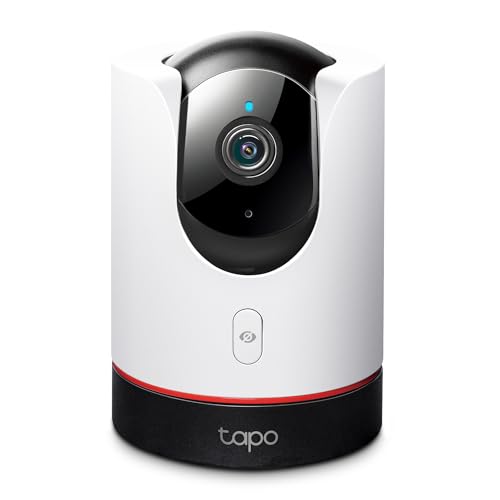
Where to buy
Check the latest price, availability and delivery on Amazon — and take the title’s figure as what it is: a ceiling a small home should come nowhere near spending. In a compact house or flat, one well-chosen camera usually covers the living space and the door, and the correct total is a fraction of this budget. The picks below are ranked for small footprints: wide coverage from one unit, no wasted features, and honest running costs. Confirm the live price of the exact model before you order, and keep the change.
- Best one-camera answer: TP-Link Tapo C225 — Check on Amazon
- Best tracking for open-plan layouts: Wyze Cam Pan v3 — Check on Amazon
- Best when space must multitask: Aqara Camera Hub G3 — Check on Amazon
- Best compact fixed camera: Wyze Cam v4 — Check on Amazon
- Best for one large main room: eufy Security Indoor Cam S350 — Check on Amazon
- Best tiny second viewpoint: Blink Mini 2 — Check on Amazon
Read the full guide ↓
Disclosure: As an Amazon Associate, dailyhomedecorating.com earns from qualifying purchases. Links to Amazon on this page are affiliate links; they cost you nothing extra. Listing details such as price and availability change often, so check the current Amazon listing before you buy.
Searching for the best indoor security camera for small homes under $400 deserves an honest opening: a small home is the easiest security problem there is, and this ceiling is far more than solving it costs. Treat the figure as headroom, never as a target. In a compact house, bungalow or flat, the living space, hallway and front door usually sit within a few metres of each other — one camera, correctly chosen and correctly placed, honestly covers the home.
That changes what ‘best’ means. In a large house, guides talk about layers and hubs; in a small home, the virtues are coverage from a single unit, a footprint that does not colonise a shelf, and nothing — no hub, no second app, no subscription — added without earning its place. A pan-and-tilt camera that sweeps the whole open-plan space beats a fixed camera and beats, especially, a bundle of cameras tripping over each other’s alerts in rooms that are practically one room.
Privacy also concentrates in a small home. The camera’s room is the room — where the household eats, relaxes and hosts. A lens that physically rotates away or points itself into its base is not a luxury feature here; it is what makes a camera acceptable in the one space where life happens. Picks with real hardware privacy are ranked accordingly, and the ones relying on app settings say so plainly.
Running cost is the last small-home virtue: a modest house should not carry a monthly camera bill it does not need. Most picks below record locally with no plan; the ones that lean on subscriptions are labelled with exactly what the plan buys. And a boundary, for completeness: these are general indoor security cameras, not baby cameras — a separate category — and not outdoor systems. For the inside of a small home, this is the whole story, and it is a short one.
Think of this guide as permission to buy small. Every pick is assessed by what it adds to a compact home and what it refrains from adding — no hubs without a caseload, no bundles without rooms to justify them, no subscriptions without a named benefit. In a market that profits from selling you more, restraint is the expertise on offer here.
There is also a quiet pleasure in a correctly small system that larger setups never offer: it can be understood completely. One camera, one app, one card, one privacy gesture — a small-home owner can hold the entire arrangement in mind, explain it to a partner in a sentence, and fix anything that ever goes wrong with a single unplug. Complexity is a cost that never appears on a receipt; this guide refuses to charge it to you.
In this guide
Quick picks
| Camera | Best for | Key spec |
|---|---|---|
| TP-Link Tapo C225 | Best one-camera answer | 2K QHD (4MP) video, 360-degree pan and 149-degree tilt, starlight colour night vision, Apple HomeKit support |
| Wyze Cam Pan v3 | Best tracking for open-plan layouts | 1080p HD, 360-degree pan and 180-degree tilt, automatic motion tracking, IP65 weather resistance |
| Aqara Camera Hub G3 | Best when space must multitask | 2K (2304 x 1296) video, 340-degree pan and 45-degree tilt, built-in Zigbee 3.0 hub, infrared remote control, HomeKit Secure Video |
| Wyze Cam v4 | Best compact fixed camera | 2.5K QHD video, enhanced colour night vision, built-in spotlight and siren, Wi-Fi 6, IP65 weather resistance |
| eufy Security Indoor Cam S350 | Best for one large main room | Dual cameras: 4K wide-angle + 2K telephoto, 8x hybrid zoom, 360-degree pan/tilt, dual-band Wi-Fi 6 |
| Blink Mini 2 | Best tiny second viewpoint | 1080p HD video, colour night view, built-in spotlight, plug-in power, works with Alexa |
How we chose
Single-camera coverage was the lead criterion: could one unit, on one shelf, see the main living space and turn or widen to include the entry? Pan-and-tilt range, field of view and tracking were weighted accordingly, because in a small home the second camera is usually redundant — and redundant cameras still send alerts, still need power, and still watch rooms nobody needed watched.
Physical size and placement flexibility came next. Small homes have small surfaces; a camera that needs a wide shelf, a wall mount or a trailing hub loses to one that sits happily on a bookcase edge. Plug-in power was assumed — in a compact home a socket is always near — and anything requiring extra hardware for basic use was marked down.
We then applied the running-cost test strictly: local recording and on-device detection with no plan scored highest, because a small home’s camera bill should be zero by default. Cloud-dependent picks appear only where they bring a specific small-home benefit — a genuinely tiny second viewpoint, for instance — with the subscription requirement stated in plain sight.
Privacy hardware closed the filter, for the reason given above: in a one-room-is-everything layout, a visible privacy state matters daily. Maker specifications are quoted as maker claims throughout, and where a camera’s privacy is software-only, the text calls it that rather than dressing it up.
The cameras in detail
TP-Link Tapo C225
The Tapo C225 is the one-camera answer a small home deserves: full pan and tilt to sweep the whole living space and turn to the door, 2K QHD clarity at the short distances small homes involve, colour night vision for the hallway at night, and recording to its own memory card with person detection handled on the camera. No hub, no plan, no second unit required.
Its privacy mode settles the small-home objection in one motion — the lens rotates down into the body, visibly covered, so the room is provably private when the household is in it. In a home where the camera’s room is every room, that gesture gets used daily, and it is the feature owners of lesser cameras end up wishing they had.
Choose it as the single camera for a compact house or flat and consider the job done. Skip it only if your main space is genuinely vast and open — the one case where the flagship below earns its premium — or if a second, separate space like a detached garage needs its own viewpoint added later.
A small-home detail that seals the C225’s top ranking: its tilt range lets it look down a short hallway from a high shelf or up from a low one, which in compact homes — where the only shelf is rarely at the ideal height — is the difference between covering the door and covering the ceiling above the door. Forgiving placement geometry is a real feature when furniture options are few.
Storage and subscriptions, honestly: Local: microSD card up to 512GB by maker spec, so weeks of event clips can live on the camera itself. Tapo Care cloud storage is optional; person, pet and vehicle detection are handled on-device without it.
Privacy: This is the privacy pick of the group: Privacy Mode physically rotates the lens down into the camera body, so the lens is visibly covered. It is the strongest kind of indoor privacy control because you can confirm it with your eyes.
Wyze Cam Pan v3
The Wyze Cam Pan v3 is built for the open-plan small home: it does not just swivel on request, it follows — turning to track a person or pet moving from kitchen counter to sofa, so one camera genuinely patrols a combined living space instead of staring at the corner where movement used to be. For L-shaped and open layouts, that tracking is worth more than resolution.
Its privacy mode points the lens down into the base, a visible off-state housemates and guests can verify, and it records to a memory card with no plan required. The whole setup is one small unit on one shelf, which is exactly the small-home brief.
Understand its one split before buying: person detection and cloud event video are subscription features, so without the plan you get motion alerts plus your card footage. Choose it if following movement across an open-plan room is the priority. Skip it if free person alerts matter — the Tapo above includes on-device detection at no cost.
Small-home owners should also know the Pan v3 settles into a patrol pattern: you can set viewpoint waypoints and let it sweep between them on a rhythm, so the kitchen end and the door end of an open-plan space each get regular attention. It is the closest a single inexpensive camera comes to being in two places, and open-plan homes are exactly where that matters.
Storage and subscriptions, honestly: Local: microSD card recording works without a plan. Be clear-eyed about the split, though: Wyze’s Cam Plus subscription is what unlocks person detection and full cloud event recording; without it you get motion alerts with still-image thumbnails and your card footage.
Privacy: Privacy Mode points the lens down into the base and stops recording, a physical gesture you can verify at a glance, though the microphone state follows the app setting rather than a hardware switch.
Aqara Camera Hub G3
In a small home, everything must multitask, and the Aqara G3 is the multitasker: a pan-and-tilt camera that is also a Zigbee hub for sensors and an infrared blaster for older appliances, in one compact unit on one shelf. A small house that gains a camera, a door-sensor network and a smarter TV corner from a single box has spent its space wisely.
It records locally to a memory card without a subscription in its own app, recognises faces and gestures by maker description, and its lens rotates to a privacy position — summonable by a wave, which in a small home quickly becomes the household’s normal goodnight routine. Apple households can add HomeKit Secure Video, at the price of an iCloud plan for that route.
Choose it if your small home is becoming a smart home and shelf space is precious. Skip it if the brief is purely a camera, as simple as possible: the G3’s extra talents are real, but a household that will never use them is carrying menus it does not need.
The G3 also solves a specifically small-home annoyance: device sprawl on the one visible shelf. Where a separate hub would sit blinking beside a router beside a camera, the G3 is a single object guests read as a gadget rather than a surveillance corner. In homes where every surface is in view, aesthetics is not vanity — it is how a camera earns permanent residence.
Storage and subscriptions, honestly: Local: microSD card recording (up to 128GB by maker spec) works in the Aqara app without a subscription. If you route it through Apple HomeKit Secure Video, recordings live in iCloud and that route does require an iCloud storage plan; Aqara’s own optional cloud exists too, but the card keeps the camera useful with no plan at all.
Privacy: The lens assembly can be rotated to a privacy position from the app, and the G3 also accepts gesture control, so a wave can send it to sleep. It is not a sliding mechanical cover, but the lens visibly turns away, which is more reassurance than a software-only off switch.
Wyze Cam v4
The Wyze Cam v4 is the fixed-camera option for the small home whose layout is simple: one squarish main room, door visible from a corner shelf. Its wide view covers that geometry without moving parts, its 2.5K picture is sharp at small-home distances, and its spotlight and siren give a small property a little deterrent voice. It records to a memory card with no plan required for the footage itself.
Compact and unobtrusive, it suits homes where a panning camera’s movement would be a distraction — some households simply prefer a camera that sits still. What it cannot do is look around a corner or follow anyone; in open-plan or L-shaped spaces its fixed gaze leaves real blind spots.
Choose it for a simple, single-room layout and the lowest-effort installation in this guide. Skip it if your living space bends, stretches or joins a kitchen — that is pan-and-tilt territory, and both cameras above it here will serve you better.
Battery-free plug-in power deserves a word in the v4’s favour for small homes: there is no charging ritual and no flat-camera week, and in a compact house a socket is always within a cable’s reach of the right corner. The simplest power arrangement is the one a small home can always satisfy, and the v4’s stillness extends to its maintenance: there is essentially none.
Storage and subscriptions, honestly: Local: microSD card up to 512GB by maker spec, with continuous or event recording and no plan required. As with the Pan v3, Cam Plus is the paid layer that adds person detection and cloud event videos; the camera is genuinely usable without it, which is not true of every brand here.
Privacy: There is no lens cover or privacy shutter. You can turn the camera off in the app and disable the microphone, but nothing physically blocks the lens, so place it with that in mind.
eufy Security Indoor Cam S350
The S350 appears in this guide as the exception that proves the ceiling rule: the one case where a small home might justify a flagship is a small home with one unusually large main room — a barn-conversion living space, a big open-plan kitchen-diner — where the camera sits far from the door and identification needs its telephoto second lens. There, its dual-lens design does what no modest camera can.
Everywhere else in a small home it is, frankly, more camera than the rooms can use: 4K wide views of a twelve-foot room buy nothing a 2K camera does not show. It records locally and detects on-device with no subscription, so it is an honest product — just an honest product aimed at bigger spaces.
Choose it only if your main room is genuinely large and the door is genuinely far. Skip it in a typical compact home without a flicker of regret, and spend the difference on nothing at all — the correct small-home outcome is money unspent.
If your small home is a converted barn, a loft or a single great room, read the S350’s case differently: there, its wide-plus-telephoto pairing covers a volume that would otherwise need two cameras, and one unit on one shelf can be the tidier solution. The exception is real — it is simply defined by room size, not by house size, and most small homes’ rooms do not meet it.
Storage and subscriptions, honestly: Local: microSD card or eufy HomeBase 3. No subscription is required for recording, playback or its on-device human and pet detection; an optional eufy cloud plan exists but nothing core is locked behind it.
Privacy: Privacy is handled in the app: you can switch the camera off, schedule it, and set privacy zones. There is no physical shutter, so when privacy matters you are trusting the software state and the status light rather than a cover you can see.
Blink Mini 2
The Blink Mini 2 is the tiny second viewpoint for the small home that turns out to have one blind spot after all — the side door’s inside face, the hallway turn, the home-office corner. It is the smallest, simplest camera here, plugs in anywhere, and joins an Alexa household without fuss. As an add-on, its size is its virtue.
Its storage model needs one clear sentence: clips and person detection sit behind the Blink Subscription Plan, and local storage requires a separate Sync Module accessory. In a small home that already pays for neither, that makes the Mini 2 a considered add-on rather than a default — the main camera should be a local-recording model, and this is the satellite.
Choose it to patch one specific blind spot inside an Alexa household that accepts the plan or the module. Skip it as the home’s only camera if subscription-free recording matters; that job belongs to the Tapo or the Wyze Pan at the top of this guide.
As the satellite in a small-home system, the Mini 2 has one more virtue: it can be unplugged and moved in seconds when the blind spot changes — a seasonal door, a new home-office corner, a puppy’s current territory. Small homes rearrange themselves often, and a camera that rearranges with them, without mounts or residue, fits that rhythm better than any fixed installation.
Storage and subscriptions, honestly: Cloud-first: recorded clips and person detection sit behind the Blink Subscription Plan. Local storage is possible only through a separate Blink Sync Module with USB or card storage, which is an extra purchase; without either, you have live view and motion alerts but no saved video.
Privacy: There is no privacy shutter or lens cover. The app lets you arm and disarm the camera and set privacy zones, so privacy is a settings choice rather than a physical one.
Comparison table
| Camera | Video | Movement | Local storage | Plan needed for playback |
|---|---|---|---|---|
| TP-Link Tapo C225 | 2K QHD (4MP) | Pan and tilt | microSD up to 512GB | No |
| Wyze Cam Pan v3 | 1080p | Pan and tilt | microSD | Only for smart detection / cloud |
| Aqara Camera Hub G3 | 2K (1296p) | Pan and tilt | microSD up to 128GB | No in Aqara app; iCloud plan for HomeKit video |
| Wyze Cam v4 | 2.5K QHD | Fixed | microSD up to 512GB | Only for smart detection / cloud |
| eufy Security Indoor Cam S350 | 4K wide + 2K telephoto | Pan and tilt | microSD / HomeBase 3 | No |
| Blink Mini 2 | 1080p | Fixed | Via separate Sync Module | Yes, Blink plan for clips |
How to choose the best indoor security camera for small homes under $400
Prove to yourself that one camera is enough before buying two. Stand at the spot you have in mind — usually a bookcase or shelf in the main room — and check the sightlines: the living space, the hallway mouth, the inside of the front door when the camera turns. In most small homes a pan-and-tilt unit covers all three. If one fixed viewpoint genuinely cannot see the door, that — and only that — is the case for a second camera.
Place for the distances you actually have. Small homes flatter cameras: faces at two or three metres are identifiable on modest hardware, so spend nothing on resolution heroics. Head height on a shelf, near a socket, within easy router range — in a compact home the router is rarely far, which quietly solves the connection problems that plague bigger houses.
Make privacy a physical habit. Choose a camera whose lens visibly closes, rotates or points away, and use that state whenever the household is home; reserve the watching state for empty-house hours and nights. In a small home the camera shares your main room, so this rhythm is not a refinement — it is the arrangement that keeps the camera welcome.
Keep the running cost at zero unless a feature truly earns a fee. Local-card recording covers a small home’s needs entirely: a card holds weeks of event clips at small-home traffic levels. If you later add a cloud camera for a specific reason, add its plan to the household budget consciously, as a utility, not as a setup-screen afterthought.
Then stop. The small-home advantage is that the finished system is one camera, one card, one app — resist the upsell gravity toward bundles and hubs that solve problems your floor plan does not have. Money left under a ceiling is not a missed opportunity; in a small home, it is the correct specification.
One closing test before you call the setup finished: spend an evening in the room with the camera in its home-hours state and confirm the household has forgotten it is there. A small-home camera that still draws attention after a week — a glowing light, a tracking motor following every trip to the kitchen — needs its schedule or position adjusted. The goal is a home that feels like a home, watched over only when it is empty.
One camera, whole home: the small-home placement method
Begin with the through-route, not the rooms. In a small home, everyone — family, guests, anyone unwelcome — passes through one connected path: door, hall or living space, then the rest. Your camera’s job is to own that path. Stand where you plan to place it and trace the route with your eyes; if the camera can see the door’s inside face and the space the route crosses, it can do the whole home’s work.
Choose the shelf by three tests in order: sightline first, socket second, router third. The sightline must include faces at the door, which means roughly head height and a few metres of distance. The socket must be reachable without an extension lead crossing a walkway. The router, in a small home, is almost always close enough — one of the layout’s quiet advantages — but confirm the live view is smooth before declaring the spot final.
Then use the camera’s movement as the second viewpoint you did not buy. Set the pan-and-tilt’s resting position on the door, its sweep across the living space, and — on tracking models — let it follow movement along the through-route. A small home’s single camera, properly swept, produces coverage that visitors routinely mistake for a multi-camera system.
Revisit the placement after one week, not one hour. Live with the alerts, notice which moments you actually checked, and adjust the resting angle toward the events that mattered. Small homes forgive repositioning — the camera lifts and moves in a minute — so treat the first placement as a draft and the second as the installation.
Why small homes should default to zero running cost
Proportions matter in a household budget. A subscription that is a rounding error for a large monitored property can be a visible monthly line for a small home — and it buys that home exactly one camera’s worth of history. The economics that make cloud plans sensible at scale invert at small scale, which is why this guide’s default for compact homes is a memory card and a monthly cost of nothing.
The local arrangement also matches how small-home footage is actually used. Owners check an event from the sofa, show a clip to a partner, confirm the dog’s afternoon. None of that needs a provider’s servers; all of it works from the card, during an internet outage, in a rural small home with fragile broadband, forever, for free. The use case and the storage model fit each other exactly.
There are honest exceptions, and they are specific rather than general: a household already paying a brand’s plan for a doorbell adds an indoor camera at no new monthly cost; a household that travels for months may value cloud footage that survives anything happening at the empty house. Both are reasons. ‘The setup screen offered a trial’ is not a reason, and small-home buyers should treat it accordingly.
So the rule for this guide’s readers is simple enough to keep: the camera’s purchase price should be its whole price unless you can name, in one sentence, what the monthly fee buys your specific home. If the sentence does not come, choose the card. In a small home, it will essentially always be the right call.
Small homes, specific shapes: terraces, bungalows, cottages and flats
The terraced house is long and thin: door at the front, kitchen at the back, everything connected by one hallway. A pan-and-tilt camera at the hallway’s midpoint, or in the living room where the hall passes, owns that spine — anyone entering at either end crosses its view within steps. This is the layout where one camera most completely deserves the phrase ‘whole-home coverage’, and where a second camera is most often pure redundancy.
The bungalow spreads the same rooms on one floor with the bedrooms off the same hall as the living space. The camera belongs at the hall’s living end, angled away from bedroom doors: it watches the entries and the day rooms while the night rooms keep their privacy by geometry rather than by settings. Bungalow owners should be especially firm about this placement, because the tempting central spot usually points at everything, including what it should not.
The cottage adds quirks: thick walls that humble Wi-Fi, low ceilings that forbid dramatic mounting angles, and doors at odd places. Keep the camera in the same room as the router where possible, expect to place it lower than instinct suggests, and favour the models whose local recording shrugs off a flaky connection — in a cottage, the internet is a fair-weather friend and the card is the archive.
The flat is the small home in its most concentrated form, and this guide’s apartment advice applies wholesale: shelf placement, no drilling, flatmate consent, one camera for the entry and living space. What flats add is neighbours — keep the camera’s view and its two-way talk inside your own walls, and let privacy zones mask any window that faces shared areas.
Different shapes, same conclusion: the through-route decides the camera, the camera count stays at one until a blind spot proves itself, and the budget stays mostly unspent. Small homes reward owners who solve the actual layout in front of them instead of buying the system in the advertisement, which was photographed in a house three times the size.
The second-camera question, answered honestly
Most small-home owners ask about a second camera within the first month, and the honest answer divides into three cases. If a specific blind spot has produced a specific worry — the back door you keep thinking about, the side window on the dark side of the house — a second camera is a rational, targeted purchase, and this guide’s satellite picks exist for it.
If the wish for a second camera is really a wish for the first camera to be better — sharper, faster to alert, less fussy — a second camera will not fix it, and may double it. Replace or reposition the first unit instead; small homes make swapping painless, and one camera you trust beats two you tolerate in every week that follows.
And if the wish is simply the pleasure of a more complete system, name it as such and price it as a hobby rather than a need. There is no shame in it — but buy the matched partner to your existing camera, keep the running cost at zero, and let the total remain a small fraction of this guide’s ceiling. The small home’s discipline is not deprivation; it is buying each thing for a reason you can say out loud.
A closing note on enough
Small homes teach a lesson the whole camera market resists: enough is a specification. One camera on the through-route, recording locally, sleeping visibly when the family is home — that is not a compromise version of a bigger system, it is a complete system, correctly sized to the building it protects. The households happiest with their cameras, in homes of every size, are the ones who could say what ‘enough’ meant before they shopped.
So let the ceiling stay a ceiling. Buy the one right camera, place it with care, and spend the difference on the home itself — a better lock for the door the camera watches would be a fitting choice. The camera will not know the budget went unspent. It will simply do its whole job, which was always smaller, and more achievable, than the marketing suggested.
Common mistakes
Buying a multi-camera bundle for a three-room home
Bundles built for large houses flood a small home with overlapping views and duplicated alerts, and their subscriptions scale with the count. One pan-and-tilt camera covers a compact layout; add a second viewpoint only for a proven blind spot, never by default.
Spending flagship money on small-room distances
At two or three metres, every camera in this guide produces identifiable faces. Premium resolution and zoom earn their cost across big rooms, not small ones. The flagship in this guide is included for one specific large-room case — if that is not your room, it is not your camera.
Skipping hardware privacy in the main living space
A small home’s camera watches the room where life happens. Software-only privacy asks the whole household to trust an app; a lens that visibly closes or turns away earns trust daily. In this layout, that feature outranks resolution, apps and ecosystems combined.
Adding a hub a small system does not need
Hubs earn their shelf space when several cameras feed them. A one-camera small home gains nothing from one except cost, clutter and another device to maintain. If your system grows to three cameras someday, revisit the idea then — not before.
Forgetting the second door while perfecting the first view
Small homes still have back doors, and a camera aimed beautifully at the front hall while the kitchen door stands unwatched is a half-finished job. Check both thresholds from your chosen spot; a pan-and-tilt’s sweep usually covers the route between them, which is the real requirement.
Final recommendation
For a small home, buy the Tapo C225, place it once, and be done: it sweeps the whole living space, watches the door, records locally for free, and hides its own lens when the family is home. The Wyze Cam Pan v3 is the alternative if following movement across an open-plan layout matters more than free person detection. Either way, the finished system costs a small fraction of this ceiling — as it should.
Reach for the other picks only on evidence: the Aqara when shelf space must multitask into a smart home, the Wyze v4 when the layout is one simple square room, the Blink to patch one blind spot, the flagship only when one main room is unusually large. A small home’s security problem is small; the discipline is in keeping the solution that size.
One final practical word: resist showing the system off by expanding it. The small home that resists the second camera until a blind spot truly proves itself ends up, a year later, with either the same single contented camera or a second one bought for a reason it can name. Both outcomes are successes. The only failure available to a small home is a shelf crowded with viewpoints nobody needed, quietly recording rooms that were never the point.
Start with the TP-Link Tapo C225 if you want one decision and no second-guessing. If its one real limitation is the thing you care about most, the Wyze Cam Pan v3 is the alternative we would buy instead.
FAQ
How many cameras does a small home actually need?
Usually one. A pan-and-tilt camera in the main living space covers the room, the hallway and — when it turns — the inside of the front door in most compact layouts. Add a second camera only for a proven blind spot, such as a back door no single viewpoint can include.
Why is this guide’s budget so much higher than what a small home needs?
Because the ceiling is a ceiling, not a target — this guide says so rather than inventing reasons to spend. A complete, good small-home setup lands at a fraction of it, and the honest recommendation is to keep the difference rather than upgrade past what your rooms can use.
Do small-home cameras need a subscription?
No. The Tapo, both Wyze picks and the Aqara here record to local memory cards without a plan, though Wyze charges extra for person detection and cloud events. Only the Blink leans on a subscription for clips. A small home’s default running cost should be zero.
Is a pan-and-tilt or fixed camera better for a small home?
Pan-and-tilt suits open-plan and L-shaped layouts, where one camera must look in several directions or follow movement. A fixed wide camera suits one simple square room and never moves or distracts. Match the mechanism to the floor plan, not to the price.
Where should the one camera go?
On a shelf or bookcase at roughly head height in the main living space, positioned so its sweep includes the inside of the front door, near a power socket and comfortably within router range. Avoid bedrooms, and prefer a model whose lens visibly closes for the hours the household is home.
Can one camera watch both the front and back door?
Often, indirectly: in a small home both doors usually connect through one hallway or living space, and a pan-and-tilt camera covering that through-route records anyone crossing between them. If the doors sit in genuinely separate sightlines, a small second camera is the honest fix — still far under this budget.
Can one camera really watch a whole small home?
It can watch the through-route — door, hall, main living space — which is where everyone and everything passes, and for most small homes that is the coverage that matters. It cannot see inside closed bedrooms, nor should it. Judge a one-camera setup by the route it covers, not by the rooms it politely ignores.
My small home has thick walls and patchy Wi-Fi. Will a camera cope?
Place the camera in the same room as the router if the layout allows, and prefer a local-recording model: if the connection drops, the card keeps the footage and the camera reconnects when the signal returns. A camera that depends on the cloud for recording is a poor match for a home whose internet is unreliable.
Is a camera worth it in a very small home at all?
If the honest answer is that a single door, always locked, in a safe building is your whole risk, a camera is a convenience — pet checks, parcel confirmations, peace of mind — rather than a necessity, and the cheapest pick here serves that honestly. Buy it for the convenience with open eyes, at convenience money, not at security money.
What size memory card does a small home need?
Event recording in a one-camera home is light work: even a modest card holds a long stretch of household events, and the largest supported cards stretch that to a generous archive. Buy within the maker’s stated limit for your model — the picks list theirs — and prefer one larger card over several small ones to swap.
Should the camera go in the living room or the hallway?
Whichever space contains the through-route’s busiest stretch. If the front door opens into the living room, the living room wins and one camera does everything. If a hallway connects the door to all rooms, the hallway camera sees every arrival and departure while watching no one’s evening — often the most elegant small-home answer of all.


